China -United States -The Third Opium War

U.S.troops in China during the Boxer Rebellion...
Image via Wikipedia

A brief glance through http://www.treasury.gov/resource-center/data-chart-center/tic/Documents/mfh.txt

shows that while US added 600 billion of debt during the past one year, the Chinese actually reduced their exposure by 50 billion Dollars.

so who has been financing the debt for the US for the past one year- It is Japan- eager to keep its currency down and United Kingdom which has pumped in an extra 300 billion of T Bills.

See the whole table at official link above or at goo.gl/qMugp

—————————————————————————————-

China still remembers the Opium Wars in which the then ruling Anglo Saxon superpower used naval superiority to enforce trade and eventual political dependency. Is China unsure of the United States brotherly nice  intentions? They certainly seem to be putting their money that way.

http://en.wikipedia.org/wiki/Opium_Wars

Britain forced the Chinese government into signing theTreaty of Nanking and the Treaty of Tianjin, also known as the Unequal Treaties, which included provisions for the opening of additional ports to unrestricted foreign trade, for fixed tariffs; for the recognition of both countries as equal in correspondence; and for the cession of Hong Kong to Britain. The British also gained extraterritorial rights. Several countries followed Britain and sought similar agreements with China. Many Chinese found these agreements humiliating and these sentiments contributed to the Taiping Rebellion (1850–1864), the Boxer Rebellion (1899–1901), and the downfall of the Qing Dynasty in 1912, putting an end to dynastic China.

———————————————————————————————-

The Koreans can always be depended on provide the first shot in any conflict- and though Anglo-US-Chinese conflict would be expensive- I guess as long as the cost of outstanding debt with China is less than cost of a brief -techno-war , we would see interesting games in this neighborhood. Note China restricts major trade with United States particularly in software, internet services (like Web Advertising, Facebook, Twitter ) and represents a lucrative market for big pharma (especially in psychiatric drugs) and big tech once it reforms its intellectual property rights. Software would be the opium of the 21st Century- if Chinese resist the Treasury Bills as their poppy flowers. The widespread Western media coverage of school kids murders by pyschopaths is also a trade tactic to encourage flow of more US made medicine in the Chinese market.

It would also help create an economic revival in the United States to exaggerate the Chinese threat (remember Sputnik) and build up its own cyber spending. Any military or cyber humiliation for the ruling party in China can help create a political vacuum for more malleable and agreeable alternatives to emerge.

(to be continued)


SAS Lawsuit against WPS- Application Dismissed

I saw Phil Rack http://twitter.com/#!/PhilRack (whom I have interviewed before at https://decisionstats.com/2009/02/03/interview-phil-rack/ ) and whom I dont talk to since Obama won the election-


well Phil -creator of Bridge to R- first SAS language to R language interface- mentioned this judgment and link.


Probably Phil should revise the documentation of Bridge to R- lest he is sued himself!!!

Conclusion
It was for these reasons that I decided to dismiss SAS’s application.

From-

http://www.bailii.org/cgi-bin/markup.cgi?doc=/ew/cases/EWHC/Ch/2010/3012.html


Neutral Citation Number: [2010] EWHC 3012 (Ch)
Case No: HC09C03293

IN THE HIGH COURT OF JUSTICE
CHANCERY DIVISION
Royal Courts of Justice
Strand, London, WC2A 2LL
22 November 2010

B e f o r e :

THE HON MR JUSTICE ARNOLD
____________________
Between:
SAS INSTITUTE INC. Claimant
– and –

WORLD PROGRAMMING LIMITED Defendant

____________________

Michael Hicks (instructed by Bristows) for the Claimant
Martin Howe QC and Isabel Jamal (instructed by Speechly Bircham LLP) for the Defendant
Hearing date: 18 November 2010
____________________

HTML VERSION OF JUDGMENT
____________________

Crown Copyright ©

MR. JUSTICE ARNOLD :

Introduction
By order dated 28 July 2010 I referred certain questions concerning the interpretation of Council Directive 91/250/EEC of 14 May 1991 on the legal protection of computer programs, which was recently codified as European Parliament and Council Directive 2009/24/EC of 23 April 2009, and European Parliament and Council Directive 2001/29/EC of 22 May 2001 on the harmonisation of certain aspects of copyright and related rights in the information society to the Court of Justice of the European Union under Article 267 of the Treaty on the Functioning of the European Union. The background to the reference is set out in full in my judgment dated 23 July 2010 [2010] EWHC 1829 (Ch). The reference is presently pending before the Court of Justice as Case C-406/10. By an application notice issued on 11 October 2010 SAS applied for the wording of the questions to be amended in a number of respects. I heard that application on 18 November 2010 and refused it for reasons to be given later. This judgment contains those reasons.

The questions and the proposed amendments
I set out below the questions referred with the amendments proposed by SAS shown by strikethrough and underlining:

“A. On the interpretation of Council Directive 91/250/EEC of 14 May 1991 on the legal protection of computer programs and of Directive 2009/24/EC of the European Parliament and of the Council of 23 April 2009 (codified version):
1. Where a computer program (‘the First Program’) is protected by copyright as a literary work, is Article 1(2) to be interpreted as meaning that it is not an infringement of the copyright in the First Program for a competitor of the rightholder without access to the source code of the First Program, either directly or via a process such as decompilation of the object code, to create another program (‘the Second Program’) which replicates by copying the functions of the First Program?
2. Is the answer to question 1 affected by any of the following factors:
(a) the nature and/or extent of the functionality of the First Program;
(b) the nature and/or extent of the skill, judgment and labour which has been expended by the author of the First Program in devising and/or selecting the functionality of the First Program;
(c) the level of detail to which the functionality of the First Program has been reproduced in the Second Program;
(d) if, the Second Program includes the following matters as a result of copying directly or indirectly from the First Program:
(i) the selection of statistical operations which have been implemented in the First Program;
(ii) the selection of mathematical formulae defining the statistical operations which the First Program carries out;
(iii) the particular commands or combinations of commands by which those statistical operations may be invoked;
(iv) the options which the author of the First Program has provided in respect of various commands;
(v) the keywords and syntax recognised by the First Program;
(vi) the defaults which the author of the First Program has chosen to implement in the event that a particular command or option is not specified by the user;
(vii) the number of iterations which the First Program will perform in certain circumstances;
(e)(d) if the source code for the Second Program reproduces by copying aspects of the source code of the First Program to an extent which goes beyond that which was strictly necessary in order to produce the same functionality as the First Program?
3. Where the First Program interprets and executes application programs written by users of the First Program in a programming language devised by the author of the First Program which comprises keywords devised or selected by the author of the First Program and a syntax devised by the author of the First Program, is Article 1(2) to be interpreted as meaning that it is not an infringement of the copyright in the First Program for the Second Program to be written so as to interpret and execute such application programs using the same keywords and the same syntax?
4. Where the First Program reads from and writes to data files in a particular format devised by the author of the First Program, is Article 1(2) to be interpreted as meaning that it is not an infringement of the copyright in the First Program for the Second Program to be written so as to read from and write to data files in the same format?
5. Does it make any difference to the answer to questions 1, 2, 3 and 4 if the author of the Second Program created the Second Program without access to the source code of the First Program, either directly or via decompilation of the object code by:
(a) observing, studying and testing the functioning of the First Program; or
(b) reading a manual created and published by the author of the First Program which describes the functions of the First Program (“the Manual”) and by implementing in the Second Program the functions described in the Manual; or
(c) both (a) and (b)?
6. Where a person has the right to use a copy of the First Program under a licence, is Article 5(3) to be interpreteding as meaning that the licensee is entitled, without the authorisation of the rightholder, to perform acts of loading, running and storing the program in order to observe, test or study the functioning of the First Program so as to determine the ideas and principles which underlie any element of the program, if the licence permits the licensee to perform acts of loading, running and storing the First Program when using it for the particular purpose permitted by the licence, but the acts done in order to observe, study or test the First Program extend outside the scope of the purpose permitted by the licence and are therefore acts for which the licensee has no right to use the copy of the First Program under the licence?
7. Is Article 5(3) to be interpreted as meaning that acts of observing, testing or studying of the functioning of the First Program are to be regarded as being done in order to determine the ideas or principles which underlie any element of the First Program where they are done:
(a) to ascertain the way in which the First Program functions, in particular details which are not described in the Manual, for the purpose of writing the Second Program in the manner referred to in question 1 above;
(b) to ascertain how the First Program interprets and executes statements written in the programming language which it interprets and executes (see question 3 above);
(c) to ascertain the formats of data files which are written to or read by the First Program (see question 4 above);
(d) to compare the performance of the Second Program with the First Program for the purpose of investigating reasons why their performances differ and to improve the performance of the Second Program;
(e) to conduct parallel tests of the First Program and the Second Program in order to compare their outputs in the course of developing the Second Program, in particular by running the same test scripts through both the First Program and the Second Program;
(f) to ascertain the output of the log file generated by the First Program in order to produce a log file which is identical or similar in appearance;
(g) to cause the First Program to output data (in fact, data correlating zip codes to States of the USA) for the purpose of ascertaining whether or not it corresponds with official databases of such data, and if it does not so correspond, to program the Second Program so that it will respond in the same way as the First Program to the same input data.
B. On the interpretation of Directive 2001/29/EC of the European Parliament and of the Council of 22 May 2001 on the harmonisation of certain aspects of copyright and related rights in the information society:
8. Where the Manual is protected by copyright as a literary work, is Article 2(a) to be interpreted as meaning that it is an infringement of the copyright in the Manual for the author of the Second Program to reproduce or substantially reproduce in the Second Program any or all of the following matters described in the Manual:
(a) the selection of statistical operations which have been described in the Manual as being implemented in the First Program;
(b) the mathematical formulae used in the Manual to describe those statistical operations;
(c) the particular commands or combinations of commands by which those statistical operations may be invoked;
(d) the options which the author of the First Program has provided in respect of various commands;
(e) the keywords and syntax recognised by the First Program;
(f) the defaults which the author of the First Program has chosen to implement in the event that a particular command or option is not specified by the user;
(g) the number of iterations which the First Program will perform in certain circumstances?
9. Is Article 2(a) to be interpreted as meaning that it is an infringement of the copyright in the Manual for the author of the Second Program to reproduce or substantially reproduce in a manual describing the Second Program the keywords and syntax recognised by the First Program?”

Jurisdiction
It was common ground between counsel that, although there is no direct authority on the point, it appears that the Court of Justice would accept an amendment to questions which had previously been referred by the referring court. The Court of Justice has stated that “national courts have the widest discretion in referring matters”: see Case 166/73 Rheinmühlen Düsseldorf v Einfuhr-und Vorratstelle für Getreide under Futtermittel [1974] ECR 33 at [4]. If an appeal court substitutes questions for those referred by a lower court, the substituted questions will be answered: Case 65/77 Razanatsimba [1977] ECR 2229. Sometimes the Court of Justice itself invites the referring court to clarify its questions, as occurred in Interflora Inc v Marks & Spencer plc (No 2) [2010] EWHC 925 (Ch). In these circumstances, there does not appear to be any reason to think that, if the referring court itself had good reason to amend its questions, the Court of Justice would disregard the amendment.

Counsel for WPL submitted, however, that, as a matter of domestic procedural law, this Court had no jurisdiction to vary an order for reference once sealed unless either there had been a material change of circumstances since the order (as in Interflora) or it had subsequently emerged that the Court had made the order on a false basis. He submitted that neither of those conditions was satisfied here. In those circumstances, the only remedy of a litigant in the position of SAS was to seek to appeal to the Court of Appeal.

As counsel for WPL pointed out, CPR rule 3.1(7) confers on courts what appears to be a general power to vary or revoke their own orders. The proper exercise of that power was considered by the Court of Appeal in Collier v Williams [2006] EWCA Civ 20, [2006] 1 WLR 1945 and Roult v North West Strategic Health Authority [2009] EWCA Civ 444, [2010] 1 WLR 487.

In Collier Dyson LJ (as he then was) giving the judgment of the Court of Appeal said:

“39. We now turn to the third argument. CPR 3.1(7) gives a very general power to vary or revoke an order. Consideration was given to the circumstances in which that power might be used by Patten J in Lloyds Investment (Scandinavia) Limited v Christen Ager-Hanssen [2003] EWHC 1740 (Ch). He said at paragraph 7:
‘The Deputy Judge exercised a discretion under CPR Part 13.3. It is not open to me as a judge exercising a parallel jurisdiction in the same division of the High Court to entertain what would in effect be an appeal from that order. If the Defendant wished to challenge whether the order made by Mr Berry was disproportionate and wrong in principle, then he should have applied for permission to appeal to the Court of Appeal. I have been given no real reasons why this was not done. That course remains open to him even today, although he will have to persuade the Court of Appeal of the reasons why he should have what, on any view, is a very considerable extension of time. It seems to me that the only power available to me on this application is that contained in CPR Part 3.1(7), which enables the Court to vary or revoke an order. This is not confined to purely procedural orders and there is no real guidance in the White Book as to the possible limits of the jurisdiction. Although this is not intended to be an exhaustive definition of the circumstances in which the power under CPR Part 3.1(7) is exercisable, it seems to me that, for the High Court to revisit one of its earlier orders, the Applicant must either show some material change of circumstances or that the judge who made the earlier order was misled in some way, whether innocently or otherwise, as to the correct factual position before him. The latter type of case would include, for example, a case of material non-disclosure on an application for an injunction. If all that is sought is a reconsideration of the order on the basis of the same material, then that can only be done, in my judgment, in the context of an appeal. Similarly it is not, I think, open to a party to the earlier application to seek in effect to re-argue that application by relying on submissions and evidence which were available to him at the time of the earlier hearing, but which, for whatever reason, he or his legal representatives chose not to employ. It is therefore clear that I am not entitled to entertain this application on the basis of the Defendant’s first main submission, that Mr Berry’s order was in any event disproportionate and wrong in principle, although I am bound to say that I have some reservations as to whether he was right to impose a condition of this kind without in terms enquiring whether the Defendant had any realistic prospects of being able to comply with the condition.’
We endorse that approach. We agree that the power given by CPR 3.1(7) cannot be used simply as an equivalent to an appeal against an order with which the applicant is dissatisfied. The circumstances outlined by Patten J are the only ones in which the power to revoke or vary an order already made should be exercised under 3.1(7).”
In Roult Hughes LJ, with whom Smith and Carnwath LJJ agreed, said at [15]:

“There is scant authority upon Rule 3.1(7) but such as exists is unanimous in holding that it cannot constitute a power in a judge to hear an appeal from himself in respect of a final order. Neuberger J said as much in Customs & Excise v Anchor Foods (No 3) [1999] EWHC 834 (Ch). So did Patten J in Lloyds Investment (Scandinavia) Ltd v Ager-Hanssen [2003] EWHC 1740 (Ch). His general approach was approved by this court, in the context of case management decisions, in Collier v Williams [2006] EWCA Civ 20. I agree that in its terms the rule is not expressly confined to procedural orders. Like Patten J in Ager-Hanssen I would not attempt any exhaustive classification of the circumstances in which it may be proper to invoke it. I am however in no doubt that CPR 3.1(7) cannot bear the weight which Mr Grime’s argument seeks to place upon it. If it could, it would come close to permitting any party to ask any judge to review his own decision and, in effect, to hear an appeal from himself, on the basis of some subsequent event. It would certainly permit any party to ask the judge to review his own decision when it is not suggested that he made any error. It may well be that, in the context of essentially case management decisions, the grounds for invoking the rule will generally fall into one or other of the two categories of (i) erroneous information at the time of the original order or (ii) subsequent event destroying the basis on which it was made. The exigencies of case management may well call for a variation in planning from time to time in the light of developments. There may possibly be examples of non-procedural but continuing orders which may call for revocation or variation as they continue – an interlocutory injunction may be one. But it does not follow that wherever one or other of the two assertions mentioned (erroneous information and subsequent event) can be made, then any party can return to the trial judge and ask him to re-open any decision…..”
In the present case there has been no material change of circumstances since I made the Order dated 28 July 2010. Nor did counsel for SAS suggest that I had made the Order upon a false basis. Counsel for SAS did submit, however, that the Court of Appeal had left open the possibility that it might be proper to exercise the power conferred by rule 3.1(7) even if there had no been material change of circumstances and it was not suggested that the order in question had been made on a false basis. Furthermore, he relied upon paragraph 1.1 of the Practice Direction to CPR Part 68, which provides that “responsibility for settling the terms of the reference lies with the English court and not with the parties”. He suggested that this meant that orders for references were not subject to the usual constraints on orders made purely inter partes.

In my judgment PD68 paragraph 1.1 does not justify exercising the power conferred by rule 3.1(7) in circumstances falling outside those identified in Collier and Roult. I am therefore very doubtful that it would be a proper exercise of the power conferred on me by CPR r. 3.1(7) to vary the Order dated 28 July 2010 in the present circumstances. I prefer, however, not to rest my decision on that ground.

Discretion
Counsel for WPL also submitted that, even if this Court had jurisdiction to amend the questions, I should exercise my discretion by refusing to do so for two reasons. First, because the application was made too late. Secondly, because there was no sufficient justification for the amendments anyway. I shall consider these points separately.

Delay
The relevant dates are as follows. The judgment was handed down on 23 July 2010, a draft having been made available to the parties a few days before that. There was a hearing to consider the form of the order, and in particular the wording of the questions to be referred, on 28 July 2010. Prior to that hearing both parties submitted drafts of the questions, and the respective drafts were discussed at the hearing. Following the hearing I settled the Order, and in particular the questions. The Order was sealed on 2 August 2010. The sealed Order was received by the parties between 3 and 5 August 2010. At around the same time the Senior Master of the Queen’s Bench Division transmitted the Order to the Court of Justice. On 15 September 2010 the Registry of the Court of Justice notified the parties, Member States and EU institutions of the reference. On 1 October 2010 the United Kingdom Intellectual Property Office advertised the reference on its website and invited comments by interested parties by 7 October 2010. The latest date on which written observations on the questions referred may be filed at the Court of Justice is 8 December 2010 (two months from the date of the notification plus 10 days extension on account of distance where applicable). This period is not extendable in any circumstances.

As noted above, the application was not issued until 11 October 2010. No justification has been provided by SAS for the delay in making the application. The only explanation offered by counsel for SAS was that the idea of proposing the amendments had only occurred to those representing SAS when starting work on SAS’s written observations.

Furthermore, the application notice requested that the matter be dealt with without a hearing. In my view that was not appropriate: the application was plainly one which was likely to require at least a short hearing. Furthermore, the practical consequence of proceeding in that way was to delay the hearing of the application. The paper application was put before me on 22 October 2010. On the same day I directed that the matter be listed for hearing. In the result it was not listed for hearing until 18 November 2010. If SAS had applied for the matter to be heard urgently, I am sure that it could have been dealt with sooner.

As counsel for WPL submitted, it is likely that the parties, Member States and institutions who intend to file written observations are now at an advanced stage of preparing those observations. Indeed, it is likely that preparations would have been well advanced even on 11 October 2010. To amend the questions at this stage in the manner proposed by SAS would effectively require the Court of Justice to re-start the written procedure all over again. The amended questions would have to be translated into all the EU official languages; the parties, Member States and EU institutions would have to be notified of the amended questions; and the time for submitting written observations would have to be re-set. This would have two consequences. First, a certain amount of time, effort and money on the part of those preparing written observations would be wasted. Secondly, the progress of the case would be delayed. Those are consequences that could have been avoided if SAS had moved promptly after receiving the sealed Order.

In these circumstances, it would not in my judgment be proper to exercise any discretion I may have in favour of amending the questions.

No sufficient justification
Counsel for WPL submitted that in any event SAS’s proposed amendments were not necessary in order to enable the Court of Justice to provide guidance on the issues in this case, and therefore there was no sufficient justification for making the amendments.

Before addressing that submission directly, I think it is worth commenting more generally on the formulation of questions. As is common ground, and reflected in paragraph 1.1 of PD68, it is well established that the questions posed on a reference under Article 267 are the referring court’s questions, not the parties’. The purpose of the procedure is for the Court of Justice to provide the referring court with the guidance it needs in order to deal with the issues before it. It follows that it is for the referring court to decide how to formulate the questions.

In my view it is usually helpful for the court to have the benefit of the parties’ comments on the wording of the proposed questions, as envisaged in paragraph 1.1 of PD68. There are two main reasons for this. The first is to try to ensure that the questions are sufficiently comprehensive to enable all the issues arising to be addressed by the Court of Justice, and thus avoid the need for a further reference at a later stage of the proceedings, as occurred in the Boehringer Ingelheim v Swingward litigation. In that case Laddie J referred questions to the Court of Justice, which were answered in Case C-143/00 [2002] ECR I-3759. The Court of Appeal subsequently concluded, with regret, that the answers to those questions did not suffice to enable it to deal with the case, and referred further questions to the Court of Justice: [2004] EWCA Civ 575, [2004] ETMR 65. Those questions were answered in Case C-348/04 [2007] ECR I-3391. The second main reason is to try to ensure that the questions are clear and free from avoidable ambiguity or obscurity.

In my experience it is not uncommon for parties addressing the court on the formulation of the questions to attempt to ensure that the questions are worded in a leading manner, that is to say, in a way which suggests the desired answer. In my view that is neither proper nor profitable. It is not proper because the questions should so far as possible be impartially worded. It is not profitable because experience shows that the Court of Justice is usually not concerned with the precise wording of the questions referred, but with their legal substance. Thus the Court of Justice frequently reformulates the question in giving its answer.

As counsel for WPL pointed out, and as I have already mentioned, in the present case the parties provided me with draft questions which were discussed at a hearing. In settling the questions I took into account the parties’ drafts and their comments on each other’s drafts, but the final wording is, for better or worse, my own.

As counsel for WPL submitted, at least to some extent SAS’s proposed amendments to the questions appear designed to bring the wording closer to that originally proposed by SAS. This is particularly true of the proposed amendment to question 1. In my judgment it would not be a proper exercise of any discretion that I may have to permit such an amendment, both because it appears to be an attempt by SAS to have the question worded in a manner which it believes favours its case and because its proper remedy if it objected to my not adopting the wording it proposed was to seek to appeal to the Court of Appeal. In saying this, I do not overlook the fact that SAS proposes to move some of the words excised from question 1 to question 5.

In any event, I am not satisfied that any of the amendments are necessary either to enable the parties to present their respective arguments to the Court of Justice or to enable the Court to give guidance on any of the issues arising in this case. On the contrary, I consider that the existing questions are sufficient for these purposes. By way of illustration, I will take the biggest single amendment, which is the proposed insertion of new paragraph (d) in question 2. In my view, the matters referred to in paragraph (d) are matters that are encompassed within paragraphs (b) and/or (c); or at least can be addressed by the parties, and hence the Court of Justice, in the context provided by paragraphs (b) and/or (c). When I put this to counsel for SAS during the course of argument, he accepted it.

Other amendments counsel for SAS himself presented as merely being minor matters of clarification. In my view none of them amount to the elimination of what would otherwise be ambiguities or obscurities in the questions.

It is fair to say that SAS have identified a small typographical error in question 2 (“interpreting” should read “interpreted”), but in my view this is an obvious error which will not cause any difficulty in the proceedings before the Court of Justice.

Conclusion
It was for these reasons that I decided to dismiss SAS’s application

New Google Ad Planner

Dusan's User Interface challenge
Image by moggs oceanlane via Flickr

The new Google Ad Planner is really nice-seems better than old Adwords interface, though needs a UI redesign before it can complete with the clean cut slice and dice of Facebook Ad Planner.

It’s the interface, stupid that makes an Iphone sell more than the Symbian even with 90% functionality. Same reasons why Google Storage is okay but Google Prediction API gets slower liftoff than Amazon Console (now with FREE instances) – though the R interface to Prediction API sure helps.

Prediction API is a terrific tool dying for oxygen out there (and will end up like Wave- I hope not)

Sometimes you need artists as well as engineers to design query tools, G Men- and guess the Double Click anti trust rumours have quietened down enough because why the heck did double click interface integration take so loooong.

( and btw why cant Google just get into the multi billion dashboard business if they can manage ALL the data IN THE INTERNET ——they sure can do it for specific companies- – but wait-

they are probably waiting for AsterData to stop sucking thumbs ,chanting on MapReduce SQL,  MapReduce SQL nursery rhymes and start inventing NEW STUFF again (or atleast creating two product brands from nCluster (when you and I were in school together giggle)

Btw the time Google make up their mind to enter BI or wait for Aster to finish- IBM would have gulped and burped all there it is- and thats the way that market rolls.

Back to Ad s and Mad Men.

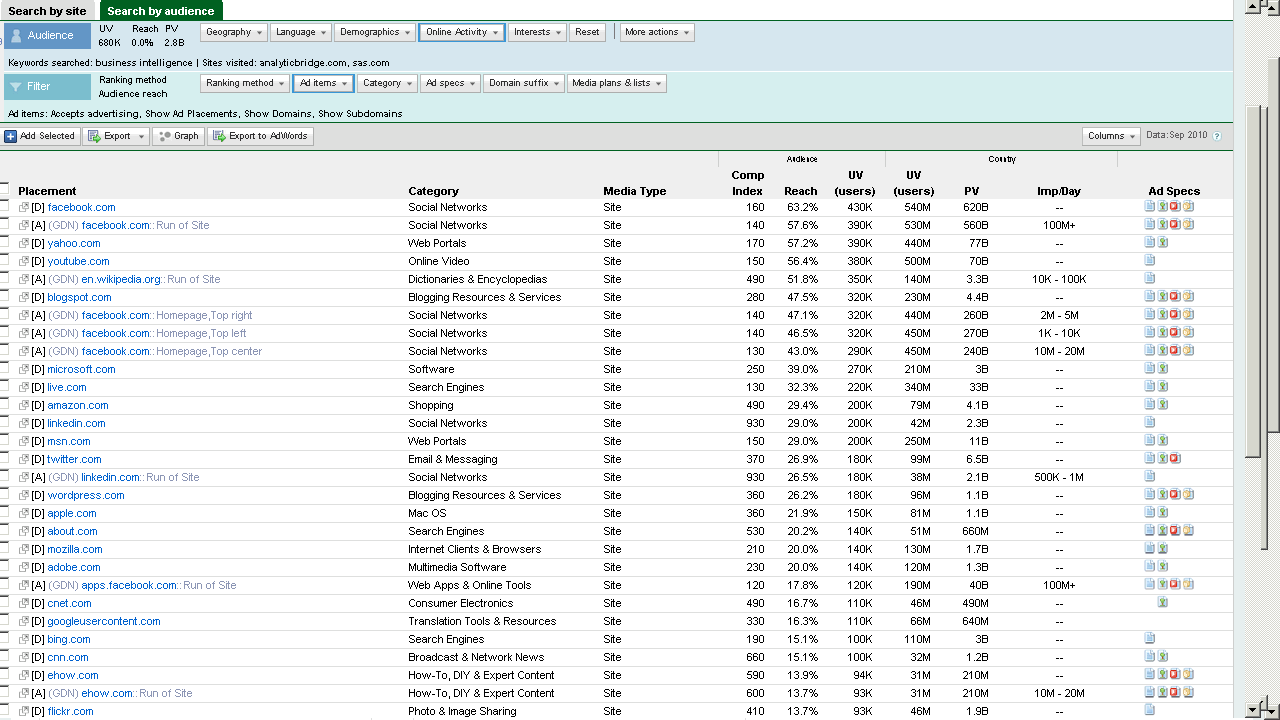
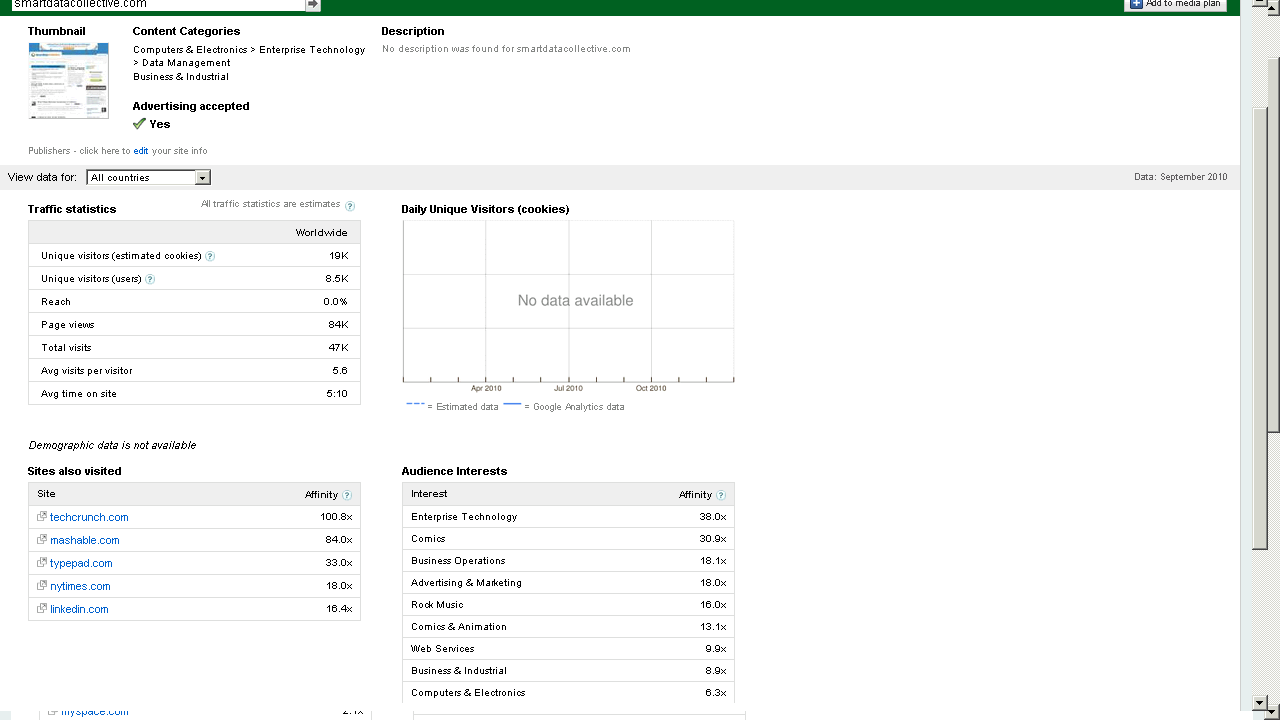
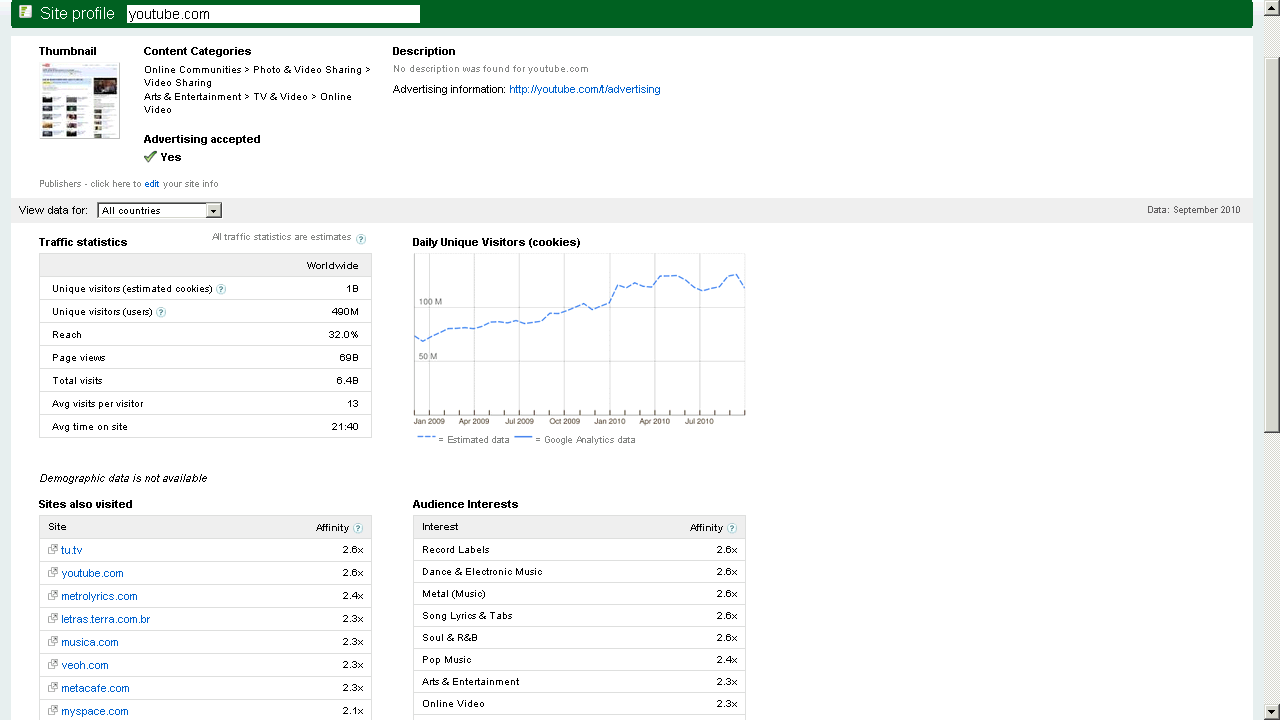
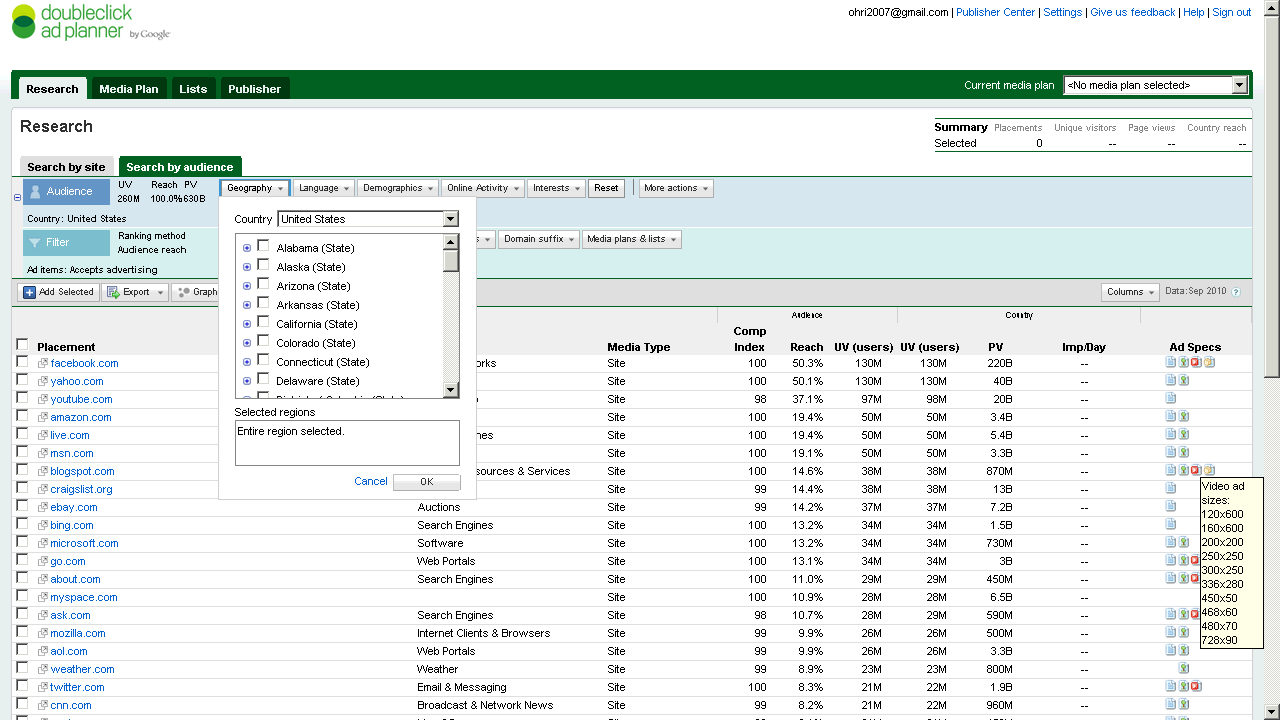
Here are some screenshots-of the new Google Ad Planner-

I found it useful to review traffic for third party websites (even better than Google Trends) and thats a definite plus over Facebooks closed dormitory world of ads.

Click on them for some more views or go straight to http://google.com/adplanner and Enjoy Baby!

Which websites attract your target customers?

View a site listing: 

Ad Planner top 1,000 sites

Refine your online advertising with DoubleClick Ad Planner, a free media planning tool that can help you:

Identify websites your target customers are likely to visit

  • Define audiences by demographics and interests.
  • Search for websites relevant to your target audience.
  • Access unique users, page views, and other data for millions of websites from over 40 countries.

Easily build media plans for yourself or your clients

  • Create lists of websites where you’d like to advertise.
  • Generate aggregated website statistics for your media plan.

and

Take charge of your DoubleClick Ad Planner site listing

View a site listing: 

Ad Planner top 1,000 sites

DoubleClick Ad Planner is a media planning tool where advertisers find sites for their media buys. As a site owner, you can access the DoubleClick Ad Planner Publisher Center and
Market your site
Write a site description to present your audience and unique value to advertisers.
Help advertisers search for you
Choose categories for your site and ad formats you support.
Improve the data that advertisers see
Share your Google Analytics data to reflect the most accurate traffic numbers for your site.


Here comes PySpread- 85,899,345 rows and 14,316,555 columns

A Bold GNU Head
Image via Wikipedia

Whats new/ One more open source analytics package. Built like a spreadsheet with an ability to import a million cells-

From http://pyspread.sourceforge.net/index.html

about Pyspread is a cross-platform Python spreadsheet application. It is based on and written in the programming language Python.

Instead of spreadsheet formulas, Python expressions are entered into the spreadsheet cells. Each expression returns a Python object that can be accessed from other cells. These objects can represent anything including lists or matrices.

Pyspread screenshot
features In pyspread, cells expect Python expressions and return Python objects. Therefore, complex data types such as lists, trees or matrices can be handled within a single cell. Macros can be used for functions that are too complex for a single expression.

Since Python modules can be easily used without external scripts, arbitrary size rational numbers (via gmpy), fixed point decimal numbers for business calculations, (via the decimal module from the standard library) and advanced statistics including plotting functions (via RPy) can be used in the spreadsheet. Everything is directly available from each cell. Just use the grid

Data can be imported and exported using csv files or the clipboard. Other forms of data exchange is possible using external Python modules.

In  order to simplify sparse matrix editing, pyspread features a three dimensional grid that can be sized up to 85,899,345 rows and 14,316,555 columns (64 bit-systems, depends on row height and column width). Note that importing a million cells requires about 500 MB of memory.

The concept of pyspread allows doing everything from each cell that a Python script can do. This may very well include deleting your hard drive or sending your data via the Internet. Of course this is a non-issue if you sandbox properly or if you only use self developed spreadsheets. Since this is not the case for everyone (see the discussion at lwn.net), a GPG signature based trust model for spreadsheet files has been introduced. It ensures that only your own trusted files are executed on loading. Untrusted files are displayed in safe mode. You can trust a file manually. Inspect carefully.

Pyspread screenshot

requirements Pyspread runs on Linux, Windows and *nix platforms with GTK+ support. There are reports that it works with MacOS X as well. If you would like to contribute by testing on OS X please contact me.

Dependencies

Highly recommended for full functionality

  • PyMe >=0.8.1, Note for Windows™ users: If you want to use signatures without compiling PyMe try out Gpg4win.
  • gmpy >=1.1.0 and
  • rpy >=1.0.3.
maturity Pyspread is in early Beta release. This means that the core functionality is fully implemented but the program needs testing and polish.

and from the wiki

http://sourceforge.net/apps/mediawiki/pyspread/index.php?title=Main_Page

a spreadsheet with more powerful functions and data structures that are accessible inside each cell. Something like Python that empowers you to do things quickly. And yes, it should be free and it should run on Linux as well as on Windows. I looked around and found nothing that suited me. Therefore, I started pyspread.

Concept

  • Each cell accepts any input that works in a Python command line.
  • The inputs are parsed and evaluated by Python’s eval command.
  • The result objects are accessible via a 3D numpy object array.
  • String representations of the result objects are displayed in the cells.

Benefits

  • Each cell returns a Python object. This object can be anything including arrays and third party library objects.
  • Generator expressions can be used efficiently for data manipulation.
  • Efficient numpy slicing is used.
  • numpy methods are accessible for the data.

Installation

  1. Download the pyspread tarball or zip and unzip at a convenient place
  2. In case you do not have it already get and install Python, wxpython and numpy
If you want the examples to work, install gmpy, R and rpy
Really do check the version requirements that are mentioned on http://pyspread.sf.net
  1. Get install privileges (e.g. become root)
  2. Change into the directory and type
python setup.py install
Windows: Replace “python” with your Python interpreter (absolute path)
  1. Become normal user again
  2. Start pyspread by typing
pyspread
  1. Enjoy

Links

Next on Spreadsheet wishlist-

a MSI bundle /Windows Self Installer which has all dependencies bundled in it-linking to PostGresSQL 😉 etc

way to go Mr Martin Manns

mmanns < at > gmx < dot > net

Interfaces to R

This is a fairly long post and is a basic collection  of material for a book/paper. It is on interfaces to use R. If you feel I need to add more on a  particular R interface, or if there is an error in this- please feel to contact me on twitter @decisionstats or mail ohri2007 on google mail.

R Interfaces

There are multiple ways to use the R statistical language.

Command Line- The default method is using the command prompt by the installed software on download from http://r-project.org
For windows users there is a simple GUI which has an option for Packages (loading package, installing package, setting CRAN mirror for downloading packages) , Misc (useful for listing all objects loaded in workspace as well as clearing objects to free up memory), and Help Menu.

Using Click and Point- Besides the command prompt, there are many Graphical User Interfaces which enable the analyst to use click and point methods to analyze data without getting into the details of learning complex and at times overwhelming R syntax. R GUIs are very popular both as mode of instruction in academia as well as in actual usage as it cuts down considerably on time taken to adapt to the language. As with all command line and GUI software, for advanced tweaks and techniques, command prompt will come in handy as well.

Advantages and Limitations of using Visual Programming Interfaces to R as compared to Command Line.


Advantages Limitations
Faster learning for new programmers Can create junk analysis by clicking menus in GUI
Easier creation of advanced models or graphics Cannot create custom functions unless you use command line
Repeatability of analysis is better Advanced techniques and custom flexibility of data handling R can be done in command line
Syntax is auto-generated Can limit scope and exposure in learning R syntax


A brief list of the notable Graphical User Interfaces is below-

1) R Commander- Basic statistics
2) Rattle- Data Mining
3) Deducer- Graphics (including GGPlot Integration) and also uses JGR (a Jave based  GUI)
4) RKward- Comprehensive R GUI for customizable graphs
5) Red-R – Dataflow programming interface using widgets

1) R Commander- R Commander was primarily created by Professor John Fox of McMaster University to cover the content of a basic statistics course. However it is extensible and many other packages can be added in menu form to it- in the form R Commander Plugins. Quite noticeably it is one of the most widely used R GUI and it also has a script window so you can write R code in combination with the menus.
As you point and click a particular menu item, the corresponding R code is automatically generated in the log window and executed.

It can be found on CRAN at http://cran.r-project.org/web/packages/Rcmdr/index.html


Advantages of Using  R Commander-
1) Useful for beginner in R language to do basic graphs and analysis and building models.
2) Has script window, output window and log window (called messages) in same screen which helps user as code is auto-generated on clicking on menus, and can be customized easily. For example in changing labels and options in Graphs.  Graphical output is shown in seperate window from output window.
3) Extensible for other R packages like qcc (for quality control), Teaching Demos (for training), survival analysis and Design of Experiments (DoE)
4) Easy to understand interface even for first time user.
5) Menu items which are not relevant are automatically greyed out- if there are only two variables, and you try to build a 3D scatterplot graph, that menu would simply not be available and is greyed out.

Comparative Disadvantages of using R Commander-
1) It is basically aimed at a statistical audience( originally students in statistics) and thus the terms as well as menus are accordingly labeled. Hence it is more of a statistical GUI rather than an analytics GUI.
2) Has limited ability to evaluate models from a business analysts perspective (ROC curve is not given as an option) even though it has extensive statistical tests for model evaluation in model sub menu. Indeed creating a Model is treated as a subsection of statistics rather than a separate menu item.
3) It is not suited for projects that do not involve advanced statistical testing and for users not proficient in statistics (particularly hypothesis testing), and for data miners.

Menu items in the R Commander window:
File Menu – For loading script files and saving Script files, Output and Workspace
It is also needed for changing the present working directory and for exiting R.
Edit Menu – For editing scripts and code in the script window.
Data Menu – For creating new dataset, inputting or importing data and manipulating data through variables. Data Import can be from text,comma separated values,clipboard, datasets from SPSS, Stata,Minitab, Excel ,dbase,  Access files or from url.
Data manipulation included deleting rows of data as well as manipulating variables.
Also this menu has the option for merging two datasets by row or columns.
Statistics Menu-This menu has options for descriptive statistics, hypothesis tests, factor analysis and clustering and also for creating models. Note there is a separate menu for evaluating the model so created.
Graphs Menu-It has options for creating various kinds of graphs including box-plot, histogram, line, pie charts and x-y plots.
The first option is color palette- it can be used for customizing the colors. It is recommended you adjust colors based on your need for publication or presentation.
A notable option is 3 D graphs for evaluating 3 variables at a time- this is really good and impressive feature and exposes the user to advanced graphs in R all at few clicks. You may want to dazzle a presentation using this graph.
Also consider scatterplot matrix graphs for graphical display of variables.
Graphical display of R surpasses any other statistical software in appeal as well as ease of creation- using GUI to create graphs can further help the user to get the most of data insights using R at a very minimum effort.
Models Menu-This is somewhat of a labeling peculiarity of R Commander as this menu is only for evaluating models which have been created using the statistics menu-model sub menu.
It includes options for graphical interpretation of model results,residuals,leverage and confidence intervals and adding back residuals to the data set.
Distributions Menu- is for cumulative probabilities, probability density, graphs of distributions, quantiles and features for standard distributions and can be used in lieu of standard statistical tables for the distributions. It has 13 standard statistical continuous distributions and 5 discrete distributions.
Tools Menu- allows you to load other packages and also load R Commander plugins (which are then added to the Interface Menu after the R Commander GUI is restarted). It also contains options sub menu for fine tuning (like opting to send output to R Menu)
Help Menu- Standard documentation and help menu. Essential reading is the short 25 page manual in it called Getting “Started With the R Commander”.

R Commander Plugins- There are twenty extensions to R Commander that greatly enhance it’s appeal -these include basic time series forecasting, survival analysis, qcc and more.

see a complete list at

  1. DoE – http://cran.r-project.org/web/packages/RcmdrPlugin.DoE/RcmdrPlugin.DoE.pdf
  2. doex
  3. EHESampling
  4. epack- http://cran.r-project.org/web/packages/RcmdrPlugin.epack/RcmdrPlugin.epack.pdf
  5. Export- http://cran.r-project.org/web/packages/RcmdrPlugin.Export/RcmdrPlugin.Export.pdf
  6. FactoMineR
  7. HH
  8. IPSUR
  9. MAc- http://cran.r-project.org/web/packages/RcmdrPlugin.MAc/RcmdrPlugin.MAc.pdf
  10. MAd
  11. orloca
  12. PT
  13. qcc- http://cran.r-project.org/web/packages/RcmdrPlugin.qcc/RcmdrPlugin.qcc.pdf and http://cran.r-project.org/web/packages/qcc/qcc.pdf
  14. qual
  15. SensoMineR
  16. SLC
  17. sos
  18. survival-http://cran.r-project.org/web/packages/RcmdrPlugin.survival/RcmdrPlugin.survival.pdf
  19. SurvivalT
  20. Teaching Demos

Note the naming convention for above e plugins is always with a Prefix of “RCmdrPlugin.” followed by the names above
Also on loading a Plugin, it must be already installed locally to be visible in R Commander’s list of load-plugin, and R Commander loads the e-plugin after restarting.Hence it is advisable to load all R Commander plugins in the beginning of the analysis session.

However the notable E Plugins are
1) DoE for Design of Experiments-
Full factorial designs, orthogonal main effects designs, regular and non-regular 2-level fractional
factorial designs, central composite and Box-Behnken designs, latin hypercube samples, and simple D-optimal designs can currently be generated from the GUI. Extensions to cover further latin hypercube designs as well as more advanced D-optimal designs (with blocking) are planned for the future.
2) Survival- This package provides an R Commander plug-in for the survival package, with dialogs for Cox models, parametric survival regression models, estimation of survival curves, and testing for differences in survival curves, along with data-management facilities and a variety of tests, diagnostics and graphs.
3) qcc -GUI for  Shewhart quality control charts for continuous, attribute and count data. Cusum and EWMA charts. Operating characteristic curves. Process capability analysis. Pareto chart and cause-and-effect chart. Multivariate control charts
4) epack- an Rcmdr “plug-in” based on the time series functions. Depends also on packages like , tseries, abind,MASS,xts,forecast. It covers Log-Exceptions garch
and following Models -Arima, garch, HoltWinters
5)Export- The package helps users to graphically export Rcmdr output to LaTeX or HTML code,
via xtable() or Hmisc::latex(). The plug-in was originally intended to facilitate exporting Rcmdr
output to formats other than ASCII text and to provide R novices with an easy-to-use,
easy-to-access reference on exporting R objects to formats suited for printed output. The
package documentation contains several pointers on creating reports, either by using
conventional word processors or LaTeX/LyX.
6) MAc- This is an R-Commander plug-in for the MAc package (Meta-Analysis with
Correlations). This package enables the user to conduct a meta-analysis in a menu-driven,
graphical user interface environment (e.g., SPSS), while having the full statistical capabilities of
R and the MAc package. The MAc package itself contains a variety of useful functions for
conducting a research synthesis with correlational data. One of the unique features of the MAc
package is in its integration of user-friendly functions to complete the majority of statistical steps
involved in a meta-analysis with correlations.
You can read more on R Commander Plugins at http://wp.me/p9q8Y-1Is
—————————————————————————————————————————-
Rattle- R Analytical Tool To Learn Easily (download from http://rattle.togaware.com/)
Rattle is more advanced user Interface than R Commander though not as popular in academia. It has been designed explicitly for data mining and it also has a commercial version for sale by Togaware. Rattle has a Tab and radio button/check box rather than Menu- drop down approach towards the graphical design. Also the Execute button needs to be clicked after checking certain options, just the same as submit button is clicked after writing code. This is different from clicking on a drop down menu.

Advantages of Using Rattle
1) Useful for beginner in R language to do building models,cluster and data mining.
2) Has separate tabs for data entry,summary, visualization,model building,clustering, association and evaluation. The design is intuitive and easy to understand even for non statistical background as the help is conveniently explained as each tab, button is clicked. Also the tabs are placed in a very sequential and logical order.
3) Uses a lot of other R packages to build a complete analytical platform. Very good for correlation graph,clustering as well decision trees.
4) Easy to understand interface even for first time user.
5) Log  for R code is auto generated and time stamp is placed.
6) Complete solution for model building from partitioning datasets randomly for testing,validation to building model, evaluating lift and ROC curve, and exporting PMML output of model for scoring.
7) Has a well documented online help as well as in-software documentation. The help helps explain terms even to non statistical users and is highly useful for business users.

Example Documentation for Hypothesis Testing in Test Tab in Rattle is ”
Distribution of the Data
* Kolomogorov-Smirnov     Non-parametric Are the distributions the same?
* Wilcoxon Signed Rank    Non-parametric Do paired samples have the same distribution?
Location of the Average
* T-test               Parametric     Are the means the same?
* Wilcoxon Rank-Sum    Non-parametric Are the medians the same?
Variation in the Data
* F-test Parametric Are the variances the same?
Correlation
* Correlation    Pearsons Are the values from the paired samples correlated?”

Comparative Disadvantages of using Rattle-
1) It is basically aimed at a data miner.  Hence it is more of a data mining GUI rather than an analytics GUI.
2) Has limited ability to create different types of graphs from a business analysts perspective Numeric variables can be made into Box-Plot, Histogram, Cumulative as well Benford Graphs. While interactivity using GGobi and Lattiticist is involved- the number of graphical options is still lesser than other GUI.
3) It is not suited for projects that involve multiple graphical analysis and which do not have model building or data mining.For example Data Plot is given in clustering tab but not in general Explore tab.
4) Despite the fact that it is meant for data miners, no support to biglm packages, as well as parallel programming is enabled in GUI for bigger datasets, though these can be done by R command line in conjunction with the Rattle GUI. Data m7ining is typically done on bigger datsets.
5) May have some problems installing it as it is dependent on GTK and has a lot of packages as dependencies.

Top Row-
This has the Execute Button (shown as two gears) and which has keyboard shortcut F2. It is used to execute the options in Tabs-and is equivalent of submit code button.
Other buttons include new Projects,Save  and Load projects which are files with extension to .rattle an which store all related information from Rattle.
It also has a button for exporting information in the current Tab as an open office document, and buttons for interrupting current process as well as exiting Rattle.

Data Tab-
It has the following options.
●        Data Type- These are radio buttons between Spreadsheet (and Comma Separated Values), ARFF files (Weka), ODBC (for Database Connections),Library (for Datasets from Packages),R Dataset or R datafile, Corpus (for Text Mining) and Script for generating the data by code.
●        The second row-in Data Tab in Rattle is Detail on Data Type- and its apperance shifts as per the radio button selection of data type in previous step. For Spreadsheet, it will show Path of File, Delimiters, Header Row while for ODBC it will show DSN, Tables, Rows and for Library it will show you a dropdown of all datasets in all R packages installed locally.
●        The third row is a Partition field for splitting dataset in training,testing,validation and it shows ratio. It also specifies a Random seed which can be customized for random partitions which can be replicated. This is very useful as model building requires model to be built and tested on random sub sets of full dataset.
●        The fourth row is used to specify the variable type of inputted data. The variable types are
○        Input: Used for modeling as independent variables
○        Target: Output for modeling or the dependent variable. Target is a categoric variable for classification, numeric for regression and for survival analysis both Time and Status need to be defined
○        Risk: A variable used in the Risk Chart
○        Ident: An identifier for unique observations in the data set like AccountId or Customer Id
○        Ignore: Variables that are to be ignored.
●        In addition the weight calculator can be used to perform mathematical operations on certain variables and identify certain variables as more important than others.

Explore Tab-
Summary Sub-Tab has Summary for brief summary of variables, Describe for detailed summary and Kurtosis and Skewness for comparing them across numeric variables.
Distributions Sub-Tab allows plotting of histograms, box plots, and cumulative plots for numeric variables and for categorical variables Bar Plot and Dot Plot.
It also has Benford Plot for Benford’s Law on probability of distribution of digits.
Correlation Sub-Tab– This displays corelation between variables as a table and also as a very nice plot.
Principal Components Sub-Tab– This is for use with Principal Components Analysis including the SVD (singular value decomposition) and Eigen methods.
Interactive Sub-Tab- Allows interactive data exploration using GGobi and Lattice software. It is a powerful visual tool.

Test Tab-This has options for hypothesis testing of data for two sample tests.
Transform Tab-This has options for rescaling data, missing values treatment, and deleting invalid or missing values.
Cluster Tab-It gives an option to KMeans, Hierarchical and Bi-Cluster clustering methods with automated graphs,plots (including dendogram, discriminant plot and data plot) and cluster results available. It is highly recommended for clustering projects especially for people who are proficient in clustering but not in R.

Associate Tab-It helps in building association rules between categorical variables, which are in the form of “if then”statements. Example. If day is Thursday, and someone buys Milk, there is 80% chance they will buy Diapers. These probabilities are generated from observed frequencies.

Model Tab-The Model tab makes Rattle one of the most advanced data mining tools, as it incorporates decision trees(including boosted models and forest method), linear and logistic regression, SVM,neural net,survival models.
Evaluate Tab-It as functionality for evaluating models including lift,ROC,confusion matrix,cost curve,risk chart,precision, specificity, sensitivity as well as scoring datasets with built model or models. Example – A ROC curve generated by Rattle for Survived Passengers in Titanic (as function of age,class,sex) This shows comparison of various models built.

Log Tab- R Code is automatically generated by Rattle as the respective operation is executed. Also timestamp is done so it helps in reviewing error as well as evaluating speed for code optimization.
—————————————————————————————————————————-
JGR- Deducer- (see http://www.deducer.org/pmwiki/pmwiki.php?n=Main.DeducerManual
JGR is a Java Based GUI. Deducer is recommended for use with JGR.
Deducer has basically been made to implement GGPLOT in a GUI- an advanced graphics package based on Grammer of Graphics and was part of Google Summer of Code project.

It first asks you to either open existing dataset or load a new dataset with just two icons. It has two initial views in Data Viewer- a Data view and Variable view which is quite similar to Base SPSS. The other Deducer options are loaded within the JGR console.

Advantages of Using  Deducer
1.      It has an option for factor as well as reliability analysis which is missing in other graphical user interfaces like R Commander and Rattle.
2.      The plot builder option gives very good graphics -perhaps the best in other GUIs. This includes a color by option which allows you to shade the colors based on variable value. An addition innovation is the form of templates which enables even a user not familiar with data visualization to choose among various graphs and click and drag them to plot builder area.
3.      You can set the Java Gui for R (JGR) menu to automatically load some packages by default using an easy checkbox list.
4.      Even though Deducer is a very young package, it offers a way for building other R GUIs using Java Widgets.
5.      Overall feel is of SPSS (Base GUI) to it’s drop down menu, and selecting variables in the sub menu dialogue by clicking to transfer to other side.SPSS users should be more comfortable at using this.
6.      A surprising thing is it rearranges the help documentation of all R in a very presentable and organized manner
7.      Very convenient to move between two or more datasets using dropdown.
8.      The most convenient GUI for merging two datasets using common variable.

Dis Advantages of Using  Deducer
1.      Not able to save plots as images (only options are .pdf and .eps), you can however copy as image.
2.      Basically a data viualization GUI – it does offer support for regression, descriptive statistics in the menu item Extras- however the menu suggests it is a work in progress.
3.      Website for help is outdated, and help documentation specific to Deducer lacks detail.


Components of Deducer-
Data Menu-Gives options for data manipulation including recoding variables,transform variables (binning, mathematical operation), sort dataset,  transpose dataset ,merge two datasets.
Analysis Menu-Gives options for frequency tables, descriptive statistics,cross tabs, one sample tests (with plots) ,two sample tests (with plots),k sample tests, correlation,linear and logistic models,generalized linear models.
Plot Builder Menu- This allows plots of various kinds to be made in an interactive manner.

Correlation using Deducer.

————————————————————————————————————————–
Red-R – A dataflow user interface for R (see http://red-r.org/

Red R uses dataflow concepts as a user interface rather than menus and tabs. Thus it is more similar to Enterprise Miner or Rapid Miner in design. For repeatable analysis dataflow programming is preferred by some analysts. Red-R is written in Python.


Advantages of using Red-R
1) Dataflow style makes it very convenient to use. It is the only dataflow GUI for R.
2) You can save the data as well as analysis in the same file.
3) User Interface makes it easy to read R code generated, and commit code.
4) For repeatable analysis-like reports or creating models it is very useful as you can replace just one widget and other widget/operations remain the same.
5) Very easy to zoom into data points by double clicking on graphs. Also to change colors and other options in graphs.
6) One minor feature- It asks you to set CRAN location just once and stores it even for next session.
7) Automated bug report submission.

Disadvantages of using Red-R
1) Current version is 1.8 and it needs a lot of improvement for building more modeling types as well as debugging errors.
2) Limited features presently.
———————————————————————————————————————-
RKWard (see http://rkward.sourceforge.net/)

It is primarily a KDE GUI for R, so it can be used on Ubuntu Linux. The windows version is available but has some bugs.

Advantages of using RKWard
1) It is the only R GUI for time series at present.
In addition it seems like the only R GUI explicitly for Item Response Theory (which includes credit response models,logistic models) and plots contains Pareto Charts.
2) It offers a lot of detail in analysis especially in plots(13 types of plots), analysis and  distribution analysis ( 8 Tests of normality,14 continuous and 6 discrete distributions). This detail makes it more suitable for advanced statisticians rather than business analytics users.
3) Output can be easily copied to Office documents.

Disadvantages of using RKWard
1) It does not have stable Windows GUI. Since a graphical user interface is aimed at making interaction easier for users- this is major disadvantage.
2) It has a lot of dependencies so may have some issues in installing.
3) The design categorization of analysis,plots and distributions seems a bit unbalanced considering other tabs are File, Edit, View, Workspace,Run,Settings, Windows,Help.
Some of the other tabs can be collapsed, while the three main tabs of analysis,plots,distributions can be better categorized (especially into modeling and non-modeling analysis).
4) Not many options for data manipulation (like subset or transpose) by the GUI.
5) Lack of detail in documentation as it is still on version 0.5.3 only.

Components-
Analysis, Plots and Distributions are the main components and they are very very extensive, covering perhaps the biggest range of plots,analysis or distribution analysis that can be done.
Thus RKWard is best combined with some other GUI, when doing advanced statistical analysis.


GNU General Public License
Image via Wikipedia

GrapherR

GrapheR is a Graphical User Interface created for simple graphs.

Depends: R (>= 2.10.0), tcltk, mgcv
Description: GrapheR is a multiplatform user interface for drawing highly customizable graphs in R. It aims to be a valuable help to quickly draw publishable graphs without any knowledge of R commands. Six kinds of graphs are available: histogram, box-and-whisker plot, bar plot, pie chart, curve and scatter plot.
License: GPL-2
LazyLoad: yes
Packaged: 2011-01-24 17:47:17 UTC; Maxime
Repository: CRAN
Date/Publication: 2011-01-24 18:41:47

More information about GrapheR at CRAN
Path: /cran/newpermanent link

Advantages of using GrapheR

  • It is bi-lingual (English and French) and can import in text and csv files
  • The intention is for even non users of R, to make the simple types of Graphs.
  • The user interface is quite cleanly designed. It is thus aimed as a data visualization GUI, but for a more basic level than Deducer.
  • Easy to rename axis ,graph titles as well use sliders for changing line thickness and color

Disadvantages of using GrapheR

  • Lack of documentation or help. Especially tips on mouseover of some options should be done.
  • Some of the terms like absicca or ordinate axis may not be easily understood by a business user.
  • Default values of color are quite plain (black font on white background).
  • Can flood terminal with lots of repetitive warnings (although use of warnings() function limits it to top 50)
  • Some of axis names can be auto suggested based on which variable s being chosen for that axis.
  • Package name GrapheR refers to a graphical calculator in Mac OS – this can hinder search engine results

Using GrapheR

  • Data Input -Data Input can be customized for CSV and Text files.
  • GrapheR gives information on loaded variables (numeric versus Factors)
  • It asks you to choose the type of Graph 
  • It then asks for usual Graph Inputs (see below). Note colors can be customized (partial window). Also number of graphs per Window can be easily customized 
  • Graph is ready for publication


Related Articles


Summary of R GUIs


Using R from other software- Please note that interfaces to R exist from other software as well. These include software from SAS Institute, IBM SPSS, Rapid Miner,Knime  and Oracle.

A brief list is shown below-

1) SAS/IML Interface to R- You can read about the SAS Institute’s SAS/ IML Studio interface to R at http://www.sas.com/technologies/analytics/statistics/iml/index.html
2) Rapid  Miner Extension to R-You can view integration with Rapid Miner’s extension to R here at http://www.youtube.com/watch?v=utKJzXc1Cow
3) IBM SPSS plugin for R-SPSS software has R integration in the form of a plugin. This was one of the earliest third party software offering interaction with R and you can read more at http://www.spss.com/software/statistics/developer/
4) Knime- Konstanz Information Miner also has R integration. You can view this on
http://www.knime.org/downloads/extensions
5) Oracle Data Miner- Oracle has a data mining offering to it’s very popular database software which is integrated with the R language. The R Interface to Oracle Data Mining ( R-ODM) allows R users to access the power of Oracle Data Mining’s in-database functions using the familiar R syntax. http://www.oracle.com/technetwork/database/options/odm/odm-r-integration-089013.html
6) JMP- JMP version 9 is the latest to offer interface to R.  You can read example scripts here at http://blogs.sas.com/jmp/index.php?/archives/298-JMP-Into-R!.html

R Excel- Using R from Microsoft Excel

Microsoft Excel is the most widely used spreadsheet program for data manipulation, entry and graphics. Yet as dataset sizes have increased, Excel’s statistical capabilities have lagged though it’s design has moved ahead in various product versions.

R Excel basically works at adding a .xla plugin to
Excel just like other Plugins. It does so by connecting to R through R packages.

Basically it offers the functionality of R
functions and capabilities to the most widely distributed spreadsheet program. All data summaries, reports and analysis end up in a spreadsheet-

R Excel enables R to be very useful for people not
knowing R. In addition it adds (by option) the menus of R Commander as menus in Excel spreadsheet.


Advantages-
Enables R and Excel to communicate thus tieing an advanced statistical tool to the most widely used business analytics tool.

Disadvantages-
No major disadvatage at all to a business user. For a data statistical user, Microsoft Excel is limited to 100,000 rows, so R data needs to be summarized or reduced.

Graphical capabilities of R are very useful, but to a new user, interactive graphics in Excel may be easier than say using Ggplot ot Ggobi.
You can read more on this at http://rcom.univie.ac.at/ or  the complete Springer Book http://www.springer.com/statistics/computanional+statistics/book/978-1-4419-0051-7

The combination of cloud computing and internet offers a new kind of interaction possible for scientists as well analysts.

Here is a way to use R on an Amazon EC2 machine, thus renting by hour hardware and computing resources which are scaleable to massive levels , whereas the software is free.

Here is how you can connect to Amazon EC2 and run R.
Running R for Cloud Computing.
1) Logging onto Amazon Console http://aws.amazon.com/ec2/
Note you need your Amazon Id (even the same id which you use for buying books).Note we are into Amazon EC2 as shown by the upper tab. Click upper tab to get into the Amazon EC2
2) Choosing the right AMI-On the left margin, you can click AMI -Images. Now you can search for the image-I chose Ubuntu images (linux images are cheaper) and latest Ubuntu Lucid  in the search .You can choose whether you want 32 bit or 64 bit image. 64 bit images will lead to  faster processing of data.Click on launch instance in the upper tab ( near the search feature). A pop up comes up, which shows the 5 step process to launch your computing.
3) Choose the right compute instance- – there are various compute instances and they all are at different multiples of prices or compute units. They differ in terms of RAM memory and number of processors.After choosing the compute instance of your choice (extra large is highlighted)- click on continue-
4) Instance Details-Do not  choose cloudburst monitoring if you are on a budget as it has a extra charge. For critical production it would be advisable to choose cloudburst monitoring once you have become comfortable with handling cloud computing..
5) Add Tag Details- If you are running a lot of instances you need to create your own tags to help you manage them. It is advisable if you are going to run many instances.
6) Create a key pair- A key pair is an added layer of encryption. Click on create new pair and name it (note the name will be handy in coming steps)
7) After clicking and downloading the key pair- you come into security groups. Security groups is just a set of instructions to help keep your data transfer secure. You want to enable access to your cloud instance to certain IP addresses (if you are going to connect from fixed IP address and to certain ports in your computer. It is necessary in security group to enable  SSH using Port 22.
Last step- Review Details and Click Launch
8) On the Left margin click on instances ( you were in Images.>AMI earlier)
It will take some 3-5 minutes to launch an instance. You can see status as pending till then.
9) Pending instance as shown by yellow light-
10) Once the instance is running -it is shown by a green light.
Click on the check box, and on upper tab go to instance actions. Click on connect-
You see a popup with instructions like these-
· Open the SSH client of your choice (e.g., PuTTY, terminal).
·  Locate your private key, nameofkeypair.pem
·  Use chmod to make sure your key file isn’t publicly viewable, ssh won’t work otherwise:
chmod 400 decisionstats.pem
·  Connect to your instance using instance’s public DNS [ec2-75-101-182-203.compute-1.amazonaws.com].
Example
Enter the following command line:
ssh -i decisionstats2.pem root@ec2-75-101-182-203.compute-1.amazonaws.com

Note- If you are using Ubuntu Linux on your desktop/laptop you will need to change the above line to ubuntu@… from root@..

ssh -i yourkeypairname.pem -X ubuntu@ec2-75-101-182-203.compute-1.amazonaws.com

(Note X11 package should be installed for Linux users- Windows Users will use Remote Desktop)

12) Install R Commander on the remote machine (which is running Ubuntu Linux) using the command

sudo apt-get install r-cran-rcmdr


Clustering Business Analysts and Industry Analysts

In my interactions with the world at large (mostly online) in the ways of data, statistics and analytics- I come across people who like to call themselves analysts.

As per me, there are 4 kinds of analysts principally,

1) Corporate Analysts- They work for a particular software company. As per them their product is great and infallible, their code has no bugs, and last zillion customer case studies all got a big benefit by buying their software.

They are very good at writing software code themselves, unfortunately this expertise is restricted to Microsoft Outlook (emails) and MS Powerpoint ( presentations). No they are more like salesmen than analysts, but as Arthur Miller said ” All salesmen (person) are dreamers. When the dream dies, the salesman (person) dies (read transfers to bigger job at a rival company)

2) Third -Party Independent Analsyst- The main reason they are third party is they can not be tolerated in a normal corporate culture, their spouse can barely stand them for more than 2 hours a day, and their Intelligence is not matched by their emotional maturity. Alas, after turning independent analysts, they realize they are actually more dependent to people than before, and they quickly polish their behaviour to praise who ever is sponsoring their webinar,  white paper , newsletter, or flying them to junkets. They are more of boutique consultants, but they used to be quite nifty at writing code, when younger, so they call themselves independent and “Noted Industry Analyst”

3) Researcher Analysts- They mostly scrape info from press releases which are mostly written by a hapless overworked communications team thrown at a task at last moment. They get into one hour call with who ever is the press or industry/analyst  relations honcho is- turn the press release into bullet points, and publish on the blog. They call this as research Analysts and give it away for free (but actually couldnt get anyone to pay for it for last 4 years). Couldnt write code if their life depended on it, but usually will find transformation and expert somehwere in their resume/about me web page. May have co -authored a book, which would have gotten them a F for plagiarism had they submitted it as a thesis.

4) Analytical Analysts- They are mostly buried deep within organizational bureaucracies if corporate, or within partnerships if they are independent. Understand coding, innovation (or creativity). Not very aggressive at networking unless provoked by an absolute idiot belonging to first three classes of industry analyst. Prefer to read Atlas Shrugged than argue on business semantics.

Next time you see an industry expert- you know which cluster to classify them 😉

Image Citation-

http://gapingvoidgallery.com/