How to balance your online advertising and your offline conscience

Google in 1998, showing the original logo
Image via Wikipedia

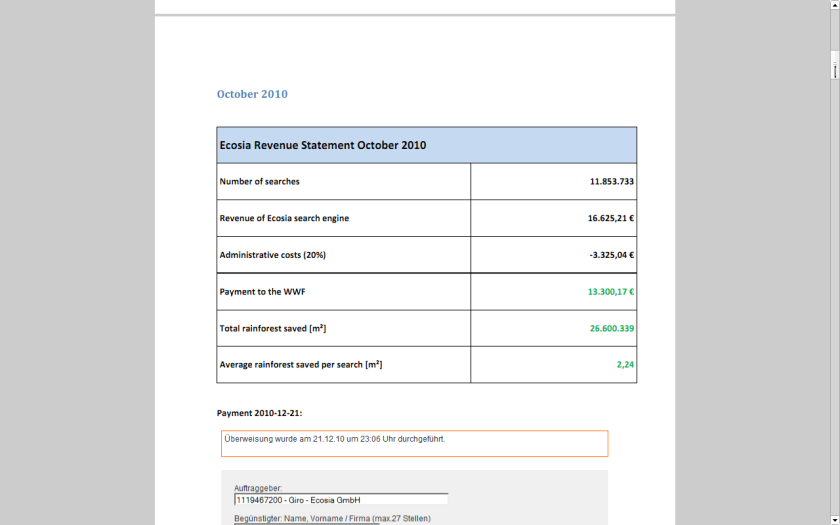
I recently found an interesting example of  a website that both makes a lot of money and yet is much more efficient than any free or non profit. It is called ECOSIA

If you see a website that wants to balance administrative costs  plus have a transparent way to make the world better- this is a great example.

  • http://ecosia.org/how.php
  • HOW IT WORKS
    You search with Ecosia.
  • Perhaps you click on an interesting sponsored link.
  • The sponsoring company pays Bing or Yahoo for the click.
  • Bing or Yahoo gives the bigger chunk of that money to Ecosia.
  • Ecosia donates at least 80% of this income to support WWF’s work in the Amazon.
  • If you like what we’re doing, help us spread the word!
  • Key facts about the park:

    • World’s largest tropical forest reserve (38,867 square kilometers, or about the size of Switzerland)
    • Home to about 14% of all amphibian species and roughly 54% of all bird species in the Amazon – not to mention large populations of at least eight threatened species, including the jaguar
    • Includes part of the Guiana Shield containing 25% of world’s remaining tropical rainforests – 80 to 90% of which are still pristine
    • Holds the last major unpolluted water reserves in the Neotropics, containing approximately 20% of all of the Earth’s water
    • One of the last tropical regions on Earth vastly unaltered by humans
    • Significant contributor to climatic regulation via heat absorption and carbon storage


    http://ecosia.org/statistics.php

    They claim to have donated 141,529.42 EUR !!!

    http://static.ecosia.org/files/donations.pdf


    Well suppose you are the Web Admin of a very popular website like Wikipedia or etc

    One way to meet server costs is to say openly hey i need to balance my costs so i need some money.

    The other way is to use online advertising.

    I started mine with Google Adsense.

    Click per milli (or CPM)  gives you a very low low conversion compared to contacting ad sponsor directly.

    But its a great data experiment-

    as you can monitor which companies are likely to be advertised on your site (assume google knows more about their algols than you will)

    which formats -banner or text or flash have what kind of conversion rates

    what are the expected pay off rates from various keywords or companies (like business intelligence software, predictive analytics software and statistical computing software are similar but have different expected returns (if you remember your eco class)


    NOW- Based on above data, you know whats your minimum baseline to expect from a private advertiser than a public, crowd sourced search engine one (like Google or Bing)

    Lets say if you have 100000 views monthly. and assume one out of 1000 page views will lead to a click. Say the advertiser will pay you 1 $ for every 1 click (=1000 impressions)

    Then your expected revenue is $100.But if your clicks are priced at 2.5$ for every click , and your click through rate is now 3 out of 1000 impressions- (both very moderate increases that can done by basic placement optimization of ad type, graphics etc)-your new revenue is  750$.

    Be a good Samaritan- you decide to share some of this with your audience -like 4 Amazon books per month ( or I free Amazon book per week)- That gives you a cost of 200$, and leaves you with some 550$.

    Wait! it doesnt end there- Adam Smith‘s invisible hand moves on .

    You say hmm let me put 100 $ for an annual paper writing contest of $1000, donate $200 to one laptop per child ( or to Amazon rain forests or to Haiti etc etc etc), pay $100 to your upgraded server hosting, and put 350$ in online advertising. say $200 for search engines and $150 for Facebook.

    Woah!

    Month 1 would should see more people  visiting you for the first time. If you have a good return rate (returning visitors as a %, and low bounce rate (visits less than 5 secs)- your traffic should see atleast a 20% jump in new arrivals and 5-10 % in long term arrivals. Ignoring bounces- within  three months you will have one of the following

    1) An interesting case study on statistics on online and social media advertising, tangible motivations for increasing community response , and some good data for study

    2) hopefully better cost management of your server expenses

    3)very hopefully a positive cash flow


    you could even set a percentage and share the monthly (or annually is better actions) to your readers and advertisers.

    go ahead- change the world!

    the key paradigms here are sharing your traffic and revenue openly to everyone

    donating to a suitable cause

    helping increase awareness of the suitable cause

    basing fixed percentages rather than absolute numbers to ensure your site and cause are sustained for years.

    Choosing R for business – What to consider?

    A composite of the GNU logo and the OSI logo, ...
    Image via Wikipedia

    Additional features in R over other analytical packages-

    1) Source Code is given to ensure complete custom solution and embedding for a particular application. Open source code has an advantage that is extensively peer- reviewed in Journals and Scientific Literature.  This means bugs will found, shared and corrected transparently.

    2) Wide literature of training material in the form of books is available for the R analytical platform.

    3) Extensively the best data visualization tools in analytical software (apart from Tableau Software ‘s latest version). The extensive data visualization available in R is of the form a variety of customizable graphs, as well as animation. The principal reason third-party software initially started creating interfaces to R is because the graphical library of packages in R is more advanced as well as rapidly getting more features by the day.

    4) Free in upfront license cost for academics and thus budget friendly for small and large analytical teams.

    5) Flexible programming for your data environment. This includes having packages that ensure compatibility with Java, Python and C++.


    6) Easy migration from other analytical platforms to R Platform. It is relatively easy for a non R platform user to migrate to R platform and there is no danger of vendor lock-in due to the GPL nature of source code and open community.

    Statistics are numbers that tell (descriptive), advise ( prescriptive) or forecast (predictive). Analytics is a decision-making help tool. Analytics on which no decision is to be made or is being considered can be classified as purely statistical and non analytical. Thus ease of making a correct decision separates a good analytical platform from a not so good analytical platform. The distinction is likely to be disputed by people of either background- and business analysis requires more emphasis on how practical or actionable the results are and less emphasis on the statistical metrics in a particular data analysis task. I believe one clear reason between business analytics is different from statistical analysis is the cost of perfect information (data costs in real world) and the opportunity cost of delayed and distorted decision-making.

    Specific to the following domains R has the following costs and benefits

    • Business Analytics
      • R is free per license and for download
      • It is one of the few analytical platforms that work on Mac OS
      • It’s results are credibly established in both journals like Journal of Statistical Software and in the work at LinkedIn, Google and Facebook’s analytical teams.
      • It has open source code for customization as per GPL
      • It also has a flexible option for commercial vendors like Revolution Analytics (who support 64 bit windows) as well as bigger datasets
      • It has interfaces from almost all other analytical software including SAS,SPSS, JMP, Oracle Data Mining, Rapid Miner. Existing license holders can thus invoke and use R from within these software
      • Huge library of packages for regression, time series, finance and modeling
      • High quality data visualization packages
      • Data Mining
        • R as a computing platform is better suited to the needs of data mining as it has a vast array of packages covering standard regression, decision trees, association rules, cluster analysis, machine learning, neural networks as well as exotic specialized algorithms like those based on chaos models.
        • Flexibility in tweaking a standard algorithm by seeing the source code
        • The RATTLE GUI remains the standard GUI for Data Miners using R. It was created and developed in Australia.
        • Business Dashboards and Reporting
        • Business Dashboards and Reporting are an essential piece of Business Intelligence and Decision making systems in organizations. R offers data visualization through GGPLOT, and GUI like Deducer and Red-R can help even non R users create a metrics dashboard
          • For online Dashboards- R has packages like RWeb, RServe and R Apache- which in combination with data visualization packages offer powerful dashboard capabilities.
          • R can be combined with MS Excel using the R Excel package – to enable R capabilities to be imported within Excel. Thus a MS Excel user with no knowledge of R can use the GUI within the R Excel plug-in to use powerful graphical and statistical capabilities.

    Additional factors to consider in your R installation-

    There are some more choices awaiting you now-
    1) Licensing Choices-Academic Version or Free Version or Enterprise Version of R

    2) Operating System Choices-Which Operating System to choose from? Unix, Windows or Mac OS.

    3) Operating system sub choice- 32- bit or 64 bit.

    4) Hardware choices-Cost -benefit trade-offs for additional hardware for R. Choices between local ,cluster and cloud computing.

    5) Interface choices-Command Line versus GUI? Which GUI to choose as the default start-up option?

    6) Software component choice- Which packages to install? There are almost 3000 packages, some of them are complimentary, some are dependent on each other, and almost all are free.

    7) Additional Software choices- Which additional software do you need to achieve maximum accuracy, robustness and speed of computing- and how to use existing legacy software and hardware for best complementary results with R.

    1) Licensing Choices-
    You can choose between two kinds of R installations – one is free and open source from http://r-project.org The other R installation is commercial and is offered by many vendors including Revolution Analytics. However there are other commercial vendors too.

    Commercial Vendors of R Language Products-
    1) Revolution Analytics http://www.revolutionanalytics.com/
    2) XL Solutions- http://www.experience-rplus.com/
    3) Information Builder – Webfocus RStat -Rattle GUI http://www.informationbuilders.com/products/webfocus/PredictiveModeling.html
    4) Blue Reference- Inference for R http://inferenceforr.com/default.aspx

    1. Choosing Operating System
        1. Windows


    Windows remains the most widely used operating system on this planet. If you are experienced in Windows based computing and are active on analytical projects- it would not make sense for you to move to other operating systems. This is also based on the fact that compatibility problems are minimum for Microsoft Windows and the help is extensively documented. However there may be some R packages that would not function well under Windows- if that happens a multiple operating system is your next option.

          1. Enterprise R from Revolution Analytics- Enterprise R from Revolution Analytics has a complete R Development environment for Windows including the use of code snippets to make programming faster. Revolution is also expected to make a GUI available by 2011. Revolution Analytics claims several enhancements for it’s version of R including the use of optimized libraries for faster performance.
        1. MacOS


    Reasons for choosing MacOS remains its considerable appeal in aesthetically designed software- but MacOS is not a standard Operating system for enterprise systems as well as statistical computing. However open source R claims to be quite optimized and it can be used for existing Mac users. However there seem to be no commercially available versions of R available as of now for this operating system.

        1. Linux


          1. Ubuntu
          2. Red Hat Enterprise Linux
          3. Other versions of Linux


    Linux is considered a preferred operating system by R users due to it having the same open source credentials-much better fit for all R packages and it’s customizability for big data analytics.

    Ubuntu Linux is recommended for people making the transition to Linux for the first time. Ubuntu Linux had an marketing agreement with revolution Analytics for an earlier version of Ubuntu- and many R packages can  installed in a straightforward way as Ubuntu/Debian packages are available. Red Hat Enterprise Linux is officially supported by Revolution Analytics for it’s enterprise module. Other versions of Linux popular are Open SUSE.

        1. Multiple operating systems-
          1. Virtualization vs Dual Boot-


    You can also choose between having a VMware VM Player for a virtual partition on your computers that is dedicated to R based computing or having operating system choice at the startup or booting of your computer. A software program called wubi helps with the dual installation of Linux and Windows.

    1. 64 bit vs 32 bit – Given a choice between 32 bit versus 64 bit versions of the same operating system like Linux Ubuntu, the 64 bit version would speed up processing by an approximate factor of 2. However you need to check whether your current hardware can support 64 bit operating systems and if so- you may want to ask your Information Technology manager to upgrade atleast some operating systems in your analytics work environment to 64 bit operating systems.


    1. Hardware choices- At the time of writing this book, the dominant computing paradigm is workstation computing followed by server-client computing. However with the introduction of cloud computing, netbooks, tablet PCs, hardware choices are much more flexible in 2011 than just a couple of years back.

    Hardware costs are a significant cost to an analytics environment and are also  remarkably depreciated over a short period of time. You may thus examine your legacy hardware, and your future analytical computing needs- and accordingly decide between the various hardware options available for R.
    Unlike other analytical software which can charge by number of processors, or server pricing being higher than workstation pricing and grid computing pricing extremely high if available- R is well suited for all kinds of hardware environment with flexible costs. Given the fact that R is memory intensive (it limits the size of data analyzed to the RAM size of the machine unless special formats and /or chunking is used)- it depends on size of datasets used and number of concurrent users analyzing the dataset. Thus the defining issue is not R but size of the data being analyzed.

      1. Local Computing- This is meant to denote when the software is installed locally. For big data the data to be analyzed would be stored in the form of databases.
        1. Server version- Revolution Analytics has differential pricing for server -client versions but for the open source version it is free and the same for Server or Workstation versions.
        2. Workstation
      2. Cloud Computing- Cloud computing is defined as the delivery of data, processing, systems via remote computers. It is similar to server-client computing but the remote server (also called cloud) has flexible computing in terms of number of processors, memory, and data storage. Cloud computing in the form of public cloud enables people to do analytical tasks on massive datasets without investing in permanent hardware or software as most public clouds are priced on pay per usage. The biggest cloud computing provider is Amazon and many other vendors provide services on top of it. Google is also coming for data storage in the form of clouds (Google Storage), as well as using machine learning in the form of API (Google Prediction API)
        1. Amazon
        2. Google
        3. Cluster-Grid Computing/Parallel processing- In order to build a cluster, you would need the RMpi and the SNOW packages, among other packages that help with parallel processing.
      3. How much resources
        1. RAM-Hard Disk-Processors- for workstation computing
        2. Instances or API calls for cloud computing
    1. Interface Choices
      1. Command Line
      2. GUI
      3. Web Interfaces
    2. Software Component Choices
      1. R dependencies
      2. Packages to install
      3. Recommended Packages
    3. Additional software choices
      1. Additional legacy software
      2. Optimizing your R based computing
      3. Code Editors
        1. Code Analyzers
        2. Libraries to speed up R

    citation-  R Development Core Team (2010). R: A language and environment for statistical computing. R Foundation for Statistical Computing,Vienna, Austria. ISBN 3-900051-07-0, URL http://www.R-project.org.

    (Note- this is a draft in progress)

    An Introduction to Data Mining-online book

    I was reading David Smith’s blog http://blog.revolutionanalytics.com/

    where he mentioned this interview of Norman Nie, at TDWI

    http://tdwi.org/Articles/2010/11/17/R-101.aspx?Page=2

    where I saw this link (its great if you want to study Data Mining btw)

    http://www.kdnuggets.com/education/usa-canada.html

    and I c/liked the U Toronto link

    http://chem-eng.utoronto.ca/~datamining/

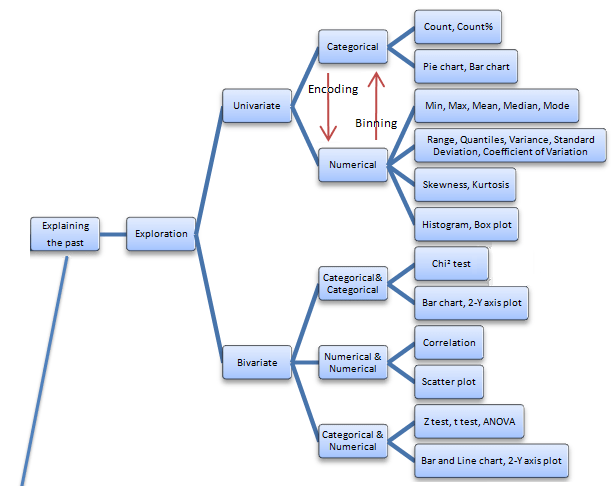
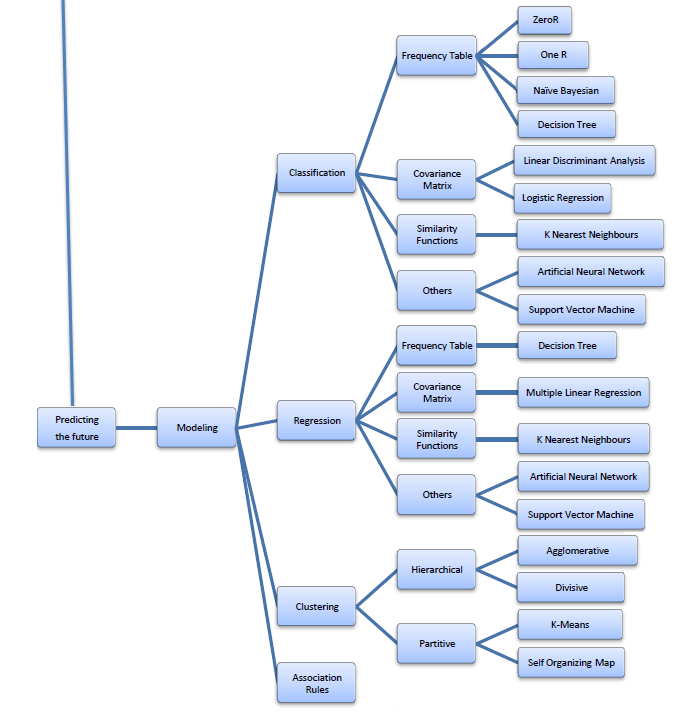
    Best of All- I really liked this online book created by Professor S. Sayad

    Its succinct and beautiful and describes all of the Data Mining you want to read in one Map (actually 4 images painstakingly assembled with perfection)

    The best thing is- in the original map- even the sub items are click-able for specifics like Pie Chart and Stacked Column chart are not in one simple drop down like Charts- but rather by nature of the kind of variables that lead to these charts. For doing that- you would need to go to the site itself- ( see http://chem-eng.utoronto.ca/~datamining/dmc/categorical_variables.htm

    vs

    http://chem-eng.utoronto.ca/~datamining/dmc/categorical_numerical.htm

    Again- there is no mention of the data visualization software used to create the images but I think I can take a hint from the Software Page which says software used are-

    Software

    See it on your own-online book (c)Professor S. Sayad

    Really good DIY tutorial

    http://chem-eng.utoronto.ca/~datamining/dmc/data_mining_map.htm

    EU files anti trust against Google to reduce budget deficit

    From the Old Lady-

    http://www.nytimes.com/2010/12/01/technology/01google.html?_r=1&hpw

    Google’s dominance on the Internet has been a sore point in Europe, where it controls more than 80 percent of the online search market, compared with about 66 percent in the United States, according to comScore, a research firm.

    and

    If Google is found in violation of European competition law, the commission has the power to fine it up to 10 percent of its annual revenue, which totaled more than $23 billion last year.

    Before settling last year, Microsoft had paid fines of about $2.4 billion over the past decade in a long-running antitrust case in Brussels that focused on the Windows operating system.

    In another case, the commission fined Intel about $1.45 billion for abusing its dominance in the computer chip market.


    ——————————————————————————————

    Maybe Google should ask the European Union to buy a groupon for anti trust cases.

    Related

    11 Ways to Beat Google


    Who searches for this Blog?

    Statue of Michael Jackson in Eindhoven, the Ne...
    Image via Wikipedia

    Using WP- Stats I set about answering this question-

    What search keywords lead here-

    Clearly Michael Jackson is down this year

    And R GUI, Data Mining is up.

    How does that affect my writing- given I get almost 250 visitors by search engines alone daily- assume I write nothing on this blog from now on.

    It doesnt- I still write what ever code or poem that comes to my mind. So it is hurtful people misunderstimate the effort in writing and jump to conclusions (esp if I write about a company- I am not on payroll of that company- just like if  I write about a poem- I am not a full time poet)

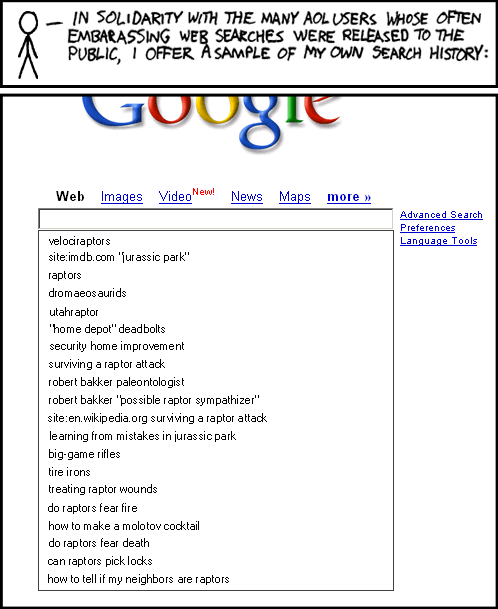
    Over to xkcd

    All Time (for Decisionstats.Wordpress.com)

    Search Views
    libre office 818
    facebook analytics 806
    michael jackson history 240
    wps sas lawsuit 180
    r gui 168
    wps sas 154
    wordle.net 118
    sas wps 116
    decision stats 110
    sas wps lawsuit 100
    google maps jet ski 94
    data mining 88
    doug savage 72
    hive tutorial 63
    spss certification 63
    hadley wickham 63
    google maps jetski 62
    sas sues wps 60
    decisionstats 58
    donald farmer microsoft 45
    libreoffice 44
    wps statistics 44
    best statistics software 42
    r gui ubuntu 41
    rstat 37
    tamilnadu advanced technical training institute tatti 37

    YTD

    2009-11-24 to Today

    Search Views
    libre office 818
    facebook analytics 781
    wps sas lawsuit 170
    r gui 164
    wps sas 125
    wordle.net 118
    sas wps 101
    sas wps lawsuit 95
    google maps jet ski 94
    data mining 86
    decision stats 82
    doug savage 63
    hadley wickham 63
    google maps jetski 62
    hive tutorial 56
    donald farmer microsoft 45

    Message from RATTLE

    Microsoft Windows Vista Wallpaper
    Image by Brajeshwar via Flickr

    A new release of the R GUI Rattle is making its way to CRAN (currently on the Austrian server).

    Latest version 2.5.47 (revision 527) released 13 Nov 2010.

    Change Log link for details –

    http://cran.r-project.org/web/packages/rattle/index.html

    Major changes relate to simplifying the installation of Rattle under the recently released R 2.12.0 on Microsoft Windows 32bit and 64bit.

    The major advance for R 2.12.0 is the improved support for 64bit Microsoft Windows and thus support for much larger datasets in memory.

    See the new installation steps at http://datamining.togaware.com/survivor/Internet_Connected.html

    For Microsoft Windows installations, to upgrade your Rattle installation you may need to remove any old installs of the Gtk+ libraries using the Uninstall application from the Microsoft Windows Control Panel). Then install the new Gtk2 library:

    http://downloads.sourceforge.net/gtk-win/gtk2-runtime-2.22.0-2010-10-21-ash.exe

    You can the update Rattle to version 2.5.47:

    > install.packages(“rattle“)

    >library(rattle)

    rattle.info()

    The output from rattle.info() will include an “install.packages” command that will identify Rattle related packages that have updates available. You can cut-and-paste that command to the R prompt to have those packages updated in your installation.

    Citation- From rattle-users@googlegroups.com

    http://rattle.togaware.com/