Choosing R for business – What to consider?

A composite of the GNU logo and the OSI logo, ...
Image via Wikipedia

Additional features in R over other analytical packages-

1) Source Code is given to ensure complete custom solution and embedding for a particular application. Open source code has an advantage that is extensively peer- reviewed in Journals and Scientific Literature.  This means bugs will found, shared and corrected transparently.

2) Wide literature of training material in the form of books is available for the R analytical platform.

3) Extensively the best data visualization tools in analytical software (apart from Tableau Software ‘s latest version). The extensive data visualization available in R is of the form a variety of customizable graphs, as well as animation. The principal reason third-party software initially started creating interfaces to R is because the graphical library of packages in R is more advanced as well as rapidly getting more features by the day.

4) Free in upfront license cost for academics and thus budget friendly for small and large analytical teams.

5) Flexible programming for your data environment. This includes having packages that ensure compatibility with Java, Python and C++.


6) Easy migration from other analytical platforms to R Platform. It is relatively easy for a non R platform user to migrate to R platform and there is no danger of vendor lock-in due to the GPL nature of source code and open community.

Statistics are numbers that tell (descriptive), advise ( prescriptive) or forecast (predictive). Analytics is a decision-making help tool. Analytics on which no decision is to be made or is being considered can be classified as purely statistical and non analytical. Thus ease of making a correct decision separates a good analytical platform from a not so good analytical platform. The distinction is likely to be disputed by people of either background- and business analysis requires more emphasis on how practical or actionable the results are and less emphasis on the statistical metrics in a particular data analysis task. I believe one clear reason between business analytics is different from statistical analysis is the cost of perfect information (data costs in real world) and the opportunity cost of delayed and distorted decision-making.

Specific to the following domains R has the following costs and benefits

  • Business Analytics
    • R is free per license and for download
    • It is one of the few analytical platforms that work on Mac OS
    • It’s results are credibly established in both journals like Journal of Statistical Software and in the work at LinkedIn, Google and Facebook’s analytical teams.
    • It has open source code for customization as per GPL
    • It also has a flexible option for commercial vendors like Revolution Analytics (who support 64 bit windows) as well as bigger datasets
    • It has interfaces from almost all other analytical software including SAS,SPSS, JMP, Oracle Data Mining, Rapid Miner. Existing license holders can thus invoke and use R from within these software
    • Huge library of packages for regression, time series, finance and modeling
    • High quality data visualization packages
    • Data Mining
      • R as a computing platform is better suited to the needs of data mining as it has a vast array of packages covering standard regression, decision trees, association rules, cluster analysis, machine learning, neural networks as well as exotic specialized algorithms like those based on chaos models.
      • Flexibility in tweaking a standard algorithm by seeing the source code
      • The RATTLE GUI remains the standard GUI for Data Miners using R. It was created and developed in Australia.
      • Business Dashboards and Reporting
      • Business Dashboards and Reporting are an essential piece of Business Intelligence and Decision making systems in organizations. R offers data visualization through GGPLOT, and GUI like Deducer and Red-R can help even non R users create a metrics dashboard
        • For online Dashboards- R has packages like RWeb, RServe and R Apache- which in combination with data visualization packages offer powerful dashboard capabilities.
        • R can be combined with MS Excel using the R Excel package – to enable R capabilities to be imported within Excel. Thus a MS Excel user with no knowledge of R can use the GUI within the R Excel plug-in to use powerful graphical and statistical capabilities.

Additional factors to consider in your R installation-

There are some more choices awaiting you now-
1) Licensing Choices-Academic Version or Free Version or Enterprise Version of R

2) Operating System Choices-Which Operating System to choose from? Unix, Windows or Mac OS.

3) Operating system sub choice- 32- bit or 64 bit.

4) Hardware choices-Cost -benefit trade-offs for additional hardware for R. Choices between local ,cluster and cloud computing.

5) Interface choices-Command Line versus GUI? Which GUI to choose as the default start-up option?

6) Software component choice- Which packages to install? There are almost 3000 packages, some of them are complimentary, some are dependent on each other, and almost all are free.

7) Additional Software choices- Which additional software do you need to achieve maximum accuracy, robustness and speed of computing- and how to use existing legacy software and hardware for best complementary results with R.

1) Licensing Choices-
You can choose between two kinds of R installations – one is free and open source from http://r-project.org The other R installation is commercial and is offered by many vendors including Revolution Analytics. However there are other commercial vendors too.

Commercial Vendors of R Language Products-
1) Revolution Analytics http://www.revolutionanalytics.com/
2) XL Solutions- http://www.experience-rplus.com/
3) Information Builder – Webfocus RStat -Rattle GUI http://www.informationbuilders.com/products/webfocus/PredictiveModeling.html
4) Blue Reference- Inference for R http://inferenceforr.com/default.aspx

  1. Choosing Operating System
      1. Windows


Windows remains the most widely used operating system on this planet. If you are experienced in Windows based computing and are active on analytical projects- it would not make sense for you to move to other operating systems. This is also based on the fact that compatibility problems are minimum for Microsoft Windows and the help is extensively documented. However there may be some R packages that would not function well under Windows- if that happens a multiple operating system is your next option.

        1. Enterprise R from Revolution Analytics- Enterprise R from Revolution Analytics has a complete R Development environment for Windows including the use of code snippets to make programming faster. Revolution is also expected to make a GUI available by 2011. Revolution Analytics claims several enhancements for it’s version of R including the use of optimized libraries for faster performance.
      1. MacOS


Reasons for choosing MacOS remains its considerable appeal in aesthetically designed software- but MacOS is not a standard Operating system for enterprise systems as well as statistical computing. However open source R claims to be quite optimized and it can be used for existing Mac users. However there seem to be no commercially available versions of R available as of now for this operating system.

      1. Linux


        1. Ubuntu
        2. Red Hat Enterprise Linux
        3. Other versions of Linux


Linux is considered a preferred operating system by R users due to it having the same open source credentials-much better fit for all R packages and it’s customizability for big data analytics.

Ubuntu Linux is recommended for people making the transition to Linux for the first time. Ubuntu Linux had an marketing agreement with revolution Analytics for an earlier version of Ubuntu- and many R packages can  installed in a straightforward way as Ubuntu/Debian packages are available. Red Hat Enterprise Linux is officially supported by Revolution Analytics for it’s enterprise module. Other versions of Linux popular are Open SUSE.

      1. Multiple operating systems-
        1. Virtualization vs Dual Boot-


You can also choose between having a VMware VM Player for a virtual partition on your computers that is dedicated to R based computing or having operating system choice at the startup or booting of your computer. A software program called wubi helps with the dual installation of Linux and Windows.

  1. 64 bit vs 32 bit – Given a choice between 32 bit versus 64 bit versions of the same operating system like Linux Ubuntu, the 64 bit version would speed up processing by an approximate factor of 2. However you need to check whether your current hardware can support 64 bit operating systems and if so- you may want to ask your Information Technology manager to upgrade atleast some operating systems in your analytics work environment to 64 bit operating systems.


  1. Hardware choices- At the time of writing this book, the dominant computing paradigm is workstation computing followed by server-client computing. However with the introduction of cloud computing, netbooks, tablet PCs, hardware choices are much more flexible in 2011 than just a couple of years back.

Hardware costs are a significant cost to an analytics environment and are also  remarkably depreciated over a short period of time. You may thus examine your legacy hardware, and your future analytical computing needs- and accordingly decide between the various hardware options available for R.
Unlike other analytical software which can charge by number of processors, or server pricing being higher than workstation pricing and grid computing pricing extremely high if available- R is well suited for all kinds of hardware environment with flexible costs. Given the fact that R is memory intensive (it limits the size of data analyzed to the RAM size of the machine unless special formats and /or chunking is used)- it depends on size of datasets used and number of concurrent users analyzing the dataset. Thus the defining issue is not R but size of the data being analyzed.

    1. Local Computing- This is meant to denote when the software is installed locally. For big data the data to be analyzed would be stored in the form of databases.
      1. Server version- Revolution Analytics has differential pricing for server -client versions but for the open source version it is free and the same for Server or Workstation versions.
      2. Workstation
    2. Cloud Computing- Cloud computing is defined as the delivery of data, processing, systems via remote computers. It is similar to server-client computing but the remote server (also called cloud) has flexible computing in terms of number of processors, memory, and data storage. Cloud computing in the form of public cloud enables people to do analytical tasks on massive datasets without investing in permanent hardware or software as most public clouds are priced on pay per usage. The biggest cloud computing provider is Amazon and many other vendors provide services on top of it. Google is also coming for data storage in the form of clouds (Google Storage), as well as using machine learning in the form of API (Google Prediction API)
      1. Amazon
      2. Google
      3. Cluster-Grid Computing/Parallel processing- In order to build a cluster, you would need the RMpi and the SNOW packages, among other packages that help with parallel processing.
    3. How much resources
      1. RAM-Hard Disk-Processors- for workstation computing
      2. Instances or API calls for cloud computing
  1. Interface Choices
    1. Command Line
    2. GUI
    3. Web Interfaces
  2. Software Component Choices
    1. R dependencies
    2. Packages to install
    3. Recommended Packages
  3. Additional software choices
    1. Additional legacy software
    2. Optimizing your R based computing
    3. Code Editors
      1. Code Analyzers
      2. Libraries to speed up R

citation-  R Development Core Team (2010). R: A language and environment for statistical computing. R Foundation for Statistical Computing,Vienna, Austria. ISBN 3-900051-07-0, URL http://www.R-project.org.

(Note- this is a draft in progress)

Trying out Google Prediction API from R

Ubuntu Login
Image via Wikipedia

So I saw the news at NY R Meetup and decided to have a go at Prediction API Package (which first started off as a blog post at

http://onertipaday.blogspot.com/2010/11/r-wrapper-for-google-prediction-api.html

1)My OS was Ubuntu 10.10 Netbook

Ubuntu has a slight glitch plus workaround for installing the RCurl package on which the Google Prediction API is dependent- you need to first install this Ubuntu package for RCurl to install libcurl4-gnutls-dev

Once you install that using Synaptic,

Simply start R

2) Install Packages rjson and Rcurl using install.packages and choosing CRAN

Since GooglePredictionAPI is not yet on CRAN

,

3) Download that package from

https://code.google.com/p/google-prediction-api-r-client/downloads/detail?name=googlepredictionapi_0.1.tar.gz&can=2&q=

You need to copy this downloaded package to your “first library ” folder

When you start R, simply run

.libPaths()[1]

and thats the folder you copy the GooglePredictionAPI package  you downloaded.

5) Now the following line works

  1. Under R prompt,
  2. > install.packages("googlepredictionapi_0.1.tar.gz", repos=NULL, type="source")

6) Uploading data to Google Storage using the GUI (rather than gs util)

Just go to https://sandbox.google.com/storage/

and thats the Google Storage manager

Notes on Training Data-

Use a csv file

The first column is the score column (like 1,0 or prediction score)

There are no headers- so delete headers from data file and move the dependent variable to the first column  (Note I used data from the kaggle contest for R package recommendation at

http://kaggle.com/R?viewtype=data )

6) The good stuff:

Once you type in the basic syntax, the first time it will ask for your Google Credentials (email and password)

It then starts showing you time elapsed for training.

Now you can disconnect and go off (actually I got disconnected by accident before coming back in a say 5 minutes so this is the part where I think this is what happened is why it happened, dont blame me, test it for yourself) –

and when you come back (hopefully before token expires)  you can see status of your request (see below)

> library(rjson)
> library(RCurl)
Loading required package: bitops
> library(googlepredictionapi)
> my.model <- PredictionApiTrain(data="gs://numtraindata/training_data")
The request for training has sent, now trying to check if training is completed
Training on numtraindata/training_data: time:2.09 seconds
Training on numtraindata/training_data: time:7.00 seconds

7)

Note I changed the format from the URL where my data is located- simply go to your Google Storage Manager and right click on the file name for link address  ( https://sandbox.google.com/storage/numtraindata/training_data.csv)

to gs://numtraindata/training_data  (that kind of helps in any syntax error)

8) From the kind of high level instructions at  https://code.google.com/p/google-prediction-api-r-client/, you could also try this on a local file

Usage

## Load googlepredictionapi and dependent libraries
library(rjson)
library(RCurl)
library(googlepredictionapi)

## Make a training call to the Prediction API against data in the Google Storage.
## Replace MYBUCKET and MYDATA with your data.
my.model <- PredictionApiTrain(data="gs://MYBUCKET/MYDATA")

## Alternatively, make a training call against training data stored locally as a CSV file.
## Replace MYPATH and MYFILE with your data.
my.model <- PredictionApiTrain(data="MYPATH/MYFILE.csv")

At the time of writing my data was still getting trained, so I will keep you posted on what happens.

Brief Interview Timo Elliott

Here is a brief interview with Timo Elliott.Timo Elliott is a 19-year veteran of SAP Business Objects.

Ajay- What are the top 5 events in Business Integration and Data Visualization services you saw in 2010 and what are the top three trends you see in these in 2011.


Timo-

Top five events in 2010:

(1) Back to strong market growth. IT spending plummeted last year (BI continued to grow, but more slowly than previous years). This year, organizations reopened their wallets and funded new analytics initiatives — all the signs indicate that BI market growth will be double that of 2009.

(2) The launch of the iPad. Mobile BI has been around for years, but the iPad opened the floodgates of organizations taking a serious look at mobile analytics — and the easy-to-use, executive-friendly iPad dashboards have considerably raised the profile of analytics projects inside organizations.

(3) Data warehousing got exciting again. Decades of incremental improvements (column databases, massively parallel processing, appliances, in-memory processing…) all came together with robust commercial offers that challenged existing data storage and calculation methods. And new “NoSQL” approaches, designed for the new problems of massive amounts of less-structured web data, started moving into the mainstream.

(4) The end of Google Wave, the start of social BI.Google Wave was launched as a rethink of how we could bring together email, instant messaging, and social networks. While Google decided to close down the technology this year, it has left its mark, notably by influencing the future of “social BI”, with several major vendors bringing out commercial products this year.

(5) The start of the big BI merge. While several small independent BI vendors reported strong growth, the major trend of the year was consolidation and integration: the BI megavendors (SAP, Oracle, IBM, Microsoft) increased their market share (sometimes by acquiring smaller vendors, e.g. IBM/SPSS and SAP/Sybase) and integrated analytics with their existing products, blurring the line between BI and other technology areas.

Top three trends next year:

(1) Analytics, reinvented. New DW techniques make it possible to do sub-second, interactive analytics directly against row-level operational data. Now BI processes and interfaces need to be rethought and redesigned to make best use of this — notably by blurring the distinctions between the “design” and “consumption” phases of BI.

(2) Corporate and personal BI come together. The ability to mix corporate and personal data for quick, pragmatic analysis is a common business need. The typical solution to the problem — extracting and combining the data into a local data store (either Excel or a departmental data mart) — pleases users, but introduces duplication and extra costs and makes a mockery of information governance. 2011 will see the rise of systems that let individuals and departments load their data into personal spaces in the corporate environment, allowing pragmatic analytic flexibility without compromising security and governance.

(3) The next generation of business applications. Where are the business applications designed to support what people really do all day, such as implementing this year’s strategy, launching new products, or acquiring another company? 2011 will see the first prototypes of people-focused, flexible, information-centric, and collaborative applications, bringing together the best of business intelligence, “enterprise 2.0”, and existing operational applications.

And one that should happen, but probably won’t:

(4) Intelligence = Information + PEOPLE. Successful analytics isn’t about technology — it’s about people, process, and culture. The biggest trend in 2011 should be organizations spending the majority of their efforts on user adoption rather than technical implementation.                 About- http://timoelliott.com/blog/about

Timo Elliott is a 19-year veteran of SAP BusinessObjects, and has spent the last twenty years working with customers around the world on information strategy.

He works closely with SAP research and innovation centers around the world to evangelize new technology prototypes.

His popular Business Analytics and SAPWeb20 blogs track innovation in analytics and social media, including topics such as augmented corporate reality, collaborative decision-making, and social network analysis.

His PowerPoint Twitter Tools lets presenters see and react to tweets in real time, embedded directly within their slides.

A popular and engaging speaker, Elliott presents regularly to IT and business audiences at international conferences, on subjects such as why BI projects fail and what to do about it, and the intersection of BI and enterprise 2.0.

Prior to Business Objects, Elliott was a computer consultant in Hong Kong and led analytics projects for Shell in New Zealand. He holds a first-class honors degree in Economics with Statistics from Bristol University, England. He blogs on http://timoelliott.com/blog/ (one of the best designed blogs in BI) . You can see more about him personal web site here and photo/sketch blog here. You should follow Timo at http://twitter.com/timoelliott

Art Credit- Timo Elliott

Related Articles

New Google Ad Planner

Dusan's User Interface challenge
Image by moggs oceanlane via Flickr

The new Google Ad Planner is really nice-seems better than old Adwords interface, though needs a UI redesign before it can complete with the clean cut slice and dice of Facebook Ad Planner.

It’s the interface, stupid that makes an Iphone sell more than the Symbian even with 90% functionality. Same reasons why Google Storage is okay but Google Prediction API gets slower liftoff than Amazon Console (now with FREE instances) – though the R interface to Prediction API sure helps.

Prediction API is a terrific tool dying for oxygen out there (and will end up like Wave- I hope not)

Sometimes you need artists as well as engineers to design query tools, G Men- and guess the Double Click anti trust rumours have quietened down enough because why the heck did double click interface integration take so loooong.

( and btw why cant Google just get into the multi billion dashboard business if they can manage ALL the data IN THE INTERNET ——they sure can do it for specific companies- – but wait-

they are probably waiting for AsterData to stop sucking thumbs ,chanting on MapReduce SQL,  MapReduce SQL nursery rhymes and start inventing NEW STUFF again (or atleast creating two product brands from nCluster (when you and I were in school together giggle)

Btw the time Google make up their mind to enter BI or wait for Aster to finish- IBM would have gulped and burped all there it is- and thats the way that market rolls.

Back to Ad s and Mad Men.

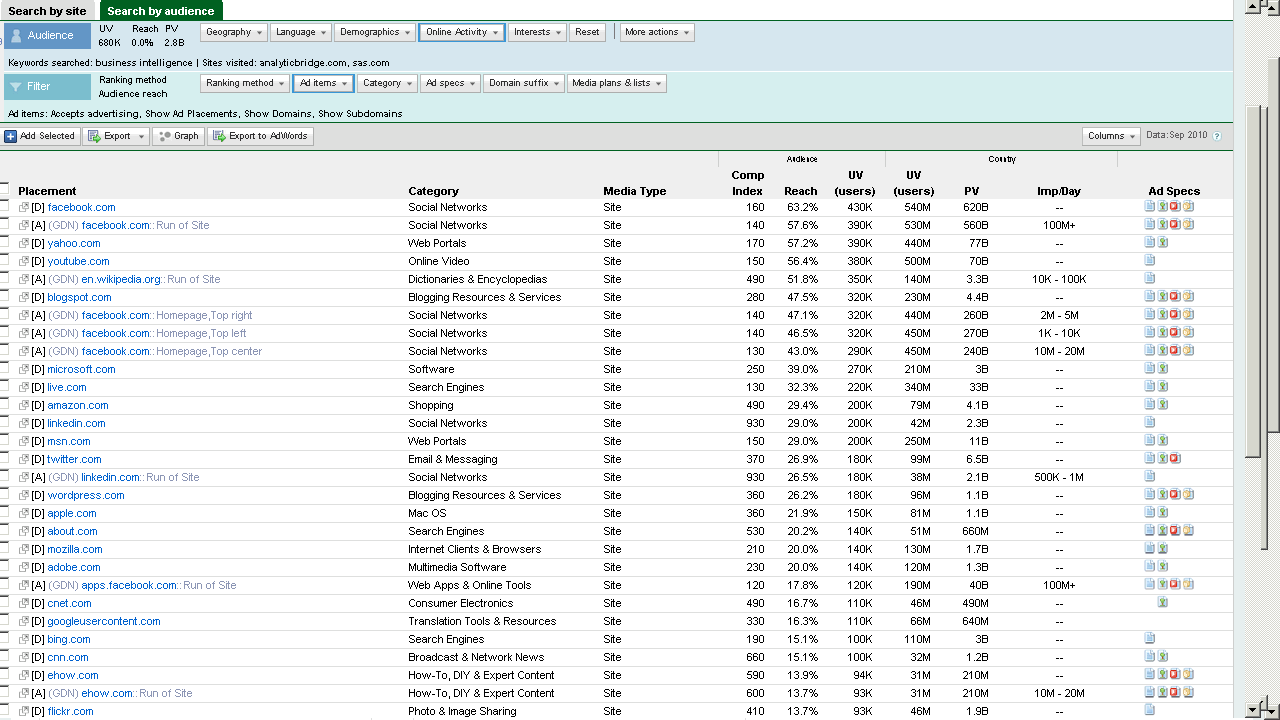
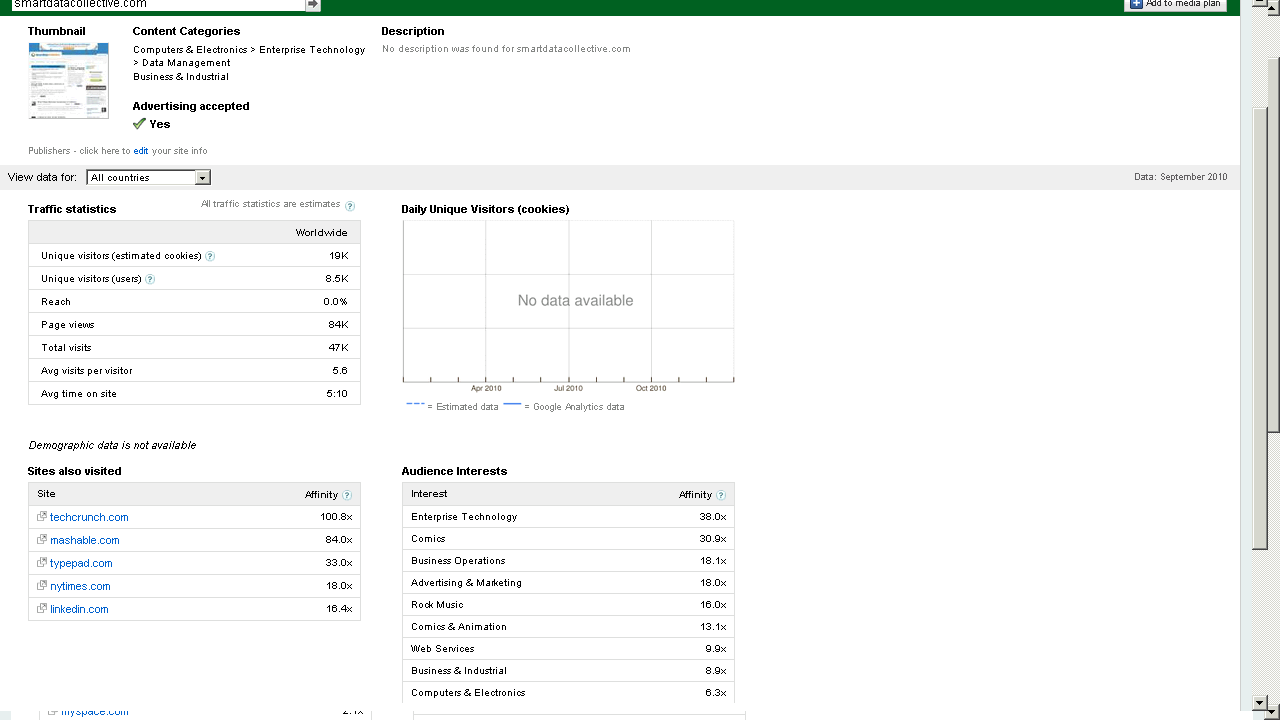
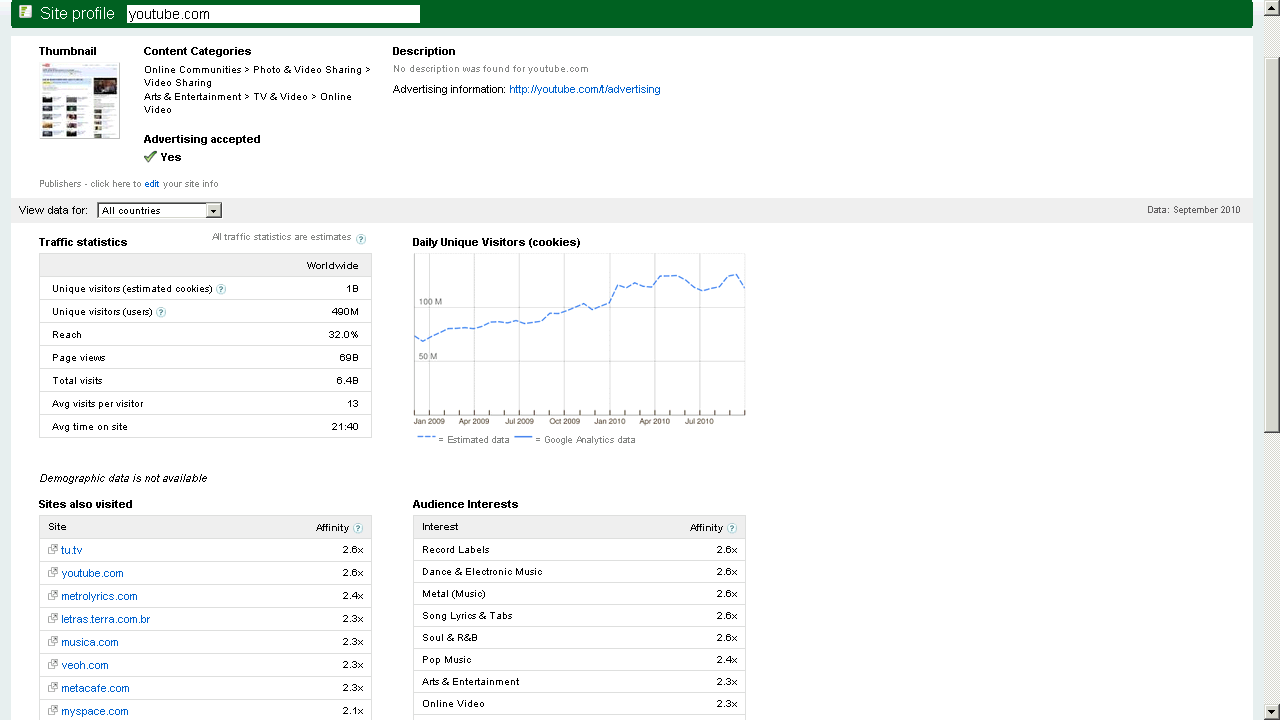
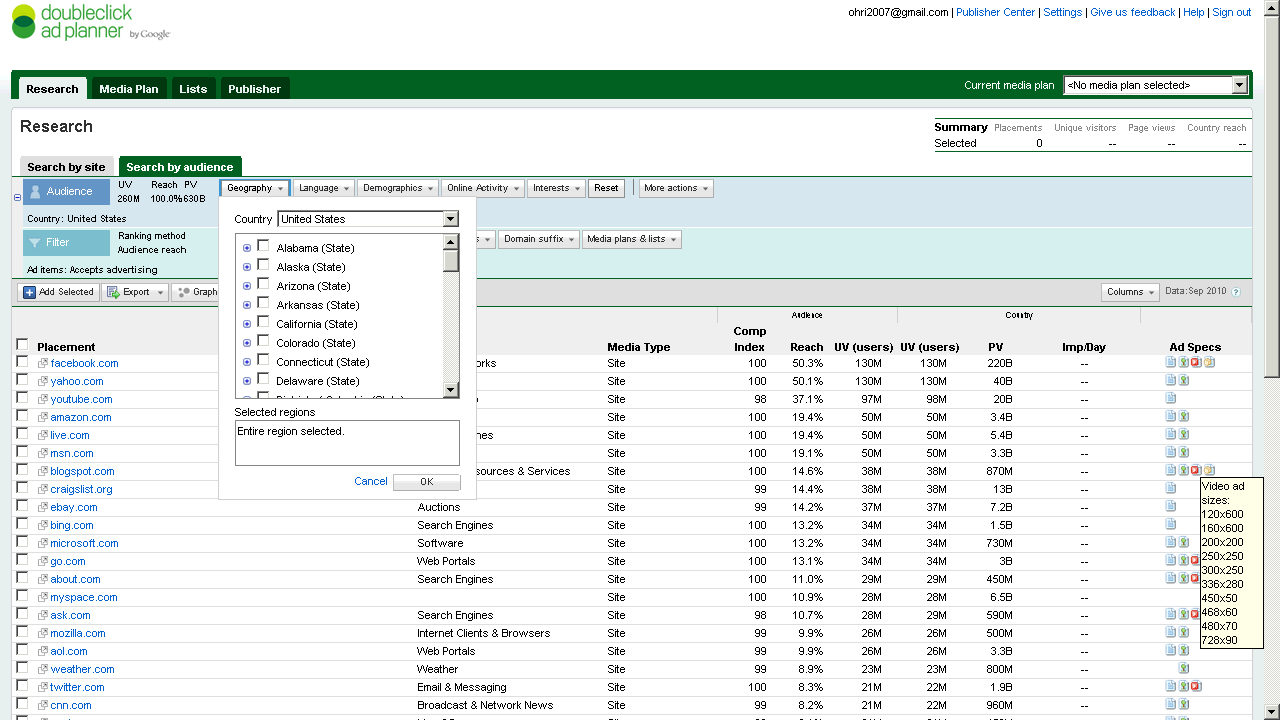
Here are some screenshots-of the new Google Ad Planner-

I found it useful to review traffic for third party websites (even better than Google Trends) and thats a definite plus over Facebooks closed dormitory world of ads.

Click on them for some more views or go straight to http://google.com/adplanner and Enjoy Baby!

Which websites attract your target customers?

View a site listing: 

Ad Planner top 1,000 sites

Refine your online advertising with DoubleClick Ad Planner, a free media planning tool that can help you:

Identify websites your target customers are likely to visit

  • Define audiences by demographics and interests.
  • Search for websites relevant to your target audience.
  • Access unique users, page views, and other data for millions of websites from over 40 countries.

Easily build media plans for yourself or your clients

  • Create lists of websites where you’d like to advertise.
  • Generate aggregated website statistics for your media plan.

and

Take charge of your DoubleClick Ad Planner site listing

View a site listing: 

Ad Planner top 1,000 sites

DoubleClick Ad Planner is a media planning tool where advertisers find sites for their media buys. As a site owner, you can access the DoubleClick Ad Planner Publisher Center and
Market your site
Write a site description to present your audience and unique value to advertisers.
Help advertisers search for you
Choose categories for your site and ad formats you support.
Improve the data that advertisers see
Share your Google Analytics data to reflect the most accurate traffic numbers for your site.


Cloud Computing with R

Illusion of Depth and Space (4/22) - Rotating ...
Image by Dominic's pics via Flickr

Here is a short list of resources and material I put together as starting points for R and Cloud Computing It’s a bit messy but overall should serve quite comprehensively.

Cloud computing is a commonly used expression to imply a generational change in computing from desktop-servers to remote and massive computing connections,shared computers, enabled by high bandwidth across the internet.

As per the National Institute of Standards and Technology Definition,
Cloud computing is a model for enabling convenient, on-demand network access to a shared pool of configurable computing resources (e.g., networks, servers, storage, applications, and services) that can be rapidly provisioned and released with minimal management effort or service provider interaction.

(Citation: The NIST Definition of Cloud Computing

Authors: Peter Mell and Tim Grance
Version 15, 10-7-09
National Institute of Standards and Technology, Information Technology Laboratory
http://csrc.nist.gov/groups/SNS/cloud-computing/cloud-def-v15.doc)

R is an integrated suite of software facilities for data manipulation, calculation and graphical display.

From http://cran.r-project.org/doc/FAQ/R-FAQ.html#R-Web-Interfaces

R Web Interfaces

Rweb is developed and maintained by Jeff Banfield. The Rweb Home Page provides access to all three versions of Rweb—a simple text entry form that returns output and graphs, a more sophisticated JavaScript version that provides a multiple window environment, and a set of point and click modules that are useful for introductory statistics courses and require no knowledge of the R language. All of the Rweb versions can analyze Web accessible datasets if a URL is provided.
The paper “Rweb: Web-based Statistical Analysis”, providing a detailed explanation of the different versions of Rweb and an overview of how Rweb works, was published in the Journal of Statistical Software (http://www.jstatsoft.org/v04/i01/).

Ulf Bartel has developed R-Online, a simple on-line programming environment for R which intends to make the first steps in statistical programming with R (especially with time series) as easy as possible. There is no need for a local installation since the only requirement for the user is a JavaScript capable browser. See http://osvisions.com/r-online/ for more information.

Rcgi is a CGI WWW interface to R by MJ Ray. It had the ability to use “embedded code”: you could mix user input and code, allowing the HTMLauthor to do anything from load in data sets to enter most of the commands for users without writing CGI scripts. Graphical output was possible in PostScript or GIF formats and the executed code was presented to the user for revision. However, it is not clear if the project is still active.

Currently, a modified version of Rcgi by Mai Zhou (actually, two versions: one with (bitmap) graphics and one without) as well as the original code are available from http://www.ms.uky.edu/~statweb/.

CGI-based web access to R is also provided at http://hermes.sdu.dk/cgi-bin/go/. There are many additional examples of web interfaces to R which basically allow to submit R code to a remote server, see for example the collection of links available from http://biostat.mc.vanderbilt.edu/twiki/bin/view/Main/StatCompCourse.

David Firth has written CGIwithR, an R add-on package available from CRAN. It provides some simple extensions to R to facilitate running R scripts through the CGI interface to a web server, and allows submission of data using both GET and POST methods. It is easily installed using Apache under Linux and in principle should run on any platform that supports R and a web server provided that the installer has the necessary security permissions. David’s paper “CGIwithR: Facilities for Processing Web Forms Using R” was published in the Journal of Statistical Software (http://www.jstatsoft.org/v08/i10/). The package is now maintained by Duncan Temple Lang and has a web page athttp://www.omegahat.org/CGIwithR/.

Rpad, developed and actively maintained by Tom Short, provides a sophisticated environment which combines some of the features of the previous approaches with quite a bit of JavaScript, allowing for a GUI-like behavior (with sortable tables, clickable graphics, editable output), etc.
Jeff Horner is working on the R/Apache Integration Project which embeds the R interpreter inside Apache 2 (and beyond). A tutorial and presentation are available from the project web page at http://biostat.mc.vanderbilt.edu/twiki/bin/view/Main/RApacheProject.

Rserve is a project actively developed by Simon Urbanek. It implements a TCP/IP server which allows other programs to use facilities of R. Clients are available from the web site for Java and C++ (and could be written for other languages that support TCP/IP sockets).

OpenStatServer is being developed by a team lead by Greg Warnes; it aims “to provide clean access to computational modules defined in a variety of computational environments (R, SAS, Matlab, etc) via a single well-defined client interface” and to turn computational services into web services.

Two projects use PHP to provide a web interface to R. R_PHP_Online by Steve Chen (though it is unclear if this project is still active) is somewhat similar to the above Rcgi and Rweb. R-php is actively developed by Alfredo Pontillo and Angelo Mineo and provides both a web interface to R and a set of pre-specified analyses that need no R code input.

webbioc is “an integrated web interface for doing microarray analysis using several of the Bioconductor packages” and is designed to be installed at local sites as a shared computing resource.

Rwui is a web application to create user-friendly web interfaces for R scripts. All code for the web interface is created automatically. There is no need for the user to do any extra scripting or learn any new scripting techniques. Rwui can also be found at http://rwui.cryst.bbk.ac.uk.

Finally, the R.rsp package by Henrik Bengtsson introduces “R Server Pages”. Analogous to Java Server Pages, an R server page is typically HTMLwith embedded R code that gets evaluated when the page is requested. The package includes an internal cross-platform HTTP server implemented in Tcl, so provides a good framework for including web-based user interfaces in packages. The approach is similar to the use of the brew package withRapache with the advantage of cross-platform support and easy installation.

Also additional R Cloud Computing Use Cases
http://wwwdev.ebi.ac.uk/Tools/rcloud/

ArrayExpress R/Bioconductor Workbench

Remote access to R/Bioconductor on EBI’s 64-bit Linux Cluster

Start the workbench by downloading the package for your operating system (Macintosh or Windows), or via Java Web Start, and you will get access to an instance of R running on one of EBI’s powerful machines. You can install additional packages, upload your own data, work with graphics and collaborate with colleagues, all as if you are running R locally, but unlimited by your machine’s memory, processor or data storage capacity.

  • Most up-to-date R version built for multicore CPUs
  • Access to all Bioconductor packages
  • Access to our computing infrastructure
  • Fast access to data stored in EBI’s repositories (e.g., public microarray data in ArrayExpress)

Using R Google Docs
http://www.omegahat.org/RGoogleDocs/run.pdf
It uses the XML and RCurl packages and illustrates that it is relatively quick and easy
to use their primitives to interact with Web services.

Using R with Amazon
Citation
http://rgrossman.com/2009/05/17/running-r-on-amazons-ec2/

Amazon’s EC2 is a type of cloud that provides on demand computing infrastructures called an Amazon Machine Images or AMIs. In general, these types of cloud provide several benefits:

  • Simple and convenient to use. An AMI contains your applications, libraries, data and all associated configuration settings. You simply access it. You don’t need to configure it. This applies not only to applications like R, but also can include any third-party data that you require.
  • On-demand availability. AMIs are available over the Internet whenever you need them. You can configure the AMIs yourself without involving the service provider. You don’t need to order any hardware and set it up.
  • Elastic access. With elastic access, you can rapidly provision and access the additional resources you need. Again, no human intervention from the service provider is required. This type of elastic capacity can be used to handle surge requirements when you might need many machines for a short time in order to complete a computation.
  • Pay per use. The cost of 1 AMI for 100 hours and 100 AMI for 1 hour is the same. With pay per use pricing, which is sometimes called utility pricing, you simply pay for the resources that you use.

Connecting to R on Amazon EC2- Detailed tutorials
Ubuntu Linux version
https://decisionstats.com/2010/09/25/running-r-on-amazon-ec2/
and Windows R version
https://decisionstats.com/2010/10/02/running-r-on-amazon-ec2-windows/

Connecting R to Data on Google Storage and Computing on Google Prediction API
https://github.com/onertipaday/predictionapirwrapper
R wrapper for working with Google Prediction API

This package consists in a bunch of functions allowing the user to test Google Prediction API from R.
It requires the user to have access to both Google Storage for Developers and Google Prediction API:
see
http://code.google.com/apis/storage/ and http://code.google.com/apis/predict/ for details.

Example usage:

#This example requires you had previously created a bucket named data_language on your Google Storage and you had uploaded a CSV file named language_id.txt (your data) into this bucket – see for details
library(predictionapirwrapper)

and Elastic R for Cloud Computing
http://user2010.org/tutorials/Chine.html

Abstract

Elastic-R is a new portal built using the Biocep-R platform. It enables statisticians, computational scientists, financial analysts, educators and students to use cloud resources seamlessly; to work with R engines and use their full capabilities from within simple browsers; to collaborate, share and reuse functions, algorithms, user interfaces, R sessions, servers; and to perform elastic distributed computing with any number of virtual machines to solve computationally intensive problems.
Also see Karim Chine’s http://biocep-distrib.r-forge.r-project.org/

R for Salesforce.com

At the point of writing this, there seem to be zero R based apps on Salesforce.com This could be a big opportunity for developers as both Apex and R have similar structures Developers could write free code in R and charge for their translated version in Apex on Salesforce.com

Force.com and Salesforce have many (1009) apps at
http://sites.force.com/appexchange/home for cloud computing for
businesses, but very few forecasting and statistical simulation apps.

Example of Monte Carlo based app is here
http://sites.force.com/appexchange/listingDetail?listingId=a0N300000016cT9EAI#

These are like iPhone apps except meant for business purposes (I am
unaware if any university is offering salesforce.com integration
though google apps and amazon related research seems to be on)

Force.com uses a language called Apex  and you can see
http://wiki.developerforce.com/index.php/App_Logic and
http://wiki.developerforce.com/index.php/An_Introduction_to_Formulas
Apex is similar to R in that is OOPs

SAS Institute has an existing product for taking in Salesforce.com data.

A new SAS data surveyor is
available to access data from the Customer Relationship Management
(CRM) software vendor Salesforce.com. at
http://support.sas.com/documentation/cdl/en/whatsnew/62580/HTML/default/viewer.htm#datasurveyorwhatsnew902.htm)

Personal Note-Mentioning SAS in an email to a R list is a big no-no in terms of getting a response and love. Same for being careless about which R help list to email (like R devel or R packages or R help)

For python based cloud see http://pi-cloud.com

Amazon S3 slashes prices

Outline of a cloud containing text 'The Cloud'
Image via Wikipedia

From Amazon- November seems like a Thanksgiving for prices as well-

————————————————————————————————

lowered the threshold for our volume based discounts from 50 terabytes to 1 terabyte, extending volume pricing discounts to more customers. Here’s a summary of the changes:

Old         New
First 1TB           $0.150    $0.140
Next 49TB         $0.150    $0.125
Next 50TB         $0.140    $0.110
Next 400TB       $0.130    $0.110
Next 500TB       $0.105    $0.095
Next 4000TB     $0.080    $0.080 (no change)
Over 5000TB     $0.055    $0.055 (no change)

These prices apply to Amazon S3 Standard storage in the US-Standard, EU-West, and AP-East regions. The new lower prices for the US-West region and Reduced Redundancy Storage can be found on the Amazon S3 Detail Page.


LibreOffice News and Google Musings

Tux, the Linux penguin
Image via Wikipedia

Official Bloggers on LibreOffice- http://planet.documentfoundation.org/

Note- for some strange reason I continue to be on top ranked LibreOffice blogs- maybe because I write more on the software itself than on Oracle politics or coffee spillovers.

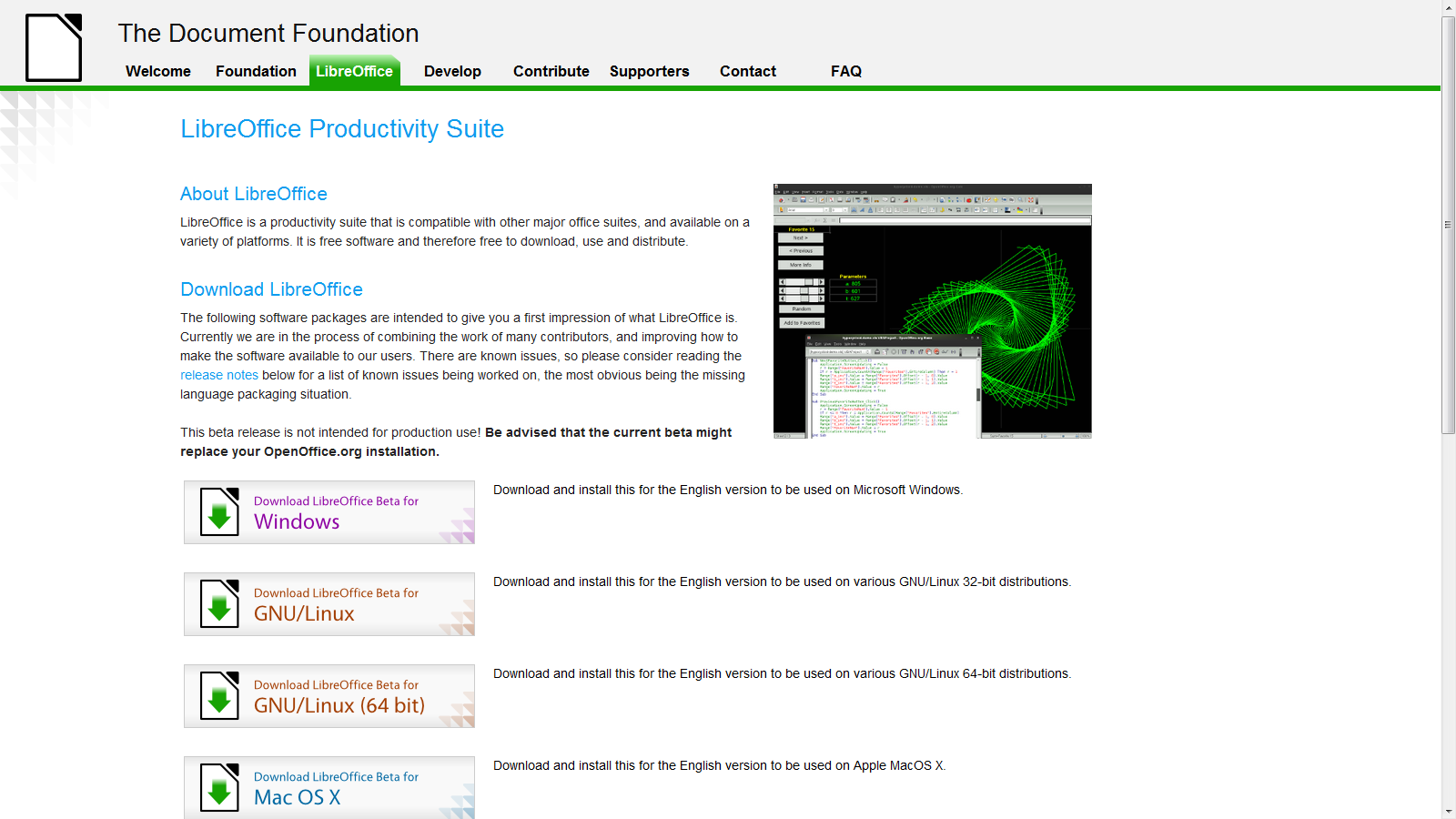
LibreOffice Beta 2  is ready and I just installed it on Windows 7 – works nice- and I somehow think open Office and Google needs an  example to stop being so scary on cautioning—— hey,hey it’s a  beta – (do you see Oracle saying this release is a beta or Windows saying hey this Windows Vista is a beta for Windows 7- No right?)-

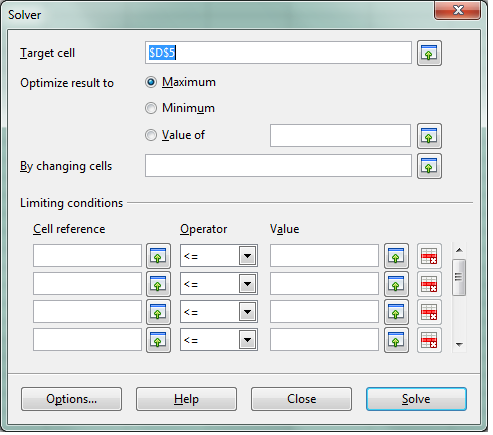
see screenshot of solver in  LibreOffice spreadsheet -works just fine.

We cant wait for Chromium OS and LibreOffice integration (or Google Docs-LibreOffice integration)  so Google starts thinking on those lines (of course

Google also needs to ramp up Google Storage and Google Predict API– but dude are you sure you wanna take on Amazon, Oracle and MS and Yahoo and Apple at the same time. Dear Herr Schmidt- Last German Guy who did that ,  ended up in a bunker in Berlin. (Ever since I had to pay 50 euros as Airline Transit fee -yes Indian passport holders have to do that in Germany- I am kind of non objective on that issue)

Google Management is busy nowadays thinking of trying to beat Facebook -hint -hint-

-buy out the biggest app makers of Facebook apps and create an api for Facebook info download and upload into Orkut –maybe invest like an angel in that startup called Diaspora http://www.joindiaspora.com/) see-

Back to the topic (and there are enough people blogging on Google should or shouldnt do)

-LibreOffice aesthetically rocks! It has a cool feel.

More news- The Wiki is up and awaits you at http://wiki.documentfoundation.org/Documentation

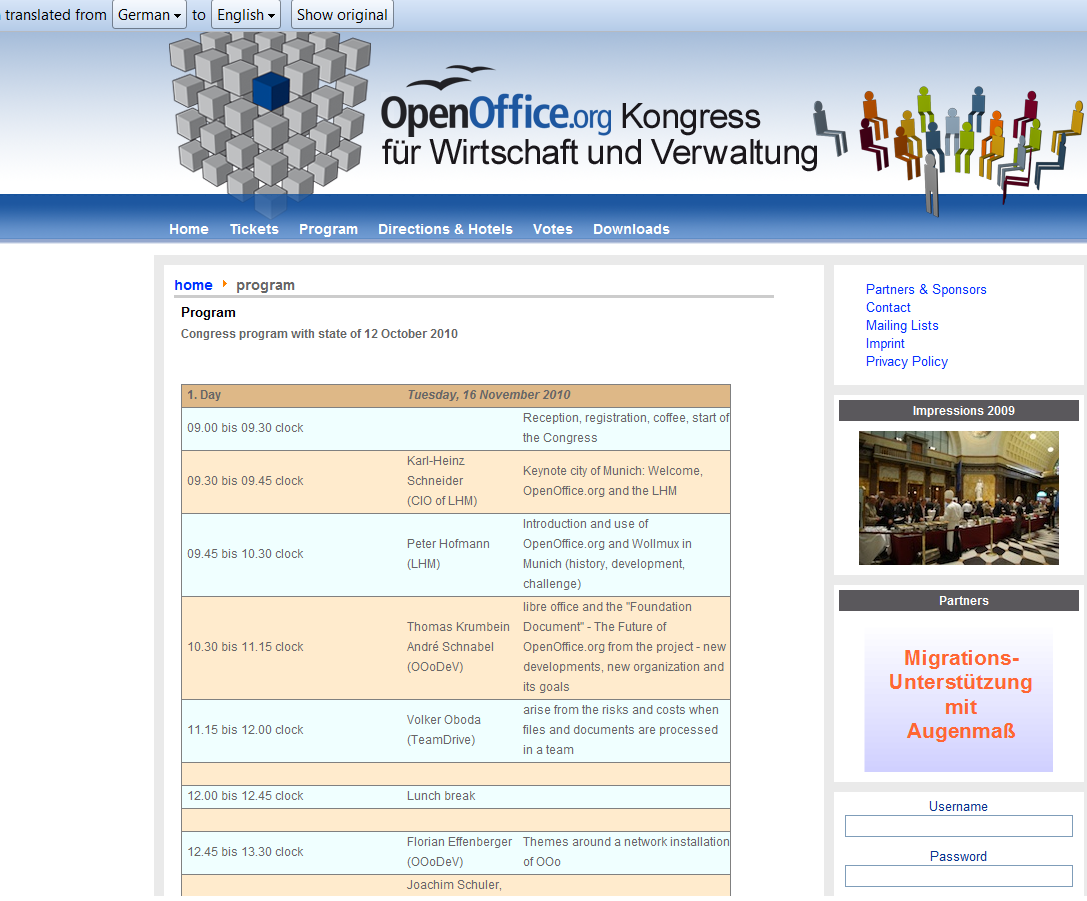
And there is a general pow-wow scheduled at http://www.oookwv.de/ for the Open Office Congress (Kongress)

As you can see I used the Chrome Extension for Google Translate for an instant translation from German into English (though it still needs some work,  Herr Translator)

Back to actually working on LibreOffice- if Word and Powerpoint is all you do- save some money for Christmas and download it today from