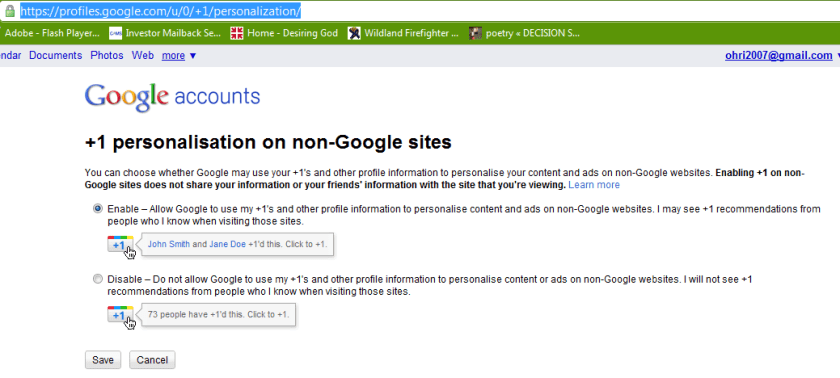
The buttons does exists because there is personalisation option available refering to non-Google sites.
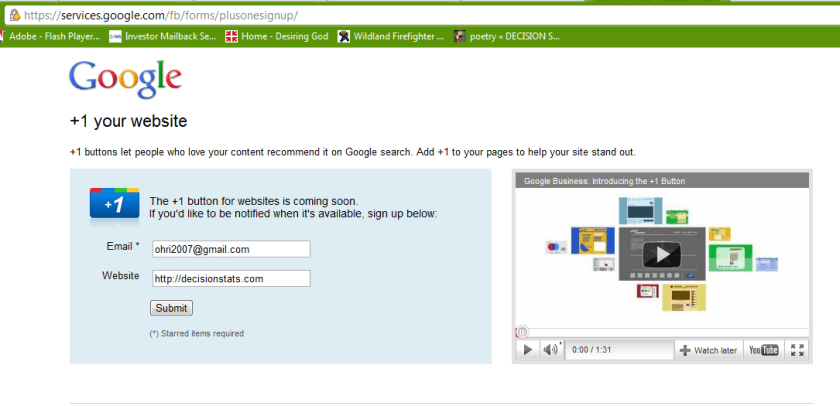
Google claims the button is “coming soon” but I couldn’t wait, so I looked around the code, and looked some more, untill I found the button endpoint hiding from me, obfuscated, in a stray piece of javascript.
Google is always experimenting with new features aimed at improving the search experience. Take one for a spin and let us know what you think.
Your selected experiment: You have joined the +1 button experiment. Note that you can only join ONE experiment at a time.
+1 button
This is your selected experiment.
Use +1 to give something your public stamp of approval, so friends, contacts, and others can find the best stuff when they search. Get recommendations for the things that interest you, right when you want them, in your search results.
To participate in this experiment:
Make sure you’re signed into your Google Account (required)
Click the new +1 button, and make your mark on the web
Your +1’s are public. They can appear in Google search results, on ads, and sites across the web. You’ll always be able to see your own +1’s in a new tab on your Google Profile, and if you want, you can share this tab with the world.
Please note, it may take a while before you see the button in search results, and it may occasionally disappear as we make improvements. Your feedback will help us make it better!
Navigate search results quickly and easily, with just your keyboard. As you navigate, items are magnified for easier viewing. If you use a screen reader or talking browser, the relevant information is spoken automatically as you navigate.
Current keyboard shortcuts include:
Key
Action
j or DOWN
Selects the next item.
k or UP
Selects the previous item.
l or RIGHT
Moves to the next category (results, sponsored links, refinements).
h or LEFT
Moves to the previous category (results, sponsored links, refinements).
<Enter>
Opens the selected result.
/
Puts the cursor in the search box.
n
Moves to the next result, and fetches more results if necessary.
p
Moves to the previous result, reloading earlier results if necessary.
For now, you need to use the Firefox 3 web browser with this experiment. This note will be updated as other browsers are added. Magnification already works with Google Chrome andApple’s Safari.
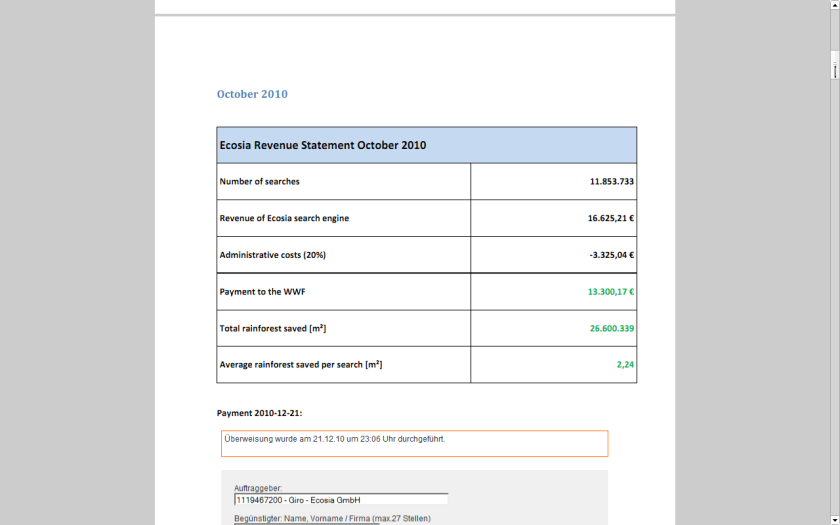
I recently found an interesting example of a website that both makes a lot of money and yet is much more efficient than any free or non profit. It is called ECOSIA
If you see a website that wants to balance administrative costs plus have a transparent way to make the world better- this is a great example.
World’s largest tropical forest reserve (38,867 square kilometers, or about the size of Switzerland)
Home to about 14% of all amphibian species and roughly 54% of all bird species in the Amazon – not to mention large populations of at least eight threatened species, including the jaguar
Includes part of the Guiana Shield containing 25% of world’s remaining tropical rainforests – 80 to 90% of which are still pristine
Holds the last major unpolluted water reserves in the Neotropics, containing approximately 20% of all of the Earth’s water
One of the last tropical regions on Earth vastly unaltered by humans
Significant contributor to climatic regulation via heat absorption and carbon storage
Click per milli (or CPM) gives you a very low low conversion compared to contacting ad sponsor directly.
But its a great data experiment-
as you can monitor which companies are likely to be advertised on your site (assume google knows more about their algols than you will)
which formats -banner or text or flash have what kind of conversion rates
what are the expected pay off rates from various keywords or companies (like business intelligence software, predictive analytics software and statistical computing software are similar but have different expected returns (if you remember your eco class)
NOW- Based on above data, you know whats your minimum baseline to expect from a private advertiser than a public, crowd sourced search engine one (like Google or Bing)
Lets say if you have 100000 views monthly. and assume one out of 1000 page views will lead to a click. Say the advertiser will pay you 1 $ for every 1 click (=1000 impressions)
Then your expected revenue is $100.But if your clicks are priced at 2.5$ for every click , and your click through rate is now 3 out of 1000 impressions- (both very moderate increases that can done by basic placement optimization of ad type, graphics etc)-your new revenue is 750$.
Be a good Samaritan- you decide to share some of this with your audience -like 4 Amazon books per month ( or I free Amazon book per week)- That gives you a cost of 200$, and leaves you with some 550$.
Wait! it doesnt end there- Adam Smith‘s invisible hand moves on .
You say hmm let me put 100 $ for an annual paper writing contest of $1000, donate $200 to one laptop per child ( or to Amazon rain forests or to Haiti etc etc etc), pay $100 to your upgraded server hosting, and put 350$ in online advertising. say $200 for search engines and $150 for Facebook.
Woah!
Month 1 would should see more people visiting you for the first time. If you have a good return rate (returning visitors as a %, and low bounce rate (visits less than 5 secs)- your traffic should see atleast a 20% jump in new arrivals and 5-10 % in long term arrivals. Ignoring bounces- within three months you will have one of the following
1) An interesting case study on statistics on online and social media advertising, tangible motivations for increasing community response , and some good data for study
2) hopefully better cost management of your server expenses
3)very hopefully a positive cash flow
you could even set a percentage and share the monthly (or annually is better actions) to your readers and advertisers.
go ahead- change the world!
the key paradigms here are sharing your traffic and revenue openly to everyone
donating to a suitable cause
helping increase awareness of the suitable cause
basing fixed percentages rather than absolute numbers to ensure your site and cause are sustained for years.
My annual traffic to this blog was almost 99,000 . Add in additional views on networking sites plus the 400 plus RSS readers- so I can say traffic was 1,20,000 for 2010. Nice. Thanks for reading and hope it was worth your time. (this is a long post and will take almost 440 secs to read but the summary is just given)
My intent is either to inform you, give something useful or atleast something interesting.
see below-
Jan
Feb
Mar
Apr
May
Jun
2010
6,311
4,701
4,922
5,463
6,493
4,271
Jul
Aug
Sep
Oct
Nov
Dec
Total
5,041
5,403
17,913
16,430
11,723
10,096
98,767
Sandro Saita from http://www.dataminingblog.com/ just named me for an award on his blog (but my surname is ohRi , Sandro left me without an R- What would I be without R :)) ).
Aw! I am touched. Google for “Data Mining Blog” and Sandro is the best that it is in data mining writing.
”
DMR People Award 2010
There are a lot of active people in the field of data mining. You can discuss with them on forums. You can read their blogs. You can also meet them in events such as PAW or KDD. Among the people I follow on a regular basis, I have elected:
Ajay Ori
He has been very active in 2010, especially on his blog . Good work Ajay and continue sharing your experience with us!”
What did I write in 2010- stuff.
What did you read on this blog- well thats the top posts list.
well I guess I owe Tal G for almost 9000 views ( incidentally I withdrew posting my blog from R- Bloggers and Analyticbridge blogs – due to SEO keyword reasons and some spam I was getting see (below))
Still reading this post- gosh let me sell you some advertising. It is only $100 a month (yes its a recession)
Advertisers are treated on First in -Last out (FILO)
I have been told I am obsessed with SEO , but I dont care much for search engines apart from Google, and yes SEO is an interesting science (they should really re name it GEO or Google Engine Optimization)
Apparently Hadley Wickham and Donald Farmer are big keywords for me so I should be more respectful I guess.
Search Terms for 365 days ending 2010-12-31 (Summarized)
2009-12-31 to Today
Search
Views
libre office
925
facebook analytics
798
test drive a chrome notebook
467
test drive a chrome notebook.
215
r gui
203
data mining
163
wps sas lawsuit
158
wordle.net
133
wps sas
123
google maps jet ski
123
test drive chrome notebook
96
sas wps
89
sas wps lawsuit
85
chrome notebook test drive
83
decision stats
83
best statistics software
74
hadley wickham
72
google maps jetski
72
libreoffice
70
doug savage
65
hive tutorial
58
funny india
56
spss certification
52
donald farmer microsoft
51
best statistical software
49
What about outgoing links? Apparently I need to find a way to ask Google to pay me for the free advertising I gave their chrome notebook launch. But since their search engine and browser is free to me, guess we are even steven.
Clicks for 365 days ending 2010-12-31 (Summarized)
Using two Chrome Extensions, Disconnect and AdBlock you can be sure of having a vary very clean browsing experience-it is recommended especially if you dont like the auto sharing of your personal preferences and cannot be bothered by the Byzantine maze of social media privacy fineprint.
* Search depersonalization is now optional and off by default. Click the “d” button then the “Depersonalize searches” checkbox to turn this feature on (or back off in case you have trouble getting to Google or Yahoo services). For help with anything else, see the known issues below and ask questions at http://j.mp/dnewgroup.

§

If you’re a typical web user, you’re unintentionally sending your browsing and search history with your name and other personal information to third parties and search engines whenever you’re online.

Take control of the data you share with Disconnect!

From the developer of the top-10-rated Facebook Disconnect extension, Disconnect lets you:

• Disable tracking by third parties like Digg, Facebook, Google, Twitter, and Yahoo, without requiring any setup or significantly degrading the usability of the web.

• Truly depersonalize searches on search engines like Google and Yahoo (by blocking identifying cookies not just changing the appearance of results pages), while staying logged into other services — e.g., so you can search anonymously on Google and access iGoogle at once.

• See how many resource and cookie requests are blocked, in real time
=================

New in version 2.1: Translated into dozens of languages!
New in version 2.0: Ads are blocked from downloading, instead of just being removed after the fact!

=======================

The official AdBlock For Chrome!  Block all advertisements on all web pages.  Your browser is automatically updated with additions to the filter: just click Install, then visit your favorite website and see the ads disappear!

FAQs:1. This is the official AdBlock extension: the original ad blocker written from the ground up to be optimized in Chrome.  There's an unrelated, older Firefox project called Adblock Plus, and they're working on making a Chrome version out of the old AdThwart codebase.  At the moment AdBlock blocks some ads that AdThwart only hides, but they're working to improve it.  It's available at bit.ly/id2Gqx; if you have trouble with AdBlock, they're good guys and a fine alternative!
1100 “Friends” on Facebook, and 9429 “Connections” on Linkedin
Deleting Facebook was an emotionally wrenching decision- see this screenshot- I tried to download all my account- family photos (320 mb) but connection kept breaking-
so I had just deactivate and not delete the account. You win, Zuckenberg
How to-
Right Hand Top Corner —-Account Settings- Deactivate Account
After Facebook de activates your account- it mocks you by saying this this in YELLOW “
Your Facebook account has been deactivated.
To reactivate your account, log in using your old login email and password. You will be able to use the site like you used to.
We hope you come back soon.”
I go back to Facebook to download all my family photos before final deletion (and not just de activation)- I get this message
It may take a little while for us to gather all of your photos, wall posts, messages, and other information. We will then ask you to verify your identity in order to help protect the security of your account.
Are you sure you don’t want to reconsider? Was it something we said? Tell us.
Before you deactivate your account, know this:
This action is permanent: account restoration is currently disabled.
You do not need to deactivate your account to change your username. (You can change it on the settings page. All @replies and followers will remain unchanged.)
Your account may be viewable on twitter.com for a few days after deactivation.
We have no control over content indexed by search engines like Google.
If you’re creating a new account and want to use the same user name, phone number and/or email address associated with this account, you must first change them on this account before you deactivate it. If you don’t, the information will be tied to this account and unavailable for use.
Okay, fine, deactivate my account (thats the button)
I clicked the Okay fine Button.
One more pop up-
Re-enter your Twitter password to deactivate @DecisionStats.
Ok Done-
Twitter tries to scare me again —-
You deactivated your account.
Account restoration is currently unavailable. Here is the message you agreed to before deactivating your account:
his action is permanent.
Before you deactivate your account, know this:
This action is permanent: account restoration is currently disabled.
You do not need to deactivate your account to change your username. (You can change it on the settings page. All @replies and followers will remain unchanged.)
Your account may be viewable on twitter.com for a few days after deactivation.
We have no control over content indexed by search engines like Google.
If you’re creating a new account and want to use the same user name, phone number and/or email address associated with this account, you must first change them on this account before you deactivate it. If you don’t, the information will be tied to this account and unavailable for use.
So Long Twitter, I gotta spend more time with my offline family okay.
And probably anyone trying to do sentiment analysis on my twitter feed for social media analytics now has an incomplete data point (hehe)
Last One- Linkedin 9349 connections are valuable- I was thinking of auctioning this on E Bay but they kicked me out.
So I just go for deletion.
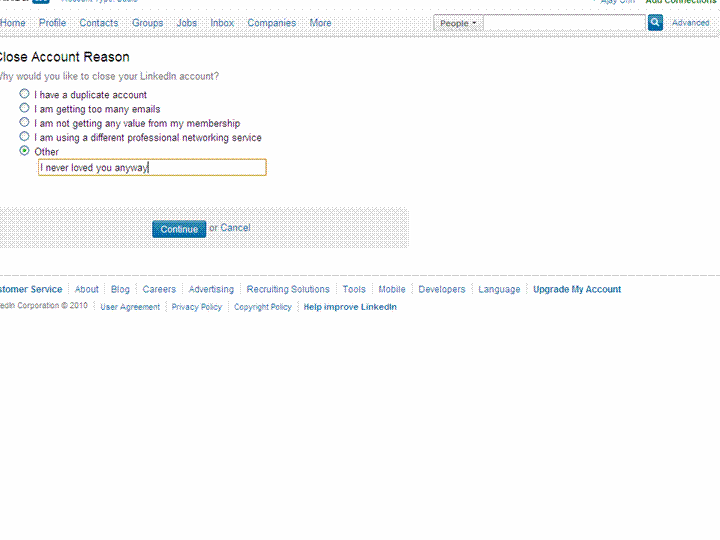
I spend 10 minuted looking for the delete account button-this is getting a bit annoying now.
Linkedin neither scares me nor emotionally coddles me – This is what is says-
Closing Your Account
How do I close my account?
Log into the account you wish to close.
Hover your cursor over your name in the top right of your home page and then click “Settings”.
Click on “Close Your Account” under Personal Information.
Select a reason for closing your account.
Click on “Continue”.
Members should only have one LinkedIn account. Multiple accounts can prevent the ability to accept an Invitation. Closing additional accounts should resolve this dilemma. Prior to closing any secondary accounts:
Inventory all connections and identify any that may be missing from the primary account you wish to keep.
Send Invitations to those connections missing from the primary account.
Update any profile information that maybe on other account profiles.
I dont think I will send that many invites again- but some of these people have been good to me ( 18 of them even wrote recommendations- which are non exportable it seems)
I check my downloaded csv file- yup all 9379 email addresses are there.
Final round-
Update- Linkedin does NOT get deleted. I get this-
Your close account request must be processed by customer support for the following reason:
You have more than 250 connections.
You will receive a confirmation email from customer support indicating that they received your request to close your account.
The account that customer support will process for closure is below:
Ajay Ohri
9,429 Connections
16 Recommendations
ohri2007@gmail.com (primary address)
and the email says
Member Comment: ajay ohri
11/24/2010 23:10
Member ID: 6691344 Member Name: Ajay Ohri
The member has attempted to self close this account and was unable because:
The member has a large network of connections to close. Please close during non peak hours.
Please confirm with the member when his or her account has been successfully closed.
So long people- you know where to find me- on this blog (and some on skype).
Occam’s razor (or Ockham’s razor[1]) is often expressed in Latin as the lex parsimoniae(translating to the law of parsimony, law of economy or law of succinctness). The principle is popularly summarized as “the simplest explanation is more likely the correct one.
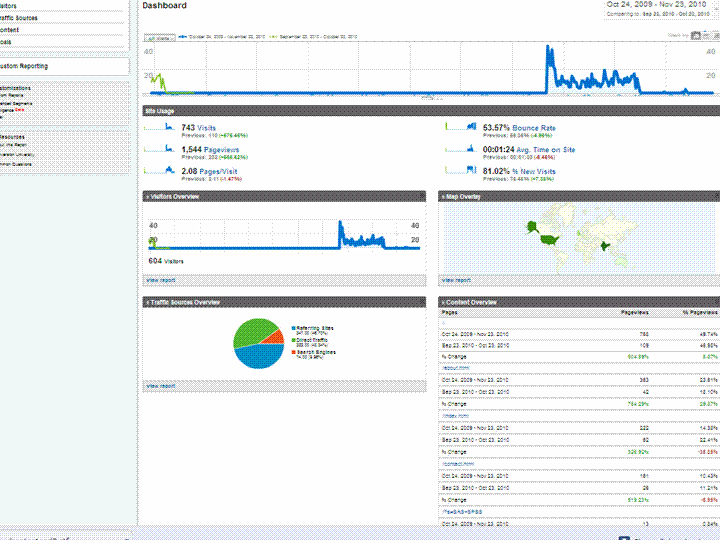
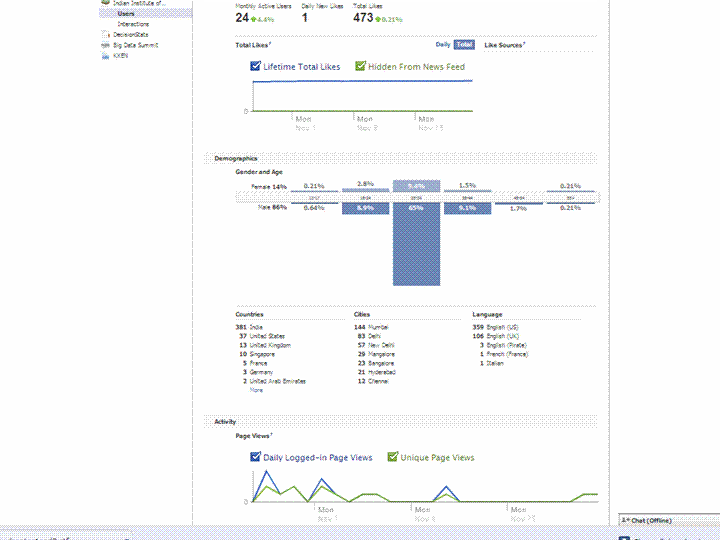
Using a simple screenshot- you can see Facebook Analytics for a Facebook page is simpler at explaining who is coming to visit rather than Google Analytics Dashboard (which has not seen the attention of a Visual UI or Graphic Redesign)
And if Facebook is going to take over the internet, well it is definitely giving better analytics in the process. What do you think?
Which Interface is simpler- and gives you better targeting. Ignore the numbers and just see the metrics measured and the way they are presented. Coincidently R is used at Facebook a lot (which has given the jjplot package)- and Google has NOT INVESTED MAJOR MONEY in creating Premium R Packages or Big Data Packages. I am talking investment at the scale Google is known for- not measly meetups.
(the summer of code dont count- it is for students mostly)
(but thanks for the Pizza G Men- and maybe revise that GA interface by putting a razor to some metrics)





 r-bloggers.com
 Reddit
 Twitter
 Google
 en.wordpress.com
 xianblog.wordpress.com

 (184) – 44,284 users – Weekly installs: 24,086