PAWCON -This week in London

Watch out for the twitter hash news on PAWCON and the exciting agenda lined up. If your in the City- you may want to just drop in

http://www.predictiveanalyticsworld.com/london/2010/agenda.php#day1-7

Disclaimer- PAWCON has been a blog partner with Decisionstats (since the first PAWCON ). It is vendor neutral and features open source as well proprietary software, as well case studies from academia and Industry for a balanced view.


Little birdie told me some exciting product enhancements may be in the works including a not yet announced R plugin 😉 and the latest SAS product using embedded analytics and Dr Elder’s full day data mining workshop.

Citation-

http://www.predictiveanalyticsworld.com/london/2010/agenda.php#day1-7

Monday November 15, 2010
All conference sessions take place in Edward 5-7

8:00am-9:00am

Registration, Coffee and Danish
Room: Albert Suites


9:00am-9:50am

Keynote
Five Ways Predictive Analytics Cuts Enterprise Risk

All business is an exercise in risk management. All organizations would benefit from measuring, tracking and computing risk as a core process, much like insurance companies do.

Predictive analytics does the trick, one customer at a time. This technology is a data-driven means to compute the risk each customer will defect, not respond to an expensive mailer, consume a retention discount even if she were not going to leave in the first place, not be targeted for a telephone solicitation that would have landed a sale, commit fraud, or become a “loss customer” such as a bad debtor or an insurance policy-holder with high claims.

In this keynote session, Dr. Eric Siegel will reveal:

  • Five ways predictive analytics evolves your enterprise to reduce risk
  • Hidden sources of risk across operational functions
  • What every business should learn from insurance companies
  • How advancements have reversed the very meaning of fraud
  • Why “man + machine” teams are greater than the sum of their parts for
  • enterprise decision support


Speaker: Eric Siegel, Ph.D., Program Chair, Predictive Analytics World

Top of this page ] [ Agenda overview ]


IBM9:50am-10:10am

Platinum Sponsor Presentation
The Analytical Revolution

The algorithms at the heart of predictive analytics have been around for years – in some cases for decades. But now, as we see predictive analytics move to the mainstream and become a competitive necessity for organisations in all industries, the most crucial challenges are to ensure that results can be delivered to where they can make a direct impact on outcomes and business performance, and that the application of analytics can be scaled to the most demanding enterprise requirements.

This session will look at the obstacles to successfully applying analysis at the enterprise level, and how today’s approaches and technologies can enable the true “industrialisation” of predictive analytics.

Speaker: Colin Shearer, WW Industry Solutions Leader, IBM UK Ltd

Top of this page ] [ Agenda overview ]


Deloitte10:10am-10:20am

Gold Sponsor Presentation
How Predictive Analytics is Driving Business Value

Organisations are increasingly relying on analytics to make key business decisions. Today, technology advances and the increasing need to realise competitive advantage in the market place are driving predictive analytics from the domain of marketers and tactical one-off exercises to the point where analytics are being embedded within core business processes.

During this session, Richard will share some of the focus areas where Deloitte is driving business transformation through predictive analytics, including Workforce, Brand Equity and Reputational Risk, Customer Insight and Network Analytics.

Speaker: Richard Fayers, Senior Manager, Deloitte Analytical Insight

Top of this page ] [ Agenda overview ]


10:20am-10:45am

Break / Exhibits
Room: Albert Suites


10:45am-11:35am
Healthcare
Case Study: Life Line Screening
Taking CRM Global Through Predictive Analytics

While Life Line is successfully executing a US CRM roadmap, they are also beginning this same evolution abroad. They are beginning in the UK where Merkle procured data and built a response model that is pulling responses over 30% higher than competitors. This presentation will give an overview of the US CRM roadmap, and then focus on the beginning of their strategy abroad, focusing on the data procurement they could not get anywhere else but through Merkle and the successful modeling and analytics for the UK.

Speaker: Ozgur Dogan, VP, Quantitative Solutions Group, Merkle Inc.

Speaker: Trish Mathe, Life Line Screening

Top of this page ] [ Agenda overview ]


11:35am-12:25pm
Open Source Analytics; Healthcare
Case Study: A large health care organization
The Rise of Open Source Analytics: Lowering Costs While Improving Patient Care

Rapidminer and R were the number 1 and 2 in this years annual KDNuggets data mining tool usage poll, followed by Knime on place 4 and Weka on place 6. So what’s going on here? Are these open source tools really that good or is their popularity strongly correlated with lower acquisition costs alone? This session answers these questions based on a real world case for a large health care organization and explains the risks & benefits of using open source technology. The final part of the session explains how these tools stack up against their traditional, proprietary counterparts.

Speaker: Jos van Dongen, Associate & Principal, DeltIQ Group

Top of this page ] [ Agenda overview ]


12:25pm-1:25pm

Lunch / Exhibits
Room: Albert Suites


1:25pm-2:15pm
Keynote
Thought Leader:
Case Study: Yahoo! and other large on-line e-businesses
Search Marketing and Predictive Analytics: SEM, SEO and On-line Marketing Case Studies

Search Engine Marketing is a $15B industry in the U.S. growing to double that number over the next 3 years. Worldwide the SEM market was over $50B in 2010. Not only is this a fast growing area of marketing, but it is one that has significant implications for brand and direct marketing and is undergoing rapid change with emerging channels such as mobile and social. What is unique about this area of marketing is a singularly heavy dependence on analytics:


  • Large numbers of variables and options
  • Real-time auctions/bids and a need to adjust strategies in real-time
  • Difficult optimization problems on allocating spend across a huge number of keywords
  • Fast-changing competitive terrain and heavy competition on the obvious channels
  • Complicated interactions between various channels and a large choice of search keyword expansion possibilities
  • Profitability and ROI analysis that are complex and often challenging


The size of the industry, its growing importance in marketing, its upcoming role in Mobile Advertising, and its uniquely heavy reliance on analytics makes it particularly interesting as an area for predictive analytics applications. In this session, not only will hear about some of the latest strategies and techniques to optimize search, you will hear case studies that illustrate the important role of analytics from industry practitioners.

Speaker: Usama Fayyad, , Ph.D., CEO, Open Insights

Top of this page ] [ Agenda overview ]


SAS2:15pm-2:35pm

Platinum Sponsor Presentation
Creating a Model Factory Using in-Database Analytics

With the ever-increasing number of analytical models required to make fact-based decisions, as well as increasing audit compliance regulations, it is more important than ever that these models can be created, monitored, retuned and deployed as quickly and automatically as possible. This paper, using a case study from a major financial organisation, will show how organisations can build a model factory efficiently using the latest SAS technology that utilizes the power of in-database processing.

Speaker: John Spooner, Analytics Specialist, SAS (UK)

Top of this page ] [ Agenda overview ]


2:35pm-2:45pm

Session Break
Room: Albert Suites


2:45pm-3:35pm

Retail
Case Study: SABMiller
Predictive Analytics & Global Marketing Strategy

Over the last few years SABMiller plc, the second largest brewing company in the world operating in 70 countries, has been systematically segmenting its markets in different countries globally in order optimize their portfolio strategy & align it to their long term country specific growth strategy. This presentation talks about the overall methodology followed and the challenges that had to be overcome both from a technical as well as from a change management stand point in order to successfully implement a standard analytics approach to diverse markets and diverse business positions in a highly global setting.

The session explains how country specific growth strategies were converted to objective variables and consumption occasion segments were created that differentiated the market effectively by their growth potential. In addition to this the presentation will also provide a discussion on issues like:

  • The dilemmas of static vs. dynamic solutions and standardization vs. adaptable solutions
  • Challenges in acceptability, local capability development, overcoming implementation inertia, cost effectiveness, etc
  • The role that business partners at SAB and analytics service partners at AbsolutData together play in providing impactful and actionable solutions


Speaker: Anne Stephens, SABMiller plc

Speaker: Titir Pal, AbsolutData

Top of this page ] [ Agenda overview ]


3:35pm-4:25pm

Retail
Case Study: Overtoom Belgium
Increasing Marketing Relevance Through Personalized Targeting


Since many years, Overtoom Belgium – a leading B2B retailer and division of the French Manutan group – focuses on an extensive use of CRM. In this presentation, we demonstrate how Overtoom has integrated Predictive Analytics to optimize customer relationships. In this process, they employ analytics to develop answers to the key question: “which product should we offer to which customer via which channel”. We show how Overtoom gained a 10% revenue increase by replacing the existing segmentation scheme with accurate predictive response models. Additionally, we illustrate how Overtoom succeeds to deliver more relevant communications by offering personalized promotional content to every single customer, and how these personalized offers positively impact Overtoom’s conversion rates.

Speaker: Dr. Geert Verstraeten, Python Predictions

Top of this page ] [ Agenda overview ]


4:25pm-4:50pm

Break / Exhibits
Room: Albert Suites


4:50pm-5:40pm
Uplift Modelling:
Case Study: Lloyds TSB General Insurance & US Bank
Uplift Modelling: You Should Not Only Measure But Model Incremental Response

Most marketing analysts understand that measuring the impact of a marketing campaign requires a valid control group so that uplift (incremental response) can be reported. However, it is much less widely understood that the targeting models used almost everywhere do not attempt to optimize that incremental measure. That requires an uplift model.

This session will explain why a switch to uplift modelling is needed, illustrate what can and does go wrong when they are not used and the hugely positive impact they can have when used effectively. It will also discuss a range of approaches to building and assessing uplift models, from simple basic adjustments to existing modelling processes through to full-blown uplift modelling.

The talk will use Lloyds TSB General Insurance & US Bank as a case study and also illustrate real-world results from other companies and sectors.


Speaker: Nicholas Radcliffe, Founder and Director, Stochastic Solutions

Top of this page ] [ Agenda overview ]


5:40pm-6:30pm

Consumer services
Case Study: Canadian Automobile Association and other B2C examples
The Diminishing Marginal Returns of Variable Creation in Predictive Analytics Solutions


Variable Creation is the key to success in any predictive analytics exercise. Many different approaches are adopted during this process, yet there are diminishing marginal returns as the number of variables increase. Our organization conducted a case study on four existing clients to explore this so-called diminishing impact of variable creation on predictive analytics solutions. Existing predictive analytics solutions were built using our traditional variable creation process. Yet, presuming that we could exponentially increase the number of variables, we wanted to determine if this added significant benefit to the existing solution.

Speaker: Richard Boire, BoireFillerGroup

Top of this page ] [ Agenda overview ]


6:30pm-7:30pm

Reception / Exhibits
Room: Albert Suites


Tuesday November 16, 2010
All conference sessions take place in Edward 5-7

8:00am-9:00am

Registration, Coffee and Danish
Room: Albert Suites


9:00am-9:55am
Keynote
Multiple Case Studies: Anheuser-Busch, Disney, HP, HSBC, Pfizer, and others
The High ROI of Data Mining for Innovative Organizations

Data mining and advanced analytics can enhance your bottom line in three basic ways, by 1) streamlining a process, 2) eliminating the bad, or 3) highlighting the good. In rare situations, a fourth way – creating something new – is possible. But modern organizations are so effective at their core tasks that data mining usually results in an iterative, rather than transformative, improvement. Still, the impact can be dramatic.

Dr. Elder will share the story (problem, solution, and effect) of nine projects conducted over the last decade for some of America’s most innovative agencies and corporations:

    Streamline:

  • Cross-selling for HSBC
  • Image recognition for Anheuser-Busch
  • Biometric identification for Lumidigm (for Disney)
  • Optimal decisioning for Peregrine Systems (now part of Hewlett-Packard)
  • Quick decisions for the Social Security Administration
    Eliminate Bad:

  • Tax fraud detection for the IRS
  • Warranty Fraud detection for Hewlett-Packard
    Highlight Good:

  • Sector trading for WestWind Foundation
  • Drug efficacy discovery for Pharmacia & UpJohn (now Pfizer)

Moderator: Eric Siegel, Program Chair, Predictive Analytics World

Speaker: John Elder, Ph.D., Elder Research, Inc.

Also see Dr. Elder’s full-day workshop


Top of this page ] [ Agenda overview ]


9:55am-10:30am

Break / Exhibits
Room: Albert Suites


10:30am-11:20am
Telecommunications
Case Study: Leading Telecommunications Operator
Predictive Analytics and Efficient Fact-based Marketing

The presentation describes what are the major topics and issues when you introduce predictive analytics and how to build a Fact-Based marketing environment. The introduced tools and methodologies proved to be highly efficient in terms of improving the overall direct marketing activity and customer contact operations for the involved companies. Generally, the introduced approaches have great potential for organizations with large customer bases like Mobile Operators, Internet Giants, Media Companies, or Retail Chains.

Main Introduced Solutions:-Automated Serial Production of Predictive Models for Campaign Targeting-Automated Campaign Measurements and Tracking Solutions-Precise Product Added Value Evaluation.

Speaker: Tamer Keshi, Ph.D., Long-term contractor, T-Mobile

Speaker: Beata Kovacs, International Head of CRM Solutions, Deutsche Telekom

Top of this page ] [ Agenda overview ]


11:20am-11:25am

Session Changeover


11:25am-12:15pm
Thought Leader
Nine Laws of Data Mining

Data mining is the predictive core of predictive analytics, a business process that finds useful patterns in data through the use of business knowledge. The industry standard CRISP-DM methodology describes the process, but does not explain why the process takes the form that it does. I present nine “laws of data mining”, useful maxims for data miners, with explanations that reveal the reasons behind the surface properties of the data mining process. The nine laws have implications for predictive analytics applications: how and why it works so well, which ambitions could succeed, and which must fail.


Speaker: Tom Khabaza, khabaza.com


Top of this page ] [ Agenda overview ]


12:15pm-1:30pm

Lunch / Exhibits
Room: Albert Suites


1:30pm-2:25pm
Expert Panel: Kaboom! Predictive Analytics Hits the Mainstream

Predictive analytics has taken off, across industry sectors and across applications in marketing, fraud detection, credit scoring and beyond. Where exactly are we in the process of crossing the chasm toward pervasive deployment, and how can we ensure progress keeps up the pace and stays on target?

This expert panel will address:

  • How much of predictive analytics’ potential has been fully realized?
  • Where are the outstanding opportunities with greatest potential?
  • What are the greatest challenges faced by the industry in achieving wide scale adoption?
  • How are these challenges best overcome?


Panelist: John Elder, Ph.D., Elder Research, Inc.

Panelist: Colin Shearer, WW Industry Solutions Leader, IBM UK Ltd

Panelist: Udo Sglavo, Global Analytic Solutions Manager, SAS

Panel moderator: Eric Siegel, Ph.D., Program Chair, Predictive Analytics World


2:25pm-2:30pm

Session Changeover


2:30pm-3:20pm
Crowdsourcing Data Mining
Case Study: University of Melbourne, Chessmetrics
Prediction Competitions: Far More Than Just a Bit of Fun

Data modelling competitions allow companies and researchers to post a problem and have it scrutinised by the world’s best data scientists. There are an infinite number of techniques that can be applied to any modelling task but it is impossible to know at the outset which will be most effective. By exposing the problem to a wide audience, competitions are a cost effective way to reach the frontier of what is possible from a given dataset. The power of competitions is neatly illustrated by the results of a recent bioinformatics competition hosted by Kaggle. It required participants to pick markers in HIV’s genetic sequence that coincide with changes in the severity of infection. Within a week and a half, the best entry had already outdone the best methods in the scientific literature. This presentation will cover how competitions typically work, some case studies and the types of business modelling challenges that the Kaggle platform can address.

Speaker: Anthony Goldbloom, Kaggle Pty Ltd

Top of this page ] [ Agenda overview ]


3:20pm-3:50pm

Breaks /Exhibits
Room: Albert Suites


3:50pm-4:40pm
Human Resources; e-Commerce
Case Study: Naukri.com, Jeevansathi.com
Increasing Marketing ROI and Efficiency of Candidate-Search with Predictive Analytics

InfoEdge, India’s largest and most profitable online firm with a bouquet of internet properties has been Google’s biggest customer in India. Our team used predictive modeling to double our profits across multiple fronts. For Naukri.com, India’s number 1 job portal, predictive models target jobseekers most relevant to the recruiter. Analytical insights provided a deeper understanding of recruiter behaviour and informed a redesign of this product’s recruiter search functionality. This session will describe how we did it, and also reveal how Jeevansathi.com, India’s 2nd-largest matrimony portal, targets the acquisition of consumers in the market for marriage.


Speaker: Suvomoy Sarkar, Chief Analytics Officer, HT Media & Info Edge India (parent company of the two companies above)


Top of this page ] [ Agenda overview ]


4:40pm-5:00pm
Closing Remarks

Speaker: Eric Siegel, Ph.D., Program Chair, Predictive Analytics World

Top of this page ] [ Agenda overview ]


Wednesday November 17, 2010

Full-day Workshop
The Best and the Worst of Predictive Analytics:
Predictive Modeling Methods and Common Data Mining Mistakes

Click here for the detailed workshop description

  • Workshop starts at 9:00am
  • First AM Break from 10:00 – 10:15
  • Second AM Break from 11:15 – 11:30
  • Lunch from 12:30 – 1:15pm
  • First PM Break: 2:00 – 2:15
  • Second PM Break: 3:15 – 3:30
  • Workshop ends at 4:30pm

Speaker: John Elder, Ph.D., CEO and Founder, Elder Research, Inc.


Doing Time Series using a R GUI

The Xerox Star Workstation introduced the firs...
Image via Wikipedia

Until recently I had been thinking that RKWard was the only R GUI supporting Time Series Models-

however Bob Muenchen of http://www.r4stats.com/ was helpful to point out that the Epack Plugin provides time series functionality to R Commander.

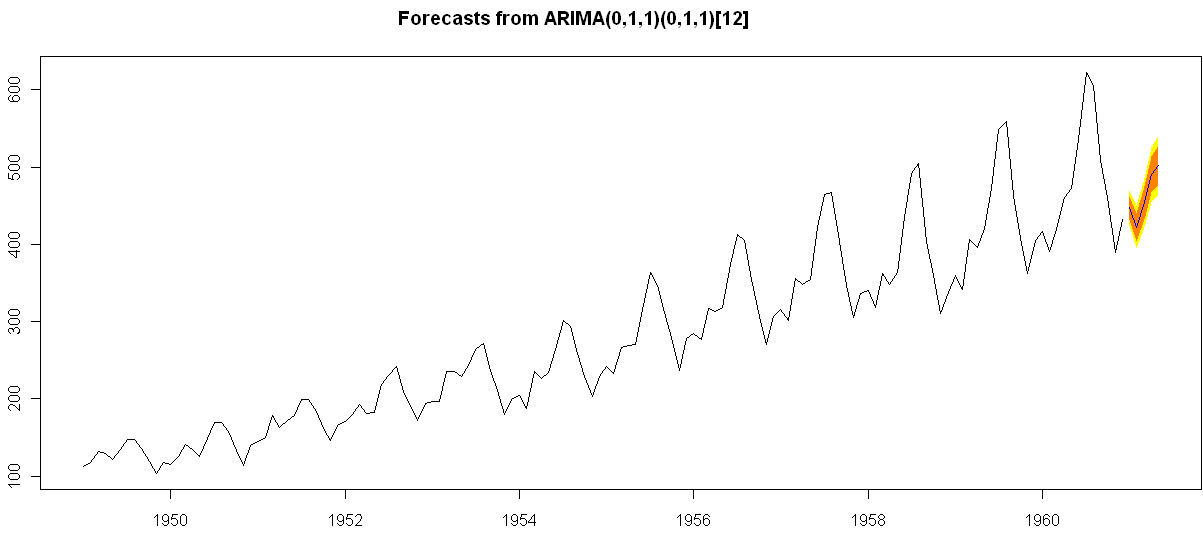
Note the GUI helps explore various time series functionality.

Using Bulkfit you can fit various ARMA models to dataset and choose based on minimum AIC


> bulkfit(AirPassengers$x)
$res
ar d ma      AIC
[1,]  0 0  0 1790.368
[2,]  0 0  1 1618.863
[3,]  0 0  2 1522.122
[4,]  0 1  0 1413.909
[5,]  0 1  1 1397.258
[6,]  0 1  2 1397.093
[7,]  0 2  0 1450.596
[8,]  0 2  1 1411.368
[9,]  0 2  2 1394.373
[10,]  1 0  0 1428.179
[11,]  1 0  1 1409.748
[12,]  1 0  2 1411.050
[13,]  1 1  0 1401.853
[14,]  1 1  1 1394.683
[15,]  1 1  2 1385.497
[16,]  1 2  0 1447.028
[17,]  1 2  1 1398.929
[18,]  1 2  2 1391.910
[19,]  2 0  0 1413.639
[20,]  2 0  1 1408.249
[21,]  2 0  2 1408.343
[22,]  2 1  0 1396.588
[23,]  2 1  1 1378.338
[24,]  2 1  2 1387.409
[25,]  2 2  0 1440.078
[26,]  2 2  1 1393.882
[27,]  2 2  2 1392.659
$min
ar        d       ma      AIC
2.000    1.000    1.000 1378.338
> ArimaModel.5 <- Arima(AirPassengers$x,order=c(0,1,1),
+ include.mean=1,
+   seasonal=list(order=c(0,1,1),period=12))
> ArimaModel.5
Series: AirPassengers$x
ARIMA(0,1,1)(0,1,1)[12]
Call: Arima(x = AirPassengers$x, order = c(0, 1, 1), seasonal = list(order = c(0,      1, 1), period = 12), include.mean = 1)
Coefficients:
ma1     sma1
-0.3087  -0.1074
s.e.   0.0890   0.0828
sigma^2 estimated as 135.4:  log likelihood = -507.5
AIC = 1021   AICc = 1021.19   BIC = 1029.63
> summary(ArimaModel.5, cor=FALSE)
Series: AirPassengers$x
ARIMA(0,1,1)(0,1,1)[12]
Call: Arima(x = AirPassengers$x, order = c(0, 1, 1), seasonal = list(order = c(0,      1, 1), period = 12), include.mean = 1)
Coefficients:
ma1     sma1
-0.3087  -0.1074
s.e.   0.0890   0.0828
sigma^2 estimated as 135.4:  log likelihood = -507.5
AIC = 1021   AICc = 1021.19   BIC = 1029.63
In-sample error measures:
ME        RMSE         MAE         MPE        MAPE        MASE
0.32355285 11.09952005  8.16242469  0.04409006  2.89713514  0.31563730
Dataset79 <- predar3(ArimaModel.5,fore1=5)


And I also found an interesting Ref Sheet for Time Series functions in R-

http://cran.r-project.org/doc/contrib/Ricci-refcard-ts.pdf

and a slightly more exhaustive time series ref card

http://www.statistische-woche-nuernberg-2010.org/lehre/bachelor/datenanalyse/Refcard3.pdf

Also of interest a matter of opinion on issues in Time Series Analysis in R at

http://www.stat.pitt.edu/stoffer/tsa2/Rissues.htm

Of course , if I was the sales manager for SAS ETS I would be worried given the increasing capabilities in Time Series in R. But then again some deficiencies in R GUI for Time Series-

1) Layout is not very elegant

2) Not enough documented help (atleast for the Epack GUI- and no integrated help ACROSS packages-)

3) Graphical capabilties need more help documentation to interpret the output (especially in ACF and PACF plots)

More resources on Time Series using R.

http://people.bath.ac.uk/masgs/time%20series/TimeSeriesR2004.pdf

and http://www.statoek.wiso.uni-goettingen.de/veranstaltungen/zeitreihen/sommer03/ts_r_intro.pdf

and books

http://www.springer.com/economics/econometrics/book/978-0-387-77316-2

http://www.springer.com/statistics/statistical+theory+and+methods/book/978-0-387-75960-9

http://www.springer.com/statistics/statistical+theory+and+methods/book/978-0-387-75958-6

http://www.springer.com/statistics/statistical+theory+and+methods/book/978-0-387-75966-1

Interfaces to R

This is a fairly long post and is a basic collection  of material for a book/paper. It is on interfaces to use R. If you feel I need to add more on a  particular R interface, or if there is an error in this- please feel to contact me on twitter @decisionstats or mail ohri2007 on google mail.

R Interfaces

There are multiple ways to use the R statistical language.

Command Line- The default method is using the command prompt by the installed software on download from http://r-project.org
For windows users there is a simple GUI which has an option for Packages (loading package, installing package, setting CRAN mirror for downloading packages) , Misc (useful for listing all objects loaded in workspace as well as clearing objects to free up memory), and Help Menu.

Using Click and Point- Besides the command prompt, there are many Graphical User Interfaces which enable the analyst to use click and point methods to analyze data without getting into the details of learning complex and at times overwhelming R syntax. R GUIs are very popular both as mode of instruction in academia as well as in actual usage as it cuts down considerably on time taken to adapt to the language. As with all command line and GUI software, for advanced tweaks and techniques, command prompt will come in handy as well.

Advantages and Limitations of using Visual Programming Interfaces to R as compared to Command Line.


Advantages Limitations
Faster learning for new programmers Can create junk analysis by clicking menus in GUI
Easier creation of advanced models or graphics Cannot create custom functions unless you use command line
Repeatability of analysis is better Advanced techniques and custom flexibility of data handling R can be done in command line
Syntax is auto-generated Can limit scope and exposure in learning R syntax


A brief list of the notable Graphical User Interfaces is below-

1) R Commander- Basic statistics
2) Rattle- Data Mining
3) Deducer- Graphics (including GGPlot Integration) and also uses JGR (a Jave based  GUI)
4) RKward- Comprehensive R GUI for customizable graphs
5) Red-R – Dataflow programming interface using widgets

1) R Commander- R Commander was primarily created by Professor John Fox of McMaster University to cover the content of a basic statistics course. However it is extensible and many other packages can be added in menu form to it- in the form R Commander Plugins. Quite noticeably it is one of the most widely used R GUI and it also has a script window so you can write R code in combination with the menus.
As you point and click a particular menu item, the corresponding R code is automatically generated in the log window and executed.

It can be found on CRAN at http://cran.r-project.org/web/packages/Rcmdr/index.html


Advantages of Using  R Commander-
1) Useful for beginner in R language to do basic graphs and analysis and building models.
2) Has script window, output window and log window (called messages) in same screen which helps user as code is auto-generated on clicking on menus, and can be customized easily. For example in changing labels and options in Graphs.  Graphical output is shown in seperate window from output window.
3) Extensible for other R packages like qcc (for quality control), Teaching Demos (for training), survival analysis and Design of Experiments (DoE)
4) Easy to understand interface even for first time user.
5) Menu items which are not relevant are automatically greyed out- if there are only two variables, and you try to build a 3D scatterplot graph, that menu would simply not be available and is greyed out.

Comparative Disadvantages of using R Commander-
1) It is basically aimed at a statistical audience( originally students in statistics) and thus the terms as well as menus are accordingly labeled. Hence it is more of a statistical GUI rather than an analytics GUI.
2) Has limited ability to evaluate models from a business analysts perspective (ROC curve is not given as an option) even though it has extensive statistical tests for model evaluation in model sub menu. Indeed creating a Model is treated as a subsection of statistics rather than a separate menu item.
3) It is not suited for projects that do not involve advanced statistical testing and for users not proficient in statistics (particularly hypothesis testing), and for data miners.

Menu items in the R Commander window:
File Menu – For loading script files and saving Script files, Output and Workspace
It is also needed for changing the present working directory and for exiting R.
Edit Menu – For editing scripts and code in the script window.
Data Menu – For creating new dataset, inputting or importing data and manipulating data through variables. Data Import can be from text,comma separated values,clipboard, datasets from SPSS, Stata,Minitab, Excel ,dbase,  Access files or from url.
Data manipulation included deleting rows of data as well as manipulating variables.
Also this menu has the option for merging two datasets by row or columns.
Statistics Menu-This menu has options for descriptive statistics, hypothesis tests, factor analysis and clustering and also for creating models. Note there is a separate menu for evaluating the model so created.
Graphs Menu-It has options for creating various kinds of graphs including box-plot, histogram, line, pie charts and x-y plots.
The first option is color palette- it can be used for customizing the colors. It is recommended you adjust colors based on your need for publication or presentation.
A notable option is 3 D graphs for evaluating 3 variables at a time- this is really good and impressive feature and exposes the user to advanced graphs in R all at few clicks. You may want to dazzle a presentation using this graph.
Also consider scatterplot matrix graphs for graphical display of variables.
Graphical display of R surpasses any other statistical software in appeal as well as ease of creation- using GUI to create graphs can further help the user to get the most of data insights using R at a very minimum effort.
Models Menu-This is somewhat of a labeling peculiarity of R Commander as this menu is only for evaluating models which have been created using the statistics menu-model sub menu.
It includes options for graphical interpretation of model results,residuals,leverage and confidence intervals and adding back residuals to the data set.
Distributions Menu- is for cumulative probabilities, probability density, graphs of distributions, quantiles and features for standard distributions and can be used in lieu of standard statistical tables for the distributions. It has 13 standard statistical continuous distributions and 5 discrete distributions.
Tools Menu- allows you to load other packages and also load R Commander plugins (which are then added to the Interface Menu after the R Commander GUI is restarted). It also contains options sub menu for fine tuning (like opting to send output to R Menu)
Help Menu- Standard documentation and help menu. Essential reading is the short 25 page manual in it called Getting “Started With the R Commander”.

R Commander Plugins- There are twenty extensions to R Commander that greatly enhance it’s appeal -these include basic time series forecasting, survival analysis, qcc and more.

see a complete list at

  1. DoE – http://cran.r-project.org/web/packages/RcmdrPlugin.DoE/RcmdrPlugin.DoE.pdf
  2. doex
  3. EHESampling
  4. epack- http://cran.r-project.org/web/packages/RcmdrPlugin.epack/RcmdrPlugin.epack.pdf
  5. Export- http://cran.r-project.org/web/packages/RcmdrPlugin.Export/RcmdrPlugin.Export.pdf
  6. FactoMineR
  7. HH
  8. IPSUR
  9. MAc- http://cran.r-project.org/web/packages/RcmdrPlugin.MAc/RcmdrPlugin.MAc.pdf
  10. MAd
  11. orloca
  12. PT
  13. qcc- http://cran.r-project.org/web/packages/RcmdrPlugin.qcc/RcmdrPlugin.qcc.pdf and http://cran.r-project.org/web/packages/qcc/qcc.pdf
  14. qual
  15. SensoMineR
  16. SLC
  17. sos
  18. survival-http://cran.r-project.org/web/packages/RcmdrPlugin.survival/RcmdrPlugin.survival.pdf
  19. SurvivalT
  20. Teaching Demos

Note the naming convention for above e plugins is always with a Prefix of “RCmdrPlugin.” followed by the names above
Also on loading a Plugin, it must be already installed locally to be visible in R Commander’s list of load-plugin, and R Commander loads the e-plugin after restarting.Hence it is advisable to load all R Commander plugins in the beginning of the analysis session.

However the notable E Plugins are
1) DoE for Design of Experiments-
Full factorial designs, orthogonal main effects designs, regular and non-regular 2-level fractional
factorial designs, central composite and Box-Behnken designs, latin hypercube samples, and simple D-optimal designs can currently be generated from the GUI. Extensions to cover further latin hypercube designs as well as more advanced D-optimal designs (with blocking) are planned for the future.
2) Survival- This package provides an R Commander plug-in for the survival package, with dialogs for Cox models, parametric survival regression models, estimation of survival curves, and testing for differences in survival curves, along with data-management facilities and a variety of tests, diagnostics and graphs.
3) qcc -GUI for  Shewhart quality control charts for continuous, attribute and count data. Cusum and EWMA charts. Operating characteristic curves. Process capability analysis. Pareto chart and cause-and-effect chart. Multivariate control charts
4) epack- an Rcmdr “plug-in” based on the time series functions. Depends also on packages like , tseries, abind,MASS,xts,forecast. It covers Log-Exceptions garch
and following Models -Arima, garch, HoltWinters
5)Export- The package helps users to graphically export Rcmdr output to LaTeX or HTML code,
via xtable() or Hmisc::latex(). The plug-in was originally intended to facilitate exporting Rcmdr
output to formats other than ASCII text and to provide R novices with an easy-to-use,
easy-to-access reference on exporting R objects to formats suited for printed output. The
package documentation contains several pointers on creating reports, either by using
conventional word processors or LaTeX/LyX.
6) MAc- This is an R-Commander plug-in for the MAc package (Meta-Analysis with
Correlations). This package enables the user to conduct a meta-analysis in a menu-driven,
graphical user interface environment (e.g., SPSS), while having the full statistical capabilities of
R and the MAc package. The MAc package itself contains a variety of useful functions for
conducting a research synthesis with correlational data. One of the unique features of the MAc
package is in its integration of user-friendly functions to complete the majority of statistical steps
involved in a meta-analysis with correlations.
You can read more on R Commander Plugins at http://wp.me/p9q8Y-1Is
—————————————————————————————————————————-
Rattle- R Analytical Tool To Learn Easily (download from http://rattle.togaware.com/)
Rattle is more advanced user Interface than R Commander though not as popular in academia. It has been designed explicitly for data mining and it also has a commercial version for sale by Togaware. Rattle has a Tab and radio button/check box rather than Menu- drop down approach towards the graphical design. Also the Execute button needs to be clicked after checking certain options, just the same as submit button is clicked after writing code. This is different from clicking on a drop down menu.

Advantages of Using Rattle
1) Useful for beginner in R language to do building models,cluster and data mining.
2) Has separate tabs for data entry,summary, visualization,model building,clustering, association and evaluation. The design is intuitive and easy to understand even for non statistical background as the help is conveniently explained as each tab, button is clicked. Also the tabs are placed in a very sequential and logical order.
3) Uses a lot of other R packages to build a complete analytical platform. Very good for correlation graph,clustering as well decision trees.
4) Easy to understand interface even for first time user.
5) Log  for R code is auto generated and time stamp is placed.
6) Complete solution for model building from partitioning datasets randomly for testing,validation to building model, evaluating lift and ROC curve, and exporting PMML output of model for scoring.
7) Has a well documented online help as well as in-software documentation. The help helps explain terms even to non statistical users and is highly useful for business users.

Example Documentation for Hypothesis Testing in Test Tab in Rattle is ”
Distribution of the Data
* Kolomogorov-Smirnov     Non-parametric Are the distributions the same?
* Wilcoxon Signed Rank    Non-parametric Do paired samples have the same distribution?
Location of the Average
* T-test               Parametric     Are the means the same?
* Wilcoxon Rank-Sum    Non-parametric Are the medians the same?
Variation in the Data
* F-test Parametric Are the variances the same?
Correlation
* Correlation    Pearsons Are the values from the paired samples correlated?”

Comparative Disadvantages of using Rattle-
1) It is basically aimed at a data miner.  Hence it is more of a data mining GUI rather than an analytics GUI.
2) Has limited ability to create different types of graphs from a business analysts perspective Numeric variables can be made into Box-Plot, Histogram, Cumulative as well Benford Graphs. While interactivity using GGobi and Lattiticist is involved- the number of graphical options is still lesser than other GUI.
3) It is not suited for projects that involve multiple graphical analysis and which do not have model building or data mining.For example Data Plot is given in clustering tab but not in general Explore tab.
4) Despite the fact that it is meant for data miners, no support to biglm packages, as well as parallel programming is enabled in GUI for bigger datasets, though these can be done by R command line in conjunction with the Rattle GUI. Data m7ining is typically done on bigger datsets.
5) May have some problems installing it as it is dependent on GTK and has a lot of packages as dependencies.

Top Row-
This has the Execute Button (shown as two gears) and which has keyboard shortcut F2. It is used to execute the options in Tabs-and is equivalent of submit code button.
Other buttons include new Projects,Save  and Load projects which are files with extension to .rattle an which store all related information from Rattle.
It also has a button for exporting information in the current Tab as an open office document, and buttons for interrupting current process as well as exiting Rattle.

Data Tab-
It has the following options.
●        Data Type- These are radio buttons between Spreadsheet (and Comma Separated Values), ARFF files (Weka), ODBC (for Database Connections),Library (for Datasets from Packages),R Dataset or R datafile, Corpus (for Text Mining) and Script for generating the data by code.
●        The second row-in Data Tab in Rattle is Detail on Data Type- and its apperance shifts as per the radio button selection of data type in previous step. For Spreadsheet, it will show Path of File, Delimiters, Header Row while for ODBC it will show DSN, Tables, Rows and for Library it will show you a dropdown of all datasets in all R packages installed locally.
●        The third row is a Partition field for splitting dataset in training,testing,validation and it shows ratio. It also specifies a Random seed which can be customized for random partitions which can be replicated. This is very useful as model building requires model to be built and tested on random sub sets of full dataset.
●        The fourth row is used to specify the variable type of inputted data. The variable types are
○        Input: Used for modeling as independent variables
○        Target: Output for modeling or the dependent variable. Target is a categoric variable for classification, numeric for regression and for survival analysis both Time and Status need to be defined
○        Risk: A variable used in the Risk Chart
○        Ident: An identifier for unique observations in the data set like AccountId or Customer Id
○        Ignore: Variables that are to be ignored.
●        In addition the weight calculator can be used to perform mathematical operations on certain variables and identify certain variables as more important than others.

Explore Tab-
Summary Sub-Tab has Summary for brief summary of variables, Describe for detailed summary and Kurtosis and Skewness for comparing them across numeric variables.
Distributions Sub-Tab allows plotting of histograms, box plots, and cumulative plots for numeric variables and for categorical variables Bar Plot and Dot Plot.
It also has Benford Plot for Benford’s Law on probability of distribution of digits.
Correlation Sub-Tab– This displays corelation between variables as a table and also as a very nice plot.
Principal Components Sub-Tab– This is for use with Principal Components Analysis including the SVD (singular value decomposition) and Eigen methods.
Interactive Sub-Tab- Allows interactive data exploration using GGobi and Lattice software. It is a powerful visual tool.

Test Tab-This has options for hypothesis testing of data for two sample tests.
Transform Tab-This has options for rescaling data, missing values treatment, and deleting invalid or missing values.
Cluster Tab-It gives an option to KMeans, Hierarchical and Bi-Cluster clustering methods with automated graphs,plots (including dendogram, discriminant plot and data plot) and cluster results available. It is highly recommended for clustering projects especially for people who are proficient in clustering but not in R.

Associate Tab-It helps in building association rules between categorical variables, which are in the form of “if then”statements. Example. If day is Thursday, and someone buys Milk, there is 80% chance they will buy Diapers. These probabilities are generated from observed frequencies.

Model Tab-The Model tab makes Rattle one of the most advanced data mining tools, as it incorporates decision trees(including boosted models and forest method), linear and logistic regression, SVM,neural net,survival models.
Evaluate Tab-It as functionality for evaluating models including lift,ROC,confusion matrix,cost curve,risk chart,precision, specificity, sensitivity as well as scoring datasets with built model or models. Example – A ROC curve generated by Rattle for Survived Passengers in Titanic (as function of age,class,sex) This shows comparison of various models built.

Log Tab- R Code is automatically generated by Rattle as the respective operation is executed. Also timestamp is done so it helps in reviewing error as well as evaluating speed for code optimization.
—————————————————————————————————————————-
JGR- Deducer- (see http://www.deducer.org/pmwiki/pmwiki.php?n=Main.DeducerManual
JGR is a Java Based GUI. Deducer is recommended for use with JGR.
Deducer has basically been made to implement GGPLOT in a GUI- an advanced graphics package based on Grammer of Graphics and was part of Google Summer of Code project.

It first asks you to either open existing dataset or load a new dataset with just two icons. It has two initial views in Data Viewer- a Data view and Variable view which is quite similar to Base SPSS. The other Deducer options are loaded within the JGR console.

Advantages of Using  Deducer
1.      It has an option for factor as well as reliability analysis which is missing in other graphical user interfaces like R Commander and Rattle.
2.      The plot builder option gives very good graphics -perhaps the best in other GUIs. This includes a color by option which allows you to shade the colors based on variable value. An addition innovation is the form of templates which enables even a user not familiar with data visualization to choose among various graphs and click and drag them to plot builder area.
3.      You can set the Java Gui for R (JGR) menu to automatically load some packages by default using an easy checkbox list.
4.      Even though Deducer is a very young package, it offers a way for building other R GUIs using Java Widgets.
5.      Overall feel is of SPSS (Base GUI) to it’s drop down menu, and selecting variables in the sub menu dialogue by clicking to transfer to other side.SPSS users should be more comfortable at using this.
6.      A surprising thing is it rearranges the help documentation of all R in a very presentable and organized manner
7.      Very convenient to move between two or more datasets using dropdown.
8.      The most convenient GUI for merging two datasets using common variable.

Dis Advantages of Using  Deducer
1.      Not able to save plots as images (only options are .pdf and .eps), you can however copy as image.
2.      Basically a data viualization GUI – it does offer support for regression, descriptive statistics in the menu item Extras- however the menu suggests it is a work in progress.
3.      Website for help is outdated, and help documentation specific to Deducer lacks detail.


Components of Deducer-
Data Menu-Gives options for data manipulation including recoding variables,transform variables (binning, mathematical operation), sort dataset,  transpose dataset ,merge two datasets.
Analysis Menu-Gives options for frequency tables, descriptive statistics,cross tabs, one sample tests (with plots) ,two sample tests (with plots),k sample tests, correlation,linear and logistic models,generalized linear models.
Plot Builder Menu- This allows plots of various kinds to be made in an interactive manner.

Correlation using Deducer.

————————————————————————————————————————–
Red-R – A dataflow user interface for R (see http://red-r.org/

Red R uses dataflow concepts as a user interface rather than menus and tabs. Thus it is more similar to Enterprise Miner or Rapid Miner in design. For repeatable analysis dataflow programming is preferred by some analysts. Red-R is written in Python.


Advantages of using Red-R
1) Dataflow style makes it very convenient to use. It is the only dataflow GUI for R.
2) You can save the data as well as analysis in the same file.
3) User Interface makes it easy to read R code generated, and commit code.
4) For repeatable analysis-like reports or creating models it is very useful as you can replace just one widget and other widget/operations remain the same.
5) Very easy to zoom into data points by double clicking on graphs. Also to change colors and other options in graphs.
6) One minor feature- It asks you to set CRAN location just once and stores it even for next session.
7) Automated bug report submission.

Disadvantages of using Red-R
1) Current version is 1.8 and it needs a lot of improvement for building more modeling types as well as debugging errors.
2) Limited features presently.
———————————————————————————————————————-
RKWard (see http://rkward.sourceforge.net/)

It is primarily a KDE GUI for R, so it can be used on Ubuntu Linux. The windows version is available but has some bugs.

Advantages of using RKWard
1) It is the only R GUI for time series at present.
In addition it seems like the only R GUI explicitly for Item Response Theory (which includes credit response models,logistic models) and plots contains Pareto Charts.
2) It offers a lot of detail in analysis especially in plots(13 types of plots), analysis and  distribution analysis ( 8 Tests of normality,14 continuous and 6 discrete distributions). This detail makes it more suitable for advanced statisticians rather than business analytics users.
3) Output can be easily copied to Office documents.

Disadvantages of using RKWard
1) It does not have stable Windows GUI. Since a graphical user interface is aimed at making interaction easier for users- this is major disadvantage.
2) It has a lot of dependencies so may have some issues in installing.
3) The design categorization of analysis,plots and distributions seems a bit unbalanced considering other tabs are File, Edit, View, Workspace,Run,Settings, Windows,Help.
Some of the other tabs can be collapsed, while the three main tabs of analysis,plots,distributions can be better categorized (especially into modeling and non-modeling analysis).
4) Not many options for data manipulation (like subset or transpose) by the GUI.
5) Lack of detail in documentation as it is still on version 0.5.3 only.

Components-
Analysis, Plots and Distributions are the main components and they are very very extensive, covering perhaps the biggest range of plots,analysis or distribution analysis that can be done.
Thus RKWard is best combined with some other GUI, when doing advanced statistical analysis.


GNU General Public License
Image via Wikipedia

GrapherR

GrapheR is a Graphical User Interface created for simple graphs.

Depends: R (>= 2.10.0), tcltk, mgcv
Description: GrapheR is a multiplatform user interface for drawing highly customizable graphs in R. It aims to be a valuable help to quickly draw publishable graphs without any knowledge of R commands. Six kinds of graphs are available: histogram, box-and-whisker plot, bar plot, pie chart, curve and scatter plot.
License: GPL-2
LazyLoad: yes
Packaged: 2011-01-24 17:47:17 UTC; Maxime
Repository: CRAN
Date/Publication: 2011-01-24 18:41:47

More information about GrapheR at CRAN
Path: /cran/newpermanent link

Advantages of using GrapheR

  • It is bi-lingual (English and French) and can import in text and csv files
  • The intention is for even non users of R, to make the simple types of Graphs.
  • The user interface is quite cleanly designed. It is thus aimed as a data visualization GUI, but for a more basic level than Deducer.
  • Easy to rename axis ,graph titles as well use sliders for changing line thickness and color

Disadvantages of using GrapheR

  • Lack of documentation or help. Especially tips on mouseover of some options should be done.
  • Some of the terms like absicca or ordinate axis may not be easily understood by a business user.
  • Default values of color are quite plain (black font on white background).
  • Can flood terminal with lots of repetitive warnings (although use of warnings() function limits it to top 50)
  • Some of axis names can be auto suggested based on which variable s being chosen for that axis.
  • Package name GrapheR refers to a graphical calculator in Mac OS – this can hinder search engine results

Using GrapheR

  • Data Input -Data Input can be customized for CSV and Text files.
  • GrapheR gives information on loaded variables (numeric versus Factors)
  • It asks you to choose the type of Graph 
  • It then asks for usual Graph Inputs (see below). Note colors can be customized (partial window). Also number of graphs per Window can be easily customized 
  • Graph is ready for publication


Related Articles


Summary of R GUIs


Using R from other software- Please note that interfaces to R exist from other software as well. These include software from SAS Institute, IBM SPSS, Rapid Miner,Knime  and Oracle.

A brief list is shown below-

1) SAS/IML Interface to R- You can read about the SAS Institute’s SAS/ IML Studio interface to R at http://www.sas.com/technologies/analytics/statistics/iml/index.html
2) Rapid  Miner Extension to R-You can view integration with Rapid Miner’s extension to R here at http://www.youtube.com/watch?v=utKJzXc1Cow
3) IBM SPSS plugin for R-SPSS software has R integration in the form of a plugin. This was one of the earliest third party software offering interaction with R and you can read more at http://www.spss.com/software/statistics/developer/
4) Knime- Konstanz Information Miner also has R integration. You can view this on
http://www.knime.org/downloads/extensions
5) Oracle Data Miner- Oracle has a data mining offering to it’s very popular database software which is integrated with the R language. The R Interface to Oracle Data Mining ( R-ODM) allows R users to access the power of Oracle Data Mining’s in-database functions using the familiar R syntax. http://www.oracle.com/technetwork/database/options/odm/odm-r-integration-089013.html
6) JMP- JMP version 9 is the latest to offer interface to R.  You can read example scripts here at http://blogs.sas.com/jmp/index.php?/archives/298-JMP-Into-R!.html

R Excel- Using R from Microsoft Excel

Microsoft Excel is the most widely used spreadsheet program for data manipulation, entry and graphics. Yet as dataset sizes have increased, Excel’s statistical capabilities have lagged though it’s design has moved ahead in various product versions.

R Excel basically works at adding a .xla plugin to
Excel just like other Plugins. It does so by connecting to R through R packages.

Basically it offers the functionality of R
functions and capabilities to the most widely distributed spreadsheet program. All data summaries, reports and analysis end up in a spreadsheet-

R Excel enables R to be very useful for people not
knowing R. In addition it adds (by option) the menus of R Commander as menus in Excel spreadsheet.


Advantages-
Enables R and Excel to communicate thus tieing an advanced statistical tool to the most widely used business analytics tool.

Disadvantages-
No major disadvatage at all to a business user. For a data statistical user, Microsoft Excel is limited to 100,000 rows, so R data needs to be summarized or reduced.

Graphical capabilities of R are very useful, but to a new user, interactive graphics in Excel may be easier than say using Ggplot ot Ggobi.
You can read more on this at http://rcom.univie.ac.at/ or  the complete Springer Book http://www.springer.com/statistics/computanional+statistics/book/978-1-4419-0051-7

The combination of cloud computing and internet offers a new kind of interaction possible for scientists as well analysts.

Here is a way to use R on an Amazon EC2 machine, thus renting by hour hardware and computing resources which are scaleable to massive levels , whereas the software is free.

Here is how you can connect to Amazon EC2 and run R.
Running R for Cloud Computing.
1) Logging onto Amazon Console http://aws.amazon.com/ec2/
Note you need your Amazon Id (even the same id which you use for buying books).Note we are into Amazon EC2 as shown by the upper tab. Click upper tab to get into the Amazon EC2
2) Choosing the right AMI-On the left margin, you can click AMI -Images. Now you can search for the image-I chose Ubuntu images (linux images are cheaper) and latest Ubuntu Lucid  in the search .You can choose whether you want 32 bit or 64 bit image. 64 bit images will lead to  faster processing of data.Click on launch instance in the upper tab ( near the search feature). A pop up comes up, which shows the 5 step process to launch your computing.
3) Choose the right compute instance- – there are various compute instances and they all are at different multiples of prices or compute units. They differ in terms of RAM memory and number of processors.After choosing the compute instance of your choice (extra large is highlighted)- click on continue-
4) Instance Details-Do not  choose cloudburst monitoring if you are on a budget as it has a extra charge. For critical production it would be advisable to choose cloudburst monitoring once you have become comfortable with handling cloud computing..
5) Add Tag Details- If you are running a lot of instances you need to create your own tags to help you manage them. It is advisable if you are going to run many instances.
6) Create a key pair- A key pair is an added layer of encryption. Click on create new pair and name it (note the name will be handy in coming steps)
7) After clicking and downloading the key pair- you come into security groups. Security groups is just a set of instructions to help keep your data transfer secure. You want to enable access to your cloud instance to certain IP addresses (if you are going to connect from fixed IP address and to certain ports in your computer. It is necessary in security group to enable  SSH using Port 22.
Last step- Review Details and Click Launch
8) On the Left margin click on instances ( you were in Images.>AMI earlier)
It will take some 3-5 minutes to launch an instance. You can see status as pending till then.
9) Pending instance as shown by yellow light-
10) Once the instance is running -it is shown by a green light.
Click on the check box, and on upper tab go to instance actions. Click on connect-
You see a popup with instructions like these-
· Open the SSH client of your choice (e.g., PuTTY, terminal).
·  Locate your private key, nameofkeypair.pem
·  Use chmod to make sure your key file isn’t publicly viewable, ssh won’t work otherwise:
chmod 400 decisionstats.pem
·  Connect to your instance using instance’s public DNS [ec2-75-101-182-203.compute-1.amazonaws.com].
Example
Enter the following command line:
ssh -i decisionstats2.pem root@ec2-75-101-182-203.compute-1.amazonaws.com

Note- If you are using Ubuntu Linux on your desktop/laptop you will need to change the above line to ubuntu@… from root@..

ssh -i yourkeypairname.pem -X ubuntu@ec2-75-101-182-203.compute-1.amazonaws.com

(Note X11 package should be installed for Linux users- Windows Users will use Remote Desktop)

12) Install R Commander on the remote machine (which is running Ubuntu Linux) using the command

sudo apt-get install r-cran-rcmdr


Using Code Editors in R

Using Enhanced Code Editors


Advantages of using enhanced code editors

1) Readability- Features like syntax coloring helps make the code more readable for documentation as well as debugging and improvement. Example functions may be colored in blue, input parameters in green, and simple default code syntax in black. Especially for lengthy programs or tweaking auto generated code by GUI, this readability comes in handy.

2) Automatic syntax error checking- Enhanced editors can prompt you if certain errors in syntax (like brackets not closed, commas misplaced)- and errors may be highlighted in color (red mostly). This helps a lot in correcting code especially if you are either new to R programming or your main focus is business insights and not just coding. Syntax debugging is thus simplified.

3) Speed of writing code- Most programmers report an increase in writing code speed when using an enhanced editor.

4) Point Breaks- You can insert breaks at certain parts of code to run some lines of code together, or debug a program. This is a big help given that default code editor makes it very cumbersome and you have to copy and paste lines of code again and again to run selectively. On an enhanced editor you can submit lines as well as paragraphs of code.

5) Auto-Completion- Auto completion enables or suggests options you to complete the syntax even when you have typed part of the function name.

Some commonly used code editors are –
Notepad++ -It supports R and also has a plugin called NPP to R.
It can be used  for a wide variety of other languages as well, and has all the features mentioned above.

Revolution R Productivity Environment (RPE)-While Revolution R has announced a new GUI to be launched in 2011- the existing enhancements to their software include a code editor called RPE.

Syntax color highlighting is already included. Code Snippets work in a fairly simply way.
Right click-
Click on Insert Code Snippet.

You can get a drop down of tasks to do- (like Analysis)
Selecting Analysis we get another list of sub-tasks (like Clustering).
Once you click on Clustering you get various options.
Like clicking clara will auto insert the code for clara clustering.

Now even if you are averse to using a GUI /or GUI creators don’t have your particular analysis you can basically type in code at an extremely fast pace.
It is useful to even experienced people who do not have to type in the entire code, but it is a boon to beginners as the parameters in function inserted by code snippet are automatically selected in multiple colors. And it can help you modify the auto generated code by your R GUI at a much faster pace.

TinnR -The most popular and a very easy to use code editor. It is available at http://www.sciviews.org/Tinn-R/
It’s disadvantage is it supports Windows operating system only.
Recommended as the beginner’s chose fore code editor.

Eclipse with R plugin http://www.walware.de/goto/statet This is recommended especially to people working with Eclipse and on Unix systems. It enables you to do most of the productivity enhancement featured in other text editors including submitting code the R session.

Gvim (http://www.vim.org/) along Vim-R-plugin2
(http://www.vim.org/scripts/script.php?script_id=2628) should be
cited. The Vim-R-plugin developer recently added windows support to a
lean cross-platform package that works well. It can be suited as a niche text editor to people who like less features in the software. It is not as good as Eclipse or Notepad++ but is probably the simplest to use.

Interview Stephanie McReynolds Director Product Marketing, AsterData

Here is an interview with Stephanie McReynolds who works as as Director of Product Marketing with AsterData. I asked her a couple of questions about the new product releases from AsterData in analytics and MapReduce.

Ajay – How does the new Eclipse Plugin help people who are already working with huge datasets but are new to AsterData’s platform?

Stephanie- Aster Data Developer Express, our new SQL-MapReduce development plug-in for Eclipse, makes MapReduce applications easy to develop. With Aster Data Developer Express, developers can develop, test and deploy a complete SQL-MapReduce application in under an hour. This is a significant increase in productivity over the traditional analytic application development process for Big Data applications, which requires significant time coding applications in low-level code and testing applications on sample data.

Ajay – What are the various analytical functions that are introduced by you recently- list say the top 10.

Stephanie- At Aster Data, we have an intense focus on making the development process easier for SQL-MapReduce applications. Aster Developer Express is a part of this initiative, as is the release of pre-defined analytic functions. We recently launched both a suite of analytic modules and a partnership program dedicated to delivering pre-defined analytic functions for the Aster Data nCluster platform. Pre-defined analytic functions delivered by Aster Data’s engineering team are delivered as modules within the Aster Data Analytic Foundation offering and include analytics in the areas of pattern matching, clustering, statistics, and text analysis– just to name a few areas. Partners like Fuzzy Logix and Cobi Systems are extending this library by delivering industry-focused analytics like Monte Carlo Simulations for Financial Services and geospatial analytics for Public Sector– to give you a few examples.

Ajay – So okay I want to do a K Means Cluster on say a million rows (and say 200 columns) using the Aster method. How do I go about it using the new plug-in as well as your product.

Stephanie- The power of the Aster Data environment for analytic application development is in SQL-MapReduce. SQL is a powerful analytic query standard because it is a declarative language. MapReduce is a powerful programming framework because it can support high performance parallel processing of Big Data and extreme expressiveness, by supporting a wide variety of programming languages, including Java, C/C#/C++, .Net, Python, etc. Aster Data has taken the performance and expressiveness of MapReduce and combined it with the familiar declarativeness of SQL. This unique combination ensures that anyone who knows standard SQL can access advanced analytic functions programmed for Big Data analysis using MapReduce techniques.

kMeans is a good example of an analytic function that we pre-package for developers as part of the Aster Data Analytic Foundation. What does that mean? It means that the MapReduce portion of the development cycle has been completed for you. Each pre-packaged Aster Data function can be called using standard SQL, and executes the defined analytic in a fully parallelized manner in the Aster Data database using MapReduce techniques. The result? High performance analytics with the expressiveness of low-level languages accessed through declarative SQL.

Ajay – I see an an increasing focus on Analytics. Is this part of your product strategy and how do you see yourself competing with pure analytics vendors.

Stephanie – Aster Data is an infrastructure provider. Our core product is a massively parallel processing database called nCluster that performs at or beyond the capabilities of any other analytic database in the market today. We developed our analytics strategy as a response to demand from our customers who were looking beyond the price/performance wars being fought today and wanted support for richer analytics from their database provider. Aster Data analytics are delivered in nCluster to enable analytic applications that are not possible in more traditional database architectures.

Ajay – Name some recent case studies in Analytics of implementation of MR-SQL with Analytical functions

Stephanie – There are three new classes of applications that Aster Data Express and Aster Analytic Foundation support: iterative analytics, prediction and optimization, and ad hoc analysis.

Aster Data customers are uncovering critical business patterns in Big Data by performing hypothesis-driven, iterative analytics. They are exploring interactively massive volumes of data—terabytes to petabytes—in a top-down deductive manner. ComScore, an Aster Data customer that performs website experience analysis is a good example of an Aster Data customer performing this type of analysis.

Other Aster Data customers are building applications for prediction and optimization that discover trends, patterns, and outliers in data sets. Examples of these types of applications are propensity to churn in telecommunications, proactive product and service recommendations in retail, and pricing and retention strategies in financial services. Full Tilt Poker, who is using Aster Data for fraud prevention is a good example of a customer in this space.

The final class of application that I would like to highlight is ad hoc analysis. Examples of ad hoc analysis that can be performed includes social network analysis, advanced click stream analysis, graph analysis, cluster analysis and a wide variety of mathematical, trigonometry, and statistical functions. LinkedIn, whose analysts and data scientists have access to all of their customer data in Aster Data are a good example of a customer using the system in this manner.

While Aster Data customers are using nCluster in a number of other ways, these three new classes of applications are areas in which we are seeing particularly innovative application development.

Biography-

Stephanie McReynolds is Director of Product Marketing at Aster Data, where she is an evangelist for Aster Data’s massively parallel data-analytics server product. Stephanie has over a decade of experience in product management and marketing for business intelligence, data warehouse, and complex event processing products at companies such as Oracle, Peoplesoft, and Business Objects. She holds both a master’s and undergraduate degree from Stanford University.

MapReduce Analytics Apps- AsterData's Developer Express Plugin

AsterData continues to wow with it’s efforts on bridging MapReduce and Analytics, with it’s new Developer Express plug-in for Eclipse. As any Eclipse user knows, that greatly improves ability to write code or develop ( similar to creating Android apps if you have tried to). I did my winter internship at AsterData last December last year in San Carlos, and its an amazing place with giga-level bright people.

Here are some details ( Note I plan to play a bit more on the plugin on my currently downUbuntu on this and let you know)

http://marketplace.eclipse.org/content/aster-data-developer-express-plug-eclipse

Aster Data Developer Express provides an integrated set of tools for development of SQL and MapReduce analytics for Aster Data nCluster, a massively parallel database with an integrated analytics engine.

The Aster Data Developer Express plug-in for Eclipse enables developers to easily create new analytic application projects with the help of an intuitive set of wizards, immediately test their applications on their desktop, and push down their applications into the nCluster database with a single click.

Using Developer Express, analysts can significantly reduce the complexity and time needed to create advanced analytic applications so that they can more rapidly deliver deeper and richer analytic insights from their data.

and from the Press Release

Now, any developer or analyst that is familiar with the Java programming language can complete a rich analytic application in under an hour using the simple yet powerful Aster Data Developer Express environment in Eclipse. Aster Data Developer Express delivers both rapid development and local testing of advanced analytic applications for any project, regardless of size.

The free, downloadable Aster Data Developer Express IDE now brings the power of SQL-MapReduce to any organization that is looking to build richer analytic applications that can leverage massive data volumes. Much of the MapReduce coding, including programming concepts like parallelization and distributed data analysis, is addressed by the IDE without the developer or analyst needing to have expertise in these areas. This simplification makes it much easier for developers to be successful quickly and eliminates the need for them to have any deep knowledge of the MapReduce parallel processing framework. Google first published MapReduce in 2004 for parallel processing of big data sets. Aster Data has coupled SQL with MapReduce and brought SQL-MapReduce to market, making it significantly easier for any organization to leverage the power of MapReduce. The Aster Developer Express IDE simplifies application development even further with an intuitive point-and-click development environment that speeds development of rich analytic applications. Applications can be validated locally on the desktop or ultimately within Aster Data nCluster, a massive parallel processing (MPP) database with a fully integrated analytics engine that is powered by MapReduce—known as a data-analytics server.

Rich analytic applications that can be easily built with Aster Data’s downloadable IDE include:

Iterative Analytics: Uncovering critical business patterns in your data requires hypothesis-driven, iterative analysis.  This class of applications is defined by the exploratory navigation of massive volumes of data in a top-down, deductive manner.  Aster Data’s IDE makes this easy to develop and to validate the algorithms and functions required to deliver these advanced analytic applications.

Prediction and Optimization: For this class of applications, the process is inductive. Rather than starting with a hypothesis, developers and analysts can easily build analytic applications that discover the trends, patterns, and outliers in data sets.  Examples include propensity to churn in telecommunications, proactive product and service recommendations in retail, and pricing and retention strategies in financial services.

Ad Hoc Analysis: Examples of ad hoc analysis that can be performed includes social network analysis, advanced click stream analysis, graph analysis, cluster analysis, and a wide variety of mathematical, trigonometry, and statistical functions.

“Aster Data’s IDE and SQL-MapReduce significantly eases development of advanced analytic applications on big data. We have now built over 350 analytic functions in SQL-MapReduce on Aster Data nCluster that are available for customers to purchase,” said Partha Sen, CEO and Founder of Fuzzy Logix. “Aster Data’s implementation of MapReduce with SQL-MapReduce goes beyond the capabilities of general analytic development APIs and provides us with the excellent control and flexibility needed to implement even the most complex analytic algorithms.”

Richer analytics on big data volumes is the new competitive frontier. Organizations have always generated reports to guide their decision-making. Although reports are important, they are historical sets of information generally arranged around predefined metrics and generated on a periodic basis.

Advanced analytics begins where reporting leaves off. Reporting often answers historical questions such as “what happened?” However, analytics addresses “why it happened” and, increasingly, “what will happen next?” To that end, solutions like Aster Data Developer Express ease the development of powerful ad hoc, predictive analytics and enables analysts to quickly and deeply explore terabytes to petabytes of data.
“We are in the midst of a new age in analytics. Organizations today can harness the power of big data regardless of scale or complexity”, said Don Watters, Chief Data Architect for MySpace. “Solutions like the Aster Data Developer Express visual development environment make it even easier by enabling us to automate aspects of development that currently take days, allowing us to build rich analytic applications significantly faster. Making Developer Express openly available for download opens the power of MapReduce to a broader audience, making big data analytics much faster and easier than ever before.”

“Our delivery of SQL coupled with MapReduce has clearly made it easier for customers to build highly advanced analytic applications that leverage the power of MapReduce. The visual IDE, Aster Data Developer Express, introduced earlier this year, made application development even easier and the great response we have had to it has driven us to make this open and freely available to any organization looking to build rich analytic applications,” said Tasso Argyros, Founder and CTO, Aster Data. “We are excited about today’s announcement as it allows companies of all sizes who need richer analytics to easily build powerful analytic applications and experience the power of MapReduce without having to learn any new skills.”

You can have a look here at http://www.asterdata.com/download_developer_express/

IPSUR – A Free R Textbook

Here is a free R textbook called IPSUR-

http://ipsur.r-forge.r-project.org/book/index.php

IPSUR stands for Introduction to Probability and Statistics Using R, ISBN: 978-0-557-24979-4, which is a textbook written for an undergraduate course in probability and statistics. The approximate prerequisites are two or three semesters of calculus and some linear algebra in a few places. Attendees of the class include mathematics, engineering, and computer science majors.

IPSUR is FREE, in the GNU sense of the word. Hard copies are available for purchase here from Lulu and will be available (coming soon) from the other standard online retailers worldwide. The price of the book is exactly the manufacturing cost plus the retailers’ markup. You may be able to get it even cheaper by downloading an electronic copy and printing it yourself, but if you elect this route then be sure to get the publisher-quality PDF from theDownloads page. And double check the price. It was cheaper for my students to buy a perfect-bound paperback from Lulu and have it shipped to their door than it was to upload the PDF to Fed-Ex Kinkos and Xerox a coil-bound copy (and on top of that go pick it up at the store).

If you are going to buy from anywhere other than Lulu then be sure to check the time-stamp on the copyright page. There is a 6 to 8 week delay from Lulu to Amazon and you may not be getting the absolute latest version available.

Refer to the Installation page for instructions to install an electronic copy of IPSUR on your personal computer. See the Feedback page for guidance about questions or comments you may have about IPSUR.

Also see http://ipsur.r-forge.r-project.org/rcmdrplugin/index.php for the R Cmdr Plugin

This plugin for the R Commander accompanies the text Introduction to Probability and Statistics Using R by G. Jay Kerns. The plugin contributes functions unique to the book as well as specific configuration and functionality to R Commander, the pioneering work by John Fox of McMaster University.

RcmdrPlugin.IPSUR’s primary goal is to provide a user-friendly graphical user interface (GUI) to the open-source and freely available R statistical computing environment. RcmdrPlugin.IPSUR is equipped to handle many of the statistical analyses and graphical displays usually encountered by upper division undergraduate mathematics, statistics, and engineering majors. Available features are comparable to many expensive commercial packages such as Minitab, SPSS, and JMP-IN.

Since the audience of RcmdrPlugin.IPSUR is slightly different than Rcmdr’s, certain functionality has been added and selected error-checks have been disabled to permit the student to explore alternative regions of the statistical landscape. The resulting benefit of increased flexibility is balanced by somewhat increased vulnerability to syntax errors and misuse; the instructor should keep this and the academic audience in mind when usingRcmdrPlugin.IPSUR in the classroom