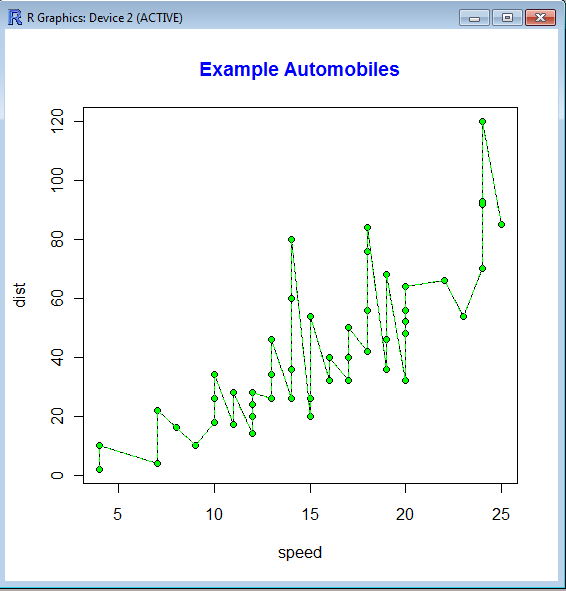
A line chart is one of the most commonly used charts in business analytics and metrics reporting. It basically consists of two variables plotted along the axes with the adjacent points being joined by line segments. Most often used with time series on the x-axis, line charts are simple to understand and use.
Variations on the line graph can include fan charts in time series which include joining line chart of historic data with ranges of future projections. Another common variation is to plot the linear regression or trend line between the two variables and superimpose it on the graph.
The slope of the line chart shows the rate of change at that particular point , and can also be used to highlight areas of discontinuity or irregular change between two variables.
The basic syntax of line graph is created by first using Plot() function to plot the points and then lines () function to plot the lines between the points.
A highly optimized blog post or web content can get you a lot of attention just like Rebecca Black’s video (provided it passes through the new quality metrics \change*/ in the Search Engine)
But if the underlying content is weak, or based on a shoddy understanding of the content-it can drive lots of horrid comments as well as ensuring that bad word of mouth is spread about the content or you/despite your hard work.
An example of this is copy and paste journalism especially in technology circles, where even a bigger Page Ranked website /blog can get away with scraping or stealing content from a lower page ranked website (or many websites) after adding a cursory “expert comment”. This is also true when someone who is basically a corporate communication specialist (or PR -public relations) person is given a techinical text and encourage to write about it without completely understanding it.
A mild technical defect in the search engine algorithm is that it does not seem to pay attention to when the content was published, so the copying website or blog actually can get by as fresher content even if it is practically has 90% of the same words). The second flaw is over punishment or manual punishment of excessive linking – this can encourage search optimization minded people to hoard links or discourage trackbacks.
A free internet is one which promotes free sharing of content and does not encourage stealing or un-authorized scraping or content copying. Unfortunately current search engine optimization can encourage scraping and content copying without paying too much attention to origin of the words.
In addition the analytical rigor by which search algorithms search your inboxes (as in search all emails for a keyword) or media rich sites (like Youtube) are quite on a different level of quality altogether. The chances of garbage results are much more while searching for media content and/or emails.
Some common analytical tasks from the diary of the glamorous life of a business analyst-
1) removing duplicates from a dataset based on certain key values/variables
2) merging two datasets based on a common key/variable/s
3) creating a subset based on a conditional value of a variable
4) creating a subset based on a conditional value of a time-date variable
5) changing format from one date time variable to another
6) doing a means grouped or classified at a level of aggregation
7) creating a new variable based on if then condition
8) creating a macro to run same program with different parameters
9) creating a logistic regression model, scoring dataset,
10) transforming variables
11) checking roc curves of model
12) splitting a dataset for a random sample (repeatable with random seed)
13) creating a cross tab of all variables in a dataset with one response variable
14) creating bins or ranks from a certain variable value
15) graphically examine cross tabs
16) histograms
17) plot(density())
18)creating a pie chart
19) creating a line graph, creating a bar graph
20) creating a bubbles chart
21) running a goal seek kind of simulation/optimization
22) creating a tabular report for multiple metrics grouped for one time/variable
23) creating a basic time series forecast
and some case studies I could think of-
As the Director, Analytics you have to examine current marketing efficiency as well as help optimize sales force efficiency across various channels. In addition you have to examine multiple sales channels including inbound telephone, outgoing direct mail, internet email campaigns. The datawarehouse is an RDBMS but it has multiple data quality issues to be checked for. In addition you need to submit your budget estimates for next year’s annual marketing budget to maximize sales return on investment.
As the Director, Risk you have to examine the overdue mortgages book that your predecessor left you. You need to optimize collections and minimize fraud and write-offs, and your efforts would be measured in maximizing profits from your department.
As a social media consultant you have been asked to maximize social media analytics and social media exposure to your client. You need to create a mechanism to report particular brand keywords, as well as automated triggers between unusual web activity, and statistical analysis of the website analytics metrics. Above all it needs to be set up in an automated reporting dashboard .
As a consultant to a telecommunication company you are asked to monitor churn and review the existing churn models. Also you need to maximize advertising spend on various channels. The problem is there are a large number of promotions always going on, some of the data is either incorrectly coded or there are interaction effects between the various promotions.
As a modeller you need to do the following-
1) Check ROC and H-L curves for existing model
2) Divide dataset in random splits of 40:60
3) Create multiple aggregated variables from the basic variables
4) run regression again and again
5) evaluate statistical robustness and fit of model
6) display results graphically
All these steps can be broken down in little little pieces of code- something which i am putting down a list of.
Are there any common data analysis tasks that you think I am missing out- any common case studies ? let me know.
Additional features in R over other analytical packages-
1) Source Code is given to ensure complete custom solution and embedding for a particular application. Open source code has an advantage that is extensively peer- reviewed in Journals and Scientific Literature. This means bugs will found, shared and corrected transparently.
2) Wide literature of training material in the form of books is available for the R analytical platform.
3) Extensively the best data visualization tools in analytical software (apart from Tableau Software ‘s latest version). The extensive data visualization available in R is of the form a variety of customizable graphs, as well as animation. The principal reason third-party software initially started creating interfaces to R is because the graphical library of packages in R is more advanced as well as rapidly getting more features by the day.
4) Free in upfront license cost for academics and thus budget friendly for small and large analytical teams.
5) Flexible programming for your data environment. This includes having packages that ensure compatibility with Java, Python and C++.
6) Easy migration from other analytical platforms to R Platform. It is relatively easy for a non R platform user to migrate to R platform and there is no danger of vendor lock-in due to the GPL nature of source code and open community.
Statistics are numbers that tell (descriptive), advise ( prescriptive) or forecast (predictive). Analytics is a decision-making help tool. Analytics on which no decision is to be made or is being considered can be classified as purely statistical and non analytical. Thus ease of making a correct decision separates a good analytical platform from a not so good analytical platform. The distinction is likely to be disputed by people of either background- and business analysis requires more emphasis on how practical or actionable the results are and less emphasis on the statistical metrics in a particular data analysis task. I believe one clear reason between business analytics is different from statistical analysis is the cost of perfect information (data costs in real world) and the opportunity cost of delayed and distorted decision-making.
Specific to the following domains R has the following costs and benefits
Business Analytics
R is free per license and for download
It is one of the few analytical platforms that work on Mac OS
It’s results are credibly established in both journals like Journal of Statistical Software and in the work at LinkedIn, Google and Facebook’s analytical teams.
It has open source code for customization as per GPL
It also has a flexible option for commercial vendors like Revolution Analytics (who support 64 bit windows) as well as bigger datasets
It has interfaces from almost all other analytical software including SAS,SPSS, JMP, Oracle Data Mining, Rapid Miner. Existing license holders can thus invoke and use R from within these software
Huge library of packages for regression, time series, finance and modeling
High quality data visualization packages
Data Mining
R as a computing platform is better suited to the needs of data mining as it has a vast array of packages covering standard regression, decision trees, association rules, cluster analysis, machine learning, neural networks as well as exotic specialized algorithms like those based on chaos models.
Flexibility in tweaking a standard algorithm by seeing the source code
The RATTLE GUI remains the standard GUI for Data Miners using R. It was created and developed in Australia.
Business Dashboards and Reporting
Business Dashboards and Reporting are an essential piece of Business Intelligence and Decision making systems in organizations. R offers data visualization through GGPLOT, and GUI like Deducer and Red-R can help even non R users create a metrics dashboard
For online Dashboards- R has packages like RWeb, RServe and R Apache- which in combination with data visualization packages offer powerful dashboard capabilities.
R can be combined with MS Excel using the R Excel package – to enable R capabilities to be imported within Excel. Thus a MS Excel user with no knowledge of R can use the GUI within the R Excel plug-in to use powerful graphical and statistical capabilities.
Additional factors to consider in your R installation-
There are some more choices awaiting you now-
1) Licensing Choices-Academic Version or Free Version or Enterprise Version of R
2) Operating System Choices-Which Operating System to choose from? Unix, Windows or Mac OS.
3) Operating system sub choice- 32- bit or 64 bit.
4) Hardware choices-Cost -benefit trade-offs for additional hardware for R. Choices between local ,cluster and cloud computing.
5) Interface choices-Command Line versus GUI? Which GUI to choose as the default start-up option?
6) Software component choice- Which packages to install? There are almost 3000 packages, some of them are complimentary, some are dependent on each other, and almost all are free.
7) Additional Software choices- Which additional software do you need to achieve maximum accuracy, robustness and speed of computing- and how to use existing legacy software and hardware for best complementary results with R.
1) Licensing Choices-
You can choose between two kinds of R installations – one is free and open source from http://r-project.org The other R installation is commercial and is offered by many vendors including Revolution Analytics. However there are other commercial vendors too.
Windows remains the most widely used operating system on this planet. If you are experienced in Windows based computing and are active on analytical projects- it would not make sense for you to move to other operating systems. This is also based on the fact that compatibility problems are minimum for Microsoft Windows and the help is extensively documented. However there may be some R packages that would not function well under Windows- if that happens a multiple operating system is your next option.
Enterprise R from Revolution Analytics- Enterprise R from Revolution Analytics has a complete R Development environment for Windows including the use of code snippets to make programming faster. Revolution is also expected to make a GUI available by 2011. Revolution Analytics claims several enhancements for it’s version of R including the use of optimized libraries for faster performance.
MacOS
Reasons for choosing MacOS remains its considerable appeal in aesthetically designed software- but MacOS is not a standard Operating system for enterprise systems as well as statistical computing. However open source R claims to be quite optimized and it can be used for existing Mac users. However there seem to be no commercially available versions of R available as of now for this operating system.
Linux
Ubuntu
Red Hat Enterprise Linux
Other versions of Linux
Linux is considered a preferred operating system by R users due to it having the same open source credentials-much better fit for all R packages and it’s customizability for big data analytics.
Ubuntu Linux is recommended for people making the transition to Linux for the first time. Ubuntu Linux had an marketing agreement with revolution Analytics for an earlier version of Ubuntu- and many R packages can installed in a straightforward way as Ubuntu/Debian packages are available. Red Hat Enterprise Linux is officially supported by Revolution Analytics for it’s enterprise module. Other versions of Linux popular are Open SUSE.
Multiple operating systems-
Virtualization vs Dual Boot-
You can also choose between having a VMware VM Player for a virtual partition on your computers that is dedicated to R based computing or having operating system choice at the startup or booting of your computer. A software program called wubi helps with the dual installation of Linux and Windows.
64 bit vs 32 bit – Given a choice between 32 bit versus 64 bit versions of the same operating system like Linux Ubuntu, the 64 bit version would speed up processing by an approximate factor of 2. However you need to check whether your current hardware can support 64 bit operating systems and if so- you may want to ask your Information Technology manager to upgrade atleast some operating systems in your analytics work environment to 64 bit operating systems.
Hardware choices- At the time of writing this book, the dominant computing paradigm is workstation computing followed by server-client computing. However with the introduction of cloud computing, netbooks, tablet PCs, hardware choices are much more flexible in 2011 than just a couple of years back.
Hardware costs are a significant cost to an analytics environment and are also remarkably depreciated over a short period of time. You may thus examine your legacy hardware, and your future analytical computing needs- and accordingly decide between the various hardware options available for R.
Unlike other analytical software which can charge by number of processors, or server pricing being higher than workstation pricing and grid computing pricing extremely high if available- R is well suited for all kinds of hardware environment with flexible costs. Given the fact that R is memory intensive (it limits the size of data analyzed to the RAM size of the machine unless special formats and /or chunking is used)- it depends on size of datasets used and number of concurrent users analyzing the dataset. Thus the defining issue is not R but size of the data being analyzed.
Local Computing- This is meant to denote when the software is installed locally. For big data the data to be analyzed would be stored in the form of databases.
Server version- Revolution Analytics has differential pricing for server -client versions but for the open source version it is free and the same for Server or Workstation versions.
Workstation
Cloud Computing- Cloud computing is defined as the delivery of data, processing, systems via remote computers. It is similar to server-client computing but the remote server (also called cloud) has flexible computing in terms of number of processors, memory, and data storage. Cloud computing in the form of public cloud enables people to do analytical tasks on massive datasets without investing in permanent hardware or software as most public clouds are priced on pay per usage. The biggest cloud computing provider is Amazon and many other vendors provide services on top of it. Google is also coming for data storage in the form of clouds (Google Storage), as well as using machine learning in the form of API (Google Prediction API)
Amazon
Google
Cluster-Grid Computing/Parallel processing- In order to build a cluster, you would need the RMpi and the SNOW packages, among other packages that help with parallel processing.
How much resources
RAM-Hard Disk-Processors- for workstation computing
Instances or API calls for cloud computing
Interface Choices
Command Line
GUI
Web Interfaces
Software Component Choices
R dependencies
Packages to install
Recommended Packages
Additional software choices
Additional legacy software
Optimizing your R based computing
Code Editors
Code Analyzers
Libraries to speed up R
citation- R Development Core Team (2010). R: A language and environment for statistical computing. R Foundation for Statistical Computing,Vienna, Austria. ISBN 3-900051-07-0, URL http://www.R-project.org.
In a world of experts-some questions to ask about China’s foreign policy , trade and military convergence
1) How can an increasingly rich 1.2 billion people accept a restricted internet, one child policies, and severe political restrictions/
2) How long can the Chinese respect for elders and ancestors be translated to a respect for the communist government? How do you measure the level of satisfaction?
3) Can ambitious Chinese Mandarins be motivated by career motives to act tougher than the country’s national interest demands?
4) Rare earth demand and supply curves? Clean energy investments versus climate change commitments graph?
5)Military- Metrics like Chinese Air Force flying hours per pilot, or submarine activity per annum?
As the Chinese supposedly said- May you live in interesting times
Occam’s razor (or Ockham’s razor[1]) is often expressed in Latin as the lex parsimoniae(translating to the law of parsimony, law of economy or law of succinctness). The principle is popularly summarized as “the simplest explanation is more likely the correct one.
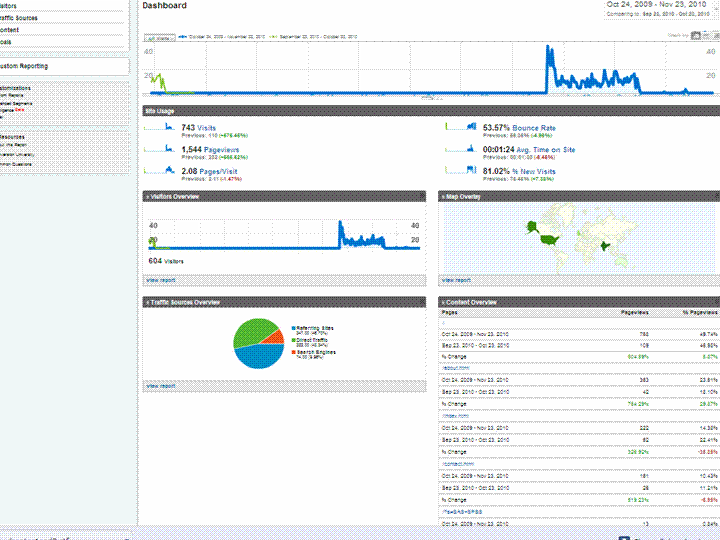
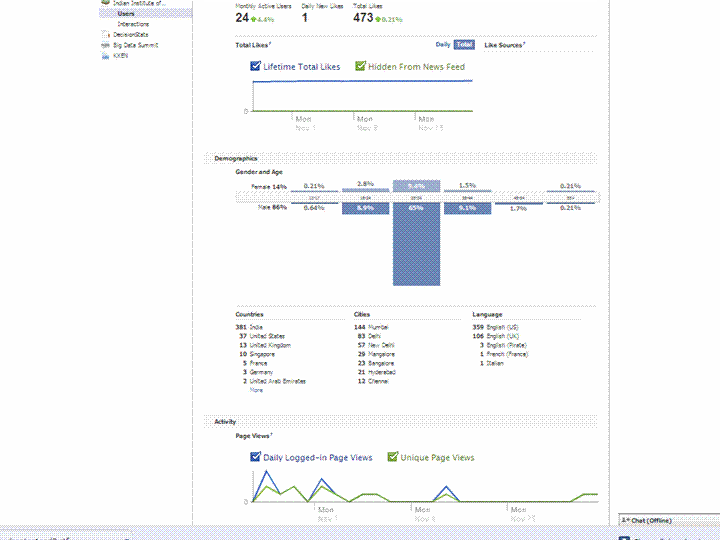
Using a simple screenshot- you can see Facebook Analytics for a Facebook page is simpler at explaining who is coming to visit rather than Google Analytics Dashboard (which has not seen the attention of a Visual UI or Graphic Redesign)
And if Facebook is going to take over the internet, well it is definitely giving better analytics in the process. What do you think?
Which Interface is simpler- and gives you better targeting. Ignore the numbers and just see the metrics measured and the way they are presented. Coincidently R is used at Facebook a lot (which has given the jjplot package)- and Google has NOT INVESTED MAJOR MONEY in creating Premium R Packages or Big Data Packages. I am talking investment at the scale Google is known for- not measly meetups.
(the summer of code dont count- it is for students mostly)
(but thanks for the Pizza G Men- and maybe revise that GA interface by putting a razor to some metrics)
Cisco SocialMiner is a social media customer care solution that can help you proactively respond to customers and prospects communicating through public social media networks like Twitter, Facebook, or other public forums or blogging sites. By providing social media monitoring, queuing, and workflow to organize customer posts on social media networks and deliver them to your social media customer care team, your company can respond to customers in real time using the same social network they are using.
Cisco SocialMiner provides:
The ability to configure multiple campaigns to search for customer postings on the public social web about your company’s products, services, or area of expertise
Filtering of social contacts based on preconfigured campaign filters to focus campaign searches
Routing of social contacts to skilled customer care representatives in the contact center or to experts in the enterprise–multiple people can work together to handle responses to customer postings through shared work queues
Detailed metrics for social media customer care activities, campaign reports, and team reports
With Cisco SocialMiner, your company can listen and respond to customer conversations originating in the social web. Being proactive can help your company enhance its service, improve customer loyalty, garner new customers, and protect your brand.
Table 1. Features and Benefits of Cisco SocialMiner 8.5
Feature
Benefits
Product Baseline Features
Social media feeds
• Feeds are configurable sources to capture public social contacts that contain specific words, terms, or phrases.
• Feeds enable you to search for information on the public social web about your company’s products, services, or area of expertise.
• Cisco SocialMiner supports the following types of feeds:
• Groups feeds into campaigns to organize all posting activity related to a product category or business objective
• Produces metrics on campaign activity
• Provides the ability to configure multiple campaigns to search for customer postings on specific products or services
• Groups social contacts for handling by the social media customer care team
• Enables filtering of social contacts based on preconfigured campaign filters to focus campaign searches
Route and queue social contacts
• Enables routing of social contacts to skilled customer care representatives in the contact center
• Draws on expertise in the enterprise by allowing multiple people in the enterprise to work together to handle responses to customer postings through shared work queues
• Enables automated distribution of work to improve efficiency and effectiveness of social media engagement
Tagging
• Allows work to be routed to the appropriate team by grouping each post or social contact into different categories; for example, a post can be marked with the “customer_support” tag; this post will then appear on a customer support agent’s queue for processing
Social media customer care metrics
• Provides detailed metrics on social media customer care activities, campaign reports, and team reports
• Measures work and results
• Manages to service-level goals
• Supports brand management
• Optimizes staffing
• Includes dashboarding of social media posting activity when Cisco Unified Intelligence Center is used
Reporting for social contacts
• Provides a reporting database that can be accessed using any reporting tool, including Cisco Unified Intelligence Center
• Enables customer care management to accurately report on and track social media interactions by the contact center
OpenSocial-compliant gadgets
Representational State Transfer (REST) application programming interfaces (APIs)
• Provides flexible user interface options
• Enables extensive opportunities for customization
Optional integration with full suite of Cisco Collaboration tools
• Allows you to take advantage of the full suite of Cisco Collaboration tools, including Cisco Quad, Cisco Show and Share, and Cisco Pulse technology, to help your social media customer care team quickly find answers to help customers efficiently and effectively
• Requires a Cisco UCS C-Series or B-Series Server.
• Server consolidation means lower cost per server with Cisco UCS Servers.
Architecture
Scalability
• One server supports up to 30 simultaneous social media customer care users and 10,000 social contacts per hour.
Management
Cisco Unified Real-Time Monitoring Tool (RTMT)
• Operational management is enhanced through integration with the Cisco Unified RTMT, providing consistent application monitoring across Cisco Unified Communications Solutions.
Simple Network Management Protocol (SNMP)
• SNMP with an associated MIB is supported through the Cisco Voice Operating System (VOS).
Reporting
Cisco Unified Intelligence Center
• Create customizable reports of social media customer care events using Cisco Unified Intelligence Center (purchased separately).

 An example of Time Series Forecasting graph or fan chart is http://addictedtor.free.fr/graphiques/RGraphGallery.php?graph=51



 DECISION STATS