Trying out Google Prediction API from R

Ubuntu Login
Image via Wikipedia

So I saw the news at NY R Meetup and decided to have a go at Prediction API Package (which first started off as a blog post at

http://onertipaday.blogspot.com/2010/11/r-wrapper-for-google-prediction-api.html

1)My OS was Ubuntu 10.10 Netbook

Ubuntu has a slight glitch plus workaround for installing the RCurl package on which the Google Prediction API is dependent- you need to first install this Ubuntu package for RCurl to install libcurl4-gnutls-dev

Once you install that using Synaptic,

Simply start R

2) Install Packages rjson and Rcurl using install.packages and choosing CRAN

Since GooglePredictionAPI is not yet on CRAN

,

3) Download that package from

https://code.google.com/p/google-prediction-api-r-client/downloads/detail?name=googlepredictionapi_0.1.tar.gz&can=2&q=

You need to copy this downloaded package to your “first library ” folder

When you start R, simply run

.libPaths()[1]

and thats the folder you copy the GooglePredictionAPI package  you downloaded.

5) Now the following line works

  1. Under R prompt,
  2. > install.packages("googlepredictionapi_0.1.tar.gz", repos=NULL, type="source")

6) Uploading data to Google Storage using the GUI (rather than gs util)

Just go to https://sandbox.google.com/storage/

and thats the Google Storage manager

Notes on Training Data-

Use a csv file

The first column is the score column (like 1,0 or prediction score)

There are no headers- so delete headers from data file and move the dependent variable to the first column  (Note I used data from the kaggle contest for R package recommendation at

http://kaggle.com/R?viewtype=data )

6) The good stuff:

Once you type in the basic syntax, the first time it will ask for your Google Credentials (email and password)

It then starts showing you time elapsed for training.

Now you can disconnect and go off (actually I got disconnected by accident before coming back in a say 5 minutes so this is the part where I think this is what happened is why it happened, dont blame me, test it for yourself) –

and when you come back (hopefully before token expires)  you can see status of your request (see below)

> library(rjson)
> library(RCurl)
Loading required package: bitops
> library(googlepredictionapi)
> my.model <- PredictionApiTrain(data="gs://numtraindata/training_data")
The request for training has sent, now trying to check if training is completed
Training on numtraindata/training_data: time:2.09 seconds
Training on numtraindata/training_data: time:7.00 seconds

7)

Note I changed the format from the URL where my data is located- simply go to your Google Storage Manager and right click on the file name for link address  ( https://sandbox.google.com/storage/numtraindata/training_data.csv)

to gs://numtraindata/training_data  (that kind of helps in any syntax error)

8) From the kind of high level instructions at  https://code.google.com/p/google-prediction-api-r-client/, you could also try this on a local file

Usage

## Load googlepredictionapi and dependent libraries
library(rjson)
library(RCurl)
library(googlepredictionapi)

## Make a training call to the Prediction API against data in the Google Storage.
## Replace MYBUCKET and MYDATA with your data.
my.model <- PredictionApiTrain(data="gs://MYBUCKET/MYDATA")

## Alternatively, make a training call against training data stored locally as a CSV file.
## Replace MYPATH and MYFILE with your data.
my.model <- PredictionApiTrain(data="MYPATH/MYFILE.csv")

At the time of writing my data was still getting trained, so I will keep you posted on what happens.

The Gospel as per WikiLeaks

Logo used by Wikileaks
Image via Wikipedia

– First Assume Nothing-

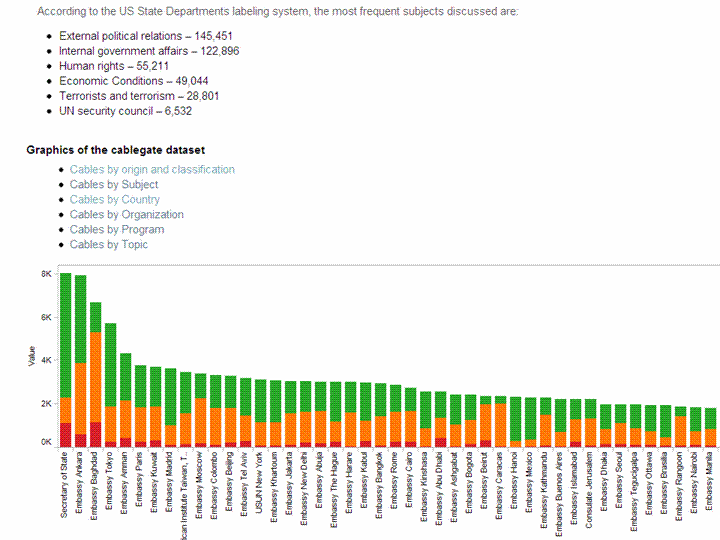
I would be very surprised if 260,000 documents and not even one was a counter-intelligence dis information move. Why was ALL the information stored in one place- maybe Wikileaks would leak the launch codes of the missiles next.

One more data visualization for Tableau– R watchers can not how jjplot by Facebook Analytics and Tableau are replacing GGPLOT 2 as visualization standards- (GGPLOT 2 needs a better GUI maybe using pyqt than the Deducer currently- maybe they can create GGPLOT extensions for Red R yet)

and yes stranger stupid things have happened in diplomacy and intelligence (like India exploding the nuclear bomb on exactly the same date and same place —-surprising CIA, but we are supposed to be on the same side atleast for the next decade) but it would be wrong not to cross reference the cables with the some verification.

Tableau gives great data viz though, but I dont think all 260,000 cables are valid data points (and boy they must really be regretting creating the internet at DARPA and DoD- but you can always blame Al Gore for that)

Who searches for this Blog?

Statue of Michael Jackson in Eindhoven, the Ne...
Image via Wikipedia

Using WP- Stats I set about answering this question-

What search keywords lead here-

Clearly Michael Jackson is down this year

And R GUI, Data Mining is up.

How does that affect my writing- given I get almost 250 visitors by search engines alone daily- assume I write nothing on this blog from now on.

It doesnt- I still write what ever code or poem that comes to my mind. So it is hurtful people misunderstimate the effort in writing and jump to conclusions (esp if I write about a company- I am not on payroll of that company- just like if  I write about a poem- I am not a full time poet)

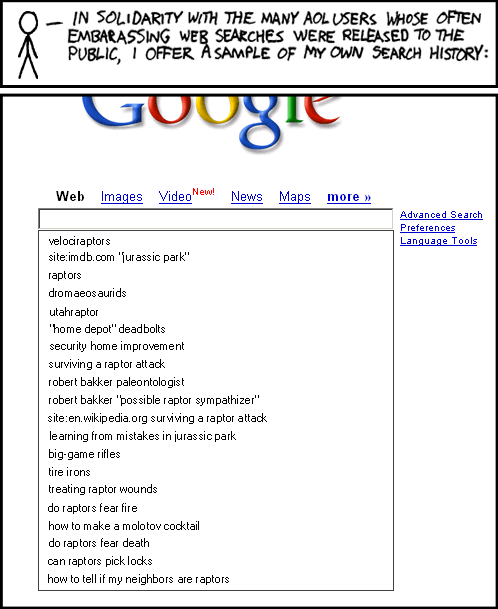
Over to xkcd

All Time (for Decisionstats.Wordpress.com)

Search Views
libre office 818
facebook analytics 806
michael jackson history 240
wps sas lawsuit 180
r gui 168
wps sas 154
wordle.net 118
sas wps 116
decision stats 110
sas wps lawsuit 100
google maps jet ski 94
data mining 88
doug savage 72
hive tutorial 63
spss certification 63
hadley wickham 63
google maps jetski 62
sas sues wps 60
decisionstats 58
donald farmer microsoft 45
libreoffice 44
wps statistics 44
best statistics software 42
r gui ubuntu 41
rstat 37
tamilnadu advanced technical training institute tatti 37

YTD

2009-11-24 to Today

Search Views
libre office 818
facebook analytics 781
wps sas lawsuit 170
r gui 164
wps sas 125
wordle.net 118
sas wps 101
sas wps lawsuit 95
google maps jet ski 94
data mining 86
decision stats 82
doug savage 63
hadley wickham 63
google maps jetski 62
hive tutorial 56
donald farmer microsoft 45

Message from RATTLE

Microsoft Windows Vista Wallpaper
Image by Brajeshwar via Flickr

A new release of the R GUI Rattle is making its way to CRAN (currently on the Austrian server).

Latest version 2.5.47 (revision 527) released 13 Nov 2010.

Change Log link for details –

http://cran.r-project.org/web/packages/rattle/index.html

Major changes relate to simplifying the installation of Rattle under the recently released R 2.12.0 on Microsoft Windows 32bit and 64bit.

The major advance for R 2.12.0 is the improved support for 64bit Microsoft Windows and thus support for much larger datasets in memory.

See the new installation steps at http://datamining.togaware.com/survivor/Internet_Connected.html

For Microsoft Windows installations, to upgrade your Rattle installation you may need to remove any old installs of the Gtk+ libraries using the Uninstall application from the Microsoft Windows Control Panel). Then install the new Gtk2 library:

http://downloads.sourceforge.net/gtk-win/gtk2-runtime-2.22.0-2010-10-21-ash.exe

You can the update Rattle to version 2.5.47:

> install.packages(“rattle“)

>library(rattle)

rattle.info()

The output from rattle.info() will include an “install.packages” command that will identify Rattle related packages that have updates available. You can cut-and-paste that command to the R prompt to have those packages updated in your installation.

Citation- From rattle-users@googlegroups.com

http://rattle.togaware.com/

Nice BI Tutorials

Tutorials screenshot.
Image via Wikipedia

Here is a set of very nice, screenshot enabled tutorials from SAP BI. They are a bit outdated (3 years old) but most of it is quite relevant- especially from a Tutorial Design Perspective –

Most people would rather see screenshot based step by step powerpoints, than cluttered or clever presentations , or even videos that force you to sit like a TV zombie. Unfortunately most tutorial presentations I see especially for BI are either slides with one or two points, that abruptly shift to “concepts” or videos that are atleast more than 10 minutes long. That works fine for scripting tutorials or hands on workshops, but cannot be reproduced for later instances of study.

The mode of tutorials especially for GUI software can vary, it may be Slideshare, Scribd, Google Presentation,Microsoft Powerpoint but a step by step screenshot by screenshot tutorial is much better for understanding than commando line jargon/ Youtub   Videos presentations, or Powerpoint with Points.

Have a look at these SAP BI 7 slideshares

and

Speaking of BI, the R Package called Brew is going to brew up something special especially combined with R Apache. However I wish R Apache, or R Web, or RServe had step by step install screenshot tutorials to increase their usage in Business Intelligence.

I tried searching for JMP GUI Tutorials too, but I believe putting all your content behind a registration wall is not so great. Do a Pareto Analysis of your training material, surely you can share a couple more tutorials without registration. It also will help new wanna-migrate users to get a test and feel for the installation complexities as well as final report GUI.


Doing Time Series using a R GUI

The Xerox Star Workstation introduced the firs...
Image via Wikipedia

Until recently I had been thinking that RKWard was the only R GUI supporting Time Series Models-

however Bob Muenchen of http://www.r4stats.com/ was helpful to point out that the Epack Plugin provides time series functionality to R Commander.

Note the GUI helps explore various time series functionality.

Using Bulkfit you can fit various ARMA models to dataset and choose based on minimum AIC


> bulkfit(AirPassengers$x)
$res
ar d ma      AIC
[1,]  0 0  0 1790.368
[2,]  0 0  1 1618.863
[3,]  0 0  2 1522.122
[4,]  0 1  0 1413.909
[5,]  0 1  1 1397.258
[6,]  0 1  2 1397.093
[7,]  0 2  0 1450.596
[8,]  0 2  1 1411.368
[9,]  0 2  2 1394.373
[10,]  1 0  0 1428.179
[11,]  1 0  1 1409.748
[12,]  1 0  2 1411.050
[13,]  1 1  0 1401.853
[14,]  1 1  1 1394.683
[15,]  1 1  2 1385.497
[16,]  1 2  0 1447.028
[17,]  1 2  1 1398.929
[18,]  1 2  2 1391.910
[19,]  2 0  0 1413.639
[20,]  2 0  1 1408.249
[21,]  2 0  2 1408.343
[22,]  2 1  0 1396.588
[23,]  2 1  1 1378.338
[24,]  2 1  2 1387.409
[25,]  2 2  0 1440.078
[26,]  2 2  1 1393.882
[27,]  2 2  2 1392.659
$min
ar        d       ma      AIC
2.000    1.000    1.000 1378.338
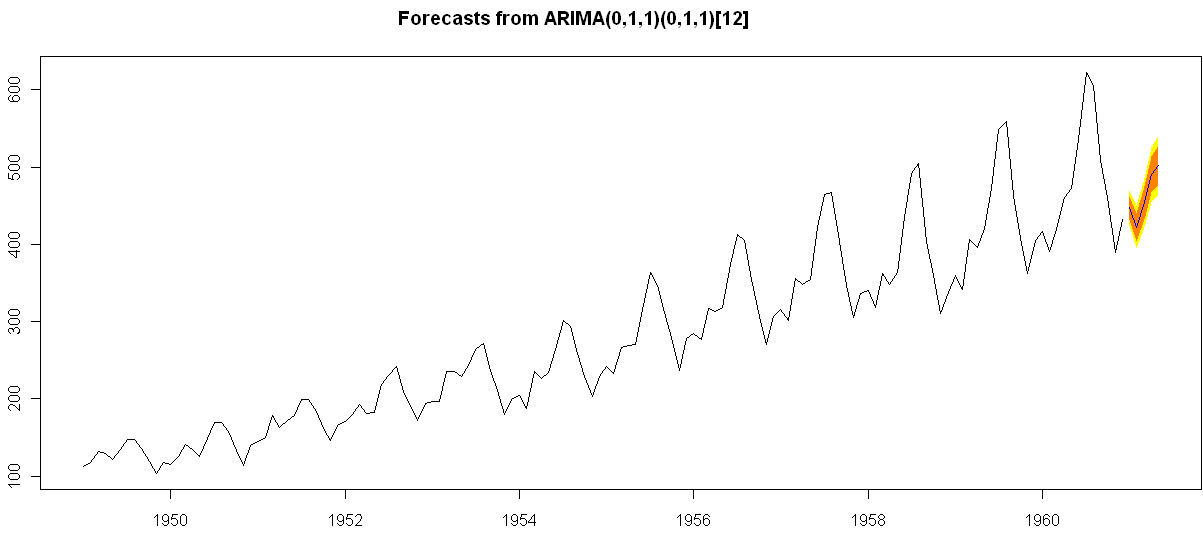
> ArimaModel.5 <- Arima(AirPassengers$x,order=c(0,1,1),
+ include.mean=1,
+   seasonal=list(order=c(0,1,1),period=12))
> ArimaModel.5
Series: AirPassengers$x
ARIMA(0,1,1)(0,1,1)[12]
Call: Arima(x = AirPassengers$x, order = c(0, 1, 1), seasonal = list(order = c(0,      1, 1), period = 12), include.mean = 1)
Coefficients:
ma1     sma1
-0.3087  -0.1074
s.e.   0.0890   0.0828
sigma^2 estimated as 135.4:  log likelihood = -507.5
AIC = 1021   AICc = 1021.19   BIC = 1029.63
> summary(ArimaModel.5, cor=FALSE)
Series: AirPassengers$x
ARIMA(0,1,1)(0,1,1)[12]
Call: Arima(x = AirPassengers$x, order = c(0, 1, 1), seasonal = list(order = c(0,      1, 1), period = 12), include.mean = 1)
Coefficients:
ma1     sma1
-0.3087  -0.1074
s.e.   0.0890   0.0828
sigma^2 estimated as 135.4:  log likelihood = -507.5
AIC = 1021   AICc = 1021.19   BIC = 1029.63
In-sample error measures:
ME        RMSE         MAE         MPE        MAPE        MASE
0.32355285 11.09952005  8.16242469  0.04409006  2.89713514  0.31563730
Dataset79 <- predar3(ArimaModel.5,fore1=5)


And I also found an interesting Ref Sheet for Time Series functions in R-

http://cran.r-project.org/doc/contrib/Ricci-refcard-ts.pdf

and a slightly more exhaustive time series ref card

http://www.statistische-woche-nuernberg-2010.org/lehre/bachelor/datenanalyse/Refcard3.pdf

Also of interest a matter of opinion on issues in Time Series Analysis in R at

http://www.stat.pitt.edu/stoffer/tsa2/Rissues.htm

Of course , if I was the sales manager for SAS ETS I would be worried given the increasing capabilities in Time Series in R. But then again some deficiencies in R GUI for Time Series-

1) Layout is not very elegant

2) Not enough documented help (atleast for the Epack GUI- and no integrated help ACROSS packages-)

3) Graphical capabilties need more help documentation to interpret the output (especially in ACF and PACF plots)

More resources on Time Series using R.

http://people.bath.ac.uk/masgs/time%20series/TimeSeriesR2004.pdf

and http://www.statoek.wiso.uni-goettingen.de/veranstaltungen/zeitreihen/sommer03/ts_r_intro.pdf

and books

http://www.springer.com/economics/econometrics/book/978-0-387-77316-2

http://www.springer.com/statistics/statistical+theory+and+methods/book/978-0-387-75960-9

http://www.springer.com/statistics/statistical+theory+and+methods/book/978-0-387-75958-6

http://www.springer.com/statistics/statistical+theory+and+methods/book/978-0-387-75966-1

Scoring SAS and SPSS Models in the cloud

Outline of a cloud containing text 'The Cloud'
Image via Wikipedia

An announcement from Zementis and Predixion Software– about using cloud computing for scoring models using PMML. Note R has a PMML package as well which is used by Rattle, data mining GUI for exporting models.

Source- http://www.marketwatch.com/story/predixion-software-introduces-new-product-to-run-sas-and-spss-predictive-models-in-the-cloud-2010-10-19?reflink=MW_news_stmp

——————————————————————————————————–

ALISO VIEJO, Calif., Oct 19, 2010 (BUSINESS WIRE) — Predixion Software today introduced Predixion PMML Connexion(TM), an interface that provides Predixion Insight(TM), the company’s low-cost, self-service in the cloud predictive analytics solution, direct and seamless access to SAS, SPSS (IBM) and other predictive models for use by Predixion Insight customers. Predixion PMML Connexion enables companies to leverage their significant investments in legacy predictive analytics solutions at a fraction of the cost of conventional licensing and maintenance fees.

The announcement was made at the Predictive Analytics World conference in Washington, D.C. where Predixion also announced a strategic partnership with Zementis, Inc., a market leader in PMML-based solutions. Zementis is exhibiting in Booth #P2.

The Predictive Model Markup Language (PMML) standard allows for true interoperability, offering a mature standard for moving predictive models seamlessly between platforms. Predixion has fully integrated this PMML functionality into Predixion Insight, meaning Predixion Insight users can now effortlessly import PMML-based predictive models, enabling information workers to score the models in the cloud from anywhere and publish reports using Microsoft Excel(R) and SharePoint(R). In addition, models can also be written back into SAS, SPSS and other platforms for a truly collaborative, interoperable solution.

“Predixion’s investment in this PMML interface makes perfect business sense as the lion’s share of the models in existence today are created by the SAS and SPSS platforms, creating compelling opportunity to leverage existing investments in predictive and statistical models on a low-cost cloud predictive analytics platform that can be fed with enterprise, line of business and cloud-based data,” said Mike Ferguson, CEO of Intelligent Business Strategies, a leading analyst and consulting firm specializing in the areas of business intelligence and enterprise business integration. “In this economy, Predixion’s low-cost, self-service predictive analytics solutions might be welcome relief to IT organizations chartered with quickly adding additional applications while at the same time cutting costs and staffing.”

“We are pleased to be partnering with Zementis, truly a PMML market leader and innovator,” said Predixion CEO Simon Arkell. “To allow any SAS or SPSS customer to immediately score any of their predictive models in the cloud from within Predixion Insight, compare those models to those created by Predixion Insight, and share the results within Excel and Sharepoint is an exciting step forward for the industry. SAS and SPSS customers are fed up with the high prices they must pay for their business users just to access reports generated by highly skilled PhDs who are burdened by performing routine tasks and thus have become a massive bottleneck. That frustration is now a thing of the past because any information worker can now unlock the power of predictive analytics without relying on experts — for a fraction of the cost and from anywhere they can connect to the cloud,” Arkell said.

Dr. Michael Zeller, Zementis CEO, added, “Our mission is to significantly shorten the time-to-market for predictive models in any industry. We are excited to be contributing to Predixion’s self-service, cloud-based predictive analytics solution set.”

About Predixion Software

Predixion Software develops and markets collaborative predictive analytics solutions in the public and private cloud. Predixion enables self-service predictive analytics, allowing customers to use and analyze large amounts of data to make actionable decisions, all within the familiar environment of Excel and PowerPivot. Predixion customers are achieving immediate results across a multitude of industries including: retail, finance, healthcare, marketing, telecommunications and insurance/risk management.

Predixion Software is headquartered in Aliso Viejo, California with development offices in Redmond, Washington. The company has venture capital backing from established investors including DFJ Frontier, Miramar Venture Partners and Palomar Ventures. For more information please contact us at 949-330-6540, or visit us atwww.predixionsoftware.com.

About Zementis

Zementis, Inc. is a leading software company focused on the operational deployment and integration of predictive analytics and data mining solutions. Its ADAPA(R) decision engine successfully bridges the gap between science and engineering. ADAPA(R) was designed from the ground up to benefit from open standards and to significantly shorten the time-to-market for predictive models in any industry. For more information, please visit www.zementis.com.