(to be continued- as I find more stuff I will keep it there, some ideas- database access from R, prominent R consultants, prominent R packages, famous R interviewees 😉 )
ps- The quote from Jerry Rubin seems funny for a while. I turn 34 this year.
R Commander Extensions: Enhancing a Statistical Graphical User Interface by extending menus to statistical packages
R Commander ( see paper by Prof J Fox at http://www.jstatsoft.org/v14/i09/paper ) is a well known and established graphical user interface to the R analytical environment.
While the original GUI was created for a basic statistics course, the enabling of extensions (or plug-ins http://www.r-project.org/doc/Rnews/Rnews_2007-3.pdf ) has greatly enhanced the possible use and scope of this software. Here we give a list of all known R Commander Plugins and their uses along with brief comments.
Note the naming convention for above e plugins is always with a Prefix of “RCmdrPlugin.” followed by the names above
Also on loading a Plugin, it must be already installed locally to be visible in R Commander’s list of load-plugin, and R Commander loads the e-plugin after restarting.Hence it is advisable to load all R Commander plugins in the beginning of the analysis session.
However the notable E Plugins are
1) DoE for Design of Experiments-
Full factorial designs, orthogonal main effects designs, regular and non-regular 2-level fractional
factorial designs, central composite and Box-Behnken designs, latin hypercube samples, and simple D-optimal designs can currently be generated from the GUI. Extensions to cover further latin hypercube designs as well as more advanced D-optimal designs (with blocking) are planned for the future.
2) Survival- This package provides an R Commander plug-in for the survival package, with dialogs for Cox models, parametric survival regression models, estimation of survival curves, and testing for differences in survival curves, along with data-management facilities and a variety of tests, diagnostics and graphs.
3) qcc -GUI for Shewhart quality control charts for continuous, attribute and count data. Cusum and EWMA charts. Operating characteristic curves. Process capability analysis. Pareto chart and cause-and-effect chart. Multivariate control charts
4) epack- an Rcmdr “plug-in” based on the time series functions. Depends also on packages like , tseries, abind,MASS,xts,forecast. It covers Log-Exceptions garch
and following Models -Arima, garch, HoltWinters
5)Export- The package helps users to graphically export Rcmdr output to LaTeX or HTML code,
via xtable() or Hmisc::latex(). The plug-in was originally intended to facilitate exporting Rcmdr
output to formats other than ASCII text and to provide R novices with an easy-to-use,
easy-to-access reference on exporting R objects to formats suited for printed output. The
package documentation contains several pointers on creating reports, either by using
conventional word processors or LaTeX/LyX.
6) MAc- This is an R-Commander plug-in for the MAc package (Meta-Analysis with
Correlations). This package enables the user to conduct a meta-analysis in a menu-driven,
graphical user interface environment (e.g., SPSS), while having the full statistical capabilities of
R and the MAc package. The MAc package itself contains a variety of useful functions for
conducting a research synthesis with correlational data. One of the unique features of the MAc
package is in its integration of user-friendly functions to complete the majority of statistical steps
involved in a meta-analysis with correlations. It uses recommended procedures as described in
The Handbook of Research Synthesis and Meta-Analysis (Cooper, Hedges, & Valentine, 2009).
A query to help for ??Rcmdrplugins reveals the following information which can be quite overwhelming given that almost 20 plugins are now available-
RcmdrPlugin.DoE::DoEGlossary
Glossary for DoE terminology as used in
RcmdrPlugin.DoE
RcmdrPlugin.DoE::Menu.linearModelDesign
RcmdrPlugin.DoE Linear Model Dialog for
experimental data
RcmdrPlugin.DoE::Menu.rsm
RcmdrPlugin.DoE response surface model Dialog
for experimental data
RcmdrPlugin.DoE::RcmdrPlugin.DoE-package
R-Commander plugin package that implements
design of experiments facilities from packages
DoE.base, FrF2 and DoE.wrapper into the
R-Commander
RcmdrPlugin.DoE::RcmdrPlugin.DoEUndocumentedFunctions
Functions used in menus
RcmdrPlugin.doex::ranblockAnova
Internal RcmdrPlugin.doex objects
RcmdrPlugin.doex::RcmdrPlugin.doex-package
Install the DOEX Rcmdr Plug-In
RcmdrPlugin.EHESsampling::OpenSampling1
Internal functions for menu system of
RcmdrPlugin.EHESsampling
RcmdrPlugin.EHESsampling::RcmdrPlugin.EHESsampling-package
Help with EHES sampling
RcmdrPlugin.Export::RcmdrPlugin.Export-package
Graphically export objects to LaTeX or HTML
RcmdrPlugin.FactoMineR::defmacro
Internal RcmdrPlugin.FactoMineR objects
RcmdrPlugin.FactoMineR::RcmdrPlugin.FactoMineR
Graphical User Interface for FactoMineR
RcmdrPlugin.IPSUR::IPSUR-package
An IPSUR Plugin for the R Commander
RcmdrPlugin.MAc::RcmdrPlugin.MAc-package
Meta-Analysis with Correlations (MAc) Rcmdr
Plug-in
RcmdrPlugin.MAd::RcmdrPlugin.MAd-package
Meta-Analysis with Mean Differences (MAd) Rcmdr
Plug-in
RcmdrPlugin.orloca::activeDataSetLocaP
RcmdrPlugin.orloca: A GUI for orloca-package
(internal functions)
RcmdrPlugin.orloca::RcmdrPlugin.orloca-package
RcmdrPlugin.orloca: A GUI for orloca-package
RcmdrPlugin.orloca::RcmdrPlugin.orloca.es
RcmdrPlugin.orloca.es: Una interfaz grafica
para el paquete orloca
RcmdrPlugin.qcc::RcmdrPlugin.qcc-package
Install the Demos Rcmdr Plug-In
RcmdrPlugin.qual::xbara
Internal RcmdrPlugin.qual objects
RcmdrPlugin.qual::RcmdrPlugin.qual-package
Install the quality Rcmdr Plug-In
RcmdrPlugin.SensoMineR::defmacro
Internal RcmdrPlugin.SensoMineR objects
RcmdrPlugin.SensoMineR::RcmdrPlugin.SensoMineR
Graphical User Interface for SensoMineR
RcmdrPlugin.SLC::Rcmdr.help.RcmdrPlugin.SLC
RcmdrPlugin.SLC: A GUI for slc-package
(internal functions)
RcmdrPlugin.SLC::RcmdrPlugin.SLC-package
RcmdrPlugin.SLC: A GUI for SLC R package
RcmdrPlugin.sos::RcmdrPlugin.sos-package
Efficiently search R Help pages
RcmdrPlugin.steepness::Rcmdr.help.RcmdrPlugin.steepness
RcmdrPlugin.steepness: A GUI for
steepness-package (internal functions)
RcmdrPlugin.steepness::RcmdrPlugin.steepness
RcmdrPlugin.steepness: A GUI for steepness R
package
RcmdrPlugin.survival::allVarsClusters
Internal RcmdrPlugin.survival Objects
RcmdrPlugin.survival::RcmdrPlugin.survival-package
Rcmdr Plug-In Package for the survival Package
RcmdrPlugin.TeachingDemos::RcmdrPlugin.TeachingDemos-package
Install the Demos Rcmdr Plug-In
Analyzing data can have many challenges associated with it. In the case of business analytics data, these challenges or constraints can have a marked effect on the quality and timeliness of the analysis as well as the expected versus actual payoff from the analytical results.
Challenges of Analytical Data Processing-
1) Data Formats- Reading in complete data, without losing any part (or meta data), or adding in superfluous details (that increase the scope). Technical constraints of data formats are relatively easy to navigate thanks to ODBC and well documented and easily search-able syntax and language.
The costs of additional data augmentation (should we pay for additional credit bureau data to be appended) , time of storing and processing the data (every column needed for analysis can add in as many rows as whole dataset, which can be a time enhancing problem if you are considering an extra 100 variables with a few million rows), but above all that of business relevance and quality guidelines will ensure basic data input and massaging are considerable parts of whole analytical project timeline.
2) Data Quality-Perfect data exists in a perfect world. The price of perfect information is one business will mostly never budget or wait for. To deliver inferences and results based on summaries of data which has missing, invalid, outlier data embedded within it makes the role of an analyst just as important as which ever tool is chosen to remove outliers, replace missing values, or treat invalid data.
3) Project Scope-
How much data? How much Analytical detail versus High Level Summary? Timelines for delivery as well as refresh of data analysis? Checks (statistical as well as business)?
How easy is it to load and implement the new analysis in existing Information Technology Infrastructure? These are some of the outer parameters that can limit both your analytical project scope, your analytical tool choice, and your processing methodology.
4) Output Results vis a vis stakeholder expectation management-
Stakeholders like to see results, not constraints, hypothesis ,assumptions , p-value, or chi -square value. Output results need to be streamlined to a decision management process to justify the investment of human time and effort in an analytical project, choice,training and navigating analytical tool complexities and constraints are subset of it. Optimum use of graphical display is a part of aligning results to a more palatable form to stakeholders, provided graphics are done nicely.
Eg Marketing wants to get more sales so they need a clear campaign, to target certain customers via specific channels with specified collateral. In order to base their business judgement, business analytics needs to validate , cross validate and sometimes invalidate this business decision making with clear transparent methods and processes.
Given a dataset- the basic analytical steps that an analyst will do with R are as follows. This is meant as a note for analysts at a beginner level with R.
Package -specific syntax
update.packages() #This updates all packages
install.packages(package1) #This installs a package locally, a one time event
library(package1) #This loads a specified package in the current R session, which needs to be done every R session
CRAN________LOCAL HARD DISK_________R SESSION is the top to bottom hierarchy of package storage and invocation.
ls() #This lists all objects or datasets currently active in the R session
> names(assetsCorr) #This gives the names of variables within a dataframe
[1] “AssetClass” “LargeStocksUS” “SmallStocksUS”
[4] “CorporateBondsUS” “TreasuryBondsUS” “RealEstateUS”
[7] “StocksCanada” “StocksUK” “StocksGermany”
[10] “StocksSwitzerland” “StocksEmergingMarkets”
> dim(assetsCorr) #gives dimensions observations and variable number
[1] 12 11
str(Dataset) – This gives the structure of the dataset (note structure gives both the names of variables within dataset as well as dimensions of the dataset)
head(dataset,n1) gives the first n1 rows of dataset while
tail(dataset,n2) gives the last n2 rows of a dataset where n1,n2 are numbers and dataset is the name of the object (here a data frame that is being considered)
summary(dataset) gives you a brief summary of all variables while
library(Hmisc)
describe(dataset) gives a detailed description on the variables
simple graphics can be given by
hist(Dataset1)
and
plot(Dataset1)
As you can see in above cases, there are multiple ways to get even basic analysis about data in R- however most of the syntax commands are intutively understood (like hist for histogram, t.test for t test, plot for plot).
For detailed analysis throughout the scope of analysis, for a business analytics user it is recommended to using multiple GUI, and multiple packages. Even for highly specific and specialized analytical tasks it is recommended to check for a GUI that incorporates the required package.
its going to be a more business analytics than a stats perspective ( I am a MBA /Mech Engineer)
and use cases would be business analytics cases. Do write to me if you need help doing some analytics in R (business use cases)- or want something featured. Big focus would be on GUI and easier analytics, using the Einsteinian principle to make things as simple as possible but no simpler)
My annual traffic to this blog was almost 99,000 . Add in additional views on networking sites plus the 400 plus RSS readers- so I can say traffic was 1,20,000 for 2010. Nice. Thanks for reading and hope it was worth your time. (this is a long post and will take almost 440 secs to read but the summary is just given)
My intent is either to inform you, give something useful or atleast something interesting.
see below-
Jan
Feb
Mar
Apr
May
Jun
2010
6,311
4,701
4,922
5,463
6,493
4,271
Jul
Aug
Sep
Oct
Nov
Dec
Total
5,041
5,403
17,913
16,430
11,723
10,096
98,767
Sandro Saita from http://www.dataminingblog.com/ just named me for an award on his blog (but my surname is ohRi , Sandro left me without an R- What would I be without R :)) ).
Aw! I am touched. Google for “Data Mining Blog” and Sandro is the best that it is in data mining writing.
”
DMR People Award 2010
There are a lot of active people in the field of data mining. You can discuss with them on forums. You can read their blogs. You can also meet them in events such as PAW or KDD. Among the people I follow on a regular basis, I have elected:
Ajay Ori
He has been very active in 2010, especially on his blog . Good work Ajay and continue sharing your experience with us!”
What did I write in 2010- stuff.
What did you read on this blog- well thats the top posts list.
well I guess I owe Tal G for almost 9000 views ( incidentally I withdrew posting my blog from R- Bloggers and Analyticbridge blogs – due to SEO keyword reasons and some spam I was getting see (below))
Still reading this post- gosh let me sell you some advertising. It is only $100 a month (yes its a recession)
Advertisers are treated on First in -Last out (FILO)
I have been told I am obsessed with SEO , but I dont care much for search engines apart from Google, and yes SEO is an interesting science (they should really re name it GEO or Google Engine Optimization)
Apparently Hadley Wickham and Donald Farmer are big keywords for me so I should be more respectful I guess.
Search Terms for 365 days ending 2010-12-31 (Summarized)
2009-12-31 to Today
Search
Views
libre office
925
facebook analytics
798
test drive a chrome notebook
467
test drive a chrome notebook.
215
r gui
203
data mining
163
wps sas lawsuit
158
wordle.net
133
wps sas
123
google maps jet ski
123
test drive chrome notebook
96
sas wps
89
sas wps lawsuit
85
chrome notebook test drive
83
decision stats
83
best statistics software
74
hadley wickham
72
google maps jetski
72
libreoffice
70
doug savage
65
hive tutorial
58
funny india
56
spss certification
52
donald farmer microsoft
51
best statistical software
49
What about outgoing links? Apparently I need to find a way to ask Google to pay me for the free advertising I gave their chrome notebook launch. But since their search engine and browser is free to me, guess we are even steven.
Clicks for 365 days ending 2010-12-31 (Summarized)
The only issue is Rattle can be quite difficult to install due to dependencies on GTK+
After fiddling for a couple of years- this is what I did
1) Created dual boot OS- Basically downloaded the netbook remix from http://ubuntu.com I created a dual boot OS so you can choose at the beginning whether to use Windows or Ubuntu Linux in that session. Alternatively you can download VM Player www.vmware.com/products/player/ if you want to do both
2) Download R packages using Ubuntu packages and Install GTK+ dependencies before that.
GTK + Requires
Libglade
Glib
Cairo
Pango
ATK
If you are a Linux newbie like me who doesnt get the sudo apt get, tar, cd, make , install rigmarole – scoot over to synaptic software packages or just the main ubuntu software centre and download these packages one by one.
For R Dependencies, you need
PMML
XML
RGTK2
Again use r-cran as the prefix to these package names and simply install (almost the same way Windows does it easily -double click)
Save theses to your hard disk (e.g., to your Desktop) but don’t extract them. Then, on GNU/Linux run the install command shown below. This command is entered into a terminal window:
R CMD INSTALL rattle_2.6.0.tar.gz
After installation-
5) Type library(rattle) and rattle.info to get messages on what R packages to update for a proper functioning
</code>

> library(rattle)
Rattle: Graphical interface for data mining using R.
Version 2.6.0 Copyright (c) 2006-2010 Togaware Pty Ltd.
Type 'rattle()' to shake, rattle, and roll your data.
> rattle.info()
Rattle: version 2.6.0
R: version 2.11.1 (2010-05-31) (Revision 52157)

Sysname: Linux
Release: 2.6.35-23-generic
Version: #41-Ubuntu SMP Wed Nov 24 10:18:49 UTC 2010
Nodename: k1-M725R
Machine: i686
Login: k1ng
User: k1ng

Installed Dependencies
RGtk2: version 2.20.3
pmml: version 1.2.26
colorspace: version 1.0-1
cairoDevice: version 2.14
doBy: version 4.1.2
e1071: version 1.5-24
ellipse: version 0.3-5
foreign: version 0.8-41
gdata: version 2.8.1
gtools: version 2.6.2
gplots: version 2.8.0
gWidgetsRGtk2: version 0.0-69
Hmisc: version 3.8-3
kernlab: version 0.9-12
latticist: version 0.9-43
Matrix: version 0.999375-46
mice: version 2.4
network: version 1.5-1
nnet: version 7.3-1
party: version 0.9-99991
playwith: version 0.9-53
randomForest: version 4.5-36 upgrade available 4.6-2
rggobi: version 2.1.16
survival: version 2.36-2
XML: version 3.2-0
bitops: version 1.0-4.1

Upgrade the packages with:

 > install.packages(c("randomForest"))

<code>
Now upgrade whatever package rattle.info tells to upgrade.
This is much simpler and less frustrating than some of the other ways to install Rattle.
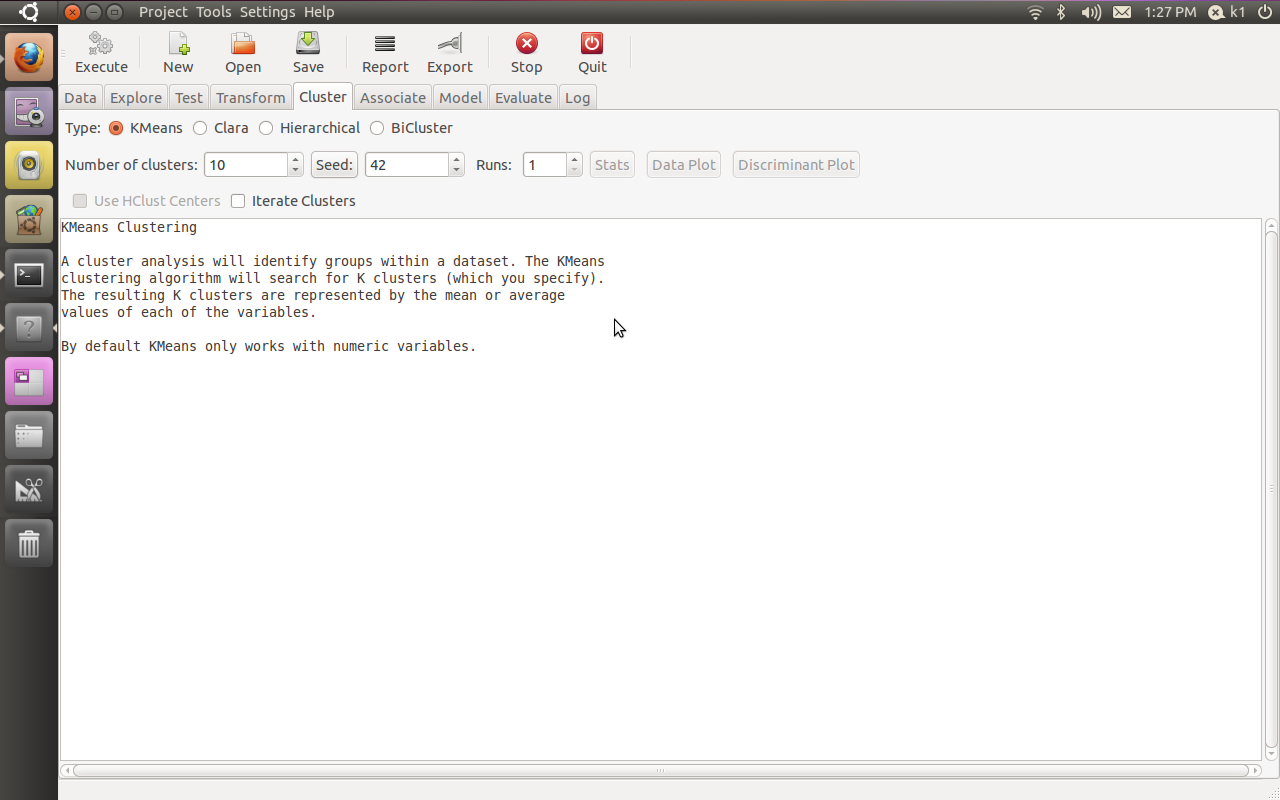
If all goes well, you will see this familiar screen popup when you type
Additional features in R over other analytical packages-
1) Source Code is given to ensure complete custom solution and embedding for a particular application. Open source code has an advantage that is extensively peer- reviewed in Journals and Scientific Literature. This means bugs will found, shared and corrected transparently.
2) Wide literature of training material in the form of books is available for the R analytical platform.
3) Extensively the best data visualization tools in analytical software (apart from Tableau Software ‘s latest version). The extensive data visualization available in R is of the form a variety of customizable graphs, as well as animation. The principal reason third-party software initially started creating interfaces to R is because the graphical library of packages in R is more advanced as well as rapidly getting more features by the day.
4) Free in upfront license cost for academics and thus budget friendly for small and large analytical teams.
5) Flexible programming for your data environment. This includes having packages that ensure compatibility with Java, Python and C++.
6) Easy migration from other analytical platforms to R Platform. It is relatively easy for a non R platform user to migrate to R platform and there is no danger of vendor lock-in due to the GPL nature of source code and open community.
Statistics are numbers that tell (descriptive), advise ( prescriptive) or forecast (predictive). Analytics is a decision-making help tool. Analytics on which no decision is to be made or is being considered can be classified as purely statistical and non analytical. Thus ease of making a correct decision separates a good analytical platform from a not so good analytical platform. The distinction is likely to be disputed by people of either background- and business analysis requires more emphasis on how practical or actionable the results are and less emphasis on the statistical metrics in a particular data analysis task. I believe one clear reason between business analytics is different from statistical analysis is the cost of perfect information (data costs in real world) and the opportunity cost of delayed and distorted decision-making.
Specific to the following domains R has the following costs and benefits
Business Analytics
R is free per license and for download
It is one of the few analytical platforms that work on Mac OS
It’s results are credibly established in both journals like Journal of Statistical Software and in the work at LinkedIn, Google and Facebook’s analytical teams.
It has open source code for customization as per GPL
It also has a flexible option for commercial vendors like Revolution Analytics (who support 64 bit windows) as well as bigger datasets
It has interfaces from almost all other analytical software including SAS,SPSS, JMP, Oracle Data Mining, Rapid Miner. Existing license holders can thus invoke and use R from within these software
Huge library of packages for regression, time series, finance and modeling
High quality data visualization packages
Data Mining
R as a computing platform is better suited to the needs of data mining as it has a vast array of packages covering standard regression, decision trees, association rules, cluster analysis, machine learning, neural networks as well as exotic specialized algorithms like those based on chaos models.
Flexibility in tweaking a standard algorithm by seeing the source code
The RATTLE GUI remains the standard GUI for Data Miners using R. It was created and developed in Australia.
Business Dashboards and Reporting
Business Dashboards and Reporting are an essential piece of Business Intelligence and Decision making systems in organizations. R offers data visualization through GGPLOT, and GUI like Deducer and Red-R can help even non R users create a metrics dashboard
For online Dashboards- R has packages like RWeb, RServe and R Apache- which in combination with data visualization packages offer powerful dashboard capabilities.
R can be combined with MS Excel using the R Excel package – to enable R capabilities to be imported within Excel. Thus a MS Excel user with no knowledge of R can use the GUI within the R Excel plug-in to use powerful graphical and statistical capabilities.
Additional factors to consider in your R installation-
There are some more choices awaiting you now-
1) Licensing Choices-Academic Version or Free Version or Enterprise Version of R
2) Operating System Choices-Which Operating System to choose from? Unix, Windows or Mac OS.
3) Operating system sub choice- 32- bit or 64 bit.
4) Hardware choices-Cost -benefit trade-offs for additional hardware for R. Choices between local ,cluster and cloud computing.
5) Interface choices-Command Line versus GUI? Which GUI to choose as the default start-up option?
6) Software component choice- Which packages to install? There are almost 3000 packages, some of them are complimentary, some are dependent on each other, and almost all are free.
7) Additional Software choices- Which additional software do you need to achieve maximum accuracy, robustness and speed of computing- and how to use existing legacy software and hardware for best complementary results with R.
1) Licensing Choices-
You can choose between two kinds of R installations – one is free and open source from http://r-project.org The other R installation is commercial and is offered by many vendors including Revolution Analytics. However there are other commercial vendors too.
Windows remains the most widely used operating system on this planet. If you are experienced in Windows based computing and are active on analytical projects- it would not make sense for you to move to other operating systems. This is also based on the fact that compatibility problems are minimum for Microsoft Windows and the help is extensively documented. However there may be some R packages that would not function well under Windows- if that happens a multiple operating system is your next option.
Enterprise R from Revolution Analytics- Enterprise R from Revolution Analytics has a complete R Development environment for Windows including the use of code snippets to make programming faster. Revolution is also expected to make a GUI available by 2011. Revolution Analytics claims several enhancements for it’s version of R including the use of optimized libraries for faster performance.
MacOS
Reasons for choosing MacOS remains its considerable appeal in aesthetically designed software- but MacOS is not a standard Operating system for enterprise systems as well as statistical computing. However open source R claims to be quite optimized and it can be used for existing Mac users. However there seem to be no commercially available versions of R available as of now for this operating system.
Linux
Ubuntu
Red Hat Enterprise Linux
Other versions of Linux
Linux is considered a preferred operating system by R users due to it having the same open source credentials-much better fit for all R packages and it’s customizability for big data analytics.
Ubuntu Linux is recommended for people making the transition to Linux for the first time. Ubuntu Linux had an marketing agreement with revolution Analytics for an earlier version of Ubuntu- and many R packages can installed in a straightforward way as Ubuntu/Debian packages are available. Red Hat Enterprise Linux is officially supported by Revolution Analytics for it’s enterprise module. Other versions of Linux popular are Open SUSE.
Multiple operating systems-
Virtualization vs Dual Boot-
You can also choose between having a VMware VM Player for a virtual partition on your computers that is dedicated to R based computing or having operating system choice at the startup or booting of your computer. A software program called wubi helps with the dual installation of Linux and Windows.
64 bit vs 32 bit – Given a choice between 32 bit versus 64 bit versions of the same operating system like Linux Ubuntu, the 64 bit version would speed up processing by an approximate factor of 2. However you need to check whether your current hardware can support 64 bit operating systems and if so- you may want to ask your Information Technology manager to upgrade atleast some operating systems in your analytics work environment to 64 bit operating systems.
Hardware choices- At the time of writing this book, the dominant computing paradigm is workstation computing followed by server-client computing. However with the introduction of cloud computing, netbooks, tablet PCs, hardware choices are much more flexible in 2011 than just a couple of years back.
Hardware costs are a significant cost to an analytics environment and are also remarkably depreciated over a short period of time. You may thus examine your legacy hardware, and your future analytical computing needs- and accordingly decide between the various hardware options available for R.
Unlike other analytical software which can charge by number of processors, or server pricing being higher than workstation pricing and grid computing pricing extremely high if available- R is well suited for all kinds of hardware environment with flexible costs. Given the fact that R is memory intensive (it limits the size of data analyzed to the RAM size of the machine unless special formats and /or chunking is used)- it depends on size of datasets used and number of concurrent users analyzing the dataset. Thus the defining issue is not R but size of the data being analyzed.
Local Computing- This is meant to denote when the software is installed locally. For big data the data to be analyzed would be stored in the form of databases.
Server version- Revolution Analytics has differential pricing for server -client versions but for the open source version it is free and the same for Server or Workstation versions.
Workstation
Cloud Computing- Cloud computing is defined as the delivery of data, processing, systems via remote computers. It is similar to server-client computing but the remote server (also called cloud) has flexible computing in terms of number of processors, memory, and data storage. Cloud computing in the form of public cloud enables people to do analytical tasks on massive datasets without investing in permanent hardware or software as most public clouds are priced on pay per usage. The biggest cloud computing provider is Amazon and many other vendors provide services on top of it. Google is also coming for data storage in the form of clouds (Google Storage), as well as using machine learning in the form of API (Google Prediction API)
Amazon
Google
Cluster-Grid Computing/Parallel processing- In order to build a cluster, you would need the RMpi and the SNOW packages, among other packages that help with parallel processing.
How much resources
RAM-Hard Disk-Processors- for workstation computing
Instances or API calls for cloud computing
Interface Choices
Command Line
GUI
Web Interfaces
Software Component Choices
R dependencies
Packages to install
Recommended Packages
Additional software choices
Additional legacy software
Optimizing your R based computing
Code Editors
Code Analyzers
Libraries to speed up R
citation- R Development Core Team (2010). R: A language and environment for statistical computing. R Foundation for Statistical Computing,Vienna, Austria. ISBN 3-900051-07-0, URL http://www.R-project.org.



 r-bloggers.com
 Reddit
 Twitter
 Google
 en.wordpress.com
 xianblog.wordpress.com

 DECISION STATS