Protovis composes custom views of data with simple marks such as bars and dots. Unlike low-level graphics libraries that quickly become tedious for visualization, Protovis defines marks through dynamic properties that encode data, allowing inheritance, scales and layouts to simplify construction.
Protovis is free and open-source and is a Stanford project. It has been used in web interface R Node (which I will talk later )
While Protovis is designed for custom visualization, it is still easy to create many standard chart types. These simpler examples serve as an introduction to the language, demonstrating key abstractions such as quantitative and ordinal scales, while hinting at more advanced features, including stack layout.
Many charting libraries provide stock chart designs, but offer only limited customization; Protovis excels at custom visualization design through a concise representation and precise control over graphical marks. These examples, including a few recreations of unusual historical designs, demonstrate the language’s expressiveness.
It uses JavaScript and SVG for web-native visualizations; no plugin required (though you will need a modern web browser)! Although programming experience is helpful, Protovis is mostly declarative and designed to be learned by example.
GrapheR is a Graphical User Interface created for simple graphs.
Depends: R (>= 2.10.0), tcltk, mgcv Description: GrapheR is a multiplatform user interface for drawing highly customizable graphs in R. It aims to be a valuable help to quickly draw publishable graphs without any knowledge of R commands. Six kinds of graphs are available: histogram, box-and-whisker plot, bar plot, pie chart, curve and scatter plot. License: GPL-2 LazyLoad: yes Packaged: 2011-01-24 17:47:17 UTC; Maxime Repository: CRAN Date/Publication: 2011-01-24 18:41:47
It is bi-lingual (English and French) and can import in text and csv files
The intention is for even non users of R, to make the simple types of Graphs.
The user interface is quite cleanly designed. It is thus aimed as a data visualization GUI, but for a more basic level than Deducer.
Easy to rename axis ,graph titles as well use sliders for changing line thickness and color
Disadvantages of using GrapheR
Lack of documentation or help. Especially tips on mouseover of some options should be done.
Some of the terms like absicca or ordinate axis may not be easily understood by a business user.
Default values of color are quite plain (black font on white background).
Can flood terminal with lots of repetitive warnings (although use of warnings() function limits it to top 50)
Some of axis names can be auto suggested based on which variable s being chosen for that axis.
Package name GrapheR refers to a graphical calculator in Mac OS – this can hinder search engine results
Using GrapheR
Data Input -Data Input can be customized for CSV and Text files.
GrapheR gives information on loaded variables (numeric versus Factors)
It asks you to choose the type of Graph
It then asks for usual Graph Inputs (see below). Note colors can be customized (partial window). Also number of graphs per Window can be easily customized
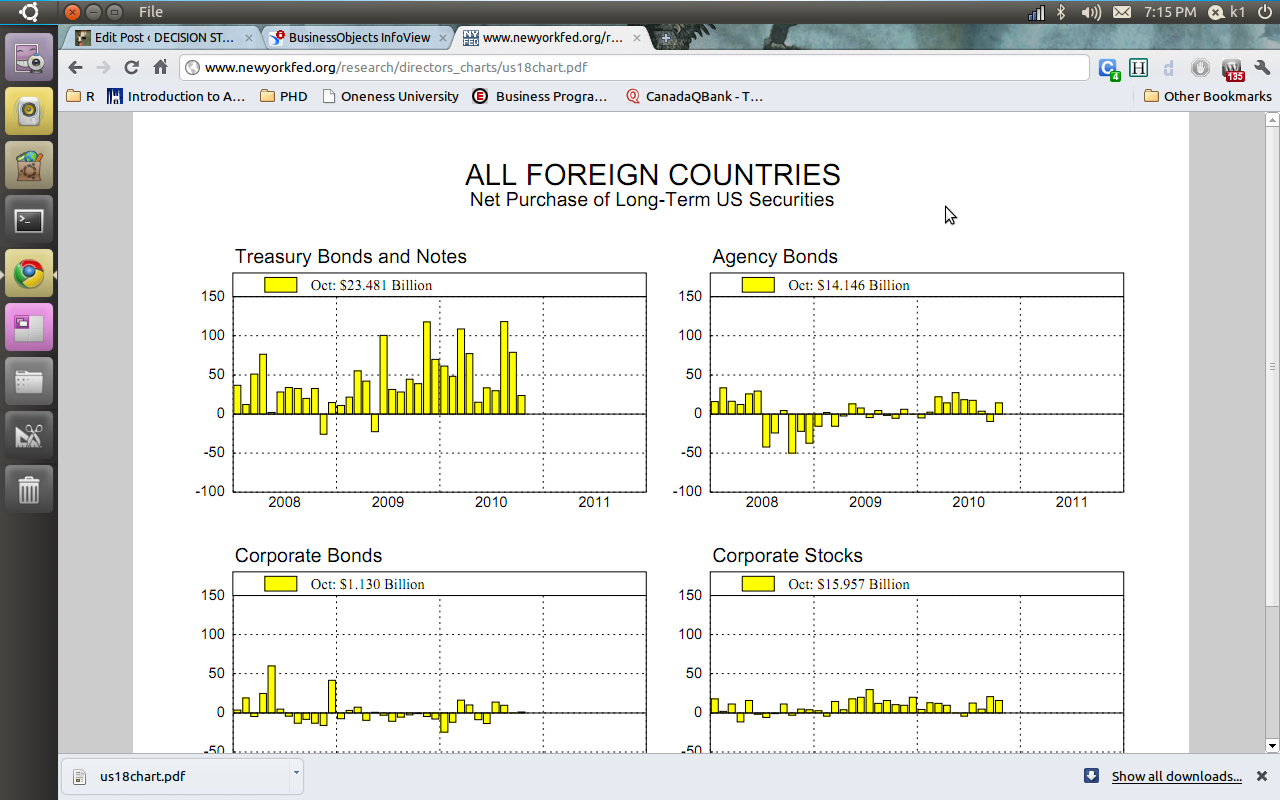
2) The Reserve bank of India choose Business Objects and gives you a proper drilldown kind of graph and tables. ( thats a lot of heavy metal and iron ore China needs from India 😉 😉
You can see the screenshots of the various visualization tools of the New York Fed Reserve Bank and Indian Reserve Bank- if the US Fed is serious about cutting the debt maybe it should start publishing better visuals
My annual traffic to this blog was almost 99,000 . Add in additional views on networking sites plus the 400 plus RSS readers- so I can say traffic was 1,20,000 for 2010. Nice. Thanks for reading and hope it was worth your time. (this is a long post and will take almost 440 secs to read but the summary is just given)
My intent is either to inform you, give something useful or atleast something interesting.
see below-
Jan
Feb
Mar
Apr
May
Jun
2010
6,311
4,701
4,922
5,463
6,493
4,271
Jul
Aug
Sep
Oct
Nov
Dec
Total
5,041
5,403
17,913
16,430
11,723
10,096
98,767
Sandro Saita from http://www.dataminingblog.com/ just named me for an award on his blog (but my surname is ohRi , Sandro left me without an R- What would I be without R :)) ).
Aw! I am touched. Google for “Data Mining Blog” and Sandro is the best that it is in data mining writing.
”
DMR People Award 2010
There are a lot of active people in the field of data mining. You can discuss with them on forums. You can read their blogs. You can also meet them in events such as PAW or KDD. Among the people I follow on a regular basis, I have elected:
Ajay Ori
He has been very active in 2010, especially on his blog . Good work Ajay and continue sharing your experience with us!”
What did I write in 2010- stuff.
What did you read on this blog- well thats the top posts list.
well I guess I owe Tal G for almost 9000 views ( incidentally I withdrew posting my blog from R- Bloggers and Analyticbridge blogs – due to SEO keyword reasons and some spam I was getting see (below))
Still reading this post- gosh let me sell you some advertising. It is only $100 a month (yes its a recession)
Advertisers are treated on First in -Last out (FILO)
I have been told I am obsessed with SEO , but I dont care much for search engines apart from Google, and yes SEO is an interesting science (they should really re name it GEO or Google Engine Optimization)
Apparently Hadley Wickham and Donald Farmer are big keywords for me so I should be more respectful I guess.
Search Terms for 365 days ending 2010-12-31 (Summarized)
2009-12-31 to Today
Search
Views
libre office
925
facebook analytics
798
test drive a chrome notebook
467
test drive a chrome notebook.
215
r gui
203
data mining
163
wps sas lawsuit
158
wordle.net
133
wps sas
123
google maps jet ski
123
test drive chrome notebook
96
sas wps
89
sas wps lawsuit
85
chrome notebook test drive
83
decision stats
83
best statistics software
74
hadley wickham
72
google maps jetski
72
libreoffice
70
doug savage
65
hive tutorial
58
funny india
56
spss certification
52
donald farmer microsoft
51
best statistical software
49
What about outgoing links? Apparently I need to find a way to ask Google to pay me for the free advertising I gave their chrome notebook launch. But since their search engine and browser is free to me, guess we are even steven.
Clicks for 365 days ending 2010-12-31 (Summarized)
Here is a terrific data visualization from Google based on their digitized books collection. How does it work, basically you can test the frequency of various words across time periods from 1700s to 2010.
Like the frequency and intensity of kung fu vs yoga, or pizza versus hot dog. The basic datasets scans millions /billions of words.
When you enter phrases into the Google Books Ngram Viewer, it displays a graph showing how those phrases have occurred in a corpus of books (e.g., “British English”, “English Fiction”, “French”) over the selected years. Let’s look at a sample graph:
This shows trends in three ngrams from 1950 to 2000: “nursery school” (a 2-gram or bigram), “kindergarten” (a 1-gram or unigram), and “child care” (another bigram). What the y-axis shows is this: of all the bigrams contained in our sample of books written in English and published in the United States, what percentage of them are “nursery school” or “child care”? Of all the unigrams, what percentage of them are “kindergarten”? Here, you can see that use of the phrase “child care” started to rise in the late 1960s, overtaking “nursery school” around 1970 and then “kindergarten” around 1973. It peaked shortly after 1990 and has been falling steadily since.
(Interestingly, the results are noticeably different when the corpus is switched to British English.)
Corpora
Below are descriptions of the corpora that can be searched with the Google Books Ngram Viewer. All of these corpora were generated in July 2009; we will update these corpora as our book scanning continues, and the updated versions will have distinct persistent identifiers.
Informal corpus name
Persistent identifier
Description
American English
googlebooks-eng-us-all-20090715
Same filtering as the English corpus but further restricted to books published in the United States.
British English
googlebooks-eng-gb-all-20090715
Same filtering as the English corpus but further restricted to books published in Great Britain.
Additional features in R over other analytical packages-
1) Source Code is given to ensure complete custom solution and embedding for a particular application. Open source code has an advantage that is extensively peer- reviewed in Journals and Scientific Literature. This means bugs will found, shared and corrected transparently.
2) Wide literature of training material in the form of books is available for the R analytical platform.
3) Extensively the best data visualization tools in analytical software (apart from Tableau Software ‘s latest version). The extensive data visualization available in R is of the form a variety of customizable graphs, as well as animation. The principal reason third-party software initially started creating interfaces to R is because the graphical library of packages in R is more advanced as well as rapidly getting more features by the day.
4) Free in upfront license cost for academics and thus budget friendly for small and large analytical teams.
5) Flexible programming for your data environment. This includes having packages that ensure compatibility with Java, Python and C++.
6) Easy migration from other analytical platforms to R Platform. It is relatively easy for a non R platform user to migrate to R platform and there is no danger of vendor lock-in due to the GPL nature of source code and open community.
Statistics are numbers that tell (descriptive), advise ( prescriptive) or forecast (predictive). Analytics is a decision-making help tool. Analytics on which no decision is to be made or is being considered can be classified as purely statistical and non analytical. Thus ease of making a correct decision separates a good analytical platform from a not so good analytical platform. The distinction is likely to be disputed by people of either background- and business analysis requires more emphasis on how practical or actionable the results are and less emphasis on the statistical metrics in a particular data analysis task. I believe one clear reason between business analytics is different from statistical analysis is the cost of perfect information (data costs in real world) and the opportunity cost of delayed and distorted decision-making.
Specific to the following domains R has the following costs and benefits
Business Analytics
R is free per license and for download
It is one of the few analytical platforms that work on Mac OS
It’s results are credibly established in both journals like Journal of Statistical Software and in the work at LinkedIn, Google and Facebook’s analytical teams.
It has open source code for customization as per GPL
It also has a flexible option for commercial vendors like Revolution Analytics (who support 64 bit windows) as well as bigger datasets
It has interfaces from almost all other analytical software including SAS,SPSS, JMP, Oracle Data Mining, Rapid Miner. Existing license holders can thus invoke and use R from within these software
Huge library of packages for regression, time series, finance and modeling
High quality data visualization packages
Data Mining
R as a computing platform is better suited to the needs of data mining as it has a vast array of packages covering standard regression, decision trees, association rules, cluster analysis, machine learning, neural networks as well as exotic specialized algorithms like those based on chaos models.
Flexibility in tweaking a standard algorithm by seeing the source code
The RATTLE GUI remains the standard GUI for Data Miners using R. It was created and developed in Australia.
Business Dashboards and Reporting
Business Dashboards and Reporting are an essential piece of Business Intelligence and Decision making systems in organizations. R offers data visualization through GGPLOT, and GUI like Deducer and Red-R can help even non R users create a metrics dashboard
For online Dashboards- R has packages like RWeb, RServe and R Apache- which in combination with data visualization packages offer powerful dashboard capabilities.
R can be combined with MS Excel using the R Excel package – to enable R capabilities to be imported within Excel. Thus a MS Excel user with no knowledge of R can use the GUI within the R Excel plug-in to use powerful graphical and statistical capabilities.
Additional factors to consider in your R installation-
There are some more choices awaiting you now-
1) Licensing Choices-Academic Version or Free Version or Enterprise Version of R
2) Operating System Choices-Which Operating System to choose from? Unix, Windows or Mac OS.
3) Operating system sub choice- 32- bit or 64 bit.
4) Hardware choices-Cost -benefit trade-offs for additional hardware for R. Choices between local ,cluster and cloud computing.
5) Interface choices-Command Line versus GUI? Which GUI to choose as the default start-up option?
6) Software component choice- Which packages to install? There are almost 3000 packages, some of them are complimentary, some are dependent on each other, and almost all are free.
7) Additional Software choices- Which additional software do you need to achieve maximum accuracy, robustness and speed of computing- and how to use existing legacy software and hardware for best complementary results with R.
1) Licensing Choices-
You can choose between two kinds of R installations – one is free and open source from http://r-project.org The other R installation is commercial and is offered by many vendors including Revolution Analytics. However there are other commercial vendors too.
Windows remains the most widely used operating system on this planet. If you are experienced in Windows based computing and are active on analytical projects- it would not make sense for you to move to other operating systems. This is also based on the fact that compatibility problems are minimum for Microsoft Windows and the help is extensively documented. However there may be some R packages that would not function well under Windows- if that happens a multiple operating system is your next option.
Enterprise R from Revolution Analytics- Enterprise R from Revolution Analytics has a complete R Development environment for Windows including the use of code snippets to make programming faster. Revolution is also expected to make a GUI available by 2011. Revolution Analytics claims several enhancements for it’s version of R including the use of optimized libraries for faster performance.
MacOS
Reasons for choosing MacOS remains its considerable appeal in aesthetically designed software- but MacOS is not a standard Operating system for enterprise systems as well as statistical computing. However open source R claims to be quite optimized and it can be used for existing Mac users. However there seem to be no commercially available versions of R available as of now for this operating system.
Linux
Ubuntu
Red Hat Enterprise Linux
Other versions of Linux
Linux is considered a preferred operating system by R users due to it having the same open source credentials-much better fit for all R packages and it’s customizability for big data analytics.
Ubuntu Linux is recommended for people making the transition to Linux for the first time. Ubuntu Linux had an marketing agreement with revolution Analytics for an earlier version of Ubuntu- and many R packages can installed in a straightforward way as Ubuntu/Debian packages are available. Red Hat Enterprise Linux is officially supported by Revolution Analytics for it’s enterprise module. Other versions of Linux popular are Open SUSE.
Multiple operating systems-
Virtualization vs Dual Boot-
You can also choose between having a VMware VM Player for a virtual partition on your computers that is dedicated to R based computing or having operating system choice at the startup or booting of your computer. A software program called wubi helps with the dual installation of Linux and Windows.
64 bit vs 32 bit – Given a choice between 32 bit versus 64 bit versions of the same operating system like Linux Ubuntu, the 64 bit version would speed up processing by an approximate factor of 2. However you need to check whether your current hardware can support 64 bit operating systems and if so- you may want to ask your Information Technology manager to upgrade atleast some operating systems in your analytics work environment to 64 bit operating systems.
Hardware choices- At the time of writing this book, the dominant computing paradigm is workstation computing followed by server-client computing. However with the introduction of cloud computing, netbooks, tablet PCs, hardware choices are much more flexible in 2011 than just a couple of years back.
Hardware costs are a significant cost to an analytics environment and are also remarkably depreciated over a short period of time. You may thus examine your legacy hardware, and your future analytical computing needs- and accordingly decide between the various hardware options available for R.
Unlike other analytical software which can charge by number of processors, or server pricing being higher than workstation pricing and grid computing pricing extremely high if available- R is well suited for all kinds of hardware environment with flexible costs. Given the fact that R is memory intensive (it limits the size of data analyzed to the RAM size of the machine unless special formats and /or chunking is used)- it depends on size of datasets used and number of concurrent users analyzing the dataset. Thus the defining issue is not R but size of the data being analyzed.
Local Computing- This is meant to denote when the software is installed locally. For big data the data to be analyzed would be stored in the form of databases.
Server version- Revolution Analytics has differential pricing for server -client versions but for the open source version it is free and the same for Server or Workstation versions.
Workstation
Cloud Computing- Cloud computing is defined as the delivery of data, processing, systems via remote computers. It is similar to server-client computing but the remote server (also called cloud) has flexible computing in terms of number of processors, memory, and data storage. Cloud computing in the form of public cloud enables people to do analytical tasks on massive datasets without investing in permanent hardware or software as most public clouds are priced on pay per usage. The biggest cloud computing provider is Amazon and many other vendors provide services on top of it. Google is also coming for data storage in the form of clouds (Google Storage), as well as using machine learning in the form of API (Google Prediction API)
Amazon
Google
Cluster-Grid Computing/Parallel processing- In order to build a cluster, you would need the RMpi and the SNOW packages, among other packages that help with parallel processing.
How much resources
RAM-Hard Disk-Processors- for workstation computing
Instances or API calls for cloud computing
Interface Choices
Command Line
GUI
Web Interfaces
Software Component Choices
R dependencies
Packages to install
Recommended Packages
Additional software choices
Additional legacy software
Optimizing your R based computing
Code Editors
Code Analyzers
Libraries to speed up R
citation- R Development Core Team (2010). R: A language and environment for statistical computing. R Foundation for Statistical Computing,Vienna, Austria. ISBN 3-900051-07-0, URL http://www.R-project.org.
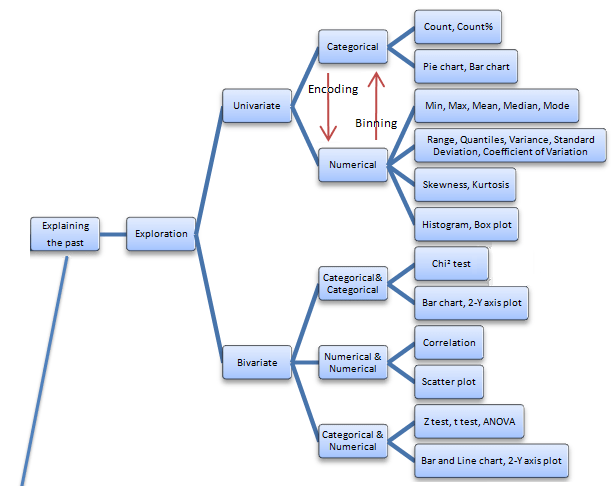
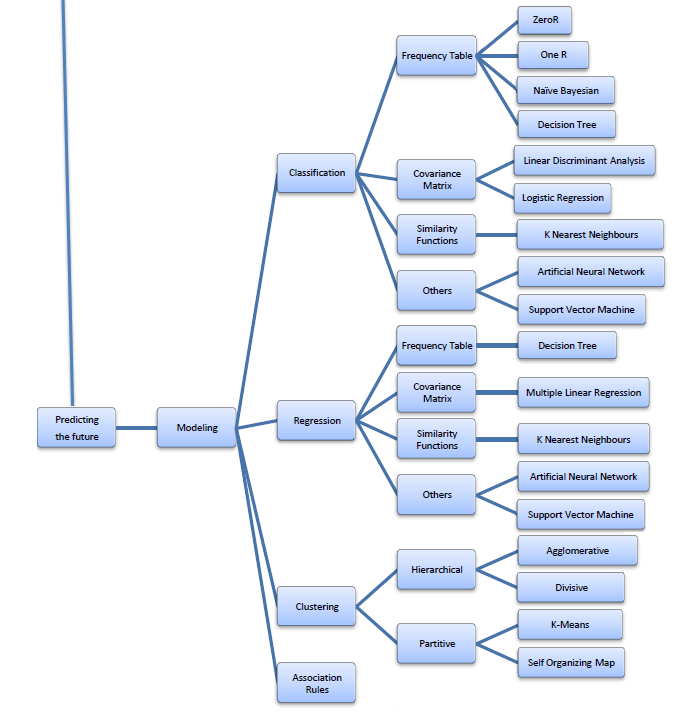
Best of All- I really liked this online book created by Professor S. Sayad
Its succinct and beautiful and describes all of the Data Mining you want to read in one Map (actually 4 images painstakingly assembled with perfection)
The best thing is- in the original map- even the sub items are click-able for specifics like Pie Chart and Stacked Column chart are not in one simple drop down like Charts- but rather by nature of the kind of variables that lead to these charts. For doing that- you would need to go to the site itself- ( see http://chem-eng.utoronto.ca/~datamining/dmc/categorical_variables.htm
Again- there is no mention of the data visualization software used to create the images but I think I can take a hint from the Software Page which says software used are-

 Area Charts
 Bar & Column Charts
 Scatterplots
 Pie & Donut Charts
 Line & Step Charts
 Stacked Charts
 Grouped Charts
 Anderson’s Flowers
 Becker’s Barley
 Bertin’s Hotel
 Streamgraphs
 Sparklines
 Bullet Charts
 Bubble Charts
 Sizing the Horizon
 Candlestick Charts
 Burtin’s Antibiotics
 Nightingale’s Rose
 Playfair’s Wheat
 Gas & Driving
 Seattle Weather
 Marey’s Trains
 Stemplots
 Merge Sort




 r-bloggers.com
 Reddit
 Twitter
 Google
 en.wordpress.com
 xianblog.wordpress.com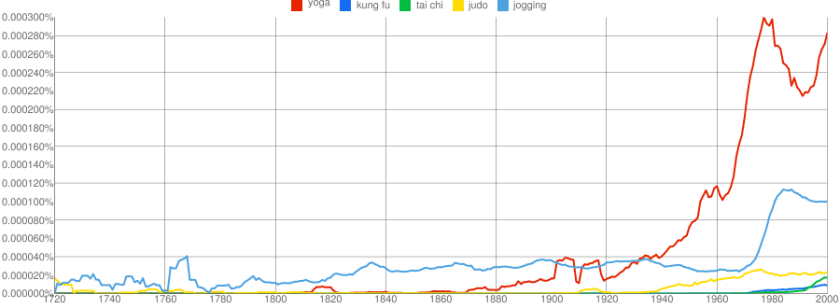




 DECISION STATS