The web application Rwui is used to create web interfaces for running R scripts. All the code is generated automatically so that a fully functional web interface for an R script can be downloaded and up and running in a matter of minutes.
Rwui is aimed at R script writers who have scripts that they want people unversed in R to use. The script writer uses Rwui to create a web application that will run their R script. Rwui allows the script writer to do this without them having to do any web application programming, because Rwui generates all the code for them.
The script writer designs the web application to run their R script by entering information on a sequence of web pages. The script writer then downloads the application they have created and installs it on their own server.
The Youtube Promoted Videos (basically a video form of Adsense) can really help companies like Oracle, SAP, IBM, Netezza, SAS Insititute, AsterData, Rapid Miner, Pentaho, JasperSoft, Teradata, Revolution who create
either corporate videos/training videos or upload their seminar, webinar,conference videos to Youtube.
Making a video is hard work in itself- doing an A/ B test with Youtube Promoted videos might just get a better ROI for your video marketing budget and IMHO embeddable videos from Youtube are much better and easier to share than Videos that can be seen only after registration on a company web site. You want to get the word out for your software, or you want to get website views?
Here is a short list of resources and material I put together as starting points for R and Cloud Computing It’s a bit messy but overall should serve quite comprehensively.
Cloud computing is a commonly used expression to imply a generational change in computing from desktop-servers to remote and massive computing connections,shared computers, enabled by high bandwidth across the internet.
As per the National Institute of Standards and Technology Definition,
Cloud computing is a model for enabling convenient, on-demand network access to a shared pool of configurable computing resources (e.g., networks, servers, storage, applications, and services) that can be rapidly provisioned and released with minimal management effort or service provider interaction.
Rweb is developed and maintained by Jeff Banfield. The Rweb Home Page provides access to all three versions of Rweb—a simple text entry form that returns output and graphs, a more sophisticated JavaScript version that provides a multiple window environment, and a set of point and click modules that are useful for introductory statistics courses and require no knowledge of the R language. All of the Rweb versions can analyze Web accessible datasets if a URL is provided.
The paper “Rweb: Web-based Statistical Analysis”, providing a detailed explanation of the different versions of Rweb and an overview of how Rweb works, was published in the Journal of Statistical Software (http://www.jstatsoft.org/v04/i01/).
Ulf Bartel has developed R-Online, a simple on-line programming environment for R which intends to make the first steps in statistical programming with R (especially with time series) as easy as possible. There is no need for a local installation since the only requirement for the user is a JavaScript capable browser. See http://osvisions.com/r-online/ for more information.
Rcgi is a CGI WWW interface to R by MJ Ray. It had the ability to use “embedded code”: you could mix user input and code, allowing the HTMLauthor to do anything from load in data sets to enter most of the commands for users without writing CGI scripts. Graphical output was possible in PostScript or GIF formats and the executed code was presented to the user for revision. However, it is not clear if the project is still active.
Currently, a modified version of Rcgi by Mai Zhou (actually, two versions: one with (bitmap) graphics and one without) as well as the original code are available from http://www.ms.uky.edu/~statweb/.
David Firth has written CGIwithR, an R add-on package available from CRAN. It provides some simple extensions to R to facilitate running R scripts through the CGI interface to a web server, and allows submission of data using both GET and POST methods. It is easily installed using Apache under Linux and in principle should run on any platform that supports R and a web server provided that the installer has the necessary security permissions. David’s paper “CGIwithR: Facilities for Processing Web Forms Using R” was published in the Journal of Statistical Software (http://www.jstatsoft.org/v08/i10/). The package is now maintained by Duncan Temple Lang and has a web page athttp://www.omegahat.org/CGIwithR/.
Rpad, developed and actively maintained by Tom Short, provides a sophisticated environment which combines some of the features of the previous approaches with quite a bit of JavaScript, allowing for a GUI-like behavior (with sortable tables, clickable graphics, editable output), etc.
Jeff Horner is working on the R/Apache Integration Project which embeds the R interpreter inside Apache 2 (and beyond). A tutorial and presentation are available from the project web page at http://biostat.mc.vanderbilt.edu/twiki/bin/view/Main/RApacheProject.
Rserve is a project actively developed by Simon Urbanek. It implements a TCP/IP server which allows other programs to use facilities of R. Clients are available from the web site for Java and C++ (and could be written for other languages that support TCP/IP sockets).
OpenStatServer is being developed by a team lead by Greg Warnes; it aims “to provide clean access to computational modules defined in a variety of computational environments (R, SAS, Matlab, etc) via a single well-defined client interface” and to turn computational services into web services.
Two projects use PHP to provide a web interface to R. R_PHP_Online by Steve Chen (though it is unclear if this project is still active) is somewhat similar to the above Rcgi and Rweb. R-php is actively developed by Alfredo Pontillo and Angelo Mineo and provides both a web interface to R and a set of pre-specified analyses that need no R code input.
webbioc is “an integrated web interface for doing microarray analysis using several of the Bioconductor packages” and is designed to be installed at local sites as a shared computing resource.
Rwui is a web application to create user-friendly web interfaces for R scripts. All code for the web interface is created automatically. There is no need for the user to do any extra scripting or learn any new scripting techniques. Rwui can also be found at http://rwui.cryst.bbk.ac.uk.
Finally, the R.rsp package by Henrik Bengtsson introduces “R Server Pages”. Analogous to Java Server Pages, an R server page is typically HTMLwith embedded R code that gets evaluated when the page is requested. The package includes an internal cross-platform HTTP server implemented in Tcl, so provides a good framework for including web-based user interfaces in packages. The approach is similar to the use of the brew package withRapache with the advantage of cross-platform support and easy installation.
Remote access to R/Bioconductor on EBI’s 64-bit Linux Cluster
Start the workbench by downloading the package for your operating system (Macintosh or Windows), or via Java Web Start, and you will get access to an instance of R running on one of EBI’s powerful machines. You can install additional packages, upload your own data, work with graphics and collaborate with colleagues, all as if you are running R locally, but unlimited by your machine’s memory, processor or data storage capacity.
Most up-to-date R version built for multicore CPUs
Access to all Bioconductor packages
Access to our computing infrastructure
Fast access to data stored in EBI’s repositories (e.g., public microarray data in ArrayExpress)
Using R Google Docs http://www.omegahat.org/RGoogleDocs/run.pdf
It uses the XML and RCurl packages and illustrates that it is relatively quick and easy
to use their primitives to interact with Web services.
Amazon’s EC2 is a type of cloud that provides on demand computing infrastructures called an Amazon Machine Images or AMIs. In general, these types of cloud provide several benefits:
Simple and convenient to use. An AMI contains your applications, libraries, data and all associated configuration settings. You simply access it. You don’t need to configure it. This applies not only to applications like R, but also can include any third-party data that you require.
On-demand availability. AMIs are available over the Internet whenever you need them. You can configure the AMIs yourself without involving the service provider. You don’t need to order any hardware and set it up.
Elastic access. With elastic access, you can rapidly provision and access the additional resources you need. Again, no human intervention from the service provider is required. This type of elastic capacity can be used to handle surge requirements when you might need many machines for a short time in order to complete a computation.
Pay per use. The cost of 1 AMI for 100 hours and 100 AMI for 1 hour is the same. With pay per use pricing, which is sometimes called utility pricing, you simply pay for the resources that you use.
#This example requires you had previously created a bucket named data_language on your Google Storage and you had uploaded a CSV file named language_id.txt (your data) into this bucket – see for details
library(predictionapirwrapper)
Elastic-R is a new portal built using the Biocep-R platform. It enables statisticians, computational scientists, financial analysts, educators and students to use cloud resources seamlessly; to work with R engines and use their full capabilities from within simple browsers; to collaborate, share and reuse functions, algorithms, user interfaces, R sessions, servers; and to perform elastic distributed computing with any number of virtual machines to solve computationally intensive problems.
Also see Karim Chine’s http://biocep-distrib.r-forge.r-project.org/
R for Salesforce.com
At the point of writing this, there seem to be zero R based apps on Salesforce.com This could be a big opportunity for developers as both Apex and R have similar structures Developers could write free code in R and charge for their translated version in Apex on Salesforce.com
Force.com and Salesforce have many (1009) apps at http://sites.force.com/appexchange/home for cloud computing for
businesses, but very few forecasting and statistical simulation apps.
These are like iPhone apps except meant for business purposes (I am
unaware if any university is offering salesforce.com integration
though google apps and amazon related research seems to be on)
Personal Note-Mentioning SAS in an email to a R list is a big no-no in terms of getting a response and love. Same for being careless about which R help list to email (like R devel or R packages or R help)
Note- for some strange reason I continue to be on top ranked LibreOffice blogs- maybe because I write more on the software itself than on Oracle politics or coffee spillovers.
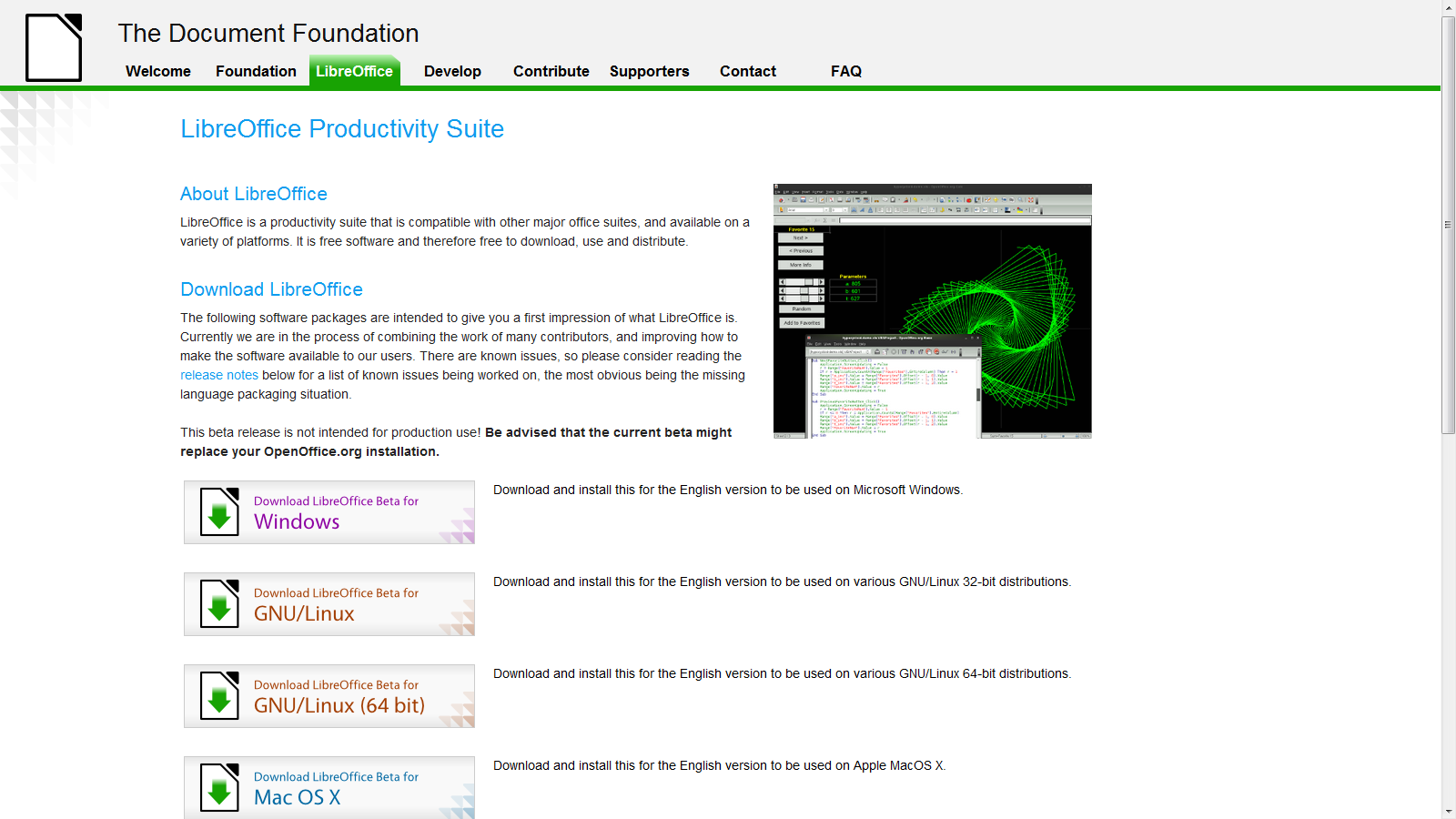
LibreOffice Beta 2 is ready and I just installed it on Windows 7 – works nice- and I somehow think open Office and Google needs an example to stop being so scary on cautioning—— hey,hey it’s a beta – (do you see Oracle saying this release is a beta or Windows saying hey this Windows Vista is a beta for Windows 7- No right?)-
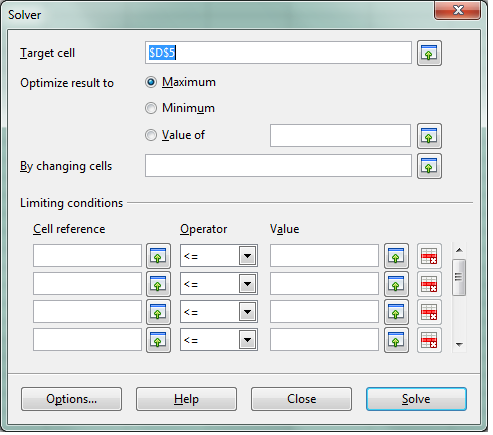
see screenshot of solver in LibreOffice spreadsheet -works just fine.
We cant wait for Chromium OS and LibreOffice integration (or Google Docs-LibreOffice integration) so Google starts thinking on those lines (of course
Google also needs to ramp up Google Storage and Google Predict API– but dude are you sure you wanna take on Amazon, Oracle and MS and Yahoo and Apple at the same time. Dear Herr Schmidt- Last German Guy who did that , ended up in a bunker in Berlin. (Ever since I had to pay 50 euros as Airline Transit fee -yes Indian passport holders have to do that in Germany- I am kind of non objective on that issue)
Google Management is busy nowadays thinking of trying to beat Facebook -hint -hint-
-buy out the biggest app makers of Facebook apps and create an api for Facebook info download and upload into Orkut –maybe invest like an angel in that startup called Diaspora http://www.joindiaspora.com/) see-
Back to the topic (and there are enough people blogging on Google should or shouldnt do)
-LibreOffice aesthetically rocks! It has a cool feel.
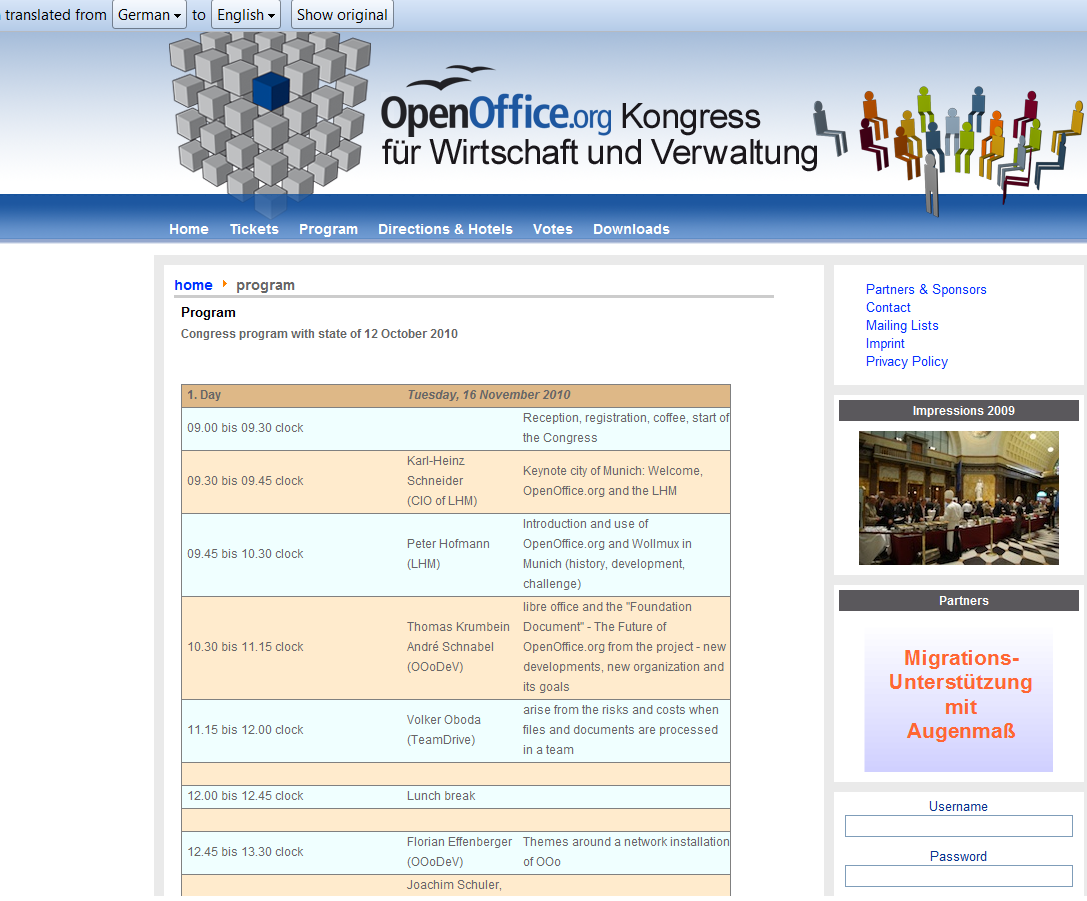
As you can see I used the Chrome Extension for Google Translate for an instant translation from German into English (though it still needs some work, Herr Translator)
Back to actually working on LibreOffice- if Word and Powerpoint is all you do- save some money for Christmas and download it today from
I really liked some awesome new features in Google Docs, and I am mentioning just some of the features I like because they are not there in WindowsOffice mostly.
List View and Mobile View Improvements Now you can see your spreadsheets with all their formatting in List View and on your mobile device, this includes background/foreground colors, borders and text formatting!
Themes for forms Add a splash of color to your surveys and questionnaires. When you create and edit a form, simply apply one of the 70 themes
Forms improvements We’ve added a new question type (grid), support for right-to-left languages in forms, and a new color scheme for the forms summary. Also, you can now pre-populate form fields with URL parameters, and if you use Google Apps, you can create forms which require sign-in to access. Learn more
Translate document You can now translate an entire document into over 40 languages.
Translate and detect languages in Google spreadsheets =GoogleTranslate(“Hola, ¿cómo estás?”,”es”,”en”) gives “Hi, how are you?” (or leave out “en” and we’ll automatically choose the default language of your spreadsheet) What if you don’t know the language? =DetectLanguage(“Hola, ¿cómo estás?”) gives “es”.
A new curve tool in drawings Create smooth curves based on a series of points with this new tool.
Here is a comparison of Windows Azure instances vs Amazon compute instances
Compute Instance Sizes:
Developers have the ability to choose the size of VMs to run their application based on the applications resource requirements. Windows Azure compute instances come in four unique sizes to enable complex applications and workloads.
Compute Instance Size
CPU
Memory
Instance Storage
I/O Performance
Small
1.6 GHz
1.75 GB
225 GB
Moderate
Medium
2 x 1.6 GHz
3.5 GB
490 GB
High
Large
4 x 1.6 GHz
7 GB
1,000 GB
High
Extra large
8 x 1.6 GHz
14 GB
2,040 GB
High
Standard Rates:
Windows Azure
Compute
Small instance (default): $0.12 per hour
Medium instance: $0.24 per hour
Large instance: $0.48 per hour
Extra large instance: $0.96 per hour
Storage
$0.15 per GB stored per month
$0.01 per 10,000 storage transactions
Content Delivery Network (CDN)
$0.15 per GB for data transfers from European and North American locations*
$0.20 per GB for data transfers from other locations*
Instances of this family are well suited for most applications.
Small Instance – default*
1.7 GB memory
1 EC2 Compute Unit (1 virtual core with 1 EC2 Compute Unit)
160 GB instance storage (150 GB plus 10 GB root partition)
32-bit platform
I/O Performance: Moderate
API name: m1.small
Large Instance
7.5 GB memory
4 EC2 Compute Units (2 virtual cores with 2 EC2 Compute Units each)
850 GB instance storage (2×420 GB plus 10 GB root partition)
64-bit platform
I/O Performance: High
API name: m1.large
Extra Large Instance
15 GB memory
8 EC2 Compute Units (4 virtual cores with 2 EC2 Compute Units each)
1,690 GB instance storage (4×420 GB plus 10 GB root partition)
64-bit platform
I/O Performance: High
API name: m1.xlarge
Micro Instances
Instances of this family provide a small amount of consistent CPU resources and allow you to burst CPUcapacity when additional cycles are available. They are well suited for lower throughput applications and web sites that consume significant compute cycles periodically.
Micro Instance
613 MB memory
Up to 2 EC2 Compute Units (for short periodic bursts)
EBS storage only
32-bit or 64-bit platform
I/O Performance: Low
API name: t1.micro
High-Memory Instances
Instances of this family offer large memory sizes for high throughput applications, including database and memory caching applications.
High-Memory Extra Large Instance
17.1 GB of memory
6.5 EC2 Compute Units (2 virtual cores with 3.25 EC2 Compute Units each)
420 GB of instance storage
64-bit platform
I/O Performance: Moderate
API name: m2.xlarge
High-Memory Double Extra Large Instance
34.2 GB of memory
13 EC2 Compute Units (4 virtual cores with 3.25 EC2 Compute Units each)
850 GB of instance storage
64-bit platform
I/O Performance: High
API name: m2.2xlarge
High-Memory Quadruple Extra Large Instance
68.4 GB of memory
26 EC2 Compute Units (8 virtual cores with 3.25 EC2 Compute Units each)
1690 GB of instance storage
64-bit platform
I/O Performance: High
API name: m2.4xlarge
High-CPU Instances
Instances of this family have proportionally more CPU resources than memory (RAM) and are well suited for compute-intensive applications.
High-CPU Medium Instance
1.7 GB of memory
5 EC2 Compute Units (2 virtual cores with 2.5 EC2 Compute Units each)
350 GB of instance storage
32-bit platform
I/O Performance: Moderate
API name: c1.medium
High-CPU Extra Large Instance
7 GB of memory
20 EC2 Compute Units (8 virtual cores with 2.5 EC2 Compute Units each)
1690 GB of instance storage
64-bit platform
I/O Performance: High
API name: c1.xlarge
Cluster Compute Instances
Instances of this family provide proportionally high CPU resources with increased network performance and are well suited for High Performance Compute (HPC) applications and other demanding network-bound applications. Learn more about use of this instance type for HPC applications.
Cluster Compute Quadruple Extra Large Instance
23 GB of memory
33.5 EC2 Compute Units (2 x Intel Xeon X5570, quad-core “Nehalem” architecture)
1690 GB of instance storage
64-bit platform
I/O Performance: Very High (10 Gigabit Ethernet)
API name: cc1.4xlarge
IPSUR stands for Introduction to Probability and Statistics Using R, ISBN: 978-0-557-24979-4, which is a textbook written for an undergraduate course in probability and statistics. The approximate prerequisites are two or three semesters of calculus and some linear algebra in a few places. Attendees of the class include mathematics, engineering, and computer science majors.
IPSUR is FREE, in the GNU sense of the word. Hard copies are available for purchase here from Lulu and will be available (coming soon) from the other standard online retailers worldwide. The price of the book is exactly the manufacturing cost plus the retailers’ markup. You may be able to get it even cheaper by downloading an electronic copy and printing it yourself, but if you elect this route then be sure to get the publisher-quality PDF from theDownloads page. And double check the price. It was cheaper for my students to buy a perfect-bound paperback from Lulu and have it shipped to their door than it was to upload the PDF to Fed-Ex Kinkos and Xerox a coil-bound copy (and on top of that go pick it up at the store).
If you are going to buy from anywhere other than Lulu then be sure to check the time-stamp on the copyright page. There is a 6 to 8 week delay from Lulu to Amazon and you may not be getting the absolute latest version available.
Refer to the Installation page for instructions to install an electronic copy of IPSUR on your personal computer. See the Feedback page for guidance about questions or comments you may have about IPSUR.
This plugin for the R Commander accompanies the text Introduction to Probability and Statistics Using R by G. Jay Kerns. The plugin contributes functions unique to the book as well as specific configuration and functionality to R Commander, the pioneering work by John Fox of McMaster University.
RcmdrPlugin.IPSUR’s primary goal is to provide a user-friendly graphical user interface (GUI) to the open-source and freely available R statistical computing environment. RcmdrPlugin.IPSUR is equipped to handle many of the statistical analyses and graphical displays usually encountered by upper division undergraduate mathematics, statistics, and engineering majors. Available features are comparable to many expensive commercial packages such as Minitab, SPSS, and JMP-IN.
Since the audience of RcmdrPlugin.IPSUR is slightly different than Rcmdr’s, certain functionality has been added and selected error-checks have been disabled to permit the student to explore alternative regions of the statistical landscape. The resulting benefit of increased flexibility is balanced by somewhat increased vulnerability to syntax errors and misuse; the instructor should keep this and the academic audience in mind when usingRcmdrPlugin.IPSUR in the classroom

 Features of web applications created by Rwui






 DECISION STATS