Privacy Browsing Extensions in Google Chrome

coat of arms of the Palaiologos dynasty, the l...
Image via Wikipedia

Using two Chrome Extensions, Disconnect and AdBlock you can be sure of having a vary very clean browsing experience-it is recommended especially if you dont like the auto sharing of your personal preferences and cannot be bothered by the Byzantine maze of social media privacy fineprint.

https://chrome.google.com/extensions/detail/jeoacafpbcihiomhlakheieifhpjdfeo

Disconnect by Brian Kennish

(184) – 44,284 users – Weekly installs: 24,086

Stop major third parties and search engines from tracking the webpages you go to and searches you do.

* Search depersonalization is now optional and off by default. Click the “d” button then the “Depersonalize searches” checkbox to turn this feature on (or back off in case you have trouble getting to Google or Yahoo services). For help with anything else, see the known issues below and ask questions at http://j.mp/dnewgroup.

§

If you’re a typical web user, you’re unintentionally sending your browsing and search history with your name and other personal information to third parties and search engines whenever you’re online.

Take control of the data you share with Disconnect!

From the developer of the top-10-rated Facebook Disconnect extension, Disconnect lets you:

• Disable tracking by third parties like Digg, Facebook, Google, Twitter, and Yahoo, without requiring any setup or significantly degrading the usability of the web.

• Truly depersonalize searches on search engines like Google and Yahoo (by blocking identifying cookies not just changing the appearance of results pages), while staying logged into other services — e.g., so you can search anonymously on Google and access iGoogle at once.

• See how many resource and cookie requests are blocked, in real time

and
https://chrome.google.com/extensions/detail/gighmmpiobklfepjocnamgkkbiglidom
ExtensionsAdBlock

AdBlock

(6937) - 1,615,373 users - Weekly installs: 153,032
The most popular Chrome extension, with over 1.5 million users! Blocks ads all over the web.
Verified author: chromeadblock.com
=================

New in version 2.1: Translated into dozens of languages!
New in version 2.0: Ads are blocked from downloading, instead of just being removed after the fact!

=======================

The official AdBlock For Chrome!  Block all advertisements on all web pages.  Your browser is automatically updated with additions to the filter: just click Install, then visit your favorite website and see the ads disappear!

FAQs:1. This is the official AdBlock extension: the original ad blocker written from the ground up to be optimized in Chrome.  There's an unrelated, older Firefox project called Adblock Plus, and they're working on making a Chrome version out of the old AdThwart codebase.  At the moment AdBlock blocks some ads that AdThwart only hides, but they're working to improve it.  It's available at bit.ly/id2Gqx; if you have trouble with AdBlock, they're good guys and a fine alternative!


Tale of Two Analytical Interfaces

Occam’s razor (or Ockham’s razor[1]) is often expressed in Latin as the lex parsimoniae(translating to the law of parsimonylaw of economy or law of succinctness). The principle is popularly summarized as “the simplest explanation is more likely the correct one.

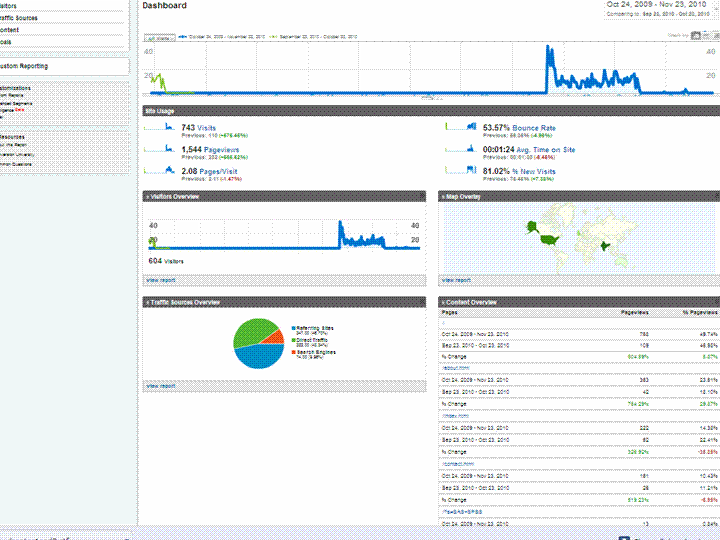
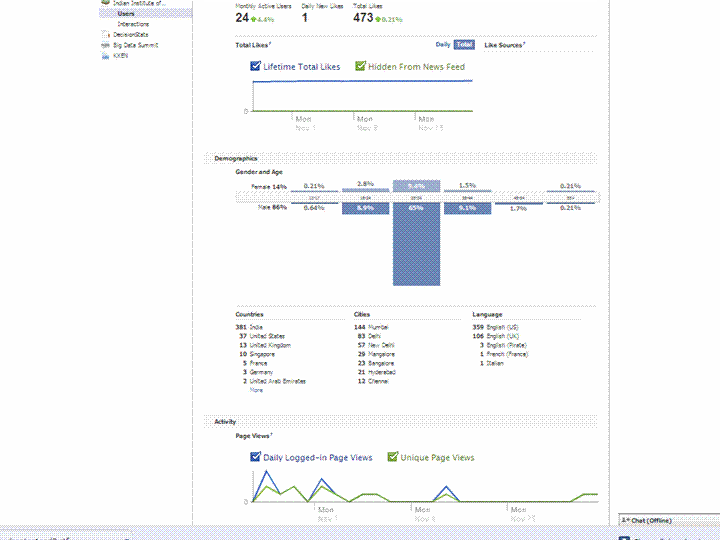
Using a simple screenshot- you can see Facebook Analytics for a Facebook page is simpler at explaining who is coming to visit rather than Google Analytics Dashboard (which has not seen the attention of a Visual UI or Graphic Redesign)

And if Facebook is going to take over the internet, well it is definitely giving better analytics in the process. What do you think?

Which Interface is simpler- and gives you better targeting. Ignore the numbers and just see the metrics measured and the way they are presented. Coincidently R is used at Facebook a lot (which has given the jjplot package)- and Google has NOT INVESTED MAJOR MONEY in creating Premium R Packages or Big Data Packages. I am talking investment at the scale Google is known for- not measly meetups.

(the summer of code dont count- it is for students mostly)

(but thanks for the Pizza G Men- and maybe revise that GA interface by putting a razor to some metrics)

GA vs Facebook Analytics


Who searches for this Blog?

Statue of Michael Jackson in Eindhoven, the Ne...
Image via Wikipedia

Using WP- Stats I set about answering this question-

What search keywords lead here-

Clearly Michael Jackson is down this year

And R GUI, Data Mining is up.

How does that affect my writing- given I get almost 250 visitors by search engines alone daily- assume I write nothing on this blog from now on.

It doesnt- I still write what ever code or poem that comes to my mind. So it is hurtful people misunderstimate the effort in writing and jump to conclusions (esp if I write about a company- I am not on payroll of that company- just like if  I write about a poem- I am not a full time poet)

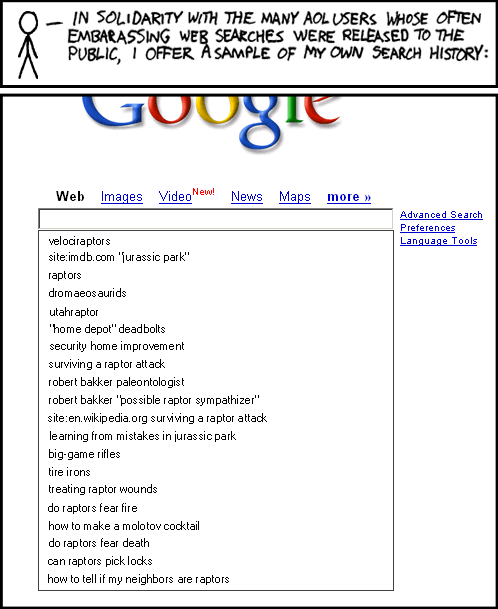
Over to xkcd

All Time (for Decisionstats.Wordpress.com)

Search Views
libre office 818
facebook analytics 806
michael jackson history 240
wps sas lawsuit 180
r gui 168
wps sas 154
wordle.net 118
sas wps 116
decision stats 110
sas wps lawsuit 100
google maps jet ski 94
data mining 88
doug savage 72
hive tutorial 63
spss certification 63
hadley wickham 63
google maps jetski 62
sas sues wps 60
decisionstats 58
donald farmer microsoft 45
libreoffice 44
wps statistics 44
best statistics software 42
r gui ubuntu 41
rstat 37
tamilnadu advanced technical training institute tatti 37

YTD

2009-11-24 to Today

Search Views
libre office 818
facebook analytics 781
wps sas lawsuit 170
r gui 164
wps sas 125
wordle.net 118
sas wps 101
sas wps lawsuit 95
google maps jet ski 94
data mining 86
decision stats 82
doug savage 63
hadley wickham 63
google maps jetski 62
hive tutorial 56
donald farmer microsoft 45

Zen and the art of applying T tests to Spam Data

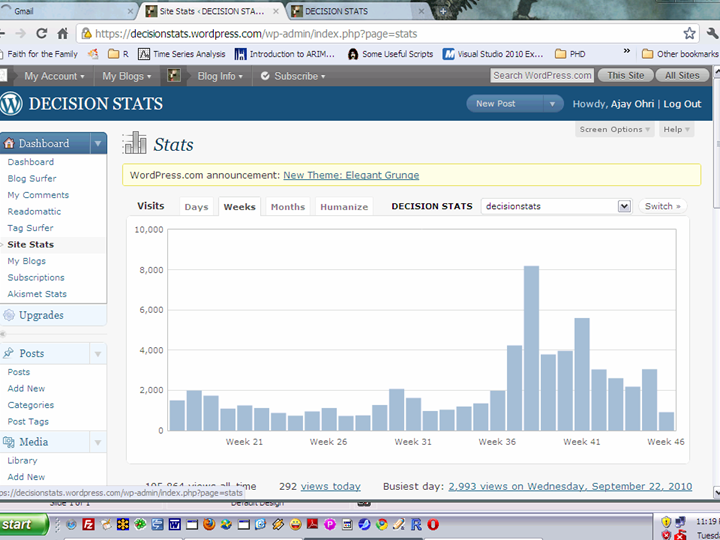
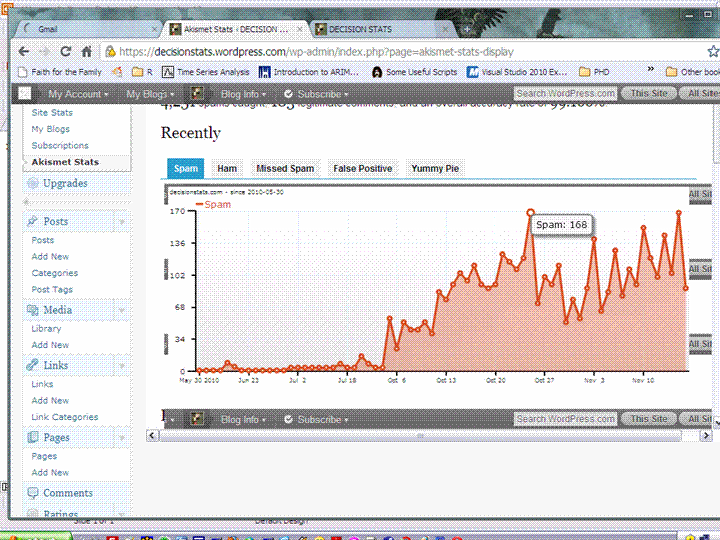
Decisionstats traffic seemed up mmm but Spam is way way up

Whos spamming my dear bloggie

hmm

is it the russians doing a link spam. unlikely they dont bot against Akismet that much (as they fail)

And Captcha can be failed by python (apparently. sigh)

Is there a co relation of certain tags of posts, and count of spam- hoping to distort say blogs’s search engine rankings for SAS WPS Lawsuit in Google or jet ski across  pacific in Google.

Sigh- an old retired outlaw black hat is never kept in peace. Try doing a blog search for R in Google- Revo  is now down to number 7 (which is hmm given Google Instant)

Of course I think too much about SEO, but I dont run CPC ads- I made much more money when traffic is low – say 5-10 small businesses needing to forecast their sales .

and enjoy your Thanksgiving. Remember the Indians bring the Turkeys.


Playing with Playwith- R Package for Interactive Data Visualizations

While just browsing through Google Code repositories for R Packages-

https://code.google.com/hosting/search?q=label:R

I came across Playwith-  which is basically a toolkit for creating interactive data visualizations. I then played with ClusterApp and it really seems promising (hierarchical) – Since I am using R 2.12 on Win 7 (x64) platform somthing broke but overall this seemed like a promising interactive tool making widget.

playwith is an R package, providing a GTK+ graphical user interface for editing and interacting with R plots.

The playwith package is maintained by Felix Andrews <felix@nfrac.org>

Here is the Data Visualization called Cluster App that impressed me There is an obvious synergy between Rattle and Playwith (though some bugs with new R 2.12 on an X64 do come into play)

https://code.google.com/p/playwith/wiki/ClusterApp

The SEO mess on joining blog aggregators


Mug shot of Paris Hilton.
Image via Wikipedia


If you are an analytics blogger who writes, and is aggregated on an analytical community- read on- Here’s how blog aggregation communities can help you lose 30% of all future traffic long term, while giving you a short term.

The problem is not created by Blogging Communities (like R-Bloggers, or PlanteR, or Smart Data Collective or AnalyticBridge or even BeyeBlogs )

It is created by the way Google Page Rank is structured- you see given exactly the same content on two different we pages- Google Page Rank will place the higher Page Rank results higher. This is counter intutive and quite simple to rectify- The Google Spider can just use the Time Stamp for choosing which article was published where first (Obviously on your blog, AND then later to the aggregator).

How bad is the mess? Well joining ANY blog aggregation will lead to an instant lift of upto 10-50 % of your current traffic as similar bloggers try and read about you. However you can lose the long term 30% proportion which is a benchmark of search engine created traffic for you.

So do you opt out of blog aggregation? No. It’s a SEO mess and it’s unfair to punish your blog aggregator, most of whom are running on ad-supported sponsors or their own funds on dry fumes to publish your content. Most of the fore mentioned communities are created by excellent people I interacted with heavily- and they are genuinely motivated to give readers an easy way to keep up with blogs. Especially Smart Data Collective, Analyticbridge and R-bloggers whose founders I have known personally.

You can do one thing- create manual summaries in the excerpt feature of your blog posts- it’s just below the WordPress page. And switch your RSS feed to summary rather than full. It avoids losing keyword rank to other websites, it prevents the Blog Aggregation from gaining too much influence in key word related searches, and it keeps your whole eco system happy, Best of All it helps readers of Blog Aggregators- since most of them use a summary on the front page anyways.

An additional thought on Google Page Rank- something I have sulked over but not spoken for a long long time.  It ignores the value of reader- If Bill Gates, Steve Jobs, and 500 ceos from Fortune 500 companies read my blog but do not link to it- it will count daily traffic as 500. Probably it will give more weightage to Paris Hilton fans.

A suggestion-humbly- you can use IP Address lookup of visitors to see if traffic is coming from corporate sources or retail sources -Clicky from GetClicky does this. Use it as feedback in Google Analytics as well as Google Trends.

And maybe PageRank needs to add quantity and quality of visitors as additional variables . Do a A/B test guys some Chi Square juice- its not quite Mad Men Adverting but its still good fun.


PageRank
Image via Wikipedia


and the world is one big community as per xkcd