Amazon just did a cluster Christmas present for us tech geek lizards- before Google could out doogle them with end of the Betas (cough- its on NDA)
Clusters used by Academic Departments now have a great chance to reduce cost without downsizing- but only if the CIO gets the email.
While Professor Goodnight of SAS / North Carolina University is still playing time sharing versus mind sharing games with analytical birdies – his 70 mill server farm set in Feb last is about to get ready
( I heard they got public subsidies for environment- but thats historic for SAS– taking public things private -right Prof as SAS itself began as a publicly funded project. and that was in the 1960s and they didnt even have no lobbyists as well. )
In realted R news, Dirk E has been thinking of a R HPC book without paying attention to Amazon but would now have to include Amazon
(he has been thinking of writing that book for 5 years, but hey he’s got a day job, consulting gigs with revo, photo ops at Google, a blog, packages to maintain without binaries, Dirk E we await thy book with bated holes.
Whos Dirk E – well http://dirk.eddelbuettel.com/ is like the Terminator of R project (in terms of unpronounceable surnames)
Unique to Cluster Compute and Cluster GPU instances is the ability to group them into clusters of instances for use with HPC
applications. This is particularly valuable for those applications that rely on protocols like Message Passing Interface (MPI) for tightly coupled inter-node communication.
Cluster Compute and Cluster GPU instances function just like other Amazon EC2 instances but also offer the following features for optimal performance with HPC applications:
When run as a cluster of instances, they provide low latency, full bisection 10 Gbps bandwidth between instances. Cluster sizes up through and above 128 instances are supported.
Cluster Compute and Cluster GPU instances include the specific processor architecture in their definition to allow developers to tune their applications by compiling applications for that specific processor architecture in order to achieve optimal performance.
The Cluster Compute instance family currently contains a single instance type, the Cluster Compute Quadruple Extra Large with the following specifications:
23 GB of memory 33.5 EC2 Compute Units (2 x Intel XeonX5570, quad-core “Nehalem” architecture) 1690 GB of instance storage 64-bit platform I/O Performance: Very High (10 Gigabit Ethernet) API name: cc1.4xlarge
The Cluster GPU instance family currently contains a single instance type, the Cluster GPU Quadruple Extra Large with the following specifications:
22 GB of memory 33.5 EC2 Compute Units (2 x Intel Xeon X5570, quad-core “Nehalem” architecture) 2 x NVIDIA Tesla “Fermi” M2050GPUs 1690 GB of instance storage 64-bit platform I/O Performance: Very High (10 Gigabit Ethernet) API name: cg1.4xlarge
Here is a short list of resources and material I put together as starting points for R and Cloud Computing It’s a bit messy but overall should serve quite comprehensively.
Cloud computing is a commonly used expression to imply a generational change in computing from desktop-servers to remote and massive computing connections,shared computers, enabled by high bandwidth across the internet.
As per the National Institute of Standards and Technology Definition,
Cloud computing is a model for enabling convenient, on-demand network access to a shared pool of configurable computing resources (e.g., networks, servers, storage, applications, and services) that can be rapidly provisioned and released with minimal management effort or service provider interaction.
Rweb is developed and maintained by Jeff Banfield. The Rweb Home Page provides access to all three versions of Rweb—a simple text entry form that returns output and graphs, a more sophisticated JavaScript version that provides a multiple window environment, and a set of point and click modules that are useful for introductory statistics courses and require no knowledge of the R language. All of the Rweb versions can analyze Web accessible datasets if a URL is provided.
The paper “Rweb: Web-based Statistical Analysis”, providing a detailed explanation of the different versions of Rweb and an overview of how Rweb works, was published in the Journal of Statistical Software (http://www.jstatsoft.org/v04/i01/).
Ulf Bartel has developed R-Online, a simple on-line programming environment for R which intends to make the first steps in statistical programming with R (especially with time series) as easy as possible. There is no need for a local installation since the only requirement for the user is a JavaScript capable browser. See http://osvisions.com/r-online/ for more information.
Rcgi is a CGI WWW interface to R by MJ Ray. It had the ability to use “embedded code”: you could mix user input and code, allowing the HTMLauthor to do anything from load in data sets to enter most of the commands for users without writing CGI scripts. Graphical output was possible in PostScript or GIF formats and the executed code was presented to the user for revision. However, it is not clear if the project is still active.
Currently, a modified version of Rcgi by Mai Zhou (actually, two versions: one with (bitmap) graphics and one without) as well as the original code are available from http://www.ms.uky.edu/~statweb/.
David Firth has written CGIwithR, an R add-on package available from CRAN. It provides some simple extensions to R to facilitate running R scripts through the CGI interface to a web server, and allows submission of data using both GET and POST methods. It is easily installed using Apache under Linux and in principle should run on any platform that supports R and a web server provided that the installer has the necessary security permissions. David’s paper “CGIwithR: Facilities for Processing Web Forms Using R” was published in the Journal of Statistical Software (http://www.jstatsoft.org/v08/i10/). The package is now maintained by Duncan Temple Lang and has a web page athttp://www.omegahat.org/CGIwithR/.
Rpad, developed and actively maintained by Tom Short, provides a sophisticated environment which combines some of the features of the previous approaches with quite a bit of JavaScript, allowing for a GUI-like behavior (with sortable tables, clickable graphics, editable output), etc.
Jeff Horner is working on the R/Apache Integration Project which embeds the R interpreter inside Apache 2 (and beyond). A tutorial and presentation are available from the project web page at http://biostat.mc.vanderbilt.edu/twiki/bin/view/Main/RApacheProject.
Rserve is a project actively developed by Simon Urbanek. It implements a TCP/IP server which allows other programs to use facilities of R. Clients are available from the web site for Java and C++ (and could be written for other languages that support TCP/IP sockets).
OpenStatServer is being developed by a team lead by Greg Warnes; it aims “to provide clean access to computational modules defined in a variety of computational environments (R, SAS, Matlab, etc) via a single well-defined client interface” and to turn computational services into web services.
Two projects use PHP to provide a web interface to R. R_PHP_Online by Steve Chen (though it is unclear if this project is still active) is somewhat similar to the above Rcgi and Rweb. R-php is actively developed by Alfredo Pontillo and Angelo Mineo and provides both a web interface to R and a set of pre-specified analyses that need no R code input.
webbioc is “an integrated web interface for doing microarray analysis using several of the Bioconductor packages” and is designed to be installed at local sites as a shared computing resource.
Rwui is a web application to create user-friendly web interfaces for R scripts. All code for the web interface is created automatically. There is no need for the user to do any extra scripting or learn any new scripting techniques. Rwui can also be found at http://rwui.cryst.bbk.ac.uk.
Finally, the R.rsp package by Henrik Bengtsson introduces “R Server Pages”. Analogous to Java Server Pages, an R server page is typically HTMLwith embedded R code that gets evaluated when the page is requested. The package includes an internal cross-platform HTTP server implemented in Tcl, so provides a good framework for including web-based user interfaces in packages. The approach is similar to the use of the brew package withRapache with the advantage of cross-platform support and easy installation.
Remote access to R/Bioconductor on EBI’s 64-bit Linux Cluster
Start the workbench by downloading the package for your operating system (Macintosh or Windows), or via Java Web Start, and you will get access to an instance of R running on one of EBI’s powerful machines. You can install additional packages, upload your own data, work with graphics and collaborate with colleagues, all as if you are running R locally, but unlimited by your machine’s memory, processor or data storage capacity.
Most up-to-date R version built for multicore CPUs
Access to all Bioconductor packages
Access to our computing infrastructure
Fast access to data stored in EBI’s repositories (e.g., public microarray data in ArrayExpress)
Using R Google Docs http://www.omegahat.org/RGoogleDocs/run.pdf
It uses the XML and RCurl packages and illustrates that it is relatively quick and easy
to use their primitives to interact with Web services.
Amazon’s EC2 is a type of cloud that provides on demand computing infrastructures called an Amazon Machine Images or AMIs. In general, these types of cloud provide several benefits:
Simple and convenient to use. An AMI contains your applications, libraries, data and all associated configuration settings. You simply access it. You don’t need to configure it. This applies not only to applications like R, but also can include any third-party data that you require.
On-demand availability. AMIs are available over the Internet whenever you need them. You can configure the AMIs yourself without involving the service provider. You don’t need to order any hardware and set it up.
Elastic access. With elastic access, you can rapidly provision and access the additional resources you need. Again, no human intervention from the service provider is required. This type of elastic capacity can be used to handle surge requirements when you might need many machines for a short time in order to complete a computation.
Pay per use. The cost of 1 AMI for 100 hours and 100 AMI for 1 hour is the same. With pay per use pricing, which is sometimes called utility pricing, you simply pay for the resources that you use.
#This example requires you had previously created a bucket named data_language on your Google Storage and you had uploaded a CSV file named language_id.txt (your data) into this bucket – see for details
library(predictionapirwrapper)
Elastic-R is a new portal built using the Biocep-R platform. It enables statisticians, computational scientists, financial analysts, educators and students to use cloud resources seamlessly; to work with R engines and use their full capabilities from within simple browsers; to collaborate, share and reuse functions, algorithms, user interfaces, R sessions, servers; and to perform elastic distributed computing with any number of virtual machines to solve computationally intensive problems.
Also see Karim Chine’s http://biocep-distrib.r-forge.r-project.org/
R for Salesforce.com
At the point of writing this, there seem to be zero R based apps on Salesforce.com This could be a big opportunity for developers as both Apex and R have similar structures Developers could write free code in R and charge for their translated version in Apex on Salesforce.com
Force.com and Salesforce have many (1009) apps at http://sites.force.com/appexchange/home for cloud computing for
businesses, but very few forecasting and statistical simulation apps.
These are like iPhone apps except meant for business purposes (I am
unaware if any university is offering salesforce.com integration
though google apps and amazon related research seems to be on)
Personal Note-Mentioning SAS in an email to a R list is a big no-no in terms of getting a response and love. Same for being careless about which R help list to email (like R devel or R packages or R help)
I am currently playing/ trying out RApache- one more excellent R product from Vanderbilt’s excellent Dept of Biostatistics and it’s prodigious coder Jeff Horner.
I really liked the virtual machine idea- you can download a virtual image of Rapache and play with it- .vmx is easy to create and great to share-
Basically using R Apache (with an EC2 on backend) can help you create customized dashboards, BI apps, etc all using R’s graphical and statistical capabilities.
Rapache embeds the R interpreter inside the Apache 2 web server. By doing this, Rapache realizes the full potential of R and its facilities over the web. R programmers configure appache by mapping Universal Resource Locaters (URL’s) to either R scripts or R functions. The R code relies on CGI variables to read a client request and R’s input/output facilities to write the response.
One advantage to Rapache’s architecture is robust multi-process management by Apache. In contrast to Rserve and RSOAP, Rapache is a pre-fork server utilizing HTTP as the communications protocol. Another advantage is a clear separation, a loose coupling, of R code from client code. With Rserve and RSOAP, the client must send data and R commands to be executed on the server. With Rapache the only client requirements are the ability to communicate via HTTP. Additionally, Rapache gains significant authentication, authorization, and encryption mechanism by virtue of being embedded in Apache.
Existing Demos of Architechture based on R Apache-
You can download version 1.1.10 of rApache now. There
are only two significant changes and you don’t have to edit your
apache config or change any code (just recompile rApache and
reinstall):
1) Error reporting should be more informative. both when you
accidentally introduce errors in the Apache config, and when your code
introduces warnings and errors from web requests.
I’ve struggled with this one for awhile, not really knowing what
strategy would be best. Basically, rApache hooks into the R I/O layer
at such a low level that it’s hard to capture all warnings and errors
as they occur and introduce them to the user in a sane manner. In
prior releases, when ROutputErrors was in effect (either the apache
directive or the R function) one would typically see a bunch of grey
boxes with a red outline with a title of RApache Warning/Error!!!.
Unfortunately those grey boxes could contain empty lines, one line of
error, or a few that relate to the lines in previously displayed
boxes. Really a big uninformative mess.
The new approach is to print just one warning box with the title
“”Oops!!! <b>rApache</b> has something to tell you. View source and
read the HTML comments at the end.” and then as the title implies you
can read the HTML comment located at the end of the file… after the
closing html. That way, you’re actually reading how R would present
the warnings and errors to you as if you executed the code at the R
command prompt. And if you don’t use ROutputErrors, the warning/error
messages are printed in the Apache log file, just as they were before,
but nicer 😉
2) Code dispatching has changed so please let me know if I’ve
introduced any strange behavior.
This was necessary to enhance error reporting. Prior to this release,
rApache would use R’s C API exclusively to build up the call to your
code that is then passed to R’s evaluation engine. The advantage to
this approach is that it’s much more efficient as there is no parsing
involved, however all information about parse errors, files which
produced errors, etc. were lost. The new approach uses R’s built-in
parse function to build up the call and then passes it of to R. A
slight overhead, but it should be negligible. So, if you feel that
this approach is too slow OR I’ve introduced bugs or strange behavior,
please let me know.
FUTURE PLANS
I’m gaining more experience building Debian/Ubuntu packages each day,
so hopefully by some time in 2011 you can rely on binary releases for
these distributions and not install rApache from source! Fingers
crossed!
Development on the rApache 1.1 branch will be winding down (save bug
fix releases) as I transition to the 1.2 branch. This will involve
taking out a small chunk of code that defines the rApache development
environment (all the CGI variables and the functions such as
setHeader, setCookie, etc) and placing it in its own R package…
unnamed as of yet. This is to facilitate my development of the ralite
R package, a small single user cross-platform web server.
The goal for ralite is to speed up development of R web applications,
take out a bit of friction in the development process by not having to
run the full rApache server. Plus it would allow users to develop in
the rApache enronment while on windows and later deploy on more
capable server environments. The secondary goal for ralite is it’s use
in other web server environments (nginx and IIS come to mind) as a
persistent per-client process.
And finally, wiki.rapache.net will be the new www.rapache.net once I
translate the manual over… any day now.
To help new AWS customers get started in the cloud, AWS is introducing a new free usage tier. Beginning November 1, new AWScustomers will be able to run a free Amazon EC2 Micro Instance for a year, while also leveraging a new free usage tier for Amazon S3, Amazon Elastic Block Store, Amazon Elastic Load Balancing, and AWSdata transfer. AWS’s free usage tier can be used for anything you want to run in the cloud: launch new applications, test existing applications in the cloud, or simply gain hands-on experience with AWS.
Below are the highlights of AWS’s new free usage tiers. All are available for one year (except Amazon SimpleDB, SQS, and SNS which are free indefinitely):
AWS’s free usage tier startsNovember 1, 2010. A valid creditcard is required to sign up.
See offer terms.
AWS Free Usage Tier (Per Month):
750 hours of Amazon EC2 Linux Micro Instance usage (613 MB of memory and 32-bit and 64-bit platform support) – enough hours to run continuously each month*
In addition to these services, the AWS Management Console is available at no charge to help you build and manage your application on AWS.
* These free tiers are only available to new AWS customers and are available for 12 months following your AWSsign-up date. When your free usage expires or if your application use exceeds the free usage tiers, you simply pay standard, pay-as-you-go service rates (see each service page for full pricing details). Restrictions apply; see offer terms for more details.
** These free tiers do not expire after 12 months and are available to both existing and new AWS customers indefinitely.
The new AWS free usage tier applies to participating services across all AWS regions: US – N. Virginia, US – N. California, EU – Ireland, and APAC – Singapore. Your free usage is calculated each month across all regions and automatically applied to your bill – free usage does not accumulate.
This is a fairly long post and is a basic collection of material for a book/paper. It is on interfaces to use R. If you feel I need to add more on a particular R interface, or if there is an error in this- please feel to contact me on twitter @decisionstats or mail ohri2007 on google mail.
● R Interfaces There are multiple ways to use the R statistical language. Command Line- The default method is using the command prompt by the installed software on download fromhttp://r-project.org For windows users there is a simple GUI which has an option for Packages (loading package, installing package, setting CRAN mirror for downloading packages) , Misc (useful for listing all objects loaded in workspace as well as clearing objects to free up memory), and Help Menu. Using Click and Point- Besides the command prompt, there are many Graphical User Interfaces which enable the analyst to use click and point methods to analyze data without getting into the details of learning complex and at times overwhelming R syntax. R GUIs are very popular both as mode of instruction in academia as well as in actual usage as it cuts down considerably on time taken to adapt to the language. As with all command line and GUI software, for advanced tweaks and techniques, command prompt will come in handy as well. Advantages and Limitations of using Visual Programming Interfaces to R as compared to Command Line.
Advantages
Limitations
Faster learning for new programmers
Can create junk analysis by clicking menus in GUI
Easier creation of advanced models or graphics
Cannot create custom functions unless you use command line
Repeatability of analysis is better
Advanced techniques and custom flexibility of data handling R can be done in command line
Syntax is auto-generated
Can limit scope and exposure in learning R syntax
A brief list of the notable Graphical User Interfaces is below- 1) R Commander- Basic statistics 2) Rattle- Data Mining 3) Deducer- Graphics (including GGPlot Integration) and also uses JGR (a Jave based GUI) 4) RKward- Comprehensive R GUI for customizable graphs 5) Red-R – Dataflow programming interface using widgets 1) R Commander- R Commander was primarily created by Professor John Fox of McMaster University to cover the content of a basic statistics course. However it is extensible and many other packages can be added in menu form to it- in the form R Commander Plugins. Quite noticeably it is one of the most widely used R GUI and it also has a script window so you can write R code in combination with the menus. As you point and click a particular menu item, the corresponding R code is automatically generated in the log window and executed. It can be found on CRAN athttp://cran.r-project.org/web/packages/Rcmdr/index.html
Advantages of Using R Commander- 1) Useful for beginner in R language to do basic graphs and analysis and building models. 2) Has script window, output window and log window (called messages) in same screen which helps user as code is auto-generated on clicking on menus, and can be customized easily. For example in changing labels and options in Graphs. Graphical output is shown in seperate window from output window. 3) Extensible for other R packages like qcc (for quality control), Teaching Demos (for training), survival analysis and Design of Experiments (DoE) 4) Easy to understand interface even for first time user. 5) Menu items which are not relevant are automatically greyed out- if there are only two variables, and you try to build a 3D scatterplot graph, that menu would simply not be available and is greyed out. Comparative Disadvantages of using R Commander- 1) It is basically aimed at a statistical audience( originally students in statistics) and thus the terms as well as menus are accordingly labeled. Hence it is more of a statistical GUI rather than an analytics GUI. 2) Has limited ability to evaluate models from a business analysts perspective (ROC curve is not given as an option) even though it has extensive statistical tests for model evaluation in model sub menu. Indeed creating a Model is treated as a subsection of statistics rather than a separate menu item. 3) It is not suited for projects that do not involve advanced statistical testing and for users not proficient in statistics (particularly hypothesis testing), and for data miners. Menu items in the R Commander window: File Menu – For loading script files and saving Script files, Output and Workspace It is also needed for changing the present working directory and for exiting R. Edit Menu – For editing scripts and code in the script window. Data Menu – For creating new dataset, inputting or importing data and manipulating data through variables.Data Import can be from text,comma separated values,clipboard, datasets from SPSS, Stata,Minitab, Excel ,dbase, Access files or from url. Data manipulation included deleting rows of data as well as manipulating variables. Also this menu has the option for merging two datasets by row or columns. Statistics Menu-This menu has options for descriptive statistics, hypothesis tests, factor analysis and clustering and also for creating models. Note there is a separate menu for evaluating the model so created. Graphs Menu-It has options for creating various kinds of graphs including box-plot, histogram, line, pie charts and x-y plots. The first option is color palette- it can be used for customizing the colors. It is recommended you adjust colors based on your need for publication or presentation. A notable option is 3 D graphs for evaluating 3 variables at a time- this is really good and impressive feature and exposes the user to advanced graphs in R all at few clicks. You may want to dazzle a presentation using this graph. Also consider scatterplot matrix graphs for graphical display of variables. Graphical display of R surpasses any other statistical software in appeal as well as ease of creation- using GUI to create graphs can further help the user to get the most of data insights using R at a very minimum effort. Models Menu-This is somewhat of a labeling peculiarity of R Commander as this menu is only for evaluating models which have been created using the statistics menu-model sub menu. It includes options for graphical interpretation of model results,residuals,leverage and confidence intervals and adding back residuals to the data set. Distributions Menu- is for cumulative probabilities, probability density, graphs of distributions, quantiles and features for standard distributions and can be used in lieu of standard statistical tables for the distributions. It has 13 standard statistical continuous distributions and 5 discrete distributions. Tools Menu- allows you to load other packages and also load R Commander plugins (which are then added to the Interface Menu after the R Commander GUI is restarted). It also contains options sub menu for fine tuning (like opting to send output to R Menu) Help Menu- Standard documentation and help menu. Essential reading is the short 25 page manual in it called Getting “Started With the R Commander”.
R Commander Plugins- There are twenty extensions to R Commander that greatly enhance it’s appeal -these include basic time series forecasting, survival analysis, qcc and more.
Note the naming convention for above e plugins is always with a Prefix of “RCmdrPlugin.” followed by the names above
Also on loading a Plugin, it must be already installed locally to be visible in R Commander’s list of load-plugin, and R Commander loads the e-plugin after restarting.Hence it is advisable to load all R Commander plugins in the beginning of the analysis session.
However the notable E Plugins are
1) DoE for Design of Experiments-
Full factorial designs, orthogonal main effects designs, regular and non-regular 2-level fractional
factorial designs, central composite and Box-Behnken designs, latin hypercube samples, and simple D-optimal designs can currently be generated from the GUI. Extensions to cover further latin hypercube designs as well as more advanced D-optimal designs (with blocking) are planned for the future.
2) Survival- This package provides an R Commander plug-in for the survival package, with dialogs for Cox models, parametric survival regression models, estimation of survival curves, and testing for differences in survival curves, along with data-management facilities and a variety of tests, diagnostics and graphs.
3) qcc -GUI for Shewhart quality control charts for continuous, attribute and count data. Cusum and EWMA charts. Operating characteristic curves. Process capability analysis. Pareto chart and cause-and-effect chart. Multivariate control charts
4) epack- an Rcmdr “plug-in” based on the time series functions. Depends also on packages like , tseries, abind,MASS,xts,forecast. It covers Log-Exceptions garch
and following Models -Arima, garch, HoltWinters
5)Export- The package helps users to graphically export Rcmdr output to LaTeX or HTML code,
via xtable() or Hmisc::latex(). The plug-in was originally intended to facilitate exporting Rcmdr
output to formats other than ASCII text and to provide R novices with an easy-to-use,
easy-to-access reference on exporting R objects to formats suited for printed output. The
package documentation contains several pointers on creating reports, either by using
conventional word processors or LaTeX/LyX.
6) MAc- This is an R-Commander plug-in for the MAc package (Meta-Analysis with
Correlations). This package enables the user to conduct a meta-analysis in a menu-driven,
graphical user interface environment (e.g., SPSS), while having the full statistical capabilities of
R and the MAc package. The MAc package itself contains a variety of useful functions for
conducting a research synthesis with correlational data. One of the unique features of the MAc
package is in its integration of user-friendly functions to complete the majority of statistical steps
involved in a meta-analysis with correlations. You can read more on R Commander Plugins at http://wp.me/p9q8Y-1Is —————————————————————————————————————————- Rattle- R Analytical Tool To Learn Easily (download from http://rattle.togaware.com/) Rattle is more advanced user Interface than R Commander though not as popular in academia. It has been designed explicitly for data mining and it also has a commercial version for sale by Togaware. Rattle has a Tab and radio button/check box rather than Menu- drop down approach towards the graphical design. Also the Execute button needs to be clicked after checking certain options, just the same as submit button is clicked after writing code. This is different from clicking on a drop down menu. Advantages of Using Rattle 1) Useful for beginner in R language to do building models,cluster and data mining. 2) Has separate tabs for data entry,summary, visualization,model building,clustering, association and evaluation. The design is intuitive and easy to understand even for non statistical background as the help is conveniently explained as each tab, button is clicked. Also the tabs are placed in a very sequential and logical order. 3) Uses a lot of other R packages to build a complete analytical platform. Very good for correlation graph,clustering as well decision trees. 4) Easy to understand interface even for first time user. 5) Log for R code is auto generated and time stamp is placed. 6) Complete solution for model building from partitioning datasets randomly for testing,validation to building model, evaluating lift and ROC curve, and exporting PMML output of model for scoring. 7) Has a well documented online help as well as in-software documentation. The help helps explain terms even to non statistical users and is highly useful for business users. Example Documentation for Hypothesis Testing in Test Tab in Rattle is ” Distribution of the Data * Kolomogorov-Smirnov Non-parametricAre the distributions the same? * Wilcoxon Signed Rank Non-parametricDo paired samples have the same distribution? Location of the Average * T-test Parametric Are the means the same? * Wilcoxon Rank-Sum Non-parametricAre the medians the same? Variation in the Data * F-testParametricAre the variances the same? Correlation * Correlation PearsonsAre the values from the paired samples correlated?” Comparative Disadvantages of using Rattle- 1) It is basically aimed at a data miner. Hence it is more of a data mining GUI rather than an analytics GUI. 2) Has limited ability to create different types of graphs from a business analysts perspective Numeric variables can be made into Box-Plot, Histogram, Cumulative as well Benford Graphs. While interactivity using GGobi and Lattiticist is involved- the number of graphical options is still lesser than other GUI. 3) It is not suited for projects that involve multiple graphical analysis and which do not have model building or data mining.For example Data Plot is given in clustering tab but not in general Explore tab. 4) Despite the fact that it is meant for data miners, no support to biglm packages, as well as parallel programming is enabled in GUI for bigger datasets, though these can be done by R command line in conjunction with the Rattle GUI. Data m7ining is typically done on bigger datsets. 5) May have some problems installing it as it is dependent on GTK and has a lot of packages as dependencies. Top Row- This has the Execute Button (shown as two gears) and which has keyboard shortcut F2. It is used to execute the options in Tabs-and is equivalent of submit code button. Other buttons include new Projects,Save and Load projects which are files with extension to .rattle an which store all related information from Rattle. It also has a button for exporting information in the current Tab as an open office document, and buttons for interrupting current process as well as exiting Rattle. Data Tab- It has the following options. ● Data Type- These are radio buttons between Spreadsheet (and Comma Separated Values), ARFF files (Weka), ODBC (for Database Connections),Library (for Datasets from Packages),R Dataset or R datafile, Corpus (for Text Mining) and Script for generating the data by code. ● The second row-in Data Tab in Rattle is Detail on Data Type- and its apperance shifts as per the radio button selection of data type in previous step. For Spreadsheet, it will show Path of File, Delimiters, Header Row while for ODBC it will show DSN, Tables, Rows and for Library it will show you a dropdown of all datasets in all R packages installed locally. ● The third row is a Partition field for splitting dataset in training,testing,validation and it shows ratio. It also specifies a Random seed which can be customized for random partitions which can be replicated. This is very useful as model building requires model to be built and tested on random sub sets of full dataset. ● The fourth row is used to specify the variable type of inputted data. The variable types are ○ Input: Used for modeling as independent variables ○ Target: Output for modeling or the dependent variable. Target is a categoric variable for classification, numeric for regression and for survival analysis both Time and Status need to be defined ○ Risk: A variable used in the Risk Chart ○ Ident: An identifier for unique observations in the data set like AccountId or Customer Id ○ Ignore: Variables that are to be ignored. ● In addition the weight calculator can be used to perform mathematical operations on certain variables and identify certain variables as more important than others. Explore Tab- Summary Sub-Tab has Summary for brief summary of variables, Describe for detailed summary and Kurtosis and Skewness for comparing them across numeric variables. Distributions Sub-Tab allows plotting of histograms, box plots, and cumulative plots for numeric variables and for categorical variables Bar Plot and Dot Plot. It also has Benford Plot for Benford’s Law on probability of distribution of digits. Correlation Sub-Tab– This displays corelation between variables as a table and also as a very nice plot. Principal Components Sub-Tab– This is for use with Principal Components Analysis including the SVD (singular value decomposition) and Eigen methods. Interactive Sub-Tab- Allows interactive data exploration using GGobi and Lattice software. It is a powerful visual tool. Test Tab-This has options for hypothesis testing of data for two sample tests. Transform Tab-This has options for rescaling data, missing values treatment, and deleting invalid or missing values. Cluster Tab-It gives an option to KMeans, Hierarchical and Bi-Cluster clustering methods with automated graphs,plots (including dendogram, discriminant plot and data plot) and cluster results available. It is highly recommended for clustering projects especially for people who are proficient in clustering but not in R. Associate Tab-It helps in building association rules between categorical variables, which are in the form of “if then”statements. Example. If day is Thursday, and someone buys Milk, there is 80% chance they will buy Diapers. These probabilities are generated from observed frequencies. Model Tab-The Model tab makes Rattle one of the most advanced data mining tools, as it incorporates decision trees(including boosted models and forest method), linear and logistic regression, SVM,neural net,survival models. Evaluate Tab-It as functionality for evaluating models including lift,ROC,confusion matrix,cost curve,risk chart,precision, specificity, sensitivity as well as scoring datasets with built model or models. Example – A ROC curve generated by Rattle for Survived Passengers in Titanic (as function of age,class,sex) This shows comparison of various models built. Log Tab- R Code is automatically generated by Rattle as the respective operation is executed. Also timestamp is done so it helps in reviewing error as well as evaluating speed for code optimization. —————————————————————————————————————————- JGR- Deducer- (see http://www.deducer.org/pmwiki/pmwiki.php?n=Main.DeducerManual JGR is a Java Based GUI. Deducer is recommended for use with JGR. Deducer has basically been made to implement GGPLOT in a GUI- an advanced graphics package based on Grammer of Graphics and was part of Google Summer of Code project. It first asks you to either open existing dataset or load a new dataset with just two icons. It has two initial views in Data Viewer- a Data view and Variable view which is quite similar to Base SPSS. The other Deducer options are loaded within the JGR console. Advantages of Using Deducer 1. It has an option for factor as well as reliability analysis which is missing in other graphical user interfaces like R Commander and Rattle. 2. The plot builder option gives very good graphics -perhaps the best in other GUIs. This includes a color by option which allows you to shade the colors based on variable value. An addition innovation is the form of templates which enables even a user not familiar with data visualization to choose among various graphs and click and drag them to plot builder area. 3. You can set the Java Gui for R (JGR) menu to automatically load some packages by default using an easy checkbox list. 4. Even though Deducer is a very young package, it offers a way for building other R GUIs using Java Widgets. 5. Overall feel is of SPSS (Base GUI) to it’s drop down menu, and selecting variables in the sub menu dialogue by clicking to transfer to other side.SPSS users should be more comfortable at using this. 6. A surprising thing is it rearranges the help documentation of all R in a very presentable and organized manner 7. Very convenient to move between two or more datasets using dropdown. 8. The most convenient GUI for merging two datasets using common variable. Dis Advantages of Using Deducer 1. Not able to save plots as images (only options are .pdf and .eps), you can however copy as image. 2. Basically a data viualization GUI – it does offer support for regression, descriptive statistics in the menu item Extras- however the menu suggests it is a work in progress. 3. Website for help is outdated, and help documentation specific to Deducer lacks detail. Components of Deducer- Data Menu-Gives options for data manipulation including recoding variables,transform variables (binning, mathematical operation), sort dataset, transpose dataset ,merge two datasets. Analysis Menu-Gives options for frequency tables, descriptive statistics,cross tabs, one sample tests (with plots) ,two sample tests (with plots),k sample tests, correlation,linear and logistic models,generalized linear models. Plot Builder Menu- This allows plots of various kinds to be made in an interactive manner. Correlation using Deducer. ————————————————————————————————————————– Red-R – A dataflow user interface for R (see http://red-r.org/ Red R uses dataflow concepts as a user interface rather than menus and tabs. Thus it is more similar to Enterprise Miner or Rapid Miner in design. For repeatable analysis dataflow programming is preferred by some analysts. Red-R is written in Python. Advantages of using Red-R 1) Dataflow style makes it very convenient to use. It is the only dataflow GUI for R. 2) You can save the data as well as analysis in the same file. 3) User Interface makes it easy to read R code generated, and commit code. 4) For repeatable analysis-like reports or creating models it is very useful as you can replace just one widget and other widget/operations remain the same. 5) Very easy to zoom into data points by double clicking on graphs. Also to change colors and other options in graphs. 6) One minor feature- It asks you to set CRAN location just once and stores it even for next session. 7) Automated bug report submission. Disadvantages of using Red-R 1) Current version is 1.8 and it needs a lot of improvement for building more modeling types as well as debugging errors. 2) Limited features presently. ———————————————————————————————————————- RKWard (see http://rkward.sourceforge.net/) It is primarily a KDE GUI for R, so it can be used on Ubuntu Linux. The windows version is available but has some bugs. Advantages of using RKWard 1) It is the only R GUI for time series at present. In addition it seems like the only R GUI explicitly for Item Response Theory (which includes credit response models,logistic models) and plots contains Pareto Charts. 2) It offers a lot of detail in analysis especially in plots(13 types of plots), analysis and distribution analysis ( 8 Tests of normality,14 continuous and 6 discrete distributions). This detail makes it more suitable for advanced statisticians rather than business analytics users. 3) Output can be easily copied to Office documents. Disadvantages of using RKWard 1) It does not have stable Windows GUI. Since a graphical user interface is aimed at making interaction easier for users- this is major disadvantage. 2) It has a lot of dependencies so may have some issues in installing. 3) The design categorization of analysis,plots and distributions seems a bit unbalanced considering other tabs are File, Edit, View, Workspace,Run,Settings, Windows,Help. Some of the other tabs can be collapsed, while the three main tabs of analysis,plots,distributions can be better categorized (especially into modeling and non-modeling analysis). 4) Not many options for data manipulation (like subset or transpose) by the GUI. 5) Lack of detail in documentation as it is still on version 0.5.3 only. Components- Analysis, Plots and Distributions are the main components and they are very very extensive, covering perhaps the biggest range of plots,analysis or distribution analysis that can be done. Thus RKWard is best combined with some other GUI, when doing advanced statistical analysis.
Image via Wikipedia
GrapherR
GrapheR is a Graphical User Interface created for simple graphs.
Depends: R (>= 2.10.0), tcltk, mgcv Description: GrapheR is a multiplatform user interface for drawing highly customizable graphs in R. It aims to be a valuable help to quickly draw publishable graphs without any knowledge of R commands. Six kinds of graphs are available: histogram, box-and-whisker plot, bar plot, pie chart, curve and scatter plot. License: GPL-2 LazyLoad: yes Packaged: 2011-01-24 17:47:17 UTC; Maxime Repository: CRAN Date/Publication: 2011-01-24 18:41:47
It is bi-lingual (English and French) and can import in text and csv files
The intention is for even non users of R, to make the simple types of Graphs.
The user interface is quite cleanly designed. It is thus aimed as a data visualization GUI, but for a more basic level than Deducer.
Easy to rename axis ,graph titles as well use sliders for changing line thickness and color
Disadvantages of using GrapheR
Lack of documentation or help. Especially tips on mouseover of some options should be done.
Some of the terms like absicca or ordinate axis may not be easily understood by a business user.
Default values of color are quite plain (black font on white background).
Can flood terminal with lots of repetitive warnings (although use of warnings() function limits it to top 50)
Some of axis names can be auto suggested based on which variable s being chosen for that axis.
Package name GrapheR refers to a graphical calculator in Mac OS – this can hinder search engine results
Using GrapheR
Data Input -Data Input can be customized for CSV and Text files.
GrapheR gives information on loaded variables (numeric versus Factors)
It asks you to choose the type of Graph
It then asks for usual Graph Inputs (see below). Note colors can be customized (partial window). Also number of graphs per Window can be easily customized
Using R from other software- Please note that interfaces to R exist from other software as well. These include software from SAS Institute, IBM SPSS, Rapid Miner,Knime and Oracle. A brief list is shown below- 1) SAS/IML Interface to R- You can read about the SAS Institute’s SAS/ IML Studio interface to R athttp://www.sas.com/technologies/analytics/statistics/iml/index.html 2) Rapid Miner Extension to R-You can view integration with Rapid Miner’s extension to R here athttp://www.youtube.com/watch?v=utKJzXc1Cow 3) IBM SPSS plugin for R-SPSS software has R integration in the form of a plugin. This was one of the earliest third party software offering interaction with R and you can read more athttp://www.spss.com/software/statistics/developer/ 4) Knime- Konstanz Information Miner also has R integration. You can view this on http://www.knime.org/downloads/extensions 5) Oracle Data Miner- Oracle has a data mining offering to it’s very popular database software which is integrated with the R language. The R Interface to Oracle Data Mining ( R-ODM) allows R users to access the power of Oracle Data Mining’s in-database functions using the familiar R syntax.http://www.oracle.com/technetwork/database/options/odm/odm-r-integration-089013.html 6) JMP- JMP version 9 is the latest to offer interface to R. You can read example scripts here athttp://blogs.sas.com/jmp/index.php?/archives/298-JMP-Into-R!.html R Excel- Using R from Microsoft Excel Microsoft Excel is the most widely used spreadsheet program for data manipulation, entry and graphics. Yet as dataset sizes have increased, Excel’s statistical capabilities have lagged though it’s design has moved ahead in various product versions.
R Excel basically works at adding a .xla plugin to Excel just like other Plugins. It does so by connecting to R through R packages.
Basically it offers the functionality of R functions and capabilities to the most widely distributed spreadsheet program. All data summaries, reports and analysis end up in a spreadsheet- R Excel enables R to be very useful for people not knowing R. In addition it adds (by option) the menus of R Commander as menus in Excel spreadsheet. Advantages- Enables R and Excel to communicate thus tieing an advanced statistical tool to the most widely used business analytics tool. Disadvantages- No major disadvatage at all to a business user. For a data statistical user, Microsoft Excel is limited to 100,000 rows, so R data needs to be summarized or reduced. Graphical capabilities of R are very useful, but to a new user, interactive graphics in Excel may be easier than say using Ggplot ot Ggobi. You can read more on this athttp://rcom.univie.ac.at/ or the complete Springer Bookhttp://www.springer.com/statistics/computanional+statistics/book/978-1-4419-0051-7
The combination of cloud computing and internet offers a new kind of interaction possible for scientists as well analysts.
Here is a way to use R on an Amazon EC2 machine, thus renting by hour hardware and computing resources which are scaleable to massive levels , whereas the software is free.
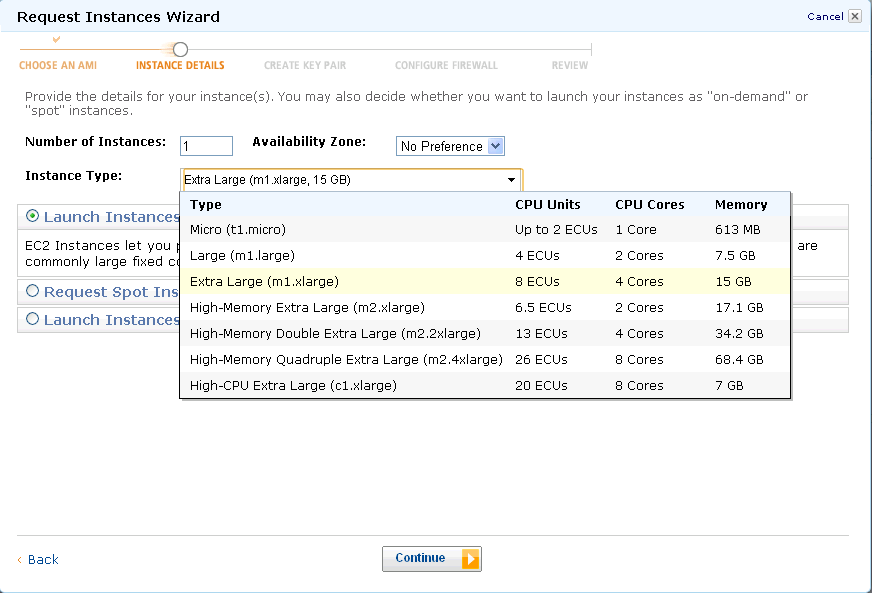
Here is how you can connect to Amazon EC2 and run R. Running R for Cloud Computing. 1) Logging onto Amazon Console http://aws.amazon.com/ec2/ Note you need your Amazon Id (even the same id which you use for buying books).Note we are into AmazonEC2 as shown by the upper tab. Click upper tab to get into the AmazonEC2 2) Choosing the right AMI-On the left margin, you can click AMI -Images. Now you can search for the image-I chose Ubuntu images (linux images are cheaper) and latest Ubuntu Lucid in the search .You can choose whether you want 32 bit or 64 bit image. 64 bit images will lead to faster processing of data.Click on launch instance in the upper tab ( near the search feature). A pop up comes up, which shows the 5 step process to launch your computing. 3) Choose the right compute instance- – there are various compute instances and they all are at different multiples of prices or compute units. They differ in terms of RAM memory and number of processors.After choosing the compute instance of your choice (extra large is highlighted)- click on continue- 4) Instance Details-Do not choose cloudburst monitoring if you are on a budget as it has a extra charge. For critical production it would be advisable to choose cloudburst monitoring once you have become comfortable with handling cloud computing.. 5) Add Tag Details- If you are running a lot of instances you need to create your own tags to help you manage them. It is advisable if you are going to run many instances. 6) Create a key pair- A key pair is an added layer of encryption. Click on create new pair and name it (note the name will be handy in coming steps) 7) After clicking and downloading the key pair- you come into security groups. Security groups is just a set of instructions to help keep your data transfer secure. You want to enable access to your cloud instance to certain IP addresses (if you are going to connect from fixed IP address and to certain ports in your computer. It is necessary in security group to enable SSH using Port 22. Last step- Review Details and Click Launch 8) On the Left margin click on instances ( you were in Images.>AMI earlier) It will take some 3-5 minutes to launch an instance. You can see status as pending till then. 9) Pending instance as shown by yellow light- 10) Once the instance is running -it is shown by a green light. Click on the check box, and on upper tab go to instance actions. Click on connect- You see a popup with instructions like these- · Open the SSH client of your choice (e.g., PuTTY, terminal). · Locate your private key, nameofkeypair.pem · Use chmod to make sure your key file isn’t publicly viewable, ssh won’t work otherwise: chmod 400 decisionstats.pem · Connect to your instance using instance’s public DNS [ec2-75-101-182-203.compute-1.amazonaws.com]. Example Enter the following command line: ssh -i decisionstats2.pem root@ec2-75-101-182-203.compute-1.amazonaws.com
Note- If you are using Ubuntu Linux on your desktop/laptop you will need to change the above line to ubuntu@… from root@..
(Note X11 package should be installed for Linux users- Windows Users will use Remote Desktop) 12) Install R Commander on the remote machine (which is running Ubuntu Linux) using the command
Running R on an Amazon EC2 has following benefits-
1) Elastic Memory and Number of Processors for heavy computation 2) Affordable micro instances for smaller datasets (2 cents per hour for Unix to 3 cents per hour). 3) An easy to use interface console for managing datasets as well as processes
Running R on an Amazon EC2 on Windows Instance has following additional benefits-
1) Remote Desktop makes operation of R very easy 2) 64 Bit R can be used 3) You can also use your evaluation of Revolution R Enterprise (which is free to academics) and quite inexpensive for enterprise software for corporates.
You can thus combine R GUIs (like Rattle , R Cmdr or Deducer based upon your need for statistical analysis, data mining or graphical analysis) , with 64 Bit OS, and Revolution’s REvoScaler Package to manage huge huge datasets at a very easy to use analytics solution.
(note if you select SQL Server it will cost you extra)
Then go through the following steps and launch instance
Selecting EC2 compute depending on number of cores, memory needs and budget
Create a key pair (a .pem file which is basically an encrypted password) and download it. For tags, etc just click on and pass (or read and create some tags to help you remember, and organize multiple instances) In configure firewall, remember to Enable Access to RDP (Remote Desktop) and HTTP. You can choose to enable whole internet or your own ip address/es for logging in Review and launch instance
Go to instance (leftmost margin)
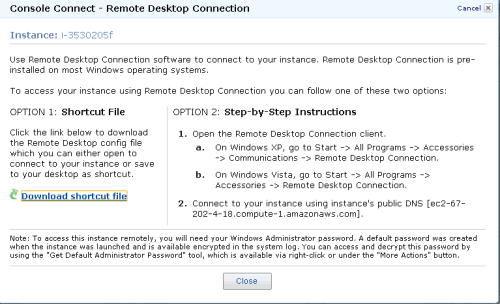
and see status (yellow for pending) Click on Instance Actions-Connect on Top Bar to see following Download the .RDP shortcut file and Click on Instance Actions-Request Admin Password
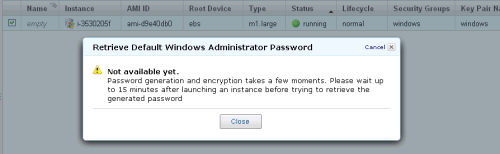
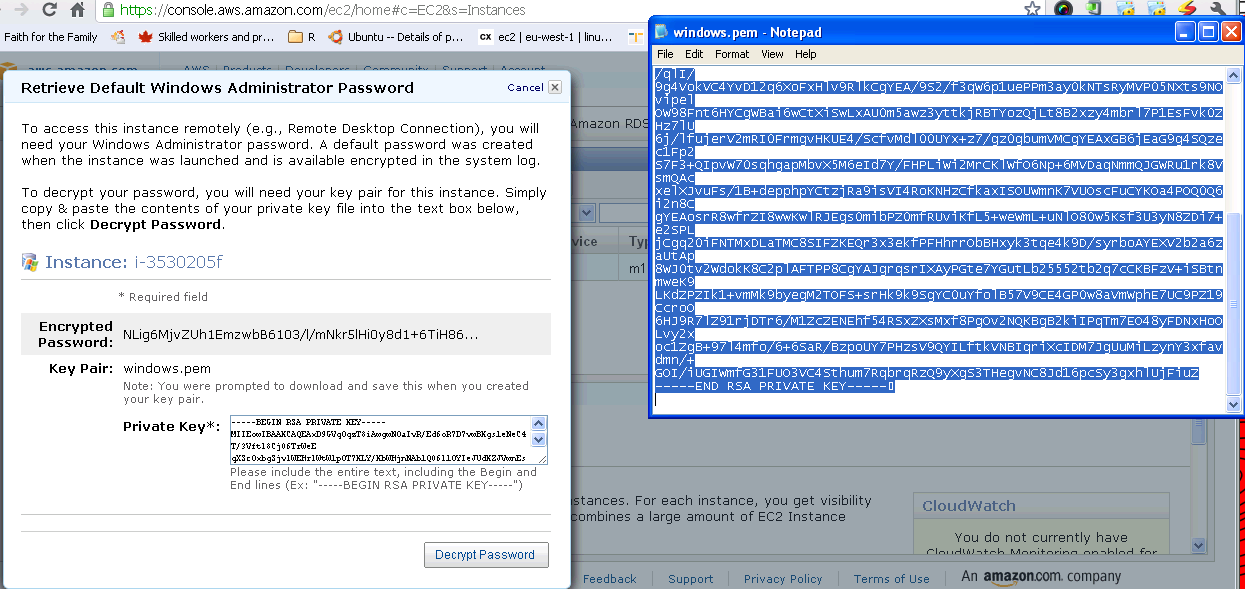
Wait 15 minutes while burning few cents for free as Microsoft creates a password for you Have coffee (or tea is you are health minded) Click Again on Instance Actions-Request Admin Password Open the key pair file (or .pem file created earlier) using
notepad, and copy and paste the Private Key (looks like gibberish)- and click Decrypt.
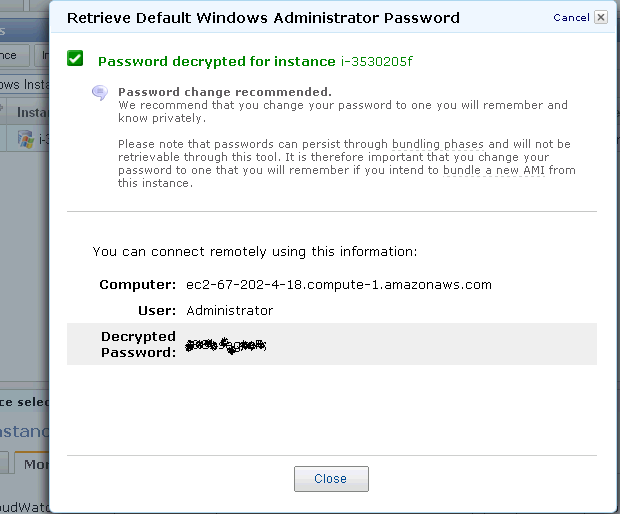
Retrieve Password for logging on.
Note the new password generated- this is your Remote Desktop Password.
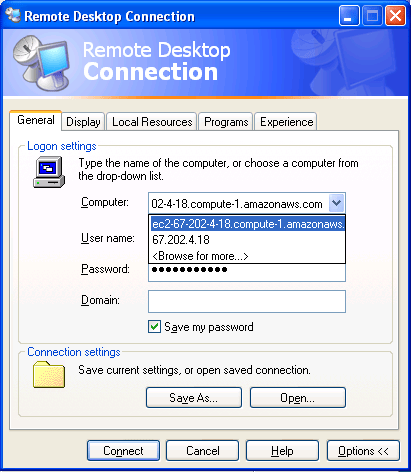
Click on the .rdp file (or Shortcut file created earlier)- It will connect to your Windows instance.
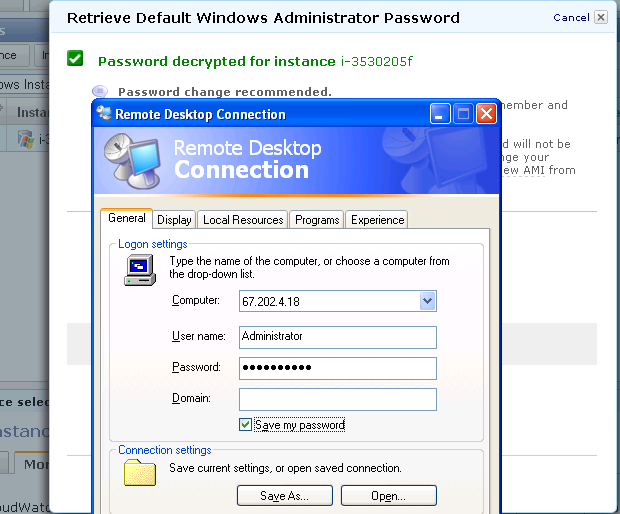
Enter the new generated password in Remote Desktop
Login
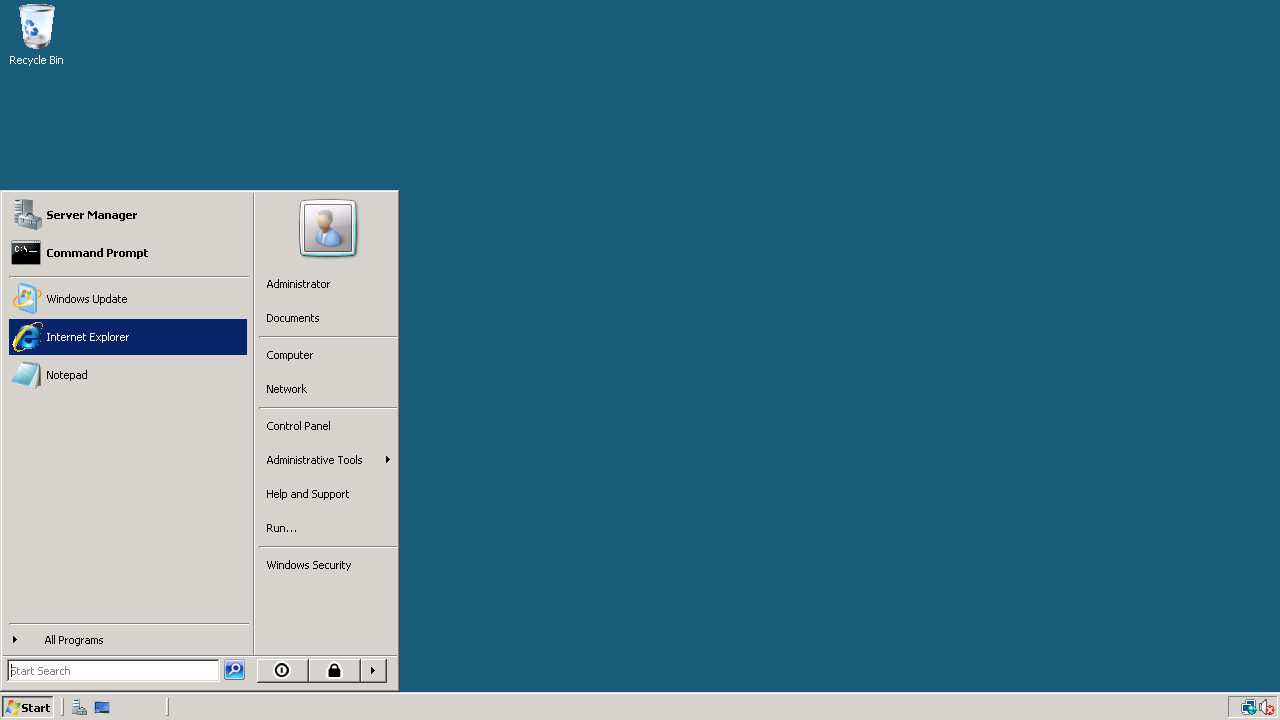
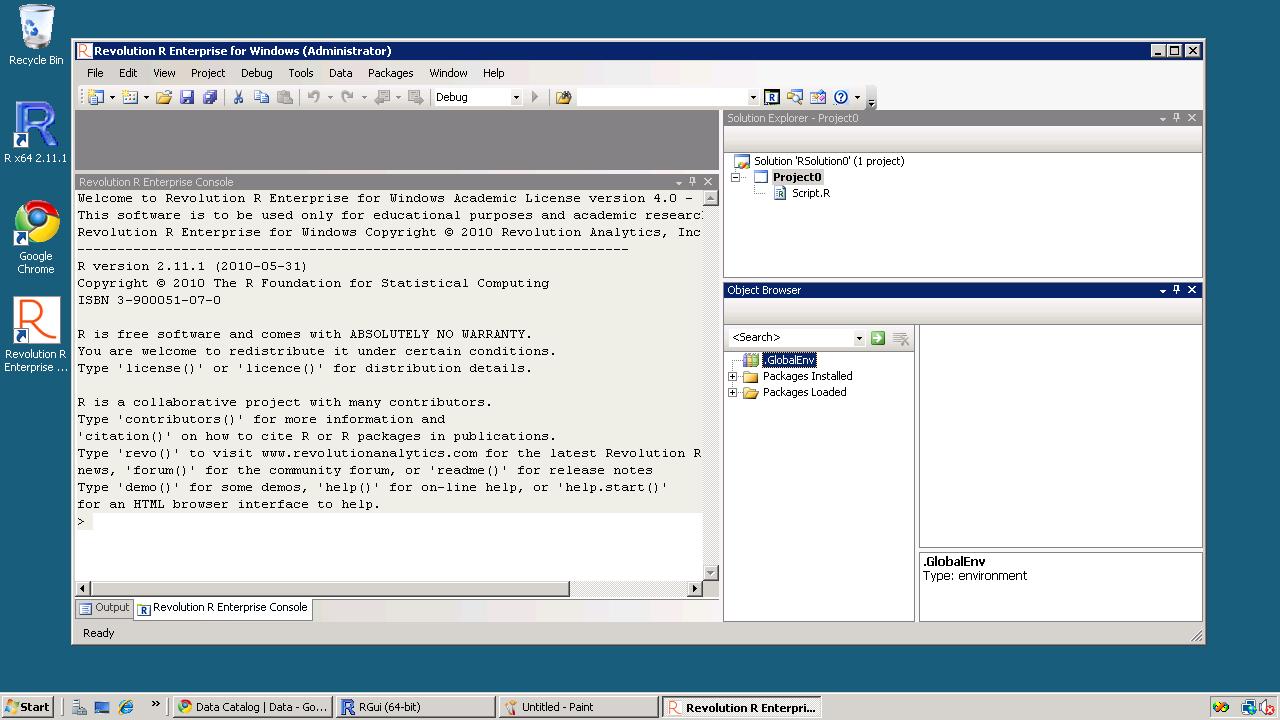
This looks like a new clean machine with just Windows OS installed on it. Install Chrome (or any other browser) if you do not use Internet Explorer Install Acrobat Reader (for documentation), Revolution R Enterprise~ 490 mb (it will automatically ask to install the .NET framework-4 files) and /or R
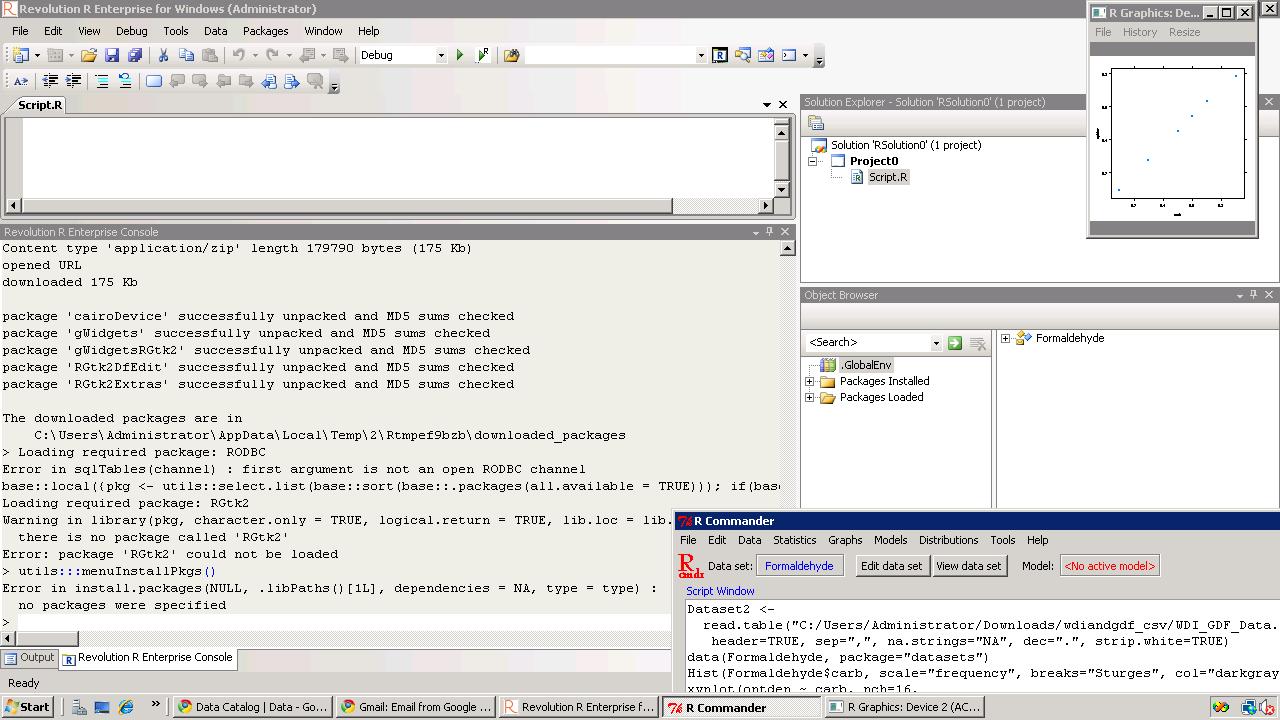
Install packages (I recommend installing R Commander, Rattle and Deducer). Apart from the fact that these GUIs are quite complimentary- they also will install almost all main packages that you need for analysis (as their dependencies) Revolution R installs parallel programming packages by default.
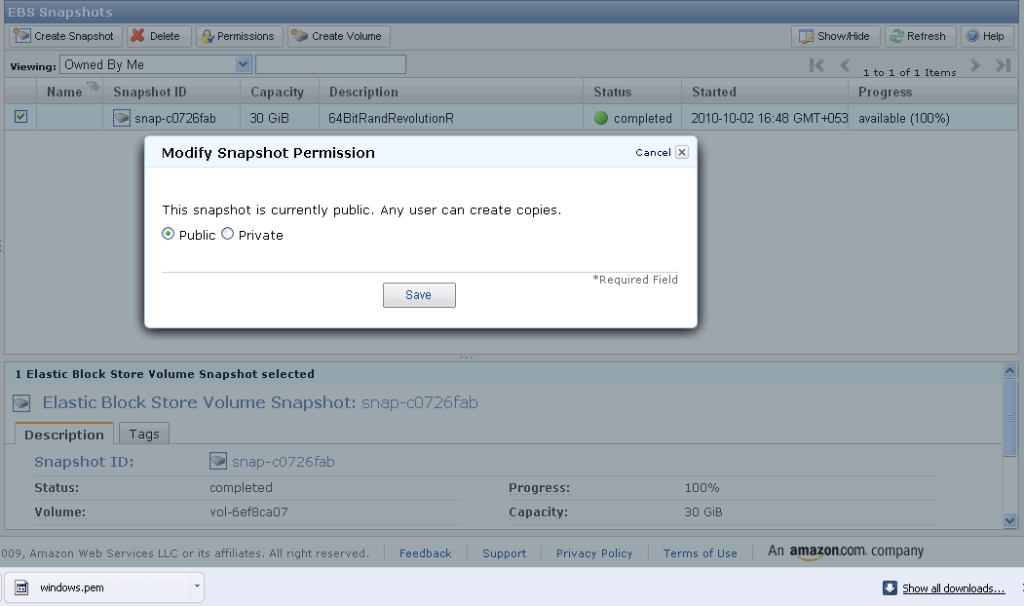
If you want to save your files for working later, you can make a snapshot (go to amazon console-ec2- left margin- ABS -Snapshot- you will see an attached memory (green light)- click on create snapshot to save your files for working later If you want to use my Windows snapshot you can work on it , just when you start your Amazon Ec2 you can click on snapshots and enter details (see snapshot name below) for making a copy or working on it for exploring either 64 bit R, or multi core cloud computing or just trying out Revolution R’s new packages for academic purposes.







 DECISION STATS