Google Storage for Developers goes into Enterprise Mode

Schematic representation of the SSL handshake ...
Image via Wikipedia

To help unify and uniform, collobrative work and data management and business models across the enterprise in secure SSL cloud environments- Google Storage has been rolling out some changes (read below)-this also gives you more options on the day Amazon goes ahem down (cough cough) because they didn’t think someone in their data environment could be sympathetic to free data.

——————————————————————————————————————————————————————–

https://groups.google.com/group/gs-announce

And now to the actual update.

We’re making some changes to Google Storage for Developers to make team-based development easier. As part of this work, we are introducing the concept of a project. In preparation for this feature, we will be creating projects for every user and migrating their buckets to it.

What does this mean for you?

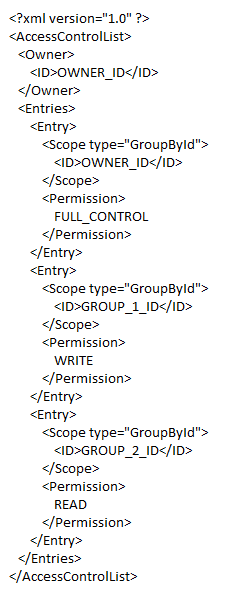
Everything will continue to work as it always has. However, you will notice that if you perform a get-acl operation on any of your buckets, you will see extra ACL entries. These entries correspond to project groups. Each group has only one member – the person who owned the buckets before the bucket migration;  no additional rights have been granted to any of your buckets or objects. You should preserve these new ACL grants if you modify bucket ACLs.

An example entry for a modified ACL would look like this:
We’ll be rolling out these changes over the next few days,

http://blog.cloudberrylab.com/2011/04/cloudberry-explorer-for-google-storage.html

Detailed Note on GS-

https://code.google.com/apis/storage/

Google Storage for Developers is a RESTful service for storing and accessing your data on Google’s infrastructure. The service combines the performance and scalability of Google’s cloud with advanced security and sharing capabilities. Highlights include:

Fast, scalable, highly available object store

  • All data replicated to multiple U.S. data centers
  • Read-your-writes data consistency
  • Objects of hundreds of gigabytes in size per request with range-get support
  • Domain-scoped bucket namespace

Easy, flexible authentication and sharing

  • Key-based authentication
  • Authenticated downloads from a web browser
  • Individual- and group-level access controls

In addition, Google Storage for Developers offers a web-based interface for managing your storage and GSUtil, an open source command line tool and library. The service is also compatible with many existing cloud storage tools and libraries. With pay-as-you-go pricing, it’s easy to get started and scale as your needs grow.

Google Storage for Developers is currently only available to a limited number of developers. Please sign up to join the waiting list.

New book on BigData Analytics and Data mining using #Rstats with a GUI

Joseph Marie Jacquard
Image via Wikipedia

I am hoping to put this on my pre-ordered or Amazon Wish list. The book the common people who wanted to do data mining with , but were unable to ask aloud they didnt know much.  It is written by the seminal Australian authority on data mining Dr Graham Williams whom I interviewed here at https://decisionstats.com/2009/01/13/interview-dr-graham-williams/

Data Mining for the masses using an ergonomically designed Graphical User Interface.

Thank you Springer. Thank you Dr Graham Williams

http://www.springer.com/statistics/physical+%26+information+science/book/978-1-4419-9889-7

Data Mining with Rattle and R

Data Mining with Rattle and R

The Art of Excavating Data for Knowledge Discovery

Series: Use R

Williams, Graham

1st Edition., 2011, XX, 409 p. 150 illus. in color.

  • Softcover, ISBN 978-1-4419-9889-7

    Due: August 29, 2011

    54,95 €
  • Encourages the concept of programming with data – more than just pushing data through tools, but learning to live and breathe the data
  • Accessible to many readers and not necessarily just those with strong backgrounds in computer science or statistics
  • Details some of the more popular algorithms for data mining, as well as covering model evaluation and model deployment

Data mining is the art and science of intelligent data analysis. By building knowledge from information, data mining adds considerable value to the ever increasing stores of electronic data that abound today. In performing data mining many decisions need to be made regarding the choice of methodology, the choice of data, the choice of tools, and the choice of algorithms.

Throughout this book the reader is introduced to the basic concepts and some of the more popular algorithms of data mining. With a focus on the hands-on end-to-end process for data mining, Williams guides the reader through various capabilities of the easy to use, free, and open source Rattle Data Mining Software built on the sophisticated R Statistical Software. The focus on doing data mining rather than just reading about data mining is refreshing.

The book covers data understanding, data preparation, data refinement, model building, model evaluation,  and practical deployment. The reader will learn to rapidly deliver a data mining project using software easily installed for free from the Internet. Coupling Rattle with R delivers a very sophisticated data mining environment with all the power, and more, of the many commercial offerings.

Content Level » Research

Keywords » Data mining

Related subjects » Physical & Information Science

Related- https://decisionstats.com/2009/01/13/interview-dr-graham-williams/

High Performance Analytics

Marry Big Data Analytics to High Performance Computing, and you get the buzzword of this season- High Performance Analytics.

It basically consists of Parallelized code to run in parallel on custom hardware, in -database analytics for speed, and cloud computing /high performance computing environments. On an operational level, it consists of software (as in analytics) partnering with software (as in databases, Map reduce, Hadoop) plus some hardware (HP or IBM mostly). It is considered a high margin , highly profitable, business with small number of deals compared to say desktop licenses.

As per HPC Wire- which is a great tool/newsletter to keep updated on HPC , SAS Institute has been busy on this front partnering with EMC Greenplum and TeraData (who also acquired  SAS Partner AsterData to gain a much needed foot in the MR/SQL space) Continue reading “High Performance Analytics”

Augustus- a PMML model producer and consumer. Scoring engine.

A Bold GNU Head
Image via Wikipedia

I just checked out this new software for making PMML models. It is called Augustus and is created by the Open Data Group (http://opendatagroup.com/) , which is headed by Robert Grossman, who was the first proponent of using R on Amazon Ec2.

Probably someone like Zementis ( http://adapasupport.zementis.com/ ) can use this to further test , enhance or benchmark on the Ec2. They did have a joint webinar with Revolution Analytics recently.

https://code.google.com/p/augustus/

Recent News

  • Augustus v 0.4.3.1 has been released
  • Added a guide (pdf) for including Augustus in the Windows System Properties.
  • Updated the install documentation.
  • Augustus 2010.II (Summer) release is available. This is v 0.4.2.0. More information is here.
  • Added performance discussion concerning the optional cyclic garbage collection.

See Recent News for more details and all recent news.

Augustus

Augustus is a PMML 4-compliant scoring engine that works with segmented models. Augustus is designed for use with statistical and data mining models. The new release provides Baseline, Tree and Naive-Bayes producers and consumers.

There is also a version for use with PMML 3 models. It is able to produce and consume models with 10,000s of segments and conforms to a PMML draft RFC for segmented models and ensembles of models. It supports Baseline, Regression, Tree and Naive-Bayes.

Augustus is written in Python and is freely available under the GNU General Public License, version 2.

See the page Which version is right for me for more details regarding the different versions.

PMML

Predictive Model Markup Language (PMML) is an XML mark up language to describe statistical and data mining models. PMML describes the inputs to data mining models, the transformations used to prepare data for data mining, and the parameters which define the models themselves. It is used for a wide variety of applications, including applications in finance, e-business, direct marketing, manufacturing, and defense. PMML is often used so that systems which create statistical and data mining models (“PMML Producers”) can easily inter-operate with systems which deploy PMML models for scoring or other operational purposes (“PMML Consumers”).

Change Detection using Augustus

For information regarding using Augustus with Change Detection and Health and Status Monitoring, please see change-detection.

Open Data

Open Data Group provides management consulting services, outsourced analytical services, analytic staffing, and expert witnesses broadly related to data and analytics. It has experience with customer data, supplier data, financial and trading data, and data from internal business processes.

It has staff in Chicago and San Francisco and clients throughout the U.S. Open Data Group began operations in 2002.


Overview

The above example contains plots generated in R of scoring results from Augustus. Each point on the graph represents a use of the scoring engine and a chart is an aggregation of multiple Augustus runs. A Baseline (Change Detection) model was used to score data with multiple segments.

Typical Use

Augustus is typically used to construct models and score data with models. Augustus includes a dedicated application for creating, or producing, predictive models rendered as PMML-compliant files. Scoring is accomplished by consuming PMML-compliant files describing an appropriate model. Augustus provides a dedicated application for scoring data with four classes of models, Baseline (Change Detection) ModelsTree ModelsRegression Models and Naive Bayes Models. The typical model development and use cycle with Augustus is as follows:

  1. Identify suitable data with which to construct a new model.
  2. Provide a model schema which proscribes the requirements for the model.
  3. Run the Augustus producer to obtain a new model.
  4. Run the Augustus consumer on new data to effect scoring.

Separate consumer and producer applications are supplied for Baseline (Change Detection) models, Tree models, Regression models and for Naive Bayes models. The producer and consumer applications require configuration with XML-formatted files. The specification of the configuration files and model schema are detailed below. The consumers provide for some configurability of the output but users will often provide additional post-processing to render the output according to their needs. A variety of mechanisms exist for transmitting data but user’s may need to provide their own preprocessing to accommodate their particular data source.

In addition to the producer and consumer applications, Augustus is conceptually structured and provided with libraries which are relevant to the development and use of Predictive Models. Broadly speaking, these consist of components that address the use of PMML and components that are specific to Augustus.

Post Processing

Augustus can accommodate a post-processing step. While not necessary, it is often useful to

  • Re-normalize the scoring results or performing an additional transformation.
  • Supplements the results with global meta-data such as timestamps.
  • Formatting of the results.
  • Select certain interesting values from the results.
  • Restructure the data for use with other applications.

Google unleashes Fusion Tables

I just discovered Fusion Tables. There is life beyond the amazing Jeff’s Amazon Ec2/s3 after all!

Check out http://www.google.com/fusiontables/public/tour/index.html

Gather, visualize and share data online

Don’t have a Google Account?
Create one now

  • Visualize and publish your data as maps, timelines and charts
  • Host your data tables online
  • Combine data from multiple people

data table turns into map

Google Fusion Tables is a modern data management and publishing web application that makes it easy
to host, manage, collaborate on, visualize, and publish data tables online.

What can I do with Google Fusion Tables?

Import your own data
Upload data tables from spreadsheets or CSV files, even KML. Developers can use the Fusion Tables API to insert, update, delete and query data programmatically. You can export your data as CSV or KML too.

Visualize it instantly
See the data on a map or as a chart immediately. Use filters for more selective visualizations.

Publish your visualization on other web properties
Now that you’ve got that nice map or chart of your data, you can embed it in a web page or blog post. Or send a link by email or IM. It will always display the latest data values from your table and helps you communicate your story more easily.

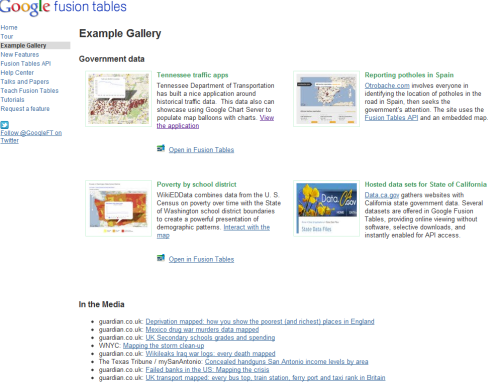
Look at the Fusion Tables Example Gallery

at https://sites.google.com/site/fusiontablestalks/stories

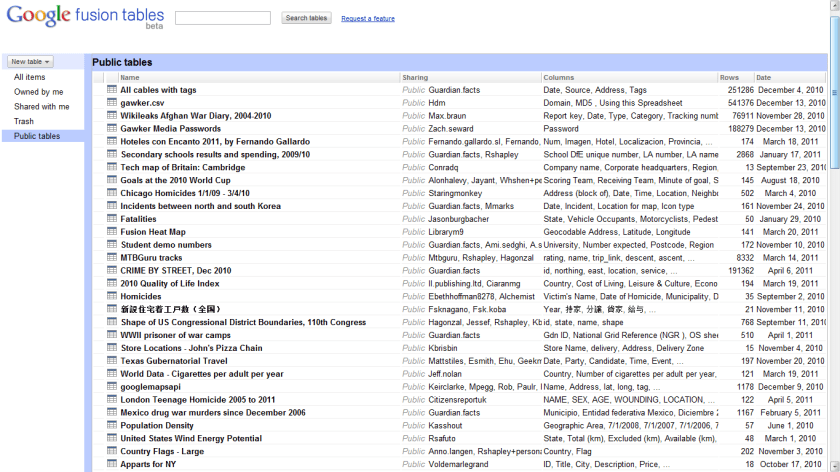
If you are worried about data.gov closing down, heres a snapshot of Fusion Table Public datasets.


iTunes finally gets some competition ?- Amazon Cloud Player


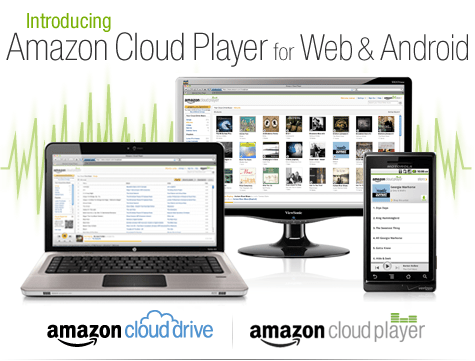
An interesting development is Amazon’s Cloud Player (though Cannonical may be credited for thinking of the idea first for Ubuntu One). Since Ubuntu One is dependent on the OS (and not the browser) this makes Amazon \s version more of a  mobile Cloud Player (as it seems to be an Android app and not an app that is independent of any platform, os or browser.

Since Android and Ubuntu are both Linux flavors, I am not sure if Cannonical has an exiting mobile app for Ubuntu One. Apple’s cloud plans also seems kind of ambiguous compared to Microsoft (Azure et al)

I guess we will have to wait for a true Cloud player.


http://www.amazon.com/b/ref=tsm_1_tw_s_dm_liujd5?node=2658409011&tag=cloudplayer-20

How to Get Started with Cloud Drive and Cloud Player


Step 1. Add music to Cloud Drive

Purchase a song or album from the Amazon MP3 Store and click the Save to Amazon Cloud Drive button when your purchase is complete. Your purchase will be saved for free.


Step 2. Play your music in Cloud Player for Web

Click the Launch Amazon Cloud Player button to start listening to your purchase. Add more music from your library by clicking theUpload to Cloud Drive button from the Cloud Player screen. Start with 5 GB of free Cloud Drive storage. Upgrade to 20 GB with an MP3 album purchase (see details). Use Cloud Player to browse and search your library, create playlists, and download to your computer.


Step 3. Enjoy your music on the go with Cloud Player for Android

Install the Amazon MP3 for Android app to use Cloud Player on your Android device. Shop the full Amazon MP3 store, save your purchases to Cloud Drive, stream your Cloud Player library, and download to your device right from your Android phone or tablet.

compare this with

https://one.ubuntu.com/music/

A cloud-enabled music store

The Ubuntu One Music Store is integrated with the Ubuntu One service making it a cloud-enabled digital music store. All purchases are transferred to your Ubuntu One personal cloud for safe storage and then conveniently downloaded to your synchronizing computers. And don’t worry aboutgoing over your storage quota with music purchases. You won’t need to pay more for personal cloud storage of music purchased from the Ubuntu One Music Store.

An Ubuntu One subscription is required to purchase music from the Ubuntu One Music Store. Choose from either the free 2 GB option or the 50 GB plan for $10 (USD) per month to synchronize more of your digital life.

5 regional stores and more in the works

  • The Ubuntu One Music requires Ubuntu 10.04 LTS and offers digital music through five regional stores.
  • The US, UK, and Germany stores offer music from all major and independent labels.
  • The EU store serves most of the EU member countries (2) and offers music from fewer major label artists.
  • The World store offers only independent label music and serves the countries not covered by the other regional stores.


Pentaho and R: working together

open_source_communism
Image by jagelado via Flickr

I interview Pentaho Co-founder here at https://decisionstats.com/2010/11/14/pentaho/

and recently became aware of the R Pentaho integration.

“R” is a popular open source statistical and analytical language that academics and commercial organizations alike have used for years to get maximum insight out of information using advanced analytic techniques. In this twelve-minute video, David Reinke from Pentaho Certified Partner OpenBI provides an overview of R, as well as a demonstration of integration between R and Pentaho.

http://www.pentaho.com/products/demos/r_project_with_pentaho/

or http://www.pentaho.com/products/demos/showNtell.php

Related-

M.S. in Applied Statistics

http://www.information-management.com/blogs/analytics_business_intelligence_BI_statistics-10019474-1.html

R and BI – Integrating R with Open Source BusinessIntelligence Platforms Pentaho and Jaspersoft

http://www.r-project.org/conferences/useR-2010/abstracts/Reinke+Miller.pdf

Web development with R

http://www.r-project.org/conferences/useR-2010/slides/Ooms.pdf

In-database analytics with R

http://www.r-project.org/conferences/useR-2010/slides/Hess+Chambers_1.pdf

R role in Business Intelligence Software Architecture

http://www.r-project.org/conferences/useR-2010/slides/Colombo+Ronzoni+Fontana.pdf