Using Views in R and comparing functions across multiple packages

Some RDF hacking relating to updating probabil...
Image via Wikipedia

R has almost 2923 available packages

This makes the task of searching among these packages and comparing functions for the same analytical task across different packages a bit tedious and prone to manual searching (of reading multiple Pdfs of help /vignette of packages) or sending an email to the R help list.

However using R Views is a slightly better way of managing all your analytical requirements for software rather than the large number of packages (see Graphics view below).

CRAN Task Views allow you to browse packages by topic and provide tools to automatically install all packages for special areas of interest. Currently, 28 views are available. http://cran.r-project.org/web/views/

Bayesian Bayesian Inference
ChemPhys Chemometrics and Computational Physics
ClinicalTrials Clinical Trial Design, Monitoring, and Analysis
Cluster Cluster Analysis & Finite Mixture Models
Distributions Probability Distributions
Econometrics Computational Econometrics
Environmetrics Analysis of Ecological and Environmental Data
ExperimentalDesign Design of Experiments (DoE) & Analysis of Experimental Data
Finance Empirical Finance
Genetics Statistical Genetics
Graphics Graphic Displays & Dynamic Graphics & Graphic Devices & Visualization
gR gRaphical Models in R
HighPerformanceComputing High-Performance and Parallel Computing with R
MachineLearning Machine Learning & Statistical Learning
MedicalImaging Medical Image Analysis
Multivariate Multivariate Statistics
NaturalLanguageProcessing Natural Language Processing
OfficialStatistics Official Statistics & Survey Methodology
Optimization Optimization and Mathematical Programming
Pharmacokinetics Analysis of Pharmacokinetic Data
Phylogenetics Phylogenetics, Especially Comparative Methods
Psychometrics Psychometric Models and Methods
ReproducibleResearch Reproducible Research
Robust Robust Statistical Methods
SocialSciences Statistics for the Social Sciences
Spatial Analysis of Spatial Data
Survival Survival Analysis
TimeSeries Time Series Analysis

To automatically install these views, the ctv package needs to be installed, e.g., via

install.packages("ctv")
library("ctv")
Created by Pretty R at inside-R.org


and then the views can be installed via install.views or update.views (which first assesses which of the packages are already installed and up-to-date), e.g.,

install.views("Econometrics")
 update.views("Econometrics")
 Created by Pretty R at inside-R.org

CRAN Task View: Graphic Displays & Dynamic Graphics & Graphic Devices & Visualization

Maintainer: Nicholas Lewin-Koh
Contact: nikko at hailmail.net
Version: 2009-10-28

R is rich with facilities for creating and developing interesting graphics. Base R contains functionality for many plot types including coplots, mosaic plots, biplots, and the list goes on. There are devices such as postscript, png, jpeg and pdf for outputting graphics as well as device drivers for all platforms running R. lattice and grid are supplied with R’s recommended packages and are included in every binary distribution. lattice is an R implementation of William Cleveland’s trellis graphics, while grid defines a much more flexible graphics environment than the base R graphics.

R’s base graphics are implemented in the same way as in the S3 system developed by Becker, Chambers, and Wilks. There is a static device, which is treated as a static canvas and objects are drawn on the device through R plotting commands. The device has a set of global parameters such as margins and layouts which can be manipulated by the user using par() commands. The R graphics engine does not maintain a user visible graphics list, and there is no system of double buffering, so objects cannot be easily edited without redrawing a whole plot. This situation may change in R 2.7.x, where developers are working on double buffering for R devices. Even so, the base R graphics can produce many plots with extremely fine graphics in many specialized instances.

One can quickly run into trouble with R’s base graphic system if one wants to design complex layouts where scaling is maintained properly on resizing, nested graphs are desired or more interactivity is needed. grid was designed by Paul Murrell to overcome some of these limitations and as a result packages like latticeggplot2vcd or hexbin (on Bioconductor ) use grid for the underlying primitives. When using plots designed with grid one needs to keep in mind that grid is based on a system of viewports and graphic objects. To add objects one needs to use grid commands, e.g., grid.polygon() rather than polygon(). Also grid maintains a stack of viewports from the device and one needs to make sure the desired viewport is at the top of the stack. There is a great deal of explanatory documentation included with grid as vignettes.

The graphics packages in R can be organized roughly into the following topics, which range from the more user oriented at the top to the more developer oriented at the bottom. The categories are not mutually exclusive but are for the convenience of presentation:

  • Plotting : Enhancements for specialized plots can be found in plotrix, for polar plotting, vcd for categorical data, hexbin (on Bioconductor ) for hexagon binning, gclus for ordering plots and gplots for some plotting enhancements. Some specialized graphs, like Chernoff faces are implemented in aplpack, which also has a nice implementation of Tukey’s bag plot. For 3D plots latticescatterplot3d and misc3d provide a selection of plots for different kinds of 3D plotting. scatterplot3d is based on R’s base graphics system, while misc3d is based on rgl. The package onion for visualizing quaternions and octonions is well suited to display 3D graphics based on derived meshes.
  • Graphic Applications : This area is not much different from the plotting section except that these packages have tools that may not for display, but can aid in creating effective displays. Also included are packages with more esoteric plotting methods. For specific subject areas, like maps, or clustering the excellent task views contributed by other dedicated useRs is an excellent place to start.
    • Effect ordering : The gclus package focuses on the ordering of graphs to accentuate cluster structure or natural ordering in the data. While not for graphics directly cba and seriation have functions for creating 1 dimensional orderings from higher dimensional criteria. For ordering an array of displays, biclust can be useful.
    • Large Data Sets : Large data sets can present very different challenges from moderate and small datasets. Aside from overplotting, rendering 1,000,000 points can tax even modern GPU’s. For univariate datalvplot produces letter value boxplots which alleviate some of the problems that standard boxplots exhibit for large data sets. For bivariate data ash can produce a bivariate smoothed histogram very quickly, and hexbin, on Bioconductor , can bin bivariate data onto a hexagonal lattice, the advantage being that the irregular lines and orientation of hexagons do not create linear artifacts. For multivariate data, hexbin can be used to create a scatterplot matrix, combined with lattice. An alternative is to use scagnostics to produce a scaterplot matrix of “data about the data”, and look for interesting combinations of variables.
    • Trees and Graphs ape and ade4 have functions for plotting phylogenetic trees, which can be used for plotting dendrograms from clustering procedures. While these packages produce decent graphics, they do not use sophisticated algorithms for node placement, so may not be useful for very large trees. igraph has the Tilford-Rheingold algorithm implementead and is useful for plotting larger trees. diagram as facilities for flow diagrams and simple graphs. For more sophisticated graphs Rgraphviz and igraph have functions for plotting and layout, especially useful for representing large networks.
  • Graphics Systems lattice is built on top of the grid graphics system and is an R implementation of William Cleveland’s trellis system for S-PLUS. lattice allows for building many types of plots with sophisticated layouts based on conditioning. ggplot2 is an R implementation of the system described in “A Grammar of Graphics” by Leland Wilkinson. Like latticeggplot (also built on top of grid) assists in trellis-like graphics, but allows for much more. Since it is built on the idea of a semantics for graphics there is much more emphasis on reshaping data, transformation, and assembling the elements of a plot.
  • Devices : Whereas grid is built on top of the R graphics engine, many in the R community have found the R graphics engine somewhat inflexible and have written separate device drivers that either emphasize interactivity or plotting in various graphics formats. R base supplies devices for PostScript, PDF, JPEG and other formats. Devices on CRAN include cairoDevice which is a device based libcairo, which can actually render to many device types. The cairo device is desgned to work with RGTK2, which is an interface to the Gimp Tool Kit, similar to pyGTK2. GDD provides device drivers for several bitmap formats, including GIF and BMP. RSvgDevice is an SVG device driver and interfaces well with with vector drawing programs, or R web development packages, such as Rpad. When SVG devices are for web display developers should be aware that internet explorer does not support SVG, but has their own standard. Trust Microsoft. rgl provides a device driver based on OpenGL, and is good for 3D and interactive development. Lastly, the Augsburg group supplies a set of packages that includes a Java-based device, JavaGD.
  • Colors : The package colorspace provides a set of functions for transforming between color spaces and mixcolor() for mixing colors within a color space. Based on the HCL colors provided in colorspacevcdprovides a set of functions for choosing color palettes suitable for coding categorical variables ( rainbow_hcl()) and numerical information ( sequential_hcl()diverge_hcl()). Similar types of palettes are provided in RColorBrewer and dichromat is focused on palettes for color-impaired viewers.
  • Interactive Graphics : There are several efforts to implement interactive graphics systems that interface well with R. In an interactive system the user can interactively query the graphics on the screen with the mouse, or a moveable brush to zoom, pan and query on the device as well as link with other views of the data. rggobi embeds the GGobi interactive graphics system within R, so that one can display a data frame or several in GGobi directly from R. The package has functions to support longitudinal data, and graphs using GGobi’s edge set functionality. The RoSuDA repository maintained and developed by the University of Augsburg group has two packages, iplots and iwidgets as well as their Java development environment including a Java device, JavaGD. Their interactive graphics tools contain functions for alpha blending, which produces darker shading around areas with more data. This is exceptionally useful for parallel coordinate plots where many lines can quickly obscure patterns. playwith has facilities for building interactive versions of R graphics using the cairoDevice and RGtk2. Lastly, the rgl package has mechanisms for interactive manipulation of plots, especially 3D rotations and surfaces.
  • Development : For development of specialized graphics packages in R, grid should probably be the first consideration for any new plot type. rgl has better tools for 3D graphics, since the device is interactive, though it can be slow. An alternative is to use Java and the Java device in the RoSuDA packages, though Java has its own drawbacks. For porting plotting code to grid, using the package gridBase presents a nice intermediate step to embed base graphics in grid graphics and vice versa.

IBM and Revolution team to create new in-database R

From the Press Release at http://www.revolutionanalytics.com/news-events/news-room/2011/revolution-analytics-netezza-partnership.php

Under the terms of the agreement, the companies will work together to create a version of Revolution’s software that takes advantage of IBM Netezza’s i-class technology so that Revolution R Enterprise can run in-database in an optimal fashion.

About IBM

For information about IBM Netezza, please visit: http://www.netezza.com.
For Information on IBM Information Management, please visit: http://www.ibm.com/software/data/information-on-demand/
For information on IBM Business Analytics, please visit the online press kit: http://www.ibm.com/press/us/en/presskit/27163.wss
Follow IBM and Analytics on Twitter: http://twitter.com/ibmbizanalytics
Follow IBM analytics on Tumblr: http://smarterplanet.tumblr.com/tagged/new_intelligence
IBM YouTube Analytics Channel: http://www.youtube.com/user/ibmbusinessanalytics
For information on IBM Smarter Systems: http://www-03.ibm.com/systems/smarter/

About Revolution Analytics

Revolution Analytics is the leading commercial provider of software and services based on the open source R project for statistical computing.  Led by predictive analytics pioneer Norman Nie, the company brings high performance, productivity and enterprise readiness to R, the most powerful statistics language in the world. The company’s flagship Revolution R product is designed to meet the production needs of large organizations in industries such as finance, life sciences, retail, manufacturing and media.  Used by over 2 million analysts in academia and at cutting-edge companies such as Google, Bank of America and Acxiom, R has emerged as the standard of innovation in statistical analysis. Revolution Analytics is committed to fostering the continued growth of the R community through sponsorship of the Inside-R.org community site, funding worldwide R user groups and offers free licenses of Revolution R Enterprise to everyone in academia.


Netezza, an IBM Company, is the global leader in data warehouse, analytic and monitoring appliances that dramatically simplify high-performance analytics across an extended enterprise. IBM Netezza’s technology enables organizations to process enormous amounts of captured data at exceptional speed, providing a significant competitive and operational advantage in today’s data-intensive industries, including digital media, energy, financial services, government, health and life sciences, retail and telecommunications.

The IBM Netezza TwinFin® appliance is built specifically to analyze petabytes of detailed data significantly faster than existing data warehouse options, and at a much lower total cost of ownership. It stores, filters and processes terabytes of records within a single unit, analyzing only the relevant information for each query.

Using Revolution R Enterprise & Netezza Together

Revolution Analytics and IBM Netezza have announced a partnership to integrate Revolution R Enterprise and the IBM Netezza TwinFin  Data Warehouse Appliance. For the first time, customers seeking to run high performance and full-scale predictive analytics from within a data warehouse platform will be able to directly leverage the power of the open source R statistics language. The companies are working together to create a version of Revolution’s software that takes advantage of IBM Netezza’s i-class technology so that Revolution R Enterprise can run in-database in an optimal fashion.

This partnership integrates Revolution R Enterprise with IBM Netezza’s high performance data warehouse and advanced analytics platform to help organizations combat the challenges that arise as complexity and the scale of data grow.  By moving the analytics processing next to the data, this integration will minimize data movement – a significant bottleneck, especially when dealing with “Big Data”.  It will deliver high performance on large scale data, while leveraging the latest innovations in analytics.

With Revolution R Enterprise for IBM Netezza, advanced R computations are available for rapid analysis of hundreds of terabyte-class data volumes — and can deliver 10-100x performance improvements at a fraction of the cost compared to traditional analytics vendors.

Additional Resources


Protected: Whats behind that pretty SAS Blog?

This content is password-protected. To view it, please enter the password below.

Pentaho and R: working together

open_source_communism
Image by jagelado via Flickr

I interview Pentaho Co-founder here at https://decisionstats.com/2010/11/14/pentaho/

and recently became aware of the R Pentaho integration.

“R” is a popular open source statistical and analytical language that academics and commercial organizations alike have used for years to get maximum insight out of information using advanced analytic techniques. In this twelve-minute video, David Reinke from Pentaho Certified Partner OpenBI provides an overview of R, as well as a demonstration of integration between R and Pentaho.

http://www.pentaho.com/products/demos/r_project_with_pentaho/

or http://www.pentaho.com/products/demos/showNtell.php

Related-

M.S. in Applied Statistics

http://www.information-management.com/blogs/analytics_business_intelligence_BI_statistics-10019474-1.html

R and BI – Integrating R with Open Source BusinessIntelligence Platforms Pentaho and Jaspersoft

http://www.r-project.org/conferences/useR-2010/abstracts/Reinke+Miller.pdf

Web development with R

http://www.r-project.org/conferences/useR-2010/slides/Ooms.pdf

In-database analytics with R

http://www.r-project.org/conferences/useR-2010/slides/Hess+Chambers_1.pdf

R role in Business Intelligence Software Architecture

http://www.r-project.org/conferences/useR-2010/slides/Colombo+Ronzoni+Fontana.pdf

Interview Anne Milley JMP

Here is an interview with Anne Milley, a notable thought leader in the world of analytics. Anne is now Senior Director, Analytical Strategy in Product Marketing for JMP , the leading data visualization software from the SAS Institute.

Ajay-What do you think are the top 5 unique selling points of JMP compared to other statistical software in its category?

Anne-

JMP combines incredible analytic depth and breadth with interactive data visualization, creating a unique environment optimized for discovery and data-driven innovation.

With an extensible framework using JSL (JMP Scripting Language), and integration with SAS, R, and Excel, JMP becomes your analytic hub.

JMP is accessible to all kinds of users. A novice analyst can dig into an interactive report delivered by a custom JMP application. An engineer looking at his own data can use built-in JMP capabilities to discover patterns, and a developer can write code to extend JMP for herself or others.

State-of-the-art DOE capabilities make it easy for anyone to design and analyze efficient experiments to determine which adjustments will yield the greatest gains in quality or process improvement – before costly changes are made.

Not to mention, JMP products are exceptionally well designed and easy to use. See for yourself and check out the free trial at www.jmp.com.

Download a free 30-day trial of JMP.

Ajay- What are the challenges and opportunities of expanding JMP’s market share? Do you see JMP expanding its conferences globally to engage global audiences?

Anne-

We realized solid global growth in 2010. The release of JMP Pro and JMP Clinical last year along with continuing enhancements to the rest of the JMP family of products (JMP and JMP Genomics) should position us well for another good year.

With the growing interest in analytics as a means to sustained value creation, we have the opportunity to help people along their analytic journey – to get started, take the next step, or adopt new paradigms speeding their time to value. The challenge is doing that as fast as we would like.

We are hiring internationally to offer even more events, training and academic programs globally.

Ajay- What are the current and proposed educational and global academic initiatives of JMP? How can we see more JMP in universities across the world (say India- China etc)?

Anne-

We view colleges and universities both as critical incubators of future JMP users and as places where attitudes about data analysis and statistics are formed. We believe that a positive experience in learning statistics makes a person more likely to eventually want and need a product like JMP.

For most students – and particularly for those in applied disciplines of business, engineering and the sciences – the ability to make a statistics course relevant to their primary area of study fosters a positive experience. Fortunately, there is a trend in statistical education toward a more applied, data-driven approach, and JMP provides a very natural environment for both students and researchers.

Its user-friendly navigation, emphasis on data visualization and easy access to the analytics behind the graphics make JMP a compelling alternative to some of our more traditional competitors.

We’ve seen strong growth in the education markets in the last few years, and JMP is now used in nearly half of the top 200 universities in the US.

Internationally, we are at an earlier stage of market development, but we are currently working with both JMP and SAS country offices and their local academic programs to promote JMP. For example, we are working with members of the JMP China office and faculty at several universities in China to support the use of JMP in the development of a master’s curriculum in Applied Statistics there, touched on in this AMSTAT News article.

Ajay- What future trends do you see for 2011 in this market (say top 5)?

Anne-

Growing complexity of data (text, image, audio…) drives the need for more and better visualization and analysis capabilities to make sense of it all.

More “chief analytics officers” are making better use of analytic talent – people are the most important ingredient for success!

JMP has been on the vanguard of 64-bit development, and users are now catching up with us as 64-bit machines become more common.

Users should demand easy-to-use, exploratory and predictive modeling tools as well as robust tools to experiment and learn to help them make the best decisions on an ongoing basis.

All these factors and more fuel the need for the integration of flexible, extensible tools with popular analytic platforms.

Ajay-You enjoy organic gardening as a hobby. How do you think hobbies and unwind time help people be better professionals?

Anne-

I am lucky to work with so many people who view their work as a hobby. They have other interests too, though, some of which are work-related (statistics is relevant everywhere!). Organic gardening helps me put things in perspective and be present in the moment. More than work defines who you are. You can be passionate about your work as well as passionate about other things. I think it’s important to spend some leisure time in ways that bring you joy and contribute to your overall wellbeing and outlook.

Btw, nice interviews over the past several months—I hadn’t kept up, but will check it out more often!

Biography–  Source- http://www.sas.com/knowledge-exchange/business-analytics/biographies.html

  • Anne Milley

    Anne Milley

    Anne Milley is Senior Director of Analytics Strategy at JMP Product Marketing at SAS. Her ties to SAS began with bank failure prediction at Federal Home Loan Bank Dallas and continued at 7-Eleven Inc. She has authored papers and served on committees for F2006, KDD, SIAM, A2010 and several years of SAS’ annual data mining conference. Milley is a contributing faculty member for the International Institute of Analytics. anne.milley@jmp.com

The Latest GUI for R- BioR

Once more a spanking new shiny software –

Bio7 is a integrated development environment for ecological modelling based on the Rich-Client-Platformconcept of the Java IDE Eclipse. The Bio7 platform contains several perspectives which arrange several views for a special purpose useful for the development and analysis of ecological models. One special perspective bundles a feature rich GUI (Graphical User Interface) for the statistical software R.
For the bidirectional communication between Java and R the Rserve application is used (as a backend to evaluate R code and transfer data from and to Java).
The Bio7 R perspective (see figure below) is divided into a R-Shell view on the left side (conceptual the R side) and a Table view on the right side (conceptual the Java side).
Data can be imported to a spreadsheet, edited and then transferred to the R workspace. Vice versa data from R can be transferred to a sheet of the Table view and then exported e.g. to an Excel or OpenOffice file.

and

General:

Built upon Eclipse 3.6.1.

Now works with the latest Java version! (Windows version bundled with the latest JRE release).

Removed the Soil perspective (now soils can be modeled with ImageJ (float precision). Active images can be displayed in the 3D discrete view (new example available).

Removed the database perspective and the plant layer. You can now built any discrete models without any plant layer.

Removed several controls in the Control view. Added the “Custom Controls” view. In addition ported the Swing component of the Time panel to Swt.

Deleted the avi to swf converter in the ImageJ menu.

Now patterns can be saved with opened Java editor source. If this file is reopened and dragged on Bio7 the pattern is loaded, the source is compiled and the setup method (if available) is executed. In this way model files can be used for presentations ->drag, setup and run. The save actions are located in the Speadsheet view toolbar.

More options available to disable panel painting and recording of values (if not needed for speed!).

New Setup button in the toolbar of Bio7 to trigger a compiled setup method if available.

Removed the load and save pattern buttons from the toolbar of Bio7. Discrete patterns can now be stored with the available action in the spreadsheet view menu.

New P2 Update Manager available in Bio7.

Updated the Janino Compiler.

New HTML perspective added with a view which embeds the TinyMC editor.

New options to disable painting operations for the discrete panels.

New option to explicitly enable scripts at startup (for a faster startup).

Quadgrid (Hexgrid)

Only states are now available which can be created in the “Spreadsheet” view menu easily. Patterns can be stored and restored as usual but are now stored in an *.exml file.

New method to transfer the quadgrid pattern as a matrix to R.

New method to transfer the population data of all quadgrid states to R.

ImageJ:

Update to the latest version (with additional fixes).

Fixed a bug to rename the image.

Thumbnail browser can now open images recursevely(limited to 1000 pics), the magnifiyng glass can be disabled, too.

Plugins can be installed dynamically with a drag and drop operation on the ImageJ view or toolbar (as known from ImageJ).

Installed plugins now extend the plugin menu as submenus or subsubmenus (not finished yet!).

Plugins can now be created with the Java editor. New Bio7 Wizard available to create a plugin template.

Compiled Java files can be added to a *.jar file with a new available action in the Navigator view (if you rightclick on the files in the Navigator). In this way ImageJ plugins can be packaged in a *.jar.

Floweditor:

Fixed a repaint bug in the debug mode of a flow (now draws correctly the active shape in the flow).

Resize with Strg+Scrollwheel works again.

Comments with more than one line works again.

New Test action to verify connections in a flow.

Debug mode now shows all executed Shapes.

Integrated more default tests (for the verification of a regular flow).

A mouse-click now deletes colored shapes in a flow (e.g. in debug mode).

Points panel:

Integrated (dynamic) Voronoi, Delauney visualization (with area and clip to rectangle action).

Points coordinates can now be set in double precision.

Transfer of point coordinates to R now in double precision.

Bio7 Table:

New import and export of Excel 2007 OOXML.

Row headers can now be resized with the mouse device.

R:

Updated R (2.12.1) and Rserve (0.6.3) to the latest version.

New help action in the R-Shell view.

New action to display help for R specific commands in the embedded Bio7 browser (which opens automatically).

New Key actions to copy the selected variable names to the expression dialog (c=cocatenate (+), a=add (,)).

New action to transfer character or numeric vectors horizontally or vertically in an opened spread (Table view) at selection coordinates.

Empty spaces in the filepath are now allowed under Windows if Rserve is started with a system shell or the RGUI (for the tempfile select a location in the Preferences dialog which is writeable) is started.This works also for the RGUI action.

Improved the search for the “Install packages” action (option “Case Sensitive” added).

API:

New API methods available!

And:

Many fixes since the last version!


Installation

Important information:

A certain firewall software can corrupt the Bio7 *.zip file (as well as other files).
Please ensure that you have downloaded a functioning Bio7 1.5 version. In addition it is also reported that a certain antivirus software detects the bundled R software (on Windows) as malware. Often the R specific “open.exe” is detected as malware. Please use a different scanner to make sure that the software is not infected if you have any doubts. For more details see:

http://r.789695.n4.nabble.com/trojan-at-current-development-version-td3244348.html


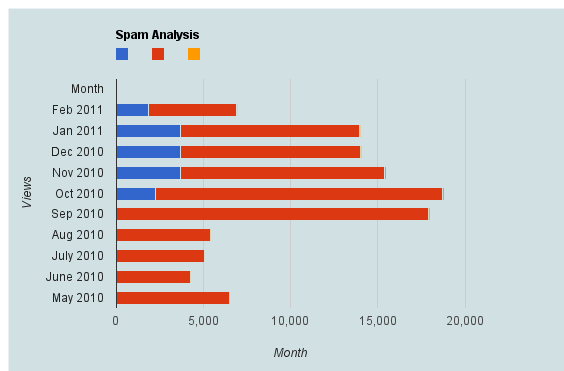
Spam Analysis Akismet-WPStats-Blogging

Here is a brief dataset I out after one hour of cutting and pasting from WordPress.com’s creative data style formats. It shows spam,comments,traffic, and number of posts written monthly.

Clearly monthly traffic is directly related to number I write (suppose A + B* Posts)

But Spam is showing a discontinuous growth especially after a big month (in which Reddit helped)

Akismet had some missing historical values (which is curious)

So what can we do with this dataframe in R or any other statistical software.

Spam Analysis
Month Spam detected Traffic excluding spam Posts Written Traffic /Post Spam /Post Spam/Traffic Ham detected Missed spam False positives
Feb-11 1848 5079 18 282.17 102.6667 36.39% 4.00 6.00 0.0%
Jan-11 3724 10238 35 292.51 106.4 36.37% 0.00 3.00 0.0%
Dec-10 3676 10345 35 295.57 105.0286 35.53% 8.00 6.00 0.0%
Nov-10 3680 11723 71 165.11 51.83099 31.39% 24.00 3.00 0.0%
Oct-10 2292 16430 71 231.41 32.28169 13.95% 24.00 18.00 0.0%
Sep-10 0 17913 63 284.33 0 0.00% 0.00 0.00 0.0%
Aug-10 0 5403 17 317.82 0 0.00% 0.00 0.00 0.0%
Jul-10 2 5041 10 504.1 0.2 0.04% 0.00 0.00 0.0%
Jun-10 5 4271 11 388.27 0.454545 0.12% 10.00 1.00 0.0%