One of the most frustrating things I had to do while working as financial business analysts was working with Data Time Formats in Base SAS. The syntax was simple enough and SAS was quite good with handing queries to the Oracle data base that the client was using, but remembering the different types of formats in SAS language was a challenge (there was a date9. and date6 and mmddyy etc )
Data and Time variables are particularly important variables in financial industry as almost everything is derived variable from the time (which varies) while other inputs are mostly constants. This includes interest as well as late fees and finance fees.
In R, date and time are handled quite simply-
Use the strptime( dataset, format) function to convert the character into string
For example if the variable dob is “01/04/1977) then following will convert into a date object
z=strptime(dob,”%d/%m/%Y”)
and if the same date is 01Apr1977
z=strptime(dob,"%d%b%Y")
does the same
For troubleshooting help with date and time, remember to enclose the formats
%d,%b,%m and % Y in the same exact order as the original string- and if there are any delimiters like ” -” or “/” then these delimiters are entered in exactly the same order in the format statement of the strptime
Sys.time() gives you the current date-time while the function difftime(time1,time2) gives you the time intervals( say if you have two columns as date-time variables)
What are the various formats for inputs in date time?
%a
Abbreviated weekday name in the current locale. (Also matches full name on input.)
%A
Full weekday name in the current locale. (Also matches abbreviated name on input.)
%b
Abbreviated month name in the current locale. (Also matches full name on input.)
%B
Full month name in the current locale. (Also matches abbreviated name on input.)
%c
Date and time. Locale-specific on output, "%a %b %e %H:%M:%S %Y" on input.
%d
Day of the month as decimal number (01–31).
%H
Hours as decimal number (00–23).
%I
Hours as decimal number (01–12).
%j
Day of year as decimal number (001–366).
%m
Month as decimal number (01–12).
%M
Minute as decimal number (00–59).
%p
AM/PM indicator in the locale. Used in conjunction with %I and not with %H. An empty string in some locales.
%S
Second as decimal number (00–61), allowing for up to two leap-seconds (but POSIX-compliant implementations will ignore leap seconds).
%U
Week of the year as decimal number (00–53) using Sunday as the first day 1 of the week (and typically with the first Sunday of the year as day 1 of week 1). The US convention.
%w
Weekday as decimal number (0–6, Sunday is 0).
%W
Week of the year as decimal number (00–53) using Monday as the first day of week (and typically with the first Monday of the year as day 1 of week 1). The UK convention.
%x
Date. Locale-specific on output, "%y/%m/%d" on input.
%X
Time. Locale-specific on output, "%H:%M:%S" on input.
%y
Year without century (00–99). Values 00 to 68 are prefixed by 20 and 69 to 99 by 19 – that is the behaviour specified by the 2004 POSIX standard, but it does also say ‘it is expected that in a future version the default century inferred from a 2-digit year will change’.
%Y
Year with century.
%z
Signed offset in hours and minutes from UTC, so -0800 is 8 hours behind UTC.
%Z
(output only.) Time zone as a character string (empty if not available).
Also to read the helpful documentation (especially for time zone level, and leap year seconds and differences)
Please use the following code to get a 15% discount on the 2 Day Conference Pass: AJAY11.
Predictive Analytics World announces new full-day workshops coming to San Francisco March 13-19, amounting to seven consecutive days of content.
These workshops deliver top-notch analytical and business expertise across the hottest topics.
Register now for one or more workshops, offered just before and after the full two-day Predictive Analytics World conference program (March 14-15). Early Bird registration ends on January 31st – take advantage of reduced pricing before then.
Make savings now with the early bird rate. Receive $200 off your registration rate for Predictive Analytics World – San Francisco (March 14-15), plus $100 off each workshop for which you register.
Carole-Ann’s 2011 Predictions for Decision Management
For Ajay Ohri on DecisionStats.com
What were the top 5 events in 2010 in your field?
Maturity: the Decision Management space was made up of technology vendors, big and small, that typically focused on one or two aspects of this discipline. Over the past few years, we have seen a lot of consolidation in the industry – first with Business Intelligence (BI) then Business Process Management (BPM) and lately in Business Rules Management (BRM) and Advanced Analytics. As a result the giant Platform vendors have helped create visibility for this discipline. Lots of tiny clues finally bubbled up in 2010 to attest of the increasing activity around Decision Management. For example, more products than ever were named Decision Manager; companies advertised for Decision Managers as a job title in their job section; most people understand what I do when I am introduced in a social setting!
Boredom: unfortunately, as the industry matures, inevitably innovation slows down… At the main BRMS shows we heard here and there complaints that the technology was stalling. We heard it from vendors like Red Hat (Drools) and we heard it from bored end-users hoping for some excitement at Business Rules Forum’s vendor panel. They sadly did not get it
Scrum: I am not thinking about the methodology there! If you have ever seen a rugby game, you can probably understand why this is the term that comes to mind when I look at the messy & confusing technology landscape. Feet blindly try to kick the ball out while superhuman forces are moving randomly the whole pack – or so it felt when I played! Business Users in search of Business Solutions are facing more and more technology choices that feel like comparing apples to oranges. There is value in all of them and each one addresses a specific aspect of Decision Management but I regret that the industry did not simplify the picture in 2010. On the contrary! Many buzzwords were created or at least made popular last year, creating even more confusion on a muddy field. A few examples: Social CRM, Collaborative Decision Making, Adaptive Case Management, etc. Don’t take me wrong, I *do* like the technologies. I sympathize with the decision maker that is trying to pick the right solution though.
Information: Analytics have been used for years of course but the volume of data surrounding us has been growing to unparalleled levels. We can blame or thank (depending on our perspective) Social Media for that. Sites like Facebook and LinkedIn have made it possible and easy to publish relevant (as well as fluffy) information in real-time. As we all started to get the hang of it and potentially over-publish, technology evolved to enable the storage, correlation and analysis of humongous volumes of data that we could not dream of before. 25 billion tweets were posted in 2010. Every month, over 30 billion pieces of data are shared on Facebook alone. This is not just about vanity and marketing though. This data can be leveraged for the greater good. Carlos pointed to some fascinating facts about catastrophic event response team getting organized thanks to crowd-sourced information. We are also seeing, in the Decision management world, more and more applicability for those very technology that have been developed for the needs of Big Data – I’ll name for example Hadoop that Carlos (yet again) discussed in his talks at Rules Fest end of 2009 and 2010.
Self-Organization: it may be a side effect of the Social Media movement but I must admit that I was impressed by the success of self-organizing initiatives. Granted, this last trend has nothing to do with Decision Management per se but I think it is a great evolution worth noting. Let me point to a couple of examples. I usually attend traditional conferences and tradeshows in which the content can be good but is sometimes terrible. I was pleasantly surprised by the professionalism and attendance at *un-conferences* such as P-Camp (P stands for Product – an event for Product Managers). When you think about it, it is already difficult to get a show together when people are dedicated to the tasks. How crazy is it to have volunteers set one up with no budget and no agenda? Well, people simply show up to do their part and everyone has fun voting on-site for what seems the most appealing content at the time. Crowdsourcing applied to shows: it works! Similar experience with meetups or tweetups. I also enjoyed attending some impromptu Twitter jam sessions on a given topic. Social Media is certainly helping people reach out and get together in person or virtually and that is wonderful!
Image via Wikipedia
What are the top three trends you see in 2011?
Performance: I might be cheating here. I was very bullish about predicting much progress for 2010 in the area of Performance Management in your Decision Management initiatives. I believe that progress was made but Carlos did not give me full credit for the right prediction… Okay, I am a little optimistic on timeline… I admit it… If it did not fully happen in 2010, can I predict it again in 2011? I think that companies want to better track their business performance in order to correct the trajectory of course but also to improve their projections. I see that it is turning into reality already here and there. I expect it to become a trend in 2011!
Insight: Big Data being available all around us with new technologies and algorithms will continue to propagate in 2011 leading to more widely spread Analytics capabilities. The buzz at Analytics shows on Social Network Analysis (SNA) is a sign that there is interest in those kinds of things. There is tremendous information that can be leveraged for smart decision-making. I think there will be more of that in 2011 as initiatives launches in 2010 will mature into material results.
Image by Intersection Consulting via Flickr
Collaboration: Social Media for the Enterprise is a discipline in the making. Social Media was initially seen for the most part as a Marketing channel. Over the years, companies have started experimenting with external communities and ideation capabilities with moderate success. The few strategic initiatives started in 2010 by “old fashion” companies seem to be an indication that we are past the early adopters. This discipline may very well materialize in 2011 as a core capability, well, or at least a new trend. I believe that capabilities such Chatter, offered by Salesforce, will transform (slowly) how people interact in the workplace and leverage the volumes of social data captured in LinkedIn and other Social Media sites. Collaboration is of course a topic of interest for me personally. I even signed up for Kare Anderson’s collaboration collaboration site – yes, twice the word “collaboration”: it is really about collaborating on collaboration techniques. Even though collaboration does not require Social Media, this medium offers perspectives not available until now.
Brief Bio-
Carole-Ann is a renowned guru in the Decision Management space. She created the vision for Decision Management that is widely adopted now in the industry. Her claim to fame is the strategy and direction of Blaze Advisor, the then-leading BRMS product, while she also managed all the Decision Management tools at FICO (business rules, predictive analytics and optimization). She has a vision for Decision Management both as a technology and a discipline that can revolutionize the way corporations do business, and will never get tired of painting that vision for her audience. She speaks often at Industry conferences and has conducted university classes in France and Washington DC.
Leveraging her Masters degree in Applied Mathematics / Computer Science from a “Grande Ecole” in France, she started her career building advanced systems using all kinds of technologies — expert systems, rules, optimization, dashboarding and cubes, web search, and beta version of database replication – as well as conducting strategic consulting gigs around change management.
She started her career building advanced systems using all kinds of technologies — expert systems, rules, optimization, dashboarding and cubes, web search, and beta version of database replication. At Cleversys (acquired by Kurt Salmon & Associates), she also conducted strategic consulting gigs mostly around change management.
While playing with advanced software components, she found a passion for technology and joined ILOG (acquired by IBM). She developed a growing interest in Optimization as well as Business Rules. At ILOG, she coined the term BRMS while brainstorming with her Sales counterpart. She led the Presales organization for Telecom in the Americas up until 2000 when she joined Blaze Software (acquired by Brokat Technologies, HNC Software and finally FICO).
Her 360-degree experience allowed her to gain appreciation for all aspects of a software company, giving her a unique perspective on the business. Her technical background kept her very much in touch with technology as she advanced.
She also became addicted to Twitter in the process. She is active on all kinds of social media, always looking for new digital experience!
Outside of work, Carole-Ann loves spending time with her two boys. They grow fruits in their Northern California home and cook all together in the French tradition.
# Colored Histogram with Different Number of Bins

hist(mtcars$mpg, breaks=12, col="red")
click to view
# Add a Normal Curve (Thanks to Peter Dalgaard)

x <- mtcars$mpg

h<-hist(x, breaks=10, col="red", xlab="Miles Per Gallon",

main="Histogram with Normal Curve")

xfit<-seq(min(x),max(x),length=40)

yfit<-dnorm(xfit,mean=mean(x),sd=sd(x))

yfit <- yfit*diff(h$mids[1:2])*length(x)

lines(xfit, yfit, col="blue", lwd=2)
click to view
Histograms can be a poor method for determining the shape of a distribution because it is so strongly affected by the number of bins used.
KERNEL DENSITY PLOTS
Kernal density plots are usually a much more effective way to view the distribution of a variable. Create the plot using plot(density(x)) where x is a numeric vector.
# Kernel Density Plot

d <- density(mtcars$mpg) # returns the density data

plot(d) # plots the results
click to view
# Filled Density Plot

d <- density(mtcars$mpg)

plot(d, main="Kernel Density of Miles Per Gallon")

polygon(d, col="red", border="blue")
click to view
COMPARING GROUPS VIA KERNAL DENSITY
The sm.density.compare( ) function in the smpackage allows you to superimpose the kernal density plots of two or more groups. The format is sm.density.compare(x, factor) where x is a numeric vector and factor is the grouping variable.
# Compare MPG distributions for cars with

# 4,6, or 8 cylinders

library(sm)

attach(mtcars)
I have received numerous requests for a hardcopy version of this site, so over the past year I have been writing a book that takes the material here and significantly expands upon it. If you are interested, early access is available.
If you have not been to that website, I recommend it highly (though the tagline or logo of R for SAS/SPSS/Stata users seems a bit familiar)-http://www.statmethods.net/index.html
Using two Chrome Extensions, Disconnect and AdBlock you can be sure of having a vary very clean browsing experience-it is recommended especially if you dont like the auto sharing of your personal preferences and cannot be bothered by the Byzantine maze of social media privacy fineprint.
* Search depersonalization is now optional and off by default. Click the “d” button then the “Depersonalize searches” checkbox to turn this feature on (or back off in case you have trouble getting to Google or Yahoo services). For help with anything else, see the known issues below and ask questions at http://j.mp/dnewgroup.

§

If you’re a typical web user, you’re unintentionally sending your browsing and search history with your name and other personal information to third parties and search engines whenever you’re online.

Take control of the data you share with Disconnect!

From the developer of the top-10-rated Facebook Disconnect extension, Disconnect lets you:

• Disable tracking by third parties like Digg, Facebook, Google, Twitter, and Yahoo, without requiring any setup or significantly degrading the usability of the web.

• Truly depersonalize searches on search engines like Google and Yahoo (by blocking identifying cookies not just changing the appearance of results pages), while staying logged into other services — e.g., so you can search anonymously on Google and access iGoogle at once.

• See how many resource and cookie requests are blocked, in real time
=================

New in version 2.1: Translated into dozens of languages!
New in version 2.0: Ads are blocked from downloading, instead of just being removed after the fact!

=======================

The official AdBlock For Chrome!  Block all advertisements on all web pages.  Your browser is automatically updated with additions to the filter: just click Install, then visit your favorite website and see the ads disappear!

FAQs:1. This is the official AdBlock extension: the original ad blocker written from the ground up to be optimized in Chrome.  There's an unrelated, older Firefox project called Adblock Plus, and they're working on making a Chrome version out of the old AdThwart codebase.  At the moment AdBlock blocks some ads that AdThwart only hides, but they're working to improve it.  It's available at bit.ly/id2Gqx; if you have trouble with AdBlock, they're good guys and a fine alternative!
The only issue is Rattle can be quite difficult to install due to dependencies on GTK+
After fiddling for a couple of years- this is what I did
1) Created dual boot OS- Basically downloaded the netbook remix from http://ubuntu.com I created a dual boot OS so you can choose at the beginning whether to use Windows or Ubuntu Linux in that session. Alternatively you can download VM Player www.vmware.com/products/player/ if you want to do both
2) Download R packages using Ubuntu packages and Install GTK+ dependencies before that.
GTK + Requires
Libglade
Glib
Cairo
Pango
ATK
If you are a Linux newbie like me who doesnt get the sudo apt get, tar, cd, make , install rigmarole – scoot over to synaptic software packages or just the main ubuntu software centre and download these packages one by one.
For R Dependencies, you need
PMML
XML
RGTK2
Again use r-cran as the prefix to these package names and simply install (almost the same way Windows does it easily -double click)
Save theses to your hard disk (e.g., to your Desktop) but don’t extract them. Then, on GNU/Linux run the install command shown below. This command is entered into a terminal window:
R CMD INSTALL rattle_2.6.0.tar.gz
After installation-
5) Type library(rattle) and rattle.info to get messages on what R packages to update for a proper functioning
</code>

> library(rattle)
Rattle: Graphical interface for data mining using R.
Version 2.6.0 Copyright (c) 2006-2010 Togaware Pty Ltd.
Type 'rattle()' to shake, rattle, and roll your data.
> rattle.info()
Rattle: version 2.6.0
R: version 2.11.1 (2010-05-31) (Revision 52157)

Sysname: Linux
Release: 2.6.35-23-generic
Version: #41-Ubuntu SMP Wed Nov 24 10:18:49 UTC 2010
Nodename: k1-M725R
Machine: i686
Login: k1ng
User: k1ng

Installed Dependencies
RGtk2: version 2.20.3
pmml: version 1.2.26
colorspace: version 1.0-1
cairoDevice: version 2.14
doBy: version 4.1.2
e1071: version 1.5-24
ellipse: version 0.3-5
foreign: version 0.8-41
gdata: version 2.8.1
gtools: version 2.6.2
gplots: version 2.8.0
gWidgetsRGtk2: version 0.0-69
Hmisc: version 3.8-3
kernlab: version 0.9-12
latticist: version 0.9-43
Matrix: version 0.999375-46
mice: version 2.4
network: version 1.5-1
nnet: version 7.3-1
party: version 0.9-99991
playwith: version 0.9-53
randomForest: version 4.5-36 upgrade available 4.6-2
rggobi: version 2.1.16
survival: version 2.36-2
XML: version 3.2-0
bitops: version 1.0-4.1

Upgrade the packages with:

 > install.packages(c("randomForest"))

<code>
Now upgrade whatever package rattle.info tells to upgrade.
This is much simpler and less frustrating than some of the other ways to install Rattle.
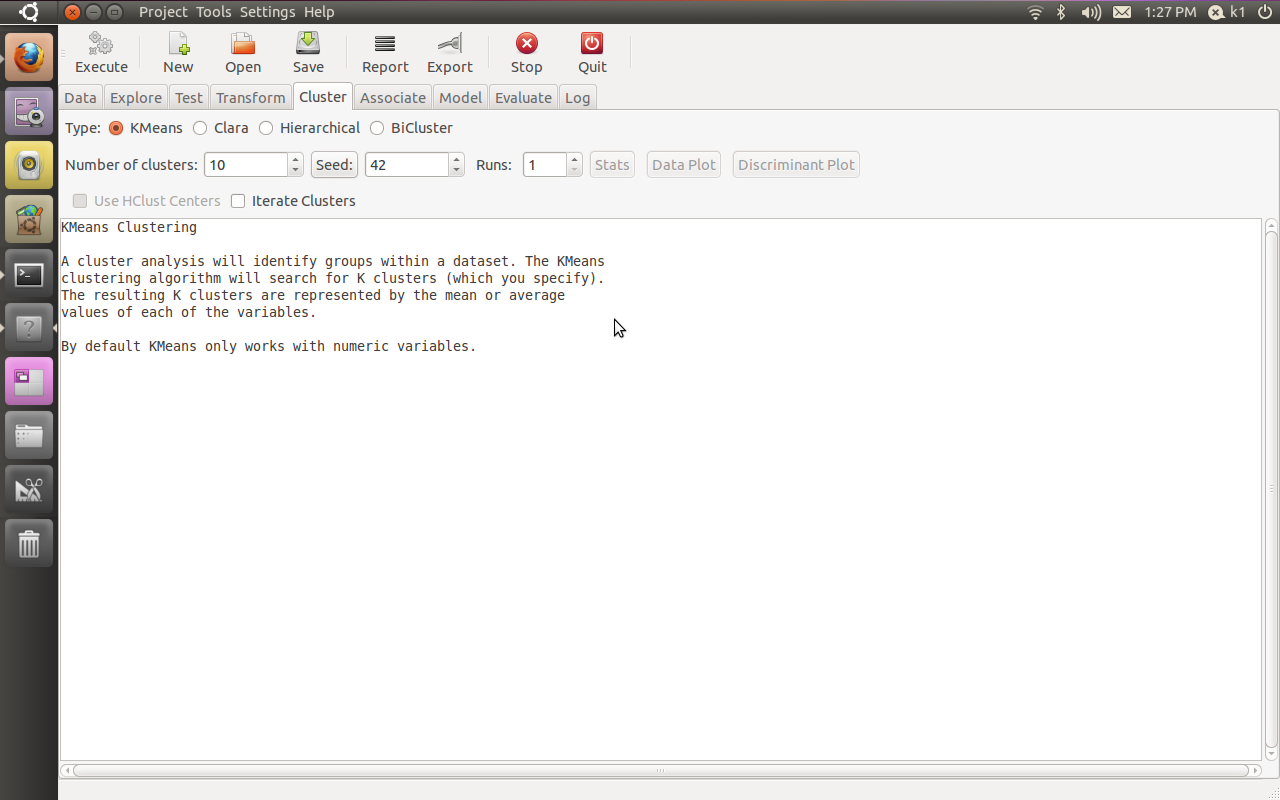
If all goes well, you will see this familiar screen popup when you type









 Follow me on Twitter


 (184) – 44,284 users – Weekly installs: 24,086


 DECISION STATS