For some time now, I had been hoping for a place where new package or algorithm developers get at least a fraction of the money that iPad or iPhone application developers get. Rapid Miner has taken the lead in establishing a marketplace for extensions. Is there going to be paid extensions as well- I hope so!!
This probably makes it the first “app” marketplace in open source and the second app marketplace in analytics after salesforce.com
It is hard work to think of new algols, and some of them can really be usefull.
Can we hope for #rstats marketplace where people downloading say ggplot3.0 atleast get a prompt to donate 99 cents per download to Hadley Wickham’s Amazon wishlist. http://www.amazon.com/gp/registry/1Y65N3VFA613B
Do you think it is okay to pay 99 cents per iTunes song, but not pay a cent for open source software.
I dont know- but I am just a capitalist born in a country that was socialist for the first 13 years of my life. Congratulations once again to Rapid Miner for innovating and leading the way.
Over the years, many of you have been developing new RapidMiner Extensions dedicated to a broad set of topics. Whereas these extensions are easy to install in RapidMiner – just download and place them in the plugins folder – the hard part is to find them in the vastness that is the Internet. Extensions made by ourselves at Rapid-I, on the other hand, are distributed by the update server making them searchable and installable directly inside RapidMiner.
We thought that this was a bit unfair, so we decieded to open up the update server to the public, and not only this, we even gave it a new look and name. The Rapid-I Marketplace is available in beta mode at http://rapidupdate.de:8180/ . You can use the Web interface to browse, comment, and rate the extensions, and you can use the update functionality in RapidMiner by going to the preferences and entering http://rapidupdate.de:8180/UpdateServer/ as the update server URL. (Once the beta test is complete, we will change the port back to 80 so we won’t have any firewall problems.)
As an Extension developer, just register with the Marketplace and drop me an email (fischer at rapid-i dot com) so I can give you permissions to upload your own extension. Upload is simple provided you use the standard RapidMiner Extension build process and will boost visibility of your extension.
Looking forward to see many new extensions there soon!
Disclaimer- Decisionstats is a partner of Rapid Miner. I have been liking the software for a long long time, and recently agreed to partner with them just like I did with KXEN some years back, and with Predictive AnalyticsConference, and Aster Data until last year.
I still think Rapid Miner is a very very good software,and a globally created software after SAP.
Welcome to the Rapid-I Marketplace Public Beta Test
The Rapid-I Marketplace will soon replace the RapidMiner update server. Using this marketplace, you can share your RapidMiner extensions and make them available for download by the community of RapidMiner users. Currently, we are beta testing this server. If you want to use this server in RapidMiner, you must go to the preferences and enter http://rapidupdate.de:8180/UpdateServer for the update url. After the beta test, we will change the port back to 80, which is currently occupied by the old update server. You can test the marketplace as a user (downloading extensions) and as an Extension developer. If you want to publish your extension here, please let us know via the contact form.
Marry Big Data Analytics to High Performance Computing, and you get the buzzword of this season- High Performance Analytics.
It basically consists of Parallelized code to run in parallel on custom hardware, in -database analytics for speed, and cloud computing /high performance computing environments. On an operational level, it consists of software (as in analytics) partnering with software (as in databases, Map reduce, Hadoop) plus some hardware (HP or IBM mostly). It is considered a high margin , highly profitable, business with small number of deals compared to say desktop licenses.
As per HPC Wire- which is a great tool/newsletter to keep updated on HPC , SAS Institute has been busy on this front partnering with EMC Greenplum and TeraData (who also acquired SAS Partner AsterData to gain a much needed foot in the MR/SQL space) Continue reading “High Performance Analytics”
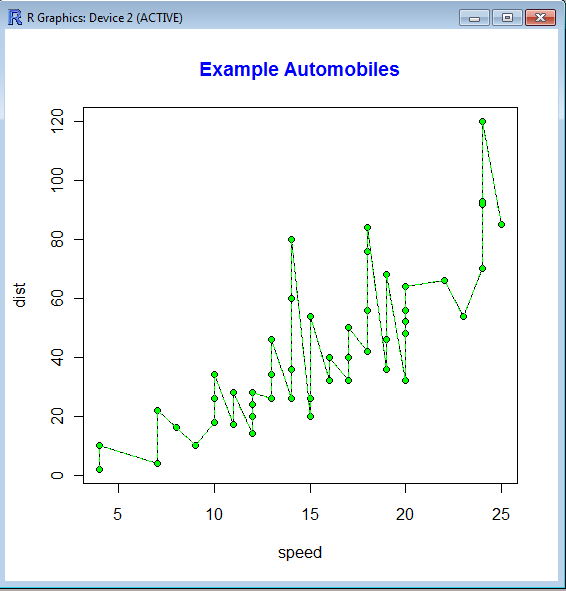
A line chart is one of the most commonly used charts in business analytics and metrics reporting. It basically consists of two variables plotted along the axes with the adjacent points being joined by line segments. Most often used with time series on the x-axis, line charts are simple to understand and use.
Variations on the line graph can include fan charts in time series which include joining line chart of historic data with ranges of future projections. Another common variation is to plot the linear regression or trend line between the two variables and superimpose it on the graph.
The slope of the line chart shows the rate of change at that particular point , and can also be used to highlight areas of discontinuity or irregular change between two variables.
The basic syntax of line graph is created by first using Plot() function to plot the points and then lines () function to plot the lines between the points.
I just checked out this new software for making PMML models. It is called Augustus and is created by the Open Data Group (http://opendatagroup.com/) , which is headed by Robert Grossman, who was the first proponent of using R on Amazon Ec2.
Probably someone like Zementis ( http://adapasupport.zementis.com/ ) can use this to further test , enhance or benchmark on the Ec2. They did have a joint webinar with Revolution Analytics recently.
See Recent News for more details and all recent news.
Augustus
Augustus is a PMML 4-compliant scoring engine that works with segmented models. Augustus is designed for use with statistical and data mining models. The new release provides Baseline, Tree and Naive-Bayes producers and consumers.
There is also a version for use with PMML 3 models. It is able to produce and consume models with 10,000s of segments and conforms to a PMML draft RFC for segmented models and ensembles of models. It supports Baseline, Regression, Tree and Naive-Bayes.
Augustus is written in Python and is freely available under the GNU General Public License, version 2.
Predictive Model Markup Language (PMML) is an XML mark up language to describe statistical and data mining models. PMML describes the inputs to data mining models, the transformations used to prepare data for data mining, and the parameters which define the models themselves. It is used for a wide variety of applications, including applications in finance, e-business, direct marketing, manufacturing, and defense. PMML is often used so that systems which create statistical and data mining models (“PMML Producers”) can easily inter-operate with systems which deploy PMML models for scoring or other operational purposes (“PMML Consumers”).
Change Detection using Augustus
For information regarding using Augustus with Change Detection and Health and Status Monitoring, please see change-detection.
Open Data
Open Data Group provides management consulting services, outsourced analytical services, analytic staffing, and expert witnesses broadly related to data and analytics. It has experience with customer data, supplier data, financial and trading data, and data from internal business processes.
It has staff in Chicago and San Francisco and clients throughout the U.S. Open Data Group began operations in 2002.
Overview
The above example contains plots generated in R of scoring results from Augustus. Each point on the graph represents a use of the scoring engine and a chart is an aggregation of multiple Augustus runs. A Baseline (Change Detection) model was used to score data with multiple segments.
Typical Use
Augustus is typically used to construct models and score data with models. Augustus includes a dedicated application for creating, or producing, predictive models rendered as PMML-compliant files. Scoring is accomplished by consuming PMML-compliant files describing an appropriate model. Augustus provides a dedicated application for scoring data with four classes of models, Baseline (Change Detection) Models, Tree Models, Regression Models and Naive Bayes Models. The typical model development and use cycle with Augustus is as follows:
Identify suitable data with which to construct a new model.
Provide a model schema which proscribes the requirements for the model.
Run the Augustus producer to obtain a new model.
Run the Augustus consumer on new data to effect scoring.
Separate consumer and producer applications are supplied for Baseline (Change Detection) models, Tree models, Regression models and for Naive Bayes models. The producer and consumer applications require configuration with XML-formatted files. The specification of the configuration files and model schema are detailed below. The consumers provide for some configurability of the output but users will often provide additional post-processing to render the output according to their needs. A variety of mechanisms exist for transmitting data but user’s may need to provide their own preprocessing to accommodate their particular data source.
In addition to the producer and consumer applications, Augustus is conceptually structured and provided with libraries which are relevant to the development and use of Predictive Models. Broadly speaking, these consist of components that address the use of PMML and components that are specific to Augustus.
Post Processing
Augustus can accommodate a post-processing step. While not necessary, it is often useful to
Re-normalize the scoring results or performing an additional transformation.
Supplements the results with global meta-data such as timestamps.
Formatting of the results.
Select certain interesting values from the results.
Restructure the data for use with other applications.
R Commander Extensions: Enhancing a Statistical Graphical User Interface by extending menus to statistical packages
R Commander ( see paper by Prof J Fox at http://www.jstatsoft.org/v14/i09/paper ) is a well known and established graphical user interface to the R analytical environment.
While the original GUI was created for a basic statistics course, the enabling of extensions (or plug-ins http://www.r-project.org/doc/Rnews/Rnews_2007-3.pdf ) has greatly enhanced the possible use and scope of this software. Here we give a list of all known R Commander Plugins and their uses along with brief comments.
Note the naming convention for above e plugins is always with a Prefix of “RCmdrPlugin.” followed by the names above
Also on loading a Plugin, it must be already installed locally to be visible in R Commander’s list of load-plugin, and R Commander loads the e-plugin after restarting.Hence it is advisable to load all R Commander plugins in the beginning of the analysis session.
However the notable E Plugins are
1) DoE for Design of Experiments-
Full factorial designs, orthogonal main effects designs, regular and non-regular 2-level fractional
factorial designs, central composite and Box-Behnken designs, latin hypercube samples, and simple D-optimal designs can currently be generated from the GUI. Extensions to cover further latin hypercube designs as well as more advanced D-optimal designs (with blocking) are planned for the future.
2) Survival- This package provides an R Commander plug-in for the survival package, with dialogs for Cox models, parametric survival regression models, estimation of survival curves, and testing for differences in survival curves, along with data-management facilities and a variety of tests, diagnostics and graphs.
3) qcc -GUI for Shewhart quality control charts for continuous, attribute and count data. Cusum and EWMA charts. Operating characteristic curves. Process capability analysis. Pareto chart and cause-and-effect chart. Multivariate control charts
4) epack- an Rcmdr “plug-in” based on the time series functions. Depends also on packages like , tseries, abind,MASS,xts,forecast. It covers Log-Exceptions garch
and following Models -Arima, garch, HoltWinters
5)Export- The package helps users to graphically export Rcmdr output to LaTeX or HTML code,
via xtable() or Hmisc::latex(). The plug-in was originally intended to facilitate exporting Rcmdr
output to formats other than ASCII text and to provide R novices with an easy-to-use,
easy-to-access reference on exporting R objects to formats suited for printed output. The
package documentation contains several pointers on creating reports, either by using
conventional word processors or LaTeX/LyX.
6) MAc- This is an R-Commander plug-in for the MAc package (Meta-Analysis with
Correlations). This package enables the user to conduct a meta-analysis in a menu-driven,
graphical user interface environment (e.g., SPSS), while having the full statistical capabilities of
R and the MAc package. The MAc package itself contains a variety of useful functions for
conducting a research synthesis with correlational data. One of the unique features of the MAc
package is in its integration of user-friendly functions to complete the majority of statistical steps
involved in a meta-analysis with correlations. It uses recommended procedures as described in
The Handbook of Research Synthesis and Meta-Analysis (Cooper, Hedges, & Valentine, 2009).
A query to help for ??Rcmdrplugins reveals the following information which can be quite overwhelming given that almost 20 plugins are now available-
RcmdrPlugin.DoE::DoEGlossary
Glossary for DoE terminology as used in
RcmdrPlugin.DoE
RcmdrPlugin.DoE::Menu.linearModelDesign
RcmdrPlugin.DoE Linear Model Dialog for
experimental data
RcmdrPlugin.DoE::Menu.rsm
RcmdrPlugin.DoE response surface model Dialog
for experimental data
RcmdrPlugin.DoE::RcmdrPlugin.DoE-package
R-Commander plugin package that implements
design of experiments facilities from packages
DoE.base, FrF2 and DoE.wrapper into the
R-Commander
RcmdrPlugin.DoE::RcmdrPlugin.DoEUndocumentedFunctions
Functions used in menus
RcmdrPlugin.doex::ranblockAnova
Internal RcmdrPlugin.doex objects
RcmdrPlugin.doex::RcmdrPlugin.doex-package
Install the DOEX Rcmdr Plug-In
RcmdrPlugin.EHESsampling::OpenSampling1
Internal functions for menu system of
RcmdrPlugin.EHESsampling
RcmdrPlugin.EHESsampling::RcmdrPlugin.EHESsampling-package
Help with EHES sampling
RcmdrPlugin.Export::RcmdrPlugin.Export-package
Graphically export objects to LaTeX or HTML
RcmdrPlugin.FactoMineR::defmacro
Internal RcmdrPlugin.FactoMineR objects
RcmdrPlugin.FactoMineR::RcmdrPlugin.FactoMineR
Graphical User Interface for FactoMineR
RcmdrPlugin.IPSUR::IPSUR-package
An IPSUR Plugin for the R Commander
RcmdrPlugin.MAc::RcmdrPlugin.MAc-package
Meta-Analysis with Correlations (MAc) Rcmdr
Plug-in
RcmdrPlugin.MAd::RcmdrPlugin.MAd-package
Meta-Analysis with Mean Differences (MAd) Rcmdr
Plug-in
RcmdrPlugin.orloca::activeDataSetLocaP
RcmdrPlugin.orloca: A GUI for orloca-package
(internal functions)
RcmdrPlugin.orloca::RcmdrPlugin.orloca-package
RcmdrPlugin.orloca: A GUI for orloca-package
RcmdrPlugin.orloca::RcmdrPlugin.orloca.es
RcmdrPlugin.orloca.es: Una interfaz grafica
para el paquete orloca
RcmdrPlugin.qcc::RcmdrPlugin.qcc-package
Install the Demos Rcmdr Plug-In
RcmdrPlugin.qual::xbara
Internal RcmdrPlugin.qual objects
RcmdrPlugin.qual::RcmdrPlugin.qual-package
Install the quality Rcmdr Plug-In
RcmdrPlugin.SensoMineR::defmacro
Internal RcmdrPlugin.SensoMineR objects
RcmdrPlugin.SensoMineR::RcmdrPlugin.SensoMineR
Graphical User Interface for SensoMineR
RcmdrPlugin.SLC::Rcmdr.help.RcmdrPlugin.SLC
RcmdrPlugin.SLC: A GUI for slc-package
(internal functions)
RcmdrPlugin.SLC::RcmdrPlugin.SLC-package
RcmdrPlugin.SLC: A GUI for SLC R package
RcmdrPlugin.sos::RcmdrPlugin.sos-package
Efficiently search R Help pages
RcmdrPlugin.steepness::Rcmdr.help.RcmdrPlugin.steepness
RcmdrPlugin.steepness: A GUI for
steepness-package (internal functions)
RcmdrPlugin.steepness::RcmdrPlugin.steepness
RcmdrPlugin.steepness: A GUI for steepness R
package
RcmdrPlugin.survival::allVarsClusters
Internal RcmdrPlugin.survival Objects
RcmdrPlugin.survival::RcmdrPlugin.survival-package
Rcmdr Plug-In Package for the survival Package
RcmdrPlugin.TeachingDemos::RcmdrPlugin.TeachingDemos-package
Install the Demos Rcmdr Plug-In
Some common analytical tasks from the diary of the glamorous life of a business analyst-
1) removing duplicates from a dataset based on certain key values/variables
2) merging two datasets based on a common key/variable/s
3) creating a subset based on a conditional value of a variable
4) creating a subset based on a conditional value of a time-date variable
5) changing format from one date time variable to another
6) doing a means grouped or classified at a level of aggregation
7) creating a new variable based on if then condition
8) creating a macro to run same program with different parameters
9) creating a logistic regression model, scoring dataset,
10) transforming variables
11) checking roc curves of model
12) splitting a dataset for a random sample (repeatable with random seed)
13) creating a cross tab of all variables in a dataset with one response variable
14) creating bins or ranks from a certain variable value
15) graphically examine cross tabs
16) histograms
17) plot(density())
18)creating a pie chart
19) creating a line graph, creating a bar graph
20) creating a bubbles chart
21) running a goal seek kind of simulation/optimization
22) creating a tabular report for multiple metrics grouped for one time/variable
23) creating a basic time series forecast
and some case studies I could think of-
As the Director, Analytics you have to examine current marketing efficiency as well as help optimize sales force efficiency across various channels. In addition you have to examine multiple sales channels including inbound telephone, outgoing direct mail, internet email campaigns. The datawarehouse is an RDBMS but it has multiple data quality issues to be checked for. In addition you need to submit your budget estimates for next year’s annual marketing budget to maximize sales return on investment.
As the Director, Risk you have to examine the overdue mortgages book that your predecessor left you. You need to optimize collections and minimize fraud and write-offs, and your efforts would be measured in maximizing profits from your department.
As a social media consultant you have been asked to maximize social media analytics and social media exposure to your client. You need to create a mechanism to report particular brand keywords, as well as automated triggers between unusual web activity, and statistical analysis of the website analytics metrics. Above all it needs to be set up in an automated reporting dashboard .
As a consultant to a telecommunication company you are asked to monitor churn and review the existing churn models. Also you need to maximize advertising spend on various channels. The problem is there are a large number of promotions always going on, some of the data is either incorrectly coded or there are interaction effects between the various promotions.
As a modeller you need to do the following-
1) Check ROC and H-L curves for existing model
2) Divide dataset in random splits of 40:60
3) Create multiple aggregated variables from the basic variables
4) run regression again and again
5) evaluate statistical robustness and fit of model
6) display results graphically
All these steps can be broken down in little little pieces of code- something which i am putting down a list of.
Are there any common data analysis tasks that you think I am missing out- any common case studies ? let me know.




 DECISION STATS