Cloud Computing using Python

I liked the new features in PiCloud , which is a cloud computing way to use Python. Python is increasingly popular as a computational language, and the cloud is the way where HW is headed to atleast as of 2011-12

http://www.picloud.com/

The new features allows you to publish your own functions as urls.

 By publishing your Python functions to URLs. Why would you want to publish a function?

  • To call your Python functions from a programming language other than Python.
  • To use PiCloud from Google AppEngine, which does not support our native client library.
  • To easily setup a scalable RPC system.

Here’s a peek at the interface:

You publish a Python function

cloud.rest.publish(your_func, ‘myfunction’)

We give you a URL Back

https://api.picloud.com/r/2/myfunction/

You make an HTTP request using your method of choice to the URL

curl -k -u ‘key:secret_key’ https://api.picloud.com/r/2/myfunction/

It certainly is an interesting development and I am wondering how other languages can adopt this paradigm as well.
For R, as of now http://www.cloudnumbers.com/ seems to be the only player in the cloud.
It would be exciting to see more players in the cloud statistical analytical space.


Using Google Fusion Tables from #rstats

But after all that- I was quite happy to see Google Fusion Tables within Google Docs. Databases as a service ? Not quite but still quite good, and lets see how it goes.

https://www.google.com/fusiontables/DataSource?dsrcid=implicit&hl=en_US&pli=1

http://googlesystem.blogspot.com/2011/09/fusion-tables-new-google-docs-app.html


But what interests me more is

http://code.google.com/apis/fusiontables/docs/developers_guide.html

The Google Fusion Tables API is a set of statements that you can use to search for and retrieve Google Fusion Tables data, insert new data, update existing data, and delete data. The API statements are sent to the Google Fusion Tables server using HTTP GET requests (for queries) and POST requests (for inserts, updates, and deletes) from a Web client application. The API is language agnostic: you can write your program in any language you prefer, as long as it provides some way to embed the API calls in HTTP requests.

The Google Fusion Tables API does not provide the mechanism for submitting the GET and POST requests. Typically, you will use an existing code library that provides such functionality; for example, the code libraries that have been developed for the Google GData API. You can also write your own code to implement GET and POST requests.

Also see http://code.google.com/apis/fusiontables/docs/sample_code.html


Google Fusion Tables API Sample Code

Libraries

SQL API

Language Library Public repository Samples
Python Fusion Tables Python Client Library fusion-tables-client-python/ Samples
PHP Fusion Tables PHP Client Library fusion-tables-client-php/ Samples

Featured Samples

An easy way to learn how to use an API can be to look at sample code. The table above provides links to some basic samples for each of the languages shown. This section highlights particularly interesting samples for the Fusion Tables API.

SQL API

Language Featured samples API version
cURL
  • Hello, cURLA simple example showing how to use curl to access Fusion Tables.
SQL API
Google Apps Script SQL API
Java
  • Hello, WorldA simple walkthrough that shows how the Google Fusion Tables API statements work.
  • OAuth example on fusion-tables-apiThe Google Fusion Tables team shows how OAuth authorization enables you to use the Google Fusion Tables API from a foreign web server with delegated authorization.
SQL API
Python
  • Docs List ExampleDemonstrates how to:
    • List tables
    • Set permissions on tables
    • Move a table to a folder
Docs List API
Android (Java)
  • Basic Sample ApplicationDemo application shows how to create a crowd-sourcing application that allows users to report potholes and save the data to a Fusion Table.
SQL API
JavaScript – FusionTablesLayer Using the FusionTablesLayer, you can display data on a Google Map

Also check out FusionTablesLayer Builder, which generates all the code necessary to include a Google Map with a Fusion Table Layer on your own website.

FusionTablesLayer, Google Maps API
JavaScript – Google Chart Tools Using the Google Chart Tools, you can request data from Fusion Tables to use in visualizations or to display directly in an HTML page. Note: responses are limited to 500 rows of data.

Google Chart Tools

External Resources

Google Fusion Tables is dedicated to providing code examples that illustrate typical uses, best practices, and really cool tricks. If you do something with the Google Fusion Tables API that you think would be interesting to others, please contact us at googletables-feedback@google.com about adding your code to our Examples page.

  • Shape EscapeA tool for uploading shape files to Fusion Tables.
  • GDALOGR Simple Feature Library has incorporated Fusion Tables as a supported format.
  • Arc2CloudArc2Earth has included support for upload to Fusion Tables via Arc2Cloud.
  • Java and Google App EngineODK Aggregate is an AppEngine application by the Open Data Kit team, uses Google Fusion Tables to store survey data that is collected through input forms on Android mobile phones. Notable code:
  • R packageAndrei Lopatenko has written an R interface to Fusion Tables so Fusion Tables can be used as the data store for R.
  • RubySimon Tokumine has written a Ruby gem for access to Fusion Tables from Ruby.


Updated-You can use Google Fusion Tables from within R from http://andrei.lopatenko.com/rstat/fusion-tables.R


ft.connect <- function(username, password) {
  url = "https://www.google.com/accounts/ClientLogin";
  params = list(Email = username, Passwd = password, accountType="GOOGLE", service= "fusiontables", source = "R_client_API")
 connection = postForm(uri = url, .params = params)
 if (length(grep("error", connection, ignore.case = TRUE))) {
 	stop("The wrong username or password")
 	return ("")
 }
 authn = strsplit(connection, "\nAuth=")[[c(1,2)]]
 auth = strsplit(authn, "\n")[[c(1,1)]]
 return (auth)
}

ft.disconnect <- function(connection) {
}

ft.executestatement <- function(auth, statement) {
      url = "http://tables.googlelabs.com/api/query"
      params = list( sql = statement)
      connection.string = paste("GoogleLogin auth=", auth, sep="")
      opts = list( httpheader = c("Authorization" = connection.string))
      result = postForm(uri = url, .params = params, .opts = opts)
      if (length(grep("<HTML>\n<HEAD>\n<TITLE>Parse error", result, ignore.case = TRUE))) {
      	stop(paste("incorrect sql statement:", statement))
      }
      return (result)
}

ft.showtables <- function(auth) {
   url = "http://tables.googlelabs.com/api/query"
   params = list( sql = "SHOW TABLES")
   connection.string = paste("GoogleLogin auth=", auth, sep="")
   opts = list( httpheader = c("Authorization" = connection.string))
   result = getForm(uri = url, .params = params, .opts = opts)
   tables = strsplit(result, "\n")
   tableid = c()
   tablename = c()
   for (i in 2:length(tables[[1]])) {
     	str = tables[[c(1,i)]]
   	    tnames = strsplit(str,",")
   	    tableid[i-1] = tnames[[c(1,1)]]
   	    tablename[i-1] = tnames[[c(1,2)]]
   	}
   	tables = data.frame( ids = tableid, names = tablename)
    return (tables)
}

ft.describetablebyid <- function(auth, tid) {
   url = "http://tables.googlelabs.com/api/query"
   params = list( sql = paste("DESCRIBE", tid))
   connection.string = paste("GoogleLogin auth=", auth, sep="")
   opts = list( httpheader = c("Authorization" = connection.string))
   result = getForm(uri = url, .params = params, .opts = opts)
   columns = strsplit(result,"\n")
   colid = c()
   colname = c()
   coltype = c()
   for (i in 2:length(columns[[1]])) {
     	str = columns[[c(1,i)]]
   	    cnames = strsplit(str,",")
   	    colid[i-1] = cnames[[c(1,1)]]
   	    colname[i-1] = cnames[[c(1,2)]]
   	    coltype[i-1] = cnames[[c(1,3)]]
   	}
   	cols = data.frame(ids = colid, names = colname, types = coltype)
    return (cols)
}

ft.describetable <- function (auth, table_name) {
   table_id = ft.idfromtablename(auth, table_name)
   result = ft.describetablebyid(auth, table_id)
   return (result)
}

ft.idfromtablename <- function(auth, table_name) {
    tables = ft.showtables(auth)
	tableid = tables$ids[tables$names == table_name]
	return (tableid)
}

ft.importdata <- function(auth, table_name) {
	tableid = ft.idfromtablename(auth, table_name)
	columns = ft.describetablebyid(auth, tableid)
	column_spec = ""
	for (i in 1:length(columns)) {
		column_spec = paste(column_spec, columns[i, 2])
		if (i < length(columns)) {
			column_spec = paste(column_spec, ",", sep="")
		}
	}
	mdata = matrix(columns$names,
	              nrow = 1, ncol = length(columns),
	              dimnames(list(c("dummy"), columns$names)), byrow=TRUE)
	select = paste("SELECT", column_spec)
	select = paste(select, "FROM")
	select = paste(select, tableid)
	result = ft.executestatement(auth, select)
    numcols = length(columns)
    rows = strsplit(result, "\n")
    for (i in 3:length(rows[[1]])) {
    	row = strsplit(rows[[c(1,i)]], ",")
    	mdata = rbind(mdata, row[[1]])
   	}
   	output.frame = data.frame(mdata[2:length(mdata[,1]), 1])
   	for (i in 2:ncol(mdata)) {
   		output.frame = cbind(output.frame, mdata[2:length(mdata[,i]),i])
   	}
   	colnames(output.frame) = columns$names
    return (output.frame)
}

quote_value <- function(value, to_quote = FALSE, quote = "'") {
	 ret_value = ""
     if (to_quote) {
     	ret_value = paste(quote, paste(value, quote, sep=""), sep="")
     } else {
     	ret_value = value
     }
     return (ret_value)
}

converttostring <- function(arr, separator = ", ", column_types) {
	con_string = ""
	for (i in 1:(length(arr) - 1)) {
		value = quote_value(arr[i], column_types[i] != "number")
		con_string = paste(con_string, value)
	    con_string = paste(con_string, separator, sep="")
	}

    if (length(arr) >= 1) {
    	value = quote_value(arr[length(arr)], column_types[length(arr)] != "NUMBER")
    	con_string = paste(con_string, value)
    }
}

ft.exportdata <- function(auth, input_frame, table_name, create_table) {
	if (create_table) {
       create.table = "CREATE TABLE "
       create.table = paste(create.table, table_name)
       create.table = paste(create.table, "(")
       cnames = colnames(input_frame)
       for (columnname in cnames) {
         create.table = paste(create.table, columnname)
    	 create.table = paste(create.table, ":string", sep="")
    	   if (columnname != cnames[length(cnames)]){
    		  create.table = paste(create.table, ",", sep="")
           }
       }
      create.table = paste(create.table, ")")
      result = ft.executestatement(auth, create.table)
    }
    if (length(input_frame[,1]) > 0) {
    	tableid = ft.idfromtablename(auth, table_name)
	    columns = ft.describetablebyid(auth, tableid)
	    column_spec = ""
	    for (i in 1:length(columns$names)) {
		   column_spec = paste(column_spec, columns[i, 2])
		   if (i < length(columns$names)) {
			  column_spec = paste(column_spec, ",", sep="")
		   }
	    }
    	insert_prefix = "INSERT INTO "
    	insert_prefix = paste(insert_prefix, tableid)
    	insert_prefix = paste(insert_prefix, "(")
    	insert_prefix = paste(insert_prefix, column_spec)
    	insert_prefix = paste(insert_prefix, ") values (")
    	insert_suffix = ");"
    	insert_sql_big = ""
    	for (i in 1:length(input_frame[,1])) {
    		data = unlist(input_frame[i,])
    		values = converttostring(data, column_types  = columns$types)
    		insert_sql = paste(insert_prefix, values)
    		insert_sql = paste(insert_sql, insert_suffix) ;
    		insert_sql_big = paste(insert_sql_big, insert_sql)
    		if (i %% 500 == 0) {
    			ft.executestatement(auth, insert_sql_big)
    			insert_sql_big = ""
    		}
    	}
        ft.executestatement(auth, insert_sql_big)
    }
}

Augustus- a PMML model producer and consumer. Scoring engine.

A Bold GNU Head
Image via Wikipedia

I just checked out this new software for making PMML models. It is called Augustus and is created by the Open Data Group (http://opendatagroup.com/) , which is headed by Robert Grossman, who was the first proponent of using R on Amazon Ec2.

Probably someone like Zementis ( http://adapasupport.zementis.com/ ) can use this to further test , enhance or benchmark on the Ec2. They did have a joint webinar with Revolution Analytics recently.

https://code.google.com/p/augustus/

Recent News

  • Augustus v 0.4.3.1 has been released
  • Added a guide (pdf) for including Augustus in the Windows System Properties.
  • Updated the install documentation.
  • Augustus 2010.II (Summer) release is available. This is v 0.4.2.0. More information is here.
  • Added performance discussion concerning the optional cyclic garbage collection.

See Recent News for more details and all recent news.

Augustus

Augustus is a PMML 4-compliant scoring engine that works with segmented models. Augustus is designed for use with statistical and data mining models. The new release provides Baseline, Tree and Naive-Bayes producers and consumers.

There is also a version for use with PMML 3 models. It is able to produce and consume models with 10,000s of segments and conforms to a PMML draft RFC for segmented models and ensembles of models. It supports Baseline, Regression, Tree and Naive-Bayes.

Augustus is written in Python and is freely available under the GNU General Public License, version 2.

See the page Which version is right for me for more details regarding the different versions.

PMML

Predictive Model Markup Language (PMML) is an XML mark up language to describe statistical and data mining models. PMML describes the inputs to data mining models, the transformations used to prepare data for data mining, and the parameters which define the models themselves. It is used for a wide variety of applications, including applications in finance, e-business, direct marketing, manufacturing, and defense. PMML is often used so that systems which create statistical and data mining models (“PMML Producers”) can easily inter-operate with systems which deploy PMML models for scoring or other operational purposes (“PMML Consumers”).

Change Detection using Augustus

For information regarding using Augustus with Change Detection and Health and Status Monitoring, please see change-detection.

Open Data

Open Data Group provides management consulting services, outsourced analytical services, analytic staffing, and expert witnesses broadly related to data and analytics. It has experience with customer data, supplier data, financial and trading data, and data from internal business processes.

It has staff in Chicago and San Francisco and clients throughout the U.S. Open Data Group began operations in 2002.


Overview

The above example contains plots generated in R of scoring results from Augustus. Each point on the graph represents a use of the scoring engine and a chart is an aggregation of multiple Augustus runs. A Baseline (Change Detection) model was used to score data with multiple segments.

Typical Use

Augustus is typically used to construct models and score data with models. Augustus includes a dedicated application for creating, or producing, predictive models rendered as PMML-compliant files. Scoring is accomplished by consuming PMML-compliant files describing an appropriate model. Augustus provides a dedicated application for scoring data with four classes of models, Baseline (Change Detection) ModelsTree ModelsRegression Models and Naive Bayes Models. The typical model development and use cycle with Augustus is as follows:

  1. Identify suitable data with which to construct a new model.
  2. Provide a model schema which proscribes the requirements for the model.
  3. Run the Augustus producer to obtain a new model.
  4. Run the Augustus consumer on new data to effect scoring.

Separate consumer and producer applications are supplied for Baseline (Change Detection) models, Tree models, Regression models and for Naive Bayes models. The producer and consumer applications require configuration with XML-formatted files. The specification of the configuration files and model schema are detailed below. The consumers provide for some configurability of the output but users will often provide additional post-processing to render the output according to their needs. A variety of mechanisms exist for transmitting data but user’s may need to provide their own preprocessing to accommodate their particular data source.

In addition to the producer and consumer applications, Augustus is conceptually structured and provided with libraries which are relevant to the development and use of Predictive Models. Broadly speaking, these consist of components that address the use of PMML and components that are specific to Augustus.

Post Processing

Augustus can accommodate a post-processing step. While not necessary, it is often useful to

  • Re-normalize the scoring results or performing an additional transformation.
  • Supplements the results with global meta-data such as timestamps.
  • Formatting of the results.
  • Select certain interesting values from the results.
  • Restructure the data for use with other applications.

QGIS and R

Logo graphic for the Quantum GIS free software...
Image via Wikipedia

Qgis is Quantum GIS http://www.qgis.org/

Quantum GIS (QGIS) is a user friendly Open Source Geographic Information System (GIS) licensed under the GNU General Public License. QGIS is an official project of the Open Source Geospatial Foundation (OSGeo). It runs on Linux, Unix, MacOSX, and Windows and supportsnumerous vector, raster, and database formats and functionalities.

Learn more about QGIS

Quantum GIS provides a continously growing number of capabilities provided by core functions and plugins. You can visualize, manage, edit, analyse data, and compose printable maps

Also you can use both Qgis and R through Python (!!!)

http://www.qgis.org/wiki/HomeRange_plugin#Home-range_analyses_in_QGIS_using_R_through_Python

Interesting app for webs (sometimes better suited than some R map packages)

https://plugins.qgis.org/plugins/HomeRange_plugin/

Based on a Google Summer of Code _

 Also

https://sites.google.com/site/eospansite/introqgis_r

and

HomeRange_plugin

http://hub.qgis.org/projects/quantum-gis/wiki/HomeRange_plugin


Also read-

http://blog.qgis.org/node/51

Related Articles-

R Graphs Resources

https://rforanalytics.wordpress.com/r-graphs-resources/

Using R from other Software

https://rforanalytics.wordpress.com/using-r-from-other-software/

and

Visualize NHL Play-by-Play using Tableau Public and R

http://brocktibert.wordpress.com/2011/02/13/visualize-nhl-play-by-play-using-tableau-public-and-r/

Viva Libre Office

WordPerfect 5.1 for DOS.
Image via Wikipedia

The Document Foundation is happy to announce the release candidate of
LibreOffice 3.3.1. This release candidate is the first in a series of
frequent bugfix releases on top of our LibreOffice 3.3 product. Please
be aware that LibreOffice 3.3.1 RC1 is not yet ready for production
use, you should continue to use LibreOffice for that.

http://listarchives.documentfoundation.org/www/announce/msg00028.html

Following is the list of changes against LibreOffice 3.3:

Key changes at a glance:

* Numerous translation updates
* new mimetype icons for LibreOffice – explained here:
http://luxate.blogspot.com/2011/01/not-even-included-but-already-improved.html
* quite a few crasher fixes

Detailed change log:

* translation updates
* Removed old/unmaintained icon themes
* Fix for https://bugzilla.novell.com/show_bug.cgi?id=664516: Don’t
use a reference or the default formula string will be changed
* Install bash completion for oo* wrappers when enabled
(https://bugzilla.novell.com/show_bug.cgi?id=665402)
* Build fix: get the stlport compat workaround working for gcc 4.6.0
* Build fix: no ddraw.h or ddraw.lib in the June 2010 DirectX SDK,
removed usage
* Windows installer: padded nologobanner.bmp, new size is 102×58
* removed gd – Gaelic, ky – Kirghiz, pap – Papiamento, ti – Tigrinya,
ms – Malay, ps – Pashto, ur – Urdu. UI localization does not exist
in these languages. So it makes no sense to ship packages.
* Build fix: pass thru PYTHON, found by configure. Will be used by
filter/source/config/fragments/makefile.mk.
* Upgraded libwpd (WordPerfect filter) to 0.9.1
* Fixed BrOffice Windows start menu branding
* Removed language code ‘kid’. kid is not Koshin, but key id pseudo
language which is good for debugging UI but should no be included
in the product
* Added ca_XV and ast language/local name and description
* Fixed incorrect page number in page preview mode
(https://bugs.freedesktop.org/show_bug.cgi?id=33155). When the
window is large enough to show several ‘Page X’ strings,
the page number was not properly incremented.
* Fixed incorrect import of cell attributes from Excel
documents. When a cell with non-default formatting attribute starts
with non-first row in a column, the filter would incorrectly apply
the same format to all the cells above it if they didn’t have any
formats.
* Ubuntu: fix for lp#696527 – enable human icon theme in LibreOffice
* Fix for https://bugzilla.redhat.com/show_bug.cgi?id=673819 crash on
changing position of drawing object in header.
* Changed OpenOffice.org to LibreOffice in nsplugin
* Added Occitan dictionary
* Added Ukrainian dictionaries
* Fix window focus for langpack installation on Mac –
https://bugs.freedesktop.org/show_bug.cgi?id=33056
* Added/modified NLPsolver translations from Pootle
* Fix for https://bugzilla.novell.com/show_bug.cgi?id=655763
* Fix for RTF export crasher
(https://bugzilla.novell.com/show_bug.cgi?id=656503)
* Use LibreOffice as product name for EPS Creator header
* Parse svg ‘color’ property (fixes
https://bugs.freedesktop.org/show_bug.cgi?id=33551)
* Use double instead of float in writerfilter import
* Build fix: use PYTHON as passed through by set_soenv.in.
* Fix for https://bugs.freedesktop.org/show_bug.cgi?id=33237 remove
debug line
* Fix for https://bugs.freedesktop.org/show_bug.cgi?id=33237 – fixes
ole object import for writer (docx)
* Fix for https://bugs.freedesktop.org/show_bug.cgi?id=33249
rename OOo -> LibO on Getting Support Page
* Fix ooxml import: handle css::table::BorderLine in addition to
css::table::BorderLine2 That means that table cell properties are
correctly set on import again.
* Fix for https://bugs.freedesktop.org/show_bug.cgi?id=33258
wikihelp: Improve the check for existence of the localized help.
* Fix for https://bugs.freedesktop.org/show_bug.cgi?id=33994 – fixes
several crashes around config UNO API
* Fix for https://bugs.freedesktop.org/show_bug.cgi?id=30879
* Fix for https://bugs.freedesktop.org/show_bug.cgi?id=32872
Implementation names weren’t matching with xcu.
* Fix: don’t pushback and process a corrupt extension
* Fix: wikihelp – do not check for existence of the localized
help. In case we do not have the help installed, it is up to the
online service to decide the fallback in case a language version is
not available.
* Fix README: change su urpmi to sudo urpmi for Mandriva section
* Fix README formatting –
https://bugs.freedesktop.org/show_bug.cgi?id=32741 – using CRLF
instead of LF on WIN platform
* Fix README: word wrap at column 75 for better readability
* Build fix: KDE3 library search order
(https://bugs.freedesktop.org/show_bug.cgi?id=32797). Use LINKFLAGS
instead of STDLIBS.
* Start using technical.dic instead of oracle.dic
(https://bugs.freedesktop.org/show_bug.cgi?id=31798)
* Build fix: add explicit QRegion* for clipRegion to fix compile of
kde backend
* Cleanup: removed obsolete m_bSingleAltPress
* Remove the menu when Left Alt Key was pressed for GTK
* Fix for https://bugs.freedesktop.org/show_bug.cgi?id=33459: use
year of era in long format for zh_TW by default
* Fix wrong collation for Catalan language
* Fix for https://bugs.freedesktop.org/show_bug.cgi?id=31271 wrong
line break with “(”
* Fix for https://bugs.freedesktop.org/show_bug.cgi?id=32561 – crash
when iterating over the database types.
* Default currency for Estonia should be Euro – fixes
https://bugs.freedesktop.org/show_bug.cgi?id=33160
* Avoid a pointless GetHelpText() call in the toolbox. Fixes
https://bugs.freedesktop.org/show_bug.cgi?id=33315. GetHelpText()
can be quite heavy, see
https://bugs.freedesktop.org/show_bug.cgi?id=33088.
* Paint toolbar handle positioned properly
(https://bugs.freedesktop.org/show_bug.cgi?id=32558)
* Build fix: move cxxabi.h after stl headers to workaround gcc 4.6.0
and stlport
* Fix for https://bugs.freedesktop.org/show_bug.cgi?id=33355
manipulate also the C runtime’s environment
* Fix for CTL/Other Default Font #i25247#, #i25561#, #i48064#,
#i92341#
* RTF export crasher
(https://bugzilla.novell.com/show_bug.cgi?id=656503)
* Fixed an infinite loop in RTF exporter
* UI: translations need more space on word count dialog, made space
for it.
* Fix for https://bugzilla.novell.com/show_bug.cgi?id=660816 improve
formfield checkbox binary export (and import)

Again a BIG Thank You!

Again whats Libre Office

What does LibreOffice give you?

Writer is the word processor inside LibreOffice. Use it for everything, from dashing off a quick letter to producing an entire book with tables of contents, embedded illustrations, bibliographies and diagrams. The while-you-type auto-completion, auto-formatting and automatic spelling checking make difficult tasks easy (but are easy to disable if you prefer). Writer is powerful enough to tackle desktop publishing tasks such as creating multi-column newsletters and brochures. The only limit is your imagination.

Calc tames your numbers and helps with difficult decisions when you’re weighing the alternatives. Analyze your data with Calc and then use it to present your final output. Charts and analysis tools help bring transparency to your conclusions. A fully-integrated help system makes easier work of entering complex formulas. Add data from external databases such as SQL or Oracle, then sort and filter them to produce statistical analyses. Use the graphing functions to display large number of 2D and 3D graphics from 13 categories, including line, area, bar, pie, X-Y, and net – with the dozens of variations available, you’re sure to find one that suits your project.

Impress is the fastest and easiest way to create effective multimedia presentations. Stunning animation and sensational special effects help you convince your audience. Create presentations that look even more professional than the standard presentations you commonly see at work. Get your collegues’ and bosses’ attention by creating something a little bit different.

Draw lets you build diagrams and sketches from scratch. A picture is worth a thousand words, so why not try something simple with box and line diagrams? Or else go further and easily build dynamic 3D illustrations and special effects. It’s as simple or as powerful as you want it to be.

Base is the database front-end of the LibreOffice suite. With Base, you can seamlessly integrate your existing database structures into the other components of LibreOffice, or create an interface to use and administer your data as a stand-alone application. You can use imported and linked tables and queries from MySQL, PostgreSQL or Microsoft Access and many other data sources, or design your own with Base, to build powerful front-ends with sophisticated forms, reports and views. Support is built-in or easily addable for a very wide range of database products, notably the standardly-provided HSQL, MySQL, Adabas D, Microsoft Access and PostgreSQL.

Math is a simple equation editor that lets you lay-out and display your mathematical, chemical, electrical or scientific equations quickly in standard written notation. Even the most-complex calculations can be understandable when displayed correctly. E=mc2.

LibreOffice also comes configured with a PDF file creator, meaning you can distribute documents that you’re sure can be opened and read by users of almost any computing device or operating system.

Download LibreOffice now and try it out today.

http://www.libreoffice.org/features/


Using R from within Python

Python logo
Image via Wikipedia

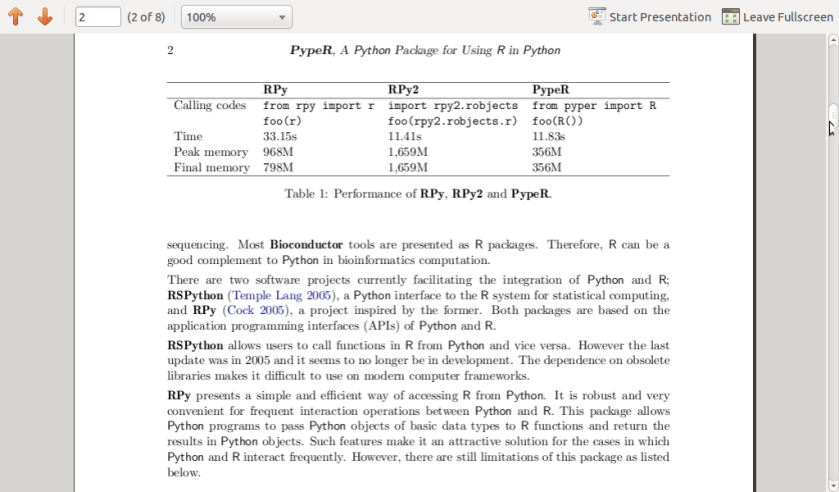
I came across this excellent JSS paper at www.jstatsoft.org/v35/c02/paper

on a Python package called PypeR which allows you to use R from within Python using the pipe functionality.

It is an interesting package and given Python’s increasing buzz , one worthy to be checked out by people using or thinking Python in their packages.


Citation:
	@article{Xia:McClelland:Wang:2010:JSSOBK:v35c02,
	  author =	"Xiao-Qin Xia and Michael McClelland and Yipeng Wang",
	  title =	"PypeR, A Python Package for Using R in Python",
	  journal =	"Journal of Statistical Software, Code Snippets",
	  volume =	"35",
	  number =	"2",
	  pages =	"1--8",
	  day =  	"30",
	  month =	"7",
	  year = 	"2010",
	  CODEN =	"JSSOBK",
	  ISSN = 	"1548-7660",
	  bibdate =	"2010-03-23",
	  URL =  	"http://www.jstatsoft.org/v35/c02",
	  accepted =	"2010-03-23",
	  acknowledgement = "",
	  keywords =	"",
	  submitted =	"2009-10-23",
	}