Data Visualization using Tableau

Image representing Tableau Software as depicte...
Image via CrunchBase

Here is a great piece of software for data visualization– the public version is free.

And you can use it for Desktop Analytics as well as BI /server versions at very low cost.

About Tableau Software

http://www.tableausoftware.com/press_release/tableau-massive-growth-hiring-q3-2010

Tableau was named by Software Magazine as the fastest growing software company in the $10 million to $30 million range in the world, and the second fastest growing software company worldwide overall. The ranking stems from the publication’s 28th annual Software 500 ranking of the world’s largest software service providers.

“We’re growing fast because the market is starving for easy-to-use products that deliver rapid-fire business intelligence to everyone. Our customers want ways to unlock their databases and produce engaging reports and dashboards,” said Christian Chabot CEO and co-founder of Tableau.

http://www.tableausoftware.com/about/who-we-are

History in the Making

Put together an Academy-Award winning professor from the nation’s most prestigious university, a savvy business leader with a passion for data, and a brilliant computer scientist. Add in one of the most challenging problems in software – making databases and spreadsheets understandable to ordinary people. You have just recreated the fundamental ingredients for Tableau.

The catalyst? A Department of Defense (DOD) project aimed at increasing people’s ability to analyze information and brought to famed Stanford professor, Pat Hanrahan. A founding member of Pixar and later its chief architect for RenderMan, Pat invented the technology that changed the world of animated film. If you know Buzz and Woody of “Toy Story”, you have Pat to thank.

Under Pat’s leadership, a team of Stanford Ph.D.s got together just down the hall from the Google folks. Pat and Chris Stolte, the brilliant computer scientist, realized that data visualization could produce large gains in people’s ability to understand information. Rather than analyzing data in text form and then creating visualizations of those findings, Pat and Chris invented a technology called VizQL™ by which visualization is part of the journey and not just the destination. Fast analytics and visualization for everyone was born.

While satisfying the DOD project, Pat and Chris met Christian Chabot, a former data analyst who turned into Jello when he saw what had been invented. The three formed a company and spun out of Stanford like so many before them (Yahoo, Google, VMWare, SUN). With Christian on board as CEO, Tableau rapidly hit one success after another: its first customer (now Tableau’s VP, Operations, Tom Walker), an OEM deal with Hyperion (now Oracle), funding from New Enterprise Associates, a PC Magazine award for “Product of the Year” just one year after launch, and now over 50,000 people in 50+ countries benefiting from the breakthrough.

also see http://www.tableausoftware.com/about/leadership

http://www.tableausoftware.com/about/board

—————————————————————————-

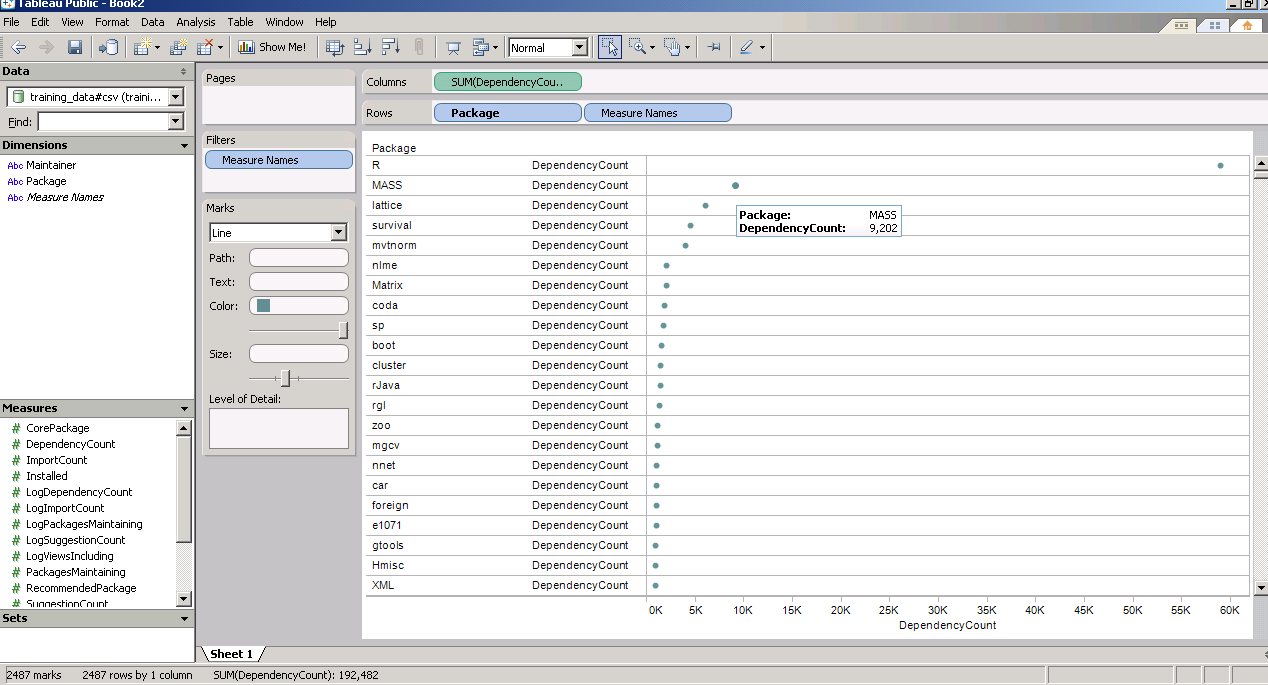
and now  a demo I ran on the Kaggle contest data (it is a csv dataset with 95000 rows)

I found Tableau works extremely good at pivoting data and visualizing it -almost like Excel on  Steroids. Download the free version here ( I dont know about an academic program (see links below) but software is not expensive at all)

http://buy.tableausoftware.com/

Desktop Personal Edition

The Personal Edition is a visual analysis and reporting solution for data stored in Excel, MS Access or Text Files. Available via download.

Product Information

$999*

Desktop Professional Edition

The Professional Edition is a visual analysis and reporting solution for data stored in MS SQL Server, MS Analysis Services, Oracle, IBM DB2, Netezza, Hyperion Essbase, Teradata, Vertica, MySQL, PostgreSQL, Firebird, Excel, MS Access or Text Files. Available via download.

Product Information

$1800*

Tableau Server

Tableau Server enables users of Tableau Desktop Professional to publish workbooks and visualizations to a server where users with web browsers can access and interact with the results. Available via download.

Product Information

Contact Us

* Price is per Named User and includes one year of maintenance (upgrades and support). Products are made available as a download immediately after purchase. You may revisit the download site at any time during your current maintenance period to access the latest releases.


Jim Goodnight on Open Source- and why he is right -sigh

Logo Open Source Initiative
Image via Wikipedia

Jim Goodnight – grand old man and Godfather of the Cosa Nostra of the BI/Database Analytics software industry said recently on open source in BI (btw R is generally termed in business analytics and NOT business intelligence software so these remarks were more apt to Pentaho and Jaspersoft )

Asked whether open source BI and data integration software from the likes of Jaspersoft, Pentaho and Talend is a growing threat, [Goodnight] said: “We haven’t noticed that a lot. Most of our companies need industrial strength software that has been tested, put through every possible scenario or failure to make sure everything works correctly.”

quotes from Jim Goodnight are courtesy Jason’s  story here:
http://www.cbronline.com/news/sas-ceo-says-cep-open-source-and-cloud-bi-have-limited-appeal

and the Pentaho follow-up reaction is here

http://bi.cbronline.com/news/pentaho-fires-back-across-sas-bows-over-limited-open-source-appeal


While you can rage and screech- here is the reality in terms of market share-

From Merv Adrian-‘s excellent article on market shares in BI

http://www.enterpriseirregulars.com/22444/decoding-bi-market-share-numbers-%E2%80%93-play-sudoku-with-analysts/

The first, labeled BI Platforms, is drawn fromGartner Market Share Analysis: Business Intelligence, Analytics and Performance Management Software, Worldwide, 2009, published May 2010 , and Gartner Dataquest Market Share: Business Intelligence, Analytics and Performance Management Software, Worldwide, 2009.

and

Advanced Analytics category.

and 

so whats the performance of Talend, Pentaho and Jaspersoft

From http://www.dbms2.com/category/products-and-vendors/talend/

It seems that Talend’s revenue was somewhat shy of $10 million in 2008.

and Talend itself says

http://www.talend.com/press/Talend-Announces-Record-2009-and-Continues-Growth-in-the-New-Year.php

Additional 2009 highlights include:

  • Achieved record revenue, more then doubling from 2008. The fourth quarter of 2009 was Talend’s tenth consecutive quarter of growth.
  • Grew customer base by 140% to over 1,000 customers, up from 420 at the end of 2008. Of these new customers, over 50% are Fortune 1000 companies.
  • Total downloads reached seven million, with over 300,000 users of the open source products.
  • Talend doubled its staff, increasing to 200 global employees. Continuing this trend, Talend has already hired 15 people in 2010 to support its rapid growth.

now for Jaspersoft numbers

http://www.dbms2.com/2008/09/14/jaspersoft-numbers/

Highlights include:

  • Revenue run rate in the double-digit millions.
  • 40% sequential growth most recent quarter. (I didn’t ask whether there was any reason to suspect seasonality.)
  • 130% annual revenue growth run rate.
  • “Not quite” profitable.
  • Several hundred commercial subscribers, at an average of $25K annually per, including >100 in Europe.
  • 9,000 paying customers of some kind.
  • 100,000+ total deployments, “very conservatively,” counting OEMs as one deployment each and not double-counting for OEMs’ customers. (Nick said Business Objects quotes 45,000 deployments by the same standards.)
  • 70% of revenue from the mid-market, defined as $100 million – $1 billion revenue. 30% from bigger enterprises. (Hmm. That begs a couple of questions, such as where OEM revenue comes in, and whether <$100 million enterprises were truly a negligible part of revenue.)

and for Pentaho numbers-

http://www.dbms2.com/2009/01/27/introduction-to-pentaho/

and http://www.monash.com/uploads/Pentaho-January-2009.pdf

suggests there are far far away from the top 5-6 vendors in BI

and a special mention  for postgreSQL– which is a non Profit but is seriously denting Oracle/MySQL

http://www.postgresql.org/about/

Limit Value
Maximum Database Size Unlimited
Maximum Table Size 32 TB
Maximum Row Size 1.6 TB
Maximum Field Size 1 GB
Maximum Rows per Table Unlimited
Maximum Columns per Table 250 – 1600 depending on column types
Maximum Indexes per Table Unlimited

and leading vendor is EnterpriseDB which is again IBM-partnering as well as IBM funded

http://www.sramanamitra.com/2009/05/18/enterprise-db/

and

http://www.enterprisedb.com/company/news_events/press_releases/2010_21.do

suggest it is still in early stages.

————————————————————–

So what do we conclude-

1) There is a complete lack of transparency in open source BI market shares as almost all these companies are privately held and do not disclose revenues.

2) What may be a pure play open source company may actually be a company funded by a big BI vendor (like Revolution Analytics is funded among others by Intel-Microsoft) and EnterpriseDB has IBM as an investor.MySQL and Sun of course are bought by Oracle

The degree of control by proprietary vendors on open source vendors is still not disclosed- whether they are holding a stake for strategic reasons or otherwise.

3) None of the Open Source Vendors are even close to a 1 Billion dollar revenue number.

Jim Goodnight is pointing out market reality when he says he has not seen much impact (in terms of market share). As for the rest of his remarks, well he’s got a job to do as CEO and thats talk up his company and trash the competition- which he as been doing for 3 decades and unlikely to change now unless there is severe market share impact. Unless you expect him to notice companies less than 5% of his size in revenue.

http://www.cbronline.com/news/sas-ceo-says-cep-open-source-and-cloud-bi-have-limited-appeal

http://bi.cbronline.com/news/pentaho-fires-back-across-sas-bows-over-limited-open-source-appeal


Using PostgreSQL and MySQL databases in R 2.12 for Windows

Air University Library's Index to Military Per...
Image via Wikipedia

If you use Windows for your stats computing and your data is in a database (probably true for almost all corporate business analysts) R 2.12 has provided a unique procedural hitch for you NO BINARIES for packages used till now to read from these databases.

The Readme notes of the release say-

Packages related to many database system must be linked to the exact
version of the database system the user has installed, hence it does
not make sense to provide binaries for packages
	RMySQL, ROracle, ROracleUI, RPostgreSQL
although it is possible to install such packages from sources by
	install.packages('packagename', type='source')
after reading the manual 'R Installation and Administration'.

So how to connect to Databases if the Windows Binary is not available-

So how to connect to PostgreSQL and MySQL databases.

For Postgres databases-

You can update your PostgreSQL databases here-

http://www.postgresql.org/download/windows

Fortunately the RpgSQL package is still available for PostgreSQL

  • Using the RpgSQL package

library(RpgSQL)

#creating a connection
con <- dbConnect(pgSQL(), user = "postgres", password = "XXXX",dbname="postgres")

#writing a table from a R Dataset
dbWriteTable(con, "BOD", BOD)

# table names are lower cased unless double quoted. Here we write a Select SQL query
dbGetQuery(con, 'select * from "BOD"')

#disconnecting the connection
dbDisconnect(con)

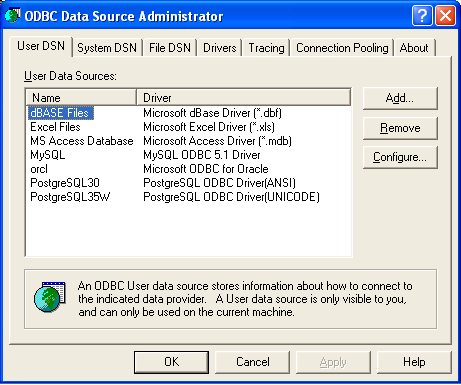
You can also use RODBC package for connecting to your PostgreSQL database but you need to configure your ODBC connections in

Windows Start Panel-

Settings-Control Panel-

Administrative Tools-Data Sources (ODBC)

You should probably see something like this screenshot.

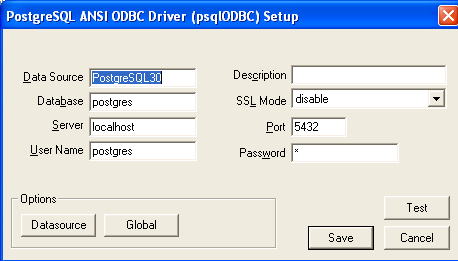
Coming back to R and noting the name of my PostgreSQL DSN from above screenshot-( If not there just click on add-scroll to appropriate database -here PostgreSQL and click on Finish- add in the default values for your database or your own created database values-see screenshot for help with other configuring- and remember to click Test below to check if username and password are working, port is correct etc.

so once the DSN is probably setup in the ODBC (frightening terminology is part of databases)- you can go to R to connect using RODBC package


#loading RODBC

library(RODBC)

#creating a Database connection
# for username,password,database name and DSN name

chan=odbcConnect("PostgreSQL35W","postgres;Password=X;Database=postgres")

#to list all table names

sqlTables(chan)

TABLE_QUALIFIER TABLE_OWNER TABLE_NAME TABLE_TYPE REMARKS
1       postgres      public        bod      TABLE      
 2        postgres      public  database1      TABLE      
 3        postgres      public         tt      TABLE

Now for MySQL databases it is exactly the same code except we download and install the ODBC driver from http://www.mysql.com/downloads/connector/odbc/

and then we run the same configuring DSN as we did for postgreSQL.

After that we use RODBC in pretty much the same way except changing for the default username and password for MySQL and changing the DSN name for the previous step.

channel <- odbcConnect("mysql","jasperdb;Password=XXX;Database=Test")
test2=sqlQuery(channel,"select * from jiuser")
test2
 id  username tenantId   fullname emailAddress  password externallyDefined enabled previousPasswordChangeTime1  1   jasperadmin        1 Jasper Administrator           NA 349AFAADD5C5A2BD477309618DC              NA    01                       
2  2       joe1ser        1             Joe User           NA                 4DD8128D07A               NA    01
odbcClose(channel)
While using RODBC for all databases is a welcome step, perhaps the change release notes for Window Users of R may need to be more substantiative than one given for R 2.12.2

Which software do we buy? -It depends

Software (novel)
Image via Wikipedia

Often I am asked by clients, friends and industry colleagues on the suitability or unsuitability of particular software for analytical needs.  My answer is mostly-

It depends on-

1) Cost of Type 1 error in purchase decision versus Type 2 error in Purchase Decision. (forgive me if I mix up Type 1 with Type 2 error- I do have some weird childhood learning disabilities which crop up now and then)

Here I define Type 1 error as paying more for a software when there were equivalent functionalities available at lower price, or buying components you do need , like SPSS Trends (when only SPSS Base is required) or SAS ETS, when only SAS/Stat would do.

The first kind is of course due to the presence of free tools with GUI like R, R Commander and Deducer (Rattle does have a 500$ commercial version).

The emergence of software vendors like WPS (for SAS language aficionados) which offer similar functionality as Base SAS, as well as the increasing convergence of business analytics (read predictive analytics), business intelligence (read reporting) has led to somewhat brand clutter in which all softwares promise to do everything at all different prices- though they all have specific strengths and weakness. To add to this, there are comparatively fewer business analytics independent analysts than say independent business intelligence analysts.

2) Type 2 Error- In this case the opportunity cost of delayed projects, business models , or lower accuracy – consequences of buying a lower priced software which had lesser functionality than you required.

To compound the magnitude of error 2, you are probably in some kind of vendor lock-in, your software budget is over because of buying too much or inappropriate software and hardware, and still you could do with some added help in business analytics. The fear of making a business critical error is a substantial reason why open source software have to work harder at proving them competent. This is because writing great software is not enough, we need great marketing to sell it, and great customer support to sustain it.

As Business Decisions are decisions made in the constraints of time, information and money- I will try to create a software purchase matrix based on my knowledge of known softwares (and unknown strengths and weakness), pricing (versus budgets), and ranges of data handling. I will add in basically an optimum approach based on known constraints, and add in flexibility for unknown operational constraints.

I will restrain this matrix to analytics software, though you could certainly extend it to other classes of enterprise software including big data databases, infrastructure and computing.

Noted Assumptions- 1) I am vendor neutral and do not suffer from subjective bias or affection for particular software (based on conferences, books, relationships,consulting etc)

2) All software have bugs so all need customer support.

3) All software have particular advantages , strengths and weakness in terms of functionality.

4) Cost includes total cost of ownership and opportunity cost of business analytics enabled decision.

5) All software marketing people will praise their own software- sometimes over-selling and mis-selling product bundles.

Software compared are SPSS, KXEN, R,SAS, WPS, Revolution R, SQL Server,  and various flavors and sub components within this. Optimized approach will include parallel programming, cloud computing, hardware costs, and dependent software costs.

To be continued-


IBM SPSS 19: Marketing Analytics and RFM

What is RFM Analysis?

Recency Frequency Monetization is basically a technique to classify your entire customer list. You may be a retail player with thousands of customers or a enterprise software seller with only two dozen customers.

RFM Analysis can help you cut through and focus on the real customer that drives your profit.

As per Wikipedia

http://en.wikipedia.org/wiki/RFM

RFM is a method used for analyzing customer behavior and defining market segments. It is commonly used in database marketing and direct marketing and has received particular attention in retail.

RFM stands for

  • Recency – How recently a customer has purchased?
  • Frequency – How often he purchases?
  • Monetary Value – How much does he spend?

To create an RFM analysis, one creates categories for each attribute. For instance, the Recency attribute might be broken into three categories: customers with purchases within the last 90 days; between 91 and 365 days; and longer than 365 days. Such categories may be arrived at by applying business rules, or using a data mining technique, such asCHAID, to find meaningful breaks.

—————————————————————————————————-

Even if you dont know what or how to do a RFM, see below for an easy to do way.

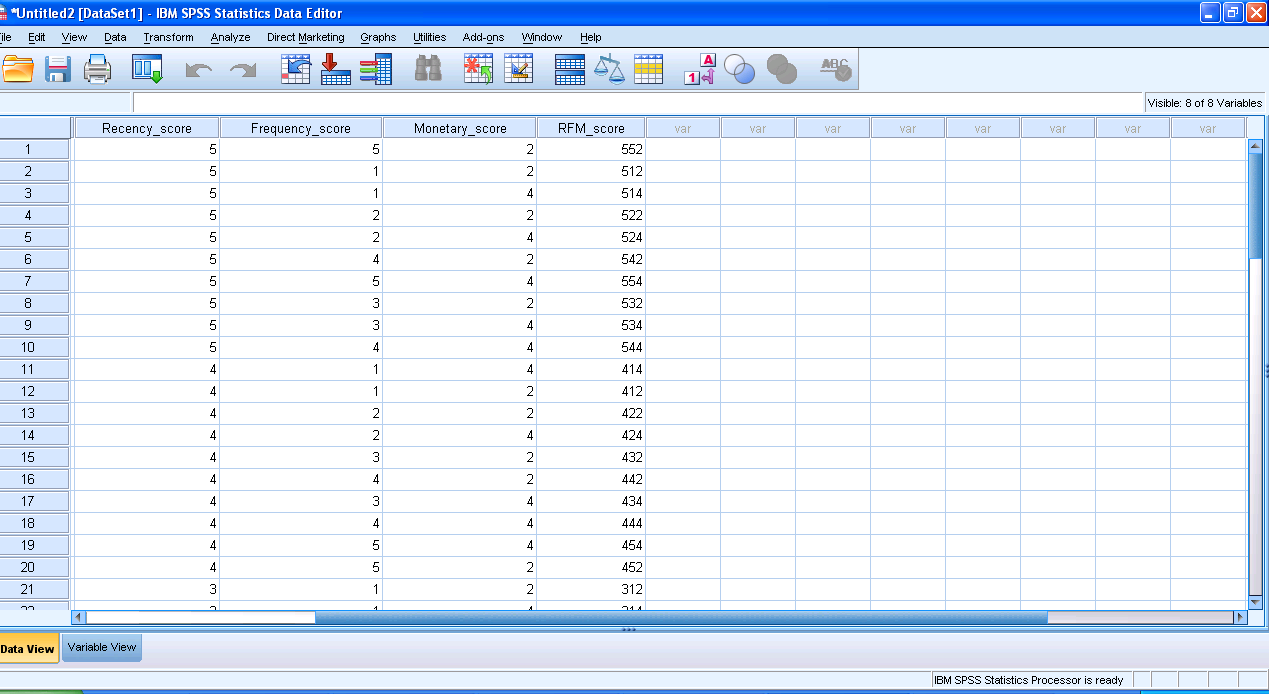
I just got myself an evaluation copy of a fully loaded IBM SPSS 19 Module and did some RFM Analysis on some data- the way SPSS recent version is it makes it very very useful even to non statistical tool- but an extremely useful one to a business or marketing user.

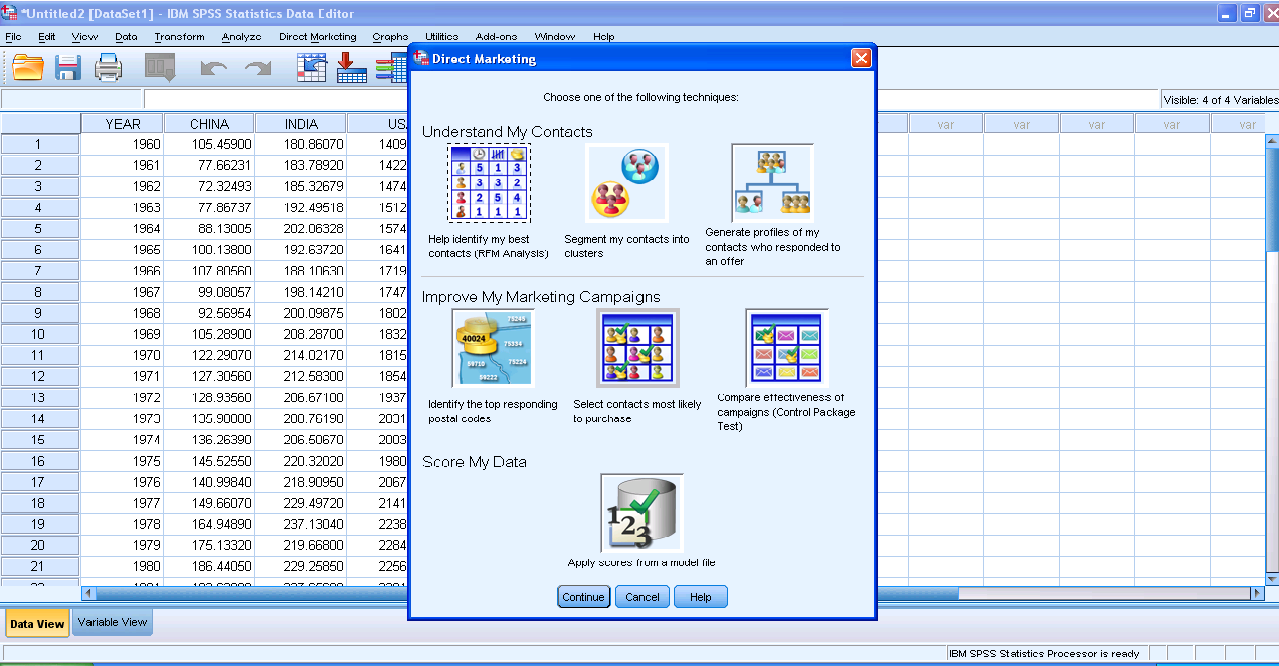
Here are some screenshots to describe the features.

1) A simple dashboard to show functionality (with room for improvement for visual appeal)

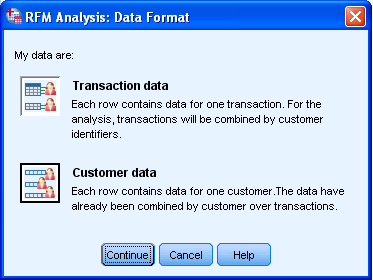
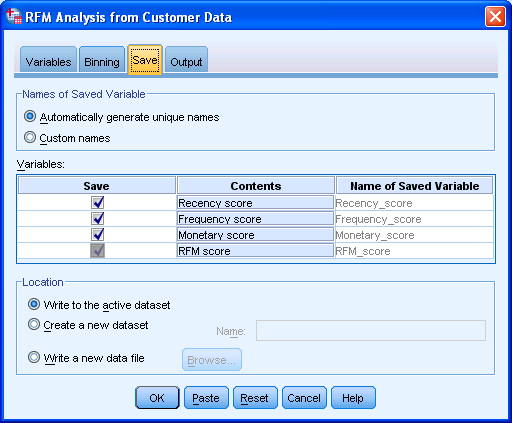
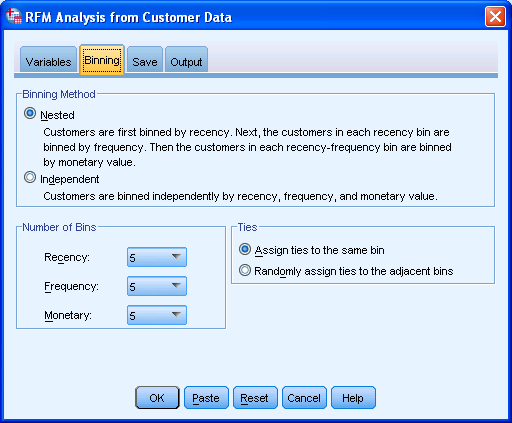
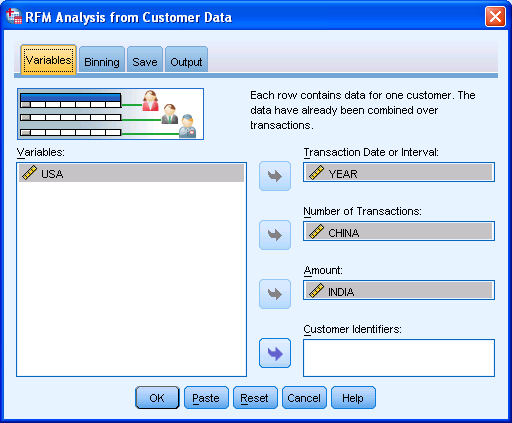
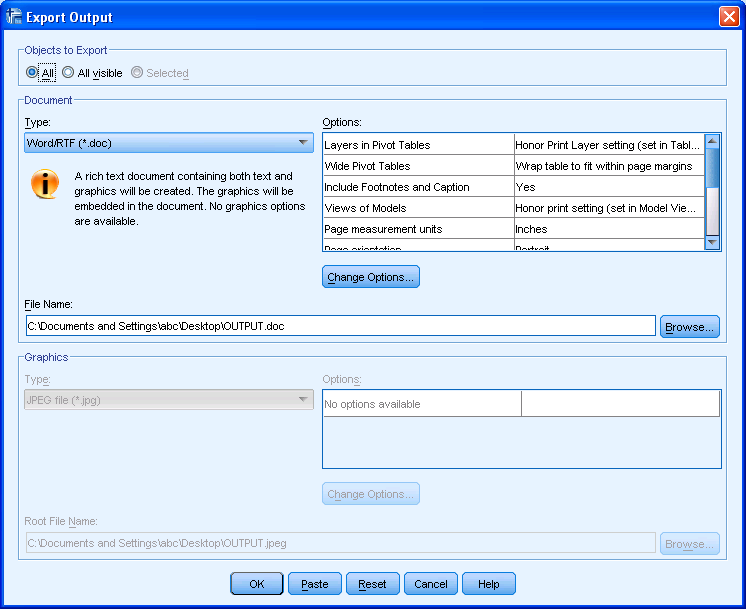
2) Simple Intuitive design to inputting data3) Some options in creating marketing scorecards4) Easy to understand features for a business audiences

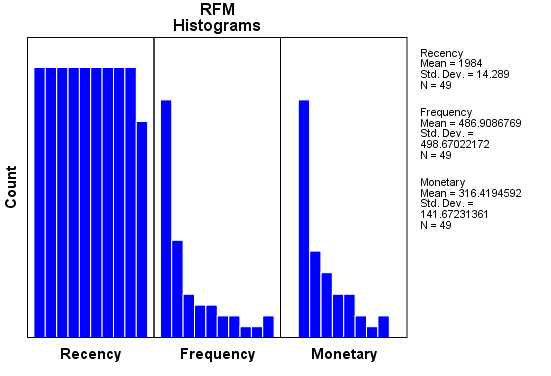
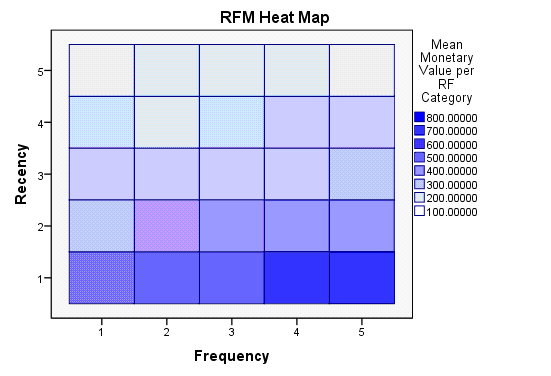
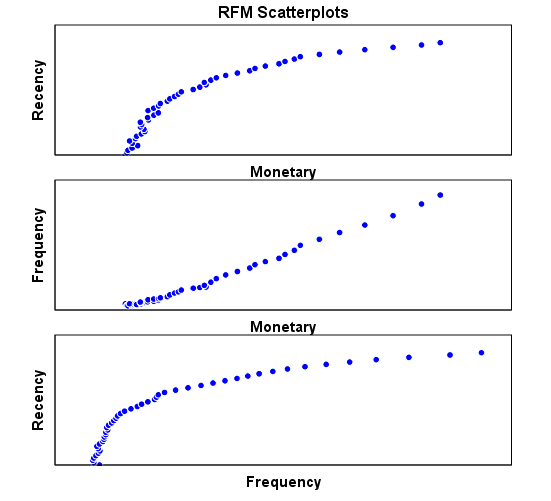
rather than pseudo techie jargon5) Note the clean design of the GUI in specifying data input type6) Again multiple options to export results in a very user friendly manner with options to customize business report7) Graphical output conveniently pasted inside a word document rather than a jumble of images. Auto generated options for customized standard graphs.8) An attractive heatmap to represent monetization for customers. Note the effect that a scale of color shades have in visual representation of data.9) Comparative plots placed side by side with easy to understand explanation (in the output word doc not shown here)10) Auto generated scores attached to data table to enhance usage. 

Note here I am evaluating RFM as a marketing technique (which is well known) but also the GUI of IBM SPSS 19 Marketing Analytics. It is simple, and yet powerful into turning what used to be a purely statistical software for nerds into a beautiful easy to implement tool for business users.

So what else can you do in Marketing Analytics with SPSS 19.

IBM SPSS Direct Marketing

The Direct Marketing add-on option allows organizations to ensure their marketing programs are as effective as possible, through techniques specifically designed for direct marketing, including:

• RFM Analysis. This technique identifies existing customers who are most likely to respond to a new offer.

• Cluster Analysis. This is an exploratory tool designed to reveal natural groupings (or clusters) within your data. For example, it can identify different groups of customers based on various demographic and purchasing characteristics.

• Prospect Profiles. This technique uses results from a previous or test campaign to create descriptive profiles. You can use the profiles to target specific groups of contacts in future campaigns.

• Postal Code Response Rates. This technique uses results from a previous campaign to calculate postal code response rates. Those rates can be used to target specific postal codes in future campaigns.

• Propensity to Purchase. This technique uses results from a test mailing or previous campaign to generate propensity scores. The scores indicate which contacts are most likely to respond.

• Control Package Test. This technique compares marketing campaigns to see if there is a significant difference in effectiveness for different packages or offers.

Click here to find out more about Direct Marketing.

Windows Azure vs Amazon EC2 (and Google Storage)

Here is a comparison of Windows Azure instances vs Amazon compute instances

Compute Instance Sizes:

Developers have the ability to choose the size of VMs to run their application based on the applications resource requirements. Windows Azure compute instances come in four unique sizes to enable complex applications and workloads.

Compute Instance Size CPU Memory Instance Storage I/O Performance
Small 1.6 GHz 1.75 GB 225 GB Moderate
Medium 2 x 1.6 GHz 3.5 GB 490 GB High
Large 4 x 1.6 GHz 7 GB 1,000 GB High
Extra large 8 x 1.6 GHz 14 GB 2,040 GB High

Standard Rates:

Windows Azure

  • Compute
    • Small instance (default): $0.12 per hour
    • Medium instance: $0.24 per hour
    • Large instance: $0.48 per hour
    • Extra large instance: $0.96 per hour
  • Storage
    • $0.15 per GB stored per month
    • $0.01 per 10,000 storage transactions
  • Content Delivery Network (CDN)
    • $0.15 per GB for data transfers from European and North American locations*
    • $0.20 per GB for data transfers from other locations*
    • $0.01 per 10,000 transactions*

Source –

http://www.microsoft.com/windowsazure/offers/popup/popup.aspx?lang=en&locale=en-US&offer=MS-AZR-0001P

and

http://www.microsoft.com/windowsazure/windowsazure/

Amazon EC2 has more options though——————————-

http://aws.amazon.com/ec2/pricing/

Standard On-Demand Instances Linux/UNIX Usage Windows Usage
Small (Default) $0.085 per hour $0.12 per hour
Large $0.34 per hour $0.48 per hour
Extra Large $0.68 per hour $0.96 per hour
Micro On-Demand Instances Linux/UNIX Usage Windows Usage
Micro $0.02 per hour $0.03 per hour
High-Memory On-Demand Instances
Extra Large $0.50 per hour $0.62 per hour
Double Extra Large $1.00 per hour $1.24 per hour
Quadruple Extra Large $2.00 per hour $2.48 per hour
High-CPU On-Demand Instances
Medium $0.17 per hour $0.29 per hour
Extra Large $0.68 per hour $1.16 per hour
Cluster Compute Instances
Quadruple Extra Large $1.60 per hour N/A*
* Windows is not currently available for Cluster Compute Instances.

http://aws.amazon.com/ec2/instance-types/

Standard Instances

Instances of this family are well suited for most applications.

Small Instance – default*

1.7 GB memory
1 EC2 Compute Unit (1 virtual core with 1 EC2 Compute Unit)
160 GB instance storage (150 GB plus 10 GB root partition)
32-bit platform
I/O Performance: Moderate
API name: m1.small

Large Instance

7.5 GB memory
4 EC2 Compute Units (2 virtual cores with 2 EC2 Compute Units each)
850 GB instance storage (2×420 GB plus 10 GB root partition)
64-bit platform
I/O Performance: High
API name: m1.large

Extra Large Instance

15 GB memory
8 EC2 Compute Units (4 virtual cores with 2 EC2 Compute Units each)
1,690 GB instance storage (4×420 GB plus 10 GB root partition)
64-bit platform
I/O Performance: High
API name: m1.xlarge

Micro Instances

Instances of this family provide a small amount of consistent CPU resources and allow you to burst CPUcapacity when additional cycles are available. They are well suited for lower throughput applications and web sites that consume significant compute cycles periodically.

Micro Instance

613 MB memory
Up to 2 EC2 Compute Units (for short periodic bursts)
EBS storage only
32-bit or 64-bit platform
I/O Performance: Low
API name: t1.micro

High-Memory Instances

Instances of this family offer large memory sizes for high throughput applications, including database and memory caching applications.

High-Memory Extra Large Instance

17.1 GB of memory
6.5 EC2 Compute Units (2 virtual cores with 3.25 EC2 Compute Units each)
420 GB of instance storage
64-bit platform
I/O Performance: Moderate
API name: m2.xlarge

High-Memory Double Extra Large Instance

34.2 GB of memory
13 EC2 Compute Units (4 virtual cores with 3.25 EC2 Compute Units each)
850 GB of instance storage
64-bit platform
I/O Performance: High
API name: m2.2xlarge

High-Memory Quadruple Extra Large Instance

68.4 GB of memory
26 EC2 Compute Units (8 virtual cores with 3.25 EC2 Compute Units each)
1690 GB of instance storage
64-bit platform
I/O Performance: High
API name: m2.4xlarge

High-CPU Instances

Instances of this family have proportionally more CPU resources than memory (RAM) and are well suited for compute-intensive applications.

High-CPU Medium Instance

1.7 GB of memory
5 EC2 Compute Units (2 virtual cores with 2.5 EC2 Compute Units each)
350 GB of instance storage
32-bit platform
I/O Performance: Moderate
API name: c1.medium

High-CPU Extra Large Instance

7 GB of memory
20 EC2 Compute Units (8 virtual cores with 2.5 EC2 Compute Units each)
1690 GB of instance storage
64-bit platform
I/O Performance: High
API name: c1.xlarge

Cluster Compute Instances

Instances of this family provide proportionally high CPU resources with increased network performance and are well suited for High Performance Compute (HPC) applications and other demanding network-bound applications. Learn more about use of this instance type for HPC applications.

Cluster Compute Quadruple Extra Large Instance

23 GB of memory
33.5 EC2 Compute Units (2 x Intel Xeon X5570, quad-core “Nehalem” architecture)
1690 GB of instance storage
64-bit platform
I/O Performance: Very High (10 Gigabit Ethernet)
API name: cc1.4xlarge

Also http://www.microsoft.com/en-us/sqlazure/default.aspx

offers SQL Databases as a service with a free trial offer

If you are into .Net /SQL big time or too dependent on MS, Azure is a nice option to EC2 http://www.microsoft.com/windowsazure/offers/popup/popup.aspx?lang=en&locale=en-US&offer=COMPARE_PUBLIC

Updated- I just got approved for Google Storage so am adding their info- though they are in Preview (and its free right now) 🙂

https://code.google.com/apis/storage/docs/overview.html

Functionality

Google Storage for Developers offers a rich set of features and capabilities:

Basic Operations

  • Store and access data from anywhere on the Internet.
  • Range-gets for large objects.
  • Manage metadata.

Security and Sharing

  • User authentication using secret keys or Google account.
  • Authenticated downloads from a web browser for Google account holders.
  • Secure access using SSL.
  • Easy, powerful sharing and collaboration via ACLs for individuals and groups.

Performance and scalability

  • Up to 100 gigabytes per object and 1,000 buckets per account during the preview.
  • Strong data consistency—read-after-write consistency for all upload and delete operations.
  • Namespace for your domain—only you can create bucket URIs containing your domain name.
  • Data replicated in multiple data centers across the U.S. and within the same data center.

Tools

  • Web-based storage manager.
  • GSUtil, an open source command line tool.
  • Compatible with many existing cloud storage tools and libraries.

Read the Getting Started Guide to learn more about the service.

Note: Google Storage for Developers does not support Google Apps accounts that use your company domain name at this time.

Back to top

Pricing

Google Storage for Developers pricing is based on usage.

  • Storage—$0.17/gigabyte/month
  • Network
    • Upload data to Google
      • $0.10/gigabyte
    • Download data from Google
      • $0.15/gigabyte for Americas and EMEA
      • $0.30/gigabyte for Asia-Pacific
  • Requests
    • PUT, POST, LIST—$0.01 per 1,000 requests
    • GET, HEAD—$0.01 per 10,000 requests

KXEN Update

Update from a very good data mining software company, KXEN –

  1. Longtime Chairman and founder Roger Haddad is retiring but would be a Board Member. See his interview with Decisionstats here https://decisionstats.wordpress.com/2009/01/05/interview-roger-haddad-founder-of-kxen-automated-modeling-software/ (note images were hidden due to migration from .com to .wordpress.com )
  2. New Members of Leadership are as-
John Ball, CEOJohn Ball
Chief Executive Officer

John Ball brings 20 years of experience in enterprise software, deep expertise in business intelligence and CRM applications, and a proven track record of success driving rapid growth at highly innovative companies.

Prior to joining KXEN, Mr. Ball served in several executive roles at salesforce.com, the leading provider of SaaS applications. Most recently, John served as VP & General Manager, Analytics and Reporting Products, where he spearheaded salesforce.com’s foray into CRM analytics and business intelligence. John also served as VP & General Manager, Service and Support Applications at salesforce.com, where he successfully grew the business to become the second largest and fastest growing product line at salesforce.com. Before salesforce.com, Ball was founder and CEO of Netonomy, the leading provider of customer self-service solutions for the telecommunications industry. Ball also held a number of executive roles at Business Objects, including General Manager, Web Products, where delivered to market the first 3 versions of WebIntelligence. Ball has a master’s degree in electrical engineering from Georgia Tech and a master’s degree in electric

I hope John atleast helps build a KXEN Force.com application- there are only 2 data mining apps there on App Exchange. Also on the wish list  more social media presence, a Web SaaS/Amazon API for KXEN, greater presence in American/Asian conferences, and a solution for SME’s (which cannot afford the premium pricing of the flagship solution. An alliance with bigger BI vendors like Oracle, SAP or IBM  for selling the great social network analysis.

Bill Russell as Non Executive Chairman-

Bill Russell as Non-executive Chairman of the Board, effective July 16 2010. Russell has 30 years of operational experience in enterprise software, with a special focus on business intelligence, analytics, and databases.Russell held a number of senior-level positions in his more than 20 years at Hewlett-Packard, including Vice President and General Manager of the multi-billion dollar Enterprise Systems Group. He has served as Non-executive Chairman of the Board for Sylantro Systems Corporation, webMethods Inc., and Network Physics, Inc. and has served as a board director for Cognos Inc. In addition to KXEN, Russell currently serves on the boards of Saba, PROS Holdings Inc., Global 360, ParAccel Inc., and B.T. Mancini Company.

Xavier Haffreingue as senior vice president, worldwide professional services and solutions.
He has almost 20 years of international enterprise software experience gained in the CRM, BI, Web and database sectors. Haffreingue joins KXEN from software provider Axway where he was VP global support operations. Prior to Axway, he held various leadership roles in the software industry, including VP self service solutions at Comverse Technologies and VP professional services and support at Netonomy, where he successfully delivered multi-million dollar projects across Europe, Asia-Pacific and Africa. Before that he was with Business Objects and Sybase, where he ran support and services in southern Europe managing over 2,500 customers in more than 20 countries.

David Guercio  as senior vice president, Americas field operations. Guercio brings to the role more than 25 years experience of building and managing high-achieving sales teams in the data mining, business intelligence and CRM markets. Guercio comes to KXEN from product lifecycle management vendor Centric Software, where he was EVP sales and client services. Prior to Centric, he was SVP worldwide sales and client services at Inxight Software, where he was also Chairman and CEO of the company’s Federal Systems Group, a subsidiary of Inxight that saw success in the US Federal Government intelligence market. The success in sales growth and penetration into the federal government led to the acquisition of Inxight by Business Objects in 2007, where Guercio then led the Inxight sales organization until Business Objects was acquired by SAP. Guercio was also a key member of the management team and a co-founder at Neovista, an early pioneer in data mining and predictive analytics. Additionally, he held the positions of director of sales and VP of professional services at Metaphor Computer Systems, one of the first data extraction solutions companies, which was acquired by IBM. During his career, Guercio also held executive positions at Resonate and SiGen.

3) Venture Capital funding to fund expansion-

It has closed $8 million in series D funding to further accelerate its growth and international expansion. The round was led by NextStage and included participation from existing investors XAnge Capital, Sofinnova Ventures, Saints Capital and Motorola Ventures.

This was done after John Ball had joined as CEO.

4) Continued kudos from analysts and customers for it’s technical excellence.

KXEN was named a leader in predictive analytics and data mining by Forrester Research (1) and was rated highest for commercial deployments of social network analytics by Frost & Sullivan (2)

Also it became an alliance partner of Accenture- which is also a prominent SAS partner as well.

In Database Optimization-

In KXEN V5.1, a new data manipulation module (ADM) is provided in conjunction with scoring to optimize database workloads and provide full in-database model deployment. Some leading data mining vendors are only now beginning to offer this kind of functionality, and then with only one or two selected databases, giving KXEN a more than five-year head start. Some other vendors are only offering generic SQL generation, not optimized for each database, and do not provide the wealth of possible outputs for their scoring equations: For example, real operational applications require not only to generate scores, but decision probabilities, error bars, individual input contributions – used to derive reasons of decision and more, which are available in KXEN in-database scoring modules.

Since 2005, KXEN has leveraged databases as the data manipulation engine for analytical dataset generation. In 2008, the ADM (Analytical Data Management) module delivered a major enhancement by providing a very easy to use data manipulation environment with unmatched productivity and efficiency. ADM works as a generator of optimized database-specific SQL code and comes with an integrated layer for the management of meta-data for analytics.

KXEN Modeling Factory- (similar to SAS’s recent product Rapid Predictive Modeler http://www.sas.com/resources/product-brief/rapid-predictive-modeler-brief.pdf and http://jtonedm.com/2010/09/02/first-look-rapid-predictive-modeler/)

KXEN Modeling Factory (KMF) has been designed to automate the development and maintenance of predictive analytics-intensive systems, especially systems that include large numbers of models, vast amounts of data or require frequent model refreshes. Information about each project and model is monitored and disseminated to ensure complete management and oversight and to facilitate continual improvement in business performance.

Main Functions

Schedule: creation of the Analytic Data Set (ADS), setup of how and when to score, setup of when and how to perform model retraining and refreshes …

Report
: Monitormodel execution over time, Track changes in model quality over time, see how useful one variable is by considering its multiple instance in models …

Notification
: Rather than having to wade through pages of event logs, KMF Department allows users to manage by exception through notifications.

Other products from KXEN have been covered here before https://decisionstats.wordpress.com/tag/kxen/ , including Structural Risk Minimization- https://decisionstats.wordpress.com/2009/04/27/kxen-automated-regression-modeling/

Thats all for the KXEN update- all the best to the new management team and a splendid job done by Roger Haddad in creating what is France and Europe’s best known data mining company.

Note- Source – http://www.kxen.com