I am still angry with THE netflix for 1 mill I lost out. No sweat! this time the money is 3 times as much, it is legit, and yes baby you can change the world, make it a better place and get rich.! see details below-http://www.heritagehealthprize.com/c/hhp/Data
You must accept this competition’s rules before you’ll be able to download data files.
IMPORTANT NOTE: The information provided below is intended only to provide general guidance to participants in the Heritage Health Prize Competition and is subject to the Competition Official Rules. Any capitalized term not defined below is defined in the Competition Official Rules. Please consult the Competition Official Rules for complete details.
Heritage Provider Network is providing Competition Entrants with deidentified member data collected during a forty-eight month period that is allocated among three data sets (the “Data Sets”). Competition Entrants will use the Data Sets to develop and test their algorithms for accurately predicting the number of days that the members will spend in a hospital (inpatient or emergency room visit) during the 12-month period following the Data Set cut-off date.
HHP_release2.zip contains the latest files, so you can ignore HHP_release1.zip. SampleEntry.CSV shows you how an entry should look.
Data Sets will be released to Entrants after registration on the Website according to the following schedule:
April 4, 2011
Claims Table – Y1 and DaysInHospital Table – Y2
May 4, 2011
All other Data Sets except Labs Table and Rx Table
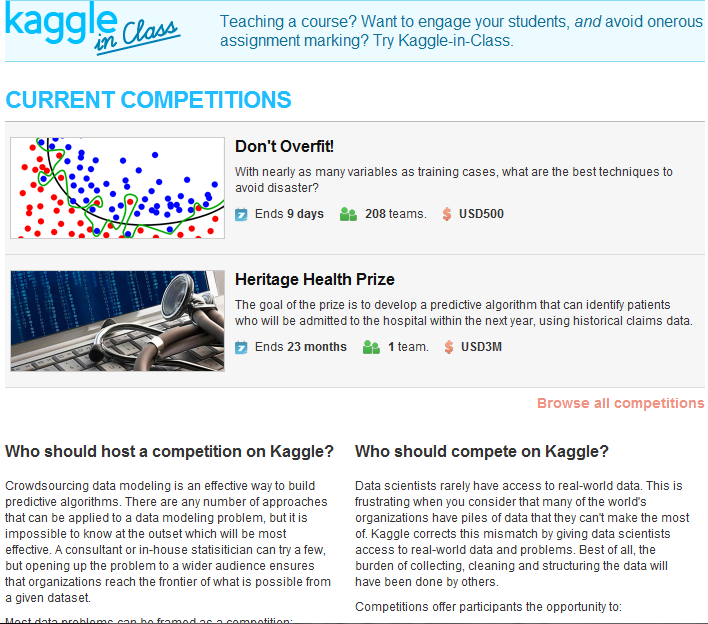
The $3 million Heritage Health Prize opens to entries
It’s been one month since the launch of the Heritage Health Prize. The prize has attracted some great publicity, receiving coverage from the Wall Street Journal, The Economist, Slate andForbes.
By now, people have had a good chance to poke around the first portion of the data. Now the fun starts! HPN have released two more years’-worth of data, set the accuracy threshold and are opening up the competition to entries. The data are available from the Heritage Health Prize page. Good luck to all participants!
The Deloitte/FIDE Chess Ratings Competition results
The Deloitte/FIDE Chess Ratings Competition attracted one of the strongest fields ever seen in a Kaggle Competition. The competition attracted 189 teams, ranging from chess ratings experts to Netflix Prize winners. As Jeff Sonas wrote on the Kaggle blog last week, the competition has far exceeded his expectations. A big congratulations the provisional winner, Tim Salimans, an econometrician at Erasmus University in Rotterdam. We look forward to reading about the approaches used by top performers on the Kaggle blog. We also look forward to the results of the FIDE prize, which could see the introduction of a new chess ratings system.
ICDAR 2011 Competition Results
The ICDAR 2011 competition also finished recently. The competiiton required participants to develop an algorithm that correctly matched handwriting samples. The winners were Lewis Griffin and Andrew Newell from the University College London who achieved Kaggle’s first ever perfect score by managing to match every sample correctly! Andrew and Lewis have posted a description of their winning method on the Kaggle blog.
Revolution R Enterprise
Since R is the most popular language used by Kaggle members, the Revolution Analytics team is making Revolution R Enterprise (the pre-eminent commercial version of R) available free of charge to Kaggle members. Revolution R Enterprise has several advantages over standard R, including the ability to seemlessly handle larger datasets. To get your free copy, visit http://info.revolutionanalytics.com/Kaggle.html.
Kaggle-in-Class
As many of you know, Kaggle offers a free platform, Kaggle-in-Class, for instructors who want to host competitions for their students. For those interested in hearing more about the use of Kaggle-in-Class as a teaching tool, Susan Holmes and Nelson Ray from Stanford University share their experience in a webinar organized by the Consortium for the Advancement of Undergraduate Statistics Education.
Bar Charts and Histograms-Bar Charts are one of the most widely used types of Business Charts. Even the ever popular histograms are special cases of bar charts (but showing frequencies). Histograms are the not the same as bar charts, they are simply bar charts of frequencies.
Basically a bar chart shows rectangular bars with length proportional to the quantities being described. It helps to see relative quantities between various category types.
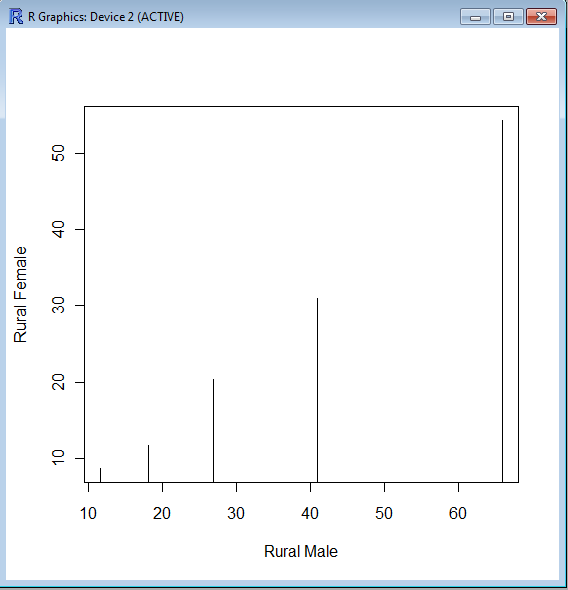
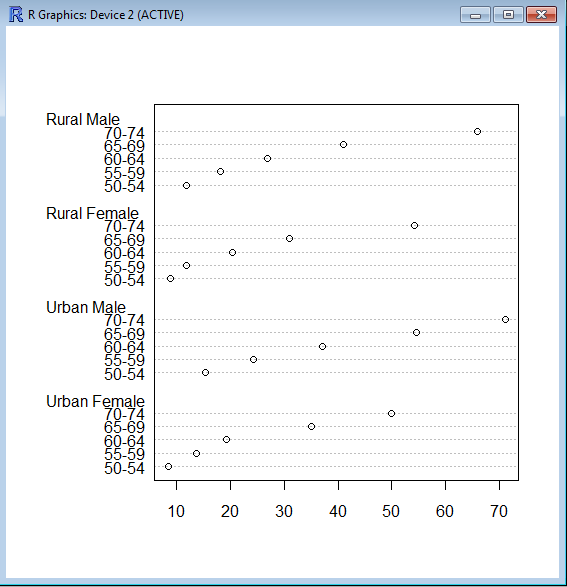
The barplot() command is used for making Bar Plots, while hist() is used for histograms. You can also use the plot() command with type=h to create histograms-The official R manual also suggests that Dot plots using dotchart () are a reasonable substitute for bar plots.
A very simple easy to understand tutorial for basic bar plots is at http://msenux.redwoods.edu/math/R/barplot.php
The difference between the three main functions that can be used for these charts are shown below-
A highly optimized blog post or web content can get you a lot of attention just like Rebecca Black’s video (provided it passes through the new quality metrics \change*/ in the Search Engine)
But if the underlying content is weak, or based on a shoddy understanding of the content-it can drive lots of horrid comments as well as ensuring that bad word of mouth is spread about the content or you/despite your hard work.
An example of this is copy and paste journalism especially in technology circles, where even a bigger Page Ranked website /blog can get away with scraping or stealing content from a lower page ranked website (or many websites) after adding a cursory “expert comment”. This is also true when someone who is basically a corporate communication specialist (or PR -public relations) person is given a techinical text and encourage to write about it without completely understanding it.
A mild technical defect in the search engine algorithm is that it does not seem to pay attention to when the content was published, so the copying website or blog actually can get by as fresher content even if it is practically has 90% of the same words). The second flaw is over punishment or manual punishment of excessive linking – this can encourage search optimization minded people to hoard links or discourage trackbacks.
A free internet is one which promotes free sharing of content and does not encourage stealing or un-authorized scraping or content copying. Unfortunately current search engine optimization can encourage scraping and content copying without paying too much attention to origin of the words.
In addition the analytical rigor by which search algorithms search your inboxes (as in search all emails for a keyword) or media rich sites (like Youtube) are quite on a different level of quality altogether. The chances of garbage results are much more while searching for media content and/or emails.
This makes the task of searching among these packages and comparing functions for the same analytical task across different packages a bit tedious and prone to manual searching (of reading multiple Pdfs of help /vignette of packages) or sending an email to the R help list.
However using R Views is a slightly better way of managing all your analytical requirements for software rather than the large number of packages (see Graphics view below).
CRAN Task Views allow you to browse packages by topic and provide tools to automatically install all packages for special areas of interest. Currently, 28 views are available. http://cran.r-project.org/web/views/
and then the views can be installed via install.views or update.views (which first assesses which of the packages are already installed and up-to-date), e.g.,
R is rich with facilities for creating and developing interesting graphics. Base R contains functionality for many plot types including coplots, mosaic plots, biplots, and the list goes on. There are devices such as postscript, png, jpeg and pdf for outputting graphics as well as device drivers for all platforms running R. lattice and grid are supplied with R’s recommended packages and are included in every binary distribution. lattice is an R implementation of William Cleveland’s trellis graphics, while grid defines a much more flexible graphics environment than the base R graphics.
R’s base graphics are implemented in the same way as in the S3 system developed by Becker, Chambers, and Wilks. There is a static device, which is treated as a static canvas and objects are drawn on the device through R plotting commands. The device has a set of global parameters such as margins and layouts which can be manipulated by the user using par() commands. The R graphics engine does not maintain a user visible graphics list, and there is no system of double buffering, so objects cannot be easily edited without redrawing a whole plot. This situation may change in R 2.7.x, where developers are working on double buffering for R devices. Even so, the base R graphics can produce many plots with extremely fine graphics in many specialized instances.
One can quickly run into trouble with R’s base graphic system if one wants to design complex layouts where scaling is maintained properly on resizing, nested graphs are desired or more interactivity is needed. grid was designed by Paul Murrell to overcome some of these limitations and as a result packages like lattice, ggplot2, vcd or hexbin (on Bioconductor ) use grid for the underlying primitives. When using plots designed with grid one needs to keep in mind that grid is based on a system of viewports and graphic objects. To add objects one needs to use grid commands, e.g., grid.polygon() rather than polygon(). Also grid maintains a stack of viewports from the device and one needs to make sure the desired viewport is at the top of the stack. There is a great deal of explanatory documentation included with grid as vignettes.
The graphics packages in R can be organized roughly into the following topics, which range from the more user oriented at the top to the more developer oriented at the bottom. The categories are not mutually exclusive but are for the convenience of presentation:
Plotting : Enhancements for specialized plots can be found in plotrix, for polar plotting, vcd for categorical data, hexbin (on Bioconductor ) for hexagon binning, gclus for ordering plots and gplots for some plotting enhancements. Some specialized graphs, like Chernoff faces are implemented in aplpack, which also has a nice implementation of Tukey’s bag plot. For 3D plots lattice, scatterplot3d and misc3d provide a selection of plots for different kinds of 3D plotting. scatterplot3d is based on R’s base graphics system, while misc3d is based on rgl. The package onion for visualizing quaternions and octonions is well suited to display 3D graphics based on derived meshes.
Graphic Applications : This area is not much different from the plotting section except that these packages have tools that may not for display, but can aid in creating effective displays. Also included are packages with more esoteric plotting methods. For specific subject areas, like maps, or clustering the excellent task views contributed by other dedicated useRs is an excellent place to start.
Effect ordering : The gclus package focuses on the ordering of graphs to accentuate cluster structure or natural ordering in the data. While not for graphics directly cba and seriation have functions for creating 1 dimensional orderings from higher dimensional criteria. For ordering an array of displays, biclust can be useful.
Large Data Sets : Large data sets can present very different challenges from moderate and small datasets. Aside from overplotting, rendering 1,000,000 points can tax even modern GPU’s. For univariate datalvplot produces letter value boxplots which alleviate some of the problems that standard boxplots exhibit for large data sets. For bivariate data ash can produce a bivariate smoothed histogram very quickly, and hexbin, on Bioconductor , can bin bivariate data onto a hexagonal lattice, the advantage being that the irregular lines and orientation of hexagons do not create linear artifacts. For multivariate data, hexbin can be used to create a scatterplot matrix, combined with lattice. An alternative is to use scagnostics to produce a scaterplot matrix of “data about the data”, and look for interesting combinations of variables.
Trees and Graphs : ape and ade4 have functions for plotting phylogenetic trees, which can be used for plotting dendrograms from clustering procedures. While these packages produce decent graphics, they do not use sophisticated algorithms for node placement, so may not be useful for very large trees. igraph has the Tilford-Rheingold algorithm implementead and is useful for plotting larger trees. diagram as facilities for flow diagrams and simple graphs. For more sophisticated graphs Rgraphviz and igraph have functions for plotting and layout, especially useful for representing large networks.
Graphics Systems : lattice is built on top of the grid graphics system and is an R implementation of William Cleveland’s trellis system for S-PLUS. lattice allows for building many types of plots with sophisticated layouts based on conditioning. ggplot2 is an R implementation of the system described in “A Grammar of Graphics” by Leland Wilkinson. Like lattice, ggplot (also built on top of grid) assists in trellis-like graphics, but allows for much more. Since it is built on the idea of a semantics for graphics there is much more emphasis on reshaping data, transformation, and assembling the elements of a plot.
Devices : Whereas grid is built on top of the R graphics engine, many in the R community have found the R graphics engine somewhat inflexible and have written separate device drivers that either emphasize interactivity or plotting in various graphics formats. R base supplies devices for PostScript, PDF, JPEG and other formats. Devices on CRAN include cairoDevice which is a device based libcairo, which can actually render to many device types. The cairo device is desgned to work with RGTK2, which is an interface to the Gimp Tool Kit, similar to pyGTK2. GDD provides device drivers for several bitmap formats, including GIF and BMP. RSvgDevice is an SVG device driver and interfaces well with with vector drawing programs, or R web development packages, such as Rpad. When SVG devices are for web display developers should be aware that internet explorer does not support SVG, but has their own standard. Trust Microsoft. rgl provides a device driver based on OpenGL, and is good for 3D and interactive development. Lastly, the Augsburg group supplies a set of packages that includes a Java-based device, JavaGD.
Colors : The package colorspace provides a set of functions for transforming between color spaces and mixcolor() for mixing colors within a color space. Based on the HCL colors provided in colorspace, vcdprovides a set of functions for choosing color palettes suitable for coding categorical variables ( rainbow_hcl()) and numerical information ( sequential_hcl(), diverge_hcl()). Similar types of palettes are provided in RColorBrewer and dichromat is focused on palettes for color-impaired viewers.
Interactive Graphics : There are several efforts to implement interactive graphics systems that interface well with R. In an interactive system the user can interactively query the graphics on the screen with the mouse, or a moveable brush to zoom, pan and query on the device as well as link with other views of the data. rggobi embeds the GGobi interactive graphics system within R, so that one can display a data frame or several in GGobi directly from R. The package has functions to support longitudinal data, and graphs using GGobi’s edge set functionality. The RoSuDA repository maintained and developed by the University of Augsburg group has two packages, iplots and iwidgets as well as their Java development environment including a Java device, JavaGD. Their interactive graphics tools contain functions for alpha blending, which produces darker shading around areas with more data. This is exceptionally useful for parallel coordinate plots where many lines can quickly obscure patterns. playwith has facilities for building interactive versions of R graphics using the cairoDevice and RGtk2. Lastly, the rgl package has mechanisms for interactive manipulation of plots, especially 3D rotations and surfaces.
Development : For development of specialized graphics packages in R, grid should probably be the first consideration for any new plot type. rgl has better tools for 3D graphics, since the device is interactive, though it can be slow. An alternative is to use Java and the Java device in the RoSuDA packages, though Java has its own drawbacks. For porting plotting code to grid, using the package gridBase presents a nice intermediate step to embed base graphics in grid graphics and vice versa.
More than 71 Million individuals in the United States are admitted to
hospitals each year, according to the latest survey from the American
Hospital Association. Studies have concluded that in 2006 well over
$30 billion was spent on unnecessary hospital admissions. Each of
these unnecessary admissions took away one hospital bed from someone
else who needed it more.
The goal of the prize is to develop a predictive algorithm that can identify patients who will be admitted to the hospital within the next year, using historical claims data.
Official registration will open in 2011, after the launch of the prize. At that time, pre-registered teams will be notified to officially register for the competition. Teams must consent to be bound by final competition rules.
Registered teams will develop and test their algorithms. The winning algorithm will be able to predict patients at risk for an unplanned hospital admission with a high rate of accuracy. The first team to reach the accuracy threshold will have their algorithms confirmed by a judging panel. If confirmed, a winner will be declared.
The competition is expected to run for approximately two years. Registration will be open throughout the competition.
Data Sets
Registered teams will be granted access to two separate datasets of de-identified patient claims data for developing and testing algorithms: a training dataset and a quiz/test dataset. The datasets will be comprised of de-identified patient data. The datasets will include:
Outpatient encounter data
Hospitalization encounter data
Medication dispensing claims data, including medications
Outpatient laboratory data, including test outcome values
The data for each de-identified patient will be organized into two sections: “Historical Data” and “Admission Data.” Historical Data will represent three years of past claims data. This section of the dataset will be used to predict if that patient is going to be admitted during the Admission Data period. Admission Data represents previous claims data and will contain whether or not a hospital admission occurred for that patient; it will be a binary flag.
The training dataset includes several thousand anonymized patients and will be made available, securely and in full, to any registered team for the purpose of developing effective screening algorithms.
The quiz/test dataset is a smaller set of anonymized patients. Teams will only receive the Historical Data section of these datasets and the two datasets will be mixed together so that teams will not be aware of which de-identified patients are in which set. Teams will make predictions based on these data sets and submit their predictions to HPN through the official Heritage Health Prize web site. HPN will use the Quiz Dataset for the initial assessment of the Team’s algorithms. HPN will evaluate and report back scores to the teams through the prize website’s leader board.
Scores from the final Test Dataset will not be made available to teams until the accuracy thresholds are passed. The test dataset will be used in the final judging and results will be kept hidden. These scores are used to preserve the integrity of scoring and to help validate the predictive algorithms.
Teams can begin developing and testing their algorithms as soon as they are registered and ready. Teams will log onto the official Heritage Health Prize website and submit their predictions online. Comparisons will be run automatically and team accuracy scores will be posted on the leader board. This score will be only on a portion of the predictions submitted (the Quiz Dataset), the additional results will be kept back (the Test Dataset).
Once a team successfully scores above the accuracy thresholds on the online testing (quiz dataset), final judging will occur. There will be three parts to this judging. First, the judges will confirm that the potential winning team’s algorithm accurately predicts patient admissions in the Test Dataset (again, above the thresholds for accuracy).
Next, the judging panel will confirm that the algorithm does not identify patients and use external data sources to derive its predictions. Lastly, the panel will confirm that the team’s algorithm is authentic and derives its predictive power from the datasets, not from hand-coding results to improve scores. If the algorithm meets these three criteria, it will be declared the winner.
Failure to meet any one of these three parts will disqualify the team and the contest will continue. The judges reserve the right to award second and third place prizes if deemed applicable.
Additional features in R over other analytical packages-
1) Source Code is given to ensure complete custom solution and embedding for a particular application. Open source code has an advantage that is extensively peer- reviewed in Journals and Scientific Literature. This means bugs will found, shared and corrected transparently.
2) Wide literature of training material in the form of books is available for the R analytical platform.
3) Extensively the best data visualization tools in analytical software (apart from Tableau Software ‘s latest version). The extensive data visualization available in R is of the form a variety of customizable graphs, as well as animation. The principal reason third-party software initially started creating interfaces to R is because the graphical library of packages in R is more advanced as well as rapidly getting more features by the day.
4) Free in upfront license cost for academics and thus budget friendly for small and large analytical teams.
5) Flexible programming for your data environment. This includes having packages that ensure compatibility with Java, Python and C++.
6) Easy migration from other analytical platforms to R Platform. It is relatively easy for a non R platform user to migrate to R platform and there is no danger of vendor lock-in due to the GPL nature of source code and open community.
Statistics are numbers that tell (descriptive), advise ( prescriptive) or forecast (predictive). Analytics is a decision-making help tool. Analytics on which no decision is to be made or is being considered can be classified as purely statistical and non analytical. Thus ease of making a correct decision separates a good analytical platform from a not so good analytical platform. The distinction is likely to be disputed by people of either background- and business analysis requires more emphasis on how practical or actionable the results are and less emphasis on the statistical metrics in a particular data analysis task. I believe one clear reason between business analytics is different from statistical analysis is the cost of perfect information (data costs in real world) and the opportunity cost of delayed and distorted decision-making.
Specific to the following domains R has the following costs and benefits
Business Analytics
R is free per license and for download
It is one of the few analytical platforms that work on Mac OS
It’s results are credibly established in both journals like Journal of Statistical Software and in the work at LinkedIn, Google and Facebook’s analytical teams.
It has open source code for customization as per GPL
It also has a flexible option for commercial vendors like Revolution Analytics (who support 64 bit windows) as well as bigger datasets
It has interfaces from almost all other analytical software including SAS,SPSS, JMP, Oracle Data Mining, Rapid Miner. Existing license holders can thus invoke and use R from within these software
Huge library of packages for regression, time series, finance and modeling
High quality data visualization packages
Data Mining
R as a computing platform is better suited to the needs of data mining as it has a vast array of packages covering standard regression, decision trees, association rules, cluster analysis, machine learning, neural networks as well as exotic specialized algorithms like those based on chaos models.
Flexibility in tweaking a standard algorithm by seeing the source code
The RATTLE GUI remains the standard GUI for Data Miners using R. It was created and developed in Australia.
Business Dashboards and Reporting
Business Dashboards and Reporting are an essential piece of Business Intelligence and Decision making systems in organizations. R offers data visualization through GGPLOT, and GUI like Deducer and Red-R can help even non R users create a metrics dashboard
For online Dashboards- R has packages like RWeb, RServe and R Apache- which in combination with data visualization packages offer powerful dashboard capabilities.
R can be combined with MS Excel using the R Excel package – to enable R capabilities to be imported within Excel. Thus a MS Excel user with no knowledge of R can use the GUI within the R Excel plug-in to use powerful graphical and statistical capabilities.
Additional factors to consider in your R installation-
There are some more choices awaiting you now-
1) Licensing Choices-Academic Version or Free Version or Enterprise Version of R
2) Operating System Choices-Which Operating System to choose from? Unix, Windows or Mac OS.
3) Operating system sub choice- 32- bit or 64 bit.
4) Hardware choices-Cost -benefit trade-offs for additional hardware for R. Choices between local ,cluster and cloud computing.
5) Interface choices-Command Line versus GUI? Which GUI to choose as the default start-up option?
6) Software component choice- Which packages to install? There are almost 3000 packages, some of them are complimentary, some are dependent on each other, and almost all are free.
7) Additional Software choices- Which additional software do you need to achieve maximum accuracy, robustness and speed of computing- and how to use existing legacy software and hardware for best complementary results with R.
1) Licensing Choices-
You can choose between two kinds of R installations – one is free and open source from http://r-project.org The other R installation is commercial and is offered by many vendors including Revolution Analytics. However there are other commercial vendors too.
Windows remains the most widely used operating system on this planet. If you are experienced in Windows based computing and are active on analytical projects- it would not make sense for you to move to other operating systems. This is also based on the fact that compatibility problems are minimum for Microsoft Windows and the help is extensively documented. However there may be some R packages that would not function well under Windows- if that happens a multiple operating system is your next option.
Enterprise R from Revolution Analytics- Enterprise R from Revolution Analytics has a complete R Development environment for Windows including the use of code snippets to make programming faster. Revolution is also expected to make a GUI available by 2011. Revolution Analytics claims several enhancements for it’s version of R including the use of optimized libraries for faster performance.
MacOS
Reasons for choosing MacOS remains its considerable appeal in aesthetically designed software- but MacOS is not a standard Operating system for enterprise systems as well as statistical computing. However open source R claims to be quite optimized and it can be used for existing Mac users. However there seem to be no commercially available versions of R available as of now for this operating system.
Linux
Ubuntu
Red Hat Enterprise Linux
Other versions of Linux
Linux is considered a preferred operating system by R users due to it having the same open source credentials-much better fit for all R packages and it’s customizability for big data analytics.
Ubuntu Linux is recommended for people making the transition to Linux for the first time. Ubuntu Linux had an marketing agreement with revolution Analytics for an earlier version of Ubuntu- and many R packages can installed in a straightforward way as Ubuntu/Debian packages are available. Red Hat Enterprise Linux is officially supported by Revolution Analytics for it’s enterprise module. Other versions of Linux popular are Open SUSE.
Multiple operating systems-
Virtualization vs Dual Boot-
You can also choose between having a VMware VM Player for a virtual partition on your computers that is dedicated to R based computing or having operating system choice at the startup or booting of your computer. A software program called wubi helps with the dual installation of Linux and Windows.
64 bit vs 32 bit – Given a choice between 32 bit versus 64 bit versions of the same operating system like Linux Ubuntu, the 64 bit version would speed up processing by an approximate factor of 2. However you need to check whether your current hardware can support 64 bit operating systems and if so- you may want to ask your Information Technology manager to upgrade atleast some operating systems in your analytics work environment to 64 bit operating systems.
Hardware choices- At the time of writing this book, the dominant computing paradigm is workstation computing followed by server-client computing. However with the introduction of cloud computing, netbooks, tablet PCs, hardware choices are much more flexible in 2011 than just a couple of years back.
Hardware costs are a significant cost to an analytics environment and are also remarkably depreciated over a short period of time. You may thus examine your legacy hardware, and your future analytical computing needs- and accordingly decide between the various hardware options available for R.
Unlike other analytical software which can charge by number of processors, or server pricing being higher than workstation pricing and grid computing pricing extremely high if available- R is well suited for all kinds of hardware environment with flexible costs. Given the fact that R is memory intensive (it limits the size of data analyzed to the RAM size of the machine unless special formats and /or chunking is used)- it depends on size of datasets used and number of concurrent users analyzing the dataset. Thus the defining issue is not R but size of the data being analyzed.
Local Computing- This is meant to denote when the software is installed locally. For big data the data to be analyzed would be stored in the form of databases.
Server version- Revolution Analytics has differential pricing for server -client versions but for the open source version it is free and the same for Server or Workstation versions.
Workstation
Cloud Computing- Cloud computing is defined as the delivery of data, processing, systems via remote computers. It is similar to server-client computing but the remote server (also called cloud) has flexible computing in terms of number of processors, memory, and data storage. Cloud computing in the form of public cloud enables people to do analytical tasks on massive datasets without investing in permanent hardware or software as most public clouds are priced on pay per usage. The biggest cloud computing provider is Amazon and many other vendors provide services on top of it. Google is also coming for data storage in the form of clouds (Google Storage), as well as using machine learning in the form of API (Google Prediction API)
Amazon
Google
Cluster-Grid Computing/Parallel processing- In order to build a cluster, you would need the RMpi and the SNOW packages, among other packages that help with parallel processing.
How much resources
RAM-Hard Disk-Processors- for workstation computing
Instances or API calls for cloud computing
Interface Choices
Command Line
GUI
Web Interfaces
Software Component Choices
R dependencies
Packages to install
Recommended Packages
Additional software choices
Additional legacy software
Optimizing your R based computing
Code Editors
Code Analyzers
Libraries to speed up R
citation- R Development Core Team (2010). R: A language and environment for statistical computing. R Foundation for Statistical Computing,Vienna, Austria. ISBN 3-900051-07-0, URL http://www.R-project.org.



 The training dataset includes several thousand anonymized patients and will be made available, securely and in full, to any registered team for the purpose of developing effective screening algorithms.

 DECISION STATS