SAS to R Challenge: Unique benchmarking

Flag of Town of Cary
Image via Wikipedia

An interesting announcemnet from Revolution Analytics promises to convert your legacy code in SAS language not only cheaper but faster. It’ s a very very interesting challenge and I wonder how SAS users ,corporates, customers as well as the Institute itself reacts

http://www.revolutionanalytics.com/sas-challenge/

Take the SAS to R Challenge

Are you paying for expensive software licenses and hardware to run time-consuming statistical analyses on big data sets?

If you’re doing linear regressions, logistic regressions, predictions, or multivariate crosstabulations* there’s something you should know: Revolution Analytics can get the same results for a substantially lower cost and faster than SAS®.

For a limited time only, Revolution Analytics invites you take the SAS to R Challenge. Let us prove that we can deliver on our promise of replicating your results in R, faster and cheaper than SAS.

Take the challenge

Here’s how it works:

Fill out the short form below, and one of our conversion experts will contact you to discuss the SAS code you want to convert. If we think Revolution R Enterprise can get the same results faster than SAS, we’ll convert your code to R free of charge. Our goal is to demonstrate that Revolution R Enterprise will produce the same results in less time. There’s no obligation, but if you choose to convert, we guarantee that your license cost for Revolution R Enterprise will be less than half what you’re currently paying for the equivalent SAS software.**

It’s that simple.

We’ll show you that you don’t need expensive hardware and software to do high quality statistical analysis of big data. And we’ll show that you don’t need to tie up your computing resources with long running operations. With Revolution R Enterprise, you can run analyses on commodity hardware using Linux or Windows, scale to terabyte-class data problems and do it at processing speeds you would never have thought possible.

Sign up now, and we will be in touch shortly.

Take the challenge


—————————-

SAS is a registered trademark of the SAS Institute, Cary, NC, in the US and other countries.

*Additional statistical algorithms are being rapidly added to Revolution R Enterprise. Custom development services are also available.

**Revolution Analytics retains the right to determine eligibility for this offer. Offer available until March 31, 2011.

LibreOffice Stable Release launched

Non Oracle Open Office completes important milestone- from the press release

The Document Foundation launches LibreOffice 3.3

The first stable release of the free office suite is available for download

The Internet, January 25, 2011 – The Document Foundation launches LibreOffice 3.3, the first stable release of the free office suite developed by the community. In less than four months, the number of developers hacking LibreOffice has grown from less than twenty in late September 2010, to well over one hundred today. This has allowed us to release ahead of the aggressive schedule set by the project.

Not only does it ship a number of new and original features, LibreOffice 3.3 is also a significant achievement for a number of reasons:

– the developer community has been able to build their own and independent process, and get up and running in a very short time (with respect to the size of the code base and the project’s strong ambitions);

– thanks to the high number of new contributors having been attracted into the project, the source code is quickly undergoing a major clean-up to provide a better foundation for future development of LibreOffice;

– the Windows installer, which is going to impact the largest and most diverse user base, has been integrated into a single build containing all language versions, thus reducing the size for download sites from 75 to 11GB, making it easier for us to deploy new versions more rapidly and lowering the carbon footprint of the entire infrastructure.

Caolán McNamara from RedHat, one of the developer community leaders, comments, “We are excited: this is our very first stable release, and therefore we are eager to get user feedback, which will be integrated as soon as possible into the code, with the first enhancements being released in February. Starting from March, we will be moving to a real time-based, predictable, transparent and public release schedule, in accordance with Engineering Steering Committee’s goals and users’ requests”. The LibreOffice development roadmap is available at http://wiki.documentfoundation.org/ReleasePlan

LibreOffice 3.3 brings several unique new features. The 10 most-popular among community members are, in no particular order:

  1. the ability to import and work with SVG files;
  2. an easy way to format title pages and their numbering in Writer;
  3. a more-helpful Navigator Tool for Writer;
  4. improved ergonomics in Calc for sheet and cell management;
  5. and Microsoft Works and Lotus Word Pro document import filters.

In addition, many great extensions are now bundled, providing

PDF import,

a slide-show presenter console,

a much improved report builder, and more besides.

A more-complete and detailed list of all the new features offered by LibreOffice 3.3 is viewable on the following web page: http://www.libreoffice.org/download/new-features-and-fixes/

LibreOffice 3.3 also provides all the new features of OpenOffice.org 3.3, such as new custom properties handling; embedding of standard PDF fonts in PDF documents; new Liberation Narrow font; increased document protection in Writer and Calc; auto decimal digits for “General” format in Calc; 1 million rows in a spreadsheet; new options for CSV import in Calc; insert drawing objects in Charts; hierarchical axis labels for Charts; improved slide layout handling in Impress; a new easier-to-use print interface; more options for changing case; and colored sheet tabs in Calc. Several of these new features were contributed by members of the LibreOffice team prior to the formation of The Document Foundation.

LibreOffice hackers will be meeting at FOSDEM in Brussels on February 5 and 6, and will be presenting their work during a one-day workshop on February 6, with speeches and hacking sessions coordinated by several members of the project.

The home of The Document Foundation is at http://www.documentfoundation.org

The home of LibreOffice is at http://www.libreoffice.org where the download page has been redesigned by the community to be more user-friendly.

*** About The Document Foundation

The Document Foundation has the mission of facilitating the evolution of the OOo Community into a new, open, independent, and meritocratic organization within the next few months. An independent Foundation is a better reflection of the values of our contributors, users and supporters, and will enable a more effective, efficient and transparent community. TDF will protect past investments by building on the achievements of the first decade, will encourage wide participation within the community, and will co-ordinate activity across the community.

*** Media Contacts for TDF

Florian Effenberger (Germany)

Mobile: +49 151 14424108 – E-mail: floeff@documentfoundation.org

Olivier Hallot (Brazil)

Mobile: +55 21 88228812 – E-mail: olivier.hallot@documentfoundation.org

Charles H. Schulz (France)

Mobile: +33 6 98655424 – E-mail: charles.schulz@documentfoundation.org

Italo Vignoli (Italy)

Mobile: +39 348 5653829 – E-mail: italo.vignoli@documentfoundation.org

Comparing Bit Torrent Downloaders

Tux, as originally drawn by Larry Ewing
Image via Wikipedia

I personally like UTorrent on Windows and KTorrent on Linux.

While no experts on this, anything that gets the data down faster while maximizing my pipes efficiency.

I also like Torrenting than  any of the sudo-apt get method of downloading software or the zip unzip,tar untar, install/make file

Torrenting is a simpler way of sharing applications but sadly not used much by the stats computing community to share downloads.

Also I think any dashboard or visualization should be sorted (but not alphabetically but numerically/categorically)

SORT THE DASHBOARD —-KEEP IT SORTED

So I am partially recreating after sorting the data viz from http://en.wikipedia.org/wiki/Comparison_of_BitTorrent_clients

BitTorrent client Magnet URI Super-seeding Embedded tracker UPnP[81] NAT Port Mapping Protocol NAT traversal[82] DHT[83] Peer exchange Encryption UDP tracker LPD
µTorrent Yes Yes[95] Yes[96] Yes[97] Yes Yes[98] Yes[99] Yes[85] Yes[100] Yes Yes[101]
BitSpirit [11] Yes Yes Yes Yes Yes Yes Yes Yes Yes Yes No
BitTorrent 6 Yes Yes Yes Yes Yes Yes Yes Yes[85] Yes Yes Yes
OneSwarm Yes Yes Yes Yes Yes Yes Yes Yes Yes Yes No
qBittorrent Yes Yes Yes Yes Yes Yes Yes Yes Yes Yes Yes
SoMud Yes Yes Yes Yes Yes Yes Yes Yes Yes Yes Yes
Vuze (formerly Azureus) Yes Yes Yes Yes Yes Yes[102] Yes[87] Yes Yes Yes No
BitComet Yes Yes Separate download Yes Yes Yes Yes Yes Yes Yes No
Tixati [43] Yes Yes No Yes No No Yes Yes Yes Yes Partial
Aria2 Yes No Yes No No No Yes Yes Yes Yes Yes
Tribler Yes No Yes Yes Yes No Yes Yes Yes No No
Bitflu Yes No No No No No Yes Yes No Yes No
Deluge Yes No No Yes Yes Yes Yes Yes Yes Yes Yes
Flush Yes No No Yes Yes No Yes Yes No No Yes
KTorrent Yes No No Yes Yes Yes Yes Yes Yes Yes Partial
Shareaza Yes No No Yes Yes No Yes[93] Yes No No No
Transmission Yes No No Yes Yes Yes Yes Yes[94] Yes No Yes
LimeWire Partial Yes Yes Yes Yes No Yes Yes Yes Yes No
BitTyrant No Yes[citation needed] Yes Yes Yes Yes[86] Yes[87] Yes Yes No No
BitTornado No Yes Yes[84] Yes No No No No Yes No No
Torrent Swapper No Yes Yes[84] Yes No No No Yes No No No
Localhost No Yes Yes Yes No Yes Yes [89] No No No No
Meerkat Bittorrent Client No Yes No Yes Yes Yes Yes No Yes No No
rTorrent No Yes No No No No Yes Yes Yes Yes No[92]
TorrentFlux No Yes No Yes No No No No Yes No No
TorrentVolve No Partial [76] No Partial[76] Partial [76] Partial [76] Partial[76] Partial [76] Partial [76] Partial [76] No
Opera No No Yes[90] No No No No Yes[91] No No No
BitTorrent 5 / Mainline No No Yes[84] Yes Yes No Yes Yes Yes No No
ABC No No Yes Yes No No No No No No No
Blog Torrent No No Yes No No No No No No No No
MLDonkey No No Yes Yes Yes No No No No Yes No
Tomato Torrent No No Yes No No No Yes No No No No
Acquisition No No No No Yes No No No No No No
Arctic Torrent No No No No No No No Yes No No No
BitLet No No No Yes No No No No No No No
BitLord No No No Yes No Yes No Yes No Yes No
BitThief No No No No No No No No No No No
Bits on Wheels No No No No No No No No No No No
BTG No No No Yes Yes No Yes Yes Yes Yes No
BTPD No No No No No No No No No No No
FlashGet No No No No No No Yes No Yes No No
Folx No No No Yes Yes No Yes Yes No Yes No
Free Download Manager No No No No No No Yes Yes No No No
G3 Torrent No No No No No No No No No No No
Gnome BitTorrent No No No No No No No No No No No
Halite No No No Yes Yes No Yes No Yes No[88] No
QTorrent No No No No No No No No No No No
Rufus No No No No No No No No No No No
SymTorrent No No No N/A N/A N/A No No No No No
Tonido Torrent No No No Yes Yes Yes Yes No No No No
Torium No No No Yes No No Yes No No No No
ZipTorrent No No No Yes Yes No No Yes No No No


Windows Azure and Amazon Free offer

Simple Cpu Cache Memory Organization
Image via Wikipedia

For Hi-Computing folks try out Azure for free-

http://www.microsoft.com/windowsazure/offers/popup/popup.aspx?lang=en&locale=en-US&offer=MS-AZR-0001P#compute

Windows Azure Platform
Introductory Special

This promotional offer enables you to try a limited amount of the Windows Azure platform at no charge. The subscription includes a base level of monthly compute hours, storage, data transfers, a SQL Azure database, Access Control transactions and Service Bus connections at no charge. Please note that any usage over this introductory base level will be charged at standard rates.

Included each month at no charge:

  • Windows Azure
    • 25 hours of a small compute instance
    • 500 MB of storage
    • 10,000 storage transactions
  • SQL Azure
    • 1GB Web Edition database (available for first 3 months only)
  • Windows Azure platform AppFabric
    • 100,000 Access Control transactions
    • 2 Service Bus connections
  • Data Transfers (per region)
    • 500 MB in
    • 500 MB out

Any monthly usage in excess of the above amounts will be charged at the standard rates. This introductory special will end on March 31, 2011 and all usage will then be charged at the standard rates.

Standard Rates:

Windows Azure

  • Compute*
    • Extra small instance**: $0.05 per hour
    • Small instance (default): $0.12 per hour
    • Medium instance: $0.24 per hour
    • Large instance: $0.48 per hour
    • Extra large instance: $0.96 per hour


http://aws.amazon.com/ec2/pricing/

Free Tier*

As part of AWS’s Free Usage Tier, new AWS customers can get started with Amazon EC2 for free. Upon sign-up, new AWScustomers receive the following EC2 services each month for one year:

  • 750 hours of EC2 running Linux/Unix Micro instance usage
  • 750 hours of Elastic Load Balancing plus 15 GB data processing
  • 10 GB of Amazon Elastic Block Storage (EBS) plus 1 million IOs, 1 GB snapshot storage, 10,000 snapshot Get Requests and 1,000 snapshot Put Requests
  • 15 GB of bandwidth in and 15 GB of bandwidth out aggregated across all AWS services


Paid Instances-


Standard On-Demand Instances Linux/UNIX Usage Windows Usage
Small (Default) $0.085 per hour $0.12 per hour
Large $0.34 per hour $0.48 per hour
Extra Large $0.68 per hour $0.96 per hour
Micro On-Demand Instances
Micro $0.02 per hour $0.03 per hour
High-Memory On-Demand Instances
Extra Large $0.50 per hour $0.62 per hour
Double Extra Large $1.00 per hour $1.24 per hour
Quadruple Extra Large $2.00 per hour $2.48 per hour
High-CPU On-Demand Instances
Medium $0.17 per hour $0.29 per hour
Extra Large $0.68 per hour $1.16 per hour
Cluster Compute Instances
Quadruple Extra Large $1.60 per hour N/A*
Cluster GPU Instances
Quadruple Extra Large $2.10 per hour N/A*
* Windows is not currently available for Cluster Compute or Cluster GPU Instances.


NOTE- Amazon Instance definitions differ slightly from Azure definitions

http://aws.amazon.com/ec2/instance-types/

Available Instance Types

Standard Instances

Instances of this family are well suited for most applications.

Small Instance – default*

1.7 GB memory
1 EC2 Compute Unit (1 virtual core with 1 EC2 Compute Unit)
160 GB instance storage
32-bit platform
I/O Performance: Moderate
API name: m1.small

Large Instance

7.5 GB memory
4 EC2 Compute Units (2 virtual cores with 2 EC2 Compute Units each)
850 GB instance storage
64-bit platform
I/O Performance: High
API name: m1.large

Extra Large Instance

15 GB memory
8 EC2 Compute Units (4 virtual cores with 2 EC2 Compute Units each)
1,690 GB instance storage
64-bit platform
I/O Performance: High
API name: m1.xlarge

Micro Instances

Instances of this family provide a small amount of consistent CPU resources and allow you to burst CPU capacity when additional cycles are available. They are well suited for lower throughput applications and web sites that consume significant compute cycles periodically.

Micro Instance

613 MB memory
Up to 2 EC2 Compute Units (for short periodic bursts)
EBS storage only
32-bit or 64-bit platform
I/O Performance: Low
API name: t1.micro

High-Memory Instances

Instances of this family offer large memory sizes for high throughput applications, including database and memory caching applications.

High-Memory Extra Large Instance

17.1 GB of memory
6.5 EC2 Compute Units (2 virtual cores with 3.25 EC2 Compute Units each)
420 GB of instance storage
64-bit platform
I/O Performance: Moderate
API name: m2.xlarge

High-Memory Double Extra Large Instance

34.2 GB of memory
13 EC2 Compute Units (4 virtual cores with 3.25 EC2 Compute Units each)
850 GB of instance storage
64-bit platform
I/O Performance: High
API name: m2.2xlarge

High-Memory Quadruple Extra Large Instance

68.4 GB of memory
26 EC2 Compute Units (8 virtual cores with 3.25 EC2 Compute Units each)
1690 GB of instance storage
64-bit platform
I/O Performance: High
API name: m2.4xlarge

High-CPU Instances

Instances of this family have proportionally more CPU resources than memory (RAM) and are well suited for compute-intensive applications.

High-CPU Medium Instance

1.7 GB of memory
5 EC2 Compute Units (2 virtual cores with 2.5 EC2 Compute Units each)
350 GB of instance storage
32-bit platform
I/O Performance: Moderate
API name: c1.medium

High-CPU Extra Large Instance

7 GB of memory
20 EC2 Compute Units (8 virtual cores with 2.5 EC2 Compute Units each)
1690 GB of instance storage
64-bit platform
I/O Performance: High
API name: c1.xlarge

Cluster Compute Instances

Instances of this family provide proportionally high CPU resources with increased network performance and are well suited for High Performance Compute (HPC) applications and other demanding network-bound applications. Learn more about use of this instance type for HPC applications.

Cluster Compute Quadruple Extra Large Instance

23 GB of memory
33.5 EC2 Compute Units (2 x Intel Xeon X5570, quad-core “Nehalem” architecture)
1690 GB of instance storage
64-bit platform
I/O Performance: Very High (10 Gigabit Ethernet)
API name: cc1.4xlarge

Cluster GPU Instances

Instances of this family provide general-purpose graphics processing units (GPUs) with proportionally high CPU and increased network performance for applications benefitting from highly parallelized processing, including HPC, rendering and media processing applications. While Cluster Compute Instances provide the ability to create clusters of instances connected by a low latency, high throughput network, Cluster GPU Instances provide an additional option for applications that can benefit from the efficiency gains of the parallel computing power of GPUs over what can be achieved with traditional processors. Learn moreabout use of this instance type for HPC applications.

Cluster GPU Quadruple Extra Large Instance

22 GB of memory
33.5 EC2 Compute Units (2 x Intel Xeon X5570, quad-core “Nehalem” architecture)
2 x NVIDIA Tesla “Fermi” M2050 GPUs
1690 GB of instance storage
64-bit platform
I/O Performance: Very High (10 Gigabit Ethernet)
API name: cg1.4xlarge

versus-

Windows Azure compute instances come in five unique sizes to enable complex applications and workloads.

Compute Instance Size CPU Memory Instance Storage I/O Performance
Extra Small 1 GHz 768 MB 20 GB* Low
Small 1.6 GHz 1.75 GB 225 GB Moderate
Medium 2 x 1.6 GHz 3.5 GB 490 GB High
Large 4 x 1.6 GHz 7 GB 1,000 GB High
Extra large 8 x 1.6 GHz 14 GB 2,040 GB High

*There is a limitation on the Virtual Hard Drive (VHD) size if you are deploying a Virtual Machine role on an extra small instance. The VHD can only be up to 15 GB.


R for Predictive Modeling:Workshop

A view of the Oakland-San Francisco Bay Bridge...
Image via Wikipedia

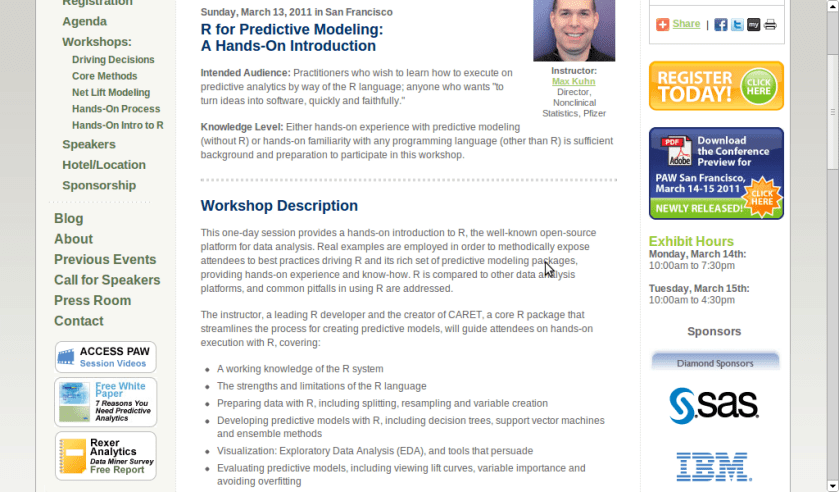
A workshop on using R for Predictive Modeling, by the Director, Non Clinical Stats, Pfizer. Interesting Bay Area Event- part of next edition of Predictive Analytics World

Sunday, March 13, 2011 in San Francisco

R for Predictive Modeling:
A Hands-On Introduction

Intended Audience: Practitioners who wish to learn how to execute on predictive analytics by way of the R language; anyone who wants “to turn ideas into software, quickly and faithfully.”

Knowledge Level: Either hands-on experience with predictive modeling (without R) or hands-on familiarity with any programming language (other than R) is sufficient background and preparation to participate in this workshop.


Workshop Description

This one-day session provides a hands-on introduction to R, the well-known open-source platform for data analysis. Real examples are employed in order to methodically expose attendees to best practices driving R and its rich set of predictive modeling packages, providing hands-on experience and know-how. R is compared to other data analysis platforms, and common pitfalls in using R are addressed.

The instructor, a leading R developer and the creator of CARET, a core R package that streamlines the process for creating predictive models, will guide attendees on hands-on execution with R, covering:

  • A working knowledge of the R system
  • The strengths and limitations of the R language
  • Preparing data with R, including splitting, resampling and variable creation
  • Developing predictive models with R, including decision trees, support vector machines and ensemble methods
  • Visualization: Exploratory Data Analysis (EDA), and tools that persuade
  • Evaluating predictive models, including viewing lift curves, variable importance and avoiding overfitting

Hardware: Bring Your Own Laptop
Each workshop participant is required to bring their own laptop running Windows or OS X. The software used during this training program, R, is free and readily available for download.

Attendees receive an electronic copy of the course materials and related R code at the conclusion of the workshop.


Schedule

  • Workshop starts at 9:00am
  • Morning Coffee Break at 10:30am – 11:00am
  • Lunch provided at 12:30 – 1:15pm
  • Afternoon Coffee Break at 2:30pm – 3:00pm
  • End of the Workshop: 4:30pm

Instructor

Max Kuhn, Director, Nonclinical Statistics, Pfizer

Max Kuhn is a Director of Nonclinical Statistics at Pfizer Global R&D in Connecticut. He has been apply models in the pharmaceutical industries for over 15 years.

He is a leading R developer and the author of several R packages including the CARET package that provides a simple and consistent interface to over 100 predictive models available in R.

Mr. Kuhn has taught courses on modeling within Pfizer and externally, including a class for the India Ministry of Information Technology.


http://www.predictiveanalyticsworld.com/sanfrancisco/2011/r_for_predictive_modeling.php


PySpread Magic

Python logo
Image via Wikipedia

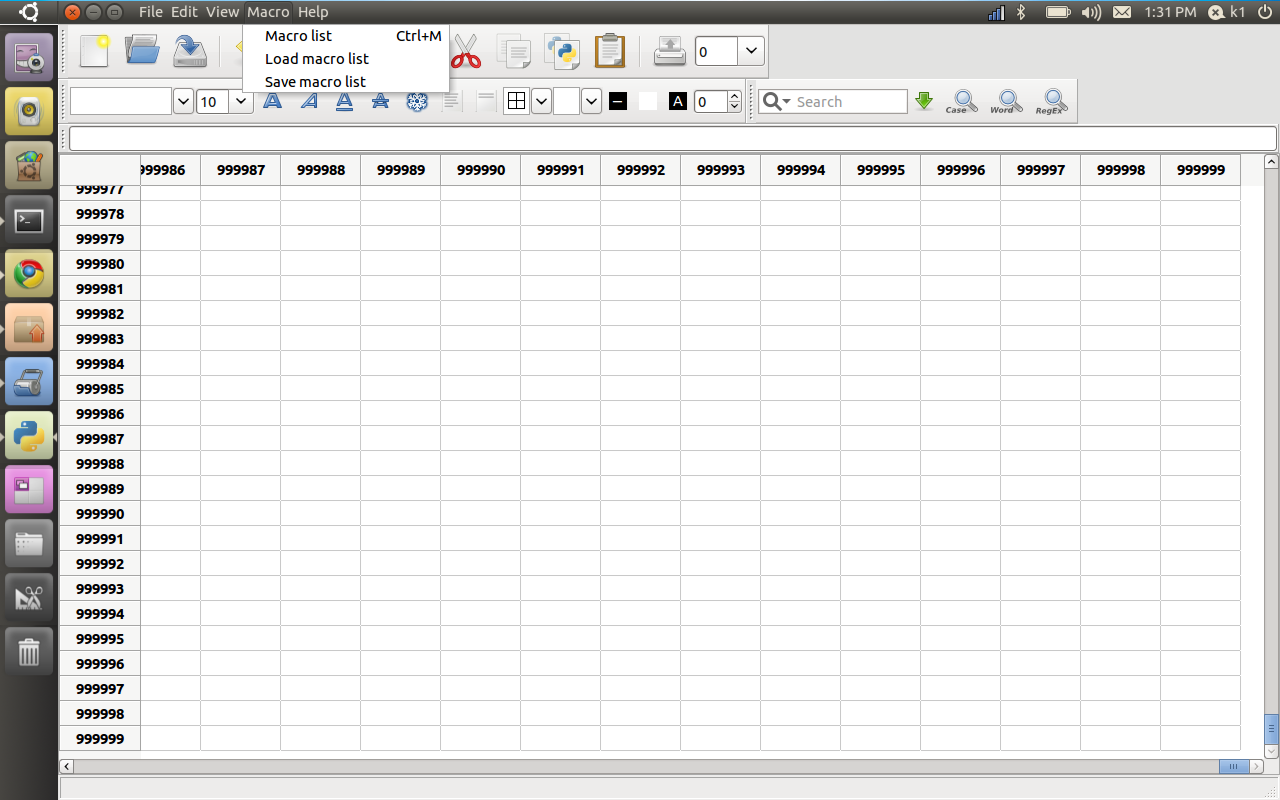
Just working with PySpread- and worked on a 1 million by 1 million spreadsheet- Python sure looks promising for the way ahead for stat computing ( you need to

sudo apt-get install python-numpy python-rpy python-scipy python-gmpy wxpython*,

cd to the untarred bz2 file from http://pyspread.sourceforge.net/download.html,  (like

:~/Downloads$ cd pyspread-0.1.2

:~/Downloads/pyspread-0.1.2

sudo python setup.py install

)

http://pyspread.sourceforge.net/

by Martin Manns


about Pyspread is a cross-platform Python spreadsheet application. It is based on and written in the programming language Python.

Instead of spreadsheet formulas, Python expressions are entered into the spreadsheet cells. Each expression returns a Python object that can be accessed from other cells. These objects can represent anything including lists or matrices.

Pyspread screenshot
features
  • Three dimensional grid with up to 85,899,345 rows and 14,316,555 columns (64 bit systems, depends on row height and column width). Note that a million cells require about 500 MB of memory.
  • Complex data types such as lists, trees or matrices within a single cell.
  • Macros for functionalities that are too complex for a single Python expression.
  • Python module access from each cell, which allows:
    • Arbitrary size rational numbers (via gmpy),
    • Fixed point decimal numbers for business calculations, (via the decimal module from the standard library)
    • Advanced statistics including plotting functions (via RPy)
    • Much more via <your favourite module>.
  • CSV import and export
  • Clipboard access
Pyspread screenshot

warning The concept of pyspread allows doing everything from each cell that a Python script can do. This powerful feature has its drawbacks. A spreadsheet may very well delete your hard drive or send your data via the Internet. Of course this is a non-issue if you sandbox properly or if you only use self developed spreadsheets.

Since this is not the case for everyone (see discussion at lwn.net), a GPG signature based trust model for spreadsheet files has been introduced. It ensures that only your own trusted files are executed on loading. Untrusted files are displayed in safe mode. You can approve a file manually. Inspect carefully.


Ways to use both Windows and Linux together

Tux, as originally drawn by Larry Ewing
Image via Wikipedia

Some programming ways to use both Windows and Linux

1) Wubi

http://wubi.sourceforge.net/

Wubi only adds an extra option to boot into Ubuntu. Wubi does not require you to modify the partitions of your PC, or to use a different bootloader, and does not install special drivers.

2) Wine

Wine lets you run Windows software on other operating systems. With Wine, you can install and run these applications just like you would in Windows. Read more at http://wiki.winehq.org/Debunking_Wine_Myths

http://www.winehq.org/about/

3) Cygwin

http://www.cygwin.com/

Cygwin is a Linux-like environment for Windows. It consists of two parts:

  • A DLL (cygwin1.dll) which acts as a Linux API emulation layer providing substantial Linux API functionality.
  • A collection of tools which provide Linux look and feel
  • What Isn’t Cygwin?

  • Cygwin is not a way to run native linux apps on Windows. You have to rebuild your application from source if you want it to run on Windows.
  • Cygwin is not a way to magically make native Windows apps aware of UNIX ® functionality, like signals, ptys, etc. Again, you need to build your apps from source if you want to take advantage of Cygwin functionality.
  • 4) Vmplayer

    https://www.vmware.com/products/player/

    VMware Player is the easiest way to run multiple operating systems at the same time on your PC. With its user-friendly interface, VMware Player makes it effortless for anyone to try out Windows 7, Chrome OS or the latest Linux releases, or create isolated virtual machines to safely test new software and surf the Web