Data Visualization using Tableau

Image representing Tableau Software as depicte...
Image via CrunchBase

Here is a great piece of software for data visualization– the public version is free.

And you can use it for Desktop Analytics as well as BI /server versions at very low cost.

About Tableau Software

http://www.tableausoftware.com/press_release/tableau-massive-growth-hiring-q3-2010

Tableau was named by Software Magazine as the fastest growing software company in the $10 million to $30 million range in the world, and the second fastest growing software company worldwide overall. The ranking stems from the publication’s 28th annual Software 500 ranking of the world’s largest software service providers.

“We’re growing fast because the market is starving for easy-to-use products that deliver rapid-fire business intelligence to everyone. Our customers want ways to unlock their databases and produce engaging reports and dashboards,” said Christian Chabot CEO and co-founder of Tableau.

http://www.tableausoftware.com/about/who-we-are

History in the Making

Put together an Academy-Award winning professor from the nation’s most prestigious university, a savvy business leader with a passion for data, and a brilliant computer scientist. Add in one of the most challenging problems in software – making databases and spreadsheets understandable to ordinary people. You have just recreated the fundamental ingredients for Tableau.

The catalyst? A Department of Defense (DOD) project aimed at increasing people’s ability to analyze information and brought to famed Stanford professor, Pat Hanrahan. A founding member of Pixar and later its chief architect for RenderMan, Pat invented the technology that changed the world of animated film. If you know Buzz and Woody of “Toy Story”, you have Pat to thank.

Under Pat’s leadership, a team of Stanford Ph.D.s got together just down the hall from the Google folks. Pat and Chris Stolte, the brilliant computer scientist, realized that data visualization could produce large gains in people’s ability to understand information. Rather than analyzing data in text form and then creating visualizations of those findings, Pat and Chris invented a technology called VizQL™ by which visualization is part of the journey and not just the destination. Fast analytics and visualization for everyone was born.

While satisfying the DOD project, Pat and Chris met Christian Chabot, a former data analyst who turned into Jello when he saw what had been invented. The three formed a company and spun out of Stanford like so many before them (Yahoo, Google, VMWare, SUN). With Christian on board as CEO, Tableau rapidly hit one success after another: its first customer (now Tableau’s VP, Operations, Tom Walker), an OEM deal with Hyperion (now Oracle), funding from New Enterprise Associates, a PC Magazine award for “Product of the Year” just one year after launch, and now over 50,000 people in 50+ countries benefiting from the breakthrough.

also see http://www.tableausoftware.com/about/leadership

http://www.tableausoftware.com/about/board

—————————————————————————-

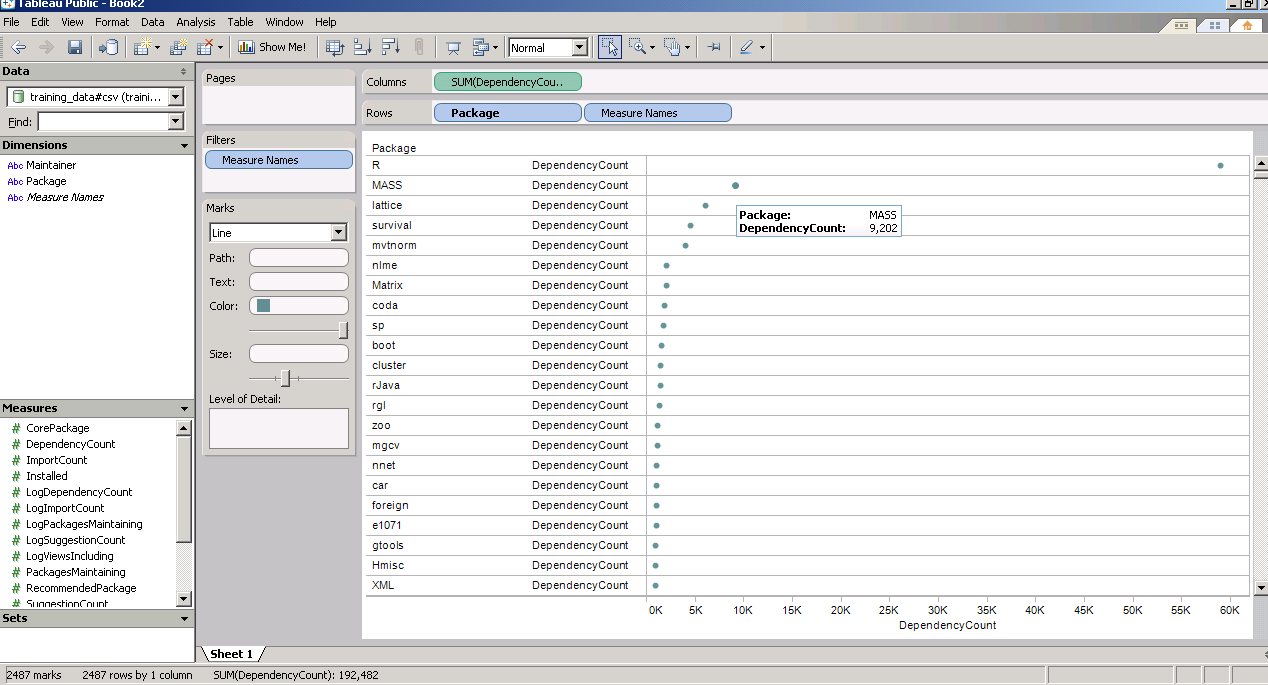
and now  a demo I ran on the Kaggle contest data (it is a csv dataset with 95000 rows)

I found Tableau works extremely good at pivoting data and visualizing it -almost like Excel on  Steroids. Download the free version here ( I dont know about an academic program (see links below) but software is not expensive at all)

http://buy.tableausoftware.com/

Desktop Personal Edition

The Personal Edition is a visual analysis and reporting solution for data stored in Excel, MS Access or Text Files. Available via download.

Product Information

$999*

Desktop Professional Edition

The Professional Edition is a visual analysis and reporting solution for data stored in MS SQL Server, MS Analysis Services, Oracle, IBM DB2, Netezza, Hyperion Essbase, Teradata, Vertica, MySQL, PostgreSQL, Firebird, Excel, MS Access or Text Files. Available via download.

Product Information

$1800*

Tableau Server

Tableau Server enables users of Tableau Desktop Professional to publish workbooks and visualizations to a server where users with web browsers can access and interact with the results. Available via download.

Product Information

Contact Us

* Price is per Named User and includes one year of maintenance (upgrades and support). Products are made available as a download immediately after purchase. You may revisit the download site at any time during your current maintenance period to access the latest releases.


Here comes PySpread- 85,899,345 rows and 14,316,555 columns

A Bold GNU Head
Image via Wikipedia

Whats new/ One more open source analytics package. Built like a spreadsheet with an ability to import a million cells-

From http://pyspread.sourceforge.net/index.html

about Pyspread is a cross-platform Python spreadsheet application. It is based on and written in the programming language Python.

Instead of spreadsheet formulas, Python expressions are entered into the spreadsheet cells. Each expression returns a Python object that can be accessed from other cells. These objects can represent anything including lists or matrices.

Pyspread screenshot
features In pyspread, cells expect Python expressions and return Python objects. Therefore, complex data types such as lists, trees or matrices can be handled within a single cell. Macros can be used for functions that are too complex for a single expression.

Since Python modules can be easily used without external scripts, arbitrary size rational numbers (via gmpy), fixed point decimal numbers for business calculations, (via the decimal module from the standard library) and advanced statistics including plotting functions (via RPy) can be used in the spreadsheet. Everything is directly available from each cell. Just use the grid

Data can be imported and exported using csv files or the clipboard. Other forms of data exchange is possible using external Python modules.

In  order to simplify sparse matrix editing, pyspread features a three dimensional grid that can be sized up to 85,899,345 rows and 14,316,555 columns (64 bit-systems, depends on row height and column width). Note that importing a million cells requires about 500 MB of memory.

The concept of pyspread allows doing everything from each cell that a Python script can do. This may very well include deleting your hard drive or sending your data via the Internet. Of course this is a non-issue if you sandbox properly or if you only use self developed spreadsheets. Since this is not the case for everyone (see the discussion at lwn.net), a GPG signature based trust model for spreadsheet files has been introduced. It ensures that only your own trusted files are executed on loading. Untrusted files are displayed in safe mode. You can trust a file manually. Inspect carefully.

Pyspread screenshot

requirements Pyspread runs on Linux, Windows and *nix platforms with GTK+ support. There are reports that it works with MacOS X as well. If you would like to contribute by testing on OS X please contact me.

Dependencies

Highly recommended for full functionality

  • PyMe >=0.8.1, Note for Windows™ users: If you want to use signatures without compiling PyMe try out Gpg4win.
  • gmpy >=1.1.0 and
  • rpy >=1.0.3.
maturity Pyspread is in early Beta release. This means that the core functionality is fully implemented but the program needs testing and polish.

and from the wiki

http://sourceforge.net/apps/mediawiki/pyspread/index.php?title=Main_Page

a spreadsheet with more powerful functions and data structures that are accessible inside each cell. Something like Python that empowers you to do things quickly. And yes, it should be free and it should run on Linux as well as on Windows. I looked around and found nothing that suited me. Therefore, I started pyspread.

Concept

  • Each cell accepts any input that works in a Python command line.
  • The inputs are parsed and evaluated by Python’s eval command.
  • The result objects are accessible via a 3D numpy object array.
  • String representations of the result objects are displayed in the cells.

Benefits

  • Each cell returns a Python object. This object can be anything including arrays and third party library objects.
  • Generator expressions can be used efficiently for data manipulation.
  • Efficient numpy slicing is used.
  • numpy methods are accessible for the data.

Installation

  1. Download the pyspread tarball or zip and unzip at a convenient place
  2. In case you do not have it already get and install Python, wxpython and numpy
If you want the examples to work, install gmpy, R and rpy
Really do check the version requirements that are mentioned on http://pyspread.sf.net
  1. Get install privileges (e.g. become root)
  2. Change into the directory and type
python setup.py install
Windows: Replace “python” with your Python interpreter (absolute path)
  1. Become normal user again
  2. Start pyspread by typing
pyspread
  1. Enjoy

Links

Next on Spreadsheet wishlist-

a MSI bundle /Windows Self Installer which has all dependencies bundled in it-linking to PostGresSQL 😉 etc

way to go Mr Martin Manns

mmanns < at > gmx < dot > net

Stuff I like to Read to Kush: Kush's Blog

RSS
Image via Wikipedia

I am putting together a list of top 500 Blogs on –


Some additional points-

  • I like YCombinator‘s Hacker News– so the auto parsed links are like that on main page. They lead to original websites.
  • Comments are disabled, feed is jumbled, only 40 word excerpts are shown.
  • Intent is also to show open source blogs and enterprise blogs at same time (regardless of advertising by vendors 😉 )
  • If your blog feed is there, I will keep it there – either dont write or dont use RSS if you dont want to share
  • If your blog feed is not there, it is probably not there for a reason.
  • No ads will be shown NOW or FOREVER on that site.

And after all that noise- you can see Kush’s Blog –http://www.kushohri.com/

For R Writers- Inside R

A composite of the GNU logo and the OSI logo, ...
Image via Wikipedia

Hurray I am on Inside -R

http://www.inside-r.org/blogs/2010/11/04/r-apache-next-frontier-r-computing

Thats blog post number 1 there.

Basically Inside R is a go-to site for tips, tricks, packages, as well as blog posts. It thus enhances R Bloggers – but also adds in other multiple features as well.

It is an excellent place for R beginners and learning R. Also it is moderated ( so you wont get the flashy jhing bhang stuff- just your R.

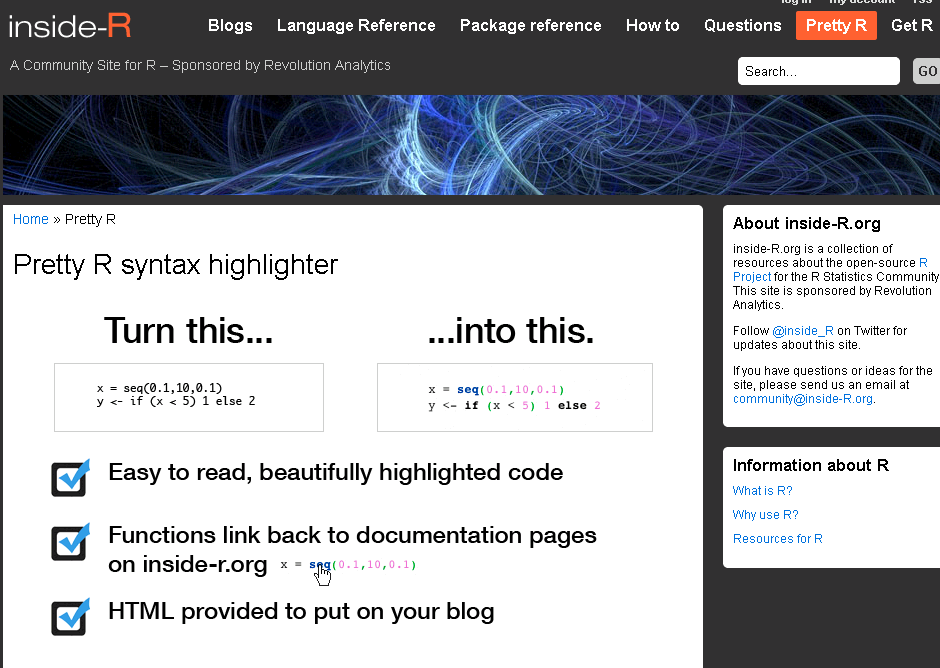
What I really liked is the Pretty R functionality for turning R code -its nifty for color coding R code for use of posting in your blog, journal or article

and when you are there drop them a line for their excellent R support for events (like Pizza, sponsorship) and nifty R packages (doSNOW, foreach, RevoScaler, RevoDeployR) and how much open core makes them look silly?

Come on Revolution- share the open code for RevoScaler package- did you notice any sales dip when you open sourced the other packages? (cue to David Smith to roll his eyes again)

Anyway- all that is part of the R family fun 🙂

Do check http://www.inside-r.org/pretty-r


R Apache – The next frontier of R Computing

I am currently playing/ trying out RApache- one more excellent R product from Vanderbilt’s excellent Dept of Biostatistics and it’s prodigious coder Jeff Horner.

The big ninja himself

I really liked the virtual machine idea- you can download a virtual image of Rapache and play with it- .vmx is easy to create and great to share-

http://rapache.net/vm.html

Basically using R Apache (with an EC2 on backend) can help you create customized dashboards, BI apps, etc all using R’s graphical and statistical capabilities.

What’s R Apache?

As  per

http://biostat.mc.vanderbilt.edu/wiki/Main/RapacheWebServicesReport

Rapache embeds the R interpreter inside the Apache 2 web server. By doing this, Rapache realizes the full potential of R and its facilities over the web. R programmers configure appache by mapping Universal Resource Locaters (URL’s) to either R scripts or R functions. The R code relies on CGI variables to read a client request and R’s input/output facilities to write the response.

One advantage to Rapache’s architecture is robust multi-process management by Apache. In contrast to Rserve and RSOAP, Rapache is a pre-fork server utilizing HTTP as the communications protocol. Another advantage is a clear separation, a loose coupling, of R code from client code. With Rserve and RSOAP, the client must send data and R commands to be executed on the server. With Rapache the only client requirements are the ability to communicate via HTTP. Additionally, Rapache gains significant authentication, authorization, and encryption mechanism by virtue of being embedded in Apache.

Existing Demos of Architechture based on R Apache-

  1. http://rweb.stat.ucla.edu/ggplot2/ An interactive web dashboard for plotting graphics based on csv or Google Spreadsheet Data
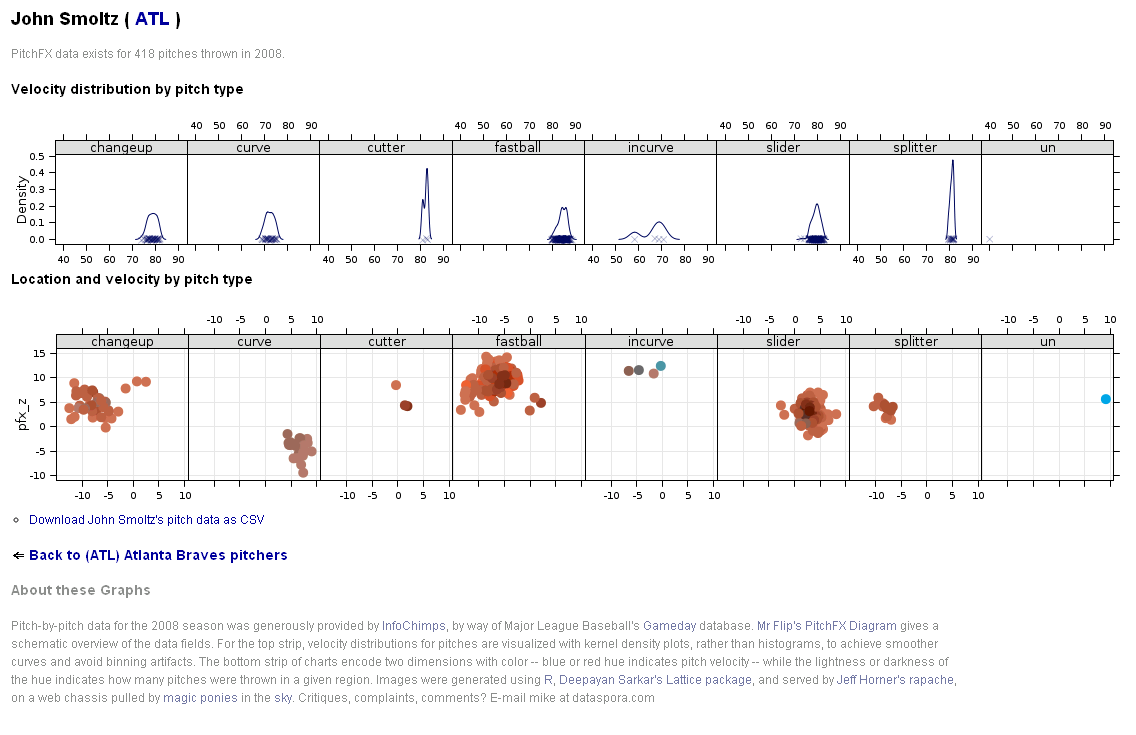
  2. http://labs.dataspora.com/gameday/ A demo visualization of a web based dashboard system of baseball pitches by pitcher by player 


3. http://data.vanderbilt.edu/rapache/bbplot For baseball results – a demo of a query based web dashboard system- very good BI feel.

Whats coming next in R Apache?

You can  download version 1.1.10 of rApache now. There
are only two significant changes and you don’t have to edit your
apache config or change any code (just recompile rApache and
reinstall):

1) Error reporting should be more informative. both when you
accidentally introduce errors in the Apache config, and when your code
introduces warnings and errors from web requests.

I’ve struggled with this one for awhile, not really knowing what
strategy would be best. Basically, rApache hooks into the R I/O layer
at such a low level that it’s hard to capture all warnings and errors
as they occur and introduce them to the user in a sane manner. In
prior releases, when ROutputErrors was in effect (either the apache
directive or the R function) one would typically see a bunch of grey
boxes with a red outline with a title of RApache Warning/Error!!!.
Unfortunately those grey boxes could contain empty lines, one line of
error, or a few that relate to the lines in previously displayed
boxes. Really a big uninformative mess.

The new approach is to print just one warning box with the title
“”Oops!!! <b>rApache</b> has something to tell you. View source and
read the HTML comments at the end.” and then as the title implies you
can read the HTML comment located at the end of the file… after the
closing html. That way, you’re actually reading how R would present
the warnings and errors to you as if you executed the code at the R
command prompt. And if you don’t use ROutputErrors, the warning/error
messages are printed in the Apache log file, just as they were before,
but nicer 😉

2) Code dispatching has changed so please let me know if I’ve
introduced any strange behavior.

This was necessary to enhance error reporting. Prior to this release,
rApache would use R’s C API exclusively to build up the call to your
code that is then passed to R’s evaluation engine. The advantage to
this approach is that it’s much more efficient as there is no parsing
involved, however all information about parse errors, files which
produced errors, etc. were lost. The new approach uses R’s built-in
parse function to build up the call and then passes it of to R. A
slight overhead, but it should be negligible. So, if you feel that
this approach is too slow OR I’ve introduced bugs or strange behavior,
please let me know.

FUTURE PLANS

I’m gaining more experience building Debian/Ubuntu packages each day,
so hopefully by some time in 2011 you can rely on binary releases for
these distributions and not install rApache from source! Fingers
crossed!

Development on the rApache 1.1 branch will be winding down (save bug
fix releases) as I transition to the 1.2 branch. This will involve
taking out a small chunk of code that defines the rApache development
environment (all the CGI variables and the functions such as
setHeader, setCookie, etc) and placing it in its own R package…
unnamed as of yet. This is to facilitate my development of the ralite
R package, a small single user cross-platform web server.

The goal for ralite is to speed up development of R web applications,
take out a bit of friction in the development process by not having to
run the full rApache server. Plus it would allow users to develop in
the rApache enronment while on windows and later deploy on more
capable server environments. The secondary goal for ralite is it’s use
in other web server environments (nginx and IIS come to mind) as a
persistent per-client process.

And finally, wiki.rapache.net will be the new www.rapache.net once I
translate the manual over… any day now.

From –http://biostat.mc.vanderbilt.edu/wiki/Main/JeffreyHorner


Not convinced ?- try the demos above.

Using PostgreSQL and MySQL databases in R 2.12 for Windows

Air University Library's Index to Military Per...
Image via Wikipedia

If you use Windows for your stats computing and your data is in a database (probably true for almost all corporate business analysts) R 2.12 has provided a unique procedural hitch for you NO BINARIES for packages used till now to read from these databases.

The Readme notes of the release say-

Packages related to many database system must be linked to the exact
version of the database system the user has installed, hence it does
not make sense to provide binaries for packages
	RMySQL, ROracle, ROracleUI, RPostgreSQL
although it is possible to install such packages from sources by
	install.packages('packagename', type='source')
after reading the manual 'R Installation and Administration'.

So how to connect to Databases if the Windows Binary is not available-

So how to connect to PostgreSQL and MySQL databases.

For Postgres databases-

You can update your PostgreSQL databases here-

http://www.postgresql.org/download/windows

Fortunately the RpgSQL package is still available for PostgreSQL

  • Using the RpgSQL package

library(RpgSQL)

#creating a connection
con <- dbConnect(pgSQL(), user = "postgres", password = "XXXX",dbname="postgres")

#writing a table from a R Dataset
dbWriteTable(con, "BOD", BOD)

# table names are lower cased unless double quoted. Here we write a Select SQL query
dbGetQuery(con, 'select * from "BOD"')

#disconnecting the connection
dbDisconnect(con)

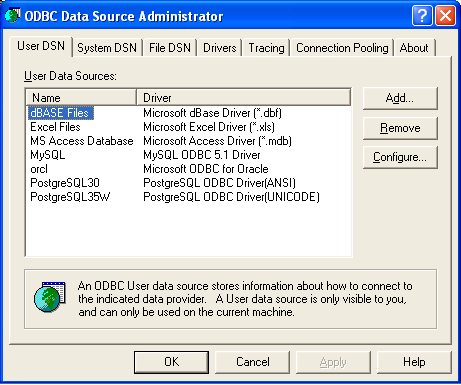
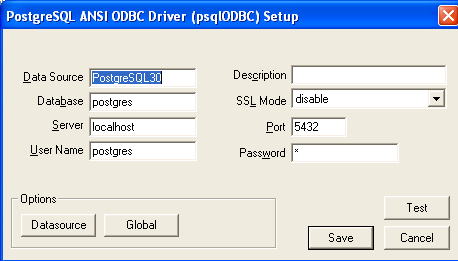
You can also use RODBC package for connecting to your PostgreSQL database but you need to configure your ODBC connections in

Windows Start Panel-

Settings-Control Panel-

Administrative Tools-Data Sources (ODBC)

You should probably see something like this screenshot.

Coming back to R and noting the name of my PostgreSQL DSN from above screenshot-( If not there just click on add-scroll to appropriate database -here PostgreSQL and click on Finish- add in the default values for your database or your own created database values-see screenshot for help with other configuring- and remember to click Test below to check if username and password are working, port is correct etc.

so once the DSN is probably setup in the ODBC (frightening terminology is part of databases)- you can go to R to connect using RODBC package


#loading RODBC

library(RODBC)

#creating a Database connection
# for username,password,database name and DSN name

chan=odbcConnect("PostgreSQL35W","postgres;Password=X;Database=postgres")

#to list all table names

sqlTables(chan)

TABLE_QUALIFIER TABLE_OWNER TABLE_NAME TABLE_TYPE REMARKS
1       postgres      public        bod      TABLE      
 2        postgres      public  database1      TABLE      
 3        postgres      public         tt      TABLE

Now for MySQL databases it is exactly the same code except we download and install the ODBC driver from http://www.mysql.com/downloads/connector/odbc/

and then we run the same configuring DSN as we did for postgreSQL.

After that we use RODBC in pretty much the same way except changing for the default username and password for MySQL and changing the DSN name for the previous step.

channel <- odbcConnect("mysql","jasperdb;Password=XXX;Database=Test")
test2=sqlQuery(channel,"select * from jiuser")
test2
 id  username tenantId   fullname emailAddress  password externallyDefined enabled previousPasswordChangeTime1  1   jasperadmin        1 Jasper Administrator           NA 349AFAADD5C5A2BD477309618DC              NA    01                       
2  2       joe1ser        1             Joe User           NA                 4DD8128D07A               NA    01
odbcClose(channel)
While using RODBC for all databases is a welcome step, perhaps the change release notes for Window Users of R may need to be more substantiative than one given for R 2.12.2