For Microsoft Windows installations, to upgrade your Rattle installation you may need to remove any old installs of the Gtk+ libraries using the Uninstall application from the Microsoft Windows Control Panel). Then install the new Gtk2 library:
The output from rattle.info() will include an “install.packages” command that will identify Rattle related packages that have updates available. You can cut-and-paste that command to the R prompt to have those packages updated in your installation.
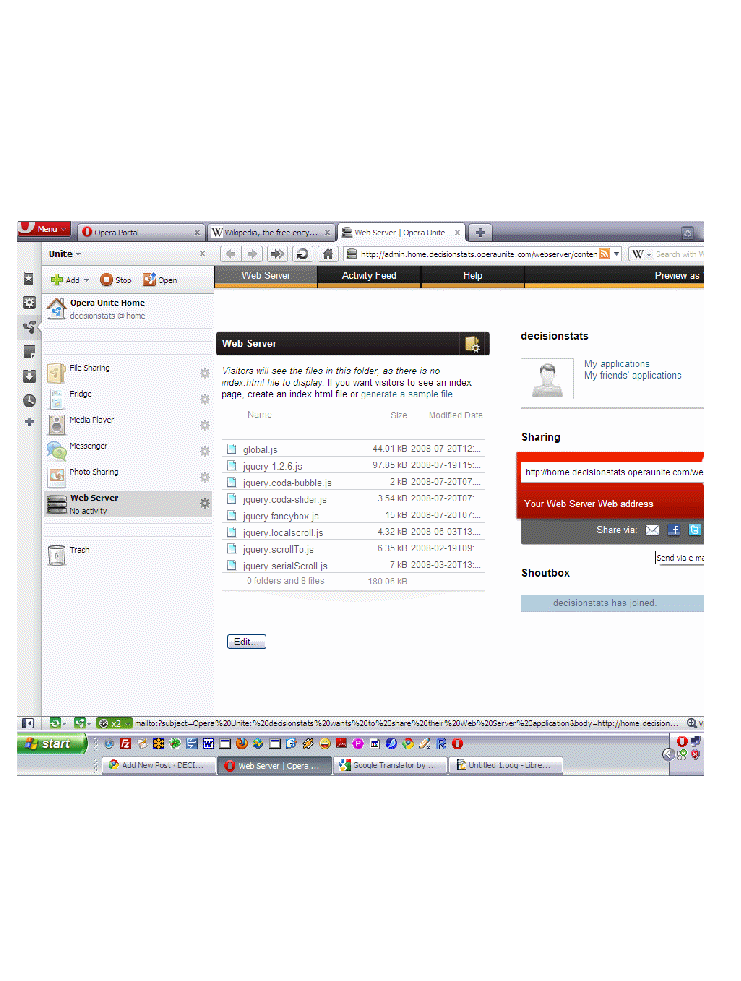
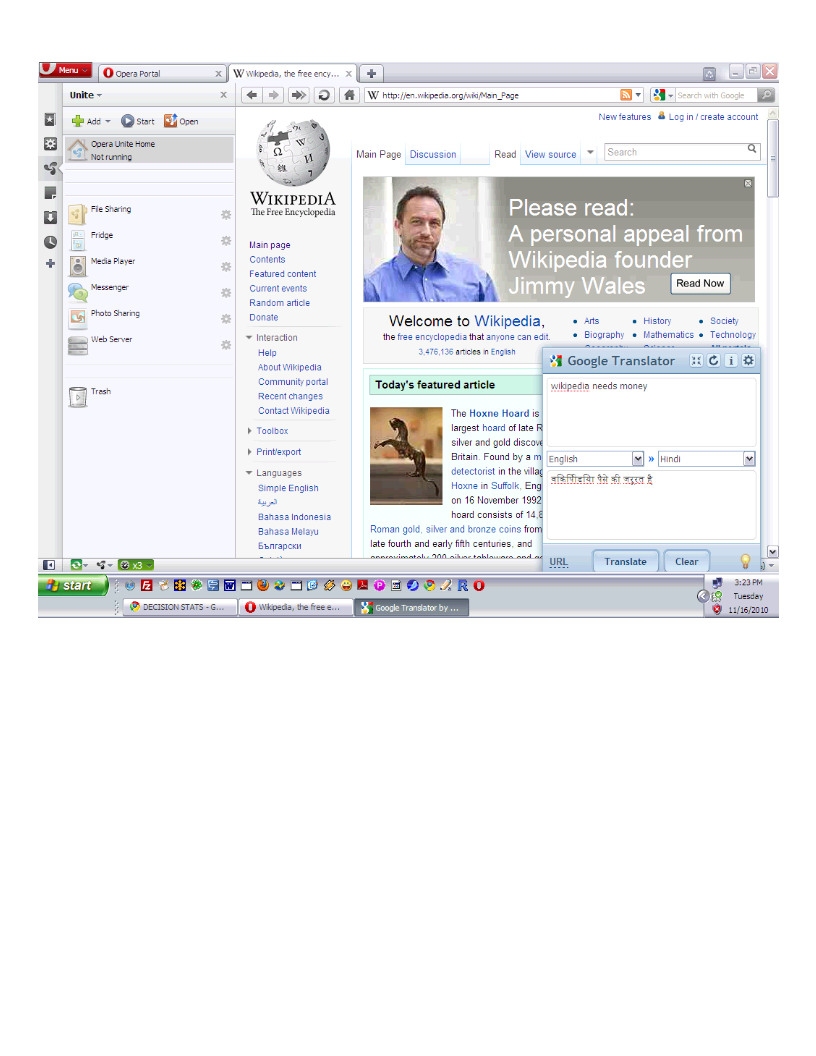
Yes Opera is a browser but you may as well call it an OS. With an uncluttered design, some mind bending Opera UnitePeer to Peer features (in a browser!) withhttp://unite.opera.com/applications/, and nifty widgets- try singing some Opera. I really dont know how browsers make money, especially since they are suing each other all the time, but well- heres to more choice – if you don’t want a corporation owned browser lusting to sell your leaked privacy data to Don Draper- Opera is a good choice- much better than Sea Monkey and the Fox .
I really liked the option to make my own web server in 2 clicks,and share stuff. The bit trorrent support is really nice but I wonder if there was any Scandinavian brotherly ports in bit torrent sharing 😉 , me hearties
Yes Opera is a browser but you may as well call it an OS. With an uncluttered design, some mind bending Opera UnitePeer to Peer features (in a browser!) withhttp://unite.opera.com/applications/, and nifty widgets- try singing some Opera. I really dont know how browsers make money, especially since they are suing each other all the time, but well- heres to more choice – if you don’t want a corporation owned browser lusting to sell your leaked privacy data to Don Draper- Opera is a good choice- much better than Sea Monkey and the Fox .
I really liked the option to make my own web server in 2 clicks,and share stuff. The bit trorrent support is really nice but I wonder if there was any Scandinavian brotherly ports in bit torrent sharing 😉 , me hearties
Here is a short list of resources and material I put together as starting points for R and Cloud Computing It’s a bit messy but overall should serve quite comprehensively.
Cloud computing is a commonly used expression to imply a generational change in computing from desktop-servers to remote and massive computing connections,shared computers, enabled by high bandwidth across the internet.
As per the National Institute of Standards and Technology Definition,
Cloud computing is a model for enabling convenient, on-demand network access to a shared pool of configurable computing resources (e.g., networks, servers, storage, applications, and services) that can be rapidly provisioned and released with minimal management effort or service provider interaction.
Rweb is developed and maintained by Jeff Banfield. The Rweb Home Page provides access to all three versions of Rweb—a simple text entry form that returns output and graphs, a more sophisticated JavaScript version that provides a multiple window environment, and a set of point and click modules that are useful for introductory statistics courses and require no knowledge of the R language. All of the Rweb versions can analyze Web accessible datasets if a URL is provided.
The paper “Rweb: Web-based Statistical Analysis”, providing a detailed explanation of the different versions of Rweb and an overview of how Rweb works, was published in the Journal of Statistical Software (http://www.jstatsoft.org/v04/i01/).
Ulf Bartel has developed R-Online, a simple on-line programming environment for R which intends to make the first steps in statistical programming with R (especially with time series) as easy as possible. There is no need for a local installation since the only requirement for the user is a JavaScript capable browser. See http://osvisions.com/r-online/ for more information.
Rcgi is a CGI WWW interface to R by MJ Ray. It had the ability to use “embedded code”: you could mix user input and code, allowing the HTMLauthor to do anything from load in data sets to enter most of the commands for users without writing CGI scripts. Graphical output was possible in PostScript or GIF formats and the executed code was presented to the user for revision. However, it is not clear if the project is still active.
Currently, a modified version of Rcgi by Mai Zhou (actually, two versions: one with (bitmap) graphics and one without) as well as the original code are available from http://www.ms.uky.edu/~statweb/.
David Firth has written CGIwithR, an R add-on package available from CRAN. It provides some simple extensions to R to facilitate running R scripts through the CGI interface to a web server, and allows submission of data using both GET and POST methods. It is easily installed using Apache under Linux and in principle should run on any platform that supports R and a web server provided that the installer has the necessary security permissions. David’s paper “CGIwithR: Facilities for Processing Web Forms Using R” was published in the Journal of Statistical Software (http://www.jstatsoft.org/v08/i10/). The package is now maintained by Duncan Temple Lang and has a web page athttp://www.omegahat.org/CGIwithR/.
Rpad, developed and actively maintained by Tom Short, provides a sophisticated environment which combines some of the features of the previous approaches with quite a bit of JavaScript, allowing for a GUI-like behavior (with sortable tables, clickable graphics, editable output), etc.
Jeff Horner is working on the R/Apache Integration Project which embeds the R interpreter inside Apache 2 (and beyond). A tutorial and presentation are available from the project web page at http://biostat.mc.vanderbilt.edu/twiki/bin/view/Main/RApacheProject.
Rserve is a project actively developed by Simon Urbanek. It implements a TCP/IP server which allows other programs to use facilities of R. Clients are available from the web site for Java and C++ (and could be written for other languages that support TCP/IP sockets).
OpenStatServer is being developed by a team lead by Greg Warnes; it aims “to provide clean access to computational modules defined in a variety of computational environments (R, SAS, Matlab, etc) via a single well-defined client interface” and to turn computational services into web services.
Two projects use PHP to provide a web interface to R. R_PHP_Online by Steve Chen (though it is unclear if this project is still active) is somewhat similar to the above Rcgi and Rweb. R-php is actively developed by Alfredo Pontillo and Angelo Mineo and provides both a web interface to R and a set of pre-specified analyses that need no R code input.
webbioc is “an integrated web interface for doing microarray analysis using several of the Bioconductor packages” and is designed to be installed at local sites as a shared computing resource.
Rwui is a web application to create user-friendly web interfaces for R scripts. All code for the web interface is created automatically. There is no need for the user to do any extra scripting or learn any new scripting techniques. Rwui can also be found at http://rwui.cryst.bbk.ac.uk.
Finally, the R.rsp package by Henrik Bengtsson introduces “R Server Pages”. Analogous to Java Server Pages, an R server page is typically HTMLwith embedded R code that gets evaluated when the page is requested. The package includes an internal cross-platform HTTP server implemented in Tcl, so provides a good framework for including web-based user interfaces in packages. The approach is similar to the use of the brew package withRapache with the advantage of cross-platform support and easy installation.
Remote access to R/Bioconductor on EBI’s 64-bit Linux Cluster
Start the workbench by downloading the package for your operating system (Macintosh or Windows), or via Java Web Start, and you will get access to an instance of R running on one of EBI’s powerful machines. You can install additional packages, upload your own data, work with graphics and collaborate with colleagues, all as if you are running R locally, but unlimited by your machine’s memory, processor or data storage capacity.
Most up-to-date R version built for multicore CPUs
Access to all Bioconductor packages
Access to our computing infrastructure
Fast access to data stored in EBI’s repositories (e.g., public microarray data in ArrayExpress)
Using R Google Docs http://www.omegahat.org/RGoogleDocs/run.pdf
It uses the XML and RCurl packages and illustrates that it is relatively quick and easy
to use their primitives to interact with Web services.
Amazon’s EC2 is a type of cloud that provides on demand computing infrastructures called an Amazon Machine Images or AMIs. In general, these types of cloud provide several benefits:
Simple and convenient to use. An AMI contains your applications, libraries, data and all associated configuration settings. You simply access it. You don’t need to configure it. This applies not only to applications like R, but also can include any third-party data that you require.
On-demand availability. AMIs are available over the Internet whenever you need them. You can configure the AMIs yourself without involving the service provider. You don’t need to order any hardware and set it up.
Elastic access. With elastic access, you can rapidly provision and access the additional resources you need. Again, no human intervention from the service provider is required. This type of elastic capacity can be used to handle surge requirements when you might need many machines for a short time in order to complete a computation.
Pay per use. The cost of 1 AMI for 100 hours and 100 AMI for 1 hour is the same. With pay per use pricing, which is sometimes called utility pricing, you simply pay for the resources that you use.
#This example requires you had previously created a bucket named data_language on your Google Storage and you had uploaded a CSV file named language_id.txt (your data) into this bucket – see for details
library(predictionapirwrapper)
Elastic-R is a new portal built using the Biocep-R platform. It enables statisticians, computational scientists, financial analysts, educators and students to use cloud resources seamlessly; to work with R engines and use their full capabilities from within simple browsers; to collaborate, share and reuse functions, algorithms, user interfaces, R sessions, servers; and to perform elastic distributed computing with any number of virtual machines to solve computationally intensive problems.
Also see Karim Chine’s http://biocep-distrib.r-forge.r-project.org/
R for Salesforce.com
At the point of writing this, there seem to be zero R based apps on Salesforce.com This could be a big opportunity for developers as both Apex and R have similar structures Developers could write free code in R and charge for their translated version in Apex on Salesforce.com
Force.com and Salesforce have many (1009) apps at http://sites.force.com/appexchange/home for cloud computing for
businesses, but very few forecasting and statistical simulation apps.
These are like iPhone apps except meant for business purposes (I am
unaware if any university is offering salesforce.com integration
though google apps and amazon related research seems to be on)
Personal Note-Mentioning SAS in an email to a R list is a big no-no in terms of getting a response and love. Same for being careless about which R help list to email (like R devel or R packages or R help)
Cisco SocialMiner is a social media customer care solution that can help you proactively respond to customers and prospects communicating through public social media networks like Twitter, Facebook, or other public forums or blogging sites. By providing social media monitoring, queuing, and workflow to organize customer posts on social media networks and deliver them to your social media customer care team, your company can respond to customers in real time using the same social network they are using.
Cisco SocialMiner provides:
The ability to configure multiple campaigns to search for customer postings on the public social web about your company’s products, services, or area of expertise
Filtering of social contacts based on preconfigured campaign filters to focus campaign searches
Routing of social contacts to skilled customer care representatives in the contact center or to experts in the enterprise–multiple people can work together to handle responses to customer postings through shared work queues
Detailed metrics for social media customer care activities, campaign reports, and team reports
With Cisco SocialMiner, your company can listen and respond to customer conversations originating in the social web. Being proactive can help your company enhance its service, improve customer loyalty, garner new customers, and protect your brand.
Table 1. Features and Benefits of Cisco SocialMiner 8.5
Feature
Benefits
Product Baseline Features
Social media feeds
• Feeds are configurable sources to capture public social contacts that contain specific words, terms, or phrases.
• Feeds enable you to search for information on the public social web about your company’s products, services, or area of expertise.
• Cisco SocialMiner supports the following types of feeds:
• Groups feeds into campaigns to organize all posting activity related to a product category or business objective
• Produces metrics on campaign activity
• Provides the ability to configure multiple campaigns to search for customer postings on specific products or services
• Groups social contacts for handling by the social media customer care team
• Enables filtering of social contacts based on preconfigured campaign filters to focus campaign searches
Route and queue social contacts
• Enables routing of social contacts to skilled customer care representatives in the contact center
• Draws on expertise in the enterprise by allowing multiple people in the enterprise to work together to handle responses to customer postings through shared work queues
• Enables automated distribution of work to improve efficiency and effectiveness of social media engagement
Tagging
• Allows work to be routed to the appropriate team by grouping each post or social contact into different categories; for example, a post can be marked with the “customer_support” tag; this post will then appear on a customer support agent’s queue for processing
Social media customer care metrics
• Provides detailed metrics on social media customer care activities, campaign reports, and team reports
• Measures work and results
• Manages to service-level goals
• Supports brand management
• Optimizes staffing
• Includes dashboarding of social media posting activity when Cisco Unified Intelligence Center is used
Reporting for social contacts
• Provides a reporting database that can be accessed using any reporting tool, including Cisco Unified Intelligence Center
• Enables customer care management to accurately report on and track social media interactions by the contact center
OpenSocial-compliant gadgets
Representational State Transfer (REST) application programming interfaces (APIs)
• Provides flexible user interface options
• Enables extensive opportunities for customization
Optional integration with full suite of Cisco Collaboration tools
• Allows you to take advantage of the full suite of Cisco Collaboration tools, including Cisco Quad, Cisco Show and Share, and Cisco Pulse technology, to help your social media customer care team quickly find answers to help customers efficiently and effectively
• Requires a Cisco UCS C-Series or B-Series Server.
• Server consolidation means lower cost per server with Cisco UCS Servers.
Architecture
Scalability
• One server supports up to 30 simultaneous social media customer care users and 10,000 social contacts per hour.
Management
Cisco Unified Real-Time Monitoring Tool (RTMT)
• Operational management is enhanced through integration with the Cisco Unified RTMT, providing consistent application monitoring across Cisco Unified Communications Solutions.
Simple Network Management Protocol (SNMP)
• SNMP with an associated MIB is supported through the Cisco Voice Operating System (VOS).
Reporting
Cisco Unified Intelligence Center
• Create customizable reports of social media customer care events using Cisco Unified Intelligence Center (purchased separately).
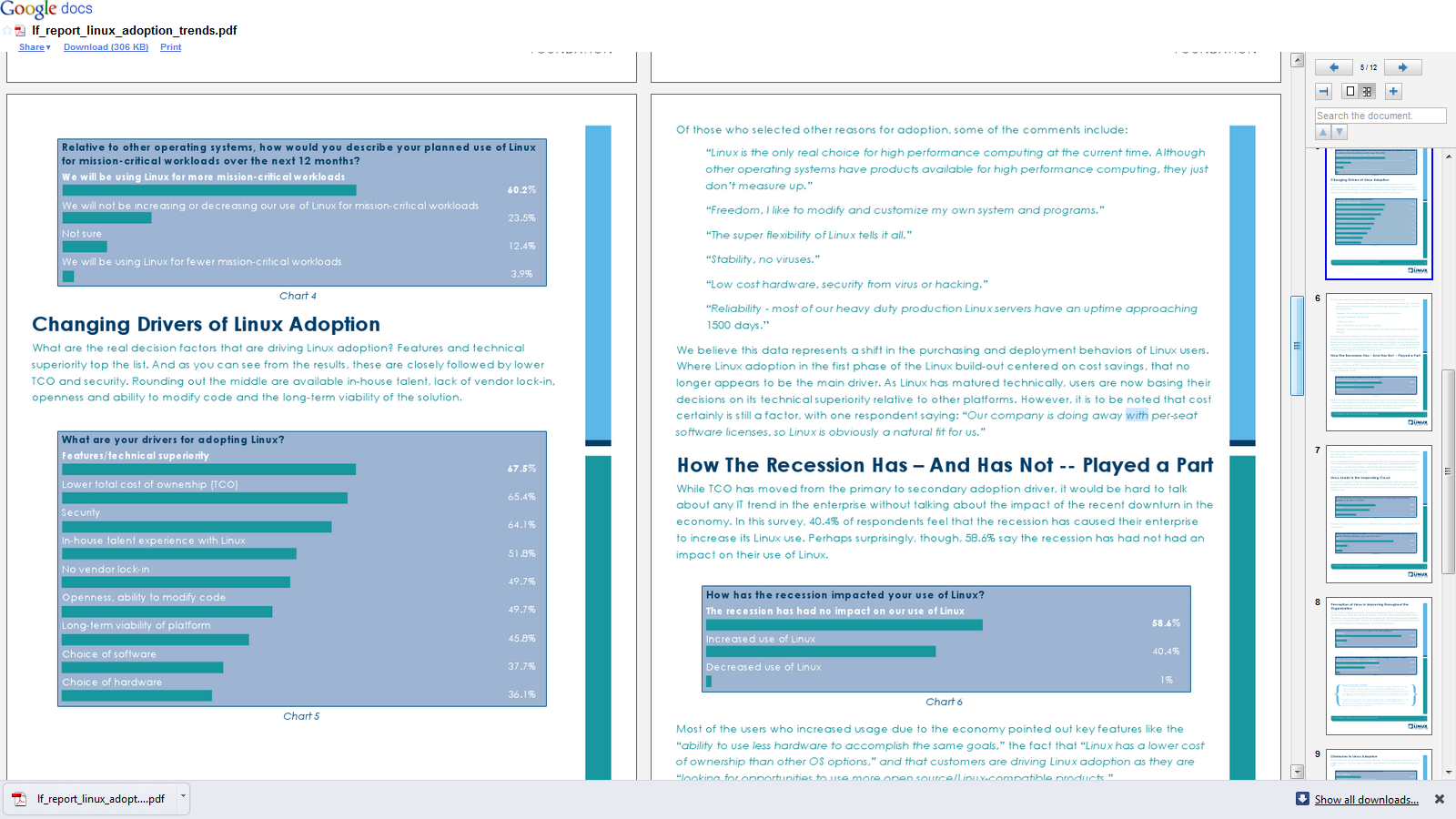
A new report from Linux Foundation found significant growth trends for enterprise usage of Linux- which should be welcome to software companies that have enabled Linux versions of software, service providers that provide Linux based consulting (note -lesser competition, lower overheads) and to application creators.
Key Findings from the Report
• 79.4 percent of companies are adding more Linux relative to other operating systems in the next five years.
• More people are reporting that their Linux deployments are migrations from Windows than any other platform, including Unix migrations. 66 percent of users surveyed say that their Linux deployments are brand new (“Greenfield”) deployments.
• Among the early adopters who are operating in cloud environments, 70.3 percent use Linux as their primary platform, while only 18.3 percent use Windows.
• 60.2 percent of respondents say they will use Linux for more mission-critical workloads over the next 12 months.
• 86.5 percent of respondents report that Linux is improving and 58.4 percent say their CIOs see Linux as more strategic to the organization as compared to three years ago.
• Drivers for Linux adoption extend beyond cost: technical superiority is the primary driver, followed by cost and then security.
• The growth in Linux, as demonstrated by this report, is leading companies to increasingly seek Linux IT professionals, with 38.3 percent of respondents citing a lack of Linux talent as one of their main concerns related to the platform.
• Users participate in Linux development in three primary ways: testing and submitting bugs (37.5 percent), working with vendors (30.7 percent) and participating in The Linux Foundation activities (26.0 percent).
and from the report itself-
It is an interesting report (and for some reason in a blue font-making it more like a blue paper than a white paper)
After writing code for the whole world, Indian DoD (Department of Defense) has decided to start making it’s own Operating System citing cyber security. Presumably they know all about embedded code in chips, sneak kill code routines in dependent packages in operating system, and would not be using Linus Trovald’s original kernel (maybe the website was hacked to insert a small call k function 😉
as the ancient Chinese said- May you live in interesting times. Still cyber wars are better than real wars- and StuxNet virus is but a case study why countries can kill enemy plans without indulging in last century tactics.
BANGALORE: India would develop its own futuristic computer operating system to thwart attempts of cyber attacks and data theft and things of that nature, a top defence scientist said.
Dr V K Saraswat, Scientific Adviser to the Defence Minister, said the DRDO has just set up a software development centre each here and in Delhi, with the mandate develop such a system. This “national effort” would be spearheaded by the Defence Research and Development Organisation (DRDO) in partnership with software companies in and around Bangalore, Hyderabad and Delhi as also academic institutions like Indian Institute of Science Bangalore and IIT Chennai, among others.
“There are many gaps in our software areas; particularly we don’t have our own operating system,” said Saraswat, also Director General of DRDO and Secretary, Defence R & D. India currently uses operating systems developed by western countries.






 DECISION STATS