Challenges of Analyzing a dataset (with R)

GIF-animation showing a moving echocardiogram;...
Image via Wikipedia

Analyzing data can have many challenges associated with it. In the case of business analytics data, these challenges or constraints can have a marked effect on the quality and timeliness of the analysis as well as the expected versus actual payoff from the analytical results.

Challenges of Analytical Data Processing-

1) Data Formats- Reading in complete data, without losing any part (or meta data), or adding in superfluous details (that increase the scope). Technical constraints of data formats are relatively easy to navigate thanks to ODBC and well documented and easily search-able syntax and language.

The costs of additional data augmentation (should we pay for additional credit bureau data to be appended) , time of storing and processing the data (every column needed for analysis can add in as many rows as whole dataset, which can be a time enhancing problem if you are considering an extra 100 variables with a few million rows), but above all that of business relevance and quality guidelines will ensure basic data input and massaging are considerable parts of whole analytical project timeline.

2) Data Quality-Perfect data exists in a perfect world. The price of perfect information is one business will mostly never budget or wait for. To deliver inferences and results based on summaries of data which has missing, invalid, outlier data embedded within it makes the role of an analyst just as important as which ever tool is chosen to remove outliers, replace missing values, or treat invalid data.

3) Project Scope-

How much data? How much Analytical detail versus High Level Summary? Timelines for delivery as well as refresh of data analysis? Checks (statistical as well as business)?

How easy is it to load and implement the new analysis in existing Information Technology Infrastructure? These are some of the outer parameters that can limit both your analytical project scope, your analytical tool choice, and your processing methodology.
4) Output Results vis a vis stakeholder expectation management-

Stakeholders like to see results, not constraints, hypothesis ,assumptions , p-value, or chi -square value. Output results need to be streamlined to a decision management process to justify the investment of human time and effort in an analytical project, choice,training and navigating analytical tool complexities and constraints are subset of it. Optimum use of graphical display is a part of aligning results to a more palatable form to stakeholders, provided graphics are done nicely.

Eg Marketing wants to get more sales so they need a clear campaign, to target certain customers via specific channels with specified collateral. In order to base their business judgement, business analytics needs to validate , cross validate and sometimes invalidate this business decision making with clear transparent methods and processes.

Given a dataset- the basic analytical steps that an analyst will do with R are as follows. This is meant as a note for analysts at a beginner level with R.

Package -specific syntax

update.packages() #This updates all packages
install.packages(package1) #This installs a package locally, a one time event
library(package1) #This loads a specified package in the current R session, which needs to be done every R session

CRAN________LOCAL HARD DISK_________R SESSION is the top to bottom hierarchy of package storage and invocation.

ls() #This lists all objects or datasets currently active in the R session

> names(assetsCorr)  #This gives the names of variables within a dataframe
[1] “AssetClass”            “LargeStocksUS”         “SmallStocksUS”
[4] “CorporateBondsUS”      “TreasuryBondsUS”       “RealEstateUS”
[7] “StocksCanada”          “StocksUK”              “StocksGermany”
[10] “StocksSwitzerland”     “StocksEmergingMarkets”

> str(assetsCorr) #gives complete structure of dataset
‘data.frame’:    12 obs. of  11 variables:
$ AssetClass           : Factor w/ 12 levels “CorporateBondsUS”,..: 4 5 2 6 1 12 3 7 11 9 …
$ LargeStocksUS        : num  15.3 16.4 1 0 0 …
$ SmallStocksUS        : num  13.49 16.64 0.66 1 0 …
$ CorporateBondsUS     : num  9.26 6.74 0.38 0.46 1 0 0 0 0 0 …
$ TreasuryBondsUS      : num  8.44 6.26 0.33 0.27 0.95 1 0 0 0 0 …
$ RealEstateUS         : num  10.6 17.32 0.08 0.59 0.35 …
$ StocksCanada         : num  10.25 19.78 0.56 0.53 -0.12 …
$ StocksUK             : num  10.66 13.63 0.81 0.41 0.24 …
$ StocksGermany        : num  12.1 20.32 0.76 0.39 0.15 …
$ StocksSwitzerland    : num  15.01 20.8 0.64 0.43 0.55 …
$ StocksEmergingMarkets: num  16.5 36.92 0.3 0.6 0.12 …

> dim(assetsCorr) #gives dimensions observations and variable number
[1] 12 11

str(Dataset) – This gives the structure of the dataset (note structure gives both the names of variables within dataset as well as dimensions of the dataset)

head(dataset,n1) gives the first n1 rows of dataset while
tail(dataset,n2) gives the last n2 rows of a dataset where n1,n2 are numbers and dataset is the name of the object (here a data frame that is being considered)

summary(dataset) gives you a brief summary of all variables while

library(Hmisc)
describe(dataset) gives a detailed description on the variables

simple graphics can be given by

hist(Dataset1)
and
plot(Dataset1)

As you can see in above cases, there are multiple ways to get even basic analysis about data in R- however most of the syntax commands are intutively understood (like hist for histogram, t.test for t test, plot for plot).

For detailed analysis throughout the scope of analysis, for a business analytics user it is recommended to using multiple GUI, and multiple packages. Even for highly specific and specialized analytical tasks it is recommended to check for a GUI that incorporates the required package.

Summer School on Uncertainty Quantification

Scheme for sensitivity analysis
Image via Wikipedia

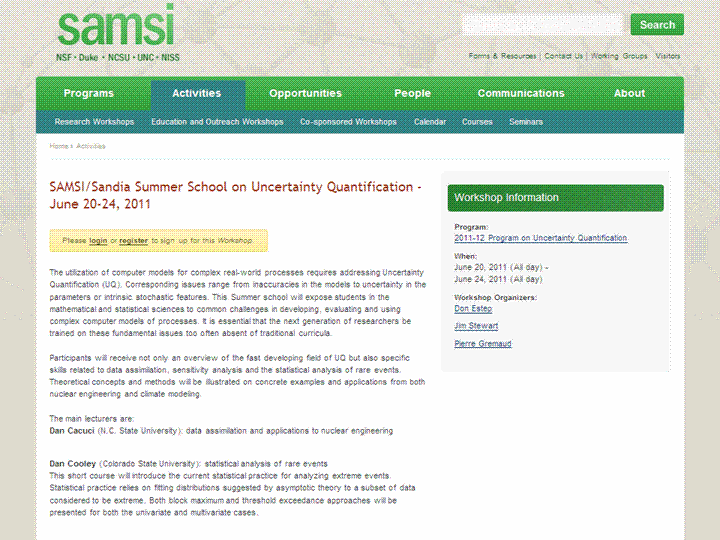
SAMSI/Sandia Summer School on Uncertainty Quantification – June 20-24, 2011

http://www.samsi.info/workshop/samsisandia-summer-school-uncertainty-quantification

The utilization of computer models for complex real-world processes requires addressing Uncertainty Quantification (UQ). Corresponding issues range from inaccuracies in the models to uncertainty in the parameters or intrinsic stochastic features.

This Summer school will expose students in the mathematical and statistical sciences to common challenges in developing, evaluating and using complex computer models of processes. It is essential that the next generation of researchers be trained on these fundamental issues too often absent of traditional curricula.

Participants will receive not only an overview of the fast developing field of UQ but also specific skills related to data assimilation, sensitivity analysis and the statistical analysis of rare events.

Theoretical concepts and methods will be illustrated on concrete examples and applications from both nuclear engineering and climate modeling.

The main lecturers are:
Dan Cacuci (N.C. State University): data assimilation and applications to nuclear engineering

Dan Cooley (Colorado State University): statistical analysis of rare events
This short course will introduce the current statistical practice for analyzing extreme events. Statistical practice relies on fitting distributions suggested by asymptotic theory to a subset of data considered to be extreme. Both block maximum and threshold exceedance approaches will be presented for both the univariate and multivariate cases.

Doug Nychka (NCAR): data assimilation and applications in climate modeling
Climate prediction and modeling do not incorporate geophysical data in the sequential manner as weather forecasting and comparison to data is typically based on accumulated statistics, such as averages. This arises because a climate model matches the state of the Earth’s atmosphere and ocean “on the average” and so one would not expect the detailed weather fluctuations to be similar between a model and the real system. An emerging area for climate model validation and improvement is the use of data assimilation to scrutinize the physical processes in a model using observations on shorter time scales. The idea is to find a match between the state of the climate model and observed data that is particular to the observed weather. In this way one can check whether short time physical processes such as cloud formation or dynamics of the atmosphere are consistent with what is observed.

Dongbin Xiu (Purdue University): sensitivity analysis and polynomial chaos for differential equations
This lecture will focus on numerical algorithms for stochastic simulations, with an emphasis on the methods based on generalized polynomial chaos methodology. Both the mathematical framework and the technical details will be examined, along with performance comparisons and implementation issues for practical complex systems.

The main lectures will be supplemented by discussion sessions and by presentations from UQ practitioners from both the Sandia and Los Alamos National Laboratories.

http://www.samsi.info/workshop/samsisandia-summer-school-uncertainty-quantification

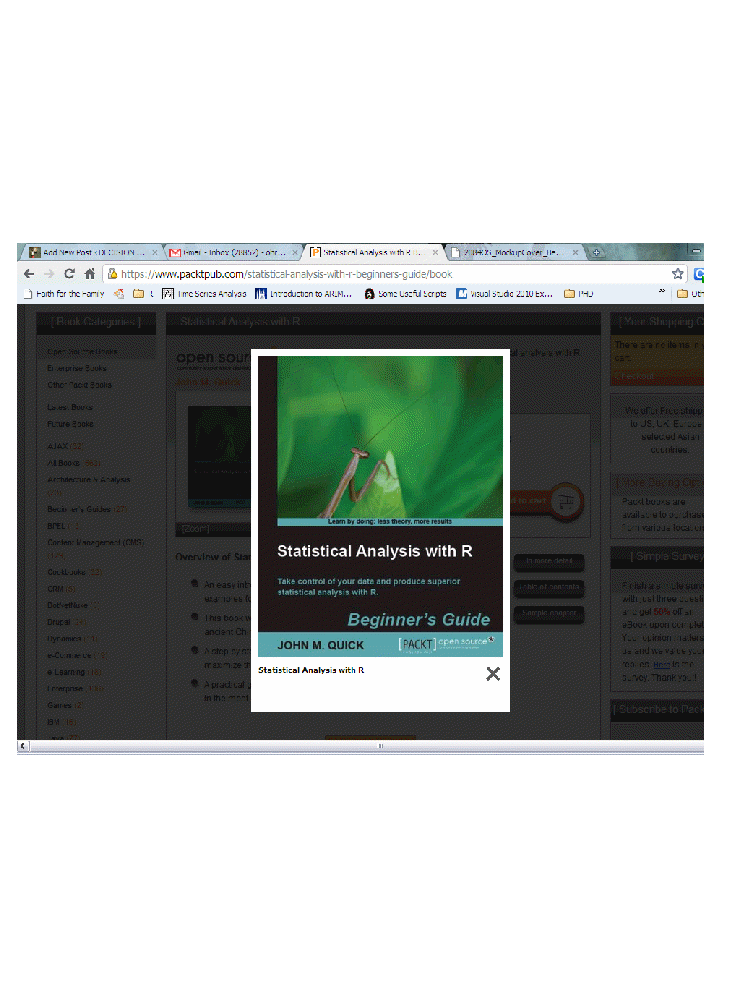
Statistical Analysis with R- by John M Quick

I was asked to be a techie reviewe for John M Quick’s new R book “Statistical Analysis with R” from Packt Publishing some months ago-(very much to my surprise I confess)-

I agreed- and technical reviewer work does take time- its like being a mid wife and there is whole team trying to get the book to birth.

Statistical Analysis with R- is a Beginner’s Guide so has nice screenshots, simple case studies, and quizzes to check recall of student/ reader. I remember struggling with the official “beginner’s guide to R” so this one is different in that it presents a story of a Chinese Army and how to use R to plan resources to fight the battle. It’s recommended especially for undergraduate courses- R need not be an elitist language- and given my experience with Asian programming acumen – I am sure it is a matter of time before high schools in India teach basic R in final years ( I learnt quite a shit load of quantum physics as compulsory topics in Indian high schools- but I guess we didnt have Jersey Shore things to do)

Congrats to author Mr John M Quick- he is doing his educational Phd from ASU- and I am sure both he and his approach to making education simple informative and fun will go places.

Only bad thing- The Name Statistical Analysis with R has atleast three other books , but I guess Google will catch up to it.

This book is here-https://www.packtpub.com/statistical-analysis-with-r-beginners-guide/book

The Best and Worst Graphs Ever

From http://www.math.yorku.ca/SCS/Gallery/ a great selection

March of the Pies

and the renowned best graph ever

and the most lieing factor or distorted graph

Doing Time Series using a R GUI

The Xerox Star Workstation introduced the firs...
Image via Wikipedia

Until recently I had been thinking that RKWard was the only R GUI supporting Time Series Models-

however Bob Muenchen of http://www.r4stats.com/ was helpful to point out that the Epack Plugin provides time series functionality to R Commander.

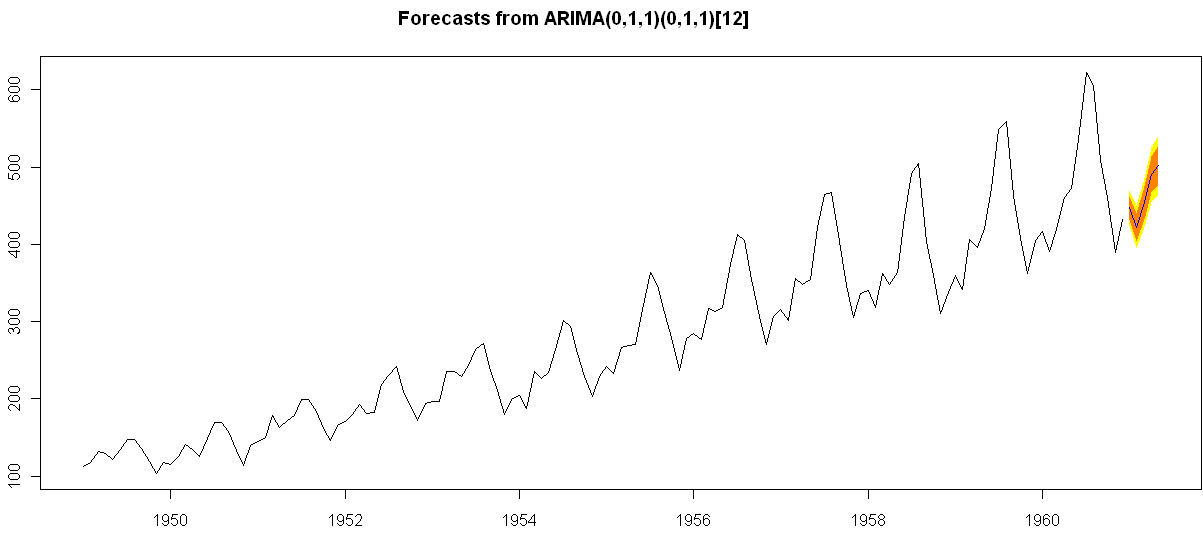
Note the GUI helps explore various time series functionality.

Using Bulkfit you can fit various ARMA models to dataset and choose based on minimum AIC


> bulkfit(AirPassengers$x)
$res
ar d ma      AIC
[1,]  0 0  0 1790.368
[2,]  0 0  1 1618.863
[3,]  0 0  2 1522.122
[4,]  0 1  0 1413.909
[5,]  0 1  1 1397.258
[6,]  0 1  2 1397.093
[7,]  0 2  0 1450.596
[8,]  0 2  1 1411.368
[9,]  0 2  2 1394.373
[10,]  1 0  0 1428.179
[11,]  1 0  1 1409.748
[12,]  1 0  2 1411.050
[13,]  1 1  0 1401.853
[14,]  1 1  1 1394.683
[15,]  1 1  2 1385.497
[16,]  1 2  0 1447.028
[17,]  1 2  1 1398.929
[18,]  1 2  2 1391.910
[19,]  2 0  0 1413.639
[20,]  2 0  1 1408.249
[21,]  2 0  2 1408.343
[22,]  2 1  0 1396.588
[23,]  2 1  1 1378.338
[24,]  2 1  2 1387.409
[25,]  2 2  0 1440.078
[26,]  2 2  1 1393.882
[27,]  2 2  2 1392.659
$min
ar        d       ma      AIC
2.000    1.000    1.000 1378.338
> ArimaModel.5 <- Arima(AirPassengers$x,order=c(0,1,1),
+ include.mean=1,
+   seasonal=list(order=c(0,1,1),period=12))
> ArimaModel.5
Series: AirPassengers$x
ARIMA(0,1,1)(0,1,1)[12]
Call: Arima(x = AirPassengers$x, order = c(0, 1, 1), seasonal = list(order = c(0,      1, 1), period = 12), include.mean = 1)
Coefficients:
ma1     sma1
-0.3087  -0.1074
s.e.   0.0890   0.0828
sigma^2 estimated as 135.4:  log likelihood = -507.5
AIC = 1021   AICc = 1021.19   BIC = 1029.63
> summary(ArimaModel.5, cor=FALSE)
Series: AirPassengers$x
ARIMA(0,1,1)(0,1,1)[12]
Call: Arima(x = AirPassengers$x, order = c(0, 1, 1), seasonal = list(order = c(0,      1, 1), period = 12), include.mean = 1)
Coefficients:
ma1     sma1
-0.3087  -0.1074
s.e.   0.0890   0.0828
sigma^2 estimated as 135.4:  log likelihood = -507.5
AIC = 1021   AICc = 1021.19   BIC = 1029.63
In-sample error measures:
ME        RMSE         MAE         MPE        MAPE        MASE
0.32355285 11.09952005  8.16242469  0.04409006  2.89713514  0.31563730
Dataset79 <- predar3(ArimaModel.5,fore1=5)


And I also found an interesting Ref Sheet for Time Series functions in R-

http://cran.r-project.org/doc/contrib/Ricci-refcard-ts.pdf

and a slightly more exhaustive time series ref card

http://www.statistische-woche-nuernberg-2010.org/lehre/bachelor/datenanalyse/Refcard3.pdf

Also of interest a matter of opinion on issues in Time Series Analysis in R at

http://www.stat.pitt.edu/stoffer/tsa2/Rissues.htm

Of course , if I was the sales manager for SAS ETS I would be worried given the increasing capabilities in Time Series in R. But then again some deficiencies in R GUI for Time Series-

1) Layout is not very elegant

2) Not enough documented help (atleast for the Epack GUI- and no integrated help ACROSS packages-)

3) Graphical capabilties need more help documentation to interpret the output (especially in ACF and PACF plots)

More resources on Time Series using R.

http://people.bath.ac.uk/masgs/time%20series/TimeSeriesR2004.pdf

and http://www.statoek.wiso.uni-goettingen.de/veranstaltungen/zeitreihen/sommer03/ts_r_intro.pdf

and books

http://www.springer.com/economics/econometrics/book/978-0-387-77316-2

http://www.springer.com/statistics/statistical+theory+and+methods/book/978-0-387-75960-9

http://www.springer.com/statistics/statistical+theory+and+methods/book/978-0-387-75958-6

http://www.springer.com/statistics/statistical+theory+and+methods/book/978-0-387-75966-1

So which software is the best analytical software? Sigh- It depends


Graph of typical Operating System placement on...
Image via Wikipedia


Here is the software matrix that I am trying to develop for analytical software- It should help as a tentative guide for software purchases- it’s independent so unbiased (hopefully)- and it will try and bring as much range or sensitivity as possible. The list (rather than matrix) is of the format-

Type 0f analysis-

  • Data Visualization (Reporting with Pivot Ability to aggregate, disaggregate)
  • Reporting without Pivot Ability
  • Regression -Logistic Regression for Propensity or Risk Models
  • Regression- Linear for Pricing Models
  • Hypothesis Testing
  • A/B Scenario Testing
  • Decision Trees (CART, CHAID)
  • Time Series Forecasting
  • Association Analysis
  • Factor Analysis
  • Survey (Questionnaires)
  • Clustering
  • Segmentation
  • Data Manipulation

Dataset Size-

  • small dataset (upto X mb)
  • big dataset (upto Y gb)
  • enterprise class production BigData datasets (no limit)

Pricing of Software that can be used-

Ease of using Software

  • GUI vs Non GUI
  • Software that require not much extensive training
  • Software that require extensive training

Installation, Customization, Maintainability (or Support) for Software

  • Installation Dependencies- Size- Hardware (costs and  efficiencies)
  • Customization provided for specific use
  • Support Channels (including approximate Turn Around Time)

Software

  • Software I have used personally
  • SAS (Base, Stat,Enterprise,Connect,ETS) WPS KXEN SPSS (Base,Trends),Revolution R,R,Rapid Miner,Knime,JMP,SQL SERVER,Rattle, R Commander,Deducer
  • Software I know by reputation- SAS Enterprise Miner etc etc

Are there any other parameters for judging software?  let me know at http://twitter.com/decisionstats