Here are some broad guidelines for Graphs from EIA.gov , so you can say these are the official graphical guidelines of USA Gov
They can be really useful for sites planning to get into the Tableau Software/NYT /Guardian Infographic mode- or even for communities of blogs that have recurrent needs to display graphical plots- particularly since communication, statistical and design specialists are different areas/expertise/people.
Energy Information Administration Standard 2009-25
Title: Statistical Graphs
Superseded Version: Standard 2002-25
Purpose: To ensure the utility (usefulness to intended users) and objectivity (accuracy, clarity, completeness, and lack of bias) of energy information presented in statistical graphs.
Applicability: All EIA information products.
Required Actions:
Graphs should be used to show and compare changes, trends and/or relationships, and to assist users in visualizing the conclusions drawn from the data represented.
HOW TO ENTER: To qualify for entry, go to the sasCommunity.org web site located at http://www.sascommunity.org/wiki/Main_Page
between April 11, 2011 and May 9, 2011 and either add or edit valid content as described herein to earn award points.
Creation of a first time profile on www.sascommunity.org will earn 1,000 points. For each valid article creation or edit, 100
points will be earned. Articles and subsequent edits should adhere to the sasCommunity.org terms of use as outlined on
http://www.sascommunity.org/wiki/sasCommunity:Terms_of_Use. All points’ accumulation will end at 5:00 PM GMT on
May 9, 2011 and only those points earned between 8:00 AM GMT on April 11, 2011 and 5:00 PM GMT on May 9, 2011
will be counted in this contest. Contest entries made through the Internet will be declared made by the registered user of
the sasCommunity.org profile account. Sponsor is not responsible for phone, technical, network, electronic, computer
hardware or software failures of any kind, misdirected, incomplete, garbled or delayed transmissions. Sponsor will not be
responsible for incorrect or inaccurate entry information, whether caused by entrants or by any of the equipment or
programming associated with or utilized in the contest.
ELIGIBILITY: The contest is open to all sasCommunity.org members 18 year of age or older on the start date of the
contest. Void where prohibited by law. Employees (including immediate family members and/or those living in the same household of each), the Sponsor, members of the sasCommunity.org Advisory Board, SAS Global Users Group Executive Board, their advertising, promotion and production agencies, the affiliated companies of each, and the immediate family members of each are not eligible.
PRIZE: Three (3) prizes will be awarded based on total points accumulated during the contest as follows:
1stPlace: 3 SAS®Press books - not to exceed $250 in combined retail value;
2ndPlace: 2 SAS®Press books - not to exceed $150 in combined retail value; and
3rdPlace: 1 SAS®Press book - not to exceed $100 in retail value.
Contribute content or SAS code to sasCommunity.org for your chance to WIN! To qualify, simply add or edit articles between April 11, 2011 and May 9, 2011 (GMT). Creation of a first-time profile on sasCommunity.org gives you 1,000 points. For each valid article creation or edit, 100 points will be earned. The user with the most points collected during this time wins SAS Press Books!
Contributing and gaining points also gets you closer to sasCommunity Guru status as explained in the article below:
Become a sasCommunity Guru
The sasCommunity support team has been hard at work adding new features and is pleased to announce a points system that recognizes each user’s contributions to the site. Every time you contribute by creating a page, updating it, or just doing a little wiki gardening, you earn points.Earning points is automatic and simple – all you have to do is contribute! Creating your account starts you with 1000 points and all the current users have been credited with points dating back to the site coming online in April 2007.
Visualize and publish your data as maps, timelines and charts
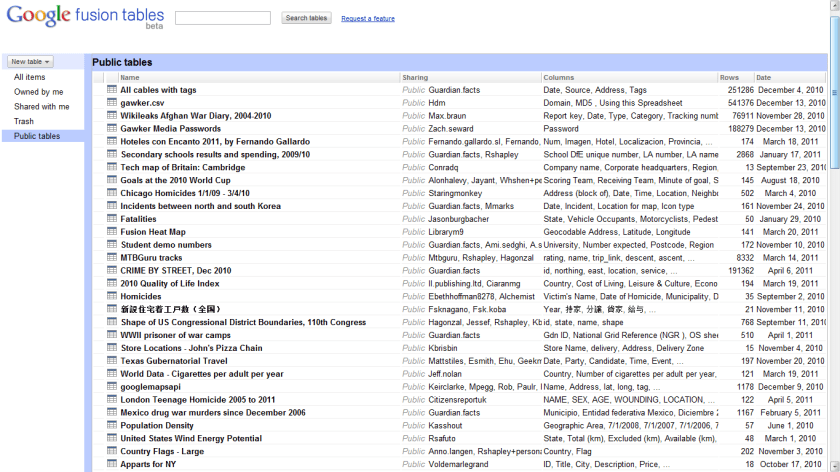
Host your data tables online
Combine data from multiple people
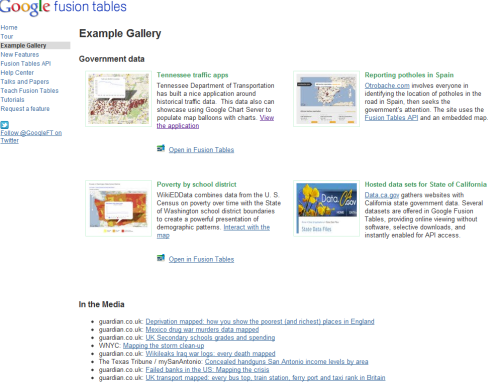
Google Fusion Tables is a modern data management and publishing web application that makes it easy
to host, manage, collaborate on, visualize, and publish data tables online.
Import your own data
Upload data tables from spreadsheets or CSV files, even KML. Developers can use the Fusion Tables API to insert, update, delete and query data programmatically. You can export your data as CSV or KML too.
Visualize it instantly
See the data on a map or as a chart immediately. Use filters for more selective visualizations.
Publish your visualization on other web properties
Now that you’ve got that nice map or chart of your data, you can embed it in a web page or blog post. Or send a link by email or IM. It will always display the latest data values from your table and helps you communicate your story more easily.
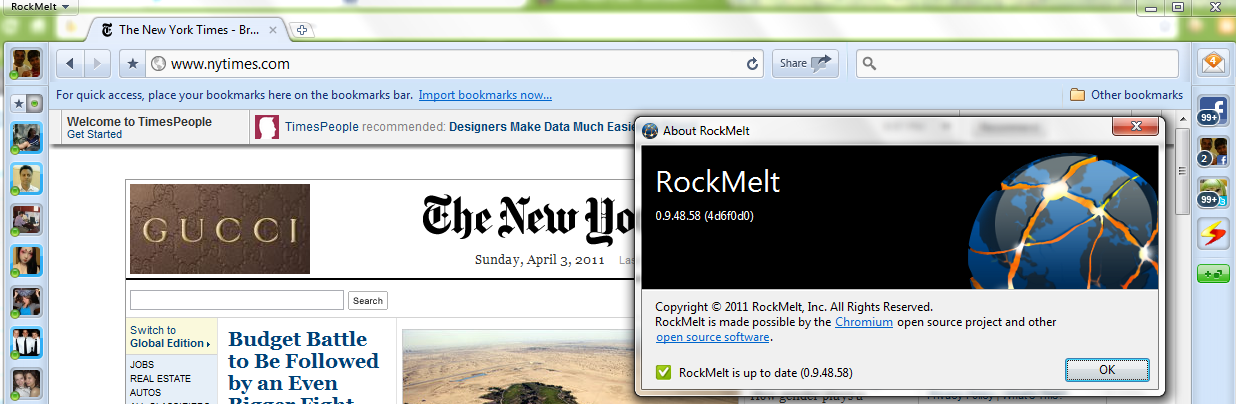
I kind of liked the latest browser on the block: Rockmelt.
It is based on Chromium open source project, that is primarily lead by Google. In case Facebook wants to buy a browser it can use Rockmelt–provided the mutual powers and angels agree.
I really liked the idea of a social layer- though I am not sure how the analytics embedded within a browser/report should be used.
Basically it re-designs the interface to put your social networks to the margin, thus quite a boon in you have active social media presence on multiple sites or a power reader/surfer. Timely alerts ping you to status/new messages without cluttering your screen and internet experience. Worth atleast a try or first look for the innovator kind of internet customer.
I still prefer the speed of Chrome– because Rockwell interface is still not easy to transition to – it almost adds in 3 dimensions in terms of where your eyeball should be while surfing (to left/right/margin).
and thats despite the funny fine print in Chrome’s user agreement of “continuing innovation”
4.3 As part of this continuing innovation, you acknowledge and agree that Google may stop (permanently or temporarily) providing the Services (or any features within the Services) to you or to users generally at Google’s sole discretion, without prior notice to you. You may stop using the Services at any time. You do not need to specifically inform Google when you stop using the Services.
Google is always experimenting with new features aimed at improving the search experience. Take one for a spin and let us know what you think.
Your selected experiment: You have joined the +1 button experiment. Note that you can only join ONE experiment at a time.
+1 button
This is your selected experiment.
Use +1 to give something your public stamp of approval, so friends, contacts, and others can find the best stuff when they search. Get recommendations for the things that interest you, right when you want them, in your search results.
To participate in this experiment:
Make sure you’re signed into your Google Account (required)
Click the new +1 button, and make your mark on the web
Your +1’s are public. They can appear in Google search results, on ads, and sites across the web. You’ll always be able to see your own +1’s in a new tab on your Google Profile, and if you want, you can share this tab with the world.
Please note, it may take a while before you see the button in search results, and it may occasionally disappear as we make improvements. Your feedback will help us make it better!
Navigate search results quickly and easily, with just your keyboard. As you navigate, items are magnified for easier viewing. If you use a screen reader or talking browser, the relevant information is spoken automatically as you navigate.
Current keyboard shortcuts include:
Key
Action
j or DOWN
Selects the next item.
k or UP
Selects the previous item.
l or RIGHT
Moves to the next category (results, sponsored links, refinements).
h or LEFT
Moves to the previous category (results, sponsored links, refinements).
<Enter>
Opens the selected result.
/
Puts the cursor in the search box.
n
Moves to the next result, and fetches more results if necessary.
p
Moves to the previous result, reloading earlier results if necessary.
For now, you need to use the Firefox 3 web browser with this experiment. This note will be updated as other browsers are added. Magnification already works with Google Chrome andApple’s Safari.
A highly optimized blog post or web content can get you a lot of attention just like Rebecca Black’s video (provided it passes through the new quality metrics \change*/ in the Search Engine)
But if the underlying content is weak, or based on a shoddy understanding of the content-it can drive lots of horrid comments as well as ensuring that bad word of mouth is spread about the content or you/despite your hard work.
An example of this is copy and paste journalism especially in technology circles, where even a bigger Page Ranked website /blog can get away with scraping or stealing content from a lower page ranked website (or many websites) after adding a cursory “expert comment”. This is also true when someone who is basically a corporate communication specialist (or PR -public relations) person is given a techinical text and encourage to write about it without completely understanding it.
A mild technical defect in the search engine algorithm is that it does not seem to pay attention to when the content was published, so the copying website or blog actually can get by as fresher content even if it is practically has 90% of the same words). The second flaw is over punishment or manual punishment of excessive linking – this can encourage search optimization minded people to hoard links or discourage trackbacks.
A free internet is one which promotes free sharing of content and does not encourage stealing or un-authorized scraping or content copying. Unfortunately current search engine optimization can encourage scraping and content copying without paying too much attention to origin of the words.
In addition the analytical rigor by which search algorithms search your inboxes (as in search all emails for a keyword) or media rich sites (like Youtube) are quite on a different level of quality altogether. The chances of garbage results are much more while searching for media content and/or emails.
This makes the task of searching among these packages and comparing functions for the same analytical task across different packages a bit tedious and prone to manual searching (of reading multiple Pdfs of help /vignette of packages) or sending an email to the R help list.
However using R Views is a slightly better way of managing all your analytical requirements for software rather than the large number of packages (see Graphics view below).
CRAN Task Views allow you to browse packages by topic and provide tools to automatically install all packages for special areas of interest. Currently, 28 views are available. http://cran.r-project.org/web/views/
and then the views can be installed via install.views or update.views (which first assesses which of the packages are already installed and up-to-date), e.g.,
R is rich with facilities for creating and developing interesting graphics. Base R contains functionality for many plot types including coplots, mosaic plots, biplots, and the list goes on. There are devices such as postscript, png, jpeg and pdf for outputting graphics as well as device drivers for all platforms running R. lattice and grid are supplied with R’s recommended packages and are included in every binary distribution. lattice is an R implementation of William Cleveland’s trellis graphics, while grid defines a much more flexible graphics environment than the base R graphics.
R’s base graphics are implemented in the same way as in the S3 system developed by Becker, Chambers, and Wilks. There is a static device, which is treated as a static canvas and objects are drawn on the device through R plotting commands. The device has a set of global parameters such as margins and layouts which can be manipulated by the user using par() commands. The R graphics engine does not maintain a user visible graphics list, and there is no system of double buffering, so objects cannot be easily edited without redrawing a whole plot. This situation may change in R 2.7.x, where developers are working on double buffering for R devices. Even so, the base R graphics can produce many plots with extremely fine graphics in many specialized instances.
One can quickly run into trouble with R’s base graphic system if one wants to design complex layouts where scaling is maintained properly on resizing, nested graphs are desired or more interactivity is needed. grid was designed by Paul Murrell to overcome some of these limitations and as a result packages like lattice, ggplot2, vcd or hexbin (on Bioconductor ) use grid for the underlying primitives. When using plots designed with grid one needs to keep in mind that grid is based on a system of viewports and graphic objects. To add objects one needs to use grid commands, e.g., grid.polygon() rather than polygon(). Also grid maintains a stack of viewports from the device and one needs to make sure the desired viewport is at the top of the stack. There is a great deal of explanatory documentation included with grid as vignettes.
The graphics packages in R can be organized roughly into the following topics, which range from the more user oriented at the top to the more developer oriented at the bottom. The categories are not mutually exclusive but are for the convenience of presentation:
Plotting : Enhancements for specialized plots can be found in plotrix, for polar plotting, vcd for categorical data, hexbin (on Bioconductor ) for hexagon binning, gclus for ordering plots and gplots for some plotting enhancements. Some specialized graphs, like Chernoff faces are implemented in aplpack, which also has a nice implementation of Tukey’s bag plot. For 3D plots lattice, scatterplot3d and misc3d provide a selection of plots for different kinds of 3D plotting. scatterplot3d is based on R’s base graphics system, while misc3d is based on rgl. The package onion for visualizing quaternions and octonions is well suited to display 3D graphics based on derived meshes.
Graphic Applications : This area is not much different from the plotting section except that these packages have tools that may not for display, but can aid in creating effective displays. Also included are packages with more esoteric plotting methods. For specific subject areas, like maps, or clustering the excellent task views contributed by other dedicated useRs is an excellent place to start.
Effect ordering : The gclus package focuses on the ordering of graphs to accentuate cluster structure or natural ordering in the data. While not for graphics directly cba and seriation have functions for creating 1 dimensional orderings from higher dimensional criteria. For ordering an array of displays, biclust can be useful.
Large Data Sets : Large data sets can present very different challenges from moderate and small datasets. Aside from overplotting, rendering 1,000,000 points can tax even modern GPU’s. For univariate datalvplot produces letter value boxplots which alleviate some of the problems that standard boxplots exhibit for large data sets. For bivariate data ash can produce a bivariate smoothed histogram very quickly, and hexbin, on Bioconductor , can bin bivariate data onto a hexagonal lattice, the advantage being that the irregular lines and orientation of hexagons do not create linear artifacts. For multivariate data, hexbin can be used to create a scatterplot matrix, combined with lattice. An alternative is to use scagnostics to produce a scaterplot matrix of “data about the data”, and look for interesting combinations of variables.
Trees and Graphs : ape and ade4 have functions for plotting phylogenetic trees, which can be used for plotting dendrograms from clustering procedures. While these packages produce decent graphics, they do not use sophisticated algorithms for node placement, so may not be useful for very large trees. igraph has the Tilford-Rheingold algorithm implementead and is useful for plotting larger trees. diagram as facilities for flow diagrams and simple graphs. For more sophisticated graphs Rgraphviz and igraph have functions for plotting and layout, especially useful for representing large networks.
Graphics Systems : lattice is built on top of the grid graphics system and is an R implementation of William Cleveland’s trellis system for S-PLUS. lattice allows for building many types of plots with sophisticated layouts based on conditioning. ggplot2 is an R implementation of the system described in “A Grammar of Graphics” by Leland Wilkinson. Like lattice, ggplot (also built on top of grid) assists in trellis-like graphics, but allows for much more. Since it is built on the idea of a semantics for graphics there is much more emphasis on reshaping data, transformation, and assembling the elements of a plot.
Devices : Whereas grid is built on top of the R graphics engine, many in the R community have found the R graphics engine somewhat inflexible and have written separate device drivers that either emphasize interactivity or plotting in various graphics formats. R base supplies devices for PostScript, PDF, JPEG and other formats. Devices on CRAN include cairoDevice which is a device based libcairo, which can actually render to many device types. The cairo device is desgned to work with RGTK2, which is an interface to the Gimp Tool Kit, similar to pyGTK2. GDD provides device drivers for several bitmap formats, including GIF and BMP. RSvgDevice is an SVG device driver and interfaces well with with vector drawing programs, or R web development packages, such as Rpad. When SVG devices are for web display developers should be aware that internet explorer does not support SVG, but has their own standard. Trust Microsoft. rgl provides a device driver based on OpenGL, and is good for 3D and interactive development. Lastly, the Augsburg group supplies a set of packages that includes a Java-based device, JavaGD.
Colors : The package colorspace provides a set of functions for transforming between color spaces and mixcolor() for mixing colors within a color space. Based on the HCL colors provided in colorspace, vcdprovides a set of functions for choosing color palettes suitable for coding categorical variables ( rainbow_hcl()) and numerical information ( sequential_hcl(), diverge_hcl()). Similar types of palettes are provided in RColorBrewer and dichromat is focused on palettes for color-impaired viewers.
Interactive Graphics : There are several efforts to implement interactive graphics systems that interface well with R. In an interactive system the user can interactively query the graphics on the screen with the mouse, or a moveable brush to zoom, pan and query on the device as well as link with other views of the data. rggobi embeds the GGobi interactive graphics system within R, so that one can display a data frame or several in GGobi directly from R. The package has functions to support longitudinal data, and graphs using GGobi’s edge set functionality. The RoSuDA repository maintained and developed by the University of Augsburg group has two packages, iplots and iwidgets as well as their Java development environment including a Java device, JavaGD. Their interactive graphics tools contain functions for alpha blending, which produces darker shading around areas with more data. This is exceptionally useful for parallel coordinate plots where many lines can quickly obscure patterns. playwith has facilities for building interactive versions of R graphics using the cairoDevice and RGtk2. Lastly, the rgl package has mechanisms for interactive manipulation of plots, especially 3D rotations and surfaces.
Development : For development of specialized graphics packages in R, grid should probably be the first consideration for any new plot type. rgl has better tools for 3D graphics, since the device is interactive, though it can be slow. An alternative is to use Java and the Java device in the RoSuDA packages, though Java has its own drawbacks. For porting plotting code to grid, using the package gridBase presents a nice intermediate step to embed base graphics in grid graphics and vice versa.





 DECISION STATS