Wubi only adds an extra option to boot into Ubuntu. Wubi does not require you to modify the partitions of your PC, or to use a different bootloader, and does not install special drivers.
Wine lets you run Windows software on other operating systems. With Wine, you can install and run these applications just like you would in Windows. Read more at http://wiki.winehq.org/Debunking_Wine_Myths
Cygwin is a Linux-like environment for Windows. It consists of two parts:
A DLL (cygwin1.dll) which acts as a Linux API emulation layer providing substantial Linux API functionality.
A collection of tools which provide Linux look and feel
What Isn’t Cygwin?
Cygwin is not a way to run native linux apps on Windows. You have to rebuild your application from source if you want it to run on Windows.
Cygwin is not a way to magically make native Windows apps aware of UNIX ® functionality, like signals, ptys, etc. Again, you need to build your apps from source if you want to take advantage of Cygwin functionality.
VMware Player is the easiest way to run multiple operating systems at the same time on your PC. With its user-friendly interface, VMware Player makes it effortless for anyone to try out Windows 7, Chrome OS or the latest Linux releases, or create isolated virtual machines to safely test new software and surf the Web
The only issue is Rattle can be quite difficult to install due to dependencies on GTK+
After fiddling for a couple of years- this is what I did
1) Created dual boot OS- Basically downloaded the netbook remix from http://ubuntu.com I created a dual boot OS so you can choose at the beginning whether to use Windows or Ubuntu Linux in that session. Alternatively you can download VM Player www.vmware.com/products/player/ if you want to do both
2) Download R packages using Ubuntu packages and Install GTK+ dependencies before that.
GTK + Requires
Libglade
Glib
Cairo
Pango
ATK
If you are a Linux newbie like me who doesnt get the sudo apt get, tar, cd, make , install rigmarole – scoot over to synaptic software packages or just the main ubuntu software centre and download these packages one by one.
For R Dependencies, you need
PMML
XML
RGTK2
Again use r-cran as the prefix to these package names and simply install (almost the same way Windows does it easily -double click)
Save theses to your hard disk (e.g., to your Desktop) but don’t extract them. Then, on GNU/Linux run the install command shown below. This command is entered into a terminal window:
R CMD INSTALL rattle_2.6.0.tar.gz
After installation-
5) Type library(rattle) and rattle.info to get messages on what R packages to update for a proper functioning
</code>

> library(rattle)
Rattle: Graphical interface for data mining using R.
Version 2.6.0 Copyright (c) 2006-2010 Togaware Pty Ltd.
Type 'rattle()' to shake, rattle, and roll your data.
> rattle.info()
Rattle: version 2.6.0
R: version 2.11.1 (2010-05-31) (Revision 52157)

Sysname: Linux
Release: 2.6.35-23-generic
Version: #41-Ubuntu SMP Wed Nov 24 10:18:49 UTC 2010
Nodename: k1-M725R
Machine: i686
Login: k1ng
User: k1ng

Installed Dependencies
RGtk2: version 2.20.3
pmml: version 1.2.26
colorspace: version 1.0-1
cairoDevice: version 2.14
doBy: version 4.1.2
e1071: version 1.5-24
ellipse: version 0.3-5
foreign: version 0.8-41
gdata: version 2.8.1
gtools: version 2.6.2
gplots: version 2.8.0
gWidgetsRGtk2: version 0.0-69
Hmisc: version 3.8-3
kernlab: version 0.9-12
latticist: version 0.9-43
Matrix: version 0.999375-46
mice: version 2.4
network: version 1.5-1
nnet: version 7.3-1
party: version 0.9-99991
playwith: version 0.9-53
randomForest: version 4.5-36 upgrade available 4.6-2
rggobi: version 2.1.16
survival: version 2.36-2
XML: version 3.2-0
bitops: version 1.0-4.1

Upgrade the packages with:

 > install.packages(c("randomForest"))

<code>
Now upgrade whatever package rattle.info tells to upgrade.
This is much simpler and less frustrating than some of the other ways to install Rattle.
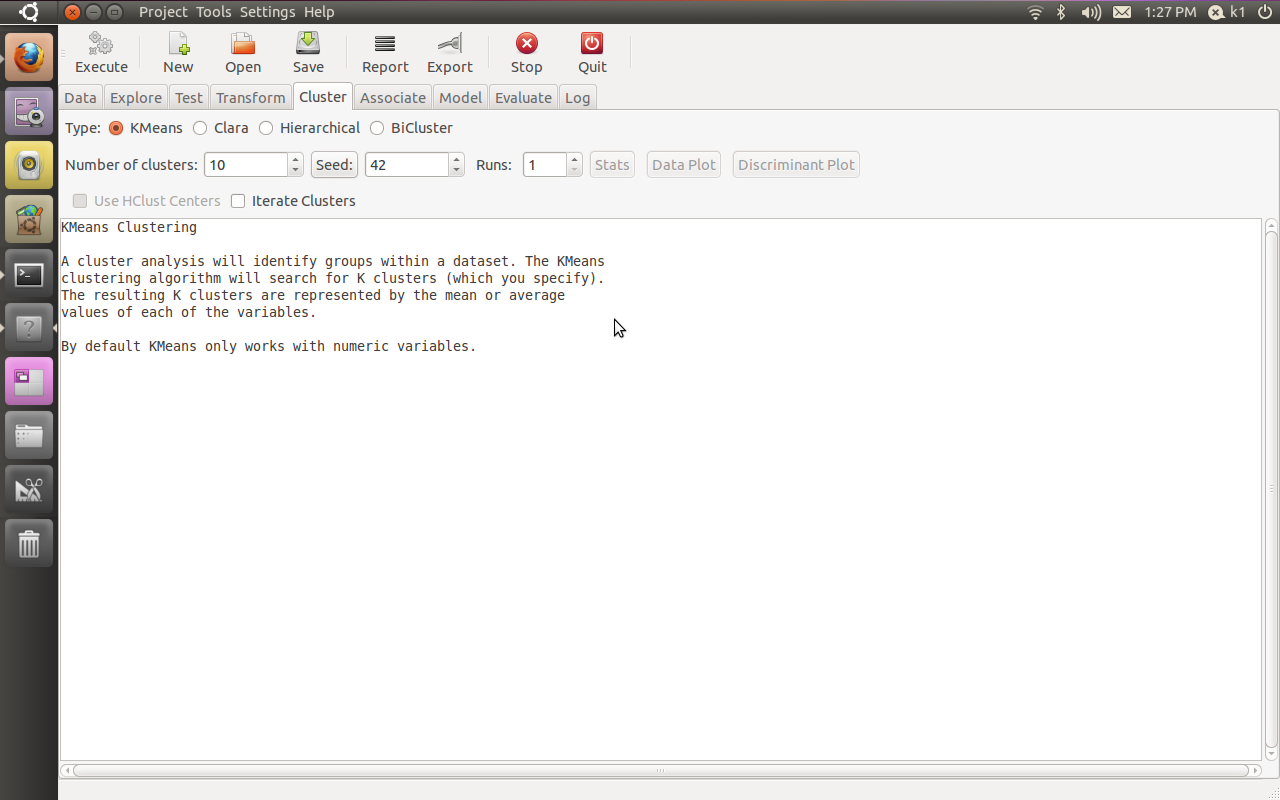
If all goes well, you will see this familiar screen popup when you type
Additional features in R over other analytical packages-
1) Source Code is given to ensure complete custom solution and embedding for a particular application. Open source code has an advantage that is extensively peer- reviewed in Journals and Scientific Literature. This means bugs will found, shared and corrected transparently.
2) Wide literature of training material in the form of books is available for the R analytical platform.
3) Extensively the best data visualization tools in analytical software (apart from Tableau Software ‘s latest version). The extensive data visualization available in R is of the form a variety of customizable graphs, as well as animation. The principal reason third-party software initially started creating interfaces to R is because the graphical library of packages in R is more advanced as well as rapidly getting more features by the day.
4) Free in upfront license cost for academics and thus budget friendly for small and large analytical teams.
5) Flexible programming for your data environment. This includes having packages that ensure compatibility with Java, Python and C++.
6) Easy migration from other analytical platforms to R Platform. It is relatively easy for a non R platform user to migrate to R platform and there is no danger of vendor lock-in due to the GPL nature of source code and open community.
Statistics are numbers that tell (descriptive), advise ( prescriptive) or forecast (predictive). Analytics is a decision-making help tool. Analytics on which no decision is to be made or is being considered can be classified as purely statistical and non analytical. Thus ease of making a correct decision separates a good analytical platform from a not so good analytical platform. The distinction is likely to be disputed by people of either background- and business analysis requires more emphasis on how practical or actionable the results are and less emphasis on the statistical metrics in a particular data analysis task. I believe one clear reason between business analytics is different from statistical analysis is the cost of perfect information (data costs in real world) and the opportunity cost of delayed and distorted decision-making.
Specific to the following domains R has the following costs and benefits
Business Analytics
R is free per license and for download
It is one of the few analytical platforms that work on Mac OS
It’s results are credibly established in both journals like Journal of Statistical Software and in the work at LinkedIn, Google and Facebook’s analytical teams.
It has open source code for customization as per GPL
It also has a flexible option for commercial vendors like Revolution Analytics (who support 64 bit windows) as well as bigger datasets
It has interfaces from almost all other analytical software including SAS,SPSS, JMP, Oracle Data Mining, Rapid Miner. Existing license holders can thus invoke and use R from within these software
Huge library of packages for regression, time series, finance and modeling
High quality data visualization packages
Data Mining
R as a computing platform is better suited to the needs of data mining as it has a vast array of packages covering standard regression, decision trees, association rules, cluster analysis, machine learning, neural networks as well as exotic specialized algorithms like those based on chaos models.
Flexibility in tweaking a standard algorithm by seeing the source code
The RATTLE GUI remains the standard GUI for Data Miners using R. It was created and developed in Australia.
Business Dashboards and Reporting
Business Dashboards and Reporting are an essential piece of Business Intelligence and Decision making systems in organizations. R offers data visualization through GGPLOT, and GUI like Deducer and Red-R can help even non R users create a metrics dashboard
For online Dashboards- R has packages like RWeb, RServe and R Apache- which in combination with data visualization packages offer powerful dashboard capabilities.
R can be combined with MS Excel using the R Excel package – to enable R capabilities to be imported within Excel. Thus a MS Excel user with no knowledge of R can use the GUI within the R Excel plug-in to use powerful graphical and statistical capabilities.
Additional factors to consider in your R installation-
There are some more choices awaiting you now-
1) Licensing Choices-Academic Version or Free Version or Enterprise Version of R
2) Operating System Choices-Which Operating System to choose from? Unix, Windows or Mac OS.
3) Operating system sub choice- 32- bit or 64 bit.
4) Hardware choices-Cost -benefit trade-offs for additional hardware for R. Choices between local ,cluster and cloud computing.
5) Interface choices-Command Line versus GUI? Which GUI to choose as the default start-up option?
6) Software component choice- Which packages to install? There are almost 3000 packages, some of them are complimentary, some are dependent on each other, and almost all are free.
7) Additional Software choices- Which additional software do you need to achieve maximum accuracy, robustness and speed of computing- and how to use existing legacy software and hardware for best complementary results with R.
1) Licensing Choices-
You can choose between two kinds of R installations – one is free and open source from http://r-project.org The other R installation is commercial and is offered by many vendors including Revolution Analytics. However there are other commercial vendors too.
Windows remains the most widely used operating system on this planet. If you are experienced in Windows based computing and are active on analytical projects- it would not make sense for you to move to other operating systems. This is also based on the fact that compatibility problems are minimum for Microsoft Windows and the help is extensively documented. However there may be some R packages that would not function well under Windows- if that happens a multiple operating system is your next option.
Enterprise R from Revolution Analytics- Enterprise R from Revolution Analytics has a complete R Development environment for Windows including the use of code snippets to make programming faster. Revolution is also expected to make a GUI available by 2011. Revolution Analytics claims several enhancements for it’s version of R including the use of optimized libraries for faster performance.
MacOS
Reasons for choosing MacOS remains its considerable appeal in aesthetically designed software- but MacOS is not a standard Operating system for enterprise systems as well as statistical computing. However open source R claims to be quite optimized and it can be used for existing Mac users. However there seem to be no commercially available versions of R available as of now for this operating system.
Linux
Ubuntu
Red Hat Enterprise Linux
Other versions of Linux
Linux is considered a preferred operating system by R users due to it having the same open source credentials-much better fit for all R packages and it’s customizability for big data analytics.
Ubuntu Linux is recommended for people making the transition to Linux for the first time. Ubuntu Linux had an marketing agreement with revolution Analytics for an earlier version of Ubuntu- and many R packages can installed in a straightforward way as Ubuntu/Debian packages are available. Red Hat Enterprise Linux is officially supported by Revolution Analytics for it’s enterprise module. Other versions of Linux popular are Open SUSE.
Multiple operating systems-
Virtualization vs Dual Boot-
You can also choose between having a VMware VM Player for a virtual partition on your computers that is dedicated to R based computing or having operating system choice at the startup or booting of your computer. A software program called wubi helps with the dual installation of Linux and Windows.
64 bit vs 32 bit – Given a choice between 32 bit versus 64 bit versions of the same operating system like Linux Ubuntu, the 64 bit version would speed up processing by an approximate factor of 2. However you need to check whether your current hardware can support 64 bit operating systems and if so- you may want to ask your Information Technology manager to upgrade atleast some operating systems in your analytics work environment to 64 bit operating systems.
Hardware choices- At the time of writing this book, the dominant computing paradigm is workstation computing followed by server-client computing. However with the introduction of cloud computing, netbooks, tablet PCs, hardware choices are much more flexible in 2011 than just a couple of years back.
Hardware costs are a significant cost to an analytics environment and are also remarkably depreciated over a short period of time. You may thus examine your legacy hardware, and your future analytical computing needs- and accordingly decide between the various hardware options available for R.
Unlike other analytical software which can charge by number of processors, or server pricing being higher than workstation pricing and grid computing pricing extremely high if available- R is well suited for all kinds of hardware environment with flexible costs. Given the fact that R is memory intensive (it limits the size of data analyzed to the RAM size of the machine unless special formats and /or chunking is used)- it depends on size of datasets used and number of concurrent users analyzing the dataset. Thus the defining issue is not R but size of the data being analyzed.
Local Computing- This is meant to denote when the software is installed locally. For big data the data to be analyzed would be stored in the form of databases.
Server version- Revolution Analytics has differential pricing for server -client versions but for the open source version it is free and the same for Server or Workstation versions.
Workstation
Cloud Computing- Cloud computing is defined as the delivery of data, processing, systems via remote computers. It is similar to server-client computing but the remote server (also called cloud) has flexible computing in terms of number of processors, memory, and data storage. Cloud computing in the form of public cloud enables people to do analytical tasks on massive datasets without investing in permanent hardware or software as most public clouds are priced on pay per usage. The biggest cloud computing provider is Amazon and many other vendors provide services on top of it. Google is also coming for data storage in the form of clouds (Google Storage), as well as using machine learning in the form of API (Google Prediction API)
Amazon
Google
Cluster-Grid Computing/Parallel processing- In order to build a cluster, you would need the RMpi and the SNOW packages, among other packages that help with parallel processing.
How much resources
RAM-Hard Disk-Processors- for workstation computing
Instances or API calls for cloud computing
Interface Choices
Command Line
GUI
Web Interfaces
Software Component Choices
R dependencies
Packages to install
Recommended Packages
Additional software choices
Additional legacy software
Optimizing your R based computing
Code Editors
Code Analyzers
Libraries to speed up R
citation- R Development Core Team (2010). R: A language and environment for statistical computing. R Foundation for Statistical Computing,Vienna, Austria. ISBN 3-900051-07-0, URL http://www.R-project.org.
The term quantitative refers to a type of information based in quantities or else quantifiable data (objective properties) —as opposed to qualitative information which deals with apparent qualities (subjective properties)
Fear, uncertainty, and doubt (FUD) is a tactic of rhetoric and fallacy used in sales, marketing, public relations,[1][2]politics and propaganda. FUD is generally a strategic attempt to influence public perception by disseminating negative and dubious/false information designed to undermine the credibility of their beliefs.
I had recently asked some friends from my Twitter lists for their take on 2011, atleast 3 of them responded back with the answer, 1 said they were still on it, and 1 claimed a recent office event.
Anyways- I take note of the view of forecasting from
The most primitive method of forecasting is guessing. The result may be rated acceptable if the person making the guess is an expert in the matter.
Ajay- people will forecast in end 2010 and 2011. many of them will get forecasts wrong, some very wrong, but by Dec 2011 most of them would be writing forecasts on 2012. almost no one will get called on by irate users-readers- (hey you got 4 out of 7 wrong last years forecast!) just wont happen. people thrive on hope. so does marketing. in 2011- and before
and some forecasts from Tom Davenport’s The International Institute for Analytics (IIA) at
Regulatory and privacy constraints will continue to hamper growth of marketing analytics.
(I wonder how privacy and analytics can co exist in peace forever- one view is that model building can use anonymized data suppose your IP address was anonymized using a standard secret Coco-Cola formula- then whatever model does get built would not be of concern to you individually as your privacy is protected by the anonymization formula)
Anyway- back to the question I asked-
What are the top 5 events in your industry (events as in things that occured not conferences) and what are the top 3 trends in 2011.
I define my industry as being online technology writing- research (with a heavy skew on stat computing)
My top 5 events for 2010 were-
1) Consolidation- Big 5 software providers in BI and Analytics bought more, sued more, and consolidated more. The valuations rose. and rose. leading to even more smaller players entering. Thus consolidation proved an oxy moron as total number of influential AND disruptive players grew.
2) Cloudy Computing- Computing shifted from the desktop but to the mobile and more to the tablet than to the cloud. Ipad front end with Amazon Ec2 backend- yup it happened.
3) Open Source grew louder- yes it got more clients. and more revenue. did it get more market share. depends on if you define market share by revenues or by users.
Both Open Source and Closed Source had a good year- the pie grew faster and bigger so no one minded as long their slices grew bigger.
4) We didnt see that coming –
Technology continued to surprise with events (thats what we love! the surprises)
Revolution Analytics broke through R’s Big Data Barrier, Tableau Software created a big Buzz, Wikileaks and Chinese FireWalls gave technology an entire new dimension (though not universally popular one).
people fought wars on emails and servers and social media- unfortunately the ones fighting real wars in 2009 continued to fight them in 2010 too
5) Money-
SAP,SAS,IBM,Oracle,Google,Microsoft made more money than ever before. Only Facebook got a movie named on itself. Venture Capitalists pumped in money in promising startups- really as if in a hurry to park money before tax cuts expired in some countries.
2011 Top Three Forecasts
1) Surprises- Expect to get surprised atleast 10 % of the time in business events. As internet grows the communication cycle shortens, the hype cycle amplifies buzz-
more unstructured data is created (esp for marketing analytics) leading to enhanced volatility
2) Growth- Yes we predict technology will grow faster than the automobile industry. Game changers may happen in the form of Chrome OS- really its Linux guys-and customer adaptability to new USER INTERFACES. Design will matter much more in technology on your phone, on your desktop and on your internet. Packaging sells.
False Top Trend 3) I will write a book on business analytics in 2011. yes it is true and I am working with A publisher. No it is not really going to be a top 3 event for anyone except me,publisher and lucky guys who read it.
3) Creating technology and technically enabling creativity will converge at an accelerated rate. use of widgets, guis, snippets, ide will ensure creative left brains can code easier. and right brains can design faster and better due to a global supply chain of techie and artsy professionals.
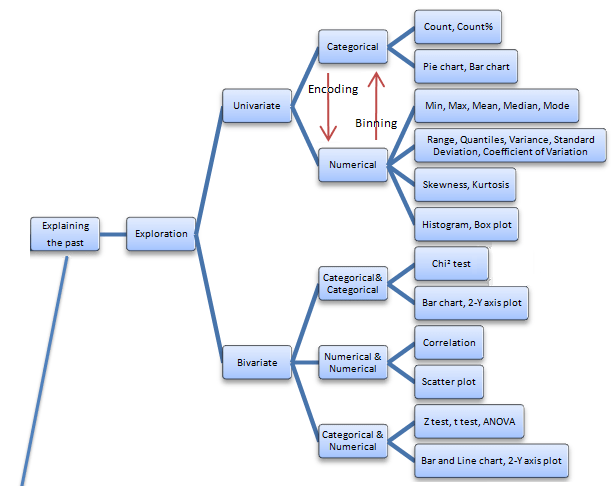
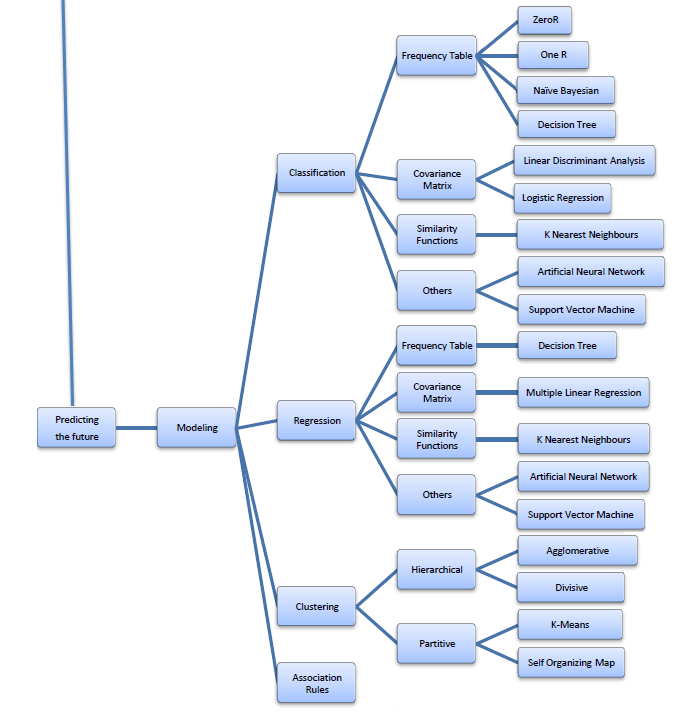
Best of All- I really liked this online book created by Professor S. Sayad
Its succinct and beautiful and describes all of the Data Mining you want to read in one Map (actually 4 images painstakingly assembled with perfection)
The best thing is- in the original map- even the sub items are click-able for specifics like Pie Chart and Stacked Column chart are not in one simple drop down like Charts- but rather by nature of the kind of variables that lead to these charts. For doing that- you would need to go to the site itself- ( see http://chem-eng.utoronto.ca/~datamining/dmc/categorical_variables.htm
Again- there is no mention of the data visualization software used to create the images but I think I can take a hint from the Software Page which says software used are-
The web application Rwui is used to create web interfaces for running R scripts. All the code is generated automatically so that a fully functional web interface for an R script can be downloaded and up and running in a matter of minutes.
Rwui is aimed at R script writers who have scripts that they want people unversed in R to use. The script writer uses Rwui to create a web application that will run their R script. Rwui allows the script writer to do this without them having to do any web application programming, because Rwui generates all the code for them.
The script writer designs the web application to run their R script by entering information on a sequence of web pages. The script writer then downloads the application they have created and installs it on their own server.







 Features of web applications created by Rwui
 DECISION STATS