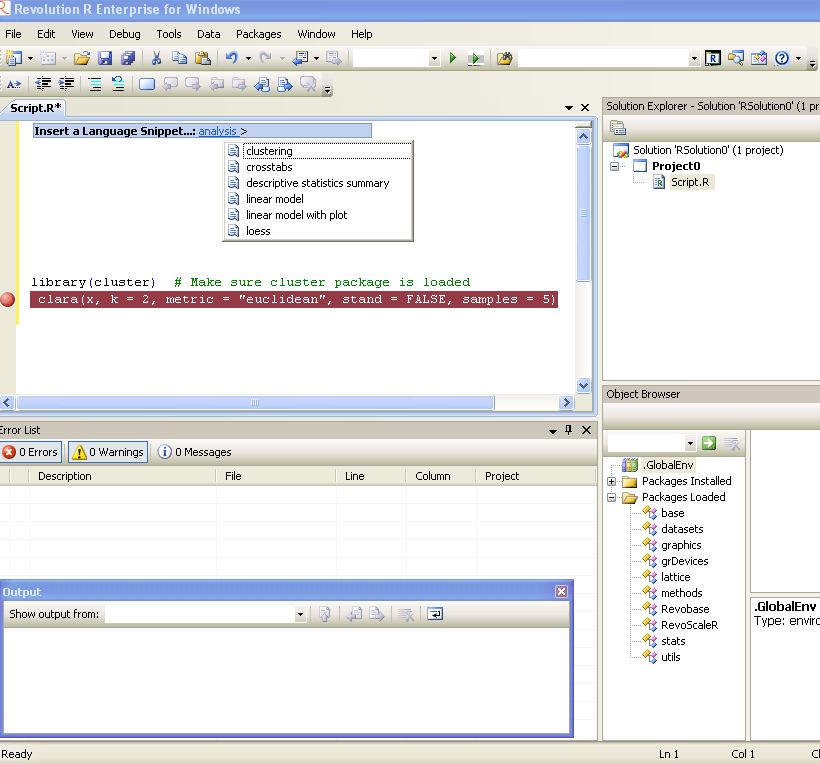
Revolution R Enterprise 4.2 is available immediately for 64-bit Red Hat Enterprise Linux systems and both 32-bit and 64-bit Windows systems. Pricing starts at $1,000 per single-user workstation
And its free for academic licenses- so come on guys it is worth atleast one download, and test.
An interesting announcemnet from Revolution Analytics promises to convert your legacy code in SAS language not only cheaper but faster. It’ s a very very interesting challenge and I wonder how SAS users ,corporates, customers as well as the Institute itself reacts
Are you paying for expensive software licenses and hardware to run time-consuming statistical analyses on big data sets?
If you’re doing linear regressions, logistic regressions, predictions, or multivariate crosstabulations* there’s something you should know: Revolution Analytics can get the same results for a substantially lower cost and faster than SAS®.
For a limited time only, Revolution Analytics invites you take the SAS to R Challenge. Let us prove that we can deliver on our promise of replicating your results in R, faster and cheaper than SAS.
Here’s how it works:
Fill out the short form below, and one of our conversion experts will contact you to discuss the SAS code you want to convert. If we think Revolution R Enterprise can get the same results faster than SAS, we’ll convert your code to R free of charge. Our goal is to demonstrate that Revolution R Enterprise will produce the same results in less time. There’s no obligation, but if you choose to convert, we guarantee that your license cost for Revolution R Enterprise will be less than half what you’re currently paying for the equivalent SAS software.**
It’s that simple.
We’ll show you that you don’t need expensive hardware and software to do high quality statistical analysis of big data. And we’ll show that you don’t need to tie up your computing resources with long running operations. With Revolution R Enterprise, you can run analyses on commodity hardware using Linux or Windows, scale to terabyte-class data problems and do it at processing speeds you would never have thought possible.
Sign up now, and we will be in touch shortly.
—————————-
SAS is a registered trademark of the SAS Institute, Cary, NC, in the US and other countries.
*Additional statistical algorithms are being rapidly added to Revolution R Enterprise. Custom development services are also available.
**Revolution Analytics retains the right to determine eligibility for this offer. Offer available until March 31, 2011.
GrapheR is a Graphical User Interface created for simple graphs.
Depends: R (>= 2.10.0), tcltk, mgcv Description: GrapheR is a multiplatform user interface for drawing highly customizable graphs in R. It aims to be a valuable help to quickly draw publishable graphs without any knowledge of R commands. Six kinds of graphs are available: histogram, box-and-whisker plot, bar plot, pie chart, curve and scatter plot. License: GPL-2 LazyLoad: yes Packaged: 2011-01-24 17:47:17 UTC; Maxime Repository: CRAN Date/Publication: 2011-01-24 18:41:47
It is bi-lingual (English and French) and can import in text and csv files
The intention is for even non users of R, to make the simple types of Graphs.
The user interface is quite cleanly designed. It is thus aimed as a data visualization GUI, but for a more basic level than Deducer.
Easy to rename axis ,graph titles as well use sliders for changing line thickness and color
Disadvantages of using GrapheR
Lack of documentation or help. Especially tips on mouseover of some options should be done.
Some of the terms like absicca or ordinate axis may not be easily understood by a business user.
Default values of color are quite plain (black font on white background).
Can flood terminal with lots of repetitive warnings (although use of warnings() function limits it to top 50)
Some of axis names can be auto suggested based on which variable s being chosen for that axis.
Package name GrapheR refers to a graphical calculator in Mac OS – this can hinder search engine results
Using GrapheR
Data Input -Data Input can be customized for CSV and Text files.
GrapheR gives information on loaded variables (numeric versus Factors)
It asks you to choose the type of Graph
It then asks for usual Graph Inputs (see below). Note colors can be customized (partial window). Also number of graphs per Window can be easily customized
Related Articles (Ps the Related Articles is auto generated by Zementa- a software embedded within WordPress.com in case you are wondering what the deal with the linking is)
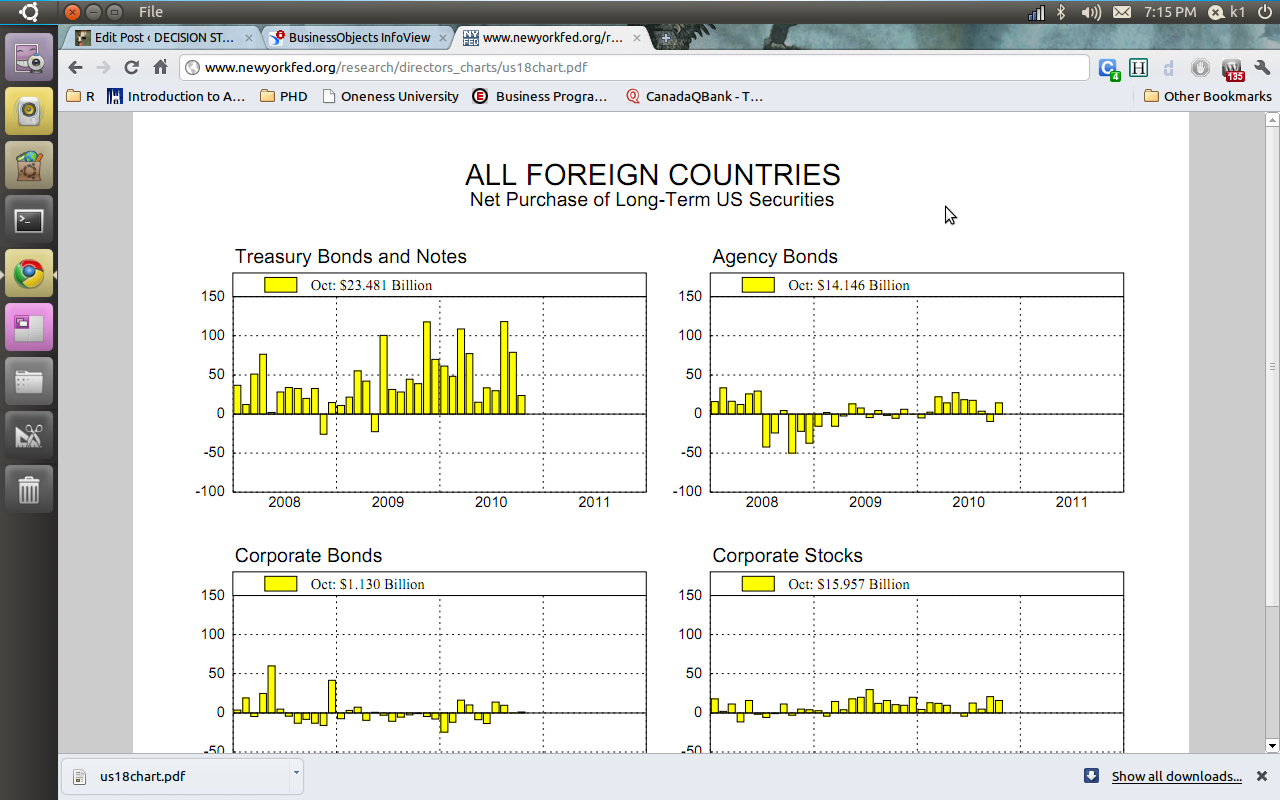
2) The Reserve bank of India choose Business Objects and gives you a proper drilldown kind of graph and tables. ( thats a lot of heavy metal and iron ore China needs from India 😉 😉
You can see the screenshots of the various visualization tools of the New York Fed Reserve Bank and Indian Reserve Bank- if the US Fed is serious about cutting the debt maybe it should start publishing better visuals
R Authors get more choice and variety now-
http://www.mail-archive.com/r-help@r-project.org/msg122965.html
We are pleased to announce the launch of a new series of books on R.

Chapman & Hall/CRC: The R Series

Aims and Scope
This book series reflects the recent rapid growth in the development and
application of R, the programming language and software environment for
statistical computing and graphics. R is now widely used in academic research,
education, and industry. It is constantly growing, with new versions of the
core software released regularly and more than 2,600 packages available. It is
difficult for the documentation to keep pace with the expansion of the
software, and this vital book series provides a forum for the publication of
books covering many aspects of the development and application of R.

The scope of the series is wide, covering three main threads:
• Applications of R to specific disciplines such as biology, epidemiology,
genetics, engineering, finance, and the social sciences.
• Using R for the study of topics of statistical methodology, such as linear
and mixed modeling, time series, Bayesian methods, and missing data.
• The development of R, including programming, building packages, and graphics.

The books will appeal to programmers and developers of R software, as well as
applied statisticians and data analysts in many fields. The books will feature
detailed worked examples and R code fully integrated into the text, ensuring
their usefulness to researchers, practitioners and students.

Series Editors
John M. Chambers (Department of Statistics, Stanford University, USA;
j...@stat.stanford.edu)
Torsten Hothorn (Institut für Statistik, Ludwig-Maximilians-Universität,
München, Germany; torsten.hoth...@stat.uni-muenchen.de)
Duncan Temple Lang (Department of Statistics, University of California, Davis,
USA; dun...@wald.ucdavis.edu)
Hadley Wickham (Department of Statistics, Rice University, Houston, Texas, USA;
had...@rice.edu)

Call for Proposals
We are interested in books covering all aspects of the development and
application of R software. If you have an idea for a book, please contact one
of the series editors above or one of the Chapman & Hall/CRC statistics
acquisitions editors below. Please provide brief details of topic, audience,
aims and scope, and include an outline if possible.

We look forward to hearing from you.

Best regards,Rob Calver (rob.cal...@informa.com)
David Grubbs (david.gru...@taylorandfrancis.com)
John Kimmel (john.kim...@taylorandfrancis.com)
This promotional offer enables you to try a limited amount of the Windows Azure platform at no charge. The subscription includes a base level of monthly compute hours, storage, data transfers, a SQL Azure database, Access Control transactions and Service Bus connections at no charge. Please note that any usage over this introductory base level will be charged at standard rates.
Included each month at no charge:
Windows Azure
25 hours of a small compute instance
500 MB of storage
10,000 storage transactions
SQL Azure
1GB Web Edition database (available for first 3 months only)
Windows Azure platform AppFabric
100,000 Access Control transactions
2 Service Bus connections
Data Transfers (per region)
500 MB in
500 MB out
Any monthly usage in excess of the above amounts will be charged at the standard rates. This introductory special will end on March 31, 2011 and all usage will then be charged at the standard rates.
As part of AWS’s Free Usage Tier, new AWS customers can get started with Amazon EC2 for free. Upon sign-up, new AWScustomers receive the following EC2 services each month for one year:
750 hours of EC2 running Linux/Unix Micro instance usage
750 hours of Elastic Load Balancing plus 15 GB data processing
10 GB of Amazon Elastic Block Storage (EBS) plus 1 million IOs, 1 GB snapshot storage, 10,000 snapshot Get Requests and 1,000 snapshot Put Requests
15 GB of bandwidth in and 15 GB of bandwidth out aggregated across all AWS services
Paid Instances-
Standard On-Demand Instances
Linux/UNIX Usage
Windows Usage
Small (Default)
$0.085 per hour
$0.12 per hour
Large
$0.34 per hour
$0.48 per hour
Extra Large
$0.68 per hour
$0.96 per hour
Micro On-Demand Instances
Micro
$0.02 per hour
$0.03 per hour
High-Memory On-Demand Instances
Extra Large
$0.50 per hour
$0.62 per hour
Double Extra Large
$1.00 per hour
$1.24 per hour
Quadruple Extra Large
$2.00 per hour
$2.48 per hour
High-CPU On-Demand Instances
Medium
$0.17 per hour
$0.29 per hour
Extra Large
$0.68 per hour
$1.16 per hour
Cluster Compute Instances
Quadruple Extra Large
$1.60 per hour
N/A*
Cluster GPU Instances
Quadruple Extra Large
$2.10 per hour
N/A*
* Windows is not currently available for Cluster Compute or Cluster GPU Instances.
NOTE- Amazon Instance definitions differ slightly from Azure definitions
Instances of this family are well suited for most applications.
Small Instance – default*
1.7 GB memory
1 EC2 Compute Unit (1 virtual core with 1 EC2 Compute Unit)
160 GB instance storage
32-bit platform
I/O Performance: Moderate
API name: m1.small
Large Instance
7.5 GB memory
4 EC2 Compute Units (2 virtual cores with 2 EC2 Compute Units each)
850 GB instance storage
64-bit platform
I/O Performance: High
API name: m1.large
Extra Large Instance
15 GB memory
8 EC2 Compute Units (4 virtual cores with 2 EC2 Compute Units each)
1,690 GB instance storage
64-bit platform
I/O Performance: High
API name: m1.xlarge
Micro Instances
Instances of this family provide a small amount of consistent CPU resources and allow you to burst CPU capacity when additional cycles are available. They are well suited for lower throughput applications and web sites that consume significant compute cycles periodically.
Micro Instance
613 MB memory
Up to 2 EC2 Compute Units (for short periodic bursts)
EBS storage only
32-bit or 64-bit platform
I/O Performance: Low
API name: t1.micro
High-Memory Instances
Instances of this family offer large memory sizes for high throughput applications, including database and memory caching applications.
High-Memory Extra Large Instance
17.1 GB of memory
6.5 EC2 Compute Units (2 virtual cores with 3.25 EC2 Compute Units each)
420 GB of instance storage
64-bit platform
I/O Performance: Moderate
API name: m2.xlarge
High-Memory Double Extra Large Instance
34.2 GB of memory
13 EC2 Compute Units (4 virtual cores with 3.25 EC2 Compute Units each)
850 GB of instance storage
64-bit platform
I/O Performance: High
API name: m2.2xlarge
High-Memory Quadruple Extra Large Instance
68.4 GB of memory
26 EC2 Compute Units (8 virtual cores with 3.25 EC2 Compute Units each)
1690 GB of instance storage
64-bit platform
I/O Performance: High
API name: m2.4xlarge
High-CPU Instances
Instances of this family have proportionally more CPU resources than memory (RAM) and are well suited for compute-intensive applications.
High-CPU Medium Instance
1.7 GB of memory
5 EC2 Compute Units (2 virtual cores with 2.5 EC2 Compute Units each)
350 GB of instance storage
32-bit platform
I/O Performance: Moderate
API name: c1.medium
High-CPU Extra Large Instance
7 GB of memory
20 EC2 Compute Units (8 virtual cores with 2.5 EC2 Compute Units each)
1690 GB of instance storage
64-bit platform
I/O Performance: High
API name: c1.xlarge
Cluster Compute Instances
Instances of this family provide proportionally high CPU resources with increased network performance and are well suited for High Performance Compute (HPC) applications and other demanding network-bound applications. Learn more about use of this instance type for HPC applications.
Cluster Compute Quadruple Extra Large Instance
23 GB of memory
33.5 EC2 Compute Units (2 x Intel Xeon X5570, quad-core “Nehalem” architecture)
1690 GB of instance storage
64-bit platform
I/O Performance: Very High (10 Gigabit Ethernet)
API name: cc1.4xlarge
Cluster GPU Instances
Instances of this family provide general-purpose graphics processing units (GPUs) with proportionally high CPU and increased network performance for applications benefitting from highly parallelized processing, including HPC, rendering and media processing applications. While Cluster Compute Instances provide the ability to create clusters of instances connected by a low latency, high throughput network, Cluster GPU Instances provide an additional option for applications that can benefit from the efficiency gains of the parallel computing power of GPUs over what can be achieved with traditional processors. Learn moreabout use of this instance type for HPC applications.
Cluster GPU Quadruple Extra Large Instance
22 GB of memory
33.5 EC2 Compute Units (2 x Intel Xeon X5570, quad-core “Nehalem” architecture)
2 x NVIDIA Tesla “Fermi” M2050 GPUs
1690 GB of instance storage
64-bit platform
I/O Performance: Very High (10 Gigabit Ethernet)
API name: cg1.4xlarge
versus-
Windows Azure compute instances come in five unique sizes to enable complex applications and workloads.
Compute Instance Size
CPU
Memory
Instance Storage
I/O Performance
Extra Small
1 GHz
768 MB
20 GB*
Low
Small
1.6 GHz
1.75 GB
225 GB
Moderate
Medium
2 x 1.6 GHz
3.5 GB
490 GB
High
Large
4 x 1.6 GHz
7 GB
1,000 GB
High
Extra large
8 x 1.6 GHz
14 GB
2,040 GB
High
*There is a limitation on the Virtual Hard Drive (VHD) size if you are deploying a Virtual Machine role on an extra small instance. The VHD can only be up to 15 GB.





 DECISION STATS