1.) Open a Flattr.com account here. This should be reasonably straightforward. A monkey hitting keys at random could manage it in about half an hour. It took me less than 45 minutes.
2.) In the top right of ‘Your Flattr Dashboard’ there is a button ‘Submit Thing’. Click on that and enter the details of your blog – the URL (like decisionstats.com for me) and a description (make that atleast 3 sentences). Flattr will create a page – for example,https://flattr.com/thing/162940/example-blog
Now go to your wordpress dashboard- sharing tab.
/wp-admin/options-general.php?page=sharing
Add the following lines to your New Add Service in respective tabs
URL= https://flattr.com/thing/175763/DecisionStats (change this to the one created for yourself instep2 above)
Before you rev up those keyboards, and shoot off a snarky comment- consider this statement- there are many ways to run (and ruin economies). But they still have not found a replacement for money. Yes Happiness is important. Search Engine is good.
So unless they start a new branch of economics with lots more motivational theory and psychology and lot less quant especially for open source projects, money ,revenue, sales is the only true measure of success in enterprise software. Particularly if you have competitors who are making more money selling the same class of software.
A highly optimized blog post or web content can get you a lot of attention just like Rebecca Black’s video (provided it passes through the new quality metrics \change*/ in the Search Engine)
But if the underlying content is weak, or based on a shoddy understanding of the content-it can drive lots of horrid comments as well as ensuring that bad word of mouth is spread about the content or you/despite your hard work.
An example of this is copy and paste journalism especially in technology circles, where even a bigger Page Ranked website /blog can get away with scraping or stealing content from a lower page ranked website (or many websites) after adding a cursory “expert comment”. This is also true when someone who is basically a corporate communication specialist (or PR -public relations) person is given a techinical text and encourage to write about it without completely understanding it.
A mild technical defect in the search engine algorithm is that it does not seem to pay attention to when the content was published, so the copying website or blog actually can get by as fresher content even if it is practically has 90% of the same words). The second flaw is over punishment or manual punishment of excessive linking – this can encourage search optimization minded people to hoard links or discourage trackbacks.
A free internet is one which promotes free sharing of content and does not encourage stealing or un-authorized scraping or content copying. Unfortunately current search engine optimization can encourage scraping and content copying without paying too much attention to origin of the words.
In addition the analytical rigor by which search algorithms search your inboxes (as in search all emails for a keyword) or media rich sites (like Youtube) are quite on a different level of quality altogether. The chances of garbage results are much more while searching for media content and/or emails.
Snappy is a compression/decompression library. It does not aim for maximum compression, or compatibility with any other compression library; instead, it aims for very high speeds and reasonable compression. For instance, compared to the fastest mode of zlib, Snappy is an order of magnitude faster for most inputs, but the resulting compressed files are anywhere from 20% to 100% bigger. On a single core of a Core i7 processor in 64-bit mode, Snappy compresses at about 250 MB/sec or more and decompresses at about 500 MB/sec or more.
Snappy is widely used inside Google, in everything from BigTable and MapReduce to our internal RPC systems. (Snappy has previously been referred to as “Zippy” in some presentations and the likes.)
For more information, please see the README. Benchmarks against a few other compression libraries (zlib, LZO, LZF, FastLZ, and QuickLZ) are included in the source code distribution.
Introduction
============
Snappy is a compression/decompression library. It does not aim for maximum
compression, or compatibility with any other compression library; instead,
it aims for very high speeds and reasonable compression. For instance,
compared to the fastest mode of zlib, Snappy is an order of magnitude faster
for most inputs, but the resulting compressed files are anywhere from 20% to
100% bigger. (For more information, see “Performance”, below.)
Snappy has the following properties:
* Fast: Compression speeds at 250 MB/sec and beyond, with no assembler code.
See “Performance” below.
* Stable: Over the last few years, Snappy has compressed and decompressed
petabytes of data in Google’s production environment. The Snappy bitstream
format is stable and will not change between versions.
* Robust: The Snappy decompressor is designed not to crash in the face of
corrupted or malicious input.
* Free and open source software: Snappy is licensed under the Apache license,
version 2.0. For more information, see the included COPYING file.
Snappy has previously been called “Zippy” in some Google presentations
and the like.
Performance
===========
Snappy is intended to be fast. On a single core of a Core i7 processor
in 64-bit mode, it compresses at about 250 MB/sec or more and decompresses at
about 500 MB/sec or more. (These numbers are for the slowest inputs in our
benchmark suite; others are much faster.) In our tests, Snappy usually
is faster than algorithms in the same class (e.g. LZO, LZF, FastLZ, QuickLZ,
etc.) while achieving comparable compression ratios.
Typical compression ratios (based on the benchmark suite) are about 1.5-1.7x
for plain text, about 2-4x for HTML, and of course 1.0x for JPEGs, PNGs and
other already-compressed data. Similar numbers for zlib in its fastest mode
are 2.6-2.8x, 3-7x and 1.0x, respectively. More sophisticated algorithms are
capable of achieving yet higher compression rates, although usually at the
expense of speed. Of course, compression ratio will vary significantly with
the input.
Although Snappy should be fairly portable, it is primarily optimized
for 64-bit x86-compatible processors, and may run slower in other environments.
In particular:
– Snappy uses 64-bit operations in several places to process more data at
once than would otherwise be possible.
– Snappy assumes unaligned 32- and 64-bit loads and stores are cheap.
On some platforms, these must be emulated with single-byte loads
and stores, which is much slower.
– Snappy assumes little-endian throughout, and needs to byte-swap data in
several places if running on a big-endian platform.
Experience has shown that even heavily tuned code can be improved.
Performance optimizations, whether for 64-bit x86 or other platforms,
are of course most welcome; see “Contact”, below.
Usage
=====
Note that Snappy, both the implementation and the interface,
is written in C++.
To use Snappy from your own program, include the file “snappy.h” from
your calling file, and link against the compiled library.
There are many ways to call Snappy, but the simplest possible is
snappy::Compress(input, &output);
and similarly
snappy::Uncompress(input, &output);
where “input” and “output” are both instances of std::string.
GrapheR is a Graphical User Interface created for simple graphs.
Depends: R (>= 2.10.0), tcltk, mgcv Description: GrapheR is a multiplatform user interface for drawing highly customizable graphs in R. It aims to be a valuable help to quickly draw publishable graphs without any knowledge of R commands. Six kinds of graphs are available: histogram, box-and-whisker plot, bar plot, pie chart, curve and scatter plot. License: GPL-2 LazyLoad: yes Packaged: 2011-01-24 17:47:17 UTC; Maxime Repository: CRAN Date/Publication: 2011-01-24 18:41:47
It is bi-lingual (English and French) and can import in text and csv files
The intention is for even non users of R, to make the simple types of Graphs.
The user interface is quite cleanly designed. It is thus aimed as a data visualization GUI, but for a more basic level than Deducer.
Easy to rename axis ,graph titles as well use sliders for changing line thickness and color
Disadvantages of using GrapheR
Lack of documentation or help. Especially tips on mouseover of some options should be done.
Some of the terms like absicca or ordinate axis may not be easily understood by a business user.
Default values of color are quite plain (black font on white background).
Can flood terminal with lots of repetitive warnings (although use of warnings() function limits it to top 50)
Some of axis names can be auto suggested based on which variable s being chosen for that axis.
Package name GrapheR refers to a graphical calculator in Mac OS – this can hinder search engine results
Using GrapheR
Data Input -Data Input can be customized for CSV and Text files.
GrapheR gives information on loaded variables (numeric versus Factors)
It asks you to choose the type of Graph
It then asks for usual Graph Inputs (see below). Note colors can be customized (partial window). Also number of graphs per Window can be easily customized
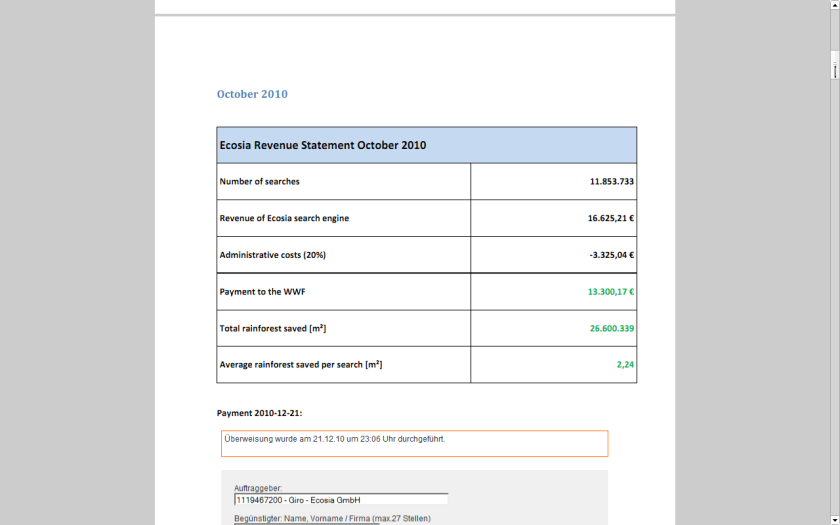
I recently found an interesting example of a website that both makes a lot of money and yet is much more efficient than any free or non profit. It is called ECOSIA
If you see a website that wants to balance administrative costs plus have a transparent way to make the world better- this is a great example.
World’s largest tropical forest reserve (38,867 square kilometers, or about the size of Switzerland)
Home to about 14% of all amphibian species and roughly 54% of all bird species in the Amazon – not to mention large populations of at least eight threatened species, including the jaguar
Includes part of the Guiana Shield containing 25% of world’s remaining tropical rainforests – 80 to 90% of which are still pristine
Holds the last major unpolluted water reserves in the Neotropics, containing approximately 20% of all of the Earth’s water
One of the last tropical regions on Earth vastly unaltered by humans
Significant contributor to climatic regulation via heat absorption and carbon storage
Click per milli (or CPM) gives you a very low low conversion compared to contacting ad sponsor directly.
But its a great data experiment-
as you can monitor which companies are likely to be advertised on your site (assume google knows more about their algols than you will)
which formats -banner or text or flash have what kind of conversion rates
what are the expected pay off rates from various keywords or companies (like business intelligence software, predictive analytics software and statistical computing software are similar but have different expected returns (if you remember your eco class)
NOW- Based on above data, you know whats your minimum baseline to expect from a private advertiser than a public, crowd sourced search engine one (like Google or Bing)
Lets say if you have 100000 views monthly. and assume one out of 1000 page views will lead to a click. Say the advertiser will pay you 1 $ for every 1 click (=1000 impressions)
Then your expected revenue is $100.But if your clicks are priced at 2.5$ for every click , and your click through rate is now 3 out of 1000 impressions- (both very moderate increases that can done by basic placement optimization of ad type, graphics etc)-your new revenue is 750$.
Be a good Samaritan- you decide to share some of this with your audience -like 4 Amazon books per month ( or I free Amazon book per week)- That gives you a cost of 200$, and leaves you with some 550$.
Wait! it doesnt end there- Adam Smith‘s invisible hand moves on .
You say hmm let me put 100 $ for an annual paper writing contest of $1000, donate $200 to one laptop per child ( or to Amazon rain forests or to Haiti etc etc etc), pay $100 to your upgraded server hosting, and put 350$ in online advertising. say $200 for search engines and $150 for Facebook.
Woah!
Month 1 would should see more people visiting you for the first time. If you have a good return rate (returning visitors as a %, and low bounce rate (visits less than 5 secs)- your traffic should see atleast a 20% jump in new arrivals and 5-10 % in long term arrivals. Ignoring bounces- within three months you will have one of the following
1) An interesting case study on statistics on online and social media advertising, tangible motivations for increasing community response , and some good data for study
2) hopefully better cost management of your server expenses
3)very hopefully a positive cash flow
you could even set a percentage and share the monthly (or annually is better actions) to your readers and advertisers.
go ahead- change the world!
the key paradigms here are sharing your traffic and revenue openly to everyone
donating to a suitable cause
helping increase awareness of the suitable cause
basing fixed percentages rather than absolute numbers to ensure your site and cause are sustained for years.

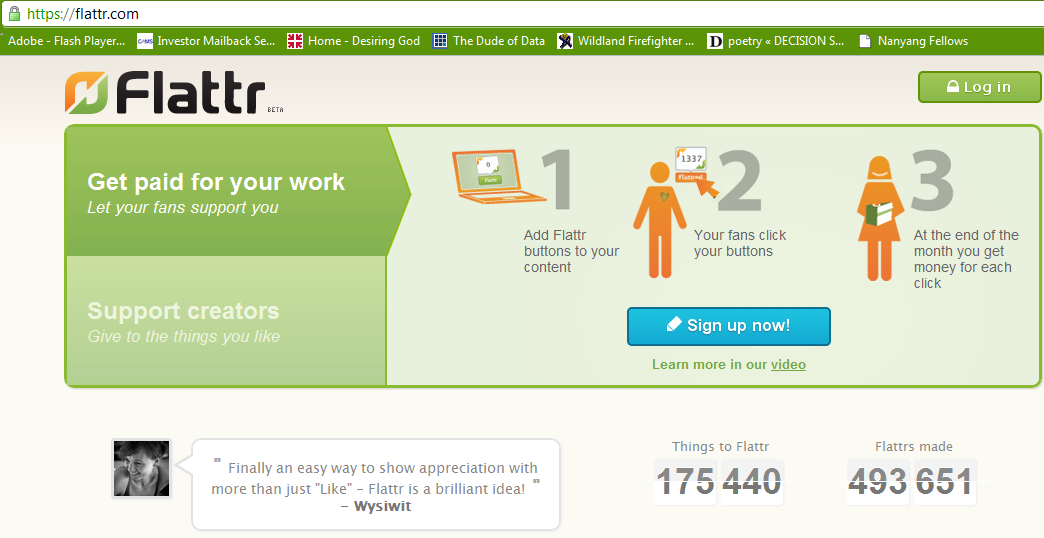 and how to enable it on WordPress.com
 If you have a non WordPress blog see instructions at http://markup.io/v/jz3wv155bsfg or screenshot of instructions here-



 DECISION STATS