Save the Data

Breakdown of political party representation in...
Image via Wikipedia

I just read an online cause here-

http://sunlightfoundation.com/savethedata/

Some of the most important technology programs that keep Washington accountable are in danger of being eliminated. Data.gov, USASpending.gov, the IT Dashboard and other federal data transparency and government accountability programs are facing a massive budget cut, despite only being a tiny fraction of the national budget. Help save the data and make sure that Congress doesn’t leave the American people in the dark.

I wonder why the federal government/ non profit agencies can help create a SPARQL database, and in days of cloud computing, why a tech major cannot donate storage space to it, after all despite US corporate tax rate being high, US technological companies do end up paying a lower rate thanks to tax breaks/routing overseas revenue.

In the new age data is power, and the US has led in its mission to use technology to further its own values even especially in Middle East. The datasets should be made public and transitioned to the private sector/academia for research and re designing for data augmentation with out straining the massive deficit /borrowing/ fighting 3 wars. Of particular interest would be datasets of campaign finances  and donors especially given large number of retail/small donors/internet marketing in elections as it will also help serve as an example of democracy and change. Even countries like China can create a corruption/expense efficiency tracking internal dashboard with restricted rights to help with rural and urban governance.

Top Ten Graphs for Business Analytics -Pie Charts (1/10)

I have not been really posting or writing worthwhile on the website for some time, as I am still busy writing ” R for Business Analytics” which I hope to get out before year end. However while doing research for that, I came across many types of graphs and what struck me is the actual usage of some kinds of graphs is very different in business analytics as compared to statistical computing.

The criterion of top ten graphs is as follows-

1) Usage-The order in which they appear is not strictly in terms of desirability but actual frequency of usage. So a frequently used graph like box plot would be recommended above say a violin plot.

2) Adequacy- Data Visualization paradigms change over time- but the need for accurate conveying of maximum information in a minium space without overwhelming reader or misleading data perceptions.

3) Ease of creation- A simpler graph created by a single function is more preferrable to writing 4-5 lines of code to create an elaborate graph.

4) Aesthetics– Aesthetics is relative and  in addition studies have shown visual perception varies across cultures and geographies. However , beauty is universally appreciated and a pretty graph is sometimes and often preferred over a not so pretty graph. Here being pretty is in both visual appeal without compromising perceptual inference from graphical analysis.


so When do we use a bar chart versus a line graph versus a pie chart? When is a mosaic plot more handy and when should histograms be used with density plots? The list tries to capture most of these practicalities.

Let me elaborate on some specific graphs-

1) Pie Chart- While Pie Chart is not really used much in stats computing, and indeed it is considered a misleading example of data visualization especially the skewed or two dimensional charts. However when it comes to evaluating market share at a particular instance, a pie chart is simple to understand. At the most two pie charts are needed for comparing two different snapshots, but three or more pie charts on same data at different points of time is definitely a bad case.

In R you can create piechart, by just using pie(dataset$variable)

As per official documentation, pie charts are not  recommended at all.

http://stat.ethz.ch/R-manual/R-patched/library/graphics/html/pie.html

Pie charts are a very bad way of displaying information. The eye is good at judging linear measures and bad at judging relative areas. A bar chart or dot chart is a preferable way of displaying this type of data.

Cleveland (1985), page 264: “Data that can be shown by pie charts always can be shown by a dot chart. This means that judgements of position along a common scale can be made instead of the less accurate angle judgements.” This statement is based on the empirical investigations of Cleveland and McGill as well as investigations by perceptual psychologists.

—-

Despite this, pie charts are frequently used as an important metric they inevitably convey is market share. Market share remains an important analytical metric for business.

The pie3D( ) function in the plotrix package provides 3D exploded pie charts.An exploded pie chart remains a very commonly used (or misused) chart.

From http://lilt.ilstu.edu/jpda/charts/chart%20tips/Chartstip%202.htm#Rules

we see some rules for using Pie charts.


  1. Avoid using pie charts.
  2. Use pie charts only for data that add up to some meaningful total.
  3. Never ever use three-dimensional pie charts; they are even worse than two-dimensional pies.
  4. Avoid forcing comparisons across more than one pie chart


From the R Graph Gallery (a slightly outdated but still very comprehensive graphical repository)

http://addictedtor.free.fr/graphiques/RGraphGallery.php?graph=4

par(bg="gray")
pie(rep(1,24), col=rainbow(24), radius=0.9)
title(main="Color Wheel", cex.main=1.4, font.main=3)
title(xlab="(test)", cex.lab=0.8, font.lab=3)
(Note adding a grey background is quite easy in the basic graphics device as well without using an advanced graphical package)


HIGHLIGHTS from REXER Survey :R gives best satisfaction

Simple graph showing hierarchical clustering. ...
Image via Wikipedia

A Summary report from Rexer Analytics Annual Survey


HIGHLIGHTS from the 4th Annual Data Miner Survey (2010):


•   FIELDS & GOALS: Data miners work in a diverse set of fields.  CRM / Marketing has been the #1 field in each of the past four years.  Fittingly, “improving the understanding of customers”, “retaining customers” and other CRM goals are also the goals identified by the most data miners surveyed.


•   ALGORITHMS: Decision trees, regression, and cluster analysis continue to form a triad of core algorithms for most data miners.  However, a wide variety of algorithms are being used.  This year, for the first time, the survey asked about Ensemble Models, and 22% of data miners report using them.
A third of data miners currently use text mining and another third plan to in the future.


•   MODELS: About one-third of data miners typically build final models with 10 or fewer variables, while about 28% generally construct models with more than 45 variables.


•   TOOLS: After a steady rise across the past few years, the open source data mining software R overtook other tools to become the tool used by more data miners (43%) than any other.  STATISTICA, which has also been climbing in the rankings, is selected as the primary data mining tool by the most data miners (18%).  Data miners report using an average of 4.6 software tools overall.  STATISTICA, IBM SPSS Modeler, and R received the strongest satisfaction ratings in both 2010 and 2009.


•   TECHNOLOGY: Data Mining most often occurs on a desktop or laptop computer, and frequently the data is stored locally.  Model scoring typically happens using the same software used to develop models.  STATISTICA users are more likely than other tool users to deploy models using PMML.


•   CHALLENGES: As in previous years, dirty data, explaining data mining to others, and difficult access to data are the top challenges data miners face.  This year data miners also shared best practices for overcoming these challenges.  The best practices are available online.


•   FUTURE: Data miners are optimistic about continued growth in the number of projects they will be conducting, and growth in data mining adoption is the number one “future trend” identified.  There is room to improve:  only 13% of data miners rate their company’s analytic capabilities as “excellent” and only 8% rate their data quality as “very strong”.


Please contact us if you have any questions about the attached report or this annual research program.  The 5th Annual Data Miner Survey will be launching next month.  We will email you an invitation to participate.


Information about Rexer Analytics is available at www.RexerAnalytics.com. Rexer Analytics continues their impressive journey see http://www.rexeranalytics.com/Clients.html

|My only thought- since most data miners are using multiple tools including free tools as well as paid software, Perhaps a pie chart of market share by revenue and volume would be handy.

Also some ideas on comparing diverse data mining projects by data size, or complexity.


Lyx Releases 2

Ubuntu Login
Image via Wikipedia

Lyx releases new version- now if only there was a SIMPLE way to put R code in a Lyx existing text class (having tried Sweave and sweaved myself into knots ! 😦

and I hope Ubuntu Linux 10.10  netbook fixes the curious case of disappearing menu bar in Lyx

see https://bugs.launchpad.net/ubuntu/+source/indicator-appmenu/+bug/619811

(Hint start Lyx using from the terminal:
QT_X11_NO_NATIVE_MENUBAR=1 lyx)

Latest News from the

http://www.lyx.org/News#item2

We are pleased to announce the release of LyX 1.6.9


Beta Release: LyX 2.0.0 beta 4 released.

February 6, 2011

We are pleased to announce the fourth public pre-release of LyX 2.0.0.
Except usual bugfixing we fixed random crashes connected with the new background export and compilation feature.

As far as new features is considered it is now possible

  • to set the table width,
  • customize the language package per document,
  • export LyX files as a single archive containing linked material (e.g. images) directly via export menu.


Since this is most probably the last beta release we also added convertor for old (1.6) preference files which are automatically checked on the startup now.


R Commander Plugins-20 and growing!

First graphical user interface in 1973.
Image via Wikipedia
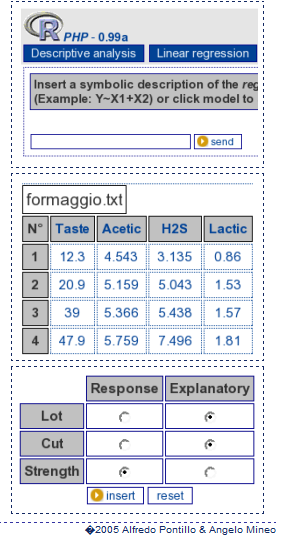
R Commander Extensions: Enhancing a Statistical Graphical User Interface by extending menus to statistical packages

R Commander ( see paper by Prof J Fox at http://www.jstatsoft.org/v14/i09/paper ) is a well known and established graphical user interface to the R analytical environment.
While the original GUI was created for a basic statistics course, the enabling of extensions (or plug-ins  http://www.r-project.org/doc/Rnews/Rnews_2007-3.pdf ) has greatly enhanced the possible use and scope of this software. Here we give a list of all known R Commander Plugins and their uses along with brief comments.

  1. DoE – http://cran.r-project.org/web/packages/RcmdrPlugin.DoE/RcmdrPlugin.DoE.pdf
  2. doex
  3. EHESampling
  4. epack- http://cran.r-project.org/web/packages/RcmdrPlugin.epack/RcmdrPlugin.epack.pdf
  5. Export- http://cran.r-project.org/web/packages/RcmdrPlugin.Export/RcmdrPlugin.Export.pdf
  6. FactoMineR
  7. HH
  8. IPSUR
  9. MAc- http://cran.r-project.org/web/packages/RcmdrPlugin.MAc/RcmdrPlugin.MAc.pdf
  10. MAd
  11. orloca
  12. PT
  13. qcc- http://cran.r-project.org/web/packages/RcmdrPlugin.qcc/RcmdrPlugin.qcc.pdf and http://cran.r-project.org/web/packages/qcc/qcc.pdf
  14. qual
  15. SensoMineR
  16. SLC
  17. sos
  18. survival-http://cran.r-project.org/web/packages/RcmdrPlugin.survival/RcmdrPlugin.survival.pdf
  19. SurvivalT
  20. Teaching Demos

Note the naming convention for above e plugins is always with a Prefix of “RCmdrPlugin.” followed by the names above
Also on loading a Plugin, it must be already installed locally to be visible in R Commander’s list of load-plugin, and R Commander loads the e-plugin after restarting.Hence it is advisable to load all R Commander plugins in the beginning of the analysis session.

However the notable E Plugins are
1) DoE for Design of Experiments-
Full factorial designs, orthogonal main effects designs, regular and non-regular 2-level fractional
factorial designs, central composite and Box-Behnken designs, latin hypercube samples, and simple D-optimal designs can currently be generated from the GUI. Extensions to cover further latin hypercube designs as well as more advanced D-optimal designs (with blocking) are planned for the future.
2) Survival- This package provides an R Commander plug-in for the survival package, with dialogs for Cox models, parametric survival regression models, estimation of survival curves, and testing for differences in survival curves, along with data-management facilities and a variety of tests, diagnostics and graphs.
3) qcc -GUI for  Shewhart quality control charts for continuous, attribute and count data. Cusum and EWMA charts. Operating characteristic curves. Process capability analysis. Pareto chart and cause-and-effect chart. Multivariate control charts
4) epack- an Rcmdr “plug-in” based on the time series functions. Depends also on packages like , tseries, abind,MASS,xts,forecast. It covers Log-Exceptions garch
and following Models -Arima, garch, HoltWinters
5)Export- The package helps users to graphically export Rcmdr output to LaTeX or HTML code,
via xtable() or Hmisc::latex(). The plug-in was originally intended to facilitate exporting Rcmdr
output to formats other than ASCII text and to provide R novices with an easy-to-use,
easy-to-access reference on exporting R objects to formats suited for printed output. The
package documentation contains several pointers on creating reports, either by using
conventional word processors or LaTeX/LyX.
6) MAc- This is an R-Commander plug-in for the MAc package (Meta-Analysis with
Correlations). This package enables the user to conduct a meta-analysis in a menu-driven,
graphical user interface environment (e.g., SPSS), while having the full statistical capabilities of
R and the MAc package. The MAc package itself contains a variety of useful functions for
conducting a research synthesis with correlational data. One of the unique features of the MAc
package is in its integration of user-friendly functions to complete the majority of statistical steps
involved in a meta-analysis with correlations. It uses recommended procedures as described in
The Handbook of Research Synthesis and Meta-Analysis (Cooper, Hedges, & Valentine, 2009).

A query to help for ??Rcmdrplugins reveals the following information which can be quite overwhelming given that almost 20 plugins are now available-

RcmdrPlugin.DoE::DoEGlossary
Glossary for DoE terminology as used in
RcmdrPlugin.DoE
RcmdrPlugin.DoE::Menu.linearModelDesign
RcmdrPlugin.DoE Linear Model Dialog for
experimental data
RcmdrPlugin.DoE::Menu.rsm
RcmdrPlugin.DoE response surface model Dialog
for experimental data
RcmdrPlugin.DoE::RcmdrPlugin.DoE-package
R-Commander plugin package that implements
design of experiments facilities from packages
DoE.base, FrF2 and DoE.wrapper into the
R-Commander
RcmdrPlugin.DoE::RcmdrPlugin.DoEUndocumentedFunctions
Functions used in menus
RcmdrPlugin.doex::ranblockAnova
Internal RcmdrPlugin.doex objects
RcmdrPlugin.doex::RcmdrPlugin.doex-package
Install the DOEX Rcmdr Plug-In
RcmdrPlugin.EHESsampling::OpenSampling1
Internal functions for menu system of
RcmdrPlugin.EHESsampling
RcmdrPlugin.EHESsampling::RcmdrPlugin.EHESsampling-package
Help with EHES sampling
RcmdrPlugin.Export::RcmdrPlugin.Export-package
Graphically export objects to LaTeX or HTML
RcmdrPlugin.FactoMineR::defmacro
Internal RcmdrPlugin.FactoMineR objects
RcmdrPlugin.FactoMineR::RcmdrPlugin.FactoMineR
Graphical User Interface for FactoMineR
RcmdrPlugin.IPSUR::IPSUR-package
An IPSUR Plugin for the R Commander
RcmdrPlugin.MAc::RcmdrPlugin.MAc-package
Meta-Analysis with Correlations (MAc) Rcmdr
Plug-in
RcmdrPlugin.MAd::RcmdrPlugin.MAd-package
Meta-Analysis with Mean Differences (MAd) Rcmdr
Plug-in
RcmdrPlugin.orloca::activeDataSetLocaP
RcmdrPlugin.orloca: A GUI for orloca-package
(internal functions)
RcmdrPlugin.orloca::RcmdrPlugin.orloca-package
RcmdrPlugin.orloca: A GUI for orloca-package
RcmdrPlugin.orloca::RcmdrPlugin.orloca.es
RcmdrPlugin.orloca.es: Una interfaz grafica
para el paquete orloca
RcmdrPlugin.qcc::RcmdrPlugin.qcc-package
Install the Demos Rcmdr Plug-In
RcmdrPlugin.qual::xbara
Internal RcmdrPlugin.qual objects
RcmdrPlugin.qual::RcmdrPlugin.qual-package
Install the quality Rcmdr Plug-In
RcmdrPlugin.SensoMineR::defmacro
Internal RcmdrPlugin.SensoMineR objects
RcmdrPlugin.SensoMineR::RcmdrPlugin.SensoMineR
Graphical User Interface for SensoMineR
RcmdrPlugin.SLC::Rcmdr.help.RcmdrPlugin.SLC
RcmdrPlugin.SLC: A GUI for slc-package
(internal functions)
RcmdrPlugin.SLC::RcmdrPlugin.SLC-package
RcmdrPlugin.SLC: A GUI for SLC R package
RcmdrPlugin.sos::RcmdrPlugin.sos-package
Efficiently search R Help pages
RcmdrPlugin.steepness::Rcmdr.help.RcmdrPlugin.steepness
RcmdrPlugin.steepness: A GUI for
steepness-package (internal functions)
RcmdrPlugin.steepness::RcmdrPlugin.steepness
RcmdrPlugin.steepness: A GUI for steepness R
package
RcmdrPlugin.survival::allVarsClusters
Internal RcmdrPlugin.survival Objects
RcmdrPlugin.survival::RcmdrPlugin.survival-package
Rcmdr Plug-In Package for the survival Package
RcmdrPlugin.TeachingDemos::RcmdrPlugin.TeachingDemos-package
Install the Demos Rcmdr Plug-In


Computer Education grants from Google

Image representing Google as depicted in Crunc...
Image via CrunchBase

message from the official google blog-

http://googleblog.blogspot.com/2011/01/supporting-computer-science-education.html

With programs like Computer Science for High School (CS4HS), we hope to increase the number of CS majors —and therefore the number of people entering into careers in CS—by promoting computer science curriculum at the high school level.

For the fourth consecutive year, we’re funding CS4HS to invest in the next generation of computer scientists and engineers. CS4HS is a workshop for high school and middle school computer science teachers that introduces new and emerging concepts in computing and provides tips, tools and guidance on how to teach them. The ultimate goals are to “train the trainer,” develop a thriving community of high school CS teachers and spread the word about the awe and beauty of computing.

If you’re a university, community college, or technical School in the U.S., Canada, Europe, Middle East or Africa and are interested in hosting a workshop at your institution, please visit www.cs4hs.com to submit an application for grant funding.Applications will be accepted between January 18, 2011 and February 18, 2011.

In addition to submitting your application, on the CS4HS website you’ll find info on how to organize a workshop, as well as websites and agendas from last year’s participants to give you an idea of how the workshops were structured in the past. There’s also a collection ofCS4HS curriculum modules that previous participating schools have shared for future organizers to use in their own program.