Skip to content

DECISION STATS

Better Decisions === Faster Stats

  • Interviews
  • About DecisionStats
    • Decisionstats.org
  • Interviews
  • About DecisionStats
DECISION STATS

Tag: Login

R Node- and other Web Interfaces to R

vector version of this image
Image via Wikipedia

R Node is a great web interface to R.

http://squirelove.net/r-node/doku.php

Features

  • Access to a R server backend via a web browser UI
  • The web browser UI works in all modern browsers, including IE 7 and 8 (excluding SVG based graphs).
  • Username/password login (both from the browser to the R-Node server, and from the R-Node server to Rserve and R).
    • Per-user R sessions. Each user can have their own R workspace, or they can share.
  • Support for most R commands that perform statistical analysis and provide textual feedback.
  • Support for most standard R commands that provide graphical feedback via server side generation of the graphs. Some graphs (e.g. plot() can be plotted via SVG client-side as well).
  • Downloading of generated graphs.
  • Accessing R help files using help() and ? commands (Note R v2.10 altered how help is provided, so this currently is not working in R v2.10)
  • Uploading files to work with their data in R.
  • Many commands will work. Try a command, if it does not work, use the feedback button in the application to let us know.

Limitations

  • Various R functions are not supported. These include:
    • Installation of new R packages.
    • Searching of help via ??.
    • Example calls (via example()).
Of course other Web Interfaces to R are-http://cran.r-project.org/doc/FAQ/R-FAQ.html#R-Web-Interfaces
  • First and now not so updated Rweb: Web-based Statistical Analysis Last Modified: 25-Jun-1999 JSS Paper (http://www.jstatsoft.org/v04/i01/
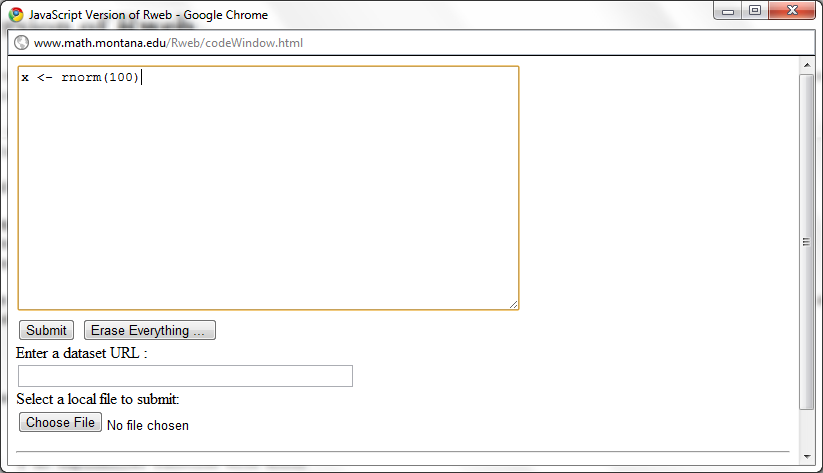


R-Online https://user.cs.tu-berlin.de/~ulfi/cgi-bin/r-online/r-online.cgi(The official FAQ seems outdated )
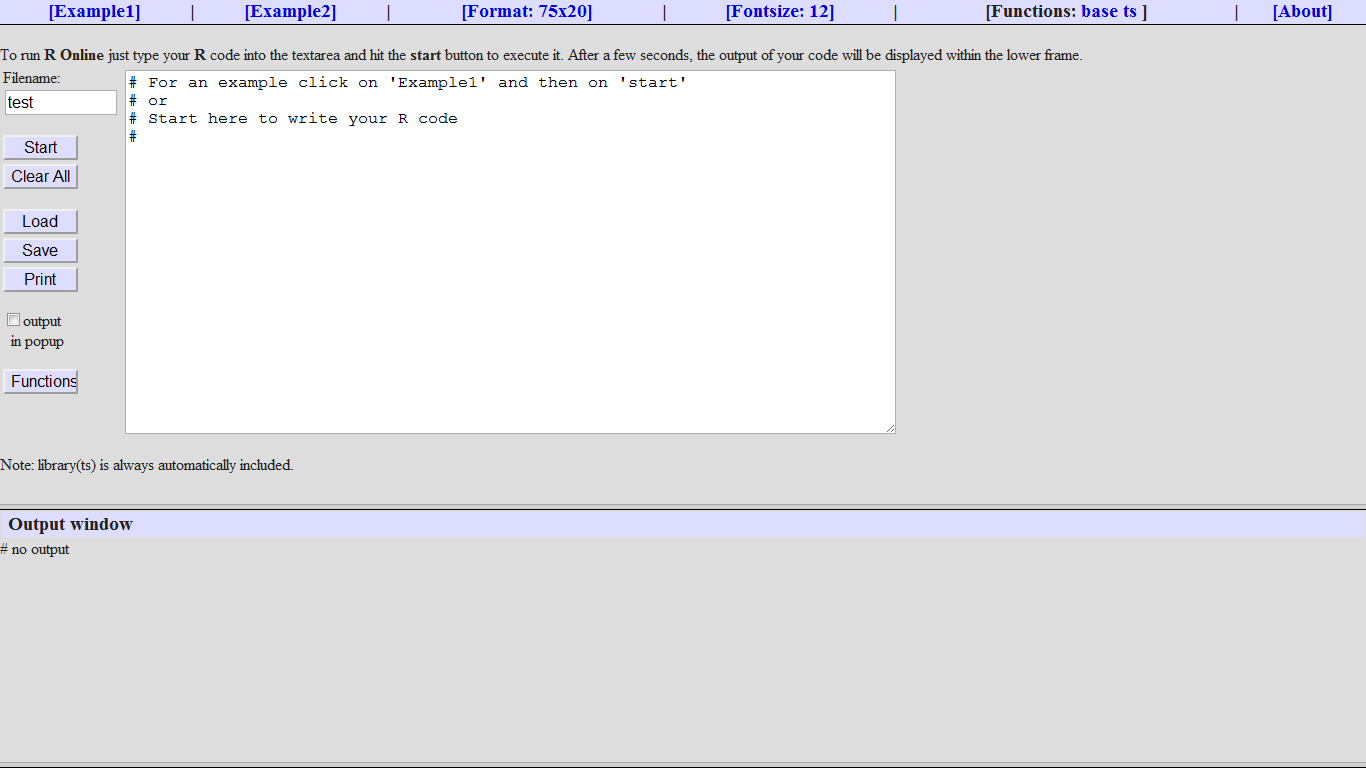
  • Rcgi  (it is not clear if the project is still active as per official FQ)  http://www.ms.uky.edu/~statweb/testR3.html
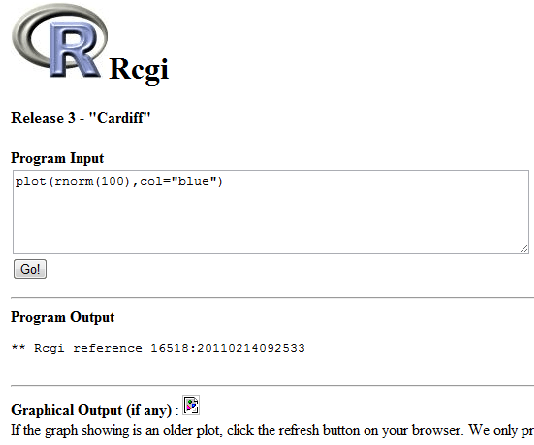
Rphp
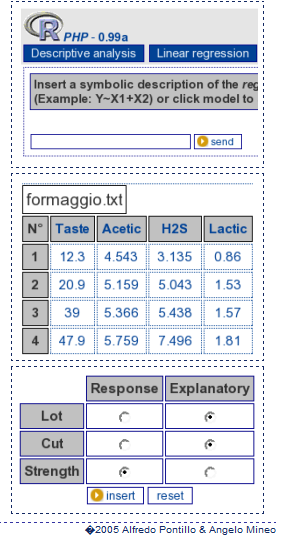
http://dssm.unipa.it/R-php/

RWui

http://sysbio.mrc-bsu.cam.ac.uk/Rwui/

R.Rsp

http://cran.r-project.org/web/packages/R.rsp/index.html

RServe

http://www.rforge.net/Rserve/

http://www.rforge.net/doc/packages/Rserve/00Index.html

RPad

http://rpad.googlecode.com/svn-history/r76/Rpad_homepage/index.html


CGIwithR

JSS paper Citation. CGIwithR: Facilities for processing Web forms using R. Journal of Statistical Software, 8(10), pp. 1-8, 2003.

A lecture on aspects of using CGI

R Apache

http://biostat.mc.vanderbilt.edu/rapache/

  • Open Infrastructure for Outcomes with a live reporting module using RSessionDA 
  • Free statistics software– Wessa server using R (see http://www.wessa.net/rwasp_arimaforecasting.wasp)

Wessa, P. (2011), Free Statistics Software, Office for Research Development and Education,
version 1.1.23-r6, URL http://www.wessa.net/
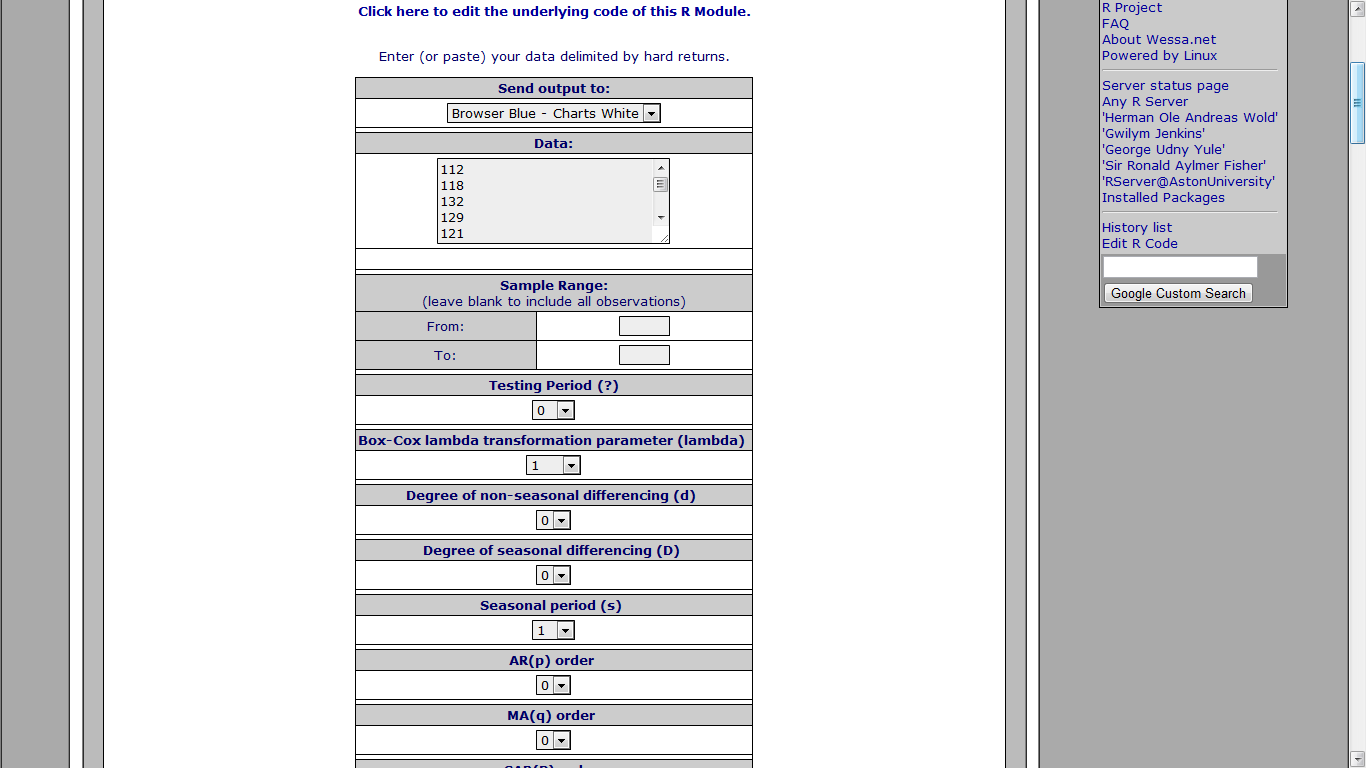
You can even see my results here
http://www.freestatistics.org/blog/index.php?v=date/2011/Feb/14/t12976948805e8vh3v1e680a0z.htm/
  • An impressive implementation of time series analysis based on R and Javascript. This web server creates separate browser windows for data entry, graphics, and procedure selection. These windows are dynamic. For example, after entering data there is no submit button to submit the data. The procedure selection window is used to start the analysis, which uses the current values in the data window.
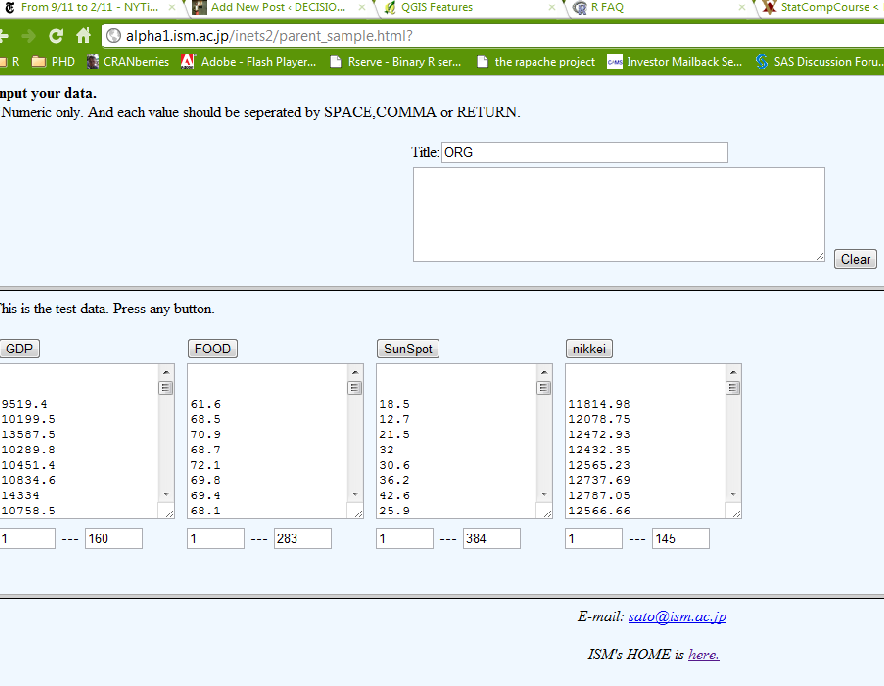
http://alpha1.ism.ac.jp/inets2/parent_sample.html?
  • Online multivariate analysis and graphical displays from PBIL, Lyon
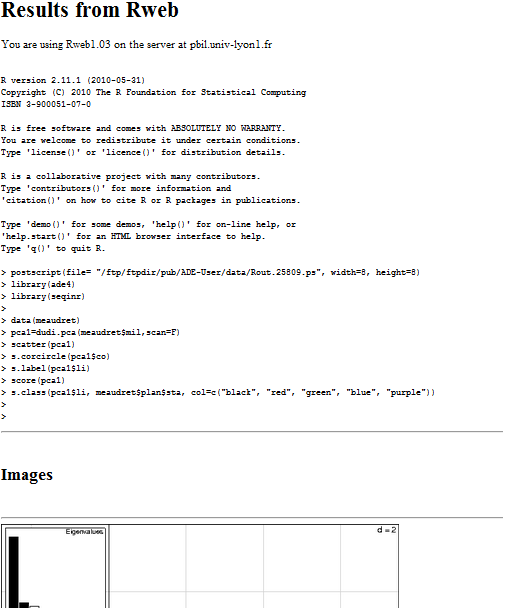
http://pbil.univ-lyon1.fr/Rweb/
  • An R web server for robust rank-based linear models
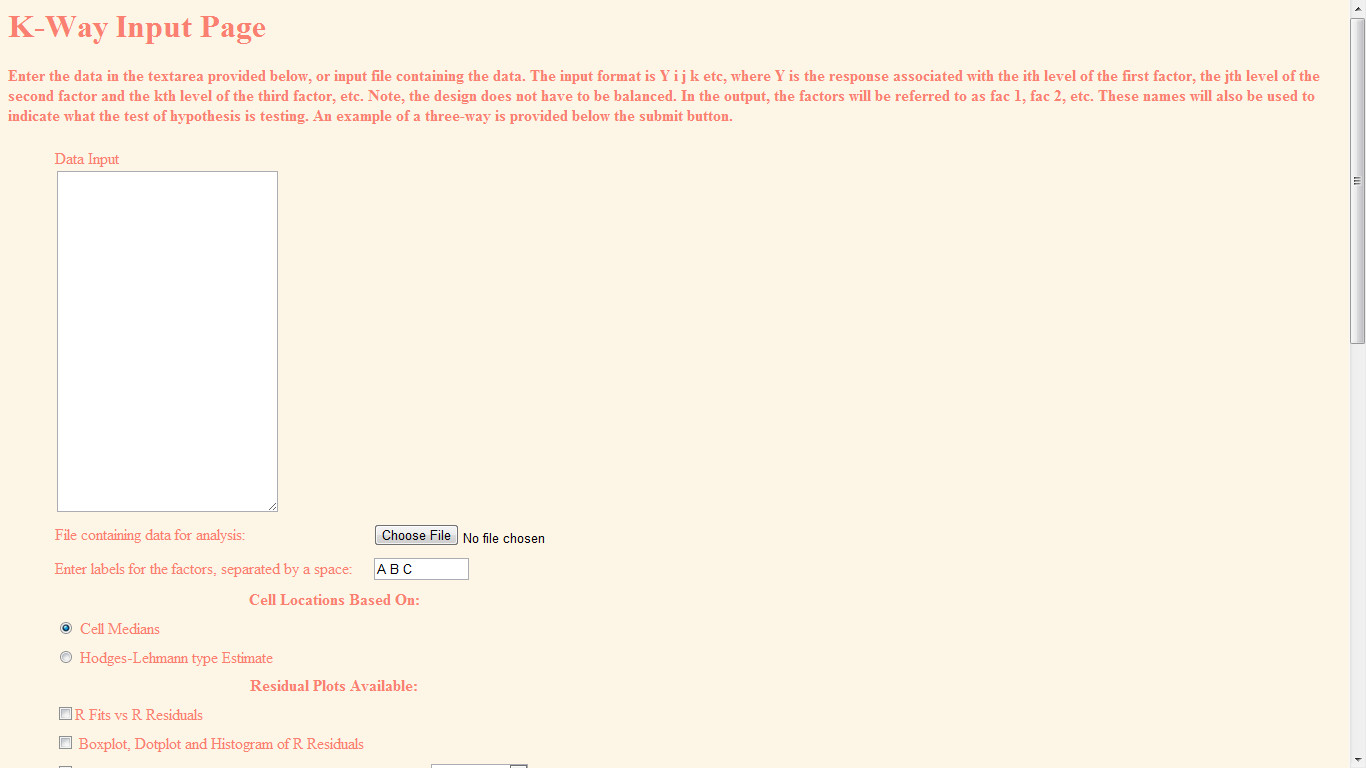
http://www.stat.wmich.edu/slab/RGLM/ (impressive except for the red font)
  • gWidgetsWWW
http://www.math.csi.cuny.edu/gWidgetsWWWrun/ex-index.R

To make an interactive GUI in gWidgets can be as easy as creating the following script:

w <- gwindow(’simple interactive GUI with one button’, visible=FALSE)
g <- ggroup(cont=w)
b <- gbutton(’click me’, cont=g, handler=function(h,...) {
gmessage(’hello world’, parent=b)
})
visible(w) <- TRUE

A big and slightly outdated  resource page from (which I used for some find and seek of resources)

http://biostat.mc.vanderbilt.edu/twiki/bin/view/Main/StatCompCourse

AND

The famous site at http://www.yeroon.net/ggplot2/ (but no sharing of this site’s  source code ,sigh!)

Thats all for now- but watch this space its exciting (to watch AND code) –

Code Enhancers for R

This page lists code editors (or IDE)

https://rforanalytics.wordpress.com/code-enhancers-for-r/

Graphical User Interfaces for R

https://rforanalytics.wordpress.com/graphical-user-interfaces-for-r/

ODBC /Databases for R

https://rforanalytics.wordpress.com/odbc-databases-for-r/

Related Articles
  • WebTunes provides Web-based iTunes interface (macworld.com)
  • 5 Reasons to Use Twitter Web Interface (madrasgeek.com)
  • Getting Started With Riak & Python (pragmaticbadger.com)
  • Rserve – Binary R server – RForge.net (rforge.net)
  • How to Run Apache and Node.js on the Same Server (readwriteweb.com)
  • Rserve – TCP/IP interface to R – RoSuDa – Lehrstuhl für Rechnerorientierte Statistik und Datenanalyse – Universität Augsburg (stats.math.uni-augsburg.de)
28.635308 77.224960

Please share:

  • Click to share on LinkedIn (Opens in new window) LinkedIn
  • Click to share on Facebook (Opens in new window) Facebook
  • Click to share on X (Opens in new window) X
Like Loading...
Unknown's avatarAuthor Ajay OhriPosted on February 14, 2011February 14, 2011Categories Analytics, InternetTags analysis, Apache, Application programming interface, browser, Button, Clients, code, data, easy, Editors, FAQ, forms, Free, graphs, GUI, Itunes, java, journal, journal of statistical, jss, live, Login, Math, module, office, python, R, reporting, research, rstats, Scalable Vector Graphics, server, sharing, space, statistical, Statistical Analysis, statistics, twitter, US, use, User interface, user interfaces, web, Web browser, web interfaces, web interfaces to R, Web server, windows, workLeave a comment on R Node- and other Web Interfaces to R

Deleting Twitter, Facebook,LinkedIn- Accepting Life

This Thanksgiving as I prayed to God for my family– I prayed to him to give me more time with my loving family. An insight or revelation struck me-

I was spending more time with my computer than with my loved ones.

Is Twitter, Facebook, LinkedIn essential to living? No

I have 1700 followers on Twitter

1100 “Friends” on Facebook, and 9429 “Connections” on Linkedin

Deleting Facebook was an emotionally wrenching decision- see this screenshot- I tried to download all my account- family photos (320 mb) but connection kept breaking-

so I had just deactivate and not delete the account. You win, Zuckenberg

How to-

Right Hand Top Corner —-Account Settings- Deactivate Account

After Facebook de activates your account- it mocks you by saying this this in YELLOW “

Your Facebook account has been deactivated.

To reactivate your account, log in using your old login email and password. You will be able to use the site like you used to.

We hope you come back soon.”


I go back to Facebook to download all my family photos before final deletion (and not just de activation)- I get this message


It may take a little while for us to gather all of your photos, wall posts, messages, and other information. We will then ask you to verify your identity in order to help protect the security of your account.

Yeah Yeah Mark.

One Down Two to Go

Deleting Twitter

Twitter was disappointingly easy-

Go to http://twitter.com/settings/account

At bottom left you see Deactivate my account.

Twitter tries to scare me now-

Is this goodbye?


This action is permanent.

Are you sure you don’t want to reconsider? Was it something we said? Tell us.

Before you deactivate your account, know this:

  • This action is permanent: account restoration is currently disabled.
  • You do not need to deactivate your account to change your username. (You can change it on the settings page. All @replies and followers will remain unchanged.)
  • Your account may be viewable on twitter.com for a few days after deactivation.
  • We have no control over content indexed by search engines like Google.
  • If you’re creating a new account and want to use the same user name, phone number and/or email address associated with this account, you must first change them on this account before you deactivate it. If you don’t, the information will be tied to this account and unavailable for use.
  • Okay, fine, deactivate my account (thats the button)
I clicked the Okay fine Button.
One more pop up-
Re-enter your Twitter password to deactivate @DecisionStats.
Ok Done-
Twitter tries to scare me again —-

You deactivated your account.

Account restoration is currently unavailable. Here is the message you agreed to before deactivating your account:

his action is permanent.

Before you deactivate your account, know this:

  • This action is permanent: account restoration is currently disabled.
  • You do not need to deactivate your account to change your username. (You can change it on the settings page. All @replies and followers will remain unchanged.)
  • Your account may be viewable on twitter.com for a few days after deactivation.
  • We have no control over content indexed by search engines like Google.
  • If you’re creating a new account and want to use the same user name, phone number and/or email address associated with this account, you must first change them on this account before you deactivate it. If you don’t, the information will be tied to this account and unavailable for use.
So Long Twitter, I gotta spend more time with my offline family okay.
And probably anyone trying to do sentiment analysis on my twitter feed for social media analytics now has an incomplete data point (hehe)
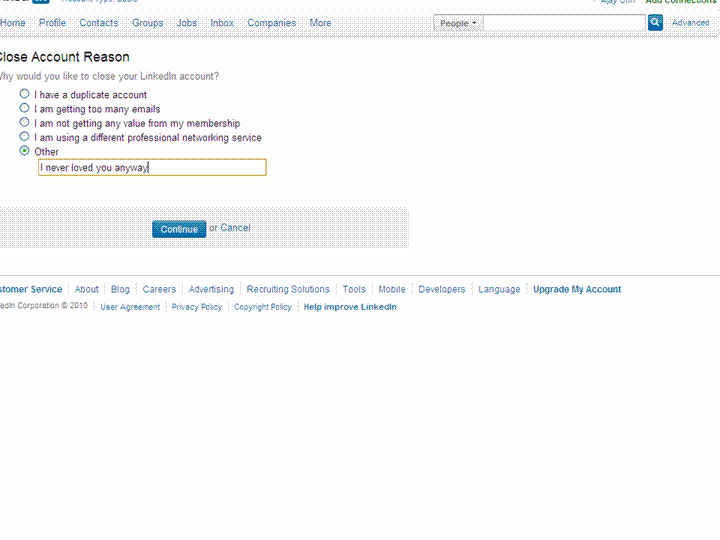
Last One- Linkedin 9349 connections are valuable- I was thinking of auctioning this on E Bay but they kicked me out.
So I just go for deletion.
I spend 10 minuted looking for the delete account button-this is getting a bit annoying now.
I finally go to
http://help.linkedin.com/
Item 4- Closing my Account-
Linkedin neither scares me nor emotionally coddles me – This is what is says-

Closing Your Account

How do I close my account?

  1. Log into the account you wish to close.
  2. Hover your cursor over your name in the top right of your home page and then click “Settings”.
  3. Click on “Close Your Account” under Personal Information.
  4. Select a reason for closing your account.
  5. Click on “Continue”.
Members should only have one LinkedIn account. Multiple accounts can prevent the ability to accept an Invitation. Closing additional accounts should resolve this dilemma. Prior to closing any secondary accounts:
  1. Inventory all connections and identify any that may be missing from the primary account you wish to keep.
  2. Send Invitations to those connections missing from the primary account.
  3. Update any profile information that maybe on other account profiles.
So I try exporting all 9300 + connections using http://www.linkedin.com/addressBookExport
I dont think I will send that many invites again- but some of these people have been good to me ( 18 of them even wrote recommendations- which are non exportable it seems)
I check my downloaded csv file- yup all 9379 email addresses are there.
Final round-
Update- Linkedin does NOT get deleted. I get this-

Your close account request must be processed by customer support for the following reason:

  • You have more than 250 connections.

You will receive a confirmation email from customer support indicating that they received your request to close your account.

The account that customer support will process for closure is below:


  • Ajay Ohri

  • 9,429 Connections
  • 16 Recommendations
  • ohri2007@gmail.com (primary address)
and the email says
Member Comment: ajay ohri 11/24/2010 23:10
Member ID: 6691344
Member Name: Ajay Ohri

The member has attempted to self close this account and was unable because:

The member has a large network of connections to close. Please close during non peak hours.

Please confirm with the member when his or her account has been successfully closed.

So long people- you know where to find me- on this blog (and some on skype).

And if you dont’ know how to find me on my blog-

Happy Thanksgiving-and kill that Turkey 🙂

Related Articles
  • Demi Lovato Deactivates Her Twitter Account (shoppingblog.com)
  • John Mayer Deactivates His Twitter Account (shoppingblog.com)
  • New Facebook privacy tip: ‘Super-logoff’ (cnn.com)
  • LinkedIn CEO: We’re adding a new user every second (money.cnn.com)
  • Stephen Fry says ‘bye-bye’ to Twitter … again (cbc.ca)
  • Making Friends: LinkedIn vs. Facebook vs. Twitter (e1evation.com)
28.635308 77.224960

Please share:

  • Click to share on LinkedIn (Opens in new window) LinkedIn
  • Click to share on Facebook (Opens in new window) Facebook
  • Click to share on X (Opens in new window) X
Like Loading...
Unknown's avatarAuthor Ajay OhriPosted on November 24, 2010November 25, 2010Categories InternetTags ajay, analysis, articles, blog, change, computer, content, csv, Customer, data, email, facebook, Friends, Home, how to, linkedin, Login, network, online communities, people, personal, phone, photos, privacy, search, search engines, security, sentiment analysis, social media, social networking, Thanksgiving, Time, Turkey, twitter, US, use, User (computing)1 Comment on Deleting Twitter, Facebook,LinkedIn- Accepting Life

Using Firesheep on Campus, Caltrain and beyond

Cookie theft by sniffing on the network
Image via Wikipedia

You must have heard about Firesheep-

it is a simple utility that adds on your Firefox browser– and simply traps all cookies floating around on public wi-fis like airports, university campuses, caltrain and soon san fransisco

Basically White Hat Hacking made easy so you can pose as anyone else on Facebook– if they are logged in nearby

When logging into a website you usually start by submitting your username and password. The server then checks to see if an account matching this information exists and if so, replies back to you with a “cookie” which is used by your browser for all subsequent requests.

It’s extremely common for websites to protect your password by encrypting the initial login, but surprisingly uncommon for websites to encrypt everything else. This leaves the cookie (and the user) vulnerable. HTTP session hijacking (sometimes called “sidejacking“) is when an attacker gets a hold of a user’s cookie, allowing them to do anything the user can do on a particular website. On an open wireless network, cookies are basically shouted through the air, making these attacks extremely easy.

Read the rest at

http://codebutler.com/firesheep

It would be interesting to see if Firesheep goes viral (or social)

Related Articles
  • New Firefox Add-On Detects Firesheep, Protects You on Open Networks (mashable.com)
  • Protection From FireSheep (Hint: It’s Not BlackSheep) (readwriteweb.com)
  • Shearing Firesheep (zdnet.com)
  • Firesheep: Facebook, Twitter Password Hijacking Made Easy (nowpublic.com)
  • BREAKING: FireSheep Brings Public WiFi Security Vulnerability (daaaveeeee.wordpress.com)
28.635308 77.224960

Please share:

  • Click to share on LinkedIn (Opens in new window) LinkedIn
  • Click to share on Facebook (Opens in new window) Facebook
  • Click to share on X (Opens in new window) X
Like Loading...
Unknown's avatarAuthor Ajay OhriPosted on November 12, 2010Categories InternetTags add-on, browser, easy, facebook, Firefox, hacking, HTTP, Login, Mozilla Firefox, open, security, server, Session hijacking, Session management, twitter, website, websites, Wi-FiLeave a comment on Using Firesheep on Campus, Caltrain and beyond

Running R on Amazon EC2 :Windows

Running R on an Amazon EC2 has following benefits-

1) Elastic Memory and Number of Processors for heavy computation
2) Affordable micro instances for smaller datasets (2 cents per hour for Unix to 3 cents per hour).
3) An easy to use interface console for managing datasets as well as processes

Running R on an Amazon EC2 on Windows Instance has following additional benefits-

1) Remote Desktop makes operation of R very easy
2) 64 Bit R can be used
3) You can also use your evaluation of Revolution R Enterprise (which is free to academics) and quite inexpensive for enterprise software for corporates.

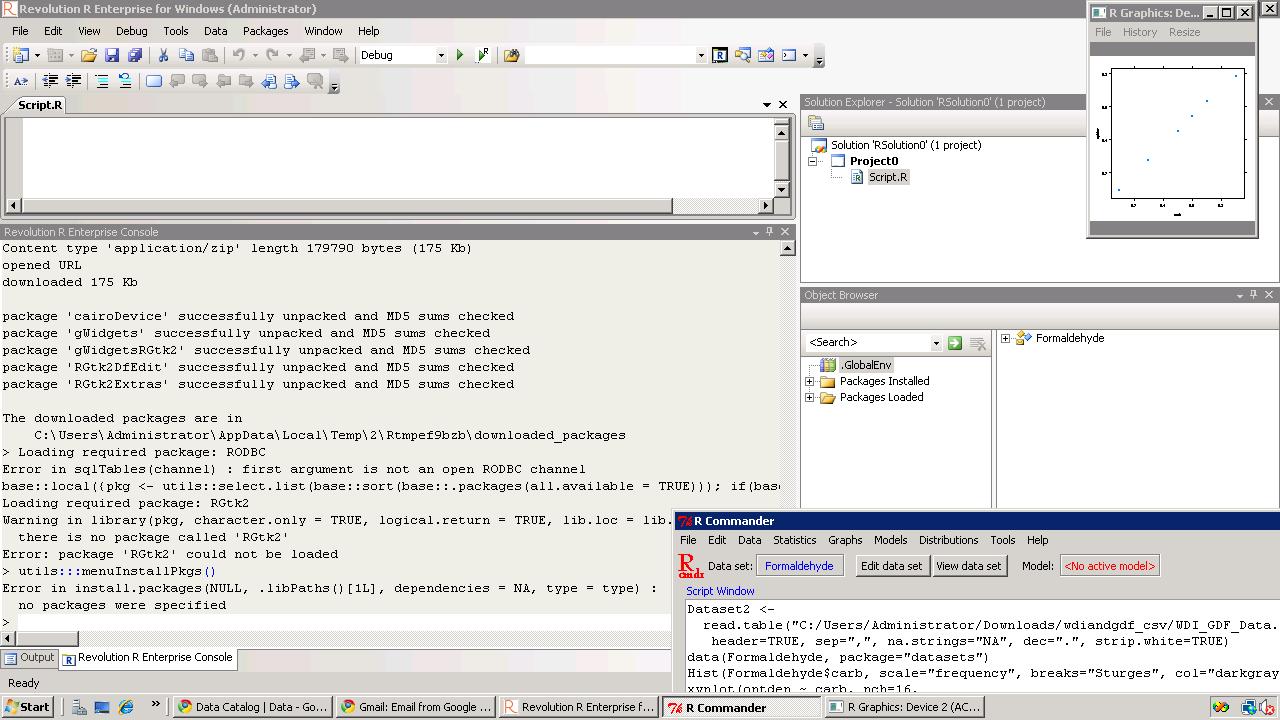
You can thus combine R GUIs (like Rattle , R Cmdr or Deducer based upon your need for statistical analysis, data mining or graphical analysis) , with 64 Bit OS, and Revolution’s REvoScaler Package to manage huge huge datasets at a very easy to use analytics solution.

Pricing-for Computation on EC2

Standard On-Demand Instances Linux/UNIX Usage Windows Usage
Small (Default) $0.085 per hour $0.12 per hour
Large $0.34 per hour $0.48 per hour
Extra Large $0.68 per hour $0.96 per hour
Micro On-Demand Instances Linux/UNIX Usage Windows Usage
Micro $0.02 per hour $0.03 per hour
High-Memory On-Demand Instances
Extra Large $0.50 per hour $0.62 per hour
Double Extra Large $1.00 per hour $1.24 per hour
Quadruple Extra Large $2.00 per hour $2.48 per hour
High-CPU On-Demand Instances
Medium $0.17 per hour $0.29 per hour
Extra Large $0.68 per hour $1.16 per hour
Cluster Compute Instances
Quadruple Extra Large $1.60 per hour N/A*
* Windows is not currently available for Cluster Compute Instances.

Internet Data Transfer

The pricing below is based on data transferred “in” and “out” of Amazon EC2.

Data Transfer In US & EU Regions APAC Region
All Data Transfer Free until Nov 1, 2010 * Free until Nov 1, 2010 *
Data Transfer Out ** US & EU Regions APAC Region
First 1 GB per Month $0.00 per GB $0.00 per GB
Up to 10 TB per Month $0.15 per GB $0.19 per GB
Amazon EBS Volumes- To store data
  • $0.10 per GB-month of provisioned storage
  • $0.10 per 1 million I/O requests
Amazon EBS Snapshots to Amazon S3 (priced the same as Amazon S3)
  • $0.15 per GB-month of data stored
  • $0.01 per 1,000 PUT requests (when saving a snapshot)
  • $0.01 per 10,000 GET requests (when loading a snapshot)

http://aws.amazon.com/ec2/#pricing Other costs are optional to your needs

Based on the above- I set out to try and create a how-to DIY for running R (and RevolutionR on 64bit Windows on EC2)

1) Logon to https://console.aws.amazon.com/ec2/home

2) Launch Windows Instance

Choose AMI

Left Margin-AMI-

Top Windows – Select Windows 64 AMI

(note if you select SQL Server it will cost you extra)

Then go through the following steps and launch instance

Selecting EC2 compute depending on number of cores, memory needs and budget

Create a key pair (a .pem file which is basically an encrypted password) and download it.
For tags, etc just click on and pass (or read and create some tags to help you remember, and organize multiple instances)
In configure firewall, remember to Enable Access to RDP (Remote Desktop) and  HTTP. You can choose to enable whole internet or your own ip address/es for logging in
Review and launch instance

Go to instance (leftmost margin)
and see status (yellow for pending)
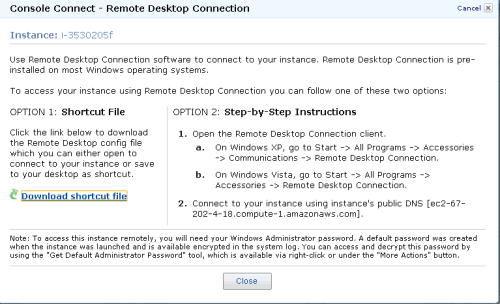
Click on Instance Actions-Connect on Top Bar to see following
Download the .RDP shortcut file and
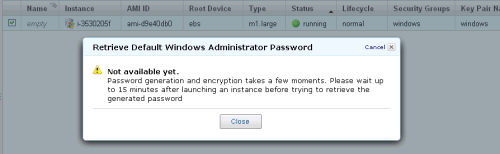
Click on Instance Actions-Request Admin Password


Wait 15 minutes while burning few cents for free as Microsoft creates a password for you
Have coffee (or tea is you are health minded)
Click Again on Instance Actions-Request Admin Password

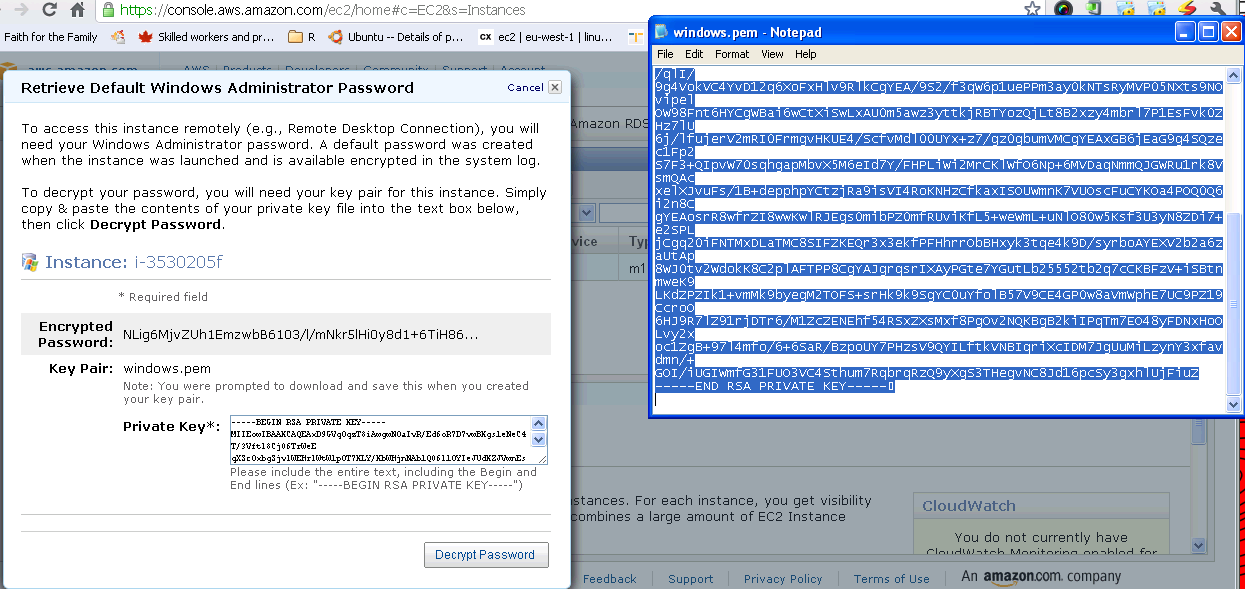
Open the key pair file (or .pem file created earlier) using

notepad, and copy and paste the Private Key (looks like gibberish)- and click Decrypt.


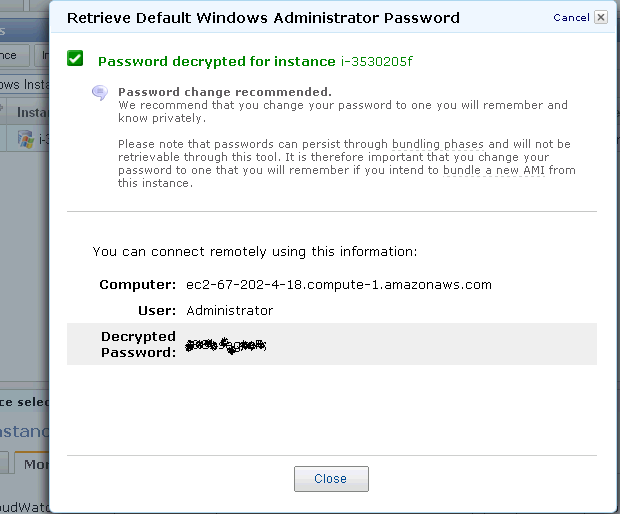
Retrieve Password for logging on.


Note the new password generated- this is your Remote Desktop Password.

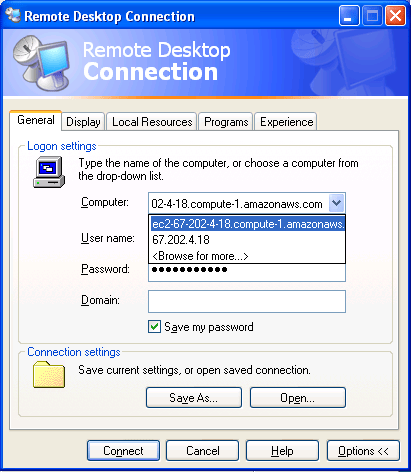
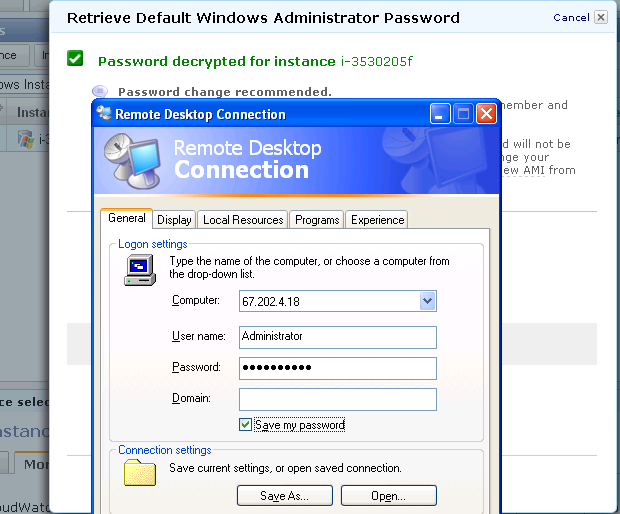
Click on the .rdp file (or Shortcut file created earlier)- It will connect to your Windows instance.


Enter the new  generated password in Remote Desktop

  • Login

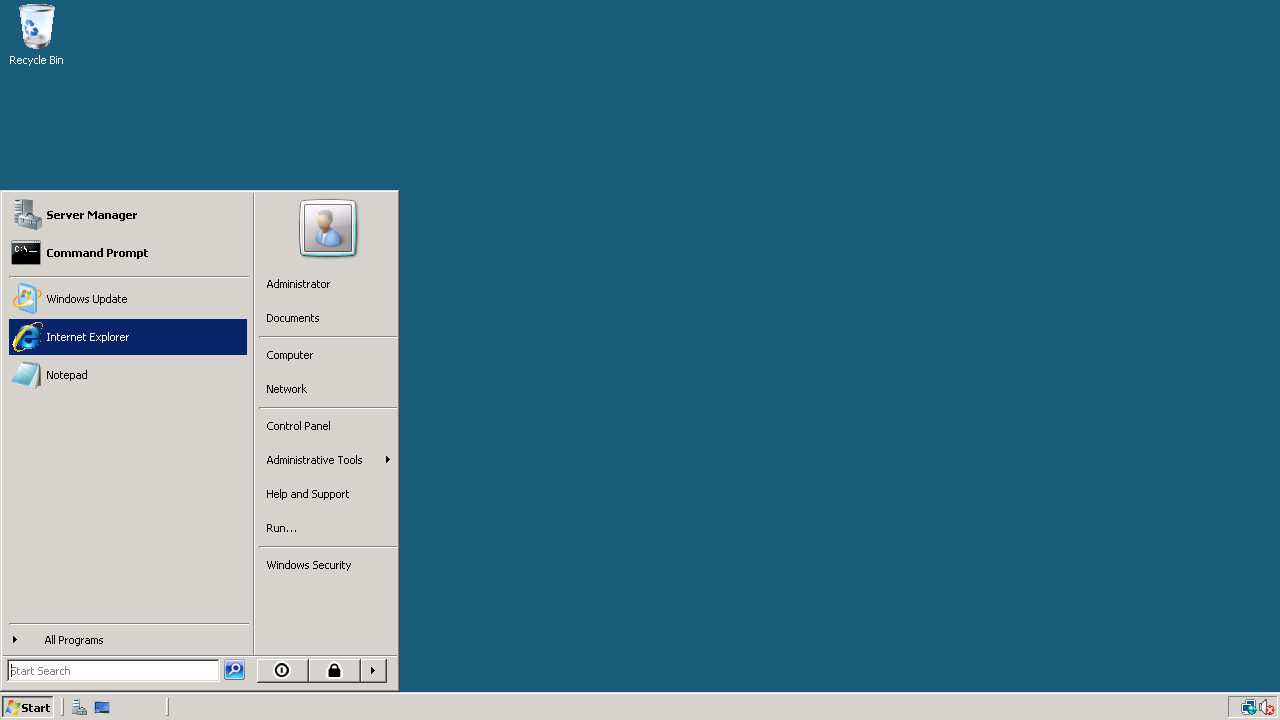
This looks like a new clean machine with just Windows OS installed on it.

Install Chrome (or any other browser) if you do not use Internet Explorer
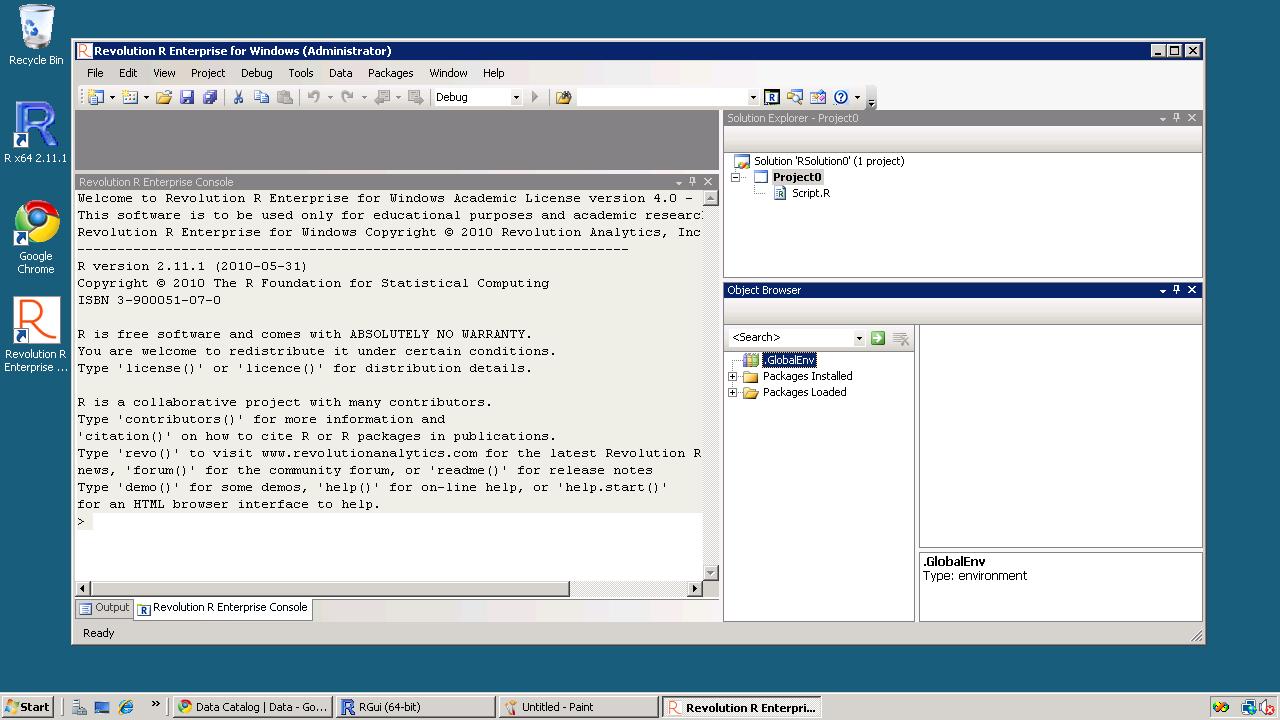
Install Acrobat Reader (for documentation), Revolution R Enterprise~ 490 mb (it will automatically ask to install the .NET framework-4 files) and /or R

Install packages (I recommend installing R Commander, Rattle and Deducer). Apart from the fact that these GUIs are quite complimentary- they also will install almost all main packages that you need for analysis (as their dependencies) Revolution R installs parallel programming packages by default.

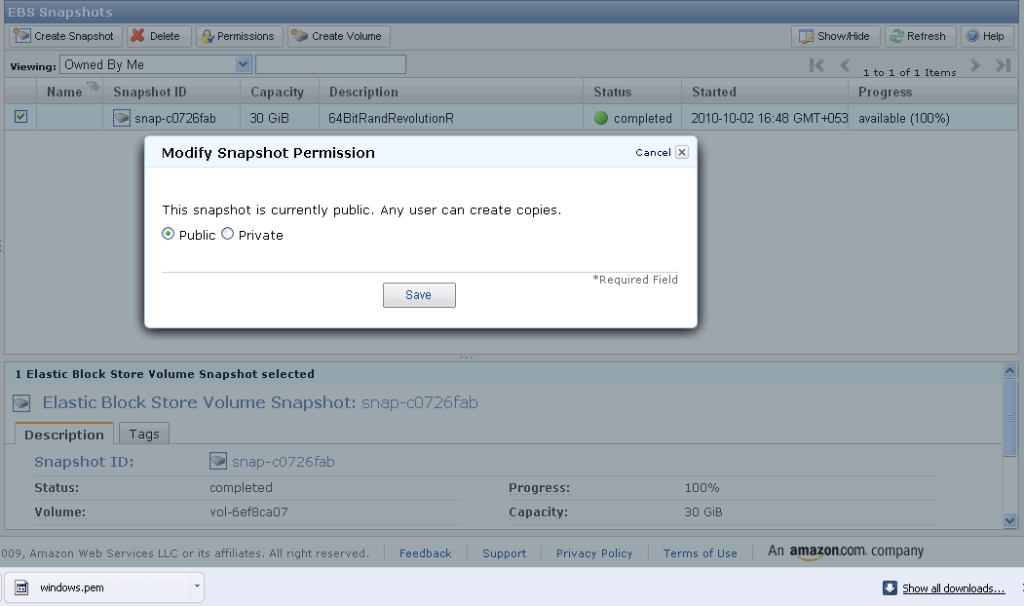
If you want to save your files for working later, you can make a snapshot (go to amazon console-ec2- left margin- ABS -Snapshot- you will see an attached memory (green light)- click on create snapshot to save your files for working later
If you want to use my Windows snapshot you can work on it , just when you start your Amazon Ec2 you can click on snapshots and enter details (see snapshot name below)  for making a copy or working on it for exploring either 64 bit R, or multi core cloud computing  or just trying out Revolution R’s new packages  for academic purposes.


35.965000 -83.920000

Please share:

  • Click to share on LinkedIn (Opens in new window) LinkedIn
  • Click to share on Facebook (Opens in new window) Facebook
  • Click to share on X (Opens in new window) X
Like Loading...
Unknown's avatarAuthor Ajay OhriPosted on October 2, 2010October 6, 2010Categories AnalyticsTags .Net, academic, Amazon, amazon ebs, amazon ec2, Amazon Elastic Compute Cloud, amazon s3, ami, analysis, Analytics, Central processing unit, chrome, cloud, cloud computing, computing, costs, data, data mining, datasets, deducer, easy, EC2, enterprise, enterprise software, Free, Graphical user interface, Health, Internet, launch, linux, Login, Machine, Microsoft, Microsoft Windows, mining, open, operating system, os, parallel, parallel programming, pricing, Programming, R, r commander, R GUI, r guis, rattle, rattloe, remote, review, revolution, revolution r, rstats, S3, server, software, sql, sql server, statistical, statistics, storage, unix, US, use, windoes, windows, work2 Comments on Running R on Amazon EC2 :Windows

Running a R GUI,and parallel programming on Amazon EC2

Ok here is an update to the post on running R on an Amazon EC2.

https://decisionstats.wordpress.com/2010/09/25/running-r-on-amazon-ec2/

1) Login to Amazon Console using instructions in earlier post

2) Select AMI-Platform Ubuntu-i-5575773f

Basically select the latest 64 bit instance from Ubuntu

3) Proceed as in post before to launch AMI and instance- here I chose large with 4cores

3.1) Before connecting to your session

search Synaptic Package Manager for x11-

I installed the X11 VNC server package –

and now interactive sessions will work (read GUIs)

3.2) Modify the line

ssh -i decisionstats2.pem root@ec2-75-101-182-203.compute-1.amazonaws.com

To

ssh -i decisionstats2.pem -X ubuntu@ec2-75-101-182-203.compute-1.amazonaws.com

This will connect you.

4) INSTALL R – Cran R is a standard Ubuntu Package

using

sudo apt-get install r-base

then type R

and install.packages(“Rcmdr”)

Note – you should be able to see the grey colored Tcl/Tpk script showing cran locations

in a seperate window if X11 is working

5) doSNOW package works on the Ubuntu 64- The results are below for

check <-function(n) {check <-function(n) {

+ for(i in 1:1000)

+ {

+ sme <- matrix(rnorm(100), 10,10)

+ solve(sme)

+ }

+ }

>

>  times <- 100

> system.time(x <- foreach(j=1:times ) %dopar% check(j))
user  system elapsed
0.150   0.080   7.303
> system.time(for(j in 1:times ) x <- check(j))
user  system elapsed
27.460   2.300  29.757

The time of 7.3 is almost 5.5 times faster than running it locally on a dual core, and still 3 times faster than running foreach locally. Note I used 4 cores this time in snow.

5) The Tcl/Tk interface of R Cmdr takes a long time to load on EC2 than locally. It may be due to the fact I was running Ubuntu using a VM Player (http://www.vmware.com/go/downloadplayer/ ). However there seems to be a general slowing down when viewing graphics.

or simply

sudo apt-get install r-cran-rcmdr 


35.965000 -83.920000

Please share:

  • Click to share on LinkedIn (Opens in new window) LinkedIn
  • Click to share on Facebook (Opens in new window) Facebook
  • Click to share on X (Opens in new window) X
Like Loading...
Unknown's avatarAuthor Ajay OhriPosted on September 27, 2010Categories AnalyticsTags Amazon, amazon ec2, ami, cloud computing, CRAN, dosnow, EC2, foreach, launch, Login, parallel, parallel programming, post, Programming, R, rcommander, rstats, server, synaptic, Time, ubuntu, vm player, work1 Comment on Running a R GUI,and parallel programming on Amazon EC2

Running R on Amazon EC2

On my second day of bludering about high technology, I came across  http://rgrossman.com/2009/05/17/running-r-on-amazons-ec2/ which describes how to run R on Amazon EC2.

I tried it out and have subsequently added some screenshots to this tutorial so as to help you run R. My intention of course was to run a R GUI preferable Revolution Enterprise on the Amazon EC 2- and crunch uhm a lot of data.

Now go through the steps as follows-

0) Logging onto Amazon Console

http://aws.amazon.com/ec2/

Note you need your Amazon Id (even the same id which you use for buying books).

Note we are into Amazon EC2 as shown by the upper tab. Click upper tab to get into the Amazon EC2

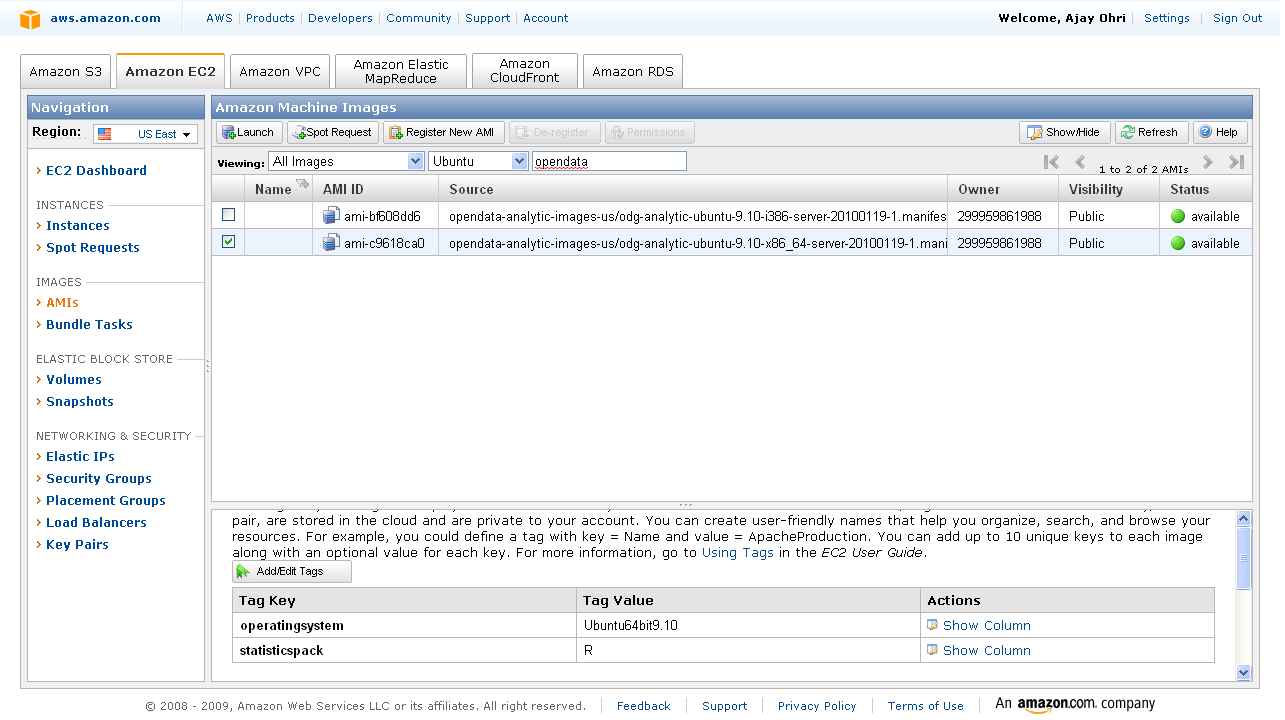
2) Choosing the right AMI-

On the left margin, you can click AMI -Images.

Now you can search for the image-

I chose Ubuntu images (linux images are cheaper) and opendata in the search as belows- I get two images.

You can choose whether you want 32 bit or 64 bit image. Thumb rule-  64 bit images are preferable for data intensive tasks.

Click on launch instance in the upper tab ( near the search feature)

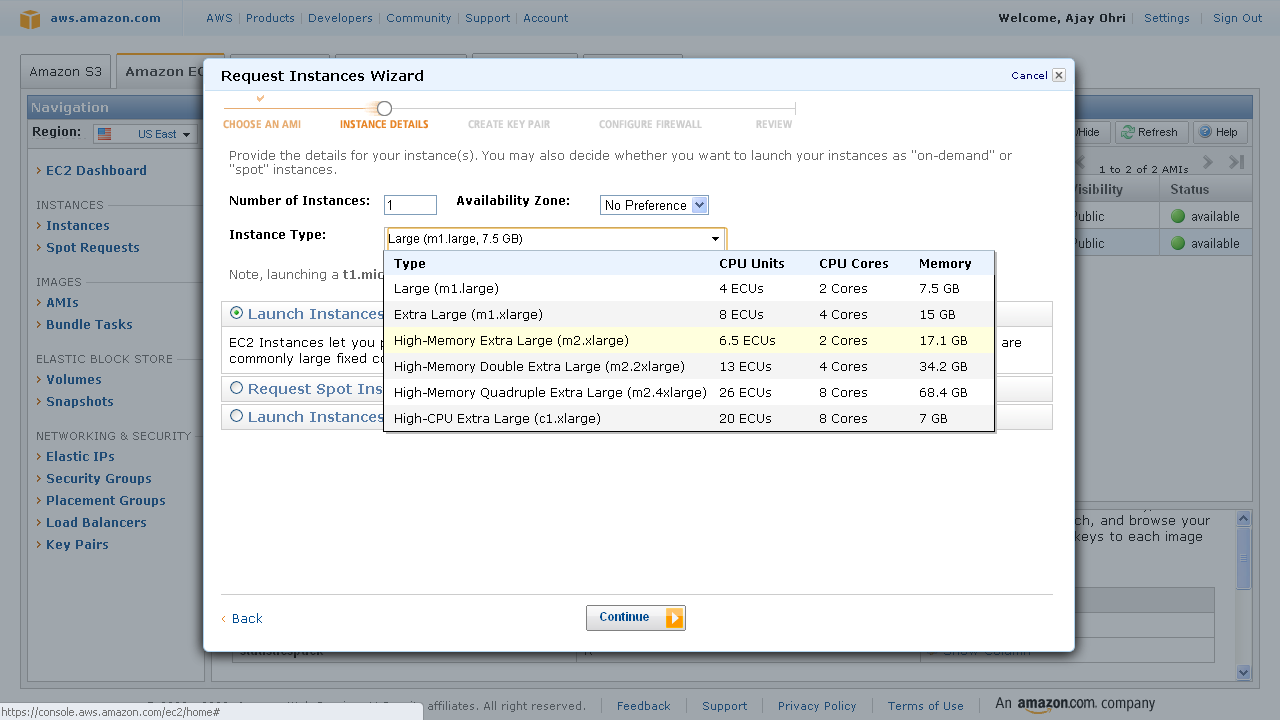
2) A pop up comes up, which shows the 5 step process to launch your computing.

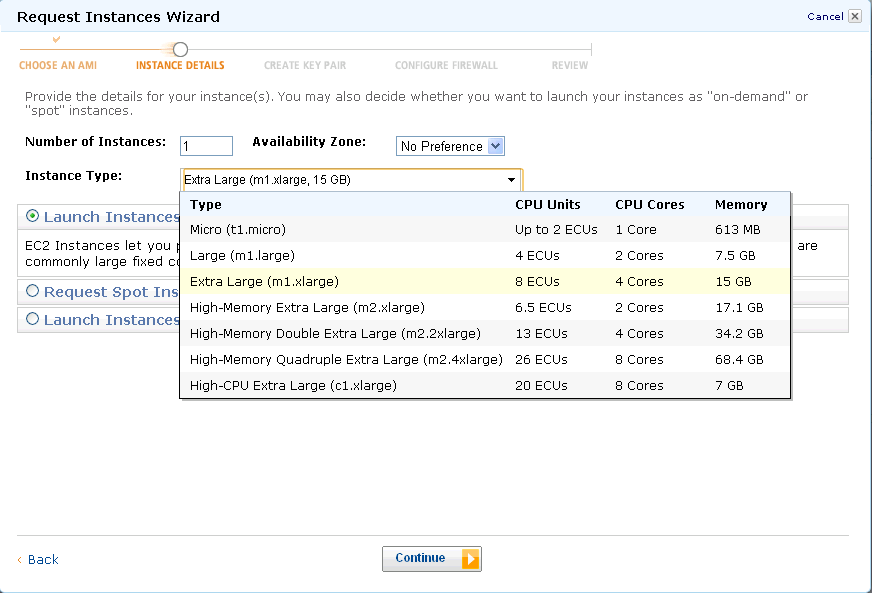
Choose the right compute instance- As the screenshot shows- there are various compute instances and they all are at different multiples of prices or compute units.

After choosing the compute  instance of your choice (extra large is highlighted)- click on continue-

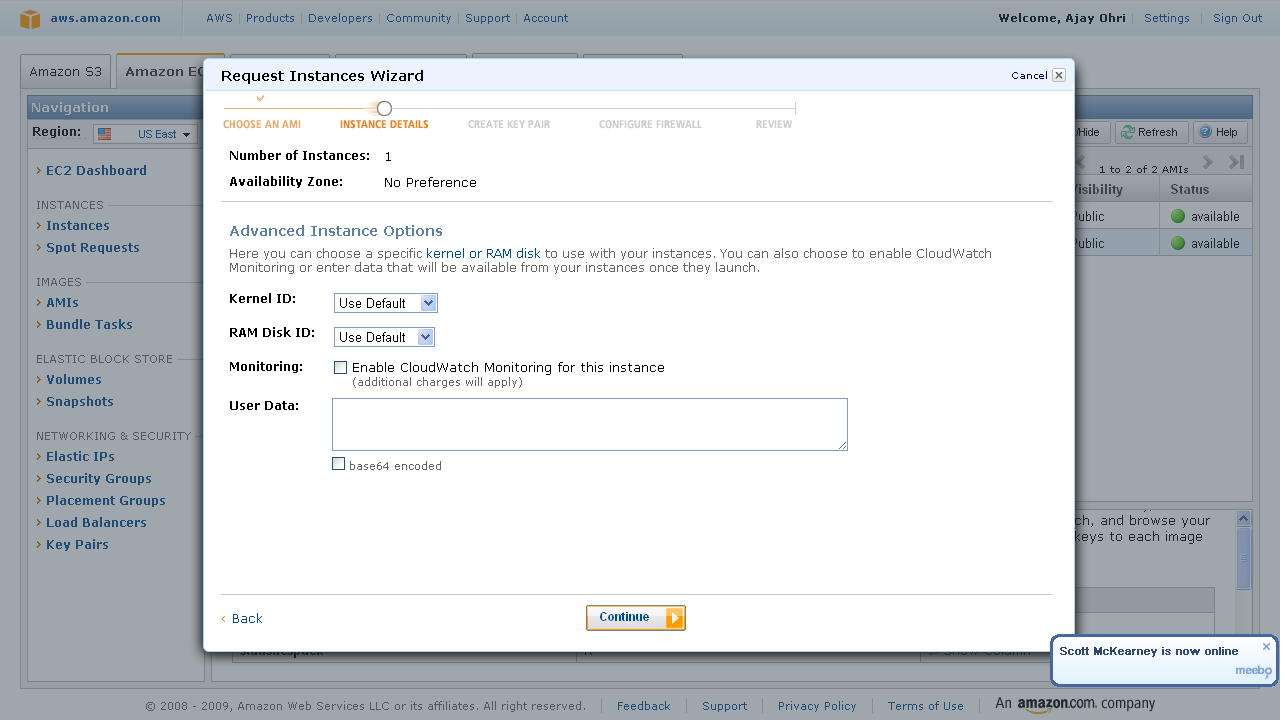
3) Instance Details-

I did not choose cloudburst monitoring as it has a extra charge- and I am just trying out things.So I simply clicked continue.

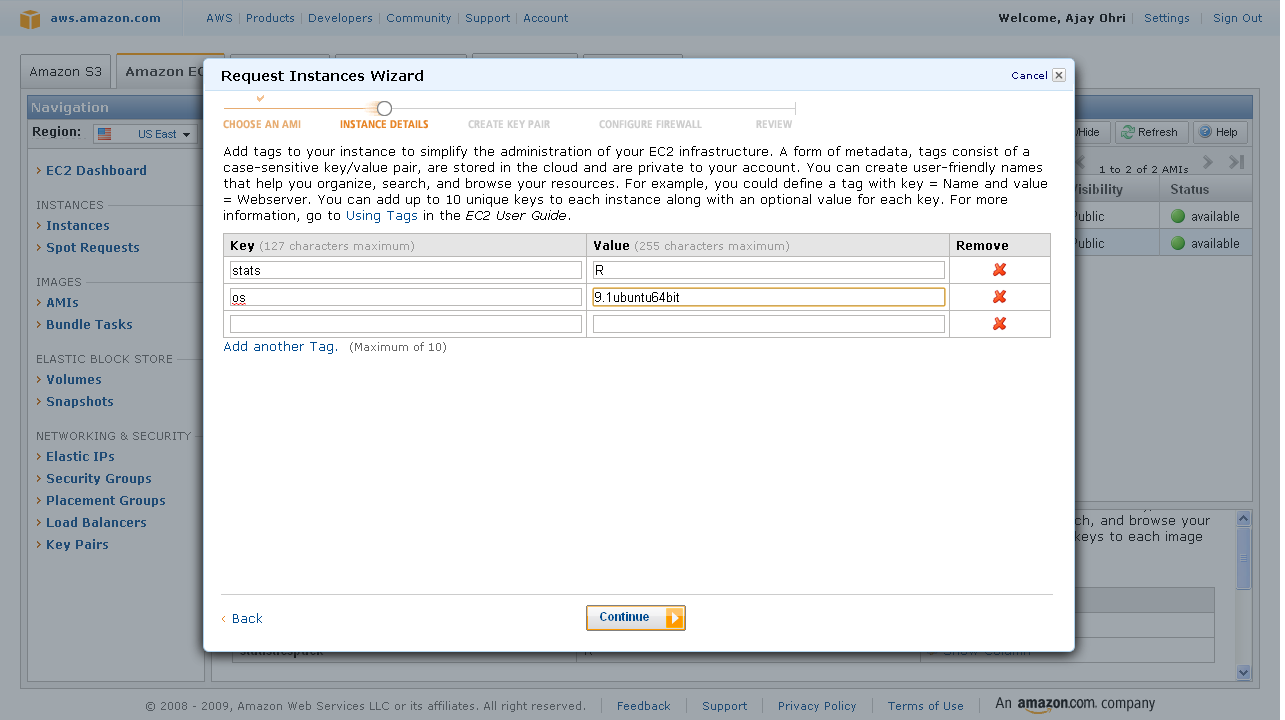
4) Add Tag Details- If you are running a lot of instances you need to create your own tags to help you manage them. Advisable if you are running many instances.

Since I am going to run just one- I clicked continue with adding just two things OS and Stats Package.

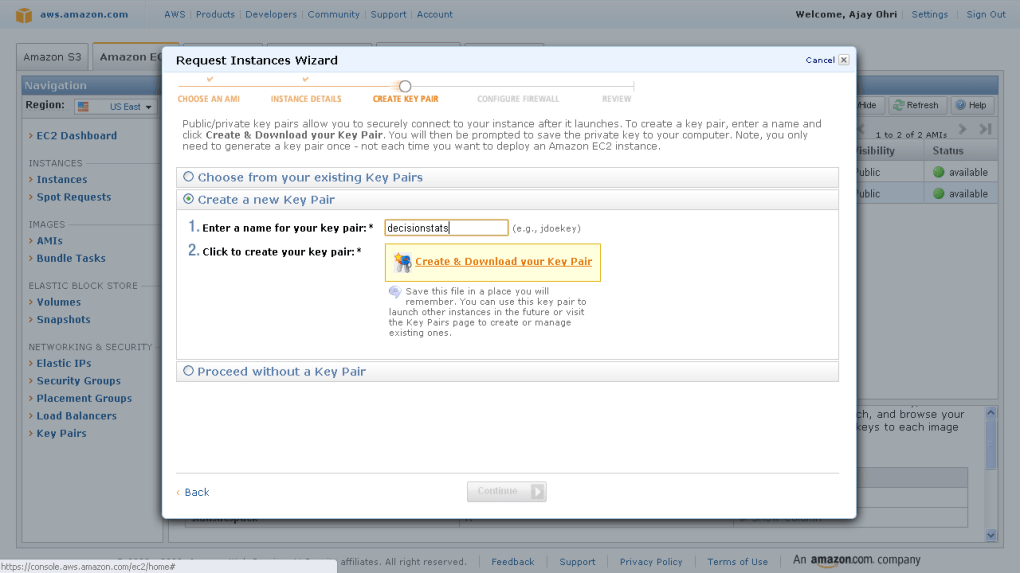
5) Create a key pair- A key pair is an added layer of encryption. Click on create new pair and name it (note the name will be handy in coming steps)

6)

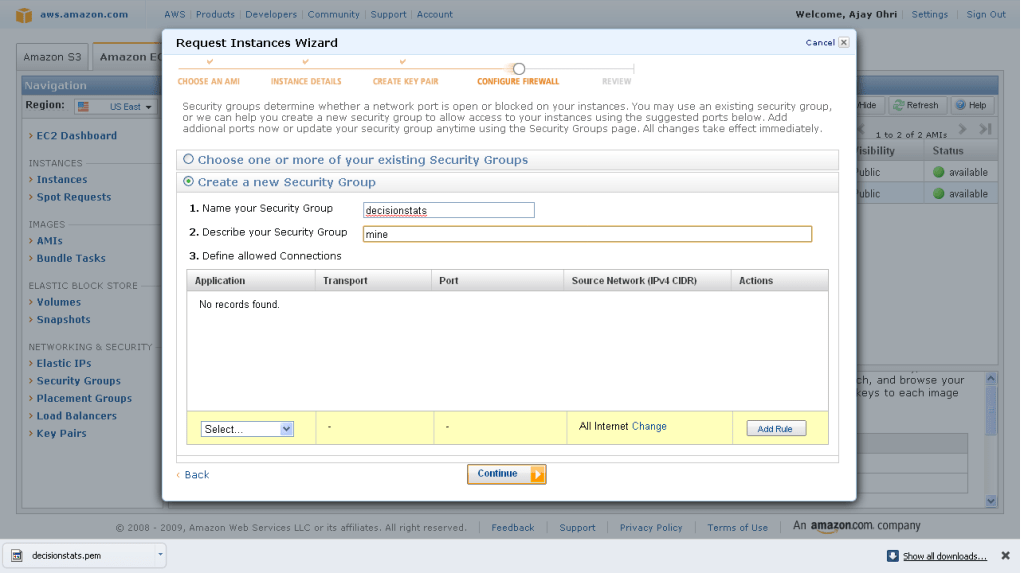
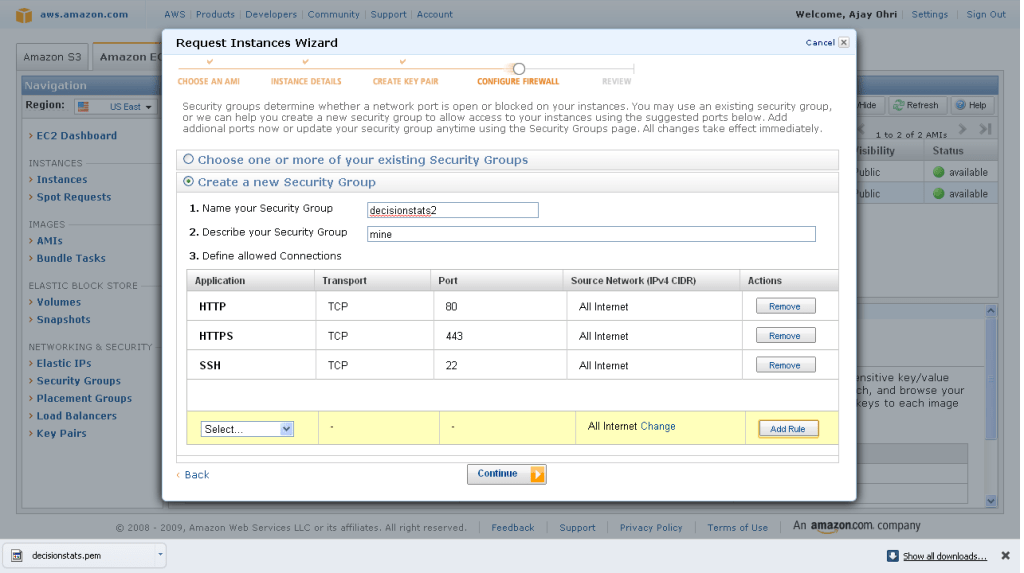
After clicking and downloading the key pair- you come into security groups. Security groups is just a set of instructions to help keep your data transfer secure. So I created a new security group.

And I added some ways in security group to connect (like SSH using Port 22)

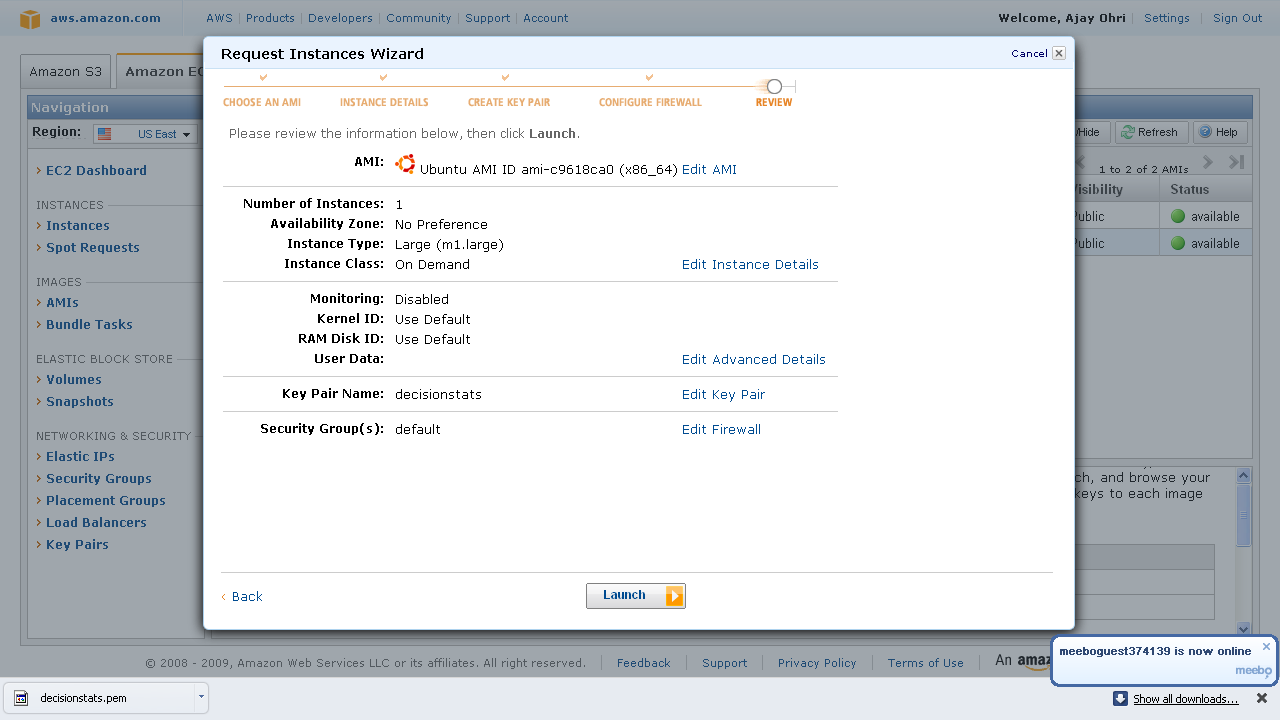
7)  Last step- Review Details and Click Launch

8) On the Left margin click on instances ( you were in Images.>AMI earlier)

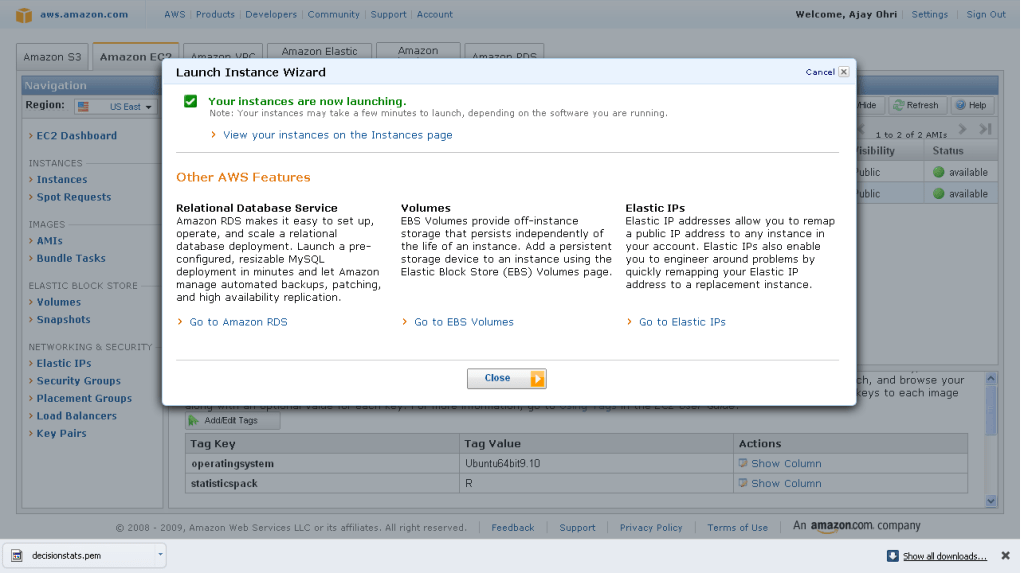
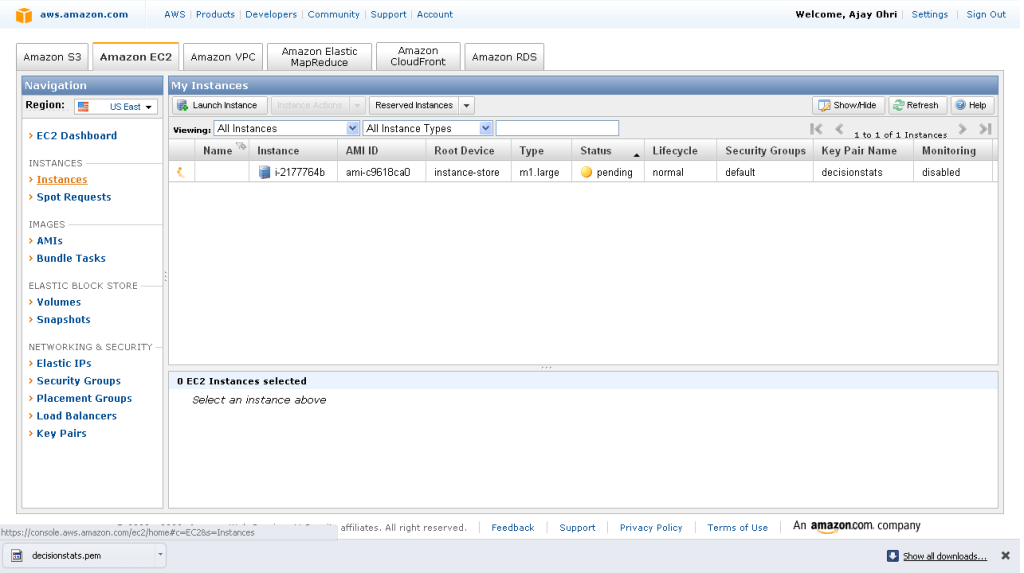
It will take some 3-5 minutes to launch an instance. You can see status as pending till then.

9) Pending instance as shown by yellow light-

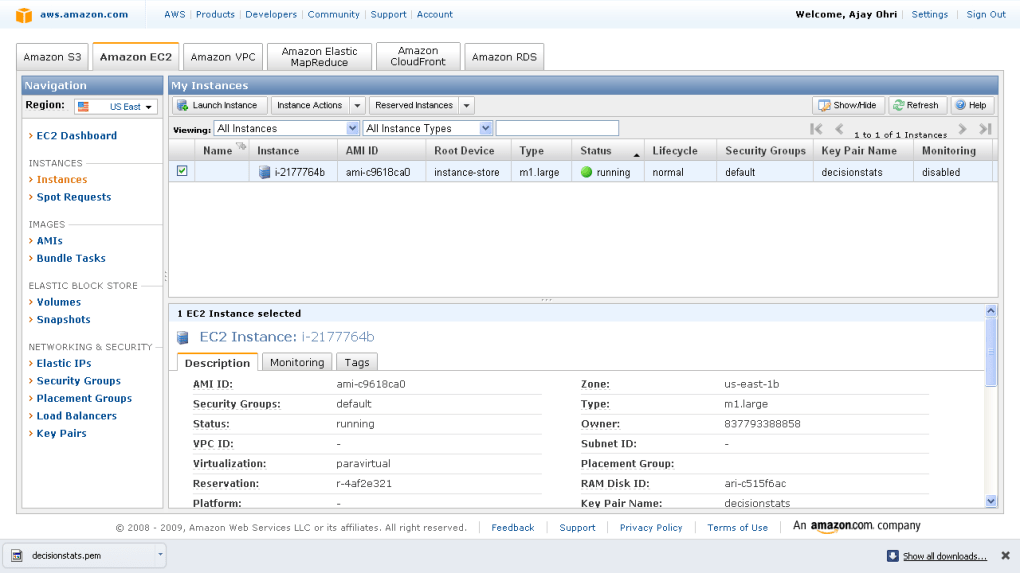
10) Once the instance is running -it is shown by a green light.

Click on the check box, and on upper tab go to instance actions. Click on connect-

you see a popup with instructions like these-

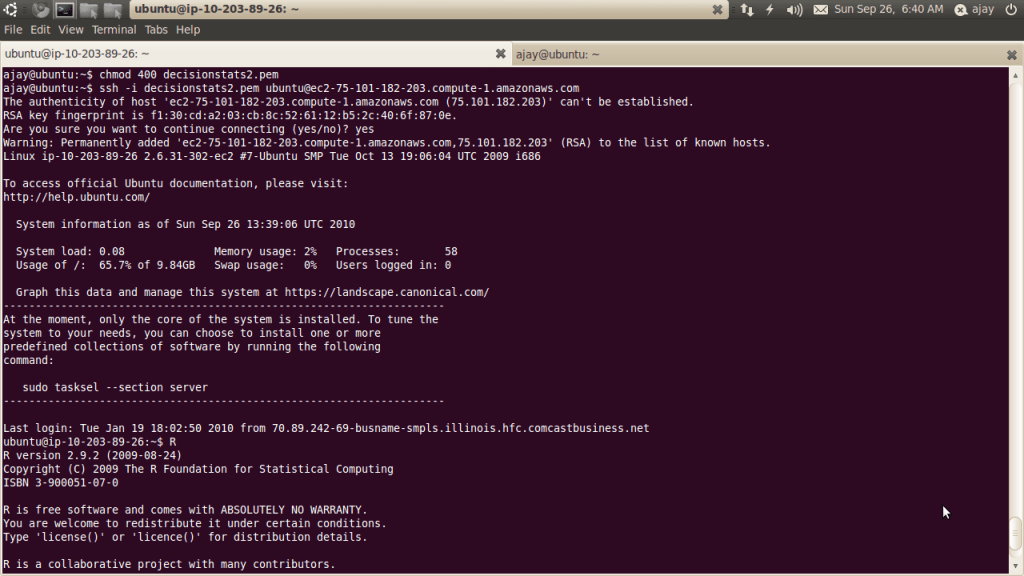
  • Open the SSH client of your choice (e.g., PuTTY, terminal).
  • Locate your private key file, decisionstats2.pem
  • Use chmod to make sure your key file isn’t publicly viewable, ssh won’t work otherwise:
    chmod 400 decisionstats.pem
  • Connect to your instance using instance’s public DNS [ec2-75-101-182-203.compute-1.amazonaws.com].
  • Example

    Enter the following command line:
    ssh -i decisionstats2.pem root@ec2-75-101-182-203.compute-1.amazonaws.com

    IMPORTANT-

    If you are choosing Ubuntu Terminal to connect- you need to change the word root from above to Ubuntu above.


    12) To launch R, just type R at the terminal

    If all goes well you should be able to see this-

    choose to install any custom packages (like

    install.packages(‘doSNOW’)

    work on R using command line

    13) IMPORTANT- After doing your R work, please CLOSE your instance (

    Go to LEFT Margin-Instances-Check the check box of instance you are running- on upper tab- Instance Actions- Click Terminate.


    Note there are other Amazon Machine Images as well which have R- I found this as well-

    Amazon EC2 Ubuntu 8.10 intrepid AMI built by Eric Hammond; Eduardo Leoni added R, many R packages, JAGS, mysql-client and subversion.

    Submitted By: Eduardo L Leoni
    US East AMI ID: ami-1b9b7c72
    AMI Manifest: PolMethImages/imageR64.manifest.xml
    License: Public
    Operating System: Linux/Uni


    2) You can install Revolution R on 32 bit Ubuntu using sudo apt install revolution-r
    Various versions of Revolution R are supported on different versions of Linux
    see http://www.revolutionanalytics.com/why-revolution-r/which-r-is-right-for-me.php
    I may be willing to try Red Hat Enterprise Linux on the ec2 with 64 bit AND Revolution Enterprise to see  the maximum juice I can get. or you can try it using an image below- It would be interesting if there could be an Amazon Machine Image for that (paid-public and private-academic)

    AMI ID: ami-8ba347e2
    Name:–
    Description:–
    Source:redhat-cloud/RHEL-5-Server/5.2/x86_64/Beta-2.6.18-92.1.1/RHEL5.2-Server-x86_64-Beta-2.6.18-92.1.1.manifest.xml
    Owner:432018295444 Visibility:Public Product Code:54DBF944
    State:available Kernel ID:aki-89a347e0 RAM Disk ID:ari-88a347e1
    Image Type:machine Architecture:x86_64 Platform:Red Hat
    Root Device Type:instance-store Root Device:– Image Size:0 bytes
    Block Devices:N/A – Instance Store
    Virtualization:paravirtual
    3) My ultimate goal is to run a parallel session using all cores on an EC2 instance and a R GUI (like R Commander or Rattle)
    4) For sake of running a test- I re did the parallel test I did on my 2 core laptop
    but using 68.4 gb Memory and 8 cores (26 Compute Units brrr)
    > check <-function(n) {
    + for(i in 1:1000)
    + {
    + sme <- matrix(rnorm(100), 10,10)
    + solve(sme)
    + }
    + }
    >
    >  times <- 100
    > system.time(for(j in 1:times ) x <- check(j))
    user  system elapsed
    20.51    0.00   20.66
    Note I still got a faster response than using parallel processors (on a 2 core 3 gb memory)  BUT the gain was not as much had I tried to use foreach for running each of the 8 cores parallely. Or running multicore package as in http://www.cerebralmastication.com/2010/02/using-the-r-multicore-package-in-linux-with-wild-and-passionate-abandon/
    5) For some reason on Ubuntu 64 bit Amazon image -I cant get Revolution R (even after using sudo apt) , and I am still learning how I can try and get Enterprise Edition fired up on a 64 bit Red Hat Enterprise Linux Amazon AMI (and maybe create an all new Machine Image 😉
    6) I was also unable to use the -X command desite having x 11 as in http://rgrossman.com/2009/05/17/running-r-on-amazons-ec2/ so was not able to see graphics,
    Also it prevents me from loogin onto as root, and asks me to login as ubuntu@amazon…. I also wanted to try logging into using my Windows session but kept shuttling between my VM Player Ubuntu session and Windows

    7) Hope this was useful. I am thankful to tips from Revolution Blog, R Grossman’s Blog, Creators of the Open Data AMI, Tal’s R Statistics Blog  and Cerebral Mastication blog on this
    35.965000 -83.920000

    Please share:

    • Click to share on LinkedIn (Opens in new window) LinkedIn
    • Click to share on Facebook (Opens in new window) Facebook
    • Click to share on X (Opens in new window) X
    Like Loading...
    Unknown's avatarAuthor Ajay OhriPosted on September 25, 2010September 26, 2010Categories AnalyticsTags Amazon, amazon ec2, ami, blog, change, data, downloading, EC2, enterprise, foreach, green, grossman, groups, GUI, how to, id, images, launch, learning, linux, Login, Machine, multicore, open, opendata, os, parallel, R, r commander, R GUI, red hat, Red Hat Enterprise Linux, review, revolution, revolution analytics, revolution r, rstats, search, security, statistics, stats, tutorial, ubuntu, use, vm player, windows, Word, work8 Comments on Running R on Amazon EC2

    Posts pagination

    Previous page Page 1 Page 2

    Blog Stats

    • 1,339,958 hits

    BitCoin Address

    BitCoin Wallet

    12FxL4og4MqtZt6pRZ1LkcMQq6ddgJK4Yg

    Latest Book

    SAS for R Users

    Books by Ajay Ohri

    Python for R USers

    R for Business Analytics


    R for Cloud Computing

    On FB

    On FB

    Archives

    • February 2025 (1)
    • July 2024 (1)
    • January 2024 (1)
    • August 2023 (1)
    • June 2023 (8)
    • April 2023 (1)
    • March 2022 (1)
    • August 2021 (1)
    • June 2021 (1)
    • March 2021 (1)
    • January 2021 (1)
    • December 2020 (1)
    • September 2020 (1)
    • July 2020 (1)
    • June 2020 (1)
    • May 2020 (1)
    • March 2020 (1)
    • February 2020 (2)
    • January 2020 (8)
    • December 2019 (1)
    • November 2019 (2)
    • October 2019 (1)
    • May 2019 (2)
    • March 2019 (3)
    • February 2019 (1)
    • January 2019 (1)
    • December 2018 (3)
    • October 2018 (1)
    • September 2018 (7)
    • August 2018 (3)
    • July 2018 (6)
    • June 2018 (2)
    • May 2018 (1)
    • April 2018 (2)
    • March 2018 (7)
    • February 2018 (16)
    • January 2018 (4)
    • December 2017 (10)
    • November 2017 (8)
    • October 2017 (6)
    • September 2017 (4)
    • August 2017 (6)
    • July 2017 (6)
    • June 2017 (3)
    • May 2017 (4)
    • March 2017 (1)
    • February 2017 (2)
    • January 2017 (2)
    • December 2016 (3)
    • November 2016 (7)
    • September 2016 (7)
    • August 2016 (12)
    • July 2016 (12)
    • June 2016 (8)
    • May 2016 (11)
    • April 2016 (5)
    • March 2016 (22)
    • February 2016 (6)
    • January 2016 (4)
    • December 2015 (26)
    • November 2015 (19)
    • October 2015 (44)
    • September 2015 (18)
    • August 2015 (28)
    • July 2015 (12)
    • June 2015 (6)
    • May 2015 (9)
    • April 2015 (9)
    • March 2015 (11)
    • February 2015 (5)
    • January 2015 (8)
    • December 2014 (9)
    • November 2014 (10)
    • October 2014 (3)
    • September 2014 (5)
    • August 2014 (5)
    • July 2014 (14)
    • June 2014 (21)
    • May 2014 (10)
    • April 2014 (14)
    • March 2014 (15)
    • February 2014 (11)
    • January 2014 (4)
    • December 2013 (16)
    • November 2013 (19)
    • October 2013 (23)
    • September 2013 (12)
    • August 2013 (14)
    • July 2013 (9)
    • June 2013 (8)
    • May 2013 (15)
    • April 2013 (16)
    • March 2013 (8)
    • February 2013 (16)
    • January 2013 (18)
    • December 2012 (7)
    • November 2012 (8)
    • October 2012 (10)
    • September 2012 (1)
    • August 2012 (26)
    • July 2012 (31)
    • June 2012 (12)
    • May 2012 (10)
    • April 2012 (12)
    • March 2012 (27)
    • February 2012 (31)
    • January 2012 (26)
    • December 2011 (27)
    • November 2011 (40)
    • October 2011 (32)
    • September 2011 (29)
    • August 2011 (30)
    • July 2011 (30)
    • June 2011 (33)
    • May 2011 (50)
    • April 2011 (51)
    • March 2011 (31)
    • February 2011 (38)
    • January 2011 (36)
    • December 2010 (35)
    • November 2010 (77)
    • October 2010 (73)
    • September 2010 (65)
    • August 2010 (19)
    • July 2010 (14)
    • June 2010 (11)
    • May 2010 (20)
    • April 2010 (18)
    • March 2010 (8)
    • February 2010 (10)
    • January 2010 (42)
    • December 2009 (38)
    • November 2009 (60)
    • October 2009 (41)
    • September 2009 (45)
    • August 2009 (37)
    • July 2009 (21)
    • June 2009 (28)
    • May 2009 (49)
    • April 2009 (29)
    • March 2009 (39)
    • February 2009 (34)
    • January 2009 (42)
    • December 2008 (18)
    • November 2008 (37)
    • October 2008 (20)
    • September 2008 (52)
    • August 2008 (62)
    • July 2008 (42)
    • June 2008 (16)
    • May 2008 (10)
    • April 2008 (20)
    • March 2008 (15)
    • February 2008 (30)
    • January 2008 (20)
    • December 2007 (13)

    This slideshow requires JavaScript.

    • Interviews
    • About DecisionStats
      • Decisionstats.org
    • Interviews
    • About DecisionStats
    DECISION STATS Blog at WordPress.com.
    • Subscribe Subscribed
      • DECISION STATS
      • Join 440 other subscribers
      • Already have a WordPress.com account? Log in now.
      • DECISION STATS
      • Subscribe Subscribed
      • Sign up
      • Log in
      • Report this content
      • View site in Reader
      • Manage subscriptions
      • Collapse this bar
     

    Loading Comments...
     

      %d