One of the most frustrating things I had to do while working as financial business analysts was working with Data Time Formats in Base SAS. The syntax was simple enough and SAS was quite good with handing queries to the Oracle data base that the client was using, but remembering the different types of formats in SAS language was a challenge (there was a date9. and date6 and mmddyy etc )
Data and Time variables are particularly important variables in financial industry as almost everything is derived variable from the time (which varies) while other inputs are mostly constants. This includes interest as well as late fees and finance fees.
In R, date and time are handled quite simply-
Use the strptime( dataset, format) function to convert the character into string
For example if the variable dob is “01/04/1977) then following will convert into a date object
z=strptime(dob,”%d/%m/%Y”)
and if the same date is 01Apr1977
z=strptime(dob,"%d%b%Y")
does the same
For troubleshooting help with date and time, remember to enclose the formats
%d,%b,%m and % Y in the same exact order as the original string- and if there are any delimiters like ” -” or “/” then these delimiters are entered in exactly the same order in the format statement of the strptime
Sys.time() gives you the current date-time while the function difftime(time1,time2) gives you the time intervals( say if you have two columns as date-time variables)
What are the various formats for inputs in date time?
%a
Abbreviated weekday name in the current locale. (Also matches full name on input.)
%A
Full weekday name in the current locale. (Also matches abbreviated name on input.)
%b
Abbreviated month name in the current locale. (Also matches full name on input.)
%B
Full month name in the current locale. (Also matches abbreviated name on input.)
%c
Date and time. Locale-specific on output, "%a %b %e %H:%M:%S %Y" on input.
%d
Day of the month as decimal number (01–31).
%H
Hours as decimal number (00–23).
%I
Hours as decimal number (01–12).
%j
Day of year as decimal number (001–366).
%m
Month as decimal number (01–12).
%M
Minute as decimal number (00–59).
%p
AM/PM indicator in the locale. Used in conjunction with %I and not with %H. An empty string in some locales.
%S
Second as decimal number (00–61), allowing for up to two leap-seconds (but POSIX-compliant implementations will ignore leap seconds).
%U
Week of the year as decimal number (00–53) using Sunday as the first day 1 of the week (and typically with the first Sunday of the year as day 1 of week 1). The US convention.
%w
Weekday as decimal number (0–6, Sunday is 0).
%W
Week of the year as decimal number (00–53) using Monday as the first day of week (and typically with the first Monday of the year as day 1 of week 1). The UK convention.
%x
Date. Locale-specific on output, "%y/%m/%d" on input.
%X
Time. Locale-specific on output, "%H:%M:%S" on input.
%y
Year without century (00–99). Values 00 to 68 are prefixed by 20 and 69 to 99 by 19 – that is the behaviour specified by the 2004 POSIX standard, but it does also say ‘it is expected that in a future version the default century inferred from a 2-digit year will change’.
%Y
Year with century.
%z
Signed offset in hours and minutes from UTC, so -0800 is 8 hours behind UTC.
%Z
(output only.) Time zone as a character string (empty if not available).
Also to read the helpful documentation (especially for time zone level, and leap year seconds and differences)
Additional features in R over other analytical packages-
1) Source Code is given to ensure complete custom solution and embedding for a particular application. Open source code has an advantage that is extensively peer- reviewed in Journals and Scientific Literature. This means bugs will found, shared and corrected transparently.
2) Wide literature of training material in the form of books is available for the R analytical platform.
3) Extensively the best data visualization tools in analytical software (apart from Tableau Software ‘s latest version). The extensive data visualization available in R is of the form a variety of customizable graphs, as well as animation. The principal reason third-party software initially started creating interfaces to R is because the graphical library of packages in R is more advanced as well as rapidly getting more features by the day.
4) Free in upfront license cost for academics and thus budget friendly for small and large analytical teams.
5) Flexible programming for your data environment. This includes having packages that ensure compatibility with Java, Python and C++.
6) Easy migration from other analytical platforms to R Platform. It is relatively easy for a non R platform user to migrate to R platform and there is no danger of vendor lock-in due to the GPL nature of source code and open community.
Statistics are numbers that tell (descriptive), advise ( prescriptive) or forecast (predictive). Analytics is a decision-making help tool. Analytics on which no decision is to be made or is being considered can be classified as purely statistical and non analytical. Thus ease of making a correct decision separates a good analytical platform from a not so good analytical platform. The distinction is likely to be disputed by people of either background- and business analysis requires more emphasis on how practical or actionable the results are and less emphasis on the statistical metrics in a particular data analysis task. I believe one clear reason between business analytics is different from statistical analysis is the cost of perfect information (data costs in real world) and the opportunity cost of delayed and distorted decision-making.
Specific to the following domains R has the following costs and benefits
Business Analytics
R is free per license and for download
It is one of the few analytical platforms that work on Mac OS
It’s results are credibly established in both journals like Journal of Statistical Software and in the work at LinkedIn, Google and Facebook’s analytical teams.
It has open source code for customization as per GPL
It also has a flexible option for commercial vendors like Revolution Analytics (who support 64 bit windows) as well as bigger datasets
It has interfaces from almost all other analytical software including SAS,SPSS, JMP, Oracle Data Mining, Rapid Miner. Existing license holders can thus invoke and use R from within these software
Huge library of packages for regression, time series, finance and modeling
High quality data visualization packages
Data Mining
R as a computing platform is better suited to the needs of data mining as it has a vast array of packages covering standard regression, decision trees, association rules, cluster analysis, machine learning, neural networks as well as exotic specialized algorithms like those based on chaos models.
Flexibility in tweaking a standard algorithm by seeing the source code
The RATTLE GUI remains the standard GUI for Data Miners using R. It was created and developed in Australia.
Business Dashboards and Reporting
Business Dashboards and Reporting are an essential piece of Business Intelligence and Decision making systems in organizations. R offers data visualization through GGPLOT, and GUI like Deducer and Red-R can help even non R users create a metrics dashboard
For online Dashboards- R has packages like RWeb, RServe and R Apache- which in combination with data visualization packages offer powerful dashboard capabilities.
R can be combined with MS Excel using the R Excel package – to enable R capabilities to be imported within Excel. Thus a MS Excel user with no knowledge of R can use the GUI within the R Excel plug-in to use powerful graphical and statistical capabilities.
Additional factors to consider in your R installation-
There are some more choices awaiting you now-
1) Licensing Choices-Academic Version or Free Version or Enterprise Version of R
2) Operating System Choices-Which Operating System to choose from? Unix, Windows or Mac OS.
3) Operating system sub choice- 32- bit or 64 bit.
4) Hardware choices-Cost -benefit trade-offs for additional hardware for R. Choices between local ,cluster and cloud computing.
5) Interface choices-Command Line versus GUI? Which GUI to choose as the default start-up option?
6) Software component choice- Which packages to install? There are almost 3000 packages, some of them are complimentary, some are dependent on each other, and almost all are free.
7) Additional Software choices- Which additional software do you need to achieve maximum accuracy, robustness and speed of computing- and how to use existing legacy software and hardware for best complementary results with R.
1) Licensing Choices-
You can choose between two kinds of R installations – one is free and open source from http://r-project.org The other R installation is commercial and is offered by many vendors including Revolution Analytics. However there are other commercial vendors too.
Windows remains the most widely used operating system on this planet. If you are experienced in Windows based computing and are active on analytical projects- it would not make sense for you to move to other operating systems. This is also based on the fact that compatibility problems are minimum for Microsoft Windows and the help is extensively documented. However there may be some R packages that would not function well under Windows- if that happens a multiple operating system is your next option.
Enterprise R from Revolution Analytics- Enterprise R from Revolution Analytics has a complete R Development environment for Windows including the use of code snippets to make programming faster. Revolution is also expected to make a GUI available by 2011. Revolution Analytics claims several enhancements for it’s version of R including the use of optimized libraries for faster performance.
MacOS
Reasons for choosing MacOS remains its considerable appeal in aesthetically designed software- but MacOS is not a standard Operating system for enterprise systems as well as statistical computing. However open source R claims to be quite optimized and it can be used for existing Mac users. However there seem to be no commercially available versions of R available as of now for this operating system.
Linux
Ubuntu
Red Hat Enterprise Linux
Other versions of Linux
Linux is considered a preferred operating system by R users due to it having the same open source credentials-much better fit for all R packages and it’s customizability for big data analytics.
Ubuntu Linux is recommended for people making the transition to Linux for the first time. Ubuntu Linux had an marketing agreement with revolution Analytics for an earlier version of Ubuntu- and many R packages can installed in a straightforward way as Ubuntu/Debian packages are available. Red Hat Enterprise Linux is officially supported by Revolution Analytics for it’s enterprise module. Other versions of Linux popular are Open SUSE.
Multiple operating systems-
Virtualization vs Dual Boot-
You can also choose between having a VMware VM Player for a virtual partition on your computers that is dedicated to R based computing or having operating system choice at the startup or booting of your computer. A software program called wubi helps with the dual installation of Linux and Windows.
64 bit vs 32 bit – Given a choice between 32 bit versus 64 bit versions of the same operating system like Linux Ubuntu, the 64 bit version would speed up processing by an approximate factor of 2. However you need to check whether your current hardware can support 64 bit operating systems and if so- you may want to ask your Information Technology manager to upgrade atleast some operating systems in your analytics work environment to 64 bit operating systems.
Hardware choices- At the time of writing this book, the dominant computing paradigm is workstation computing followed by server-client computing. However with the introduction of cloud computing, netbooks, tablet PCs, hardware choices are much more flexible in 2011 than just a couple of years back.
Hardware costs are a significant cost to an analytics environment and are also remarkably depreciated over a short period of time. You may thus examine your legacy hardware, and your future analytical computing needs- and accordingly decide between the various hardware options available for R.
Unlike other analytical software which can charge by number of processors, or server pricing being higher than workstation pricing and grid computing pricing extremely high if available- R is well suited for all kinds of hardware environment with flexible costs. Given the fact that R is memory intensive (it limits the size of data analyzed to the RAM size of the machine unless special formats and /or chunking is used)- it depends on size of datasets used and number of concurrent users analyzing the dataset. Thus the defining issue is not R but size of the data being analyzed.
Local Computing- This is meant to denote when the software is installed locally. For big data the data to be analyzed would be stored in the form of databases.
Server version- Revolution Analytics has differential pricing for server -client versions but for the open source version it is free and the same for Server or Workstation versions.
Workstation
Cloud Computing- Cloud computing is defined as the delivery of data, processing, systems via remote computers. It is similar to server-client computing but the remote server (also called cloud) has flexible computing in terms of number of processors, memory, and data storage. Cloud computing in the form of public cloud enables people to do analytical tasks on massive datasets without investing in permanent hardware or software as most public clouds are priced on pay per usage. The biggest cloud computing provider is Amazon and many other vendors provide services on top of it. Google is also coming for data storage in the form of clouds (Google Storage), as well as using machine learning in the form of API (Google Prediction API)
Amazon
Google
Cluster-Grid Computing/Parallel processing- In order to build a cluster, you would need the RMpi and the SNOW packages, among other packages that help with parallel processing.
How much resources
RAM-Hard Disk-Processors- for workstation computing
Instances or API calls for cloud computing
Interface Choices
Command Line
GUI
Web Interfaces
Software Component Choices
R dependencies
Packages to install
Recommended Packages
Additional software choices
Additional legacy software
Optimizing your R based computing
Code Editors
Code Analyzers
Libraries to speed up R
citation- R Development Core Team (2010). R: A language and environment for statistical computing. R Foundation for Statistical Computing,Vienna, Austria. ISBN 3-900051-07-0, URL http://www.R-project.org.
Keynote
Predictive Analytics and Business Performance
In this session, Bruno Aziza will discuss the challenges organizations face with Analytics and Performance. This participative session will provide first-hand accounts from Fortune 500 companies who are winning by building accountability, intelligence, and informed decision-making into their organizational DNA.
Speaker: Bruno Aziza, Director, Worldwide Strategy Lead, Business Intelligence, Microsoft
Bruno Aziza, Director, Worldwide Strategy Lead, Business Intelligence,Microsoft
Bruno Aziza is a recognized authority on Strategy Execution, Business Intelligence and Information Management. He is the co-author of best-selling book, “Drive Business Performance: Enabling a Culture of Intelligent Execution” and a Fellow at the Advanced Performance Institute, a world-leading and independent advisory group specialized in organizational performance. Drs. Kaplan & Norton, of Balanced Scorecard fame, praise Aziza for moving “the field of performance management forward in important new directions.”
Aziza’s work has been featured in publications across North America, Europe and Asia such as Business Finance magazine, Intelligent Enterprise, CRM magazine and others.
Aziza has held management positions at Apple Inc., Business Objects (SAP), AppStream(Symantec) and Decathlon SA. He currently works on Microsoft Business Intelligence go-to-market strategy and execution for partners, services, sales and marketing. Aziza lives in Seattle with his family and enjoys sports and travelling.
He regularly provides views on leadership and performance on the SuccessFactors thought leader Network , the CIO Network and Forbes Magazine. Aziza is the host ofBizIntelligence.TV – a leading weekly show on Business Intelligence and Analytics. An award-winning speaker, Aziza frequently keynotes international events and has shared the stage with executives and thought leaders such as Dr. Kaplan. Aziza’s biggest crowd to date is 5,000 people.
I was searching for a Linux install of Revolution’s latest enterprise version, but it seems version 4 will be available on Red Hat Enterprise Linux only by Decemebr 2010. Also even though Revolution once opted for co branding with Canonical’s Karmic Koala, they seem to have ignored Ubuntu from the Enterprise version of Revolution R.
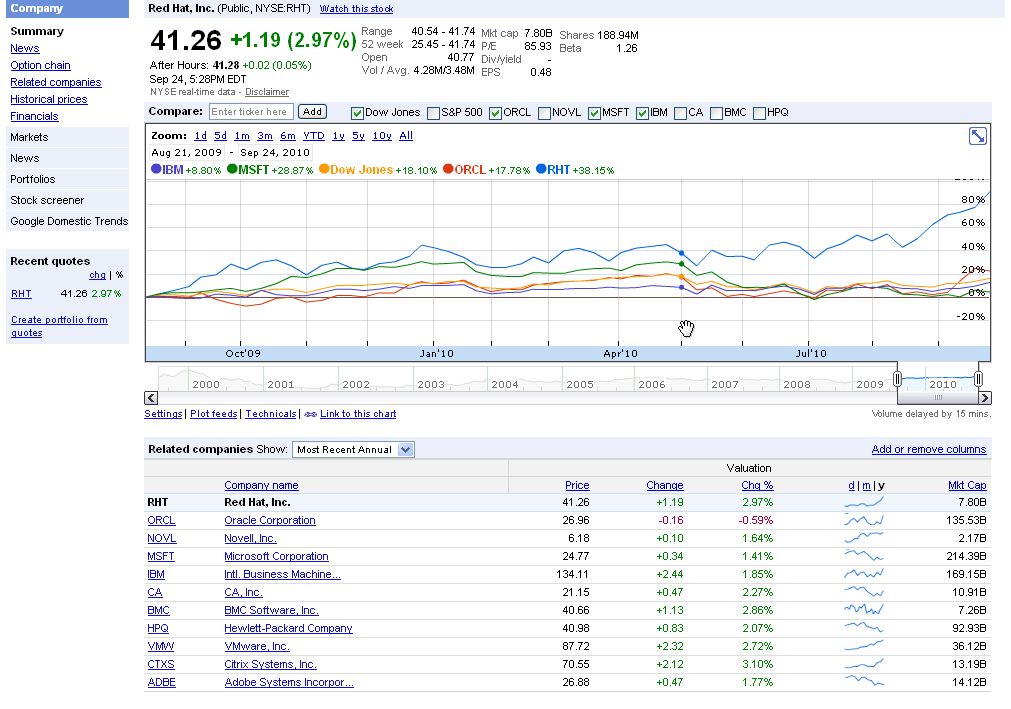
Revenue of $220 million, up 20% from the prior year
GAAP operating income up 24%, non-GAAP operating income up 25% from the prior year
Deferred revenue of $650 million, up 12% from the prior year
RALEIGH, NC – Sept 22, 2010 – Red Hat, Inc. (NYSE: RHT), the world’s leading provider of open source solutions, today announced financial results for its fiscal year 2011 second quarter ended August 31, 2010.
Total revenue for the quarter was $219.8 million, an increase of 20% from the year ago quarter. Subscription revenue for the quarter was $186.2 million, up 19% year-over-year.
Revolution News
Every month, we’ll bring you the latest news about Revolution’s products and events in this section. Follow us on Twitter at @RevolutionR for up-to-the-minute news and updates from Revolution Analytics!
Revolution R Enterprise 4.0 for Windows now available. Based on the latest R 2.11.1 and including the RevoScaleR package for big-data analysis in R, Revolution R Enterprise is now available for download for Windows 32-bit and 64-bit systems. Click here to subscribe, or available free to academia.
New! Integrate R with web applications, BI dashboards and more with web services. RevoDeployR is a new Web Services framework that integrates dynamic R-based computations into applications for business users. It will be available September 30 with Revolution R Enterprise Server on RHEL 5. Click here to learn more.
Inside-R: A new site for the R Community. At www.inside-R.org you’ll find the latest information about R from around the Web, searchable R documentation and packages, hints and tips about R, and more. You can even add a “Download R” badge to your own web-page to help spread the word about R.
R News, Tips and Tricks from the Revolutions blog
The Revolutions blog brings you daily news and tips about R, statistics and open source. Here are some highlights from Revolutions from the past month.
R’s key role in the oil spill response: Read how NIST’s Division Chief of Statistical Engineering used R to provide critical analysis in real time to the Secretaries of Energy and the Interior, and helped coordinate the government’s response.
Animating data with R and Google Earth: Learn how to use R to create animated visualizations of geographical data with Google Earth, such as this video showing how tuna migrations intersect with the location of the Gulf oil spill.
Are baseball games getting longer? Or is it just Red Sox games? Ryan Elmore uses nonparametric regression in R to find out.
Keynote presentations from useR! 2010: the worldwide R user’s conference was a great success, and there’s a wealth of useful tips and information in the presentations. Video of the keynote presentations are available too: check out in particular Frank Harrell’s talk Information Allergy, and Friedrich Leisch’s talk on reproducible statistical research.
Looking for more R tips and tricks? Check out the monthly round-ups at the Revolutions blog.
Upcoming Events Every month, we’ll highlight some upcoming events from R Community Calendar.
September 23: The San Diego R User Group has a meetup on BioConductor and microarray data analysis.
September 28: The Sydney Users of R Forum has a meetup on building world-class predictive models in R (with dinner to follow).
September 28: The Los Angeles R User Group presents an introduction to statistical finance with R.
September 28: The Seattle R User Group meets to discuss, “What are you doing with R?”
Press Release by the Guys in Revolution Analytics- this time claiming to enable terabyte level analytics with R. Interesting stuff but techie details are awaited.
Revolution Analytics Brings
Big Data Analysis to R
The world’s most powerful statistics language can now tackle terabyte-class data sets using
Revolution R Enterprise—at a fraction of the cost of legacy analytics products
JSM 2010 – VANCOUVER (August 3, 2010) — Revolution Analytics today introduced ‘Big Data’ analysis to its Revolution R Enterprise software, taking the popular R statistics language to unprecedented new levels of capacity and performance for analyzing very large data sets. For the first time, R users will be able to process, visualize and model terabyte-class data sets in a fraction of the time of legacy products—without employing expensive or specialized hardware.
The new version of Revolution R Enterprise introduces an add-on package called RevoScaleR that provides a new framework for fast and efficient multi-core processing of large data sets. It includes:
The XDF file format,a new binary ‘Big Data’ file format with an interface to the R language that provides high-speed access to arbitrary rows, blocks and columns of data.
A collection of widely-used statistical algorithms optimized for Big Data, including high-performance implementations of Summary Statistics, Linear Regression, Binomial Logistic Regressionand Crosstabs—with more to be added in the near future.
Data Reading & Transformation tools that allow users to interactively explore and prepare large data sets for analysis.
Extensibility, expert R users can develop and extend their own statistical algorithms to take advantage of Revolution R Enterprise’s new speed and scalability capabilities.
“The R language’s inherent power and extensibility has driven its explosive adoption as the modern system for predictive analytics,” said Norman H. Nie, president and CEO of Revolution Analytics. “We believe that this new Big Data scalability will help R transition from an amazing research and prototyping tool to a production-ready platform for enterprise applications such as quantitative finance and risk management, social media, bioinformatics and telecommunications data analysis.”
Sage Bionetworks is the nonprofit force behind the open-source collaborative effort, Sage Commons, a place where data and disease models can be shared by scientists to better understand disease biology. David Henderson, Director of Scientific Computing at Sage, commented: “At Sage Bionetworks, we need to analyze genomic databases hundreds of gigabytes in size with R. We’re looking forward to using the high-speed data-analysis features of RevoScaleR to dramatically reduce the times it takes us to process these data sets.”
Take Hadoop and Other Big Data Sources to the Next Level
Revolution R Enterprise fits well within the modern ‘Big Data’ architecture by leveraging popular sources such as Hadoop, NoSQL or key value databases, relational databases and data warehouses. These products can be used to store, regularize and do basic manipulation on very large datasets—while Revolution R Enterprise now provides advanced analytics at unparalleled speed and scale: producing speed on speed.
“Together, Hadoop and R can store and analyze massive, complex data,” said Saptarshi Guha, developer of the popular RHIPE R package that integrates the Hadoop framework with R in an automatically distributed computing environment. “Employing the new capabilities of Revolution R Enterprise, we will be able to go even further and compute Big Data regressions and more.”
Platforms and Availability
The new RevoScaleR package will be delivered as part of Revolution R Enterprise 4.0, which will be available for 32-and 64-bit Microsoft Windows in the next 30 days. Support for Red Hat Enterprise Linux (RHEL 5) is planned for later this year.
On its website (http://www.revolutionanalytics.com/bigdata), Revolution Analytics has published performance and scalability benchmarks for Revolution R Enterprise analyzing a 13.2 gigabyte data set of commercial airline information containing more than 123 million rows, and 29 columns.
Additionally, the company will showcase its new Big Data solution in a free webinar on August 25 at 9:00 a.m. Pacific.
Revolution Analytics (http://www.revolutionanalytics.com) is the leading commercial provider of software and support for the popular open source R statistics language. Its Revolution R products help make predictive analytics accessible to every type of user and budget. The company is headquartered in Palo Alto, Calif. and backed by North Bridge Venture Partners and Intel Capital.
Media Contact
Chantal Yang
Page One PR, for Revolution Analytics
Tel: +1 415-875-7494



 Bruno Aziza is a recognized authority on Strategy Execution, Business Intelligence and Information Management. He is the co-author of best-selling book,

 DECISION STATS