#Rstats for Business Intelligence

This is a short list of several known as well as lesser known R ( #rstats) language codes, packages and tricks to build a business intelligence application. It will be slightly Messy (and not Messi) but I hope to refine it someday when the cows come home.

It assumes that BI is basically-

a Database, a Document Database, a Report creation/Dashboard pulling software as well unique R packages for business intelligence.

What is business intelligence?

Seamless dissemination of data in the organization. In short let it flow- from raw transactional data to aggregate dashboards, to control and test experiments, to new and legacy data mining models- a business intelligence enabled organization allows information to flow easily AND capture insights and feedback for further action.

BI software has lately meant to be just reporting software- and Business Analytics has meant to be primarily predictive analytics. the terms are interchangeable in my opinion -as BI reports can also be called descriptive aggregated statistics or descriptive analytics, and predictive analytics is useless and incomplete unless you measure the effect in dashboards and summary reports.

Data Mining- is a bit more than predictive analytics- it includes pattern recognizability as well as black box machine learning algorithms. To further aggravate these divides, students mostly learn data mining in computer science, predictive analytics (if at all) in business departments and statistics, and no one teaches metrics , dashboards, reporting  in mainstream academia even though a large number of graduates will end up fiddling with spreadsheets or dashboards in real careers.

Using R with

1) Databases-

I created a short list of database connectivity with R here at https://rforanalytics.wordpress.com/odbc-databases-for-r/ but R has released 3 new versions since then.

The RODBC package remains the package of choice for connecting to SQL Databases.

http://cran.r-project.org/web/packages/RODBC/RODBC.pdf

Details on creating DSN and connecting to Databases are given at  https://rforanalytics.wordpress.com/odbc-databases-for-r/

For document databases like MongoDB and CouchDB

( what is the difference between traditional RDBMS and NoSQL if you ever need to explain it in a cocktail conversation http://dba.stackexchange.com/questions/5/what-are-the-differences-between-nosql-and-a-traditional-rdbms

Basically dispensing with the relational setup, with primary and foreign keys, and with the additional overhead involved in keeping transactional safety, often gives you extreme increases in performance

NoSQL is a kind of database that doesn’t have a fixed schema like a traditional RDBMS does. With the NoSQL databases the schema is defined by the developer at run time. They don’t write normal SQL statements against the database, but instead use an API to get the data that they need.

instead relating data in one table to another you store things as key value pairs and there is no database schema, it is handled instead in code.)

I believe any corporation with data driven decision making would need to both have atleast one RDBMS and one NoSQL for unstructured data-Ajay. This is a sweeping generic statement 😉 , and is an opinion on future technologies.

  • Use RMongo

From- http://tommy.chheng.com/2010/11/03/rmongo-accessing-mongodb-in-r/

http://plindenbaum.blogspot.com/2010/09/connecting-to-mongodb-database-from-r.html

Connecting to a MongoDB database from R using Java

http://nsaunders.wordpress.com/2010/09/24/connecting-to-a-mongodb-database-from-r-using-java/

Also see a nice basic analysis using R Mongo from

http://pseudofish.com/blog/2011/05/25/analysis-of-data-with-mongodb-and-r/

For CouchDB

please see https://github.com/wactbprot/R4CouchDB and

http://digitheadslabnotebook.blogspot.com/2010/10/couchdb-and-r.html

  • First install RCurl and RJSONIO. You’ll have to download the tar.gz’s if you’re on a Mac. For the second part, we’ll need to installR4CouchDB,

2) External Report Creating Software-

Jaspersoft- It has good integration with R and is a certified Revolution Analytics partner (who seem to be the only ones with a coherent #Rstats go to market strategy- which begs the question – why is the freest and finest stats software having only ONE vendor- if it was so great lots of companies would make exclusive products for it – (and some do -see https://rforanalytics.wordpress.com/r-business-solutions/ and https://rforanalytics.wordpress.com/using-r-from-other-software/)

From

http://www.jaspersoft.com/sites/default/files/downloads/events/Analytics%20-Jaspersoft-SEP2010.pdf

we see

http://jasperforge.org/projects/rrevodeployrbyrevolutionanalytics

RevoConnectR for JasperReports Server

RevoConnectR for JasperReports Server RevoConnectR for JasperReports Server is a Java library interface between JasperReports Server and Revolution R Enterprise’s RevoDeployR, a standardized collection of web services that integrates security, APIs, scripts and libraries for R into a single server. JasperReports Server dashboards can retrieve R charts and result sets from RevoDeployR.

http://jasperforge.org/plugins/esp_frs/optional_download.php?group_id=409


Using R and Pentaho
Extending Pentaho with R analytics”R” is a popular open source statistical and analytical language that academics and commercial organizations alike have used for years to get maximum insight out of information using advanced analytic techniques. In this twelve-minute video, David Reinke from Pentaho Certified Partner OpenBI provides an overview of R, as well as a demonstration of integration between R and Pentaho.
and from
R and BI – Integrating R with Open Source Business
Intelligence Platforms Pentaho and Jaspersoft
David Reinke, Steve Miller
Keywords: business intelligence
Increasingly, R is becoming the tool of choice for statistical analysis, optimization, machine learning and
visualization in the business world. This trend will only escalate as more R analysts transition to business
from academia. But whereas in academia R is often the central tool for analytics, in business R must coexist
with and enhance mainstream business intelligence (BI) technologies. A modern BI portfolio already includes
relational databeses, data integration (extract, transform, load – ETL), query and reporting, online analytical
processing (OLAP), dashboards, and advanced visualization. The opportunity to extend traditional BI with
R analytics revolves on the introduction of advanced statistical modeling and visualizations native to R. The
challenge is to seamlessly integrate R capabilities within the existing BI space. This presentation will explain
and demo an initial approach to integrating R with two comprehensive open source BI (OSBI) platforms –
Pentaho and Jaspersoft. Our efforts will be successful if we stimulate additional progress, transparency and
innovation by combining the R and BI worlds.
The demonstration will show how we integrated the OSBI platforms with R through use of RServe and
its Java API. The BI platforms provide an end user web application which include application security,
data provisioning and BI functionality. Our integration will demonstrate a process by which BI components
can be created that prompt the user for parameters, acquire data from a relational database and pass into
RServer, invoke R commands for processing, and display the resulting R generated statistics and/or graphs
within the BI platform. Discussion will include concepts related to creating a reusable java class library of
commonly used processes to speed additional development.

If you know Java- try http://ramanareddyg.blog.com/2010/07/03/integrating-r-and-pentaho-data-integration/


and I like this list by two venerable powerhouses of the BI Open Source Movement

http://www.openbi.com/demosarticles.html

Open Source BI as disruptive technology

http://www.openbi.biz/articles/osbi_disruption_openbi.pdf

Open Source Punditry

TITLE AUTHOR COMMENTS
Commercial Open Source BI Redux Dave Reinke & Steve Miller An review and update on the predictions made in our 2007 article focused on the current state of the commercial open source BI market. Also included is a brief analysis of potential options for commercial open source business models and our take on their applicability.
Open Source BI as Disruptive Technology Dave Reinke & Steve Miller Reprint of May 2007 DM Review article explaining how and why Commercial Open Source BI (COSBI) will disrupt the traditional proprietary market.

Spotlight on R

TITLE AUTHOR COMMENTS
R You Ready for Open Source Statistics? Steve Miller R has become the “lingua franca” for academic statistical analysis and modeling, and is now rapidly gaining exposure in the commercial world. Steve examines the R technology and community and its relevancy to mainstream BI.
R and BI (Part 1): Data Analysis with R Steve Miller An introduction to R and its myriad statistical graphing techniques.
R and BI (Part 2): A Statistical Look at Detail Data Steve Miller The usage of R’s graphical building blocks – dotplots, stripplots and xyplots – to create dashboards which require little ink yet tell a big story.
R and BI (Part 3): The Grooming of Box and Whiskers Steve Miller Boxplots and variants (e.g. Violin Plot) are explored as an essential graphical technique to summarize data distributions by categories and dimensions of other attributes.
R and BI (Part 4): Embellishing Graphs Steve Miller Lattices and logarithmic data transformations are used to illuminate data density and distribution and find patterns otherwise missed using classic charting techniques.
R and BI (Part 5): Predictive Modelling Steve Miller An introduction to basic predictive modelling terminology and techniques with graphical examples created using R.
R and BI (Part 6) :
Re-expressing Data
Steve Miller How do you deal with highly skewed data distributions? Standard charting techniques on this “deviant” data often fail to illuminate relationships. This article explains techniques to re-express skewed data so that it is more understandable.
The Stock Market, 2007 Steve Miller R-based dashboards are presented to demonstrate the return performance of various asset classes during 2007.
Bootstrapping for Portfolio Returns: The Practice of Statistical Analysis Steve Miller Steve uses the R open source stats package and Monte Carlo simulations to examine alternative investment portfolio returns…a good example of applied statistics using R.
Statistical Graphs for Portfolio Returns Steve Miller Steve uses the R open source stats package to analyze market returns by asset class with some very provocative embedded trellis charts.
Frank Harrell, Iowa State and useR!2007 Steve Miller In August, Steve attended the 2007 Internation R User conference (useR!2007). This article details his experiences, including his meeting with long-time R community expert, Frank Harrell.
An Open Source Statistical “Dashboard” for Investment Performance Steve Miller The newly launched Dashboard Insight web site is focused on the most useful of BI tools: dashboards. With this article discussing the use of R and trellis graphics, OpenBI brings the realm of open source to this forum.
Unsexy Graphics for Business Intelligence Steve Miller Utilizing Tufte’s philosophy of maximizing the data to ink ratio of graphics, Steve demonstrates the value in dot plot diagramming. The R open source statistical/analytics software is showcased.
I think that the report generation package Brew would also qualify as a BI package, but large scale implementation remains to be seen in
a commercial business environment
  • brew: Creating Repetitive Reports
 brew: Templating Framework for Report Generation

brew implements a templating framework for mixing text and R code for report generation. brew template syntax is similar to PHP, Ruby's erb module, Java Server Pages, and Python's psp module. http://bit.ly/jINmaI
  • Yarr- creating reports in R
to be continued ( when I have more time and the temperature goes down from 110F in Delhi, India)

Jaspersoft 4.1 launched

http://www.jaspersoft.com/events/jaspersoft-41-webinar-north-america

one more webinar, but a newer software and a changing paradigm.

———————————————————————————————————————————————

Webinar: Introducing Jaspersoft 4.1- North America

 Date: June 8, 2011

Time: 10:00 AM PT/1:00 PM ET
Duration: 60 Minutes
Language: English

Self-service Business Intelligence helps individuals and organizations respond quickly to operational and strategic decisions.  A driving factor for the success of self-service BI is an intuitive and integrated UI that spans reporting, dashboards, and data analysis. Additionally, the rise of the cloud and big-data environments presents new opportunities for organizations that can analyze and respond to these emerging data sources.

In this webinar, see how the new Jaspersoft Business Intelligence Suite 4.1 release achieves all this and more.
Register now and learn how you can now take advantage of:

  • Modern self-service BI for reporting and analysis: powerful, unified capabilities for both ad hoc reporting and analysis tasks.
  • Flexible insight into any data source: a seamless analytics UI for both data stored within relational, OLAP, and big data stores.
  • Maximum performance—now designed to take advantage of 64-bit processors.

    Join the webinar and explore the world’s most advanced and affordable BI suite through live demos, interactive Q&A and more.

the upcoming Jaspersoft 4.1 Webinar and Demo. Here’s a preview of what you’ll see:

  • Unified drag-and-drop UI for reporting and analytics. Jaspersoft 4.1 delivers powerful, unified drag-and-drop usability to both ad hoc reporting and analysis tasks while supporting both in-memory and OLAP engines. That means easier, more powerful analysis for business users and a faster route to self-service BI.
  • Insight against any data source. The analytics UI provides easier, more powerful analysis across relational, OLAP, and Big Data stores.
  • High performance with native 64-bit installer support. With Jaspersoft 4.1, you can also scale BI applications to new performance heights, thanks to full support for today’s powerful 64-bit processors.

Join us for the webinar and see how quickly and easily BI Builders like you can deliver true, self-service BI, combining reports, dashboards, and analytics, against virtually any data source — all through a single, web-based UI.

Interview- Top Data Mining Blogger on Earth , Sandro Saitta

Surajustement Modèle 2
Image via Wikipedia

If you do a Google search for Data Mining Blog- for the past several years one Blog will come on top. data mining blog – Google Search http://bit.ly/kEdPlE

To honor 5 years of Sandro Saitta’s blog (yes thats 5 years!) , we cover an exclusive interview with him where he reveals his unique sauce for cool techie blogging.

Ajay- Describe your journey as a scientist and data miner, from early experiences, to schooling to your work/research/blogging.

Sandro- My first experience with data mining was my master project. I used decision tree to predict pollen concentration for the following week using input data such as wind, temperature and rain. The fact that an algorithm can make a computer learn from experience was really amazing to me. I found it so interesting that I started a PhD in data mining. This time, the field of application was civil engineering. Civil engineers put a lot of sensors on their structure in order to understand how they behave. With all these sensors they generate a lot of data. To interpret these data, I used data mining techniques such as feature selection and clustering. I started my blog, Data Mining Research, during my PhD, to share with other researchers.

I then started applying data mining in the stock market as my first job in industry. I realized the difference between image recognition, where 99% correct classification rate is state of the art, and stock market, where you’re happy with 55%. However, the company ambiance was not as good as I thought, so I moved to consulting. There, I applied data mining in behavioral targeting to increase click-through rates. When you compare the number of customers who click with the ones who don’t, then you really understand what class imbalance mean. A few months ago, I accepted a very good opportunity at SICPA. I’m looking forward to resolving new challenges there.

Ajay- Your blog is the top ranked blog for “data mining blog”. Could you share some tips on better blogging for analytics and technical people

Sandro- It’s always difficult to start a blog, since at the beginning you have no reader. Writing for nobody may seem stupid, but it is not. By writing my first posts during my PhD I was reorganizing my ideas. I was expressing concepts which were not always clear to me. I thus learned a lot and also improved my English level. Of course, it’s still not perfect, but I hope most people can understand me.

Next come the readers. A few dozen each week first. To increase this number, I then started to learn SEO (Search Engine Optimization) by reading books and blogs. I tested many techniques that increased Data Mining Research visibility in the blogosphere. I think SEO is interesting when you already have some content published (which means not at the very beginning of your blog). After a while, once your blog is nicely ranked, the main task is to work on the content of the blog. To be of interest, your content must be particular: original, informative or provocative for example. I also had the chance to have a good visibility thanks to well-known people in the field like Kevin Hillstrom, Gregory Piatetsky-Shapiro, Will Dwinnell / Dean Abbott, Vincent Granville, Matthew Hurst and many others.

Ajay- Whats your favorite statistical software and what are the various softwares that you have worked with.
Could you compare and contrast these software as well.

Sandro- My favorite software at this point is SAS. I worked with it for two years. Once you know the language, you can perform ETL and data mining so easily. It’s also very fast compared to others. There are a lot of tools for data mining, but I cannot think of a tool that is as powerful as SAS and, in the same time, has a high-level programming language behind it.

I also worked with R and Matlab. R is very nice since you have all the up-to-date data mining algorithms implemented. However, working in the memory is not always a good choice, especially for ETL. Matlab is an excellent tool for prototyping. It’s not so fast and certainly not done for ETL, but the price is low regarding all the possibilities for data mining. According to me, SAS is the best choice for ETL and a good choice for data mining. Of course, there is the price.

Ajay- What are your favorite techniques and training resources for learning basics of data mining to say statisticians or business management graduates.

Sandro- I’m the kind of guy who likes to read books. I read data mining books one after the other. The fact that the same concepts are explained differently (and by different people) helps a lot in learning a topic like data mining. Of course, nothing replaces experience in the field. You can read hundreds of books, you will still not be a good practitioner until you really apply data mining in specific fields. My second choice after books is blogs. By reading data mining blogs, you will really see the issues and challenges in the field. It’s still not experience, but we are closer. Finally, web resources and networks such as KDnuggets of course, but also AnalyticBridge and LinkedIn.

Ajay- Describe your hobbies and how they help you ,if at all in your professional life.

Sandro- One of my hobbies is reading. I read a lot of books about data mining, SEO, Google as well as Sci-Fi and Fantasy. I’m a big fan of Asimov by the way. My other hobby is playing tennis. I think I simply use my hobbies as a way to find equilibrium in my life. I always try to find the best balance between work, family, friends and sport.

Ajay- What are your plans for your website for 2011-2012.

Sandro- I will continue to publish guest posts and interviews. I think it is important to let other people express themselves about data mining topics. I will not write about my current applications due to the policies of my current employer. But don’t worry, I still have a lot to write, whether it is technical or not. I will also emphasis more on my experience with data mining, advices for data miners, tips and tricks, and of course book reviews!

Standard Disclosure of Blogging- Sandro awarded me the Peoples Choice award for his blog for 2010 and carried out my interview. There is a lot of love between our respective wordpress blogs, but to reassure our puritan American readers- it is platonic and intellectual.

About Sandro S-


Sandro Saitta is a Data Mining Research Engineer at SICPA Security Solutions. He is also a blogger at Data Mining Research (www.dataminingblog.com). His interests include data mining, machine learning, search engine optimization and website marketing.

You can contact Mr Saitta at his Twitter address- 

https://twitter.com/#!/dataminingblog

#Rstats gets into Enterprise Cloud Software

Defense Agencies of the United States Departme...
Image via Wikipedia

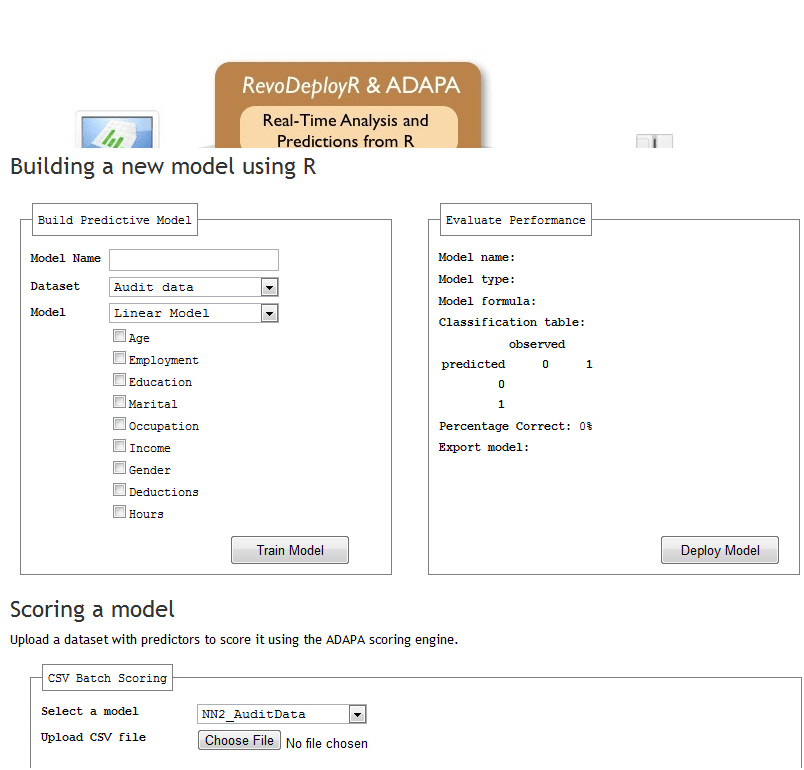
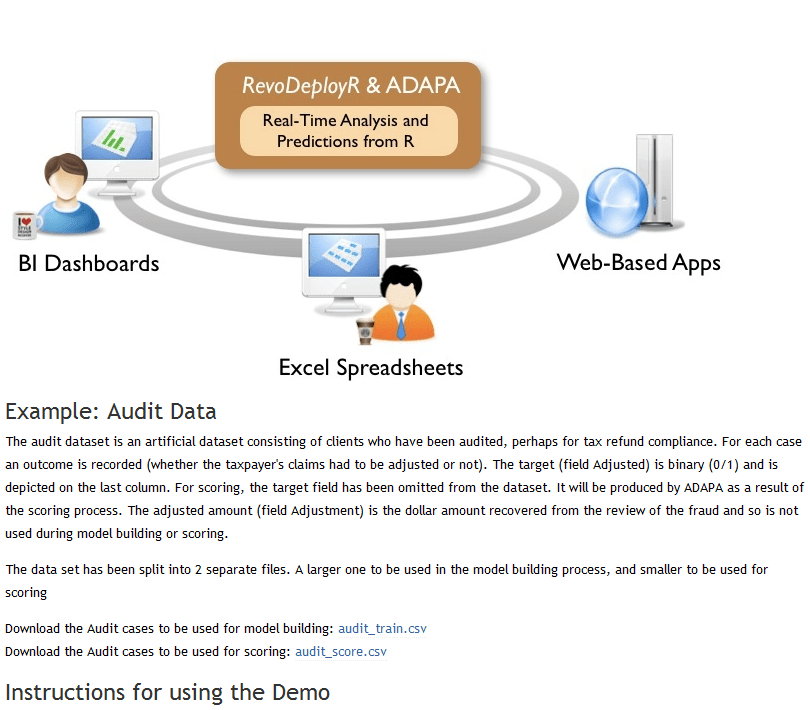
Here is an excellent example of how websites should help rather than hinder new customers take a demo of the software without being overwhelmed by sweet talking marketing guys who dont know the difference between heteroskedasticity, probability, odds and likelihood.

It is made by Zementis (Dr Michael Zeller has been a frequent guest here) and Revolution Analytics is still the best shot in Enterprise software for #Rstats

Now if only Revo could get into the lucrative Department of Energy or Department of Defense business- they could change the world AND earn some more revenue than they have been doing. But seriously.

Check out http://deployr.revolutionanalytics.com/zementis/ and play with it. or better still mash it with some data viz and ROC curves.- or extend it with some APIS 😉

New book on BigData Analytics and Data mining using #Rstats with a GUI

Joseph Marie Jacquard
Image via Wikipedia

I am hoping to put this on my pre-ordered or Amazon Wish list. The book the common people who wanted to do data mining with , but were unable to ask aloud they didnt know much.  It is written by the seminal Australian authority on data mining Dr Graham Williams whom I interviewed here at https://decisionstats.com/2009/01/13/interview-dr-graham-williams/

Data Mining for the masses using an ergonomically designed Graphical User Interface.

Thank you Springer. Thank you Dr Graham Williams

http://www.springer.com/statistics/physical+%26+information+science/book/978-1-4419-9889-7

Data Mining with Rattle and R

Data Mining with Rattle and R

The Art of Excavating Data for Knowledge Discovery

Series: Use R

Williams, Graham

1st Edition., 2011, XX, 409 p. 150 illus. in color.

  • Softcover, ISBN 978-1-4419-9889-7

    Due: August 29, 2011

    54,95 €
  • Encourages the concept of programming with data – more than just pushing data through tools, but learning to live and breathe the data
  • Accessible to many readers and not necessarily just those with strong backgrounds in computer science or statistics
  • Details some of the more popular algorithms for data mining, as well as covering model evaluation and model deployment

Data mining is the art and science of intelligent data analysis. By building knowledge from information, data mining adds considerable value to the ever increasing stores of electronic data that abound today. In performing data mining many decisions need to be made regarding the choice of methodology, the choice of data, the choice of tools, and the choice of algorithms.

Throughout this book the reader is introduced to the basic concepts and some of the more popular algorithms of data mining. With a focus on the hands-on end-to-end process for data mining, Williams guides the reader through various capabilities of the easy to use, free, and open source Rattle Data Mining Software built on the sophisticated R Statistical Software. The focus on doing data mining rather than just reading about data mining is refreshing.

The book covers data understanding, data preparation, data refinement, model building, model evaluation,  and practical deployment. The reader will learn to rapidly deliver a data mining project using software easily installed for free from the Internet. Coupling Rattle with R delivers a very sophisticated data mining environment with all the power, and more, of the many commercial offerings.

Content Level » Research

Keywords » Data mining

Related subjects » Physical & Information Science

Related- https://decisionstats.com/2009/01/13/interview-dr-graham-williams/

Google Refine

An interesting data cleaning software from Google at

https://code.google.com/p/google-refine/

From the page at

https://code.google.com/p/google-refine/wiki/UserGuide

The Basics

First, although Google Refine might start out looking like a spreadsheet program (Microsoft Excel, Google Spreadsheets, etc.), don’t expect it to work like a spreadsheet program. That’s almost like expecting a database to work like a text editor.

Google Refine is NOT for entering new data one cell at a time. It is NOT for doing accounting.

Google Refine is for applying transformations over many existing cells in bulk, for the purpose of cleaning up the data, extending it with more data from other sources, and getting it to some form that other tools can consume.

To use Google Refine, think in big patterns. For example, to spot errors, think

  • Show me every row where the string length of the customer’s name is longer than 50 characters (because I suspect that the customer’s address is mistakenly included in the name field)
  • Show me every row where the contract fee is less than 1 (because I suspect the fee was entered in unit of thousand dollars rather than dollars)
  • Show me every row where the description field (scraped from some web site) contains “&” (because I suspect it wasn’t decoded properly)

To edit data, think

  • For every row where the contract fee is less than 1, multiply the fee by 1000.
  • For every row where the customer name contains a comma (it has been entered as “last_name, first_name”), split the name by the comma, reverse the array, and join it back with a space (producing “first_name last_name”)

To specify patterns, use filters and facets. Typically, you create a filter or facet on a particular column. For example, you can create a numeric facet on the “contract fee” column and adjust its range selector to select values less than 1. If the default facet doesn’t do what you want, you can configure it (by clicking “change” on the facet’s header). For example, you can create a text facet with on the same “contract fee” column with this expression:

  value < 1

It will show 2 choices: true and false. Just select true. Then, invoke the Transform command on that same column and enter the expression

  value * 1000

That Transform command affects only rows where the “contract fee” cell contains a value less than 1.

You can use several filters and facets together. Only rows that are selected by all facets and filters will be shown in the data table. For example, say you have two text facets, one on the “contract fee” column with the expression

  value < 1

and another on the “state” column (with the default expression). If you select “true” in the first facet and “Nevada” in the second, then you will only see rows for contracts in Nevada with fees less than 1.

Analogies

Databases

If you have programmed databases before (performing SQL queries), then what Google Refine works should be quite familiar to you. Creating filters and facets and selecting something in them is like performing this SELECT statement:

  SELECT *
  WHERE ... constraints determined by selection in facets and filters ...

And invoking the Transform command on a column while having some filters and facets selected is like performing this UPDATE statement

  UPDATE whole_table SET column_X = ... expression ...
  WHERE ... constraints determined by selection in facets and filters ...

The difference between Google Refine and databases is that the facets show you choices that you can select, whereas databases assume that you already know what’s in the data.


HIGHLIGHTS from REXER Survey :R gives best satisfaction

Simple graph showing hierarchical clustering. ...
Image via Wikipedia

A Summary report from Rexer Analytics Annual Survey


HIGHLIGHTS from the 4th Annual Data Miner Survey (2010):


•   FIELDS & GOALS: Data miners work in a diverse set of fields.  CRM / Marketing has been the #1 field in each of the past four years.  Fittingly, “improving the understanding of customers”, “retaining customers” and other CRM goals are also the goals identified by the most data miners surveyed.


•   ALGORITHMS: Decision trees, regression, and cluster analysis continue to form a triad of core algorithms for most data miners.  However, a wide variety of algorithms are being used.  This year, for the first time, the survey asked about Ensemble Models, and 22% of data miners report using them.
A third of data miners currently use text mining and another third plan to in the future.


•   MODELS: About one-third of data miners typically build final models with 10 or fewer variables, while about 28% generally construct models with more than 45 variables.


•   TOOLS: After a steady rise across the past few years, the open source data mining software R overtook other tools to become the tool used by more data miners (43%) than any other.  STATISTICA, which has also been climbing in the rankings, is selected as the primary data mining tool by the most data miners (18%).  Data miners report using an average of 4.6 software tools overall.  STATISTICA, IBM SPSS Modeler, and R received the strongest satisfaction ratings in both 2010 and 2009.


•   TECHNOLOGY: Data Mining most often occurs on a desktop or laptop computer, and frequently the data is stored locally.  Model scoring typically happens using the same software used to develop models.  STATISTICA users are more likely than other tool users to deploy models using PMML.


•   CHALLENGES: As in previous years, dirty data, explaining data mining to others, and difficult access to data are the top challenges data miners face.  This year data miners also shared best practices for overcoming these challenges.  The best practices are available online.


•   FUTURE: Data miners are optimistic about continued growth in the number of projects they will be conducting, and growth in data mining adoption is the number one “future trend” identified.  There is room to improve:  only 13% of data miners rate their company’s analytic capabilities as “excellent” and only 8% rate their data quality as “very strong”.


Please contact us if you have any questions about the attached report or this annual research program.  The 5th Annual Data Miner Survey will be launching next month.  We will email you an invitation to participate.


Information about Rexer Analytics is available at www.RexerAnalytics.com. Rexer Analytics continues their impressive journey see http://www.rexeranalytics.com/Clients.html

|My only thought- since most data miners are using multiple tools including free tools as well as paid software, Perhaps a pie chart of market share by revenue and volume would be handy.

Also some ideas on comparing diverse data mining projects by data size, or complexity.