Free Machine Learning at Stanford

One of the cornerstones of the technology revolution, Stanford now offers some courses for free via distance learning. One of the more exciting courses is of course- machine learning


http://jan2012.ml-class.org/

About The Course

This course provides a broad introduction to machine learning, datamining, and statistical pattern recognition. Topics include: (i) Supervised learning (parametric/non-parametric algorithms, support vector machines, kernels, neural networks). (ii) Unsupervised learning (clustering, dimensionality reduction, recommender systems, deep learning). (iii) Best practices in machine learning (bias/variance theory; innovation process in machine learning and AI). The course will also draw from numerous case studies and applications, so that you’ll also learn how to apply learning algorithms to building smart robots (perception, control), text understanding (web search, anti-spam), computer vision, medical informatics, audio, database mining, and other areas.

The Instructor

Professor Andrew Ng is Director of the Stanford Artificial Intelligence Lab, the main AI research organization at Stanford, with 20 professors and about 150 students/post docs. At Stanford, he teaches Machine Learning, which with a typical enrollment of 350 Stanford students, is among the most popular classes on campus. His research is primarily on machine learning, artificial intelligence, and robotics, and most universities doing robotics research now do so using a software platform (ROS) from his group.


  1. When does the class start?The class will start in January 2012 and will last approximately ten weeks.
  2. What is the format of the class?The class will consist of lecture videos, which are broken into small chunks, usually between eight and twelve minutes each. Some of these may contain integrated quiz questions. There will also be standalone quizzes that are not part of video lectures, and programming assignments.
  3. Will the text of the lectures be available?We hope to transcribe the lectures into text to make them more accessible for those not fluent in English. Stay tuned.
  4. Do I need to watch the lectures live?No. You can watch the lectures at your leisure.
  5. Can online students ask questions and/or contact the professor?Yes, but not directly There is a Q&A forum in which students rank questions and answers, so that the most important questions and the best answers bubble to the top. Teaching staff will monitor these forums, so that important questions not answered by other students can be addressed.
  6. Will other Stanford resources be available to online students?No.
  7. How much programming background is needed for the course?The course includes programming assignments and some programming background will be helpful.
  8. Do I need to buy a textbook for the course?No.
  9. How much does it cost to take the course?Nothing: it’s free!
  10. Will I get university credit for taking this course?No.Interested in learning machine learning-

    Well here is the website to enroll http://jan2012.ml-class.org/

Preview- Google Cloud SQL

From –http://code.google.com/apis/sql/

What is Google Cloud SQL?

Google Cloud SQL is web service that allows you to create, configure, and use relational databases with your App Engine applications. It is a fully-managed service that maintains, manages, and administers your databases, allowing you to focus on your applications and services.

By offering the capabilities of a MySQL database, the service enables you to easily move your data, applications, and services into and out of the cloud. This allows for high data portability and helps in faster time-to-market because you can quickly leverage your existing database (using JDBC and/or DB-API) in your App Engine application.

Here is where you can get an invite to the beta only Google Cloud SQL

Sign up for Limited Preview

Google Cloud SQL is available to a limited number of users. To sign up for the service:

  1. Visit the Google APIs Console. The console opens the All services pane.
  2. Find the SQL Service line in the Services table and click Request access…
  3. Fill out the enrollment form.
  4. Our team will review your enrollment information and respond by email to the address associated with your Google Account.
  5. Follow the link in the email to view the Terms of Service. Please read these carefully before accepting.
  6. Sign up for the google-cloud-sql-announce group to receive important announcements and product news. (NOTE- Members: 384)
and after all that violence and double talk, a walk in the clouds with SQL.
1. There are three kinds of instances in the beta view
2. Wait for the Instance to be created note- the Design of the Interface uptil now is much better than Amazon’s.  
Note you need to have an appspot application from Google Apps and can choose between the Python and Java versions. Quite clearly there is a play for other languages too. I think GO is also supported.
3. You can import your data from your Google Storage bucket
4. I am not that hot at coding or maybe the interface was too pretty. Anyways- the log tells me that import of the text file has failed from Google Storage to Google Cloud SQL 
5. Incidentally the Google Cloud Storage interface is also much better than the Amazon GUI for transferring data- Note I was using the classical statistical dataset Boston Housing Data as the test case. 
6. The SQL prompt is the weakest part of the design process of the Interphase. There is no Query builder and the SELECT FROM WHERE prompt is slightly amusing/ insulting . I mean guys either throw in a fully fledged GUI for query builder similar to the MYSQL Workbench , than create a pretty white command prompt.
7. You can also export your data back to your Google Storage bucket 
These are early days, and I am trying to see if there is a play for some cloud kind of ODBC action between R, Prediction API , and the cloud SQL… so try it out yourself at http://code.google.com/apis/sql/ and see if there is any juice you can build  here.

Google Cloud SQL

Another xing bang API from the boyz in Mountain View. (entry by invite only) But it is free and you can test your stuff on a MySQL db =10 GB

Database as a service ? (Maybe)— while Amazon was building fires (and Fire)

—————————————————————–

https://code.google.com/apis/sql/index.html

What is Google Cloud SQL?

Google Cloud SQL is a web service that provides a highly available, fully-managed, hosted SQL storage solution for your App Engine applications.

What are the benefits of using Google Cloud SQL?

You can access a familiar, highly available SQL database from your App Engine applications, without having to worry about provisioning, management, and integration with other Google services.

How much does Google Cloud SQL cost?

We will not be billing for this service in 2011. We will give you at least 30 days’ advance notice before we begin billing in the future. Other services such as Google App Engine, Google Cloud Storage etc. that you use with Google Cloud SQL may have their own payment terms, and you need to pay for them. Please consult their documentation for details.

Currently you are limited to the three instance sizes. What if I need to store more data or need better performance?

In the Limited Preview period, we only have three sizes available. If you have specific needs, we would like to hear from you on our google-cloud-sqldiscussion board.

When is Google Cloud SQL be out of Limited Preview?

We are working hard to make the service generally available.We don’t have a firm date that we can announce right now.

Do you support all the features of MySQL?

In general, Google Cloud SQL supports all the features of MySQL. The following are lists of all the unsupported features and notable differences that Google Cloud SQL has from MySQL.

Unsupported Features:

  • User defined functions
  • MySql replication

Unsupported MySQL statements:

  • LOAD DATA INFILE
  • SELECT ... INTO OUTFILE
  • SELECT ... INTO DUMPFILE
  • INSTALL PLUGIN .. SONAME ...
  • UNINSTALL PLUGIN
  • CREATE FUNCTION ... SONAME ...

Unsupported SQL Functions:

  • LOAD_FILE()

Notable Differences:

  • If you want to import databases with binary data into your Google Cloud SQL instance, you must use the --hex-blob option with mysqldump.Although this is not a required flag when you are using a local MySQL server instance and the MySQL command line, it is required if you want to import any databases with binary data into your Google Cloud SQL instance. For more information, see Importing Data.
How large a database can I use with Google Cloud SQL?
Currently, in this limited preview period, your database instance must be no larger than 10GB.
How can I be notified when there are any changes to Google Cloud SQL?
You can sign up for the sql-announcements forum where we post announcements and news about the Google Cloud SQL.
How can I cancel my Google Cloud SQL account?
To remove all data from your Google Cloud SQL account and disable the service:

  1. Delete all your data. You can remove your tables, databases, and indexes using the drop command. For more information, see SQL DROP statement.
  2. Deactivate the Google Cloud SQL by visiting the Services pane and clicking the On button next to Google Cloud SQL. The button changes from Onto Off.
How do I report a bug, request a feature, or ask a question?
You can report bugs and request a feature on our project page.You can ask a question in our discussion forum.

Getting Started

Can I use languages other than Java or Python?
Only Java and Python are supported for Google Cloud SQL.
Can I use Google Cloud SQL outside of Google App Engine?
The Limited Preview is primarily focused on giving Google App Engine customers the ability to use a familiar relational database environment. Currently, you cannot access Google Cloud SQL from outside Google App Engine.
What database engine are we using in the Google Cloud SQL?
MySql Version 5.1.59
Do I need to install a local version of MySQL to use the Development Server?
Yes.

Managing Your Instances

Do I need to use the Google APIs Console to use Google Cloud SQL?
Yes. For basic tasks like granting access control to applications, creating instances, and deleting instances, you need to use the Google APIs Console.
Can I import or export specific databases?
No, currently it is not possible to export specific databases. You can only export your entire instance.
Do I need a Google Cloud Storage account to import or export my instances?
Yes, you need to sign up for a Google Cloud Storage account or have access to a Google Cloud Storage account to import or export your instances. For more information, see Importing and Exporting Data.
If I delete my instance, can I reuse the instance name?
Yes, but not right away. The instance name is reserved for up to two months before it can be reused.

Tools & Resources

Can I use Django with Google Cloud SQL?
No, currently Google Cloud SQL is not compatible with Django.
What is the best tool to use for interacting with my instance?
There are a variety of tools available for Google Cloud SQL. For executing simple statements, you can use the SQL prompt. For executing more complicated tasks, you might want to use the command line tool. If you want to use a tool with a graphical interface, the SQuirrel SQL Client provides an interface you can use to interact with your instance.

Common Technical Questions

Should I use InnoDB for my tables?
Yes. InnoDB is the default storage engine in MySQL 5.5 and is also the recommended storage engine for Google Cloud SQL. If you do not need any features that require MyISAM, you should use InnoDB. You can convert your existing tables using the following SQL command, replacing tablename with the name of the table to convert:

ALTER tablename ENGINE = InnoDB;

If you have a mysqldump file where all your tables are in MyISAM format, you can convert them by piping the file through a sed script:

mysqldump --databases database_name [-u username -p  password] --hex-blob database_name | sed 's/ENGINE=MyISAM/ENGINE=InnoDB/g' > database_file.sql

Warning: You should not do this if your mysqldump file contains the mysql schema. Those files must remain in MyISAM.

Are there any size or QPS limits?
Yes, the following limits apply to Google Cloud SQL:

Resource Limits from External Requests Limits from Google App Engine
Queries Per Second (QPS) 5 QPS No limit
Maximum Request Size 16 MB
Maximum Response Size 16 MB

Google App Engine Limits

Google App Engine applications are also subject to additional Google App Engine quotas and limits. Requests from Google App Engine applications to Google Cloud SQL are subject to the following time limits:

  • All database requests must finish within the HTTP request timer, around 60 seconds.
  • Offline requests like cron tasks have a time limit of 10 minutes.
  • Backend requests to Google Cloud SQL have a time limit of 10 minutes.

App Engine-specific quotas and access limits are discussed on the Google App Engine Quotas page.

Should I use Google Cloud SQL with my non-High Replication App Engine application?
We recommend that you use Google Cloud SQL with High Replication App Engine applications. While you can use use Google Cloud SQL with applications that do not use high replication, doing so might impact performance.
Source-
https://code.google.com/apis/sql/faq.html#supportmysqlfeatures

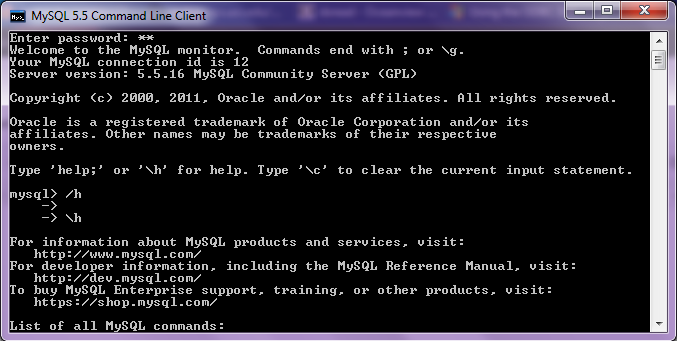
Using R with MySQL #rstats

A brief tutorial to working with R and MySQL. MySQL belongs to Oracle is one of the most widely used databases now.

1. Download mySQL from
http://www.mysql.com/downloads/mysql/  or (http://www.mysql.com/downloads/mirror.php?id=403831)
Click Install -use default options, remember to note down the password=XX
2.Download the ODBC connector from http://www.mysql.com/downloads/connector/odbc/5.1.htmlThe Data Sources (ODBC) can be located from the Control Panel in Windows7

Install ODBC Connector by double clicking the .msi file downloaded in Step 2-
Check this screenshot in ODBC Connectors to verify-
Note this is the Drivers tab in ODBC Data Source Administrator
Click the System DSN and Configure MySQL using the add button Use the configuration options shown exactly here. The user is root, the TCP/IP Server is local host, use the same password in Step 1 and the Database is MySQL
Test the connection

Click OK to finish this step.
Click the User DSN tab (and repeating the step  immediately above -Add, and Configure the connection using options The user is root, the TCP/IP Server is local host, use the same password in Step 1 and the Database is MySQL , Test the connection and OK to add the connection
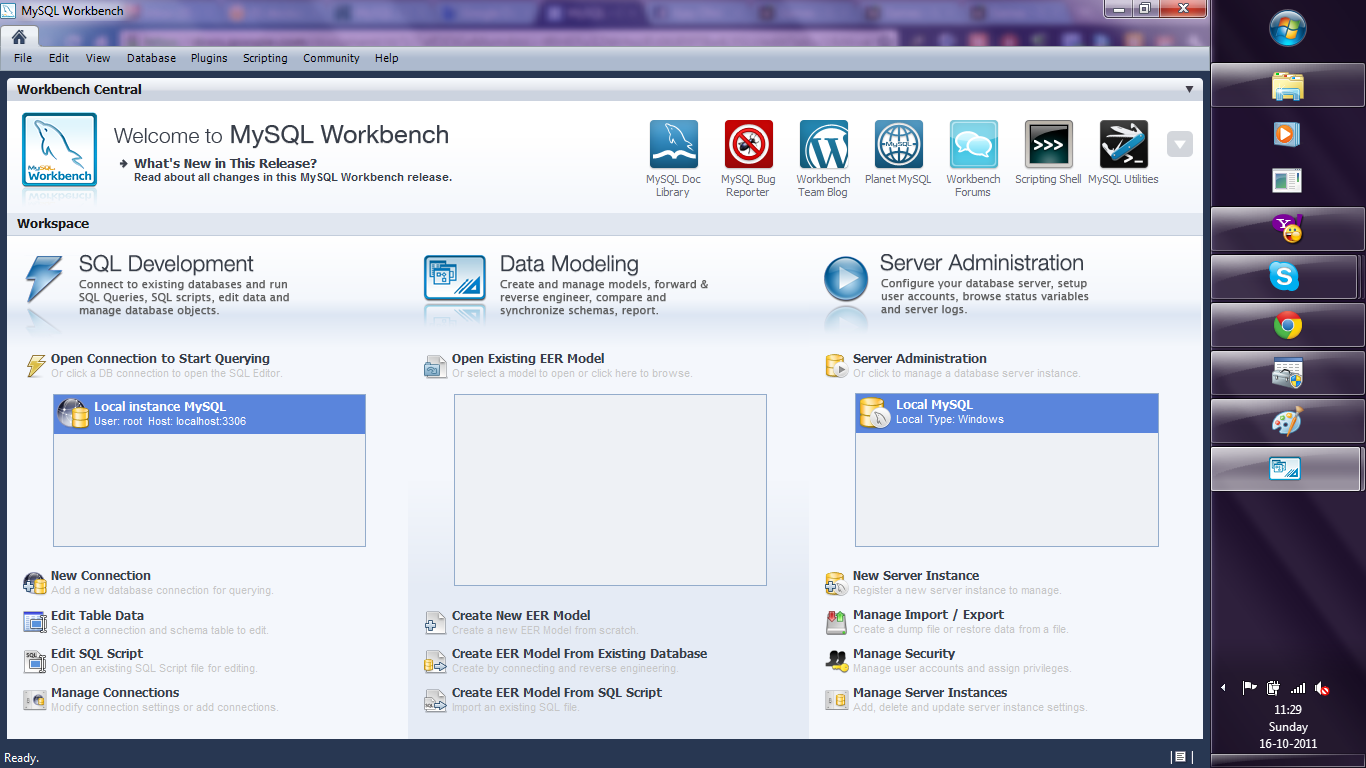
3. Download the MySQL workbench from http://www.mysql.com/downloads/workbench/

This is very helpful to configuring the database
http://www.mysql.com/downloads/mirror.php?id=403983#mirrors

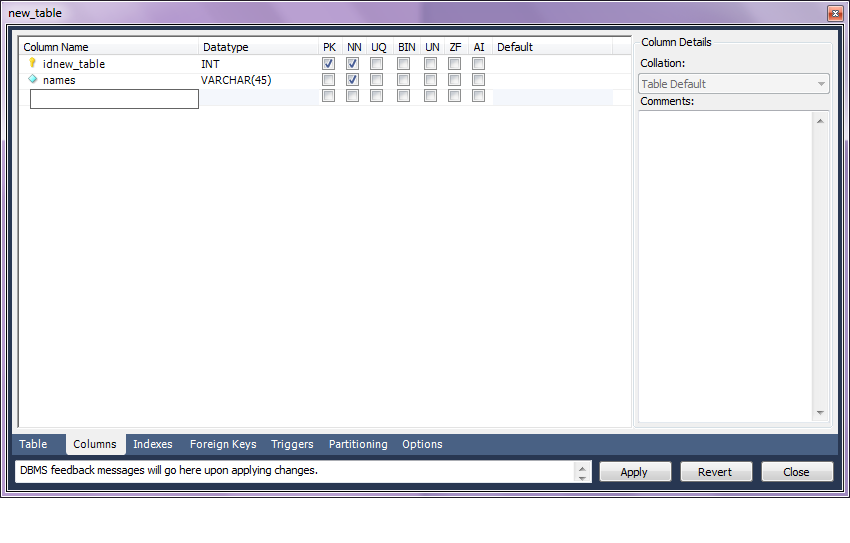
Create a new table using the options in the screenshots below

Open Connection

You can create a new table using the options as below,
Once created you can also add new variables (using the Columns Tab)

MySQL allows you create new columns very easily
The  SQL commands are automatically generated.
Click Apply  to execute the changes to the Database.

Now we start R
Type the commands in the screenshot below to create a connection to the Database in MySQL
> library(RODBC)
> odbcDataSources()
> ajay=odbcConnect(“MySQL”,uid=”root”,pwd=”XX”)
> ajay
> sqlTables(ajay)
>tested=sqlFetch(ajay,”host”)

Note- this is a brief tutorial for beginners without getting into too many complexities of database administration and management, to start using R and MySQL.

Knowledge Discovery in Databases -KDD using PostgreSQL and #Rstats

Here is a small brief primer for beginners on configuring an open source database and using an open source analytics package.

All you need to know – is to read!


1. download PostgreSQL from
http://www.postgresql.org/download/windowsInstall PostgreSQL

Remember to store /memorize the password for the user postgres!

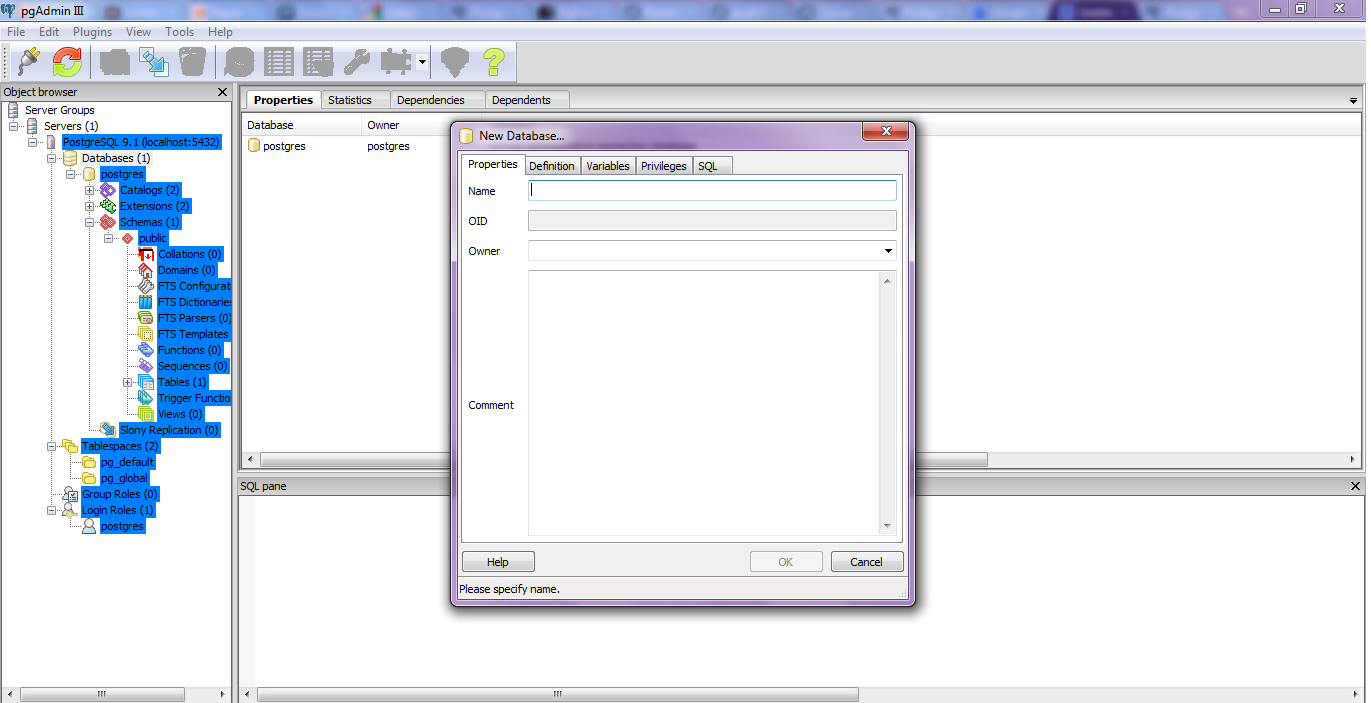
Create a connection using pgAdmin feature in Start Menu

2. download ODBC driver from
http://www.postgresql.org/ftp/odbc/versions/msi/
and the Win 64 edition from
http://wwwmaster.postgresql.org/download/mirrors-ftp/odbc/versions/msi/psqlodbc_09_00_0310-x64.zip

install ODBC driver

3. Go to

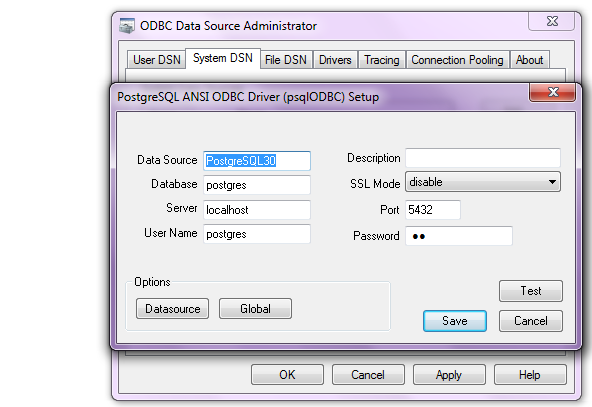
Start Menu\Control Panel\All Control Panel Items\Administrative Tools\Data Sources (ODBC)

4. Configure the following details in System DSN and  User DSN using the ADD tabs .Test connection to check if connection is working

5. Start R and install and load library RODBC

6. Use following initial code for R- if you know SQL you can  do the rest
> library(RODBC)

> odbcDataSources(type = c(“all”, “user”, “system”))
SQLServer              PostgreSQL30             PostgreSQL35W
“SQL Server”    “PostgreSQL ANSI(x64)” “PostgreSQL Unicode(x64)”

> ajay=odbcConnect(“PostgreSQL30”, uid = “postgres”, pwd = “XX”)

> sqlTables(ajay)
TABLE_QUALIFIER TABLE_OWNER TABLE_NAME TABLE_TYPE REMARKS
1        postgres      public      names      TABLE

> crimedat <- sqlFetch(ajay, “names”)

Oracle adds R to Big Data Appliance -Use #Rstats

From the press release, Oracle gets on R and me too- NoSQL

http://www.oracle.com/us/corporate/press/512001

The Oracle Big Data Appliance is a new engineered system that includes an open source distribution of Apache™ Hadoop™, Oracle NoSQL Database, Oracle Data Integrator Application Adapter for Hadoop, Oracle Loader for Hadoop, and an open source distribution of R.

From

http://www.theregister.co.uk/2011/10/03/oracle_big_data_appliance/

the Big Data Appliance also includes the R programming language, a popular open source statistical-analysis tool. This R engine will integrate with 11g R2, so presumably if you want to do statistical analysis on unstructured data stored in and chewed by Hadoop, you will have to move it to Oracle after the chewing has subsided.

This approach to R-Hadoop integration is different from that announced last week between Revolution Analytics, the so-called Red Hat for stats that is extending and commercializing the R language and its engine, and Cloudera, which sells a commercial Hadoop setup called CDH3 and which was one of the early companies to offer support for Hadoop. Both Revolution Analytics and Cloudera now have Oracle as their competitor, which was no doubt no surprise to either.

In any event, the way they do it, the R engine is put on each node in the Hadoop cluster, and those R engines just see the Hadoop data as a native format that they can do analysis on individually. As statisticians do analyses on data sets, the summary data from all the nodes in the Hadoop cluster is sent back to their R workstations; they have no idea that they are using MapReduce on unstructured data.

Oracle did not supply configuration and pricing information for the Big Data Appliance, and also did not say when it would be for sale or shipping to customers

From

http://www.oracle.com/us/corporate/features/feature-oracle-nosql-database-505146.html

A Horizontally Scaled, Key-Value Database for the Enterprise
Oracle NoSQL Database is a commercial grade, general-purpose NoSQL database using a key/value paradigm. It allows you to manage massive quantities of data, cope with changing data formats, and submit simple queries. Complex queries are supported using Hadoop or Oracle Database operating upon Oracle NoSQL Database data.

Oracle NoSQL Database delivers scalable throughput with bounded latency, easy administration, and a simple programming model. It scales horizontally to hundreds of nodes with high availability and transparent load balancing. Customers might choose Oracle NoSQL Database to support Web applications, acquire sensor data, scale authentication services, or support online serves and social media.

and

from

http://siliconangle.com/blog/2011/09/30/oracle-adopting-open-source-r-to-connect-legacy-systems/

Oracle says it will integrate R with its Oracle Database. Other signs from Oracle show the deeper interest in using the statistical framework for integration with Hadoop to potentially speed statistical analysis. This has particular value with analyzing vast amounts of unstructured data, which has overwhelmed organizations, especially over the past year.

and

from

http://www.oracle.com/us/corporate/features/features-oracle-r-enterprise-498732.html

Oracle R Enterprise

Integrates the Open-Source Statistical Environment R with Oracle Database 11g
Oracle R Enterprise allows analysts and statisticians to run existing R applications and use the R client directly against data stored in Oracle Database 11g—vastly increasing scalability, performance and security. The combination of Oracle Database 11g and R delivers an enterprise-ready, deeply integrated environment for advanced analytics. Users can also use analytical sandboxes, where they can analyze data and develop R scripts for deployment while results stay managed inside Oracle Database.

Interview Eberhard Miethke and Dr. Mamdouh Refaat, Angoss Software

Here is an interview with Eberhard Miethke and Dr. Mamdouh Refaat, of Angoss Software. Angoss is a global leader in delivering business intelligence software and predictive analytics solutions that help businesses capitalize on their data by uncovering new opportunities to increase sales and profitability and to reduce risk.

Ajay-  Describe your personal journey in software. How can we guide young students to pursue more useful software development than just gaming applications.

 Mamdouh- I started using computers long time ago when they were programmed using punched cards! First in Fortran, then C, later C++, and then the rest. Computers and software were viewed as technical/engineering tools, and that’s why we can still see the heavy technical orientation of command languages such as Unix shells and even in the windows Command shell. However, with the introduction of database systems and Microsoft office apps, it was clear that business will be the primary user and field of application for software. My personal trip in software started with scientific applications, then business and database systems, and finally statistical software – which you can think of it as returning to the more scientific orientation. However, with the wide acceptance of businesses of the application of statistical methods in different fields such as marketing and risk management, it is a fast growing field that in need of a lot of innovation.

Ajay – Angoss makes multiple data mining and analytics products. could you please introduce us to your product portfolio and what specific data analytics need they serve.

a- Attached please find our main product flyers for KnowledgeSTUDIO and KnowledgeSEEKER. We have a 3rd product called “strategy builder” which is an add-on to the decision tree modules. This is also described in the flyer.

(see- Angoss Knowledge Studio Product Guide April2011  and http://www.scribd.com/doc/63176430/Angoss-Knowledge-Seeker-Product-Guide-April2011  )

Ajay-  The trend in analytics is for big data and cloud computing- with hadoop enabling processing of massive data sets on scalable infrastructure. What are your plans for cloud computing, tablet based as well as mobile based computing.

a- This is an area where the plan is still being figured out in all organizations. The current explosion of data collected from mobile phones, text messages, and social websites will need radically new applications that can utilize the data from these sources. Current applications are based on the relational database paradigm designed in the 70’s through the 90’s of the 20th century.

But data sources are generating data in volumes and formats that are challenging this paradigm and will need a set of new tools and possibly programming languages to fit these needs. The cloud computing, tablet based and mobile computing (which are the same thing in my opinion, just different sizes of the device) are also two technologies that have not been explored in analytics yet.

The approach taken so far by most companies, including Angoss, is to rely on new xml-based standards to represent data structures for the particular models. In this case, it is the PMML (predictive modelling mark-up language) standard, in order to allow the interoperability between analytics applications. Standardizing on the representation of models is viewed as the first step in order to allow the implementation of these models to emerging platforms, being that the cloud or mobile, or social networking websites.

The second challenge cited above is the rapidly increasing size of the data to be analyzed. Angoss has already identified this challenge early on and is currently offering in-database analytics drivers for several database engines: Netezza, Teradata and SQL Server.

These drivers allow our analytics products to translate their routines into efficient SQL-based scripts that run in the database engine to exploit its performance as well as the powerful hardware on which it runs. Thus, instead of copying the data to a staging format for analytics, these drivers allow the data to be analyzed “in-place” within the database without moving it.

Thus offering performance, security and integrity. The performance is improved because of the use of the well tuned database engines running on powerful hardware.

Extra security is achieved by not copying the data to other platforms, which could be less secure. And finally, the integrity of the results are vastly improved by making sure that the results are always obtained by analyzing the up-to-date data residing in the database rather than an older copy of the data which could be obsolete by the time the analysis is concluded.

Ajay- What are the principal competing products to your offerings, and what makes your products special or differentiated in value to them (for each customer segment).

a- There are two major players in today’s market that we usually encounter as competitors, they are: SAS and IBM.

SAS offers a data mining workbench in the form of SAS Enterprise Miner, which is closely tied to SAS data mining methodology known as SEMMA.

On the other hand, IBM has recently acquired SPSS, which offered its Clementine data mining software. IBM has now rebranded Clementine as IBM SPSS Modeller.

In comparison to these products, our KnowledgeSTUDIO and KnowledgeSEEKER offer three main advantages: ease of use; affordability; and ease of integration into existing BI environments.

Angoss products were designed to look-and-feel-like popular Microsoft office applications. This makes the learning curve indeed very steep. Typically, an intermediate level analyst needs only 2-3 days of training to become proficient in the use of the software with all its advanced features.

Another important feature of Angoss software products is their integration with SAS/base product, and SQL-based database engines. All predictive models generated by Angoss can be automatically translated to SAS and SQL scripts. This allows the generation of scoring code for these common platforms. While the software interface simplifies all the tasks to allow business users to take advantage of the value added by predictive models, the software includes advanced options to allow experienced statisticians to fine-tune their models by adjusting all model parameters as needed.

In addition, Angoss offers a unique product called StrategyBuilder, which allows the analyst to add key performance indicators (KPI’s) to predictive models. KPI’s such as profitability, market share, and loyalty are usually required to be calculated in conjunction with any sales and marketing campaign. Therefore, StrategyBuilder was designed to integrate such KPI’s with the results of a predictive model in order to render the appropriate treatment for each customer segment. These results are all integrated into a deployment strategy that can also be translated into an execution code in SQL or SAS.

The above competitive features offered by the software products of Angoss is behind its success in serving over 4000 users from over 500 clients worldwide.

Ajay -Describe a major case study where using Angoss software helped save a big amount of revenue/costs by innovative data mining.

a-Rogers Telecommunications Inc. is one of the largest Canadian telecommunications providers, serving over 8.5 million customers and a revenue of 11.1 Billion Canadian Dollars (2009). In 2008, Rogers engaged Angoss in order to help with the problem of ballooning accounts receivable for a period of 18 months.

The problem was approached by improving the efficiency of the call centre serving the collections process by a set of predictive models. The first set of models were designed to find accounts likely to default ahead of time in order to take preventative measures. A second set of models were designed to optimize the call centre resources to focus on delinquent accounts likely to pay back most of the outstanding balance. Accounts that were identified as not likely to pack quickly were good candidates for “Early-out” treatment, by forwarding them directly to collection agencies. Angoss hosted Rogers’ data and provided on a regular interval the lists of accounts for each treatment to be deployed by the call centre dialler. As a result of this Rogers estimated an improvement of 10% of the collected sums.

Biography-

Mamdouh has been active in consulting, research, and training in various areas of information technology and software development for the last 20 years. He has worked on numerous projects with major organizations in North America and Europe in the areas of data mining, business analytics, business analysis, and engineering analysis. He has held several consulting positions for solution providers including Predict AG in Basel, Switzerland, and as ANGOSS Corp. Mamdouh is the Director of Professional services for EMEA region of ANGOSS Software. Mamdouh received his PhD in engineering from the University of Toronto and his MBA from the University of Leeds, UK.

Mamdouh is the author of:

"Credit Risk Scorecards: Development and Implmentation using SAS"
 "Data Preparation for Data Mining Using SAS",
 (The Morgan Kaufmann Series in Data Management Systems) (Paperback)
 and co-author of
 "Data Mining: Know it all",Morgan Kaufmann


Eberhard Miethke  works as a senior sales executive for Angoss


About Angoss-

Angoss is a global leader in delivering business intelligence software and predictive analytics to businesses looking to improve performance across sales, marketing and risk. With a suite of desktop, client-server and in-database software products and Software-as-a-Service solutions, Angoss delivers powerful approaches to turn information into actionable business decisions and competitive advantage.

Angoss software products and solutions are user-friendly and agile, making predictive analytics accessible and easy to use.