RapidMiner launches extensions marketplace

For some time now, I had been hoping for a place where new package or algorithm developers get at least a fraction of the money that iPad or iPhone application developers get. Rapid Miner has taken the lead in establishing a marketplace for extensions. Is there going to be paid extensions as well- I hope so!!

This probably makes it the first “app” marketplace in open source and the second app marketplace in analytics after salesforce.com

It is hard work to think of new algols, and some of them can really be usefull.

Can we hope for #rstats marketplace where people downloading say ggplot3.0 atleast get a prompt to donate 99 cents per download to Hadley Wickham’s Amazon wishlist. http://www.amazon.com/gp/registry/1Y65N3VFA613B

Do you think it is okay to pay 99 cents per iTunes song, but not pay a cent for open source software.

I dont know- but I am just a capitalist born in a country that was socialist for the first 13 years of my life. Congratulations once again to Rapid Miner for innovating and leading the way.

http://rapid-i.com/component/option,com_myblog/show,Rapid-I-Marketplace-Launched.html/Itemid,172

RapidMinerMarketplaceExtensions 30 May 2011
Rapid-I Marketplace Launched by Simon Fischer

Over the years, many of you have been developing new RapidMiner Extensions dedicated to a broad set of topics. Whereas these extensions are easy to install in RapidMiner – just download and place them in the plugins folder – the hard part is to find them in the vastness that is the Internet. Extensions made by ourselves at Rapid-I, on the other hand,  are distributed by the update server making them searchable and installable directly inside RapidMiner.

We thought that this was a bit unfair, so we decieded to open up the update server to the public, and not only this, we even gave it a new look and name. The Rapid-I Marketplace is available in beta mode at http://rapidupdate.de:8180/ . You can use the Web interface to browse, comment, and rate the extensions, and you can use the update functionality in RapidMiner by going to the preferences and entering http://rapidupdate.de:8180/UpdateServer/ as the update server URL. (Once the beta test is complete, we will change the port back to 80 so we won’t have any firewall problems.)

As an Extension developer, just register with the Marketplace and drop me an email (fischer at rapid-i dot com) so I can give you permissions to upload your own extension. Upload is simple provided you use the standard RapidMiner Extension build process and will boost visibility of your extension.

Looking forward to see many new extensions there soon!

Disclaimer- Decisionstats is a partner of Rapid Miner. I have been liking the software for a long long time, and recently agreed to partner with them just like I did with KXEN some years back, and with Predictive AnalyticsConference, and Aster Data until last year.

I still think Rapid Miner is a very very good software,and a globally created software after SAP.

Here is the actual marketplace

http://rapidupdate.de:8180/UpdateServer/faces/index.xhtml

Welcome to the Rapid-I Marketplace Public Beta Test

The Rapid-I Marketplace will soon replace the RapidMiner update server. Using this marketplace, you can share your RapidMiner extensions and make them available for download by the community of RapidMiner users. Currently, we are beta testing this server. If you want to use this server in RapidMiner, you must go to the preferences and enter http://rapidupdate.de:8180/UpdateServer for the update url. After the beta test, we will change the port back to 80, which is currently occupied by the old update server. You can test the marketplace as a user (downloading extensions) and as an Extension developer. If you want to publish your extension here, please let us know via the contact form.

Hot Downloads
«« « 1 2 3 » »»
[Icon]The Image Processing Extension provides operators for handling image data. You can extract attributes describing colour and texture in the image, you can make several transformation of a image data which allows you to perform segmentation and detection of suspicious areas in image data.The extension provides many of image transformation and extraction operators ranging from Wavelet Decomposition, Hough Circle to Block Difference of Inverse probabilities.

[Icon]RapidMiner is unquestionably the world-leading open-source system for data mining. It is available as a stand-alone application for data analysis and as a data mining engine for the integration into own products. Thousands of applications of RapidMiner in more than 40 countries give their users a competitive edge.

  • Data IntegrationAnalytical ETLData Analysis, and Reporting in one single suite
  • Powerful but intuitive graphical user interface for the design of analysis processes
  • Repositories for process, data and meta data handling
  • Only solution with meta data transformation: forget trial and error and inspect results already during design time
  • Only solution which supports on-the-fly error recognition and quick fixes
  • Complete and flexible: Hundreds of data loading, data transformation, data modeling, and data visualization methods
[Icon]All modeling methods and attribute evaluation methods from the Weka machine learning library are available within RapidMiner. After installing this extension you will get access to about 100 additional modelling schemes including additional decision trees, rule learners and regression estimators.This extension combines two of the most widely used open source data mining solutions. By installing it, you can extend RapidMiner to everything what is possible with Weka while keeping the full analysis, preprocessing, and visualization power of RapidMiner.

[Icon]Finally, the two most widely used data analysis solutions – RapidMiner and R – are connected. Arbitrary R models and scripts can now be directly integrated into the RapidMiner analysis processes. The new R perspective offers the known R console together with the great plotting facilities of R. All variables and R scripts can be organized in the RapidMiner Repository.A directly included online help and multi-line editing makes the creation of R scripts much more comfortable.

Top Ten Graphs for Business Analytics -Pie Charts (1/10)

I have not been really posting or writing worthwhile on the website for some time, as I am still busy writing ” R for Business Analytics” which I hope to get out before year end. However while doing research for that, I came across many types of graphs and what struck me is the actual usage of some kinds of graphs is very different in business analytics as compared to statistical computing.

The criterion of top ten graphs is as follows-

1) Usage-The order in which they appear is not strictly in terms of desirability but actual frequency of usage. So a frequently used graph like box plot would be recommended above say a violin plot.

2) Adequacy- Data Visualization paradigms change over time- but the need for accurate conveying of maximum information in a minium space without overwhelming reader or misleading data perceptions.

3) Ease of creation- A simpler graph created by a single function is more preferrable to writing 4-5 lines of code to create an elaborate graph.

4) Aesthetics– Aesthetics is relative and  in addition studies have shown visual perception varies across cultures and geographies. However , beauty is universally appreciated and a pretty graph is sometimes and often preferred over a not so pretty graph. Here being pretty is in both visual appeal without compromising perceptual inference from graphical analysis.


so When do we use a bar chart versus a line graph versus a pie chart? When is a mosaic plot more handy and when should histograms be used with density plots? The list tries to capture most of these practicalities.

Let me elaborate on some specific graphs-

1) Pie Chart- While Pie Chart is not really used much in stats computing, and indeed it is considered a misleading example of data visualization especially the skewed or two dimensional charts. However when it comes to evaluating market share at a particular instance, a pie chart is simple to understand. At the most two pie charts are needed for comparing two different snapshots, but three or more pie charts on same data at different points of time is definitely a bad case.

In R you can create piechart, by just using pie(dataset$variable)

As per official documentation, pie charts are not  recommended at all.

http://stat.ethz.ch/R-manual/R-patched/library/graphics/html/pie.html

Pie charts are a very bad way of displaying information. The eye is good at judging linear measures and bad at judging relative areas. A bar chart or dot chart is a preferable way of displaying this type of data.

Cleveland (1985), page 264: “Data that can be shown by pie charts always can be shown by a dot chart. This means that judgements of position along a common scale can be made instead of the less accurate angle judgements.” This statement is based on the empirical investigations of Cleveland and McGill as well as investigations by perceptual psychologists.

—-

Despite this, pie charts are frequently used as an important metric they inevitably convey is market share. Market share remains an important analytical metric for business.

The pie3D( ) function in the plotrix package provides 3D exploded pie charts.An exploded pie chart remains a very commonly used (or misused) chart.

From http://lilt.ilstu.edu/jpda/charts/chart%20tips/Chartstip%202.htm#Rules

we see some rules for using Pie charts.


  1. Avoid using pie charts.
  2. Use pie charts only for data that add up to some meaningful total.
  3. Never ever use three-dimensional pie charts; they are even worse than two-dimensional pies.
  4. Avoid forcing comparisons across more than one pie chart


From the R Graph Gallery (a slightly outdated but still very comprehensive graphical repository)

http://addictedtor.free.fr/graphiques/RGraphGallery.php?graph=4

par(bg="gray")
pie(rep(1,24), col=rainbow(24), radius=0.9)
title(main="Color Wheel", cex.main=1.4, font.main=3)
title(xlab="(test)", cex.lab=0.8, font.lab=3)
(Note adding a grey background is quite easy in the basic graphics device as well without using an advanced graphical package)


Protected: Whats behind that pretty SAS Blog?

This content is password-protected. To view it, please enter the password below.

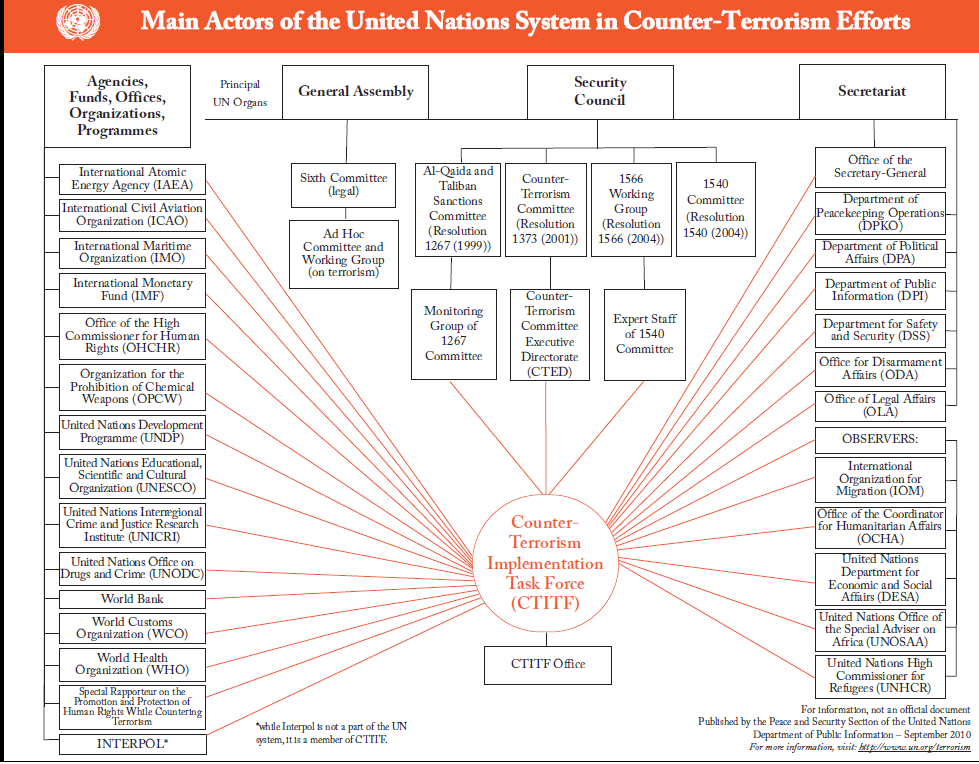
Amazing Data Visualization- UN Counter Terrorism

Here is an amazing organigram depicting the organization of United Nations Task force of Countering Terrorism

source-

http://www.un.org/terrorism/cttaskforce.shtml

so now you know whom to call at 3 am, in case of airline bombing terrorists or just bad guys in general.


Interview Anne Milley JMP

Here is an interview with Anne Milley, a notable thought leader in the world of analytics. Anne is now Senior Director, Analytical Strategy in Product Marketing for JMP , the leading data visualization software from the SAS Institute.

Ajay-What do you think are the top 5 unique selling points of JMP compared to other statistical software in its category?

Anne-

JMP combines incredible analytic depth and breadth with interactive data visualization, creating a unique environment optimized for discovery and data-driven innovation.

With an extensible framework using JSL (JMP Scripting Language), and integration with SAS, R, and Excel, JMP becomes your analytic hub.

JMP is accessible to all kinds of users. A novice analyst can dig into an interactive report delivered by a custom JMP application. An engineer looking at his own data can use built-in JMP capabilities to discover patterns, and a developer can write code to extend JMP for herself or others.

State-of-the-art DOE capabilities make it easy for anyone to design and analyze efficient experiments to determine which adjustments will yield the greatest gains in quality or process improvement – before costly changes are made.

Not to mention, JMP products are exceptionally well designed and easy to use. See for yourself and check out the free trial at www.jmp.com.

Download a free 30-day trial of JMP.

Ajay- What are the challenges and opportunities of expanding JMP’s market share? Do you see JMP expanding its conferences globally to engage global audiences?

Anne-

We realized solid global growth in 2010. The release of JMP Pro and JMP Clinical last year along with continuing enhancements to the rest of the JMP family of products (JMP and JMP Genomics) should position us well for another good year.

With the growing interest in analytics as a means to sustained value creation, we have the opportunity to help people along their analytic journey – to get started, take the next step, or adopt new paradigms speeding their time to value. The challenge is doing that as fast as we would like.

We are hiring internationally to offer even more events, training and academic programs globally.

Ajay- What are the current and proposed educational and global academic initiatives of JMP? How can we see more JMP in universities across the world (say India- China etc)?

Anne-

We view colleges and universities both as critical incubators of future JMP users and as places where attitudes about data analysis and statistics are formed. We believe that a positive experience in learning statistics makes a person more likely to eventually want and need a product like JMP.

For most students – and particularly for those in applied disciplines of business, engineering and the sciences – the ability to make a statistics course relevant to their primary area of study fosters a positive experience. Fortunately, there is a trend in statistical education toward a more applied, data-driven approach, and JMP provides a very natural environment for both students and researchers.

Its user-friendly navigation, emphasis on data visualization and easy access to the analytics behind the graphics make JMP a compelling alternative to some of our more traditional competitors.

We’ve seen strong growth in the education markets in the last few years, and JMP is now used in nearly half of the top 200 universities in the US.

Internationally, we are at an earlier stage of market development, but we are currently working with both JMP and SAS country offices and their local academic programs to promote JMP. For example, we are working with members of the JMP China office and faculty at several universities in China to support the use of JMP in the development of a master’s curriculum in Applied Statistics there, touched on in this AMSTAT News article.

Ajay- What future trends do you see for 2011 in this market (say top 5)?

Anne-

Growing complexity of data (text, image, audio…) drives the need for more and better visualization and analysis capabilities to make sense of it all.

More “chief analytics officers” are making better use of analytic talent – people are the most important ingredient for success!

JMP has been on the vanguard of 64-bit development, and users are now catching up with us as 64-bit machines become more common.

Users should demand easy-to-use, exploratory and predictive modeling tools as well as robust tools to experiment and learn to help them make the best decisions on an ongoing basis.

All these factors and more fuel the need for the integration of flexible, extensible tools with popular analytic platforms.

Ajay-You enjoy organic gardening as a hobby. How do you think hobbies and unwind time help people be better professionals?

Anne-

I am lucky to work with so many people who view their work as a hobby. They have other interests too, though, some of which are work-related (statistics is relevant everywhere!). Organic gardening helps me put things in perspective and be present in the moment. More than work defines who you are. You can be passionate about your work as well as passionate about other things. I think it’s important to spend some leisure time in ways that bring you joy and contribute to your overall wellbeing and outlook.

Btw, nice interviews over the past several months—I hadn’t kept up, but will check it out more often!

Biography–  Source- http://www.sas.com/knowledge-exchange/business-analytics/biographies.html

  • Anne Milley

    Anne Milley

    Anne Milley is Senior Director of Analytics Strategy at JMP Product Marketing at SAS. Her ties to SAS began with bank failure prediction at Federal Home Loan Bank Dallas and continued at 7-Eleven Inc. She has authored papers and served on committees for F2006, KDD, SIAM, A2010 and several years of SAS’ annual data mining conference. Milley is a contributing faculty member for the International Institute of Analytics. anne.milley@jmp.com

R Graphs Resources

Relevant GUI-

GrapheR and Deducer

https://rforanalytics.wordpress.com/graphical-user-interfaces-for-r/

Websites-


Graphics by Examples

. UCLA: Academic Technology Services,  Statistical Consulting Group. from https://www.ats.ucla.edu/stat/R/gbe/default.htm (accessed Feb 10, 2011)

https://www.ats.ucla.edu/stat/R/gbe/default.htm

Quick-R

http://www.statmethods.net/graphs/

Graph Gallery

http://addictedtor.free.fr/graphiques/allgraph.php

Frank McCown

https://www.harding.edu/fmccown/r/

Detailed Tutorial

https://math.illinoisstate.edu/dhkim/rstuff/rtutor.html

Advanced Data Visualization

Hadley Wickham

Courses- http://had.co.nz/stat645/

and Package-  http://had.co.nz/ggplot2/

example-

http://had.co.nz/ggplot2/geom_density.html

OK Cupid Data Visualization- Flow Chart to your Heart

Quite appropriate on a V Day, OK Cupid remains quite innovative how they use data (in this questionnaire data)