Getting Flatr on a wordpress.com blog

What is Flattr?

social micro payments- aka another way for bloggers, tweeters, facebookies to make money.

Thing of it as the Paypal plus a ReTweetmeme button.

FlattR is the new legal business of the creator of Pirate Bay- the large search engine for bit torrent data.
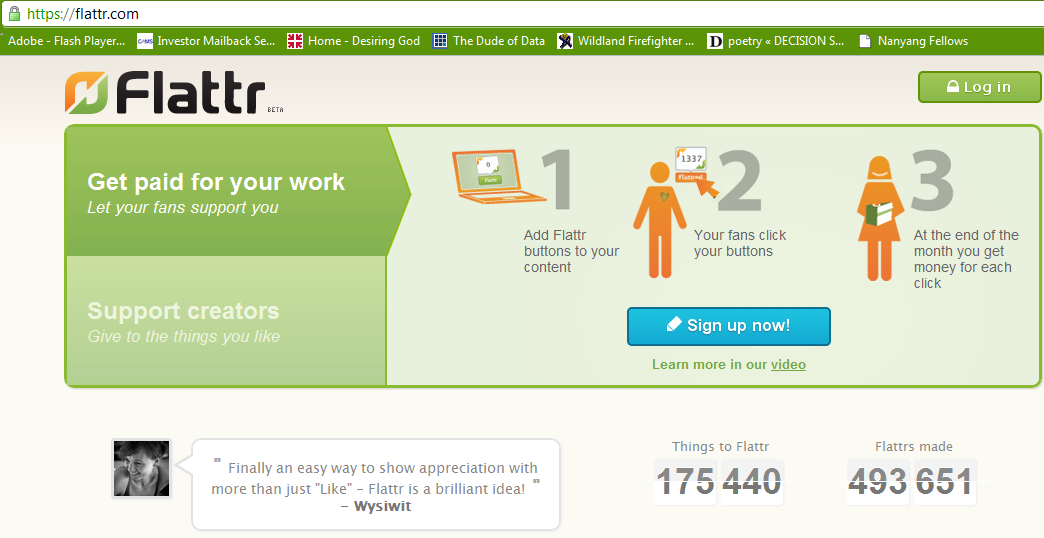
 and how to enable it on WordPress.com

Read some snarkly grrovy instructions here with a screenshot

http://thereturnofthepublic.wordpress.com/2011/04/10/putting-flattr-on-a-wordpress-com-blog-a-guide-for-drooling-imbeciles/

1.) Open a Flattr.com account here. This should be reasonably straightforward. A monkey hitting keys at random could manage it in about half an hour. It took me less than 45 minutes.

2.) In the top right of ‘Your Flattr Dashboard’ there is a button ‘Submit Thing’. Click on that and enter the details of your blog – the URL (like decisionstats.com for me) and a description (make that atleast 3 sentences). Flattr will create a page – for example,https://flattr.com/thing/162940/example-blog


Now go to your wordpress dashboard- sharing tab.

/wp-admin/options-general.php?page=sharing

Add the following lines to your New Add Service in respective tabs

URL= https://flattr.com/thing/175763/DecisionStats (change this to the one created for yourself instep2 above)

ICON = http://api.flatrr.com/button/flattr-badge-large.png

 If you have a non WordPress blog see instructions at http://markup.io/v/jz3wv155bsfg or screenshot of instructions here-

High Performance Analytics

Marry Big Data Analytics to High Performance Computing, and you get the buzzword of this season- High Performance Analytics.

It basically consists of Parallelized code to run in parallel on custom hardware, in -database analytics for speed, and cloud computing /high performance computing environments. On an operational level, it consists of software (as in analytics) partnering with software (as in databases, Map reduce, Hadoop) plus some hardware (HP or IBM mostly). It is considered a high margin , highly profitable, business with small number of deals compared to say desktop licenses.

As per HPC Wire- which is a great tool/newsletter to keep updated on HPC , SAS Institute has been busy on this front partnering with EMC Greenplum and TeraData (who also acquired  SAS Partner AsterData to gain a much needed foot in the MR/SQL space) Continue reading “High Performance Analytics”

Broad Guidelines for Graphs

Here are some broad guidelines for Graphs from EIA.gov , so you can say these are the official graphical guidelines of USA Gov

They can be really useful for sites planning to get into the Tableau Software/NYT /Guardian Infographic mode- or even for communities of blogs that have recurrent needs to display graphical plots- particularly since communication, statistical and design specialists are different areas/expertise/people.

Energy Information Administration Standard

Broad Guidelines for Graphs-I am reproducing an example from EIA ‘s guidelines for graphs-
http://www.eia.gov/about/eia_standards.cfm#Standard25

Energy Information Administration Standard 2009-25

Title: Statistical Graphs
Superseded Version: Standard 2002-25
Purpose: To ensure the utility (usefulness to intended users) and objectivity (accuracy, clarity, completeness, and lack of bias) of energy information presented in statistical graphs.
Applicability: All EIA information products.
Required Actions:

  1. Graphs should be used to show and compare changes, trends and/or relationships, and to assist users in visualizing the conclusions drawn from the data represented.
  2. A graph should contain sufficient Continue reading “Broad Guidelines for Graphs”

Using Color Palettes in R

If you like me, are unable to decide whether blue or brown is a better color for graph- color palettes in R are a big help for aesthetically acceptable alternatives.

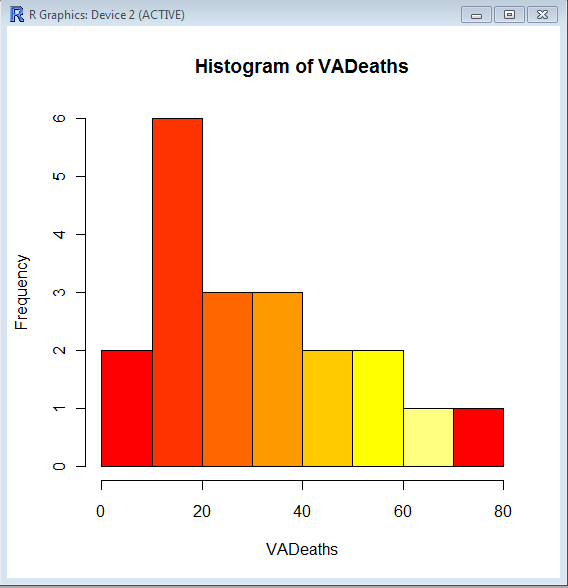
Using the same graphs, I choose the 5 main kinds of color palettes, using them is as easy as specifying the col= parameter in graphical display in Base Graphs. And I modified the n parameter for number of colors to be used- you can specify more or less depending how much you want the gradient or difference in colors to be.

> hist(VADeaths,col=heat.colors(7))

> hist(VADeaths,col=terrain.colors(7))

Continue reading “Using Color Palettes in R”

Top ten business analytics graphs Bar Charts (3/10)

Bar Charts and Histograms-Bar Charts are one of the most widely used types of Business Charts. Even the ever popular histograms are  special cases of bar charts (but showing frequencies). Histograms are the not the same as bar charts, they are simply bar charts of frequencies.

Basically a bar chart shows rectangular bars with length proportional to the quantities being described. It helps to see relative quantities between various category types.

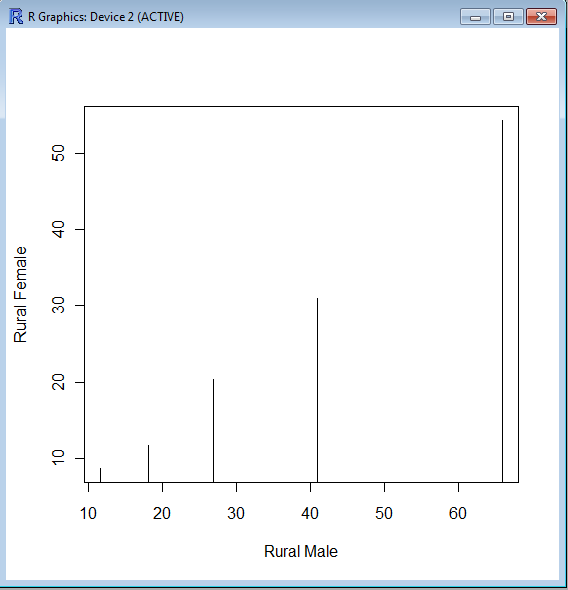
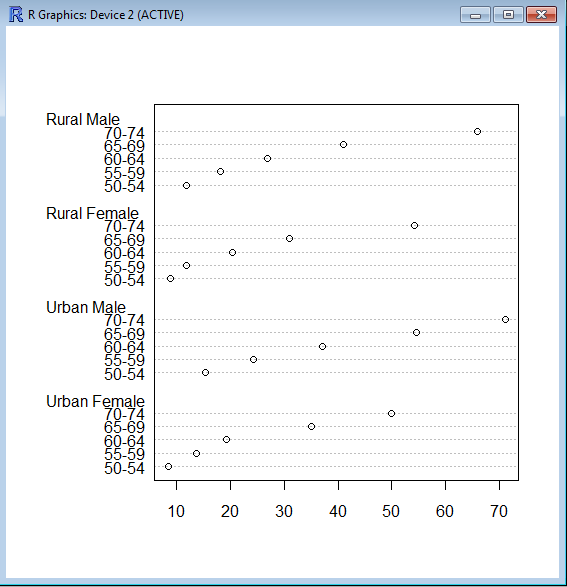
The barplot() command is used for making Bar Plots, while hist() is used for histograms. You can also use the plot() command with type=h to create histograms-The official R manual also suggests that Dot plots using dotchart () are a reasonable substitute for bar plots.
A very simple easy to understand tutorial for basic bar plots is at http://msenux.redwoods.edu/math/R/barplot.php

The difference between the three main functions that can be used for these charts are shown below-

> VADeaths
Rural Male Rural Female Urban Male Urban Female
50-54       11.7          8.7       15.4          8.4
55-59       18.1         11.7       24.3         13.6
60-64       26.9         20.3       37.0         19.3
65-69       41.0         30.9       54.6         35.1
70-74       66.0         54.3       71.1         50.0

> plot(VADeaths,type=”h”)


> dotchart(VADeaths)

Microsoft works on ad supported desktop programs

3 years ago, in a mock article I speculated what happened if Microsoft followed Google, and gave away Windows/Office for free while showing you ads. Basically whats the value of a single customer for 3-4 years worth of ads.

https://decisionstats.com/2008/02/02/ballmer-yahoo-googles-boo-hoo-2/

Well it seems like Windows 7, and Microsoft Word have  made a quiet move to showing ads OUT of the browser and into the desktop program.

See screnshot on Windows 7, when even a simple Rich text document shows an ad for slidefest/powerpoint. Continue reading “Microsoft works on ad supported desktop programs”

Top Ten Business Analytics Graphs-Line Charts (2/10)

A line chart is one of the most commonly used charts in business analytics and metrics reporting. It basically consists of two variables plotted along the axes with the adjacent points being joined by line segments. Most often used with time series on the x-axis, line charts are simple to understand and use.
Variations on the line graph can include fan charts in time series which include joining line chart of historic data with ranges of future projections. Another common variation is to plot the linear regression or trend line between the two variables  and superimpose it on the graph.
The slope of the line chart shows the rate of change at that particular point , and can also be used to highlight areas of discontinuity or irregular change between two variables.

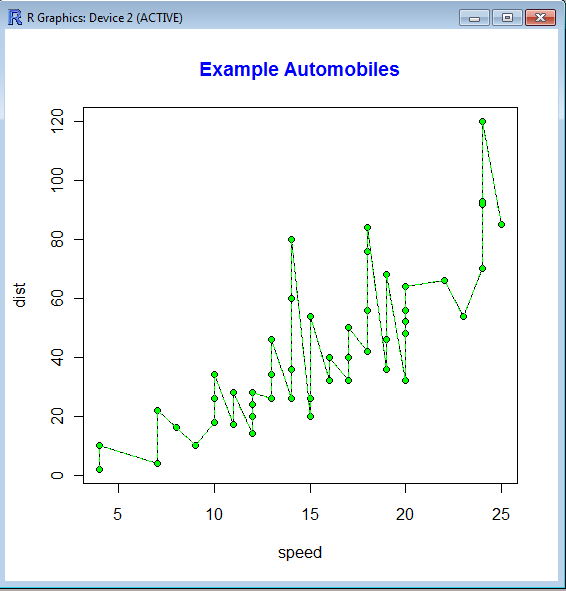
The basic syntax of line graph is created by first using Plot() function to plot the points and then lines () function to plot the lines between the points.

> str(cars)
‘data.frame’:   50 obs. of  2 variables:
$ speed: num  4 4 7 7 8 9 10 10 10 11 …
$ dist : num  2 10 4 22 16 10 18 26 34 17 …
> plot(cars)
> lines(cars,type=”o”, pch=20, lty=2, col=”green”)
> title(main=”Example Automobiles”, col.main=”blue”, font.main=2)

An example of Time Series Forecasting graph  or fan chart is http://addictedtor.free.fr/graphiques/RGraphGallery.php?graph=51