Interview- Top Data Mining Blogger on Earth , Sandro Saitta

Surajustement Modèle 2
Image via Wikipedia

If you do a Google search for Data Mining Blog- for the past several years one Blog will come on top. data mining blog – Google Search http://bit.ly/kEdPlE

To honor 5 years of Sandro Saitta’s blog (yes thats 5 years!) , we cover an exclusive interview with him where he reveals his unique sauce for cool techie blogging.

Ajay- Describe your journey as a scientist and data miner, from early experiences, to schooling to your work/research/blogging.

Sandro- My first experience with data mining was my master project. I used decision tree to predict pollen concentration for the following week using input data such as wind, temperature and rain. The fact that an algorithm can make a computer learn from experience was really amazing to me. I found it so interesting that I started a PhD in data mining. This time, the field of application was civil engineering. Civil engineers put a lot of sensors on their structure in order to understand how they behave. With all these sensors they generate a lot of data. To interpret these data, I used data mining techniques such as feature selection and clustering. I started my blog, Data Mining Research, during my PhD, to share with other researchers.

I then started applying data mining in the stock market as my first job in industry. I realized the difference between image recognition, where 99% correct classification rate is state of the art, and stock market, where you’re happy with 55%. However, the company ambiance was not as good as I thought, so I moved to consulting. There, I applied data mining in behavioral targeting to increase click-through rates. When you compare the number of customers who click with the ones who don’t, then you really understand what class imbalance mean. A few months ago, I accepted a very good opportunity at SICPA. I’m looking forward to resolving new challenges there.

Ajay- Your blog is the top ranked blog for “data mining blog”. Could you share some tips on better blogging for analytics and technical people

Sandro- It’s always difficult to start a blog, since at the beginning you have no reader. Writing for nobody may seem stupid, but it is not. By writing my first posts during my PhD I was reorganizing my ideas. I was expressing concepts which were not always clear to me. I thus learned a lot and also improved my English level. Of course, it’s still not perfect, but I hope most people can understand me.

Next come the readers. A few dozen each week first. To increase this number, I then started to learn SEO (Search Engine Optimization) by reading books and blogs. I tested many techniques that increased Data Mining Research visibility in the blogosphere. I think SEO is interesting when you already have some content published (which means not at the very beginning of your blog). After a while, once your blog is nicely ranked, the main task is to work on the content of the blog. To be of interest, your content must be particular: original, informative or provocative for example. I also had the chance to have a good visibility thanks to well-known people in the field like Kevin Hillstrom, Gregory Piatetsky-Shapiro, Will Dwinnell / Dean Abbott, Vincent Granville, Matthew Hurst and many others.

Ajay- Whats your favorite statistical software and what are the various softwares that you have worked with.
Could you compare and contrast these software as well.

Sandro- My favorite software at this point is SAS. I worked with it for two years. Once you know the language, you can perform ETL and data mining so easily. It’s also very fast compared to others. There are a lot of tools for data mining, but I cannot think of a tool that is as powerful as SAS and, in the same time, has a high-level programming language behind it.

I also worked with R and Matlab. R is very nice since you have all the up-to-date data mining algorithms implemented. However, working in the memory is not always a good choice, especially for ETL. Matlab is an excellent tool for prototyping. It’s not so fast and certainly not done for ETL, but the price is low regarding all the possibilities for data mining. According to me, SAS is the best choice for ETL and a good choice for data mining. Of course, there is the price.

Ajay- What are your favorite techniques and training resources for learning basics of data mining to say statisticians or business management graduates.

Sandro- I’m the kind of guy who likes to read books. I read data mining books one after the other. The fact that the same concepts are explained differently (and by different people) helps a lot in learning a topic like data mining. Of course, nothing replaces experience in the field. You can read hundreds of books, you will still not be a good practitioner until you really apply data mining in specific fields. My second choice after books is blogs. By reading data mining blogs, you will really see the issues and challenges in the field. It’s still not experience, but we are closer. Finally, web resources and networks such as KDnuggets of course, but also AnalyticBridge and LinkedIn.

Ajay- Describe your hobbies and how they help you ,if at all in your professional life.

Sandro- One of my hobbies is reading. I read a lot of books about data mining, SEO, Google as well as Sci-Fi and Fantasy. I’m a big fan of Asimov by the way. My other hobby is playing tennis. I think I simply use my hobbies as a way to find equilibrium in my life. I always try to find the best balance between work, family, friends and sport.

Ajay- What are your plans for your website for 2011-2012.

Sandro- I will continue to publish guest posts and interviews. I think it is important to let other people express themselves about data mining topics. I will not write about my current applications due to the policies of my current employer. But don’t worry, I still have a lot to write, whether it is technical or not. I will also emphasis more on my experience with data mining, advices for data miners, tips and tricks, and of course book reviews!

Standard Disclosure of Blogging- Sandro awarded me the Peoples Choice award for his blog for 2010 and carried out my interview. There is a lot of love between our respective wordpress blogs, but to reassure our puritan American readers- it is platonic and intellectual.

About Sandro S-



Sandro Saitta is a Data Mining Research Engineer at SICPA Security Solutions. He is also a blogger at Data Mining Research (www.dataminingblog.com). His interests include data mining, machine learning, search engine optimization and website marketing.

You can contact Mr Saitta at his Twitter address- 

https://twitter.com/#!/dataminingblog

#Rstats gets into Enterprise Cloud Software

Defense Agencies of the United States Departme...
Image via Wikipedia

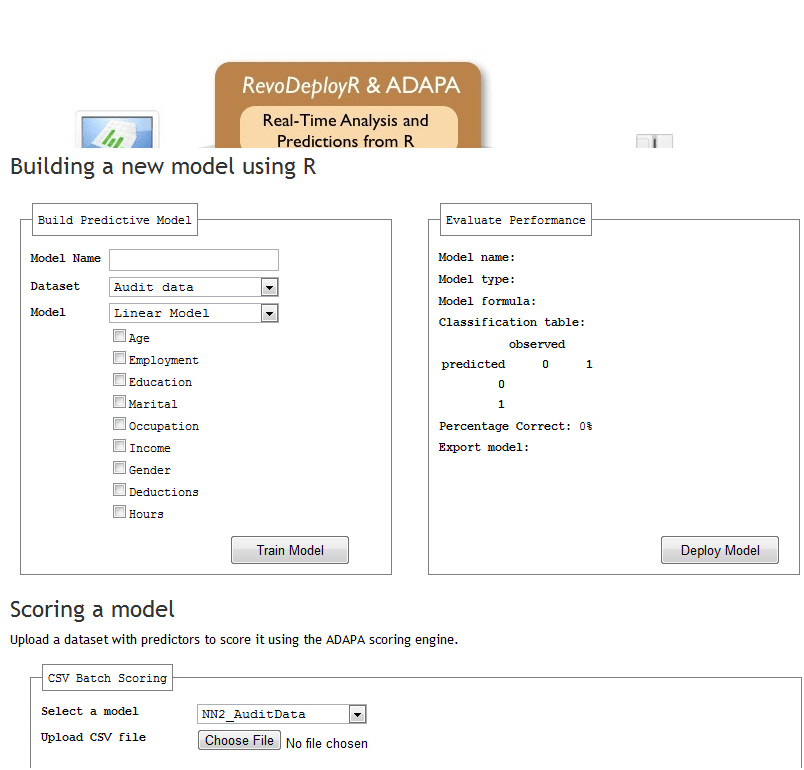
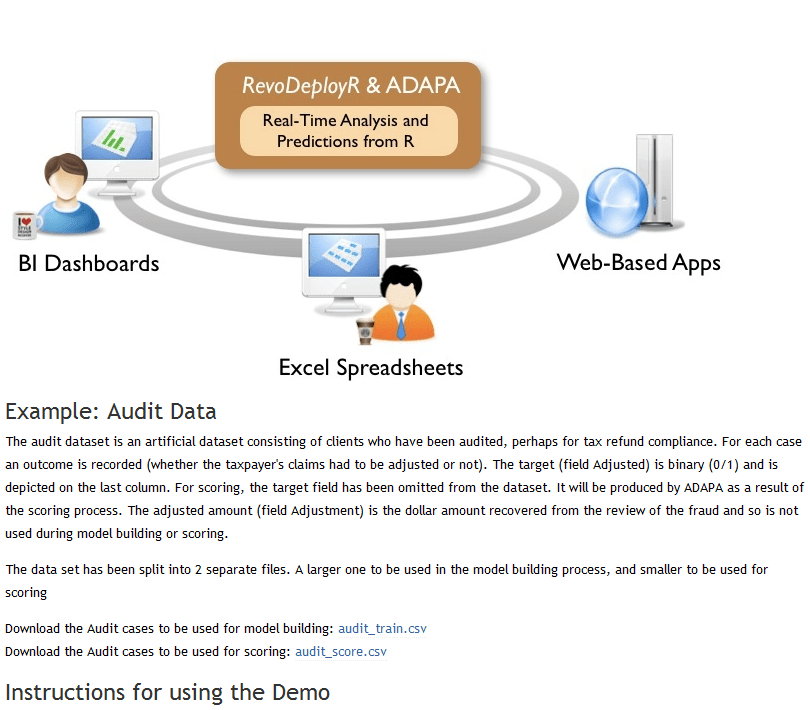
Here is an excellent example of how websites should help rather than hinder new customers take a demo of the software without being overwhelmed by sweet talking marketing guys who dont know the difference between heteroskedasticity, probability, odds and likelihood.

It is made by Zementis (Dr Michael Zeller has been a frequent guest here) and Revolution Analytics is still the best shot in Enterprise software for #Rstats

Now if only Revo could get into the lucrative Department of Energy or Department of Defense business- they could change the world AND earn some more revenue than they have been doing. But seriously.

Check out http://deployr.revolutionanalytics.com/zementis/ and play with it. or better still mash it with some data viz and ROC curves.- or extend it with some APIS 😉

New book on BigData Analytics and Data mining using #Rstats with a GUI

Joseph Marie Jacquard
Image via Wikipedia

I am hoping to put this on my pre-ordered or Amazon Wish list. The book the common people who wanted to do data mining with , but were unable to ask aloud they didnt know much.  It is written by the seminal Australian authority on data mining Dr Graham Williams whom I interviewed here at https://decisionstats.com/2009/01/13/interview-dr-graham-williams/

Data Mining for the masses using an ergonomically designed Graphical User Interface.

Thank you Springer. Thank you Dr Graham Williams

http://www.springer.com/statistics/physical+%26+information+science/book/978-1-4419-9889-7

Data Mining with Rattle and R

Data Mining with Rattle and R

The Art of Excavating Data for Knowledge Discovery

Series: Use R

Williams, Graham

1st Edition., 2011, XX, 409 p. 150 illus. in color.

  • Softcover, ISBN 978-1-4419-9889-7

    Due: August 29, 2011

    54,95 €
  • Encourages the concept of programming with data – more than just pushing data through tools, but learning to live and breathe the data
  • Accessible to many readers and not necessarily just those with strong backgrounds in computer science or statistics
  • Details some of the more popular algorithms for data mining, as well as covering model evaluation and model deployment

Data mining is the art and science of intelligent data analysis. By building knowledge from information, data mining adds considerable value to the ever increasing stores of electronic data that abound today. In performing data mining many decisions need to be made regarding the choice of methodology, the choice of data, the choice of tools, and the choice of algorithms.

Throughout this book the reader is introduced to the basic concepts and some of the more popular algorithms of data mining. With a focus on the hands-on end-to-end process for data mining, Williams guides the reader through various capabilities of the easy to use, free, and open source Rattle Data Mining Software built on the sophisticated R Statistical Software. The focus on doing data mining rather than just reading about data mining is refreshing.

The book covers data understanding, data preparation, data refinement, model building, model evaluation,  and practical deployment. The reader will learn to rapidly deliver a data mining project using software easily installed for free from the Internet. Coupling Rattle with R delivers a very sophisticated data mining environment with all the power, and more, of the many commercial offerings.

Content Level » Research

Keywords » Data mining

Related subjects » Physical & Information Science

Related- https://decisionstats.com/2009/01/13/interview-dr-graham-williams/

Jump to JMP- the best statistical GUI software as per Google Search

This book just won an international award

producing graphs alongside results. In most cases, each page or two-page spread completes a JMP task, which maximizes the book’s utility as a reference.

Continue reading “Jump to JMP- the best statistical GUI software as per Google Search”

Do android hackers tweet about electric sheep?

Here is a very amusing site where bunch of hackers discuss black hat techniques to game social media- they meet in the MJ website. LOL

Thats actually the official MJ website. (also see my Poem on MJ at

https://decisionstats.com/2011/04/29/tribute-to-michael-jackson/

and https://decisionstats.com/2009/12/01/obama-and-mj-on-history/)

But back to the funny twitter gamers

http://www.michaeljackson.com/us/node/703109

MICHAEL JACKSON YOU ARE OVER THE STATUS UPDATE LIMIT. PLEASE WAIT A FEW HOURS AND TRY AGAIN.

Contest for SAS Users and Students

Heres a new contest for SAS users. The prizes are books, so students should be interested as well.

From http://www.sascommunity.org/mwiki/images/b/bc/PointsforprizesRules.pdf

HOW TO ENTER: To qualify for entry, go to the sasCommunity.org web site located at http://www.sascommunity.org/wiki/Main_Page
between April 11, 2011 and May 9, 2011 and either add or edit valid content as described herein to earn award points.
Creation of a first time profile on www.sascommunity.org will earn 1,000 points. For each valid article creation or edit, 100
points will be earned. Articles and subsequent edits should adhere to the sasCommunity.org terms of use as outlined on
http://www.sascommunity.org/wiki/sasCommunity:Terms_of_Use. All points’ accumulation will end at 5:00 PM GMT on
May 9, 2011 and only those points earned between 8:00 AM GMT on April 11, 2011 and 5:00 PM GMT on May 9, 2011
will be counted in this contest. Contest entries made through the Internet will be declared made by the registered user of
the sasCommunity.org profile account. Sponsor is not responsible for phone, technical, network, electronic, computer
hardware or software failures of any kind, misdirected, incomplete, garbled or delayed transmissions. Sponsor will not be
responsible for incorrect or inaccurate entry information, whether caused by entrants or by any of the equipment or
programming associated with or utilized in the contest.
ELIGIBILITY: The contest is open to all sasCommunity.org members 18 year of age or older on the start date of the
contest. Void where prohibited by law. Employees (including immediate family members and/or those living in the same 
household of each), the Sponsor, members of the sasCommunity.org Advisory Board, SAS Global Users Group Executive 
Board, their advertising, promotion and production agencies, the affiliated companies of each, and the immediate family 
members of each are not eligible. 

PRIZE: Three (3) prizes will be awarded based on total points accumulated during the contest as follows:
 1stPlace: 3 SAS®Press books - not to exceed $250 in combined retail value;
 2ndPlace: 2 SAS®Press books - not to exceed $150 in combined retail value; and
 3rdPlace: 1 SAS®Press book - not to exceed $100 in retail value.

What’s New

http://www.sascommunity.org/wiki/Main_Page

New Points for Prizes Contest
Points for Prizes Contest
Win SAS books!
Contribute content or SAS code to sasCommunity.org for your chance to WIN! To qualify, simply add or edit articles between April 11, 2011 and May 9, 2011 (GMT). Creation of a first-time profile on sasCommunity.org gives you 1,000 points. For each valid article creation or edit, 100 points will be earned. The user with the most points collected during this time wins SAS Press Books!

Become a sasCommunity Guru
Thanks for Contributing to sasCommunity.org!
New sasCommunity.org Point System
The sasCommunity support team has been hard at work adding new features and is pleased to announce a points system that recognizes each user’s contributions to the site. Every time you contribute by creating a page, updating it, or just doing a little wiki gardening, you earn points.Earning points is automatic and simple – all you have to do is contribute! Creating your account starts you with 1000 points and all the current users have been credited with points dating back to the site coming online in April 2007.

Viva Libre Office

WordPerfect 5.1 for DOS.
Image via Wikipedia

The Document Foundation is happy to announce the release candidate of
LibreOffice 3.3.1. This release candidate is the first in a series of
frequent bugfix releases on top of our LibreOffice 3.3 product. Please
be aware that LibreOffice 3.3.1 RC1 is not yet ready for production
use, you should continue to use LibreOffice for that.

http://listarchives.documentfoundation.org/www/announce/msg00028.html

Following is the list of changes against LibreOffice 3.3:

Key changes at a glance:

* Numerous translation updates
* new mimetype icons for LibreOffice – explained here:
http://luxate.blogspot.com/2011/01/not-even-included-but-already-improved.html
* quite a few crasher fixes

Detailed change log:

* translation updates
* Removed old/unmaintained icon themes
* Fix for https://bugzilla.novell.com/show_bug.cgi?id=664516: Don’t
use a reference or the default formula string will be changed
* Install bash completion for oo* wrappers when enabled
(https://bugzilla.novell.com/show_bug.cgi?id=665402)
* Build fix: get the stlport compat workaround working for gcc 4.6.0
* Build fix: no ddraw.h or ddraw.lib in the June 2010 DirectX SDK,
removed usage
* Windows installer: padded nologobanner.bmp, new size is 102×58
* removed gd – Gaelic, ky – Kirghiz, pap – Papiamento, ti – Tigrinya,
ms – Malay, ps – Pashto, ur – Urdu. UI localization does not exist
in these languages. So it makes no sense to ship packages.
* Build fix: pass thru PYTHON, found by configure. Will be used by
filter/source/config/fragments/makefile.mk.
* Upgraded libwpd (WordPerfect filter) to 0.9.1
* Fixed BrOffice Windows start menu branding
* Removed language code ‘kid’. kid is not Koshin, but key id pseudo
language which is good for debugging UI but should no be included
in the product
* Added ca_XV and ast language/local name and description
* Fixed incorrect page number in page preview mode
(https://bugs.freedesktop.org/show_bug.cgi?id=33155). When the
window is large enough to show several ‘Page X’ strings,
the page number was not properly incremented.
* Fixed incorrect import of cell attributes from Excel
documents. When a cell with non-default formatting attribute starts
with non-first row in a column, the filter would incorrectly apply
the same format to all the cells above it if they didn’t have any
formats.
* Ubuntu: fix for lp#696527 – enable human icon theme in LibreOffice
* Fix for https://bugzilla.redhat.com/show_bug.cgi?id=673819 crash on
changing position of drawing object in header.
* Changed OpenOffice.org to LibreOffice in nsplugin
* Added Occitan dictionary
* Added Ukrainian dictionaries
* Fix window focus for langpack installation on Mac –
https://bugs.freedesktop.org/show_bug.cgi?id=33056
* Added/modified NLPsolver translations from Pootle
* Fix for https://bugzilla.novell.com/show_bug.cgi?id=655763
* Fix for RTF export crasher
(https://bugzilla.novell.com/show_bug.cgi?id=656503)
* Use LibreOffice as product name for EPS Creator header
* Parse svg ‘color’ property (fixes
https://bugs.freedesktop.org/show_bug.cgi?id=33551)
* Use double instead of float in writerfilter import
* Build fix: use PYTHON as passed through by set_soenv.in.
* Fix for https://bugs.freedesktop.org/show_bug.cgi?id=33237 remove
debug line
* Fix for https://bugs.freedesktop.org/show_bug.cgi?id=33237 – fixes
ole object import for writer (docx)
* Fix for https://bugs.freedesktop.org/show_bug.cgi?id=33249
rename OOo -> LibO on Getting Support Page
* Fix ooxml import: handle css::table::BorderLine in addition to
css::table::BorderLine2 That means that table cell properties are
correctly set on import again.
* Fix for https://bugs.freedesktop.org/show_bug.cgi?id=33258
wikihelp: Improve the check for existence of the localized help.
* Fix for https://bugs.freedesktop.org/show_bug.cgi?id=33994 – fixes
several crashes around config UNO API
* Fix for https://bugs.freedesktop.org/show_bug.cgi?id=30879
* Fix for https://bugs.freedesktop.org/show_bug.cgi?id=32872
Implementation names weren’t matching with xcu.
* Fix: don’t pushback and process a corrupt extension
* Fix: wikihelp – do not check for existence of the localized
help. In case we do not have the help installed, it is up to the
online service to decide the fallback in case a language version is
not available.
* Fix README: change su urpmi to sudo urpmi for Mandriva section
* Fix README formatting –
https://bugs.freedesktop.org/show_bug.cgi?id=32741 – using CRLF
instead of LF on WIN platform
* Fix README: word wrap at column 75 for better readability
* Build fix: KDE3 library search order
(https://bugs.freedesktop.org/show_bug.cgi?id=32797). Use LINKFLAGS
instead of STDLIBS.
* Start using technical.dic instead of oracle.dic
(https://bugs.freedesktop.org/show_bug.cgi?id=31798)
* Build fix: add explicit QRegion* for clipRegion to fix compile of
kde backend
* Cleanup: removed obsolete m_bSingleAltPress
* Remove the menu when Left Alt Key was pressed for GTK
* Fix for https://bugs.freedesktop.org/show_bug.cgi?id=33459: use
year of era in long format for zh_TW by default
* Fix wrong collation for Catalan language
* Fix for https://bugs.freedesktop.org/show_bug.cgi?id=31271 wrong
line break with “(”
* Fix for https://bugs.freedesktop.org/show_bug.cgi?id=32561 – crash
when iterating over the database types.
* Default currency for Estonia should be Euro – fixes
https://bugs.freedesktop.org/show_bug.cgi?id=33160
* Avoid a pointless GetHelpText() call in the toolbox. Fixes
https://bugs.freedesktop.org/show_bug.cgi?id=33315. GetHelpText()
can be quite heavy, see
https://bugs.freedesktop.org/show_bug.cgi?id=33088.
* Paint toolbar handle positioned properly
(https://bugs.freedesktop.org/show_bug.cgi?id=32558)
* Build fix: move cxxabi.h after stl headers to workaround gcc 4.6.0
and stlport
* Fix for https://bugs.freedesktop.org/show_bug.cgi?id=33355
manipulate also the C runtime’s environment
* Fix for CTL/Other Default Font #i25247#, #i25561#, #i48064#,
#i92341#
* RTF export crasher
(https://bugzilla.novell.com/show_bug.cgi?id=656503)
* Fixed an infinite loop in RTF exporter
* UI: translations need more space on word count dialog, made space
for it.
* Fix for https://bugzilla.novell.com/show_bug.cgi?id=660816 improve
formfield checkbox binary export (and import)

Again a BIG Thank You!

Again whats Libre Office

What does LibreOffice give you?

Writer is the word processor inside LibreOffice. Use it for everything, from dashing off a quick letter to producing an entire book with tables of contents, embedded illustrations, bibliographies and diagrams. The while-you-type auto-completion, auto-formatting and automatic spelling checking make difficult tasks easy (but are easy to disable if you prefer). Writer is powerful enough to tackle desktop publishing tasks such as creating multi-column newsletters and brochures. The only limit is your imagination.

Calc tames your numbers and helps with difficult decisions when you’re weighing the alternatives. Analyze your data with Calc and then use it to present your final output. Charts and analysis tools help bring transparency to your conclusions. A fully-integrated help system makes easier work of entering complex formulas. Add data from external databases such as SQL or Oracle, then sort and filter them to produce statistical analyses. Use the graphing functions to display large number of 2D and 3D graphics from 13 categories, including line, area, bar, pie, X-Y, and net – with the dozens of variations available, you’re sure to find one that suits your project.

Impress is the fastest and easiest way to create effective multimedia presentations. Stunning animation and sensational special effects help you convince your audience. Create presentations that look even more professional than the standard presentations you commonly see at work. Get your collegues’ and bosses’ attention by creating something a little bit different.

Draw lets you build diagrams and sketches from scratch. A picture is worth a thousand words, so why not try something simple with box and line diagrams? Or else go further and easily build dynamic 3D illustrations and special effects. It’s as simple or as powerful as you want it to be.

Base is the database front-end of the LibreOffice suite. With Base, you can seamlessly integrate your existing database structures into the other components of LibreOffice, or create an interface to use and administer your data as a stand-alone application. You can use imported and linked tables and queries from MySQL, PostgreSQL or Microsoft Access and many other data sources, or design your own with Base, to build powerful front-ends with sophisticated forms, reports and views. Support is built-in or easily addable for a very wide range of database products, notably the standardly-provided HSQL, MySQL, Adabas D, Microsoft Access and PostgreSQL.

Math is a simple equation editor that lets you lay-out and display your mathematical, chemical, electrical or scientific equations quickly in standard written notation. Even the most-complex calculations can be understandable when displayed correctly. E=mc2.

LibreOffice also comes configured with a PDF file creator, meaning you can distribute documents that you’re sure can be opened and read by users of almost any computing device or operating system.

Download LibreOffice now and try it out today.

http://www.libreoffice.org/features/