Augustus- a PMML model producer and consumer. Scoring engine.

A Bold GNU Head
Image via Wikipedia

I just checked out this new software for making PMML models. It is called Augustus and is created by the Open Data Group (http://opendatagroup.com/) , which is headed by Robert Grossman, who was the first proponent of using R on Amazon Ec2.

Probably someone like Zementis ( http://adapasupport.zementis.com/ ) can use this to further test , enhance or benchmark on the Ec2. They did have a joint webinar with Revolution Analytics recently.

https://code.google.com/p/augustus/

Recent News

  • Augustus v 0.4.3.1 has been released
  • Added a guide (pdf) for including Augustus in the Windows System Properties.
  • Updated the install documentation.
  • Augustus 2010.II (Summer) release is available. This is v 0.4.2.0. More information is here.
  • Added performance discussion concerning the optional cyclic garbage collection.

See Recent News for more details and all recent news.

Augustus

Augustus is a PMML 4-compliant scoring engine that works with segmented models. Augustus is designed for use with statistical and data mining models. The new release provides Baseline, Tree and Naive-Bayes producers and consumers.

There is also a version for use with PMML 3 models. It is able to produce and consume models with 10,000s of segments and conforms to a PMML draft RFC for segmented models and ensembles of models. It supports Baseline, Regression, Tree and Naive-Bayes.

Augustus is written in Python and is freely available under the GNU General Public License, version 2.

See the page Which version is right for me for more details regarding the different versions.

PMML

Predictive Model Markup Language (PMML) is an XML mark up language to describe statistical and data mining models. PMML describes the inputs to data mining models, the transformations used to prepare data for data mining, and the parameters which define the models themselves. It is used for a wide variety of applications, including applications in finance, e-business, direct marketing, manufacturing, and defense. PMML is often used so that systems which create statistical and data mining models (“PMML Producers”) can easily inter-operate with systems which deploy PMML models for scoring or other operational purposes (“PMML Consumers”).

Change Detection using Augustus

For information regarding using Augustus with Change Detection and Health and Status Monitoring, please see change-detection.

Open Data

Open Data Group provides management consulting services, outsourced analytical services, analytic staffing, and expert witnesses broadly related to data and analytics. It has experience with customer data, supplier data, financial and trading data, and data from internal business processes.

It has staff in Chicago and San Francisco and clients throughout the U.S. Open Data Group began operations in 2002.


Overview

The above example contains plots generated in R of scoring results from Augustus. Each point on the graph represents a use of the scoring engine and a chart is an aggregation of multiple Augustus runs. A Baseline (Change Detection) model was used to score data with multiple segments.

Typical Use

Augustus is typically used to construct models and score data with models. Augustus includes a dedicated application for creating, or producing, predictive models rendered as PMML-compliant files. Scoring is accomplished by consuming PMML-compliant files describing an appropriate model. Augustus provides a dedicated application for scoring data with four classes of models, Baseline (Change Detection) ModelsTree ModelsRegression Models and Naive Bayes Models. The typical model development and use cycle with Augustus is as follows:

  1. Identify suitable data with which to construct a new model.
  2. Provide a model schema which proscribes the requirements for the model.
  3. Run the Augustus producer to obtain a new model.
  4. Run the Augustus consumer on new data to effect scoring.

Separate consumer and producer applications are supplied for Baseline (Change Detection) models, Tree models, Regression models and for Naive Bayes models. The producer and consumer applications require configuration with XML-formatted files. The specification of the configuration files and model schema are detailed below. The consumers provide for some configurability of the output but users will often provide additional post-processing to render the output according to their needs. A variety of mechanisms exist for transmitting data but user’s may need to provide their own preprocessing to accommodate their particular data source.

In addition to the producer and consumer applications, Augustus is conceptually structured and provided with libraries which are relevant to the development and use of Predictive Models. Broadly speaking, these consist of components that address the use of PMML and components that are specific to Augustus.

Post Processing

Augustus can accommodate a post-processing step. While not necessary, it is often useful to

  • Re-normalize the scoring results or performing an additional transformation.
  • Supplements the results with global meta-data such as timestamps.
  • Formatting of the results.
  • Select certain interesting values from the results.
  • Restructure the data for use with other applications.

Call for Analytics Speakers

Good news for analytics speakers and listeners. Predictive Analytics Conference is accepting nominations.

http://www.predictiveanalyticsworld.com/submit.php

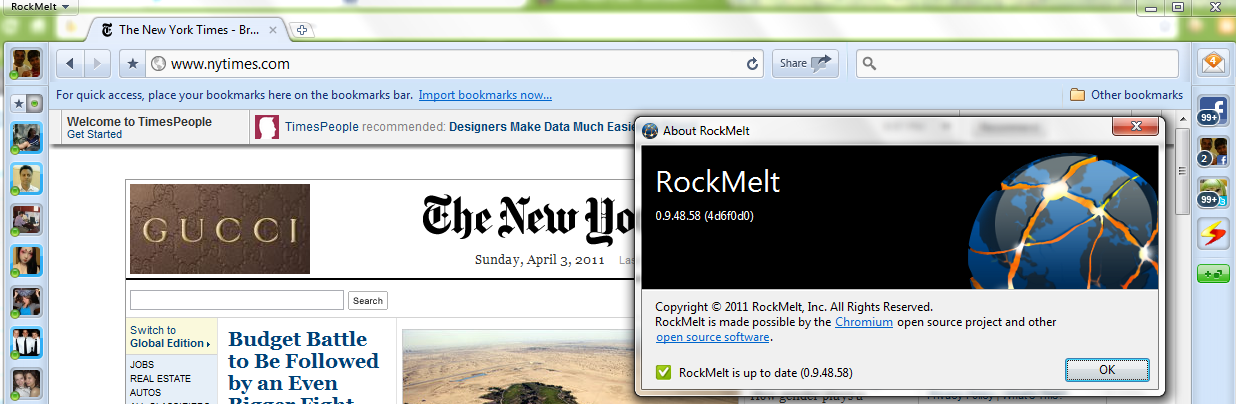
Rockmelt: A chromium based browser with a social layer

I kind of liked the latest browser on the block: Rockmelt.

It is based on Chromium open source project, that is primarily lead by Google. In case Facebook wants to buy a browser it can use Rockmelt–provided the mutual powers and angels agree.

I really liked the idea of a social layer- though I am not sure how the analytics embedded within a browser/report should be used.

Basically it re-designs the interface to put your social networks to the margin, thus quite a boon in you have active social media presence on multiple sites or a power reader/surfer. Timely alerts ping you to status/new messages without cluttering your screen and internet experience. Worth atleast a try or first look for the innovator kind of internet customer.

I still prefer the speed of Chrome– because Rockwell interface is still not easy to transition to – it almost adds in 3 dimensions in terms of where your eyeball should be while surfing (to left/right/margin).


and thats despite the funny fine print in Chrome’s user agreement of “continuing innovation”

type about:terms in your chrome bar to see-

4.3 As part of this continuing innovation, you acknowledge and agree that Google may stop (permanently or temporarily) providing the Services (or any features within the Services) to you or to users generally at Google’s sole discretion, without prior notice to you. You may stop using the Services at any time. You do not need to specifically inform Google when you stop using the Services.

Top Ten Graphs for Business Analytics -Pie Charts (1/10)

I have not been really posting or writing worthwhile on the website for some time, as I am still busy writing ” R for Business Analytics” which I hope to get out before year end. However while doing research for that, I came across many types of graphs and what struck me is the actual usage of some kinds of graphs is very different in business analytics as compared to statistical computing.

The criterion of top ten graphs is as follows-

1) Usage-The order in which they appear is not strictly in terms of desirability but actual frequency of usage. So a frequently used graph like box plot would be recommended above say a violin plot.

2) Adequacy- Data Visualization paradigms change over time- but the need for accurate conveying of maximum information in a minium space without overwhelming reader or misleading data perceptions.

3) Ease of creation- A simpler graph created by a single function is more preferrable to writing 4-5 lines of code to create an elaborate graph.

4) Aesthetics– Aesthetics is relative and  in addition studies have shown visual perception varies across cultures and geographies. However , beauty is universally appreciated and a pretty graph is sometimes and often preferred over a not so pretty graph. Here being pretty is in both visual appeal without compromising perceptual inference from graphical analysis.


so When do we use a bar chart versus a line graph versus a pie chart? When is a mosaic plot more handy and when should histograms be used with density plots? The list tries to capture most of these practicalities.

Let me elaborate on some specific graphs-

1) Pie Chart- While Pie Chart is not really used much in stats computing, and indeed it is considered a misleading example of data visualization especially the skewed or two dimensional charts. However when it comes to evaluating market share at a particular instance, a pie chart is simple to understand. At the most two pie charts are needed for comparing two different snapshots, but three or more pie charts on same data at different points of time is definitely a bad case.

In R you can create piechart, by just using pie(dataset$variable)

As per official documentation, pie charts are not  recommended at all.

http://stat.ethz.ch/R-manual/R-patched/library/graphics/html/pie.html

Pie charts are a very bad way of displaying information. The eye is good at judging linear measures and bad at judging relative areas. A bar chart or dot chart is a preferable way of displaying this type of data.

Cleveland (1985), page 264: “Data that can be shown by pie charts always can be shown by a dot chart. This means that judgements of position along a common scale can be made instead of the less accurate angle judgements.” This statement is based on the empirical investigations of Cleveland and McGill as well as investigations by perceptual psychologists.

—-

Despite this, pie charts are frequently used as an important metric they inevitably convey is market share. Market share remains an important analytical metric for business.

The pie3D( ) function in the plotrix package provides 3D exploded pie charts.An exploded pie chart remains a very commonly used (or misused) chart.

From http://lilt.ilstu.edu/jpda/charts/chart%20tips/Chartstip%202.htm#Rules

we see some rules for using Pie charts.


  1. Avoid using pie charts.
  2. Use pie charts only for data that add up to some meaningful total.
  3. Never ever use three-dimensional pie charts; they are even worse than two-dimensional pies.
  4. Avoid forcing comparisons across more than one pie chart


From the R Graph Gallery (a slightly outdated but still very comprehensive graphical repository)

http://addictedtor.free.fr/graphiques/RGraphGallery.php?graph=4

par(bg="gray")
pie(rep(1,24), col=rainbow(24), radius=0.9)
title(main="Color Wheel", cex.main=1.4, font.main=3)
title(xlab="(test)", cex.lab=0.8, font.lab=3)
(Note adding a grey background is quite easy in the basic graphics device as well without using an advanced graphical package)


Youtube's variance in interface/s for sharing

Youtube seems to have a different  interface for sharing a channel, a playlist or an individual song. Also it seems to be missing out on revenue from Itunes (or maybe it isnt). and it seems to promoting Facebook and Twitter to the expense of other social media sharing buttons which can be only seen when you click share more (or maybe the buttons/social media channels change based on sharing activity analytics 🙂 )

on a slightly different note read my techie tutorial on boosting your youtube channel views

https://decisionstats.com/2010/09/10/creating-an-anonymous-bot/

Creating an Anonymous Bot


See the following interface snapshots/views-

youtube song share expanded


youtube song share
youtube song share default
youtube playlist share
utube channel share
youtube channel share

PMML Plugin for Greenplum now available

Predictive Model Markup Language
Image via Wikipedia

From a press release from Zementis.


, the Universal PMML Plug-in for in-database scoring. Available now for the EMC Greenplum Database, a high-performance massively parallel processing (MPP) database, the plug-in leverages the Predictive Model Markup Language (PMML) to execute predictive models directly within EMC Greenplum, for highly optimized in-database scoring.

Universal PMML Plug-in

Developed by the Data Mining Group (DMG), PMML is supported by all major data mining vendors, e.g., IBM SPSS, SAS, Teradata, FICO, STASTICA, Microstrategy, TIBCO and Revolution Analytics as well as open source tools like R, KNIME and RapidMiner. With PMML, models built in any of these data mining tools can now instantly be deployed in the EMC Greenplum database. The net result is the ability to leverage the power of standards-based predictive analytics on a massive scale, right where the data resides.

“By partnering with Zementis, a true PMML innovator, we are able to offer a vendor-agnostic solution for moving enterprise-level predictive analytics into the database execution environment,” said Dr. Steven Hillion, Vice President of Analytics at EMC Greenplum. “With Zementis and PMML, the de-facto standard for representing data mining models, we are eliminating the need to recode predictive analytic models in order to deploy them within our database. In turn, this enables an analyst to reduce the time to insight required in most businesses today.”

Want to learn more?
 

To learn more about how the EMC Greenplum Database and the Universal PMML Plug-in work together, feel free to:

  1. Visit the PMML Plug-in product page
  2. Download the white paper

The Universal PMML Plug-in for the EMC Greenplum Database is available now. Contact us today for more information.

Michael Zeller, CEO, Zementis


KDNuggets Survey on R

CRISP-DM
Image via Wikipedia

From http://www.kdnuggets.com/2011/03/new-poll-r-in-analytics-data-mining-work.html?k11n07

A new poll/survey on actual usage of R in Data Mining

R has been steadily growing in popularity among data miners and analytic professionals.

In KDnuggets 2010 Data Mining / Analytic Tools Poll, R was used by 30% of respondents.
In 2010 Rexer Analytics Data Miner SurveyR was the most popular tool, used by 43% of the data miners.

Another aspect of tool usefulness is how much does it help with the entire data mining process from data preparation and cleaning, modeling, evaluation, visualization and presentation (excluding deployment).

New KDnuggets Poll is asking:
What part of your analytics / data mining work in the past 12 months was done in R?

http://www.kdnuggets.com/2011/03/new-poll-r-in-analytics-data-mining-work.html?k11n07