IBM SPSS 19: Marketing Analytics and RFM

What is RFM Analysis?

Recency Frequency Monetization is basically a technique to classify your entire customer list. You may be a retail player with thousands of customers or a enterprise software seller with only two dozen customers.

RFM Analysis can help you cut through and focus on the real customer that drives your profit.

As per Wikipedia

http://en.wikipedia.org/wiki/RFM

RFM is a method used for analyzing customer behavior and defining market segments. It is commonly used in database marketing and direct marketing and has received particular attention in retail.

RFM stands for

  • Recency – How recently a customer has purchased?
  • Frequency – How often he purchases?
  • Monetary Value – How much does he spend?

To create an RFM analysis, one creates categories for each attribute. For instance, the Recency attribute might be broken into three categories: customers with purchases within the last 90 days; between 91 and 365 days; and longer than 365 days. Such categories may be arrived at by applying business rules, or using a data mining technique, such asCHAID, to find meaningful breaks.

—————————————————————————————————-

Even if you dont know what or how to do a RFM, see below for an easy to do way.

I just got myself an evaluation copy of a fully loaded IBM SPSS 19 Module and did some RFM Analysis on some data- the way SPSS recent version is it makes it very very useful even to non statistical tool- but an extremely useful one to a business or marketing user.

Here are some screenshots to describe the features.

1) A simple dashboard to show functionality (with room for improvement for visual appeal)
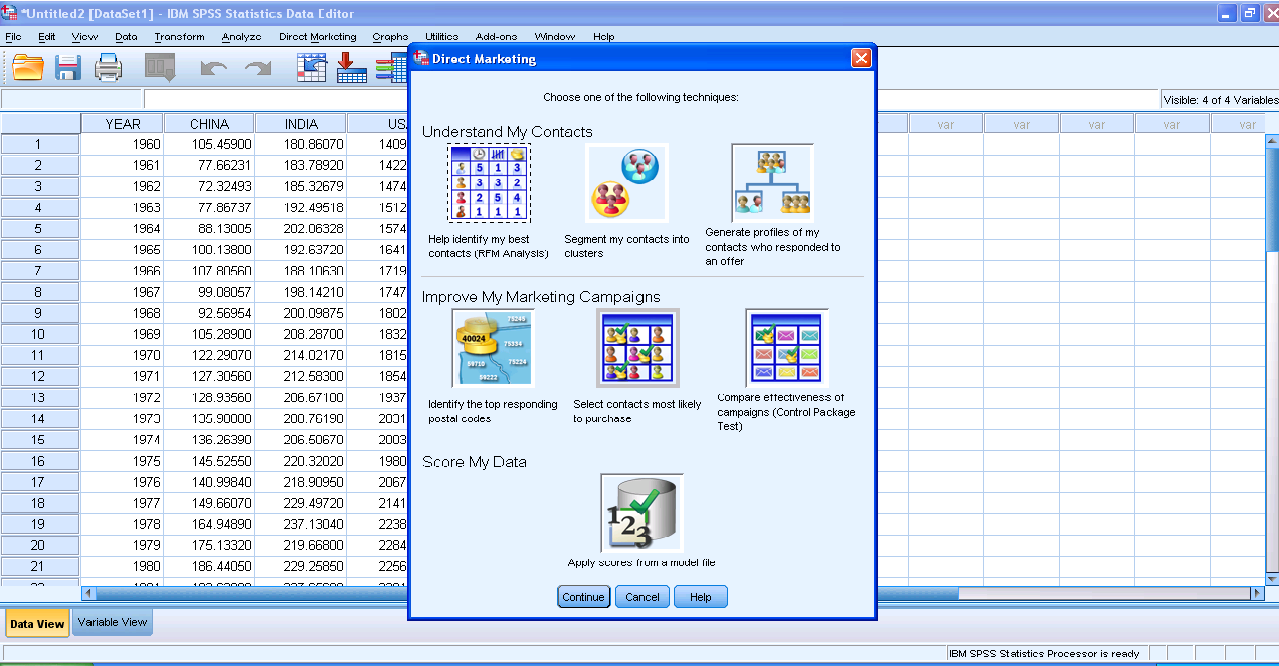
2) Simple Intuitive design to inputting data3) Some options in creating marketing scorecards4) Easy to understand features for a business audiences
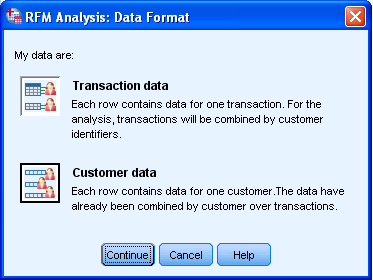
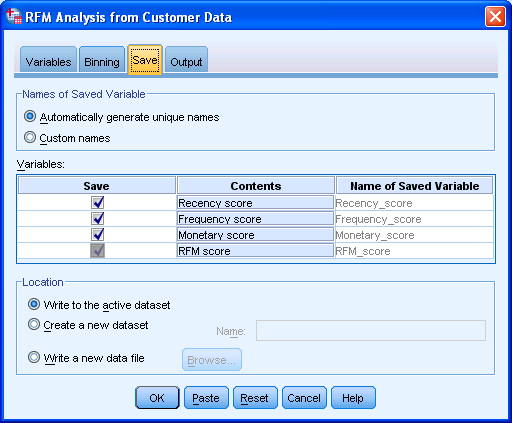
rather than pseudo techie jargon5) Note the clean design of the GUI in specifying data input type6) Again multiple options to export results in a very user friendly manner with options to customize business report7) Graphical output conveniently pasted inside a word document rather than a jumble of images. Auto generated options for customized standard graphs.8) An attractive heatmap to represent monetization for customers. Note the effect that a scale of color shades have in visual representation of data.9) Comparative plots placed side by side with easy to understand explanation (in the output word doc not shown here)10) Auto generated scores attached to data table to enhance usage. 
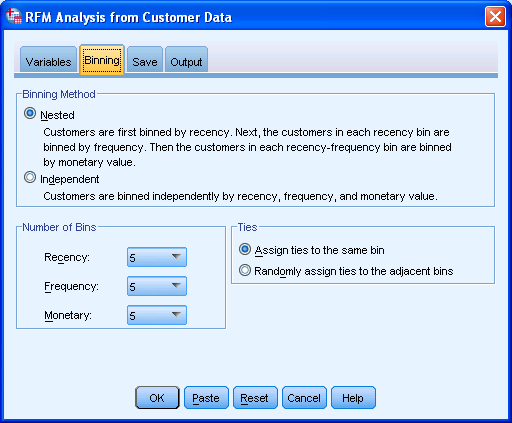
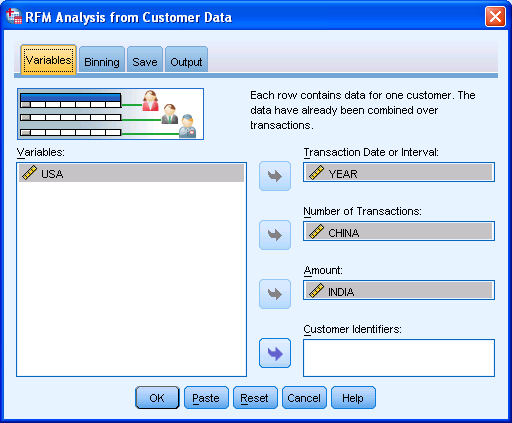
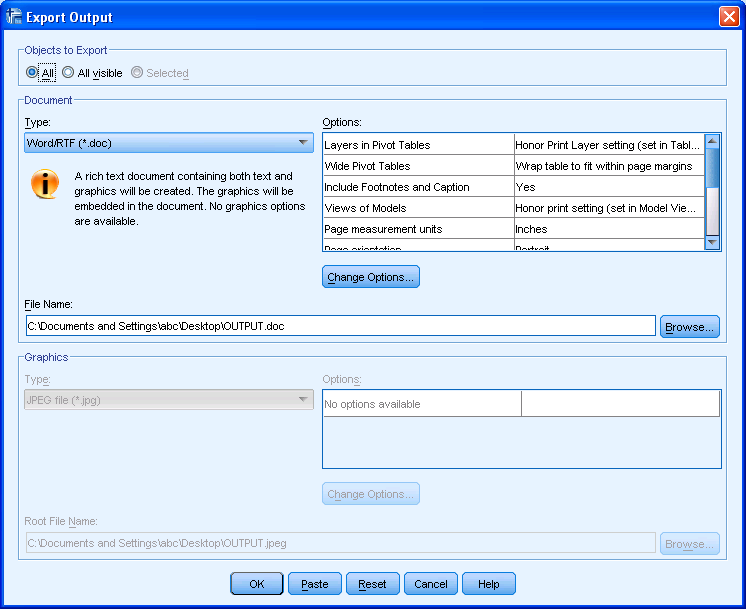
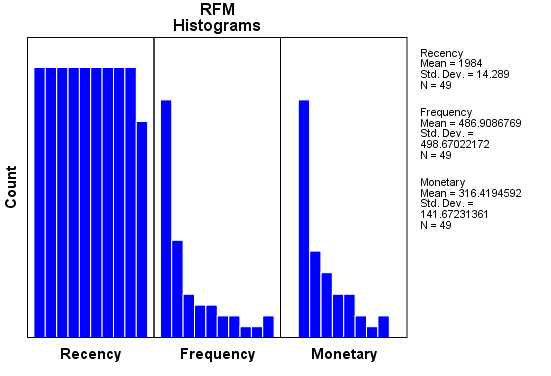
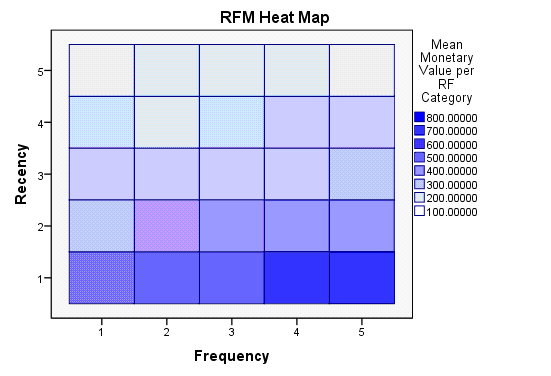
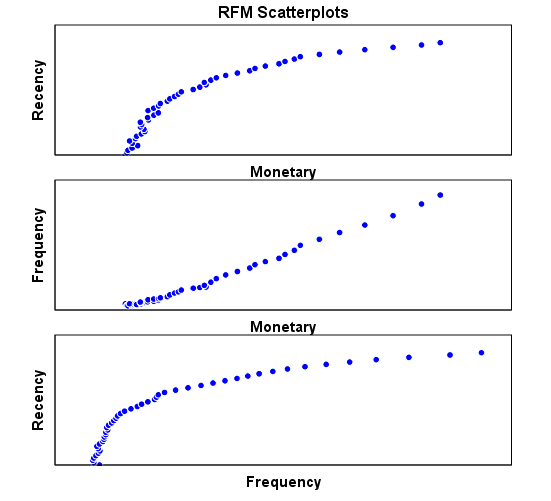
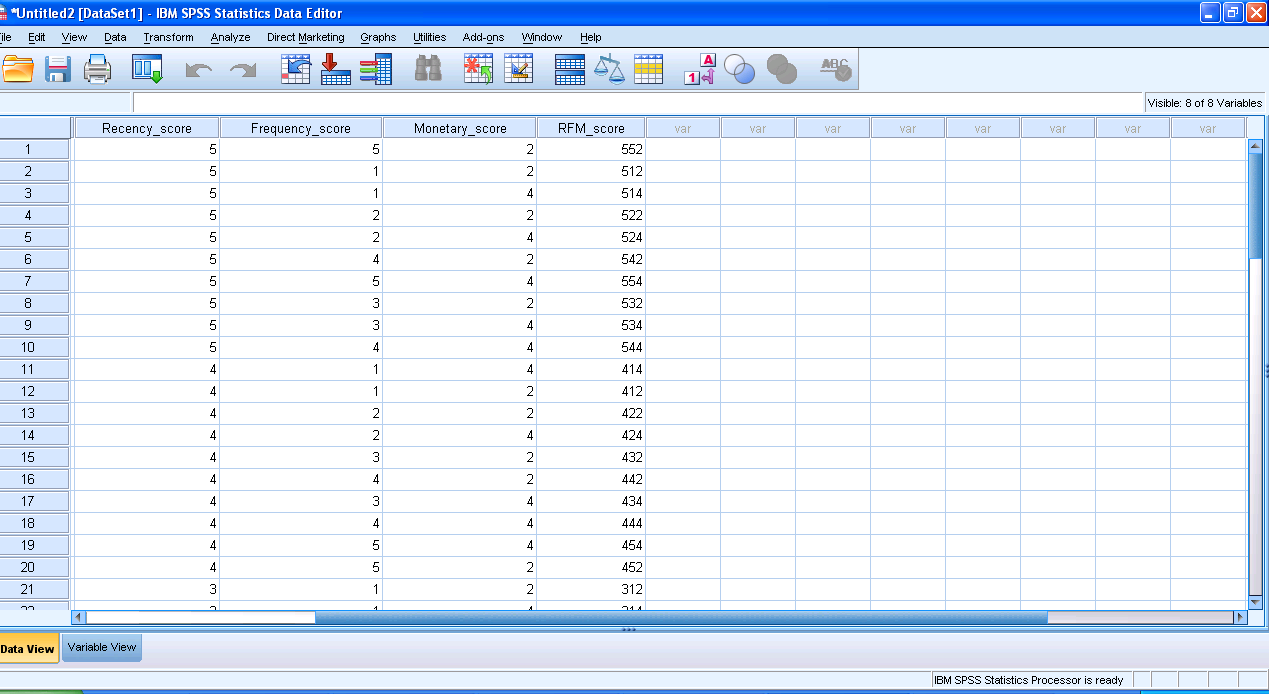
Note here I am evaluating RFM as a marketing technique (which is well known) but also the GUI of IBM SPSS 19 Marketing Analytics. It is simple, and yet powerful into turning what used to be a purely statistical software for nerds into a beautiful easy to implement tool for business users.

So what else can you do in Marketing Analytics with SPSS 19.

IBM SPSS Direct Marketing

The Direct Marketing add-on option allows organizations to ensure their marketing programs are as effective as possible, through techniques specifically designed for direct marketing, including:

• RFM Analysis. This technique identifies existing customers who are most likely to respond to a new offer.

• Cluster Analysis. This is an exploratory tool designed to reveal natural groupings (or clusters) within your data. For example, it can identify different groups of customers based on various demographic and purchasing characteristics.

• Prospect Profiles. This technique uses results from a previous or test campaign to create descriptive profiles. You can use the profiles to target specific groups of contacts in future campaigns.

• Postal Code Response Rates. This technique uses results from a previous campaign to calculate postal code response rates. Those rates can be used to target specific postal codes in future campaigns.

• Propensity to Purchase. This technique uses results from a test mailing or previous campaign to generate propensity scores. The scores indicate which contacts are most likely to respond.

• Control Package Test. This technique compares marketing campaigns to see if there is a significant difference in effectiveness for different packages or offers.

Click here to find out more about Direct Marketing.
Using JMP 9 and R together

An interesting blog post at http://blogs.sas.com/jmp/index.php?/archives/298-JMP-Into-R!.html on using the new JMP 9 with R, and quite possibly using SAS as well.

Example Code-

Here’s the R integration JSL code used to run the bootstrap

rconn = R Connect();
rconn << Submit(“\[
library(boot)

# Load Boot package
library(boot)

RStatFctn <- function(x,d) {return(mean(x[d]))}

b.basic = matrix(data=NA, nrow=1000, ncol=2)
b.normal = matrix(data=NA, nrow=1000, ncol=2)
b.percent =matrix(data=NA, nrow=1000, ncol=2)
b.bca =matrix(data=NA, nrow=1000, ncol=2)

for(i in 1:1000){
rnormdat = rnorm(30,0,1)
b <- boot(rnormdat, RStatFctn, R = 1000)
b.ci=boot.ci(b, conf =095,type=c(“basic”,”norm”,”perc”,”bca”)) b.basic[i,] = b.ci$basic[,4:5]
b.normal[i,] = b.ci$normal[,2:3]
b.percent[i,] = b.ci$percent[,4:5]
b.bca[i,] = b.ci$bca[,4:5]
}
]\”));
b_basic= rconn << Get(b.basic);
b_normal = rconn << Get(b.normal);
b_percent= rconn << Get(b.percent);
b_bca = rconn << Get(b.bca);
rconn << Disconnect();

Using the R Connect() JSL command and assigning it to the object “rconn”, the code sends messages to the JSL scriptable object “rconn” to submit R code via the Submit() command and to retrieve R matrices containing the bootstrap confidence intervals back via the Get() commands.

and I also found interesting what the write has to say about using JMP (for visual analysis) and SAS (bigger datasets handling) and R (for advanced statistics) together

Other standard JMP tools such as the Data Filter can help to explore these results in ways that cannot easily and quickly be done in R

and

With a little JSL and the statistical and graphics platforms of JMP coupled with the breadth and variety of packages and functions in R, one can build complete easy-to-use applications for statistical analysis.

JMP can also integrate with SAS, which adds the ability to work with large-scale data through the file-based system as well as the depth and advanced capabilities of SAS procedures. With these seamless integrations, JMP can become a hub that enables you to connect with both SAS and R, as well as provide unique statistical features such as the JMP Profiler and interactive graphic features such as Graph Builder

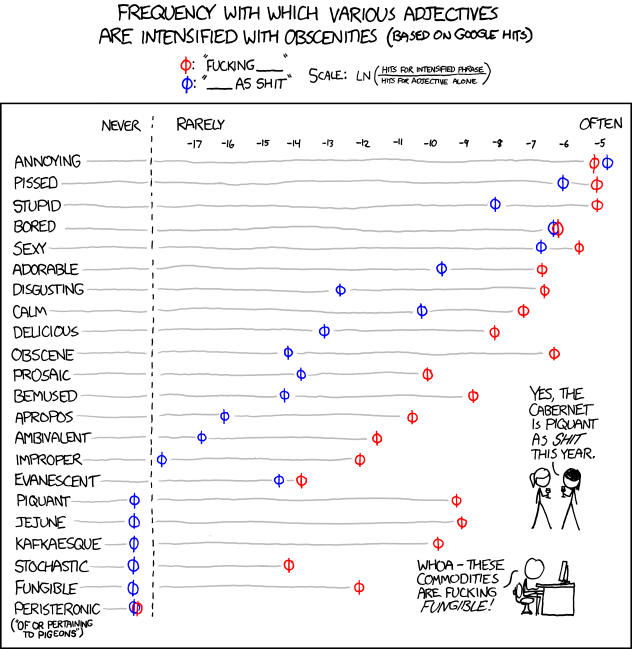
and in the meanwhile here is a data visualization of a frequency analysis of various words bundled together from xkcd.com

PAW Reception and R Meetup

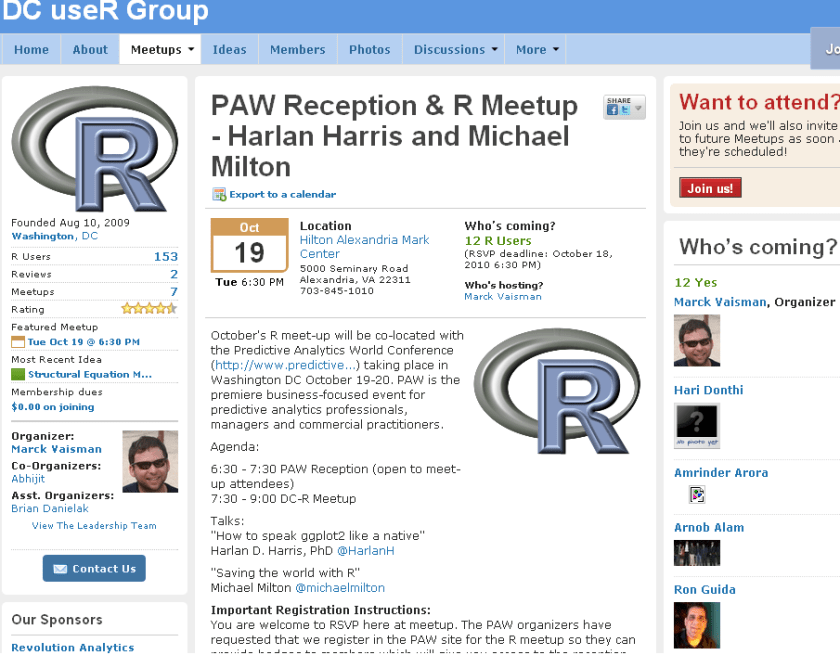
New DC meetup for R Users-

source- http://www.meetup.com/R-users-DC/calendar/14236478/

October’s R meet-up will be co-located with the Predictive Analytics World Conference (http://www.predictive…) taking place in Washington DC October 19-20. PAW is the premiere business-focused event for predictive analytics professionals, managers and commercial practitioners.

Agenda:

6:30 – 7:30 PAW Reception (open to meet-up attendees)
7:30 – 9:00 DC-R Meetup

Talks:
“How to speak ggplot2 like a native”
Harlan D. Harris, PhD @HarlanH

“Saving the world with R”
Michael Milton @michaelmilton

Important Registration Instructions:
You are welcome to RSVP here at meetup. The PAW organizers have requested that we register in the PAW site for the R meetup so they can provide badges to members which will give you access to the reception. There is no charge to register using the PAW site. Please click here to register.


Speaker Bios

Harlan D. Harris, PhD, is a statistical data scientist working for Kaplan Test Prep and Admissions in New York City. He has degrees from the University of Wisconsin-Madison and the University of Illinois at Urbana-Champaign. Prior to turning to the private sector, he worked as a researcher and lecturer in various areas of Artificial Intelligence and Cognitive Science at the University of Illinois, Columbia University, the University of Connecticut, and New York University.

Harlan’s talk is titled “How to speak ggplot2 like a native.”. One of the most innovative ideas in data visualization in recent years is that graphical images can be described using a grammar. Just as a fluent speaker of a language can talk more precisely and clearly than someone using a tourist phrasebook, graphics based on a grammar can yield more insights than graphics based on a limited set of templates (bar chart, pie graph, etc.). There are at least two implementations of the Grammar of Graphics idea in R, of which the most popular is the ggplot2 package written by Prof. Hadley Wickham. Just as with natural languages, ggplot2 has a surface structure made up of R vocabulary elements, as well as a deep structure that mediates the link between the vocabulary and the “semantic” representation of the data shown on a computer screen. In this introductory presentation, the links among these levels of representation are demonstrated, so that new ggplot2 users can build the mental models necessary for fluent and creative visualization of their data.

Michael Milton is a Client Manager at Blue State Digital. When he’s not saving the world by designing interactive marketing strategies that connect passionate users with causes and organizations, he writes about data and analytics. For O’Reilly Media, he wrote Head First Data Analysis and Head First Excel and has created the videos Great R: Level 1 and Getting the Most Out of Google Apps for Business.

Michael’s talk is called “How to Save the World Using R.” In this wide-ranging discussion, Michael will highlight individuals and organizations who are using R to help others as well as ways in which R can be used to promote good statistical thinking.

Red Hat worth 7.8 Billion now

I was searching for a Linux install of Revolution’s latest enterprise version, but it seems version 4 will be available on Red Hat Enterprise Linux only by Decemebr 2010. Also even though Revolution once opted for co branding with Canonical’s Karmic Koala, they seem to have ignored Ubuntu from the Enterprise version of Revolution R.

http://www.revolutionanalytics.com/why-revolution-r/which-r-is-right-for-me.php

Base R Revolution R Community Revolution R Enterprise
Buy Now
Target Use Open Source Product Evaluation & Simple Prototyping Business, Research & Academics
Software
100% Compatible with R language X X X
Certified for Stability X X
Command-Line Programming X X X
Getting Started Guide X X
Performance & Scalability
Analyze larger data sets with 64-bit RAM X X
Optimized for Multi-processor workstations X X
Multi-threaded Math libraries X X
Parallel Programming (Single Workstation) X X
Out-of-the-Box Cluster-Ready X
“Big Data” Analysis
Terabyte-Class File Structures X
Specialized “Big Data” Algorithms X
Integrated Web Services
Scalable Web Services Platform X*
User Interface
Visual IDE X
Comprehensive Data Analysis GUI X*
Technical Support
Discussion Forums X X X
Online Support Mailing List Forum X
Email Support X
Phone Support X
Support for Base & Recommended R Packages X X X
Authorized Training & Consulting X
Platforms
Single User X X X
Multi-User Server X X
32-bit Windows X X X
64-bit Windows X X
Mac OS X X X
Ubuntu Linux X X
Red Hat Enterprise Linux X
Cloud-Ready X

and though the page on RED HAT’s Partner page for Revolution seems old/not so updated

https://www.redhat.com/wapps/partnerlocator/web/home.html;#productId=188

, I was still curious to see what the buzz about Red Hat is all about.

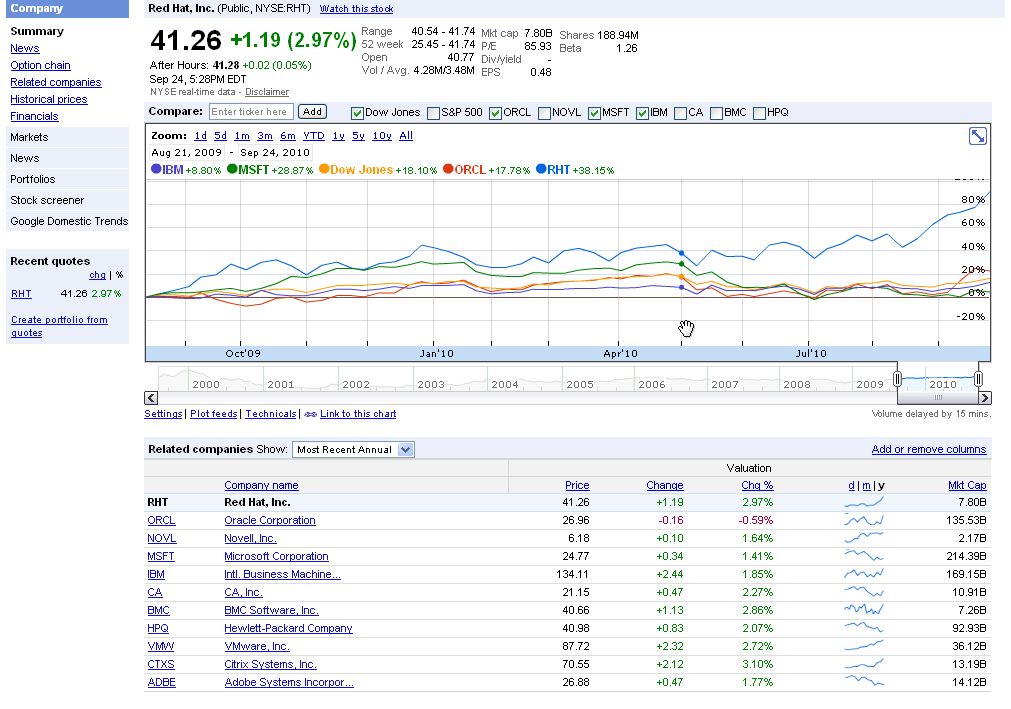
And one of the answers is Red Hat is now a 7.8 Billion Dollar Company.

http://www.redhat.com/about/news/prarchive/2010/Q2_2011.html

Red Hat Reports Second Quarter Results

  • Revenue of $220 million, up 20% from the prior year
  • GAAP operating income up 24%, non-GAAP operating income up 25% from the prior year
  • Deferred revenue of $650 million, up 12% from the prior year

RALEIGH, NC – Sept 22, 2010 – Red Hat, Inc. (NYSE: RHT), the world’s leading provider of open source solutions, today announced financial results for its fiscal year 2011 second quarter ended August 31, 2010.

Total revenue for the quarter was $219.8 million, an increase of 20% from the year ago quarter. Subscription revenue for the quarter was $186.2 million, up 19% year-over-year.

and the stock goes zoom 48 % up for the year

http://www.google.com/finance?chdnp=1&chdd=1&chds=1&chdv=1&chvs=maximized&chdeh=0&chfdeh=0&chdet=1285505944359&chddm=98141&chls=IntervalBasedLine&cmpto=INDEXDJX:.DJI;NASDAQ:ORCL;NASDAQ:MSFT;NYSE:IBM&cmptdms=0;0;0;0&q=NYSE:RHT&ntsp=0

(Note to Google- please put the URL shortener on Google Finance as well)

The software is also reasonably priced starting from 80$ onwards.

https://www.redhat.com/apps/store/desktop/

Basic Subscription

Web support, 2 business day response, unlimited incidents
1 Year
$80
Multi-OS with Basic SubscriptionWeb support, 2 business day response, unlimited incidents
1 Year
$120
Workstation with Basic Subscription
Web support, 2 business day response, unlimited incidents
1 Year
$179
Workstation and Multi-OS with Basic Subscription
Web support, 2 business day response, unlimited incidents
1 Year
$219
Workstation with Standard Subscription
Business Hours phone support, web support, unlimited incidents
1 Year
$299
Workstation and Multi-OS with Standard Subscription
Business Hours phone support, web support, unlimited incidents
1 Year
$339
——————————————————————————————
That should be a good enough case for open source as a business model.


When China overtook India- using DEDUCER

I was just reading about the new release of World Bank Data at http://www.r-chart.com/2010/09/new-world-bank-data-available.html Now World Bank Data is something I worked with in the past, but the RWDI package is a great package. (see http://www.r-chart.com/2010/09/new-world-bank-data-available.html)

The whole dataset is a 29 mb in zipped CSV though and is available for terrific macroeconomic analysis _ I downloaded it and loaded it instead.

http://data.worldbank.org/sites/default/files/data/wdiandgdf_csv.zip

I took a small subset of the data –


WDI_GDF_Data <- read.table("C:/Documents and Settings/abc/My Documents/Downloads/WDI_GDF_Data.csv",header=T,sep=",",quote="\"")
 WDI_GDF_Data.sub<-subset(WDI_GDF_Data,Country.Code == "CHN" | Country.Code == "IND" | Country.Code == "USA")
WDI_GDF_Data.sub.sub<-subset(WDI_GDF_Data.sub,Series.Code == "NY.GDP.PCAP.KD")
WDI_GDF_Data.sub.sub<-as.data.frame(t(WDI_GDF_Data.sub.sub))
write.csv(WDI_GDF_Data.sub.sub,'C:/Documents and Settings/abc/Desktop/gdp3.csv')

Note- WordPress.com now supports source code in R via http://en.support.wordpress.com/code/posting-source-code/

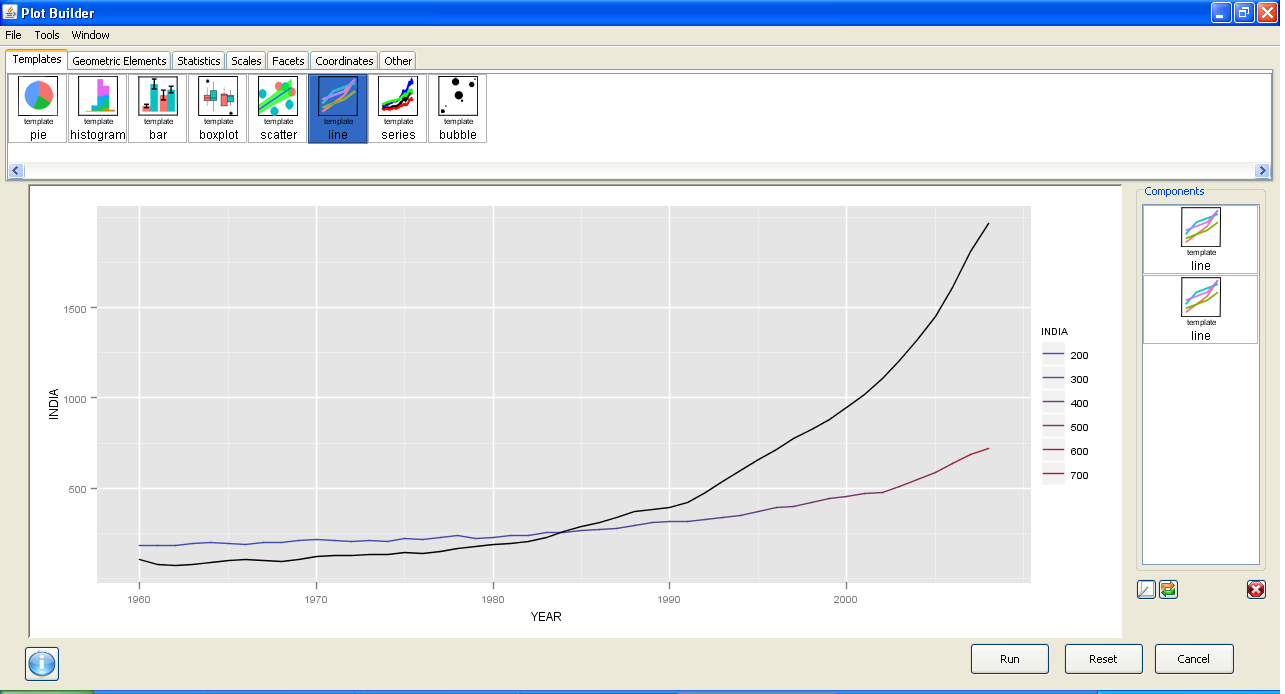
Now this is basic data manipulation- and I used Deducer for it.

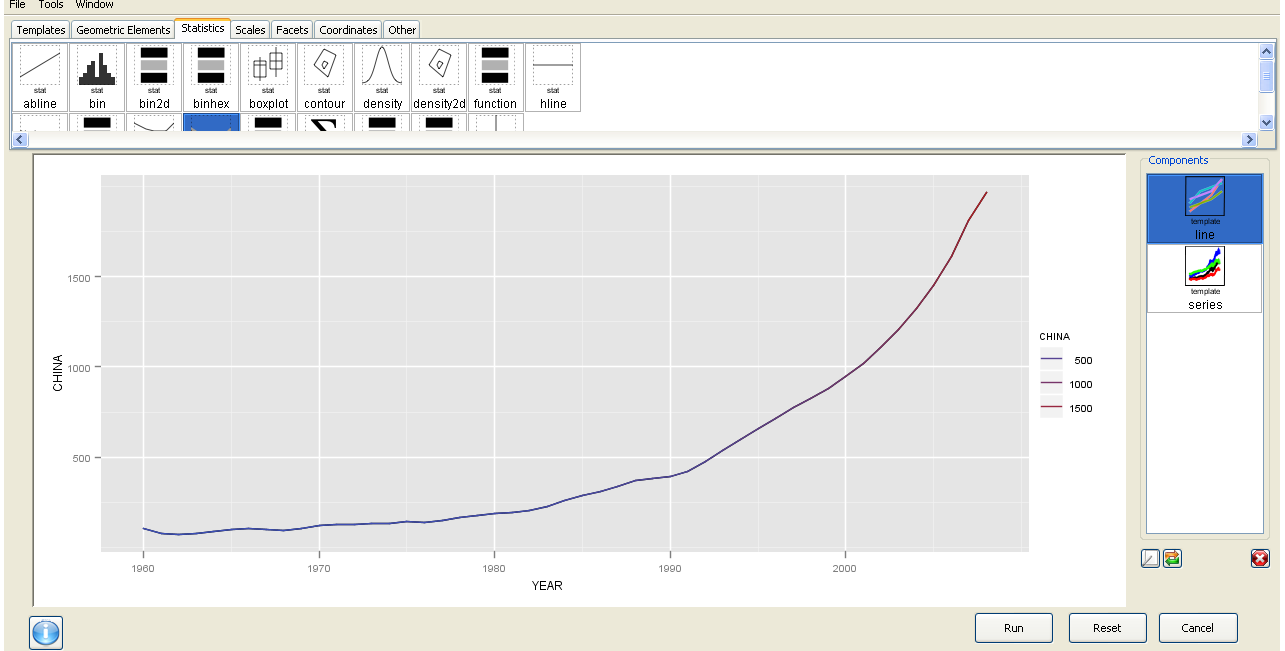
The best thing is the ability to use GGPlot using a GUI.
I am now trying to create more complicated plots for example with more than one Y variable but it is still a work in progress. Overall Deducer has made impressive improvements and with the JGR GUI seems very very promising. The look and feel also shows a combination of features (from SPSS ‘s variable and data view)

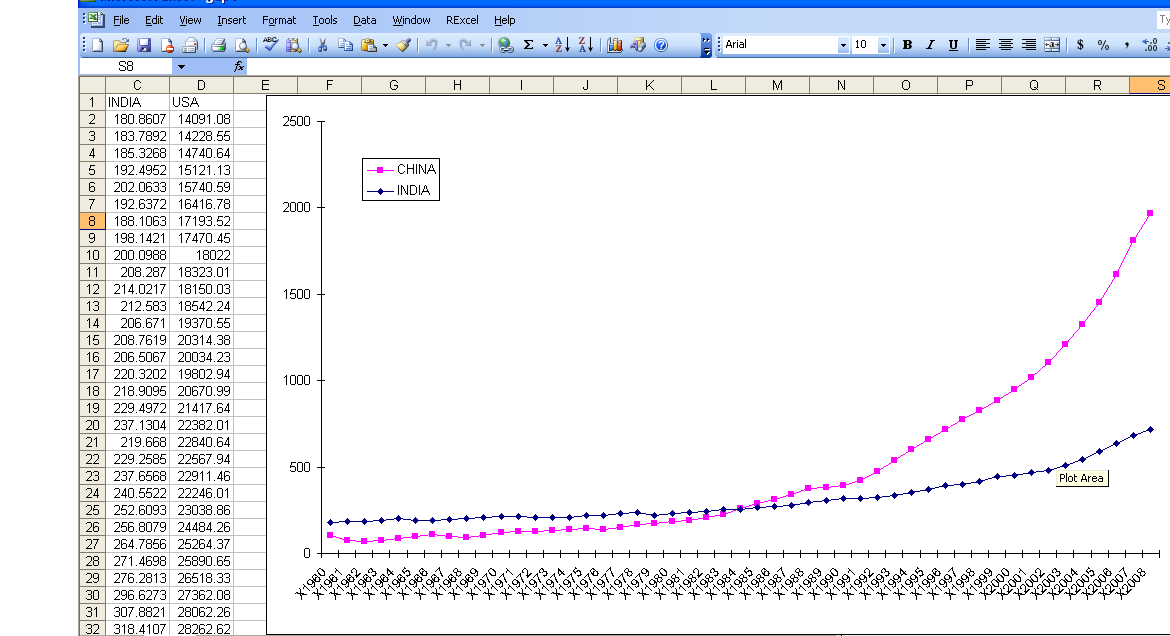
And yes China overtook India in 1985. In GDP per capita. Sigh

GGPLot though overtook Excel graphics as well.


Here is a video which is much better than my screenshots

R on Windows HPC Server

From HPC Wire, the newsletter/site for all HPC news-

Source- Link

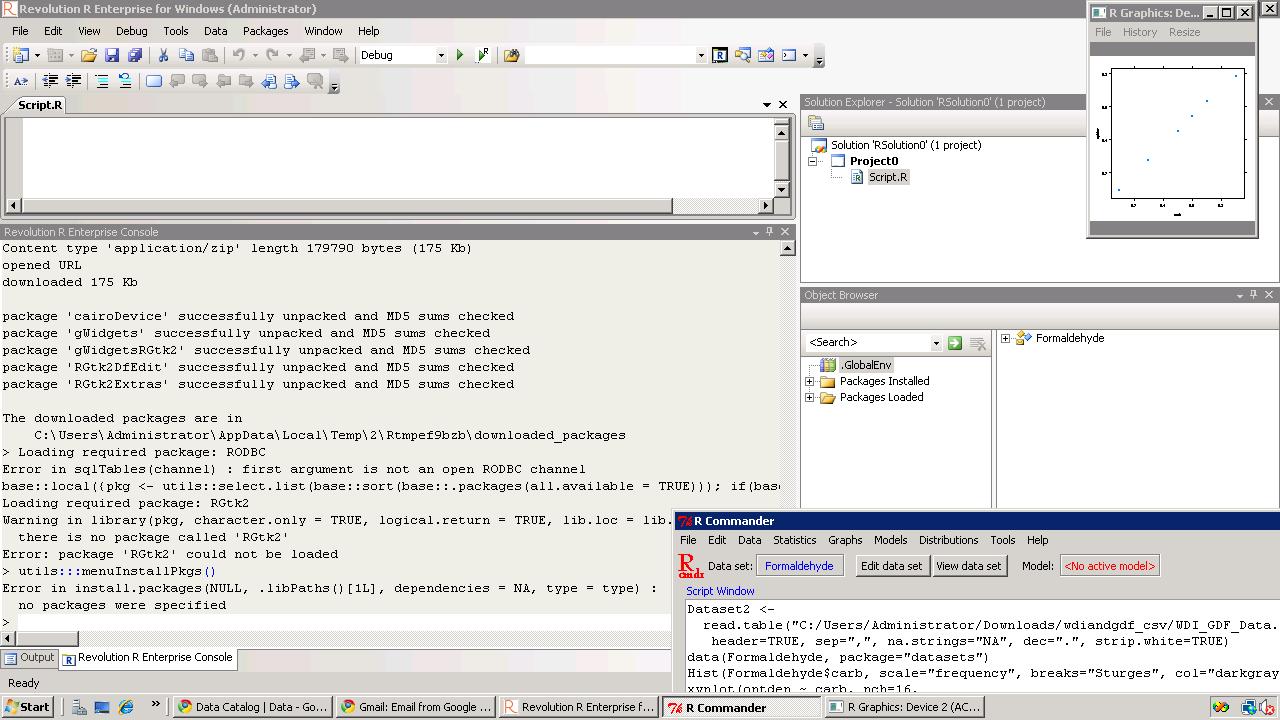
PALO ALTO, Calif., Sept. 20 — Revolution Analytics, the leading commercial provider of software and support for the popular open source R statistics language, today announced it will deliver Revolution R Enterprise for Microsoft Windows HPC Server 2008 R2, released today, enabling users to analyze very large data sets in high-performance computing environments.

R is a powerful open source statistics language and the modern system for predictive analytics. Revolution Analytics recently introduced RevoScaleR, new “Big Data” analysis capabilities, to its R distribution, Revolution R Enterprise. RevoScaleR solves the performance and capacity limitations of the R language by with parallelized algorithms that stream data across multiple cores on a laptop, workstation or server. Users can now process, visualize and model terabyte-class data sets at top speeds — without the need for specialized hardware.

“Revolution Analytics is pleased to support Microsoft’s Technical Computing initiative, whose efforts will benefit scientists, engineers and data analysts,” said David Champagne, CTO at Revolution. “We believe the engineering we have done for Revolution R Enterprise, in particular our work on big-data statistics and multicore computing, along with Microsoft’s HPC platform for technical computing, makes an ideal combination for high-performance large scale statistical computing.”

“Processing and analyzing this ‘big data’ is essential to better prediction and decision making,” said Bill Hamilton, director of technical computing at Microsoft Corp. “Revolution R Enterprise for Windows HPC Server 2008 R2 gives customers an extremely powerful tool that handles analysis of very large data and high workloads.”

To learn more about Revolution R Enterprise and its Big Data capabilities, download thewhite paper. Revolution Analytics also has an on-demand webcast, “High-performance analytics with Revolution R and Windows HPC Server,” available online.

AND from Microsoft’s website

http://www.microsoft.com/hpc/en/us/solutions/hpc-for-life-sciences.aspx

REvolution R Enterprise »

REvolution Computing

REvolution R Enterprise is designed for both novice and experienced R users looking for a production-grade R distribution to perform mission critical predictive analytics tasks right from the desktop and scale across multiprocessor environments. Featuring RPE™ REvolution’s R Productivity Environment for Windows.

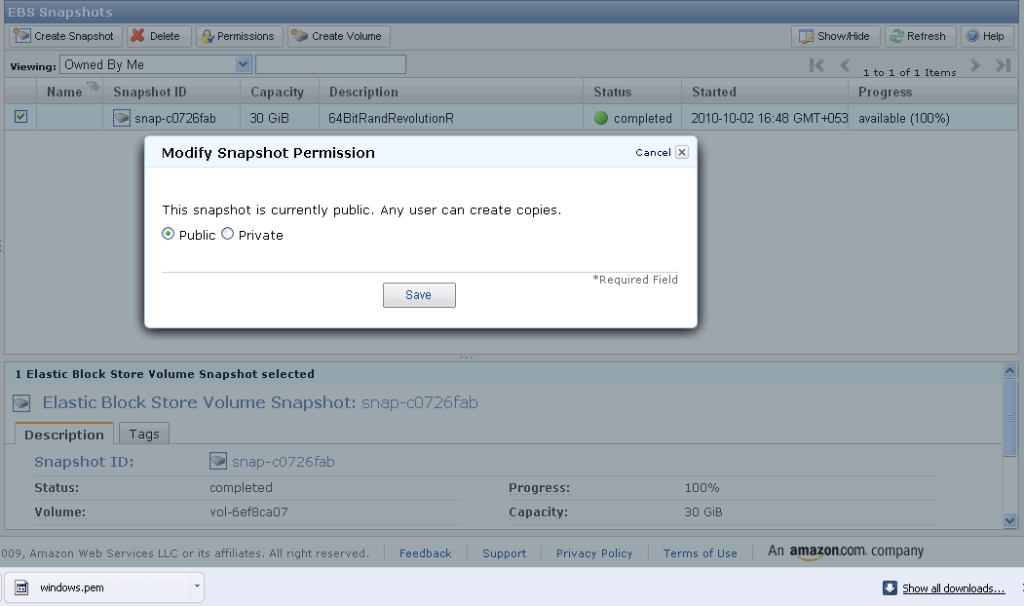
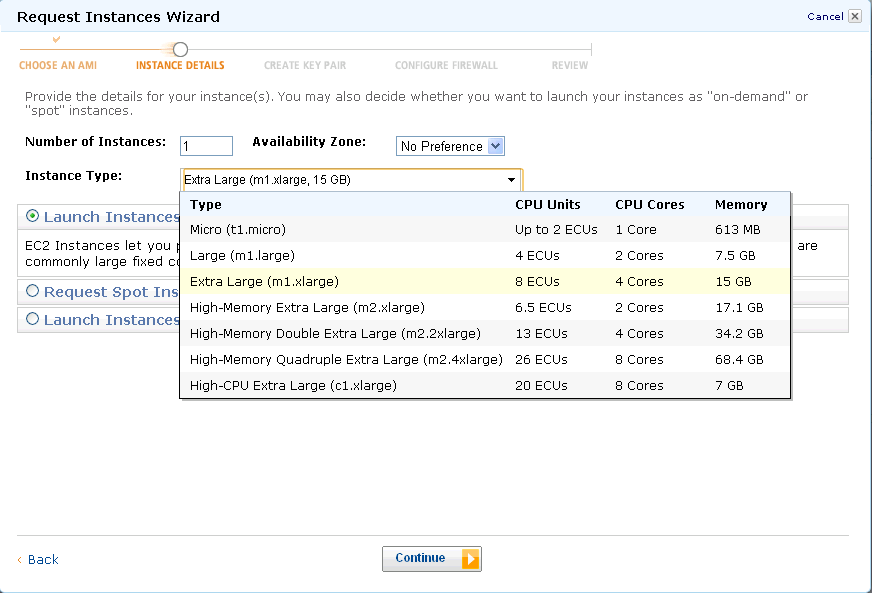
Of course R Enterprise is available on Linux but on Red Hat Enterprise Linux- it would be nice to see Amazom Machine Images as well as Ubuntu versions as well.

An Amazon Machine Image (AMI) is a special type of virtual appliance which is used to instantiate (create) a virtual machine within the Amazon Elastic Compute Cloud. It serves as the basic unit of deployment for services delivered using EC2.[1]

Like all virtual appliances, the main component of an AMI is a read-only filesystem image which includes an operating system (e.g., Linux, UNIX, or Windows) and any additional software required to deliver a service or a portion of it.[2]

The AMI filesystem is compressed, encrypted, signed, split into a series of 10MB chunks and uploaded into Amazon S3 for storage. An XML manifest file stores information about the AMI, including name, version, architecture, default kernel id, decryption key and digests for all of the filesystem chunks.

An AMI does not include a kernel image, only a pointer to the default kernel id, which can be chosen from an approved list of safe kernels maintained by Amazon and its partners (e.g., RedHat, Canonical, Microsoft). Users may choose kernels other than the default when booting an AMI.[3]

[edit]Types of images

  • Public: an AMI image that can be used by any one.
  • Paid: a for-pay AMI image that is registered with Amazon DevPay and can be used by any one who subscribes for it. DevPay allows developers to mark-up Amazon’s usage fees and optionally add monthly subscription fees.