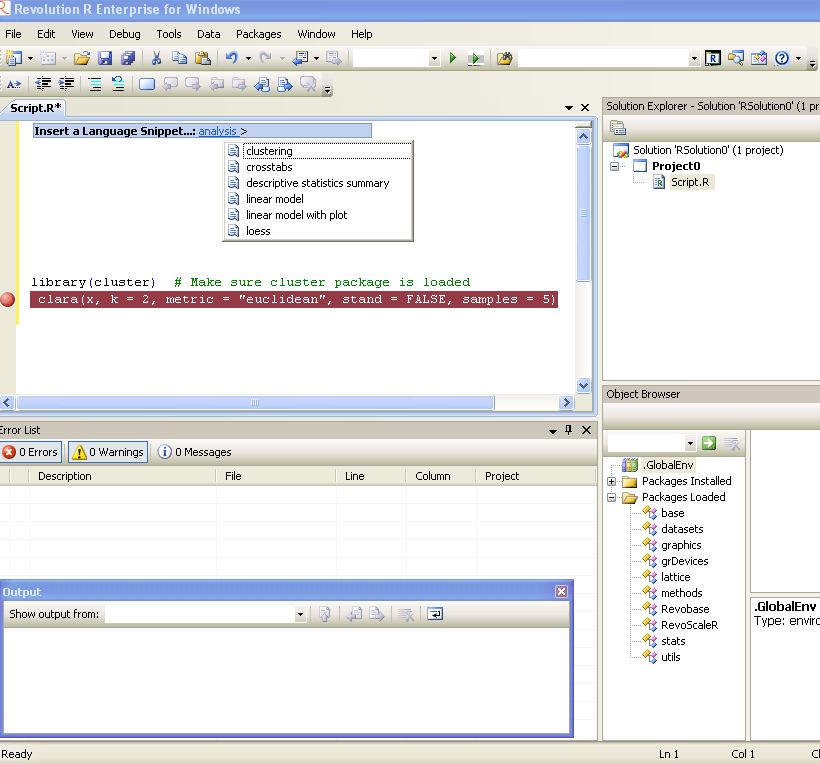
Revolution R Enterprise 4.2

Revo R gets more and more yum yum-

he following new features:

  • Direct import of SAS data sets into the native, efficient XDF file format
  • Direct import of fixed-format text data files into XDF file format
  • New commands to read subsets of rows and variables from XDF files in memory;
  • Many enhancements to the R Productivity Environment (RPE) for Windows
  • Expanded and updated user documentation
  • Added support on Linux for the big-data statistics package RevoScaleR
  • Added support on Windows for Web Services integration of predictive analytics with RevoDeployR.

Revolution R Enterprise 4.2 is available immediately for 64-bit Red Hat Enterprise Linux systems and both 32-bit and 64-bit Windows systems. Pricing starts at $1,000 per single-user workstation

And its free for academic licenses- so come on guys it is worth  atleast one download, and test.

http://www.revolutionanalytics.com/downloads/free-academic.php


PAW Blog Partnership

Please use the following code  to get a 15% discount on the 2 Day Conference Pass: AJAY11.


Predictive Analytics World announces new full-day workshops coming to San Francisco March 13-19, amounting to seven consecutive days of content.

These workshops deliver top-notch analytical and business expertise across the hottest topics.

Register now for one or more workshops, offered just before and after the full two-day Predictive Analytics World conference program (March 14-15). Early Bird registration ends on January 31st – take advantage of reduced pricing before then.

Driving Enterprise Decisions with Business Analytics – March 13, 2011
James Taylor, CEO, Decision Management Solutions
NEW – R for Predictive Modeling: A Hands-On Introduction – March 13, 2011
Max Kuhn, Director, Nonclinical Statistics, Pfizer
The Best and Worst of Predictive Analytics: Predictive Modeling Methods and Common Data Mining Mistakes – March 16, 2011
John Elder, Ph.D., CEO and Founder, Elder Research, Inc.
Hands-On Predictive Analytics – March 17, 2011
Dean Abbott, President, Abbott Analytics
NEW – Net Lift Models: Optimizing the Impact of Your Marketing – March 18-19, 2011
Kim Larsen, VP of Analytical Insights, Market Share Partners

Download the Conference Preview or view the Predictive Analytics World Agenda online

Make savings now with the early bird rate. Receive $200 off your registration rate for Predictive Analytics World – San Francisco (March 14-15), plus $100 off each workshop for which you register.

Register now before Early Bird Price expires on January 31st!

Additional savings of $200 on the two-day conference pass when you register a colleague at the same time.


Interview Ajay Ohri Decisionstats.com with DMR

From-

http://www.dataminingblog.com/data-mining-research-interview-ajay-ohri/

Here is the winner of the Data Mining Research People Award 2010: Ajay Ohri! Thanks to Ajay for giving some time to answer Data Mining Research questions. And all the best to his blog, Decision Stat!

Data Mining Research (DMR): Could you please introduce yourself to the readers of Data Mining Research?

Ajay Ohri (AO): I am a business consultant and writer based out of Delhi- India. I have been working in and around the field of business analytics since 2004, and have worked with some very good and big companies primarily in financial analytics and outsourced analytics. Since 2007, I have been writing my blog at http://decisionstats.com which now has almost 10,000 views monthly.

All in all, I wrote about data, and my hobby is also writing (poetry). Both my hobby and my profession stem from my education ( a masters in business, and a bachelors in mechanical engineering).

My research interests in data mining are interfaces (simpler interfaces to enable better data mining), education (making data mining less complex and accessible to more people and students), and time series and regression (specifically ARIMAX)
In business my research interests software marketing strategies (open source, Software as a service, advertising supported versus traditional licensing) and creation of technology and entrepreneurial hubs (like Palo Alto and Research Triangle, or Bangalore India).

DMR: I know you have worked with both SAS and R. Could you give your opinion about these two data mining tools?

AO: As per my understanding, SAS stands for SAS language, SAS Institute and SAS software platform. The terms are interchangeably used by people in industry and academia- but there have been some branding issues on this.
I have not worked much with SAS Enterprise Miner , probably because I could not afford it as business consultant, and organizations I worked with did not have a budget for Enterprise Miner.
I have worked alone and in teams with Base SAS, SAS Stat, SAS Access, and SAS ETS- and JMP. Also I worked with SAS BI but as a user to extract information.
You could say my use of SAS platform was mostly in predictive analytics and reporting, but I have a couple of projects under my belt for knowledge discovery and data mining, and pattern analysis. Again some of my SAS experience is a bit dated for almost 1 year ago.

I really like specific parts of SAS platform – as in the interface design of JMP (which is better than Enterprise Guide or Base SAS ) -and Proc Sort in Base SAS- I guess sequential processing of data makes SAS way faster- though with computing evolving from Desktops/Servers to even cheaper time shared cloud computers- I am not sure how long Base SAS and SAS Stat can hold this unique selling proposition.

I dislike the clutter in SAS Stat output, it confuses me with too much information, and I dislike shoddy graphics in the rendering output of graphical engine of SAS. Its shoddy coding work in SAS/Graph and if JMP can give better graphics why is legacy source code preventing SAS platform from doing a better job of it.

I sometimes think the best part of SAS is actually code written by Goodnight and Sall in 1970’s , the latest procs don’t impress me much.

SAS as a company is something I admire especially for its way of treating employees globally- but it is strange to see the rest of tech industry not following it. Also I don’t like over aggression and the SAS versus Rest of the Analytics /Data Mining World mentality that I sometimes pick up when I deal with industry thought leaders.

I think making SAS Enterprise Miner, JMP, and Base SAS in a completely new web interface priced at per hour rates is my wishlist but I guess I am a bit sentimental here- most data miners I know from early 2000’s did start with SAS as their first bread earning software. Also I think SAS needs to be better priced in Business Intelligence- it seems quite cheap in BI compared to Cognos/IBM but expensive in analytical licensing.

If you are a new stats or business student, chances are – you may know much more R than SAS today. The shift in education at least has been very rapid, and I guess R is also more of a platform than a analytics or data mining software.

I like a lot of things in R- from graphics, to better data mining packages, modular design of software, but above all I like the can do kick ass spirit of R community. Lots of young people collaborating with lots of young to old professors, and the energy is infectious. Everybody is a CEO in R ’s world. Latest data mining algols will probably start in R, published in journals.

Which is better for data mining SAS or R? It depends on your data and your deadline. The golden rule of management and business is -it depends.

Also I have worked with a lot of KXEN, SQL, SPSS.

DMR: Can you tell us more about Decision Stats? You have a traffic of 120′000 for 2010. How did you reach such a success?

AO: I don’t think 120,000 is a success. Its not a failure. It just happened- the more I wrote, the more people read.In 2007-2008 I used to obsess over traffic. I tried SEO, comments, back linking, and I did some black hat experimental stuff. Some of it worked- some didn’t.

In the end, I started asking questions and interviewing people. To my surprise, senior management is almost always more candid , frank and honest about their views while middle managers, public relations, marketing folks can be defensive.

Social Media helped a bit- Twitter, Linkedin, Facebook really helped my network of friends who I suppose acted as informal ambassadors to spread the word.
Again I was constrained by necessity than choices- my middle class finances ( I also had a baby son in 2007-my current laptop still has some broken keys :) – by my inability to afford traveling to conferences, and my location Delhi isn’t really a tech hub.

The more questions I asked around the internet, the more people responded, and I wrote it all down.

I guess I just was lucky to meet a lot of nice people on the internet who took time to mentor and educate me.

I tried building other websites but didn’t succeed so i guess I really don’t know. I am not a smart coder, not very clever at writing but I do try to be honest.

Basic economics says pricing is proportional to demand and inversely proportional to supply. Honest and candid opinions have infinite demand and an uncertain supply.

DMR: There is a rumor about a R book you plan to publish in 2011 :-) Can you confirm the rumor and tell us more?

AO: I just signed a contract with Springer for ” R for Business Analytics”. R is a great software, and lots of books for statistically trained people, but I felt like writing a book for the MBAs and existing analytics users- on how to easily transition to R for Analytics.

Like any language there are tricks and tweaks in R, and with a focus on code editors, IDE, GUI, web interfaces, R’s famous learning curve can be bent a bit.

Making analytics beautiful, and simpler to use is always a passion for me. With 3000 packages, R can be used for a lot more things and a lot more simply than is commonly understood.
The target audience however is business analysts- or people working in corporate environments.

Brief Bio-
Ajay Ohri has been working in the field of analytics since 2004 , when it was a still nascent emerging Industries in India. He has worked with the top two Indian outsourcers listed on NYSE,and with Citigroup on cross sell analytics where he helped sell an extra 50000 credit cards by cross sell analytics .He was one of the very first independent data mining consultants in India working on analytics products and domestic Indian market analytics .He regularly writes on analytics topics on his web site www.decisionstats.com and is currently working on open source analytical tools like R besides analytical software like SPSS and SAS.

Choosing R for business – What to consider?

A composite of the GNU logo and the OSI logo, ...
Image via Wikipedia

Additional features in R over other analytical packages-

1) Source Code is given to ensure complete custom solution and embedding for a particular application. Open source code has an advantage that is extensively peer- reviewed in Journals and Scientific Literature.  This means bugs will found, shared and corrected transparently.

2) Wide literature of training material in the form of books is available for the R analytical platform.

3) Extensively the best data visualization tools in analytical software (apart from Tableau Software ‘s latest version). The extensive data visualization available in R is of the form a variety of customizable graphs, as well as animation. The principal reason third-party software initially started creating interfaces to R is because the graphical library of packages in R is more advanced as well as rapidly getting more features by the day.

4) Free in upfront license cost for academics and thus budget friendly for small and large analytical teams.

5) Flexible programming for your data environment. This includes having packages that ensure compatibility with Java, Python and C++.


6) Easy migration from other analytical platforms to R Platform. It is relatively easy for a non R platform user to migrate to R platform and there is no danger of vendor lock-in due to the GPL nature of source code and open community.

Statistics are numbers that tell (descriptive), advise ( prescriptive) or forecast (predictive). Analytics is a decision-making help tool. Analytics on which no decision is to be made or is being considered can be classified as purely statistical and non analytical. Thus ease of making a correct decision separates a good analytical platform from a not so good analytical platform. The distinction is likely to be disputed by people of either background- and business analysis requires more emphasis on how practical or actionable the results are and less emphasis on the statistical metrics in a particular data analysis task. I believe one clear reason between business analytics is different from statistical analysis is the cost of perfect information (data costs in real world) and the opportunity cost of delayed and distorted decision-making.

Specific to the following domains R has the following costs and benefits

  • Business Analytics
    • R is free per license and for download
    • It is one of the few analytical platforms that work on Mac OS
    • It’s results are credibly established in both journals like Journal of Statistical Software and in the work at LinkedIn, Google and Facebook’s analytical teams.
    • It has open source code for customization as per GPL
    • It also has a flexible option for commercial vendors like Revolution Analytics (who support 64 bit windows) as well as bigger datasets
    • It has interfaces from almost all other analytical software including SAS,SPSS, JMP, Oracle Data Mining, Rapid Miner. Existing license holders can thus invoke and use R from within these software
    • Huge library of packages for regression, time series, finance and modeling
    • High quality data visualization packages
    • Data Mining
      • R as a computing platform is better suited to the needs of data mining as it has a vast array of packages covering standard regression, decision trees, association rules, cluster analysis, machine learning, neural networks as well as exotic specialized algorithms like those based on chaos models.
      • Flexibility in tweaking a standard algorithm by seeing the source code
      • The RATTLE GUI remains the standard GUI for Data Miners using R. It was created and developed in Australia.
      • Business Dashboards and Reporting
      • Business Dashboards and Reporting are an essential piece of Business Intelligence and Decision making systems in organizations. R offers data visualization through GGPLOT, and GUI like Deducer and Red-R can help even non R users create a metrics dashboard
        • For online Dashboards- R has packages like RWeb, RServe and R Apache- which in combination with data visualization packages offer powerful dashboard capabilities.
        • R can be combined with MS Excel using the R Excel package – to enable R capabilities to be imported within Excel. Thus a MS Excel user with no knowledge of R can use the GUI within the R Excel plug-in to use powerful graphical and statistical capabilities.

Additional factors to consider in your R installation-

There are some more choices awaiting you now-
1) Licensing Choices-Academic Version or Free Version or Enterprise Version of R

2) Operating System Choices-Which Operating System to choose from? Unix, Windows or Mac OS.

3) Operating system sub choice- 32- bit or 64 bit.

4) Hardware choices-Cost -benefit trade-offs for additional hardware for R. Choices between local ,cluster and cloud computing.

5) Interface choices-Command Line versus GUI? Which GUI to choose as the default start-up option?

6) Software component choice- Which packages to install? There are almost 3000 packages, some of them are complimentary, some are dependent on each other, and almost all are free.

7) Additional Software choices- Which additional software do you need to achieve maximum accuracy, robustness and speed of computing- and how to use existing legacy software and hardware for best complementary results with R.

1) Licensing Choices-
You can choose between two kinds of R installations – one is free and open source from http://r-project.org The other R installation is commercial and is offered by many vendors including Revolution Analytics. However there are other commercial vendors too.

Commercial Vendors of R Language Products-
1) Revolution Analytics http://www.revolutionanalytics.com/
2) XL Solutions- http://www.experience-rplus.com/
3) Information Builder – Webfocus RStat -Rattle GUI http://www.informationbuilders.com/products/webfocus/PredictiveModeling.html
4) Blue Reference- Inference for R http://inferenceforr.com/default.aspx

  1. Choosing Operating System
      1. Windows


Windows remains the most widely used operating system on this planet. If you are experienced in Windows based computing and are active on analytical projects- it would not make sense for you to move to other operating systems. This is also based on the fact that compatibility problems are minimum for Microsoft Windows and the help is extensively documented. However there may be some R packages that would not function well under Windows- if that happens a multiple operating system is your next option.

        1. Enterprise R from Revolution Analytics- Enterprise R from Revolution Analytics has a complete R Development environment for Windows including the use of code snippets to make programming faster. Revolution is also expected to make a GUI available by 2011. Revolution Analytics claims several enhancements for it’s version of R including the use of optimized libraries for faster performance.
      1. MacOS


Reasons for choosing MacOS remains its considerable appeal in aesthetically designed software- but MacOS is not a standard Operating system for enterprise systems as well as statistical computing. However open source R claims to be quite optimized and it can be used for existing Mac users. However there seem to be no commercially available versions of R available as of now for this operating system.

      1. Linux


        1. Ubuntu
        2. Red Hat Enterprise Linux
        3. Other versions of Linux


Linux is considered a preferred operating system by R users due to it having the same open source credentials-much better fit for all R packages and it’s customizability for big data analytics.

Ubuntu Linux is recommended for people making the transition to Linux for the first time. Ubuntu Linux had an marketing agreement with revolution Analytics for an earlier version of Ubuntu- and many R packages can  installed in a straightforward way as Ubuntu/Debian packages are available. Red Hat Enterprise Linux is officially supported by Revolution Analytics for it’s enterprise module. Other versions of Linux popular are Open SUSE.

      1. Multiple operating systems-
        1. Virtualization vs Dual Boot-


You can also choose between having a VMware VM Player for a virtual partition on your computers that is dedicated to R based computing or having operating system choice at the startup or booting of your computer. A software program called wubi helps with the dual installation of Linux and Windows.

  1. 64 bit vs 32 bit – Given a choice between 32 bit versus 64 bit versions of the same operating system like Linux Ubuntu, the 64 bit version would speed up processing by an approximate factor of 2. However you need to check whether your current hardware can support 64 bit operating systems and if so- you may want to ask your Information Technology manager to upgrade atleast some operating systems in your analytics work environment to 64 bit operating systems.


  1. Hardware choices- At the time of writing this book, the dominant computing paradigm is workstation computing followed by server-client computing. However with the introduction of cloud computing, netbooks, tablet PCs, hardware choices are much more flexible in 2011 than just a couple of years back.

Hardware costs are a significant cost to an analytics environment and are also  remarkably depreciated over a short period of time. You may thus examine your legacy hardware, and your future analytical computing needs- and accordingly decide between the various hardware options available for R.
Unlike other analytical software which can charge by number of processors, or server pricing being higher than workstation pricing and grid computing pricing extremely high if available- R is well suited for all kinds of hardware environment with flexible costs. Given the fact that R is memory intensive (it limits the size of data analyzed to the RAM size of the machine unless special formats and /or chunking is used)- it depends on size of datasets used and number of concurrent users analyzing the dataset. Thus the defining issue is not R but size of the data being analyzed.

    1. Local Computing- This is meant to denote when the software is installed locally. For big data the data to be analyzed would be stored in the form of databases.
      1. Server version- Revolution Analytics has differential pricing for server -client versions but for the open source version it is free and the same for Server or Workstation versions.
      2. Workstation
    2. Cloud Computing- Cloud computing is defined as the delivery of data, processing, systems via remote computers. It is similar to server-client computing but the remote server (also called cloud) has flexible computing in terms of number of processors, memory, and data storage. Cloud computing in the form of public cloud enables people to do analytical tasks on massive datasets without investing in permanent hardware or software as most public clouds are priced on pay per usage. The biggest cloud computing provider is Amazon and many other vendors provide services on top of it. Google is also coming for data storage in the form of clouds (Google Storage), as well as using machine learning in the form of API (Google Prediction API)
      1. Amazon
      2. Google
      3. Cluster-Grid Computing/Parallel processing- In order to build a cluster, you would need the RMpi and the SNOW packages, among other packages that help with parallel processing.
    3. How much resources
      1. RAM-Hard Disk-Processors- for workstation computing
      2. Instances or API calls for cloud computing
  1. Interface Choices
    1. Command Line
    2. GUI
    3. Web Interfaces
  2. Software Component Choices
    1. R dependencies
    2. Packages to install
    3. Recommended Packages
  3. Additional software choices
    1. Additional legacy software
    2. Optimizing your R based computing
    3. Code Editors
      1. Code Analyzers
      2. Libraries to speed up R

citation-  R Development Core Team (2010). R: A language and environment for statistical computing. R Foundation for Statistical Computing,Vienna, Austria. ISBN 3-900051-07-0, URL http://www.R-project.org.

(Note- this is a draft in progress)

Open Source's worst enemy is itself not Microsoft/SAS/SAP/Oracle

The decision of quality open source makers to offer their software at bargain basement prices even to enterprise customers who are used to pay prices many times more-pricing is the reason open source software is taking a long time to command respect in enterprise software.

I hate to be the messenger who brings the bad news to my open source brethren-

but their worst nightmare is not the actions of their proprietary competitors like Oracle, SAP, SAS, Microsoft ( they hate each other even more than open source )

nor the collective marketing tactics which are textbook like (but referred as Fear Uncertainty Doubt by those outside that golden quartet)- it is their own communities and their own cheap pricing.

It is community action which prevents them from offering their software by ridiculously low bargain basement prices. James Dixon, head geek and founder at Pentaho has a point when he says traditional metrics like revenue need o be adjusted for this impact in his article at http://jamesdixon.wordpress.com/2010/11/02/comparing-open-source-and-proprietary-software-markets/

But James, why offer software to enterprise customers at one tenth the next competitor- one reason is open source companies more often than not compete more with their free community version software than with big proprietary packages.

Communities including academics are used to free- hey how about paying say 1$ for each download.

There are two million R users- if say even 50 % of them  paid 1 $ as a lifetime license fee- you could sponsor enough new packages than twenty years of Google Summer of Code does right now.

Secondly, this pricing can easily be adjusted by shifting the licensing to say free for businesses less than 2 people (even for the enhanced corporate software version not just the plain vanilla community software thus further increasing the spread of the plain vanilla versions)- for businesses from 10 to 20 people offer a six month trial rather than one month trial.

– but adjust the pricing to much more realistic levels compared to competing software. Make enterprise software pay a real value.

That’s the only way to earn respect. as well as a few dollars more.

As for SAS, it is time it started ridiculing Python now that it has accepted R.

Python is even MORE powerful than R in some use cases for stat computing

Dixon’s Pentaho and the Jaspersoft/ Revolution combo are nice _ I tested both Jasper and Pentaho thanks to these remarks this week 🙂  (see slides at http://www.jaspersoft.com/sites/default/files/downloads/events/Analytics%20-Jaspersoft-SEP2010.pdf or http://www.revolutionanalytics.com/news-events/free-webinars/2010/deploying-r/index.php )

Pentaho and Jasper do give good great graphics in BI (Graphical display in BI is not a SAS forte though probably I dont know how much they cross sell JMP to BI customers- probably too much JMP is another division syndrome there)

Amazon S3 slashes prices

Outline of a cloud containing text 'The Cloud'
Image via Wikipedia

From Amazon- November seems like a Thanksgiving for prices as well-

————————————————————————————————

lowered the threshold for our volume based discounts from 50 terabytes to 1 terabyte, extending volume pricing discounts to more customers. Here’s a summary of the changes:

Old         New
First 1TB           $0.150    $0.140
Next 49TB         $0.150    $0.125
Next 50TB         $0.140    $0.110
Next 400TB       $0.130    $0.110
Next 500TB       $0.105    $0.095
Next 4000TB     $0.080    $0.080 (no change)
Over 5000TB     $0.055    $0.055 (no change)

These prices apply to Amazon S3 Standard storage in the US-Standard, EU-West, and AP-East regions. The new lower prices for the US-West region and Reduced Redundancy Storage can be found on the Amazon S3 Detail Page.


Amazon goes free for users next month

Amazon Web Services logo
Image via Wikipedia

Amazon EC2 and company announced a free year long tier for new users-you cant beat free 🙂

http://aws.amazon.com/free/

AWS Free Usage Tier

To help new AWS customers get started in the cloud, AWS is introducing a new free usage tier. Beginning November 1, new AWScustomers will be able to run a free Amazon EC2 Micro Instance for a year, while also leveraging a new free usage tier for Amazon S3, Amazon Elastic Block Store, Amazon Elastic Load Balancing, and AWSdata transfer. AWS’s free usage tier can be used for anything you want to run in the cloud: launch new applications, test existing applications in the cloud, or simply gain hands-on experience with AWS.

Below are the highlights of AWS’s new free usage tiers. All are available for one year (except Amazon SimpleDB, SQS, and SNS which are free indefinitely):

Sign Up Now

AWS’s free usage tier startsNovember 1, 2010. A valid creditcard is required to sign up.
See offer terms.

AWS Free Usage Tier (Per Month):

In addition to these services, the AWS Management Console is available at no charge to help you build and manage your application on AWS.

* These free tiers are only available to new AWS customers and are available for 12 months following your AWSsign-up date. When your free usage expires or if your application use exceeds the free usage tiers, you simply pay standard, pay-as-you-go service rates (see each service page for full pricing details). Restrictions apply; see offer terms for more details.

** These free tiers do not expire after 12 months and are available to both existing and new AWS customers indefinitely.

The new AWS free usage tier applies to participating services across all AWS regions: US – N. Virginia, US – N. California, EU – Ireland, and APAC – Singapore. Your free usage is calculated each month across all regions and automatically applied to your bill – free usage does not accumulate.