The Latest GUI for R- BioR

Once more a spanking new shiny software –

Bio7 is a integrated development environment for ecological modelling based on the Rich-Client-Platformconcept of the Java IDE Eclipse. The Bio7 platform contains several perspectives which arrange several views for a special purpose useful for the development and analysis of ecological models. One special perspective bundles a feature rich GUI (Graphical User Interface) for the statistical software R.
For the bidirectional communication between Java and R the Rserve application is used (as a backend to evaluate R code and transfer data from and to Java).
The Bio7 R perspective (see figure below) is divided into a R-Shell view on the left side (conceptual the R side) and a Table view on the right side (conceptual the Java side).
Data can be imported to a spreadsheet, edited and then transferred to the R workspace. Vice versa data from R can be transferred to a sheet of the Table view and then exported e.g. to an Excel or OpenOffice file.

and

General:

Built upon Eclipse 3.6.1.

Now works with the latest Java version! (Windows version bundled with the latest JRE release).

Removed the Soil perspective (now soils can be modeled with ImageJ (float precision). Active images can be displayed in the 3D discrete view (new example available).

Removed the database perspective and the plant layer. You can now built any discrete models without any plant layer.

Removed several controls in the Control view. Added the “Custom Controls” view. In addition ported the Swing component of the Time panel to Swt.

Deleted the avi to swf converter in the ImageJ menu.

Now patterns can be saved with opened Java editor source. If this file is reopened and dragged on Bio7 the pattern is loaded, the source is compiled and the setup method (if available) is executed. In this way model files can be used for presentations ->drag, setup and run. The save actions are located in the Speadsheet view toolbar.

More options available to disable panel painting and recording of values (if not needed for speed!).

New Setup button in the toolbar of Bio7 to trigger a compiled setup method if available.

Removed the load and save pattern buttons from the toolbar of Bio7. Discrete patterns can now be stored with the available action in the spreadsheet view menu.

New P2 Update Manager available in Bio7.

Updated the Janino Compiler.

New HTML perspective added with a view which embeds the TinyMC editor.

New options to disable painting operations for the discrete panels.

New option to explicitly enable scripts at startup (for a faster startup).

Quadgrid (Hexgrid)

Only states are now available which can be created in the “Spreadsheet” view menu easily. Patterns can be stored and restored as usual but are now stored in an *.exml file.

New method to transfer the quadgrid pattern as a matrix to R.

New method to transfer the population data of all quadgrid states to R.

ImageJ:

Update to the latest version (with additional fixes).

Fixed a bug to rename the image.

Thumbnail browser can now open images recursevely(limited to 1000 pics), the magnifiyng glass can be disabled, too.

Plugins can be installed dynamically with a drag and drop operation on the ImageJ view or toolbar (as known from ImageJ).

Installed plugins now extend the plugin menu as submenus or subsubmenus (not finished yet!).

Plugins can now be created with the Java editor. New Bio7 Wizard available to create a plugin template.

Compiled Java files can be added to a *.jar file with a new available action in the Navigator view (if you rightclick on the files in the Navigator). In this way ImageJ plugins can be packaged in a *.jar.

Floweditor:

Fixed a repaint bug in the debug mode of a flow (now draws correctly the active shape in the flow).

Resize with Strg+Scrollwheel works again.

Comments with more than one line works again.

New Test action to verify connections in a flow.

Debug mode now shows all executed Shapes.

Integrated more default tests (for the verification of a regular flow).

A mouse-click now deletes colored shapes in a flow (e.g. in debug mode).

Points panel:

Integrated (dynamic) Voronoi, Delauney visualization (with area and clip to rectangle action).

Points coordinates can now be set in double precision.

Transfer of point coordinates to R now in double precision.

Bio7 Table:

New import and export of Excel 2007 OOXML.

Row headers can now be resized with the mouse device.

R:

Updated R (2.12.1) and Rserve (0.6.3) to the latest version.

New help action in the R-Shell view.

New action to display help for R specific commands in the embedded Bio7 browser (which opens automatically).

New Key actions to copy the selected variable names to the expression dialog (c=cocatenate (+), a=add (,)).

New action to transfer character or numeric vectors horizontally or vertically in an opened spread (Table view) at selection coordinates.

Empty spaces in the filepath are now allowed under Windows if Rserve is started with a system shell or the RGUI (for the tempfile select a location in the Preferences dialog which is writeable) is started.This works also for the RGUI action.

Improved the search for the “Install packages” action (option “Case Sensitive” added).

API:

New API methods available!

And:

Many fixes since the last version!


Installation

Important information:

A certain firewall software can corrupt the Bio7 *.zip file (as well as other files).
Please ensure that you have downloaded a functioning Bio7 1.5 version. In addition it is also reported that a certain antivirus software detects the bundled R software (on Windows) as malware. Often the R specific “open.exe” is detected as malware. Please use a different scanner to make sure that the software is not infected if you have any doubts. For more details see:

http://r.789695.n4.nabble.com/trojan-at-current-development-version-td3244348.html


PSPP – SPSS 's Open Source Counterpart

A Bold GNU Head
Image via Wikipedia

New Website for Windows Installers for PSPP– try at your own time if you are dedicated to either SPSS or free statistical computing.

http://pspp.awardspace.com/

This page is intended to give a stable root for downloading the PSPP-for-Windows setup from free mirrors.

Highlights of the current PSPP-for-Windows setup
PSPP info:

Current version: Master version = 0.7.6
Release date: See filenames
Information about PSPP: http://www.gnu.org/software/pspp
PSPP Manual: PDF or HTML
(current version will be installed on your PC by the installer package)
Package info:

Windows version: Windows XP and newer
Package Size: 15 Mb
Size on disk: 34 Mb
Technical: MinGW based
Cross-compiled on openSUSE 11.3

Downloads:
There are issues with the latest build. Some users report crashes on their systems on other systems it works fine.

Version Installer for multi-user installation.
Administrator privileges required.
Recommended version.
Installer for single-user installation.
No administrator privileges required
0.7.6-g38ba1e-blp-build20101116
0.7.5-g805e7e-blp-build20100908
0.7.5-g7803d3-blp-build20100820
0.7.5-g333ac4-blp-build20100727
PSPP-Master-2010-11-16
PSPP-Master-2010-09-08
PSPP-Master-2010-08-20
PSPP-Master-2010-07-27
PSPP-Master-single-user-2010-11-16
PSPP-Master-single-user-2010-09-08
PSPP-Master-single-user-2010-08-20
PSPP-Master-single-user-2010-07-27


Sources can be found here.

Also see http://en.wikipedia.org/wiki/PSPP

At the user’s choice, statistical output and graphics are done in ASCIIPDFPostScript or HTML formats. A limited range of statistical graphs can be produced, such as histogramspie-charts and np-charts.

PSPP can import GnumericOpenDocument and Excel spreadsheetsPostgres databasescomma-separated values– and ASCII-files. It can export files in the SPSS ‘portable’ and ‘system’ file formats and to ASCII files. Some of the libraries used by PSPP can be accessed programmatically; PSPP-Perl provides an interface to the libraries used by PSPP.

and

http://www.gnu.org/software/pspp/

A brief list of some of the features of PSPP follows:

  • Supports over 1 billion cases.
  • Supports over 1 billion variables.
  • Syntax and data files are compatible with SPSS.
  • Choice of terminal or graphical user interface.
  • Choice of text, postscript or html output formats.
  • Inter-operates with GnumericOpenOffice.Org and other free software.
  • Easy data import from spreadsheets, text files and database sources.
  • Fast statistical procedures, even on very large data sets.
  • No license fees.
  • No expiration period.
  • No unethical “end user license agreements”.
  • Fully indexed user manual.
  • Free Software; licensed under GPLv3 or later.
  • Cross platform; Runs on many different computers and many different operating systems.


Viva Libre Office

WordPerfect 5.1 for DOS.
Image via Wikipedia

The Document Foundation is happy to announce the release candidate of
LibreOffice 3.3.1. This release candidate is the first in a series of
frequent bugfix releases on top of our LibreOffice 3.3 product. Please
be aware that LibreOffice 3.3.1 RC1 is not yet ready for production
use, you should continue to use LibreOffice for that.

http://listarchives.documentfoundation.org/www/announce/msg00028.html

Following is the list of changes against LibreOffice 3.3:

Key changes at a glance:

* Numerous translation updates
* new mimetype icons for LibreOffice – explained here:
http://luxate.blogspot.com/2011/01/not-even-included-but-already-improved.html
* quite a few crasher fixes

Detailed change log:

* translation updates
* Removed old/unmaintained icon themes
* Fix for https://bugzilla.novell.com/show_bug.cgi?id=664516: Don’t
use a reference or the default formula string will be changed
* Install bash completion for oo* wrappers when enabled
(https://bugzilla.novell.com/show_bug.cgi?id=665402)
* Build fix: get the stlport compat workaround working for gcc 4.6.0
* Build fix: no ddraw.h or ddraw.lib in the June 2010 DirectX SDK,
removed usage
* Windows installer: padded nologobanner.bmp, new size is 102×58
* removed gd – Gaelic, ky – Kirghiz, pap – Papiamento, ti – Tigrinya,
ms – Malay, ps – Pashto, ur – Urdu. UI localization does not exist
in these languages. So it makes no sense to ship packages.
* Build fix: pass thru PYTHON, found by configure. Will be used by
filter/source/config/fragments/makefile.mk.
* Upgraded libwpd (WordPerfect filter) to 0.9.1
* Fixed BrOffice Windows start menu branding
* Removed language code ‘kid’. kid is not Koshin, but key id pseudo
language which is good for debugging UI but should no be included
in the product
* Added ca_XV and ast language/local name and description
* Fixed incorrect page number in page preview mode
(https://bugs.freedesktop.org/show_bug.cgi?id=33155). When the
window is large enough to show several ‘Page X’ strings,
the page number was not properly incremented.
* Fixed incorrect import of cell attributes from Excel
documents. When a cell with non-default formatting attribute starts
with non-first row in a column, the filter would incorrectly apply
the same format to all the cells above it if they didn’t have any
formats.
* Ubuntu: fix for lp#696527 – enable human icon theme in LibreOffice
* Fix for https://bugzilla.redhat.com/show_bug.cgi?id=673819 crash on
changing position of drawing object in header.
* Changed OpenOffice.org to LibreOffice in nsplugin
* Added Occitan dictionary
* Added Ukrainian dictionaries
* Fix window focus for langpack installation on Mac –
https://bugs.freedesktop.org/show_bug.cgi?id=33056
* Added/modified NLPsolver translations from Pootle
* Fix for https://bugzilla.novell.com/show_bug.cgi?id=655763
* Fix for RTF export crasher
(https://bugzilla.novell.com/show_bug.cgi?id=656503)
* Use LibreOffice as product name for EPS Creator header
* Parse svg ‘color’ property (fixes
https://bugs.freedesktop.org/show_bug.cgi?id=33551)
* Use double instead of float in writerfilter import
* Build fix: use PYTHON as passed through by set_soenv.in.
* Fix for https://bugs.freedesktop.org/show_bug.cgi?id=33237 remove
debug line
* Fix for https://bugs.freedesktop.org/show_bug.cgi?id=33237 – fixes
ole object import for writer (docx)
* Fix for https://bugs.freedesktop.org/show_bug.cgi?id=33249
rename OOo -> LibO on Getting Support Page
* Fix ooxml import: handle css::table::BorderLine in addition to
css::table::BorderLine2 That means that table cell properties are
correctly set on import again.
* Fix for https://bugs.freedesktop.org/show_bug.cgi?id=33258
wikihelp: Improve the check for existence of the localized help.
* Fix for https://bugs.freedesktop.org/show_bug.cgi?id=33994 – fixes
several crashes around config UNO API
* Fix for https://bugs.freedesktop.org/show_bug.cgi?id=30879
* Fix for https://bugs.freedesktop.org/show_bug.cgi?id=32872
Implementation names weren’t matching with xcu.
* Fix: don’t pushback and process a corrupt extension
* Fix: wikihelp – do not check for existence of the localized
help. In case we do not have the help installed, it is up to the
online service to decide the fallback in case a language version is
not available.
* Fix README: change su urpmi to sudo urpmi for Mandriva section
* Fix README formatting –
https://bugs.freedesktop.org/show_bug.cgi?id=32741 – using CRLF
instead of LF on WIN platform
* Fix README: word wrap at column 75 for better readability
* Build fix: KDE3 library search order
(https://bugs.freedesktop.org/show_bug.cgi?id=32797). Use LINKFLAGS
instead of STDLIBS.
* Start using technical.dic instead of oracle.dic
(https://bugs.freedesktop.org/show_bug.cgi?id=31798)
* Build fix: add explicit QRegion* for clipRegion to fix compile of
kde backend
* Cleanup: removed obsolete m_bSingleAltPress
* Remove the menu when Left Alt Key was pressed for GTK
* Fix for https://bugs.freedesktop.org/show_bug.cgi?id=33459: use
year of era in long format for zh_TW by default
* Fix wrong collation for Catalan language
* Fix for https://bugs.freedesktop.org/show_bug.cgi?id=31271 wrong
line break with “(”
* Fix for https://bugs.freedesktop.org/show_bug.cgi?id=32561 – crash
when iterating over the database types.
* Default currency for Estonia should be Euro – fixes
https://bugs.freedesktop.org/show_bug.cgi?id=33160
* Avoid a pointless GetHelpText() call in the toolbox. Fixes
https://bugs.freedesktop.org/show_bug.cgi?id=33315. GetHelpText()
can be quite heavy, see
https://bugs.freedesktop.org/show_bug.cgi?id=33088.
* Paint toolbar handle positioned properly
(https://bugs.freedesktop.org/show_bug.cgi?id=32558)
* Build fix: move cxxabi.h after stl headers to workaround gcc 4.6.0
and stlport
* Fix for https://bugs.freedesktop.org/show_bug.cgi?id=33355
manipulate also the C runtime’s environment
* Fix for CTL/Other Default Font #i25247#, #i25561#, #i48064#,
#i92341#
* RTF export crasher
(https://bugzilla.novell.com/show_bug.cgi?id=656503)
* Fixed an infinite loop in RTF exporter
* UI: translations need more space on word count dialog, made space
for it.
* Fix for https://bugzilla.novell.com/show_bug.cgi?id=660816 improve
formfield checkbox binary export (and import)

Again a BIG Thank You!

Again whats Libre Office

What does LibreOffice give you?

Writer is the word processor inside LibreOffice. Use it for everything, from dashing off a quick letter to producing an entire book with tables of contents, embedded illustrations, bibliographies and diagrams. The while-you-type auto-completion, auto-formatting and automatic spelling checking make difficult tasks easy (but are easy to disable if you prefer). Writer is powerful enough to tackle desktop publishing tasks such as creating multi-column newsletters and brochures. The only limit is your imagination.

Calc tames your numbers and helps with difficult decisions when you’re weighing the alternatives. Analyze your data with Calc and then use it to present your final output. Charts and analysis tools help bring transparency to your conclusions. A fully-integrated help system makes easier work of entering complex formulas. Add data from external databases such as SQL or Oracle, then sort and filter them to produce statistical analyses. Use the graphing functions to display large number of 2D and 3D graphics from 13 categories, including line, area, bar, pie, X-Y, and net – with the dozens of variations available, you’re sure to find one that suits your project.

Impress is the fastest and easiest way to create effective multimedia presentations. Stunning animation and sensational special effects help you convince your audience. Create presentations that look even more professional than the standard presentations you commonly see at work. Get your collegues’ and bosses’ attention by creating something a little bit different.

Draw lets you build diagrams and sketches from scratch. A picture is worth a thousand words, so why not try something simple with box and line diagrams? Or else go further and easily build dynamic 3D illustrations and special effects. It’s as simple or as powerful as you want it to be.

Base is the database front-end of the LibreOffice suite. With Base, you can seamlessly integrate your existing database structures into the other components of LibreOffice, or create an interface to use and administer your data as a stand-alone application. You can use imported and linked tables and queries from MySQL, PostgreSQL or Microsoft Access and many other data sources, or design your own with Base, to build powerful front-ends with sophisticated forms, reports and views. Support is built-in or easily addable for a very wide range of database products, notably the standardly-provided HSQL, MySQL, Adabas D, Microsoft Access and PostgreSQL.

Math is a simple equation editor that lets you lay-out and display your mathematical, chemical, electrical or scientific equations quickly in standard written notation. Even the most-complex calculations can be understandable when displayed correctly. E=mc2.

LibreOffice also comes configured with a PDF file creator, meaning you can distribute documents that you’re sure can be opened and read by users of almost any computing device or operating system.

Download LibreOffice now and try it out today.

http://www.libreoffice.org/features/


Revolution R Enterprise 4.2

Revo R gets more and more yum yum-

he following new features:

  • Direct import of SAS data sets into the native, efficient XDF file format
  • Direct import of fixed-format text data files into XDF file format
  • New commands to read subsets of rows and variables from XDF files in memory;
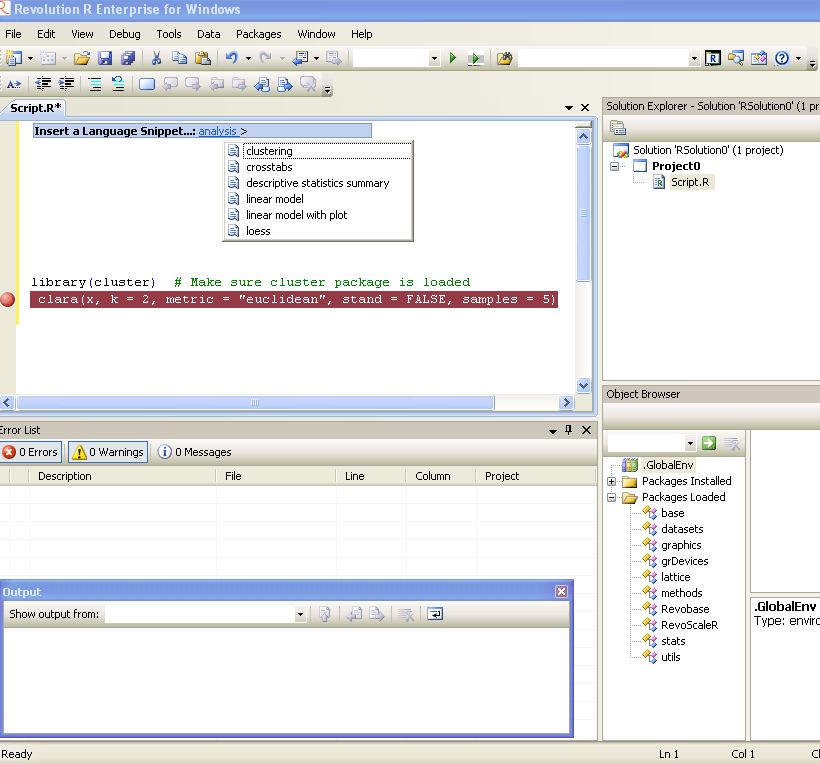
  • Many enhancements to the R Productivity Environment (RPE) for Windows
  • Expanded and updated user documentation
  • Added support on Linux for the big-data statistics package RevoScaleR
  • Added support on Windows for Web Services integration of predictive analytics with RevoDeployR.

Revolution R Enterprise 4.2 is available immediately for 64-bit Red Hat Enterprise Linux systems and both 32-bit and 64-bit Windows systems. Pricing starts at $1,000 per single-user workstation

And its free for academic licenses- so come on guys it is worth  atleast one download, and test.

http://www.revolutionanalytics.com/downloads/free-academic.php


LibreOffice Stable Release launched

Non Oracle Open Office completes important milestone- from the press release

The Document Foundation launches LibreOffice 3.3

The first stable release of the free office suite is available for download

The Internet, January 25, 2011 – The Document Foundation launches LibreOffice 3.3, the first stable release of the free office suite developed by the community. In less than four months, the number of developers hacking LibreOffice has grown from less than twenty in late September 2010, to well over one hundred today. This has allowed us to release ahead of the aggressive schedule set by the project.

Not only does it ship a number of new and original features, LibreOffice 3.3 is also a significant achievement for a number of reasons:

– the developer community has been able to build their own and independent process, and get up and running in a very short time (with respect to the size of the code base and the project’s strong ambitions);

– thanks to the high number of new contributors having been attracted into the project, the source code is quickly undergoing a major clean-up to provide a better foundation for future development of LibreOffice;

– the Windows installer, which is going to impact the largest and most diverse user base, has been integrated into a single build containing all language versions, thus reducing the size for download sites from 75 to 11GB, making it easier for us to deploy new versions more rapidly and lowering the carbon footprint of the entire infrastructure.

Caolán McNamara from RedHat, one of the developer community leaders, comments, “We are excited: this is our very first stable release, and therefore we are eager to get user feedback, which will be integrated as soon as possible into the code, with the first enhancements being released in February. Starting from March, we will be moving to a real time-based, predictable, transparent and public release schedule, in accordance with Engineering Steering Committee’s goals and users’ requests”. The LibreOffice development roadmap is available at http://wiki.documentfoundation.org/ReleasePlan

LibreOffice 3.3 brings several unique new features. The 10 most-popular among community members are, in no particular order:

  1. the ability to import and work with SVG files;
  2. an easy way to format title pages and their numbering in Writer;
  3. a more-helpful Navigator Tool for Writer;
  4. improved ergonomics in Calc for sheet and cell management;
  5. and Microsoft Works and Lotus Word Pro document import filters.

In addition, many great extensions are now bundled, providing

PDF import,

a slide-show presenter console,

a much improved report builder, and more besides.

A more-complete and detailed list of all the new features offered by LibreOffice 3.3 is viewable on the following web page: http://www.libreoffice.org/download/new-features-and-fixes/

LibreOffice 3.3 also provides all the new features of OpenOffice.org 3.3, such as new custom properties handling; embedding of standard PDF fonts in PDF documents; new Liberation Narrow font; increased document protection in Writer and Calc; auto decimal digits for “General” format in Calc; 1 million rows in a spreadsheet; new options for CSV import in Calc; insert drawing objects in Charts; hierarchical axis labels for Charts; improved slide layout handling in Impress; a new easier-to-use print interface; more options for changing case; and colored sheet tabs in Calc. Several of these new features were contributed by members of the LibreOffice team prior to the formation of The Document Foundation.

LibreOffice hackers will be meeting at FOSDEM in Brussels on February 5 and 6, and will be presenting their work during a one-day workshop on February 6, with speeches and hacking sessions coordinated by several members of the project.

The home of The Document Foundation is at http://www.documentfoundation.org

The home of LibreOffice is at http://www.libreoffice.org where the download page has been redesigned by the community to be more user-friendly.

*** About The Document Foundation

The Document Foundation has the mission of facilitating the evolution of the OOo Community into a new, open, independent, and meritocratic organization within the next few months. An independent Foundation is a better reflection of the values of our contributors, users and supporters, and will enable a more effective, efficient and transparent community. TDF will protect past investments by building on the achievements of the first decade, will encourage wide participation within the community, and will co-ordinate activity across the community.

*** Media Contacts for TDF

Florian Effenberger (Germany)

Mobile: +49 151 14424108 – E-mail: floeff@documentfoundation.org

Olivier Hallot (Brazil)

Mobile: +55 21 88228812 – E-mail: olivier.hallot@documentfoundation.org

Charles H. Schulz (France)

Mobile: +33 6 98655424 – E-mail: charles.schulz@documentfoundation.org

Italo Vignoli (Italy)

Mobile: +39 348 5653829 – E-mail: italo.vignoli@documentfoundation.org

GrapheR

GNU General Public License
Image via Wikipedia

GrapherR

GrapheR is a Graphical User Interface created for simple graphs.

Depends: R (>= 2.10.0), tcltk, mgcv
Description: GrapheR is a multiplatform user interface for drawing highly customizable graphs in R. It aims to be a valuable help to quickly draw publishable graphs without any knowledge of R commands. Six kinds of graphs are available: histogram, box-and-whisker plot, bar plot, pie chart, curve and scatter plot.
License: GPL-2
LazyLoad: yes
Packaged: 2011-01-24 17:47:17 UTC; Maxime
Repository: CRAN
Date/Publication: 2011-01-24 18:41:47

More information about GrapheR at CRAN
Path: /cran/newpermanent link

Advantages of using GrapheR

  • It is bi-lingual (English and French) and can import in text and csv files
  • The intention is for even non users of R, to make the simple types of Graphs.
  • The user interface is quite cleanly designed. It is thus aimed as a data visualization GUI, but for a more basic level than Deducer.
  • Easy to rename axis ,graph titles as well use sliders for changing line thickness and color

Disadvantages of using GrapheR

  • Lack of documentation or help. Especially tips on mouseover of some options should be done.
  • Some of the terms like absicca or ordinate axis may not be easily understood by a business user.
  • Default values of color are quite plain (black font on white background).
  • Can flood terminal with lots of repetitive warnings (although use of warnings() function limits it to top 50)
  • Some of axis names can be auto suggested based on which variable s being chosen for that axis.
  • Package name GrapheR refers to a graphical calculator in Mac OS – this can hinder search engine results

Using GrapheR

  • Data Input -Data Input can be customized for CSV and Text files.
  • GrapheR gives information on loaded variables (numeric versus Factors)
  • It asks you to choose the type of Graph 
  • It then asks for usual Graph Inputs (see below). Note colors can be customized (partial window). Also number of graphs per Window can be easily customized 
  • Graph is ready for publication