Statistics on Social Media

Some official statistics on social media from the owners themselves

1) Facebook-

http://www.facebook.com/press/info.php?statistics

Date -17 Nov 2011

Statistics

People on Facebook

HANA Oncolyzer

An interesting use case of technology for better health is HANA Oncolyzer at http://epic.hpi.uni-potsdam.de/Home/HanaOncolyzer

“Build on the newest in-memory technology the HANA Oncolyzer is able to analyze even huge amounts of medical data in shortest time”, says Dr. Alexander Zeier, Deputy Chair of EPIC. Research institutes and university hospital support from HANA Oncolyzer by building the basis for a flexible exchange of information about efficiency of medicines and treatments.

In near future, the tumor’s DNA of all cancer patients needs to be analyzed to support specific patient therapies. These analyses result in medical data in amount of multiple terabytes. “These data need to be analyzed regarding mutations and anomalies in real-time”, says Matthias Steinbrecher at SAP’s Innovation Center in Potsdam. As one of the aims the research prototype HANA Oncolyzer was developed at our chair in cooperation with SAP’s Innovation Center in Potsdam. “The ‘heart’ of our development builds the in-memory technology that supports the parallel analysis of million of data within seconds in main memory”, saysMatthieu Schapranow, Ph.D. cand. at the HPI.

and

research activities result in 500.000 or more data points per patient.

and

With the help of a dedicated iPad application medical doctors can access all data mobile at any location anytime.


Creating Pages on Google Plus for some languages

So I decided to create Pages on Google Plus for my favorite programming languages.

a programming language that lets you work more quickly and integrate your systems more effectively

Add to circles

  –  Comment  –  Share

Ajay Ohri

Ajay Ohri's profile photo

Ajay Ohri  –
Ajay Ohri shared a Google+ page with you.
Structured Query Language
Leading statistical language since 1960’s especially in sociology and market research
The leading statistical language in the world
The leading statistical language since 1970’s

Python

https://plus.google.com/107930407101060924456/posts


These are in accordance with Google’s Policies http://www.google.com/intl/en/+/policy/pagesterm.html  Continue reading “Creating Pages on Google Plus for some languages”

Preview- Google Cloud SQL

From –http://code.google.com/apis/sql/

What is Google Cloud SQL?

Google Cloud SQL is web service that allows you to create, configure, and use relational databases with your App Engine applications. It is a fully-managed service that maintains, manages, and administers your databases, allowing you to focus on your applications and services.

By offering the capabilities of a MySQL database, the service enables you to easily move your data, applications, and services into and out of the cloud. This allows for high data portability and helps in faster time-to-market because you can quickly leverage your existing database (using JDBC and/or DB-API) in your App Engine application.

Here is where you can get an invite to the beta only Google Cloud SQL

Sign up for Limited Preview

Google Cloud SQL is available to a limited number of users. To sign up for the service:

  1. Visit the Google APIs Console. The console opens the All services pane.
  2. Find the SQL Service line in the Services table and click Request access…
  3. Fill out the enrollment form.
  4. Our team will review your enrollment information and respond by email to the address associated with your Google Account.
  5. Follow the link in the email to view the Terms of Service. Please read these carefully before accepting.
  6. Sign up for the google-cloud-sql-announce group to receive important announcements and product news. (NOTE- Members: 384)
and after all that violence and double talk, a walk in the clouds with SQL.
1. There are three kinds of instances in the beta view
2. Wait for the Instance to be created note- the Design of the Interface uptil now is much better than Amazon’s.  
Note you need to have an appspot application from Google Apps and can choose between the Python and Java versions. Quite clearly there is a play for other languages too. I think GO is also supported.
3. You can import your data from your Google Storage bucket
4. I am not that hot at coding or maybe the interface was too pretty. Anyways- the log tells me that import of the text file has failed from Google Storage to Google Cloud SQL 
5. Incidentally the Google Cloud Storage interface is also much better than the Amazon GUI for transferring data- Note I was using the classical statistical dataset Boston Housing Data as the test case. 
6. The SQL prompt is the weakest part of the design process of the Interphase. There is no Query builder and the SELECT FROM WHERE prompt is slightly amusing/ insulting . I mean guys either throw in a fully fledged GUI for query builder similar to the MYSQL Workbench , than create a pretty white command prompt.
7. You can also export your data back to your Google Storage bucket 
These are early days, and I am trying to see if there is a play for some cloud kind of ODBC action between R, Prediction API , and the cloud SQL… so try it out yourself at http://code.google.com/apis/sql/ and see if there is any juice you can build  here.

Google Plus Hangouts gets Enterprise Level Upgrade

Check out the new Google Plus Hangout with Extras

http://www.google.com/support/plus/bin/answer.py?hl=en&answer=1289346&ctx=go&hl=en

About Hangouts with Extras

Hangouts with Extras is a simple and easy way to connect and collaborate with your colleagues in real time. With Hangouts with Extras you can:

Connect with multiple people simultaneously: With group video chat and web conferencing you can connect with multiple people around the world at the same time.

Share your screen: Ever look at something that you couldn’t quite put into words? Well, with screen sharing you give other people the ability to view what’s on your computer screen. You can choose an open window screen on your computer and give everyone in your meeting the ability to look at it. Learn More

Collaborate in real time: You can meet, share notes, and even work on documents at the same time.Learn More

For enterprises- you can throw out your video conferencing software and collaboration tools and get a new mobile app for free.

Small drawbacks in the Google Plus- lack of integration with Youtube (it is one way integration from youtube to hangouts but not the other way round fixed), lack of a whiteboard  for sketches- (like again a shortcut to a google doc 🙂 ) or even bundling the record from your web cam to record your desktop.

Ultimately enterprises want to know how they can use this stuff for e-learning modules or webcasts.

—————–END—————————-

Alternative uses-

Check out NY Met Museum with Friends (thanks to Google Art Project)

Play Linkin Park Playlist (100 videos) with Friends btw. great graphic redesign of Youtube icons!! Now if we could only convince the Google Docs to get more integrated with Open Office or LibreOffice templates

or even set up a DJ table session using Google Hangouts. with Extras of course.

But as it stands it may be good to go for webcasts !!


Moving data between Windows and Ubuntu VMWare partition

I use Windows 7 on my laptop (it came pre-installed) and Ubuntu using the VMWare Player. What are the advantages of using VM Player instead of creating a dual-boot system? Well I can quickly shift from Ubuntu to Windows and bakc again without restarting my computer everytime. Using this approach allows me to utilize software that run only on Windows and run software like Rattle, the R data mining GUI, that are much easier installed on Linux.

However if your statistical software is on your Virtual Disk , and your data is on your Windows disk, you need a way to move data from Windows to Ubuntu.

The solution to this as per Ubuntu forums is –http://communities.vmware.com/thread/55242

Open My Computer, browse to the folder you want to share.  Right-click on the folder, select Properties.  Sharing tab.  Select the radio button to “Share this Folder”.  Change the default generated name if you wish; add a description if you wish.  Click the Permissions button to modify the security settings of what users can read/write to the share.

On the Linux side, it depends on the distro, the shell, and the window manager.

Well Ubuntu makes it really easy to configure the Linux steps to move data within Windows and Linux partitions.


NEW UPDATE-

VMmare makes it easy to share between your Windows (host) and Linux (guest) OS


Step 1
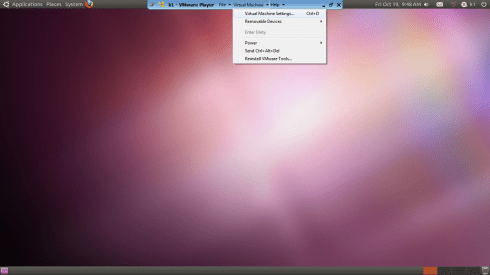
and step 2

Do this


and

Start the Wizard

when you finish the wizard and share a drive or folder- hey where do I see my shared ones-


see this folder in Linux- /mnt/hgfs (bingo!)
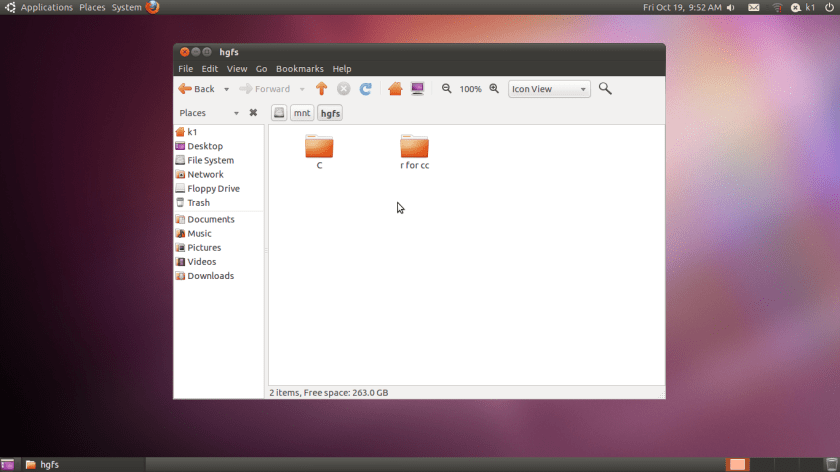
Hacker HW – Make this folder //mnt/hgfs a shortcut in Places your Ubuntu startup

Hacker Hw 2-

Upload using an anon email your VM dark data to Ubuntu one

Delete VM

Purge using software XX

Reinstall VM and bring back backup


Note time to do this


-General Sharing in Windows


Just open the Network tab in Ubuntu- see screenshots below-

Windows will now ask your Ubuntu user for login-

Once Logged in Windows from within Ubuntu Vmware, this is what happens

You see a tab called “users on “windows username”- pc appear on your Ubuntu Desktop  (see top right of the screenshot)

If you double click it- you see your windows path

You can now just click and drag data between your windows and linux partitions , just the way you do it in Windows .

So based on this- if you want to build  decision trees, artifical neural networks, regression models, and even time series models for zero capital expenditure- you can use both Ubuntu/R without compromising on your IT policy of Windows only in your organization (there is a shortage of Ubuntu trained IT administrators in the enterprise world)

Revised Installation Procedure for utilizing both Ubuntu /R/Rattle data mining on your Windows PC.

Using VMWare to build a free data mining system in R, as well as isolate your analytics system (thus using both Linux and Windows without overburdening your machine)

First Time

  1. http://downloads.vmware.com/d/info/desktop_end_user_computing/vmware_player/4_0Download and Install
  2. http://www.ubuntu.com/download/ubuntu/downloadDownload Only
  3. Create New Virtual Image in VM Ware Player
  4. Applications—–Terminal——sudo apt get-install R (to download and install)
  5.                                          sudo R (to open R)
  6. Once R is opened type this  —-install.packages(rattle)—– This will install rattle
  7. library(rattle) will load Rattle—–
  8. rattle() will open the GUI—-
Getting Data from Host to Guest VM
Next Time
  1. Go to VM Player
  2. Open the VM
  3. sudo R in terminal to bring up R
  4. library(rattle) within R
  5. rattle()
At this point even if you dont know any Linux and dont know any R, you can create data mining models using the Rattle GUI (and time series model using E pack in the R Commander GUI) – What can Rattle do in data mining? See this slideshow-http://www.decisionstats.com/data-mining-with-r-gui-rattle-rstats/
If Google Docs is banned as per your enterprise organizational IT policy of having Windows Explorer only- well you can see these screenshots http://rattle.togaware.com/rattle-screenshots.html

Faster Distinct Values using Proc Freq in SAS

I recently stumbled upon the nlevels function in SAS. It is awesome in terms of processing speed, given that the alternative is PROC SQL, COUNT(DISTINCT) etc etc

Truly the fastest way to find uniqueness in vars is use the nlevels in PROC  FREQ – and why do we need to find levels in character variables- well to check for binary variables (2 values), constants (just 1 level), and simple data analysis stuff.

See this extract from-

ods output nlevels=levels;
proc freq data=good.sas nlevels;
tables _char_ /noprint;
quit;
