Here comes PySpread- 85,899,345 rows and 14,316,555 columns

A Bold GNU Head
Image via Wikipedia

Whats new/ One more open source analytics package. Built like a spreadsheet with an ability to import a million cells-

From http://pyspread.sourceforge.net/index.html

about Pyspread is a cross-platform Python spreadsheet application. It is based on and written in the programming language Python.

Instead of spreadsheet formulas, Python expressions are entered into the spreadsheet cells. Each expression returns a Python object that can be accessed from other cells. These objects can represent anything including lists or matrices.

Pyspread screenshot
features In pyspread, cells expect Python expressions and return Python objects. Therefore, complex data types such as lists, trees or matrices can be handled within a single cell. Macros can be used for functions that are too complex for a single expression.

Since Python modules can be easily used without external scripts, arbitrary size rational numbers (via gmpy), fixed point decimal numbers for business calculations, (via the decimal module from the standard library) and advanced statistics including plotting functions (via RPy) can be used in the spreadsheet. Everything is directly available from each cell. Just use the grid

Data can be imported and exported using csv files or the clipboard. Other forms of data exchange is possible using external Python modules.

In  order to simplify sparse matrix editing, pyspread features a three dimensional grid that can be sized up to 85,899,345 rows and 14,316,555 columns (64 bit-systems, depends on row height and column width). Note that importing a million cells requires about 500 MB of memory.

The concept of pyspread allows doing everything from each cell that a Python script can do. This may very well include deleting your hard drive or sending your data via the Internet. Of course this is a non-issue if you sandbox properly or if you only use self developed spreadsheets. Since this is not the case for everyone (see the discussion at lwn.net), a GPG signature based trust model for spreadsheet files has been introduced. It ensures that only your own trusted files are executed on loading. Untrusted files are displayed in safe mode. You can trust a file manually. Inspect carefully.

Pyspread screenshot

requirements Pyspread runs on Linux, Windows and *nix platforms with GTK+ support. There are reports that it works with MacOS X as well. If you would like to contribute by testing on OS X please contact me.

Dependencies

Highly recommended for full functionality

  • PyMe >=0.8.1, Note for Windows™ users: If you want to use signatures without compiling PyMe try out Gpg4win.
  • gmpy >=1.1.0 and
  • rpy >=1.0.3.
maturity Pyspread is in early Beta release. This means that the core functionality is fully implemented but the program needs testing and polish.

and from the wiki

http://sourceforge.net/apps/mediawiki/pyspread/index.php?title=Main_Page

a spreadsheet with more powerful functions and data structures that are accessible inside each cell. Something like Python that empowers you to do things quickly. And yes, it should be free and it should run on Linux as well as on Windows. I looked around and found nothing that suited me. Therefore, I started pyspread.

Concept

  • Each cell accepts any input that works in a Python command line.
  • The inputs are parsed and evaluated by Python’s eval command.
  • The result objects are accessible via a 3D numpy object array.
  • String representations of the result objects are displayed in the cells.

Benefits

  • Each cell returns a Python object. This object can be anything including arrays and third party library objects.
  • Generator expressions can be used efficiently for data manipulation.
  • Efficient numpy slicing is used.
  • numpy methods are accessible for the data.

Installation

  1. Download the pyspread tarball or zip and unzip at a convenient place
  2. In case you do not have it already get and install Python, wxpython and numpy
If you want the examples to work, install gmpy, R and rpy
Really do check the version requirements that are mentioned on http://pyspread.sf.net
  1. Get install privileges (e.g. become root)
  2. Change into the directory and type
python setup.py install
Windows: Replace “python” with your Python interpreter (absolute path)
  1. Become normal user again
  2. Start pyspread by typing
pyspread
  1. Enjoy

Links

Next on Spreadsheet wishlist-

a MSI bundle /Windows Self Installer which has all dependencies bundled in it-linking to PostGresSQL 😉 etc

way to go Mr Martin Manns

mmanns < at > gmx < dot > net

JMP Genomics 5 released

Animation of the structure of a section of DNA...
Image via Wikipedia

Close to the launch of JMP9 with it’s R integration comes the announcement of JMP Genomics 5 released. The product brief is available here http://jmp.com/software/genomics/pdf/103112_jmpg5_prodbrief.pdf and it has an interesting mix of features. If you want to try out the features you can see http://jmp.com/software/license.shtml

As per me, I snagged some “new”stuff in this release-

  • Perform enrichment analysis using functional information from Ingenuity Pathways Analysis.+
  • New bar chart track allows summarization of reads or intensities.
  • New color map track displays heat plots of information for individual subjects.
  • Use a variety of continuous measures for summarization.
  • Using a common identifier, compare list membership for up tofive groups and display overlaps with Venn diagrams.
  • Filter or shade segments by mean intensity, with an optionto display segment mean intensity and set a reference valuefor shading.
  • Adjust intensities or counts for experimental samples using paired or grouped control samples.
  • Screen paired DNA and RNA intensities for allele-specific expression.
  • Standardize using a shifting factor and perform log2transformation after standardization.
  • Use kernel density information in loess and quantile normalization.
  • Depict partition tree information graphically for standard models with new Tree Viewer
  • Predictive modeling for survival analysis with Harrell’s assessment method and integration with Cross-Validation Model Comparison.

That’s right- that is incorporating the work of our favorite professor from R Project himself- http://biostat.mc.vanderbilt.edu/wiki/Main/FrankHarrell

Apparently Prof Frank E was quite a SAS coder himself (see http://biostat.mc.vanderbilt.edu/wiki/Main/SasMacros)

Back to JMP Genomics 5-

The JMP software platform provides:

• New integration capabilities let R users leverage JMP’s interactivegraphics to display analytic results.

• Tools for R programmers to build and package user interfaces that let them share customized R analytics with a broader audience.•

A new add-in infrastructure that simplifies the integration of external analytics into JMP.


+ For people in life sciences who like new stats software you can also download a trial version of IPA here at http://www.ingenuity.com/products/IPA/Free-Trial-Software.html

Doing Time Series using a R GUI

The Xerox Star Workstation introduced the firs...
Image via Wikipedia

Until recently I had been thinking that RKWard was the only R GUI supporting Time Series Models-

however Bob Muenchen of http://www.r4stats.com/ was helpful to point out that the Epack Plugin provides time series functionality to R Commander.

Note the GUI helps explore various time series functionality.

Using Bulkfit you can fit various ARMA models to dataset and choose based on minimum AIC


> bulkfit(AirPassengers$x)
$res
ar d ma      AIC
[1,]  0 0  0 1790.368
[2,]  0 0  1 1618.863
[3,]  0 0  2 1522.122
[4,]  0 1  0 1413.909
[5,]  0 1  1 1397.258
[6,]  0 1  2 1397.093
[7,]  0 2  0 1450.596
[8,]  0 2  1 1411.368
[9,]  0 2  2 1394.373
[10,]  1 0  0 1428.179
[11,]  1 0  1 1409.748
[12,]  1 0  2 1411.050
[13,]  1 1  0 1401.853
[14,]  1 1  1 1394.683
[15,]  1 1  2 1385.497
[16,]  1 2  0 1447.028
[17,]  1 2  1 1398.929
[18,]  1 2  2 1391.910
[19,]  2 0  0 1413.639
[20,]  2 0  1 1408.249
[21,]  2 0  2 1408.343
[22,]  2 1  0 1396.588
[23,]  2 1  1 1378.338
[24,]  2 1  2 1387.409
[25,]  2 2  0 1440.078
[26,]  2 2  1 1393.882
[27,]  2 2  2 1392.659
$min
ar        d       ma      AIC
2.000    1.000    1.000 1378.338
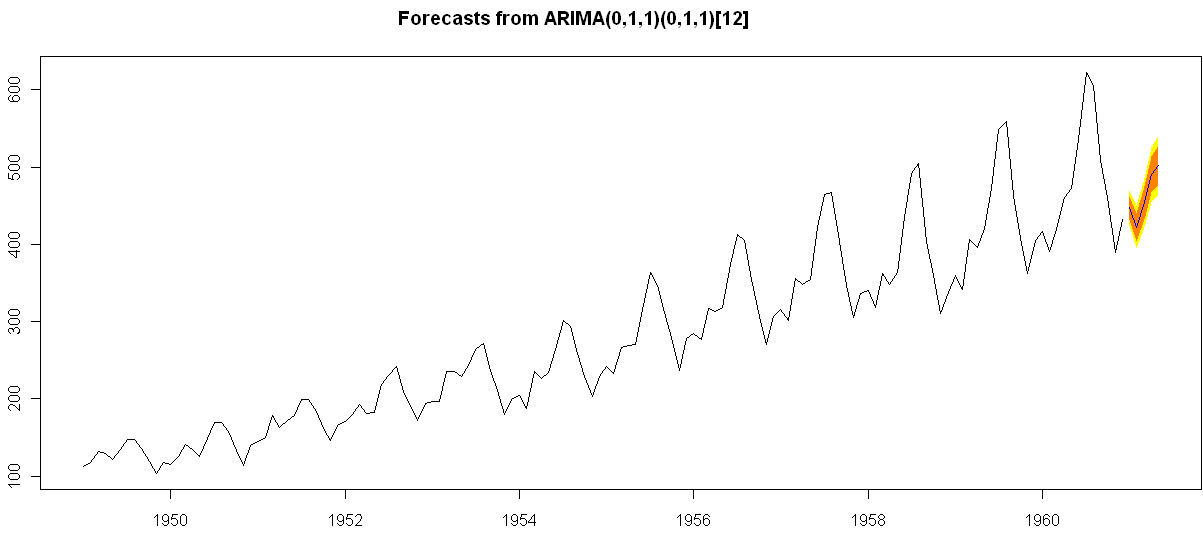
> ArimaModel.5 <- Arima(AirPassengers$x,order=c(0,1,1),
+ include.mean=1,
+   seasonal=list(order=c(0,1,1),period=12))
> ArimaModel.5
Series: AirPassengers$x
ARIMA(0,1,1)(0,1,1)[12]
Call: Arima(x = AirPassengers$x, order = c(0, 1, 1), seasonal = list(order = c(0,      1, 1), period = 12), include.mean = 1)
Coefficients:
ma1     sma1
-0.3087  -0.1074
s.e.   0.0890   0.0828
sigma^2 estimated as 135.4:  log likelihood = -507.5
AIC = 1021   AICc = 1021.19   BIC = 1029.63
> summary(ArimaModel.5, cor=FALSE)
Series: AirPassengers$x
ARIMA(0,1,1)(0,1,1)[12]
Call: Arima(x = AirPassengers$x, order = c(0, 1, 1), seasonal = list(order = c(0,      1, 1), period = 12), include.mean = 1)
Coefficients:
ma1     sma1
-0.3087  -0.1074
s.e.   0.0890   0.0828
sigma^2 estimated as 135.4:  log likelihood = -507.5
AIC = 1021   AICc = 1021.19   BIC = 1029.63
In-sample error measures:
ME        RMSE         MAE         MPE        MAPE        MASE
0.32355285 11.09952005  8.16242469  0.04409006  2.89713514  0.31563730
Dataset79 <- predar3(ArimaModel.5,fore1=5)


And I also found an interesting Ref Sheet for Time Series functions in R-

http://cran.r-project.org/doc/contrib/Ricci-refcard-ts.pdf

and a slightly more exhaustive time series ref card

http://www.statistische-woche-nuernberg-2010.org/lehre/bachelor/datenanalyse/Refcard3.pdf

Also of interest a matter of opinion on issues in Time Series Analysis in R at

http://www.stat.pitt.edu/stoffer/tsa2/Rissues.htm

Of course , if I was the sales manager for SAS ETS I would be worried given the increasing capabilities in Time Series in R. But then again some deficiencies in R GUI for Time Series-

1) Layout is not very elegant

2) Not enough documented help (atleast for the Epack GUI- and no integrated help ACROSS packages-)

3) Graphical capabilties need more help documentation to interpret the output (especially in ACF and PACF plots)

More resources on Time Series using R.

http://people.bath.ac.uk/masgs/time%20series/TimeSeriesR2004.pdf

and http://www.statoek.wiso.uni-goettingen.de/veranstaltungen/zeitreihen/sommer03/ts_r_intro.pdf

and books

http://www.springer.com/economics/econometrics/book/978-0-387-77316-2

http://www.springer.com/statistics/statistical+theory+and+methods/book/978-0-387-75960-9

http://www.springer.com/statistics/statistical+theory+and+methods/book/978-0-387-75958-6

http://www.springer.com/statistics/statistical+theory+and+methods/book/978-0-387-75966-1

Getting Inside R

Forums and Minerals, the new Internet tools
Image via Wikipedia

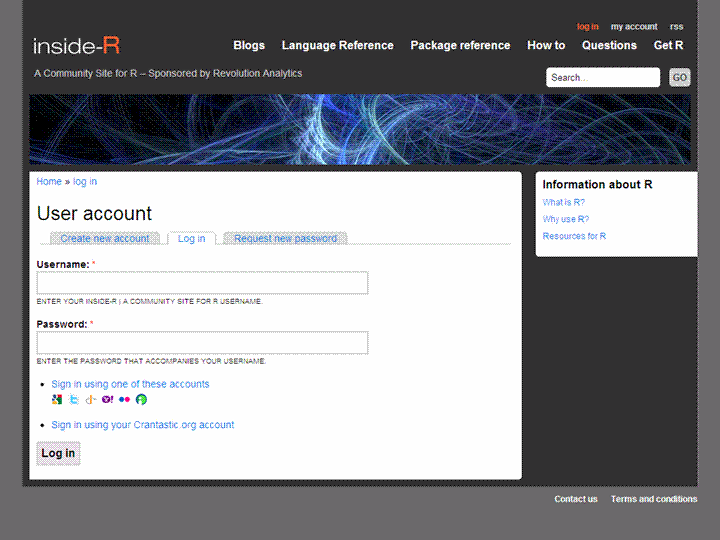
I loved the new upgraded design of Inside-R, Revo’s new(?) community.

And promptly shot up a blog application.

What makes Inside- R- slightly better than SDC, Analyticbridge,PlanetR and R _bloggers (with due respects)

  1. Open Id logins (I think thats a new and good step)
  2. Options for automated feed parsing for blogs
  3. More than just a blog aggregator- includes sections on other stuff- thus more like a community than a big feed
  4. Abbreviated feeds- just gives you two-three lines of summary per post  than the whole big schmakaround -thats a time saver for me —(D Smith is the only -lonely blogger atm there)
  5. The more the merrier- One more place to read and write R.


btw is the name insider (as in guy who knows inside stuff) or Inside- R (as in get inside the R box)- just kidding. With PlyR, ManipulatR, ApplyR and now Inside R- the pun gets MerrieR

If my blog app gets rejected- these views may change ,grr


Using R for Time Series in SAS


Time series: random data plus trend, with best...
Image via Wikipedia


Here is a great paper on using Time Series in R, and it specifically allows you to use just R output in Base SAS.

SAS Code

/* three methods: */

/* 1. Call R directly – Some errors are not reported to log */

x “’C:\Program Files\R\R-2.12.0\bin\r.exe’–no-save –no-restore <“”&rsourcepath\tsdiag.r””>””&rsourcepath\tsdiag.out”””;

/* include the R log in the SAS log */7data _null_;

infile “&rsourcepath\tsdiag.out”;

file log;

input;

put ’R LOG: ’ _infile_;

run;

/* include the image in the sas output.Specify a file if you are not using autogenerated html output */

ods html;

data _null_;

file print;

put “<IMG SRC=’” “&rsourcepath\plot.png” “’ border=’0’>”;

put “<IMG SRC=’” “&rsourcepath\acf.png” “’ border=’0’>”;

put “<IMG SRC=’” “&rsourcepath\pacf.png” “’ border=’0’>”;

put “<IMG SRC=’” “&rsourcepath\spect.png” “’ border=’0’>”;

put “<IMG SRC=’” “&rsourcepath\fcst.png” “’ border=’0’>”;

run;

ods html close;

The R code to create a time series plot is quite elegant though-


library(tseries)

air <- AirPassengers #Datasetname

ts.plot(air)

acf(air)

pacf(air)

plot(decompose(air))

air.fit <- arima(air,order=c(0,1,1), seasonal=list(order=c(0,1,1), period=12) #The ARIMA Model Based on PACF and ACF Graphs

tsdiag(air.fit)

library(forecast)

air.forecast <- forecast(air.fit)

plot.forecast(air.forecast)

You can download the fascinating paper from the Analytics NCSU Website http://analytics.ncsu.edu/sesug/2008/ST-146.pdf

About the Author-

Sam Croker has a MS in Statistics from the University of South Carolina and has over ten years of experience in analytics.   His research interests are in time series analysis and forecasting with focus on stream-flow analysis.  He is currently using SAS, R and other analytical tools for fraud and abuse detection in Medicare and Medicaid data. He also has experience in analyzing, modeling and forecasting in the finance, marketing, hospitality, retail and pharmaceutical industries.

John Sall sets JMP 9 free to tango with R


Diagnostic graphs produced by plot.lm() functi...
Image via Wikipedia


John Sall, founder SAS AND JMP , has released the latest blockbuster edition of flagship of JMP 9 (JMP Stands for John’s Macintosh Program).

To kill all birds with one software, it is integrated with R and SAS, and the brochure frankly lists all the qualities. Why am I excited for JMP 9 integration with R and with SAS- well it integrates bigger datasets manipulation (thanks to SAS) with R’s superb library of statistical packages and a great statistical GUI (JMP). This makes JMP the latest software apart from SAS/IML, Rapid Miner,Knime, Oracle Data Miner to showcase it’s R integration (without getting into the GPL compliance need for showing source code– it does not ship R- and advises you to just freely download R). I am sure Peter Dalgaard, and Frankie Harell are all overjoyed that R Base and Hmisc packages would be used by fellow statisticians  and students for JMP- which after all is made in the neighborhood state of North Carolina.

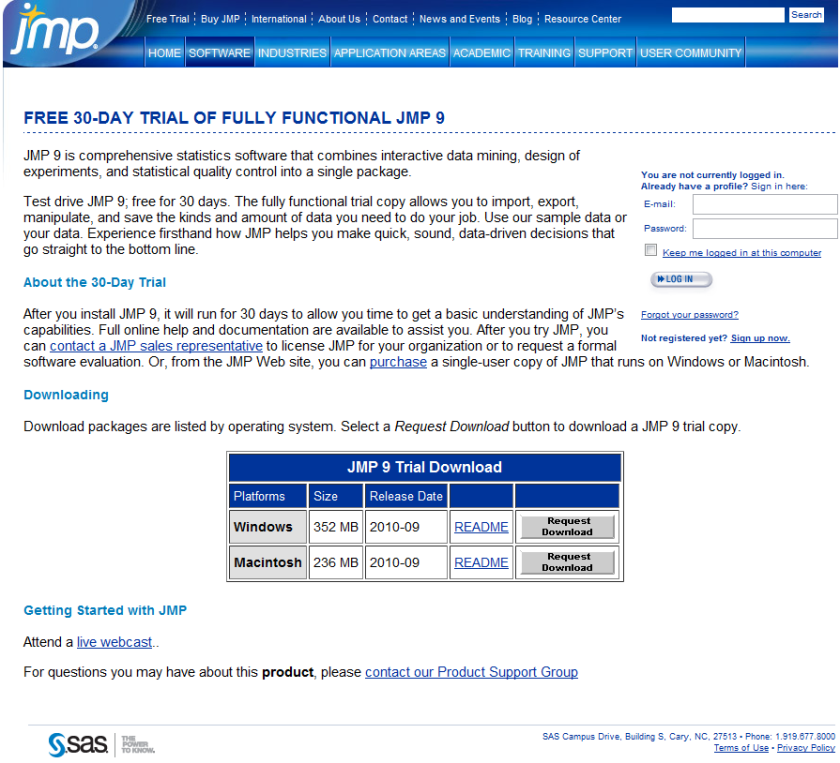
Best of all a JMP 30 day trial is free- so no money lost if you download JMP 9 (and no they dont ask for your credit card number, or do they- but they do have a huuuuuuge form to register before you download. Still JMP 9 the software itself is more thoughtfully designed than the email-prospect-leads-form and the extra functionality in the free 30 day trial is worth it.

Also see “New Features  in JMP 9  http://www.jmp.com/software/jmp9/pdf/new_features.pdf

which has this regarding R.

Working with R

R is a programming language and software environment for statistical computing and graphics. JMP now  supports a set of JSL functions to access R. The JSL functions provide the following options:

• open and close a connection between JMP and R

• exchange data between JMP and R

•submit R code for execution

•display graphics produced by R

JMP and R each have their own sets of computational methods.

R has some methods that JMP does not have. Using JSL functions, you can connect to R and use these R computational methods from within JMP.

Textual output and error messages from R appear in the log window.R must be installed on the same computer as JMP.

JMP is not distributed with a copy of R. You can download R from the Comprehensive R Archive Network Web site:http://cran.r-project.org

Because JMP is supported as both a 32-bit and a 64-bit Windows application, you must install the corresponding 32-bit or 64-bit version of R.

For details, see the Scripting Guide book.

and the download trial page ( search optimized URL) –

http://www.sas.com/apps/demosdownloads/jmptrial9_PROD__sysdep.jsp?packageID=000717&jmpflag=Y

In related news (Richest man in North Carolina also ranks nationally(charlotte.news14.com) , Jim Goodnight is now just as rich as Mark Zuckenberg, creator of Facebook-

though probably they are not creating a movie on Jim yet (imagine a movie titled “The Statistical Software” -not just the same dude feel as “The Social Network”)

See John’s latest interview :

The People Behind the Software: John Sall

http://blogs.sas.com/jmp/index.php?/archives/352-The-People-Behind-the-Software-John-Sall.html

Interview John Sall Founder JMP/SAS Institute

https://decisionstats.com/2009/07/28/interview-john-sall-jmp/

SAS Early Days

https://decisionstats.com/2010/06/02/sas-early-days/

So which software is the best analytical software? Sigh- It depends


Graph of typical Operating System placement on...
Image via Wikipedia


Here is the software matrix that I am trying to develop for analytical software- It should help as a tentative guide for software purchases- it’s independent so unbiased (hopefully)- and it will try and bring as much range or sensitivity as possible. The list (rather than matrix) is of the format-

Type 0f analysis-

  • Data Visualization (Reporting with Pivot Ability to aggregate, disaggregate)
  • Reporting without Pivot Ability
  • Regression -Logistic Regression for Propensity or Risk Models
  • Regression- Linear for Pricing Models
  • Hypothesis Testing
  • A/B Scenario Testing
  • Decision Trees (CART, CHAID)
  • Time Series Forecasting
  • Association Analysis
  • Factor Analysis
  • Survey (Questionnaires)
  • Clustering
  • Segmentation
  • Data Manipulation

Dataset Size-

  • small dataset (upto X mb)
  • big dataset (upto Y gb)
  • enterprise class production BigData datasets (no limit)

Pricing of Software that can be used-

Ease of using Software

  • GUI vs Non GUI
  • Software that require not much extensive training
  • Software that require extensive training

Installation, Customization, Maintainability (or Support) for Software

  • Installation Dependencies- Size- Hardware (costs and  efficiencies)
  • Customization provided for specific use
  • Support Channels (including approximate Turn Around Time)

Software

  • Software I have used personally
  • SAS (Base, Stat,Enterprise,Connect,ETS) WPS KXEN SPSS (Base,Trends),Revolution R,R,Rapid Miner,Knime,JMP,SQL SERVER,Rattle, R Commander,Deducer
  • Software I know by reputation- SAS Enterprise Miner etc etc

Are there any other parameters for judging software?  let me know at http://twitter.com/decisionstats