Revolution Webinar Series #Rstats

Revolution Analytics Webinar-


Featured Webinar
David Champagne REGISTER NOW
Presenter David Champagne
CTO, Revolution Analytics
Date Tuesday, December 20th
Time 11:00AM – 11:30AM Pacific 
Click here for the webinar time in your local time zone

Big Data Starts with R

Traditional IT infrastructure is simply unable to meet

the demands of the new “Big Data Analytics” landscape.   Many enterprises are turning to the “R” statistical programming language and Hadoop (both open source projects) as a potential solution. This webinar will introduce the statistical capabilities of R within the Hadoop ecosystem.  We’ll cover:

  • An introduction to new packages developed by Revolution Analytics to facilitate interaction with the data stores HDFS and HBase so that they can be leveraged from the R environment
  • An overview of how to write Map Reduce jobs in R using Hadoop
  • Special considerations that need to be made when working with R and Hadoop.

We’ll also provide additional resources that are available to people interested in integrating R and Hadoop.


Upcoming Webinars
Wed, Dec 14th
11:00AM – 11:30AM PT
Revolution R Enterprise – 100% R and MoreR users already know why the R language is the lingua franca of statisticians today: because it’s the most powerful statistical language in the world. Revolution Analytics builds on the power of open source R, and adds performance, productivity and integration features to create Revolution R Enterprise. In this webinar, author and blogger David Smith will introduce the additional capabilities of Revolution R Enterprise.
 Archived Webinars-
Revolution Webinar: New Features in Revolution R Enterprise 5.0 (including RevoScaleR) to Support Scalable Data AnalysisRevolution R Enterprise 5.0 is Revolution Analytics’ scalable analytics platform.  At its core is Revolution Analytics’ enhanced Distribution of R, the world’s most widely-used project for statistical computing.  In this webinar, Dr. Ranney will discuss new features and show examples of the new functionality, which extend the platform’s usability, integration and scalability


Webinar: Using R within Oracle #rstats

Webinar: Using R within Oracle — Nov 30, noon EST

==========================================
Oracle now supports the R open source statistical programming language. Come to this webinar to learn more about using R within an Oracle environment.

— URL for TechCast: https://stbeehive.oracle.com/bconf/confDetails?confID=334B:3BF0:owch:38893C00F42F38A1E0404498C8A6612B0004075AECF7&guest=true&confKey=608880
— Web Conference ID: 303397
— Web Conference Key: 608880
— Dialup:             1-866-682-4770      , ID 5548204, passcode 1234

After a steady rise in the past few years, in 2010 the open source data mining software R overtook other tools to become the tool used by more data miners (43%) than any other (http://www.rexeranalytics.com/Data-Miner-Survey-Results-2010.html).

Several analytic tool vendors have added R-integration to their software. However, Oracle is the largest company to throw their weight behind R. On October 3, Oracle unveiled their integration of R: Oracle R Enterprise (http://www.oracle.com/us/corporate/features/features-oracle-r-enterprise-498732.html) as part of their Oracle Big Data Appliance announcement (http://www.oracle.com/us/corporate/press/512001).

Oracle R Enterprise allows users to perform statistical analysis with advanced visualization on data stored in Oracle Database. Oracle R Enterprise enables scalable R solutions, while facilitating production deployment of R scripts and Hadoop based solutions, as well as integration of R results with Oracle BI Publisher and OBIEE dashboards.

This TechCast introduces the various Oracle R Enterprise components and features, along with R script demonstrations that interface with Oracle Database.

TechCast presenter: Mark Hornick, Senior Manager, Oracle Advanced Analytics Development.
This TechCast is part of the ongoing TechCasts series coordinated by Oracle BIWA: The BI, Warehousing and Analytics SIG (http://www.oracleBIWA.org).

Secure Browsing from Mobile and PC ( Tor ,PeerNet, WasteAgain)

While Tor remains the tool of choice with pseudo-techie hacker wannabes , there is enough juice and smoke and mirrors on the market to confuse your average Joe.

For a secure browsing experience on Mobile – do NOT use either Apple or Windows OS

Use Android  and this app called Orbot in particular

Installing Tor with a QR code

Orbot is easy to install by simply scanning the following QR code with your Android Barcode scanner.

Android QR code

Installing Tor from the Android Market

Orbot is available in the Android Market.

ENTER PEERNET

If you have a Dell PC, well just use PeerNet to configure and set up your own network around the neighbourhood. This is particularly applicable if you are in country that is both repressive and not so technologically advanced. Wont work in China or USA.

http://support.dell.com/support/edocs/network/p70008/EN/vista_7/peernet.htm

What is a peer network?

A peer network is a network in which one computer can connect directly to another computer. This capability is accomplished by enabling access point (AP) functionality on one of the computers. Other computers can then connect to this computer in the same way that they would connect to a physical AP. If Internet Connection Sharing is enabled on the computer that has the AP functionality, computers that connect to that computer have Internet connectivity as well.

A basic peer network, which requires no networking knowledge or experience to set up, should meet the needs of most home users and small businesses. By default, a basic peer network is configured with the strongest available security (see How do I set up a basic peer network?).

For users who are familiar with wireless networking technology, advanced configuration features are available to do the following:

Change security settings (see How do I configure my peer network?)
Choose which method (push button or PIN) computers with Wi-Fi Protected Setup™ capability can join your peer network (see How do I allow peer devices to join my peer network using Wi-Fi Protected Setup technology?)
Change the DHCP Server IP address (see How do I configure my peer network?).
Change the channel on which to operate your peer network (see How do I configure my peer network?)

 If you are really really in a need for secure browsing (like you are maybe a big hot shot in the tech world), I suggest go over to VMWare

http://www.vmware.com/products/player/

create a seperate Linux (Ubuntu for ease) virtual disc, then download the Tor Browser Bundle from

https://www.torproject.org/projects/torbrowser.html.en for surfing and a Peernet (above) or  a prepaid one time use disposable mobile pre-paid wireless card. It is also quite easy to delete your virtual disc in times of emergencies (but it is best to use encryption even when in Ubuntu https://help.ubuntu.com/community/EncryptedHome)

IRC chat is less secure than you think it is thanks to BOT  Trawlers- so I am hoping someone in the open source community updates Waste Again for encrypted chats http://wasteagain.sourceforge.net/

What is “WASTE again”?

“WASTE again” enables you to create a decentralized and secure private mesh network using an unsecure network, such as the internet. Once the public encryption keys are exchanged, sending messages, creating groupchats and transferring files is easy and secure.

Creating a mesh

To create a mesh you need at least two computers with “WASTE again” installed. During installation, a unique pair of public and private keys for each computer is being generated. Before the first connection can be established, you need to exchange these public keys. These keys enable “WASTE again” to authenticate every connection to other “WASTE again” clients.

After exchanging the keys, you simply type in the computers IP address to connect to. If that computer is located behind a firewall or a NAT-router, you have to create a portmap first to enable incoming connections.

At least one computer in your mesh has to be able to accept incoming connections, making it a “public node”. If no direct connection between two firewalled computers can be made, “WASTE again” automatically routes your traffic through one or more of the available public nodes.

Every new node simply has to exchange keys with one of the connected nodes and then connect to it. All the other nodes will exchange their keys automatically over the mesh.

A Brief Overview of Open vs Closed in Computing

1984 – IBM   (Big Brother) vs Apple  (Computing opened for individuals)

1988- Apple (Closed Hardware and Software) vs Microsoft (  Licensed to all software)

1998- Microsoft (Source code is closed but licenses to all) vs Linux (Open Source Code)

2008- Apple (Closed Hardware and Software) vs Google (Android/Linux) -(Free and Open Source)

2010 – Google (Web open to search) vs Facebook (Closed to search)

2018 (?)-Google (Code is open for all non revenue generating software, but search engine algorithm is closed) VS       TBD

Using R with MySQL #rstats

A brief tutorial to working with R and MySQL. MySQL belongs to Oracle is one of the most widely used databases now.

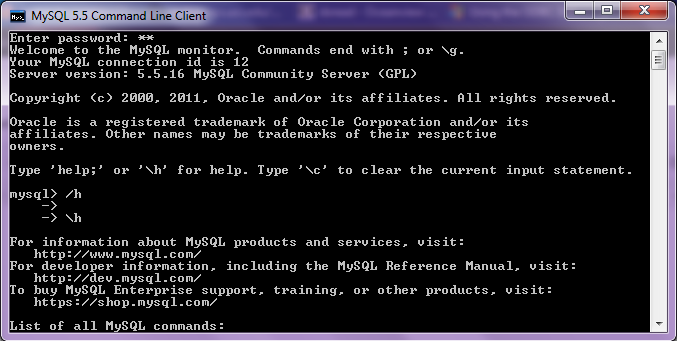
1. Download mySQL from
http://www.mysql.com/downloads/mysql/  or (http://www.mysql.com/downloads/mirror.php?id=403831)
Click Install -use default options, remember to note down the password=XX
2.Download the ODBC connector from http://www.mysql.com/downloads/connector/odbc/5.1.htmlThe Data Sources (ODBC) can be located from the Control Panel in Windows7

Install ODBC Connector by double clicking the .msi file downloaded in Step 2-
Check this screenshot in ODBC Connectors to verify-
Note this is the Drivers tab in ODBC Data Source Administrator
Click the System DSN and Configure MySQL using the add button Use the configuration options shown exactly here. The user is root, the TCP/IP Server is local host, use the same password in Step 1 and the Database is MySQL
Test the connection

Click OK to finish this step.
Click the User DSN tab (and repeating the step  immediately above -Add, and Configure the connection using options The user is root, the TCP/IP Server is local host, use the same password in Step 1 and the Database is MySQL , Test the connection and OK to add the connection
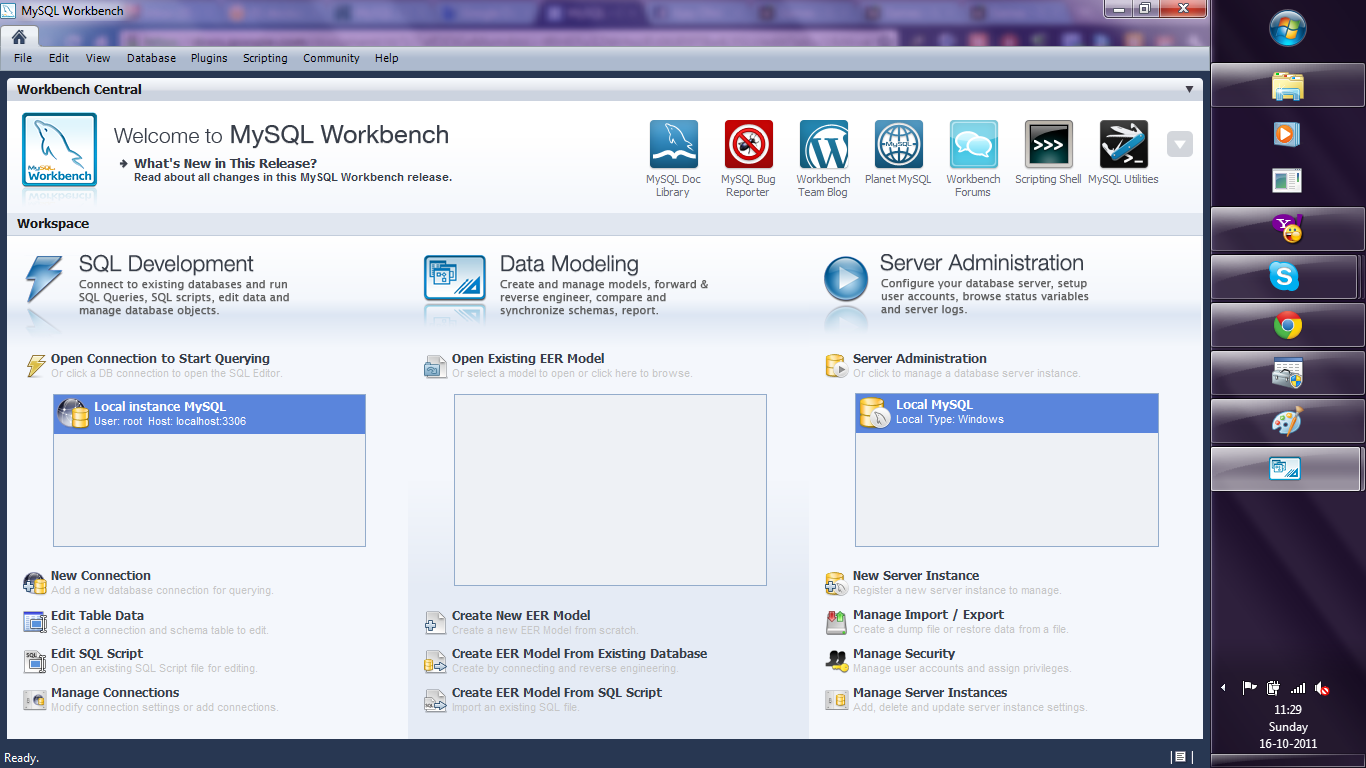
3. Download the MySQL workbench from http://www.mysql.com/downloads/workbench/

This is very helpful to configuring the database
http://www.mysql.com/downloads/mirror.php?id=403983#mirrors

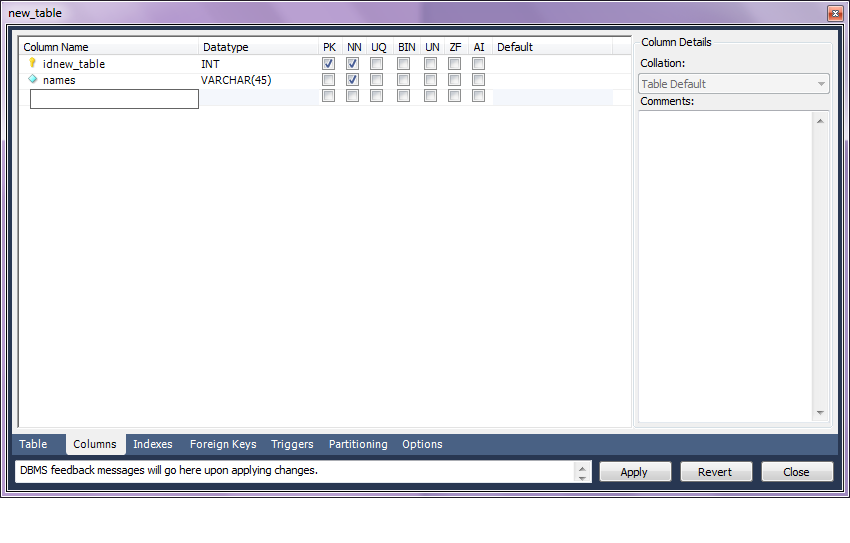
Create a new table using the options in the screenshots below

Open Connection

You can create a new table using the options as below,
Once created you can also add new variables (using the Columns Tab)

MySQL allows you create new columns very easily
The  SQL commands are automatically generated.
Click Apply  to execute the changes to the Database.

Now we start R
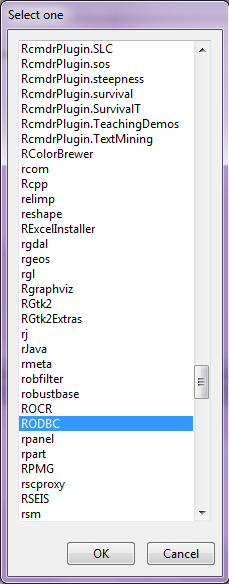
Type the commands in the screenshot below to create a connection to the Database in MySQL
> library(RODBC)
> odbcDataSources()
> ajay=odbcConnect(“MySQL”,uid=”root”,pwd=”XX”)
> ajay
> sqlTables(ajay)
>tested=sqlFetch(ajay,”host”)

Note- this is a brief tutorial for beginners without getting into too many complexities of database administration and management, to start using R and MySQL.

Knowledge Discovery in Databases -KDD using PostgreSQL and #Rstats

Here is a small brief primer for beginners on configuring an open source database and using an open source analytics package.

All you need to know – is to read!


1. download PostgreSQL from
http://www.postgresql.org/download/windowsInstall PostgreSQL

Remember to store /memorize the password for the user postgres!

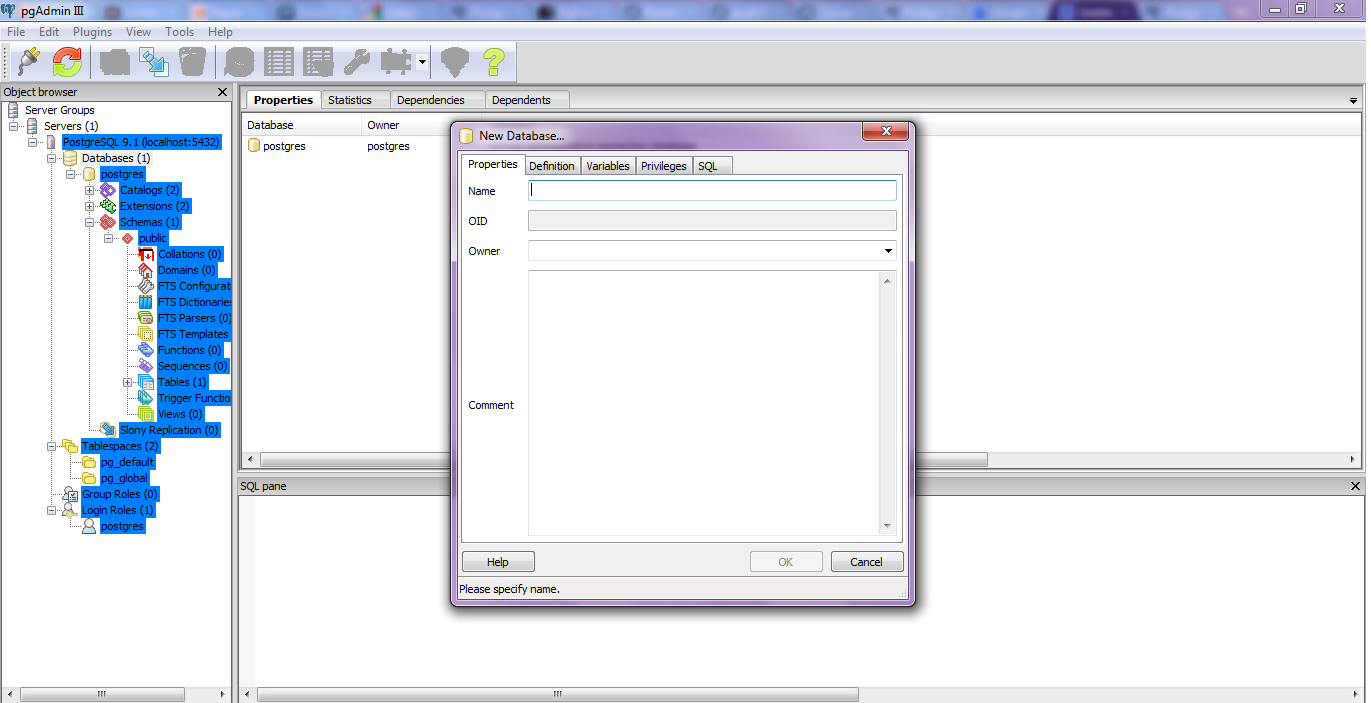
Create a connection using pgAdmin feature in Start Menu

2. download ODBC driver from
http://www.postgresql.org/ftp/odbc/versions/msi/
and the Win 64 edition from
http://wwwmaster.postgresql.org/download/mirrors-ftp/odbc/versions/msi/psqlodbc_09_00_0310-x64.zip

install ODBC driver

3. Go to

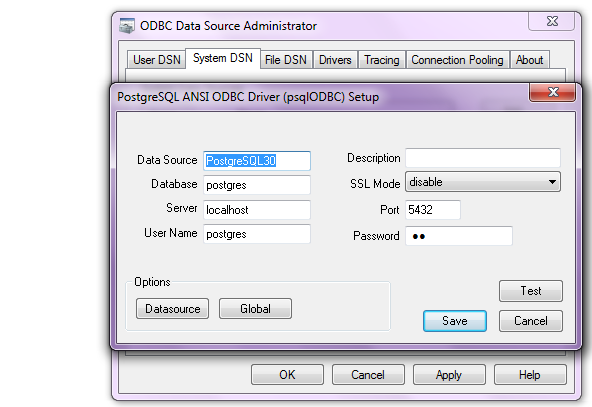
Start Menu\Control Panel\All Control Panel Items\Administrative Tools\Data Sources (ODBC)

4. Configure the following details in System DSN and  User DSN using the ADD tabs .Test connection to check if connection is working

5. Start R and install and load library RODBC

6. Use following initial code for R- if you know SQL you can  do the rest
> library(RODBC)

> odbcDataSources(type = c(“all”, “user”, “system”))
SQLServer              PostgreSQL30             PostgreSQL35W
“SQL Server”    “PostgreSQL ANSI(x64)” “PostgreSQL Unicode(x64)”

> ajay=odbcConnect(“PostgreSQL30”, uid = “postgres”, pwd = “XX”)

> sqlTables(ajay)
TABLE_QUALIFIER TABLE_OWNER TABLE_NAME TABLE_TYPE REMARKS
1        postgres      public      names      TABLE

> crimedat <- sqlFetch(ajay, “names”)

The all new Blogging in Blogger

I had given up on Blogspot ever having a makeover in favor of the nice themes at

wordpress, but man, the new CEO at google is really shaking some stuff here.

Check out the nice features for customizing the themes at Blogspot

Continue reading “The all new Blogging in Blogger”