How to Analyze Wikileaks Data – R SPARQL

Logo for R
Image via Wikipedia

Drew Conway- one of the very very few Project R voices I used to respect until recently. declared on his blog http://www.drewconway.com/zia/

Why I Will Not Analyze The New WikiLeaks Data

and followed it up with how HE analyzed the post announcing the non-analysis.

“If you have not visited the site in a week or so you will have missed my previous post on analyzing WikiLeaks data, which from the traffic and 35 Comments and 255 Reactions was at least somewhat controversial. Given this rare spotlight I thought it would be fun to use the infochimps API to map out the geo-location of everyone that visited the blog post over the last few days. Unfortunately, after nearly two years with the same web hosting service, only today did I realize that I was not capturing daily log files for my domain”

Anyways – non American users of R Project can analyze the Wikileaks data using the R SPARQL package I would advise American friends not to use this approach or attempt to analyze any data because technically the data is still classified and it’s possession is illegal (which is the reason Federal employees and organizations receiving federal funds have advised not to use this or any WikiLeaks dataset)

https://code.google.com/p/r-sparql/

Overview

R is a programming language designed for statistics.

R Sparql allows you to run SPARQL Queries inside R and store it as a R data frame.

The main objective is to allow the integration of Ontologies with Statistics.

It requires Java and rJava installed.

Example (in R console):

> library(sparql)> data <- query("SPARQL query>","RDF file or remote SPARQL Endpoint")

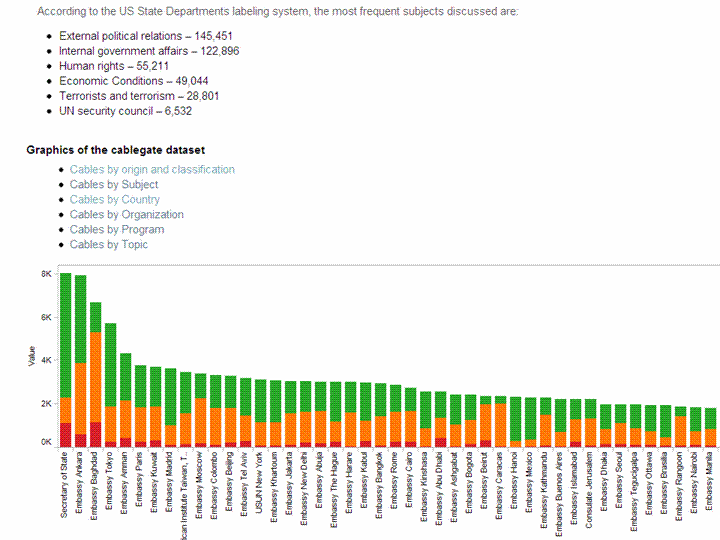
and the data in a remote SPARQL  http://www.ckan.net/package/cablegate

SPARQL is an easy language to pick  up, but dammit I am not supposed to blog on my vacations.

http://code.google.com/p/r-sparql/wiki/GettingStarted

Getting Started

1. Installation

1.1 Make sure Java is installed and is the default JVM:

$ sudo apt-get install sun-java6-bin sun-java6-jre sun-java6-jdk$ sudo update-java-alternatives -s java-6-sun

1.2 Configure R to use the correct version of Java

$ sudo R CMD javareconf

1.3 Install the rJava library

$ R> install.packages("rJava")> q()

1.4 Download and install the sparql library

Download: http://code.google.com/p/r-sparql/downloads/list

$ R CMD INSTALL sparql-0.1-X.tar.gz

2. Executing a SPARQL query

2.1 Start R

#Load the librarylibrary(sparql)#Run the queryresult <- query("SELECT ... ", "http://...")#Print the resultprint(result)

3. Examples

3.1 The Query can be a string or a local file:

query("SELECT ?date ?number ?season WHERE {  ... }", "local-file.rdf")
query("my-query.rq", "local-file.rdf")

The package will detect if my-query.rq exists and will load it from the file.

3.3 The uri can be a file or an url (for remote queries):

query("SELECT ... ","local-file.db")
query("SELECT ... ","http://dbpedia.org/sparql")

3.4 Get some examples here: http://code.google.com/p/r-sparql/downloads/list

SPARQL Tutorial-

http://openjena.org/ARQ/Tutorial/index.html

Also read-

http://webr3.org/blog/linked-data/virtuoso-6-sparqlgeo-and-linked-data/

and from the favorite blog of Project R- Also known as NY Times

http://bits.blogs.nytimes.com/2010/11/15/sorting-through-the-government-data-explosion/?twt=nytimesbits

In May 2009, the Obama administration started putting raw 
government data on the Web. 
It started with 47 data sets. Today, there are more than
 270,000 government data sets, spanning every imaginable 
category from public health to foreign aid.

An Introduction to Data Mining-online book

I was reading David Smith’s blog http://blog.revolutionanalytics.com/

where he mentioned this interview of Norman Nie, at TDWI

http://tdwi.org/Articles/2010/11/17/R-101.aspx?Page=2

where I saw this link (its great if you want to study Data Mining btw)

http://www.kdnuggets.com/education/usa-canada.html

and I c/liked the U Toronto link

http://chem-eng.utoronto.ca/~datamining/

Best of All- I really liked this online book created by Professor S. Sayad

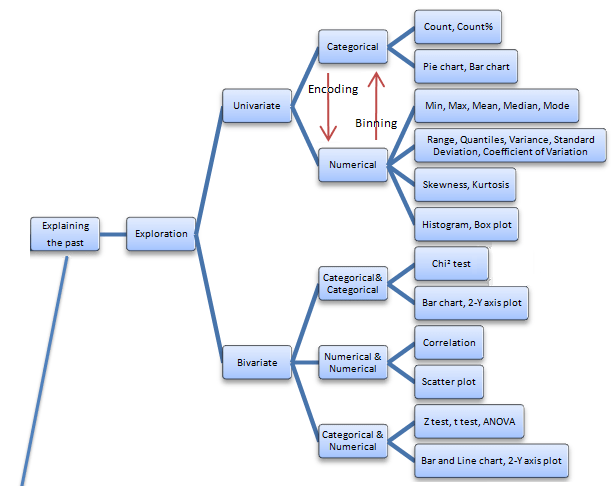
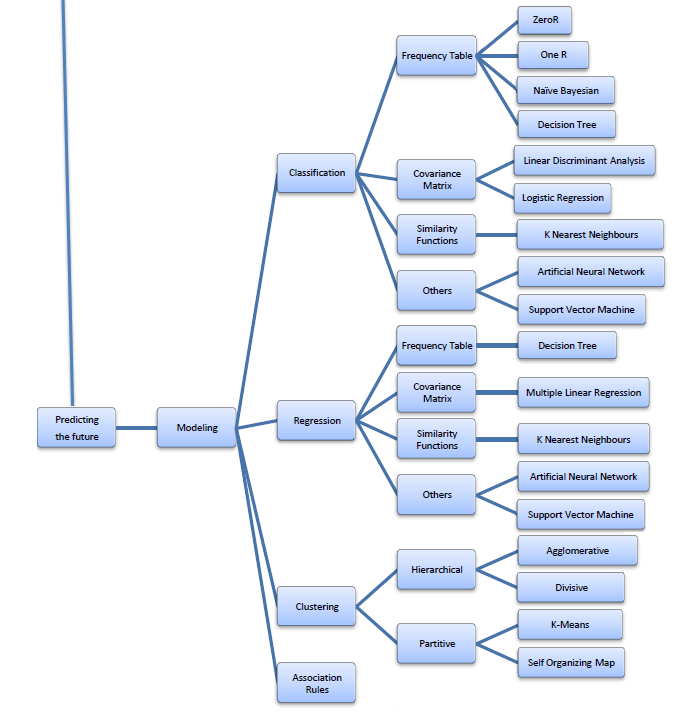
Its succinct and beautiful and describes all of the Data Mining you want to read in one Map (actually 4 images painstakingly assembled with perfection)

The best thing is- in the original map- even the sub items are click-able for specifics like Pie Chart and Stacked Column chart are not in one simple drop down like Charts- but rather by nature of the kind of variables that lead to these charts. For doing that- you would need to go to the site itself- ( see http://chem-eng.utoronto.ca/~datamining/dmc/categorical_variables.htm

vs

http://chem-eng.utoronto.ca/~datamining/dmc/categorical_numerical.htm

Again- there is no mention of the data visualization software used to create the images but I think I can take a hint from the Software Page which says software used are-

Software

See it on your own-online book (c)Professor S. Sayad

Really good DIY tutorial

http://chem-eng.utoronto.ca/~datamining/dmc/data_mining_map.htm

RWui :Creating R Web Interfaces on the go

Here is a great R application created by http://sysbio.mrc-bsu.cam.ac.uk

R Wui for creating R Web Interfaces

its been there for some time now- but presumably R Apache is more well known.

From-

http://sysbio.mrc-bsu.cam.ac.uk/Rwui/tutorial/Rwui_Rnews_final.pdf

The web application Rwui is used to create web interfaces  for running R scripts. All the code is generated automatically so that a fully functional web interface for an R script can be downloaded and up and running in a matter of minutes.

Rwui is aimed at R script writers who have scripts that they want people unversed in R to use. The script writer uses Rwui to create a web application that will run their R script. Rwui allows the script writer to do this without them having to do any web application programming, because Rwui generates all the code for them.

The script writer designs the web application to run their R script by entering information on a sequence of web pages. The script writer then downloads the application they have created and installs it on their own server.

http://sysbio.mrc-bsu.cam.ac.uk/Rwui/tutorial/Technical_Report.pdf

Features of web applications created by Rwui
  1. Whole range of input items available if required – text boxes, checkboxes, file upload etc.
  2. Facility for uploading of an arbitrary number of files (for example, microarray replicates).
  3. Facility for grouping uploaded files (for example, into ‘Diseased’ and ‘Control’ microarray data files).
  4. Results files displayed on results page and available for download.
  5. Results files can be e-mailed to the user.
  6. Interactive results files using image maps.
  7. Repeat analyses with different parameters and data files – new results added to results list, as a link to the corresponding results page.
  8. Real time progress information (text or graphical) displayed when running the application.

Requirements

In order to use the completed web applications created by Rwui you will need:

  1. A Java webserver such as Tomcat version 5.5 or later.
  2. Java version 1.5
  3. R – a version compatible with your R script(s).

Using Rwui

Using Rwui to create a web application for an R script simply involves:

  1. Entering details about your Rscript on a sequence of web pages.
  2. Rwui is quite flexible so you can backtrack, edit and insert, as you design your application.
  3. Rwui then generates the web application, which is Java based and platform independent.
  4. The application can be downloaded either as a .zip or .tgz file.
  5. Unpacked, the download contains all the source code and a .war file.
  6. Once the .war file is copied to the Tomcat webapps directory, the application is ready to use.
  7. Application details are saved in an ‘application definition file’ for reuse and modification.
Interested-
go click and check out a new web app from http://sysbio.mrc-bsu.cam.ac.uk/Rwui/ in a matter of minutes
Also see

Using SAS/IML with R

Analyze That
Image via Wikipedia

SAS just released an updated documentation to SAS/IML language with a special chapter devoted to using R

Here is an example-

CALL EXPORTMATRIXTOR( IMLMatrix, RMatrix ) ;

CALL IMPORTMATRIXFROMR( IMLMatrix, RExpr ) ;

If you have existing SAS licences and existing hardware and loots of data -this may be the best of both worlds- without getting into the mess of technically learning MKL threads/BLAS/Premium Packages/Cloud

Another thought- its a good professional looking help book, which is what more R packages can do (work on improving ease of their help/update vignettes)


Link-http://support.sas.com/documentation/cdl/en/imlug/63541/HTML/default/viewer.htm#r_toc.htm


Calling Functions in the R Language

[continuerule]

The Gospel as per WikiLeaks

Logo used by Wikileaks
Image via Wikipedia

– First Assume Nothing-

I would be very surprised if 260,000 documents and not even one was a counter-intelligence dis information move. Why was ALL the information stored in one place- maybe Wikileaks would leak the launch codes of the missiles next.

One more data visualization for Tableau– R watchers can not how jjplot by Facebook Analytics and Tableau are replacing GGPLOT 2 as visualization standards- (GGPLOT 2 needs a better GUI maybe using pyqt than the Deducer currently- maybe they can create GGPLOT extensions for Red R yet)

and yes stranger stupid things have happened in diplomacy and intelligence (like India exploding the nuclear bomb on exactly the same date and same place —-surprising CIA, but we are supposed to be on the same side atleast for the next decade) but it would be wrong not to cross reference the cables with the some verification.

Tableau gives great data viz though, but I dont think all 260,000 cables are valid data points (and boy they must really be regretting creating the internet at DARPA and DoD- but you can always blame Al Gore for that)

Tale of Two Analytical Interfaces

Occam’s razor (or Ockham’s razor[1]) is often expressed in Latin as the lex parsimoniae(translating to the law of parsimonylaw of economy or law of succinctness). The principle is popularly summarized as “the simplest explanation is more likely the correct one.

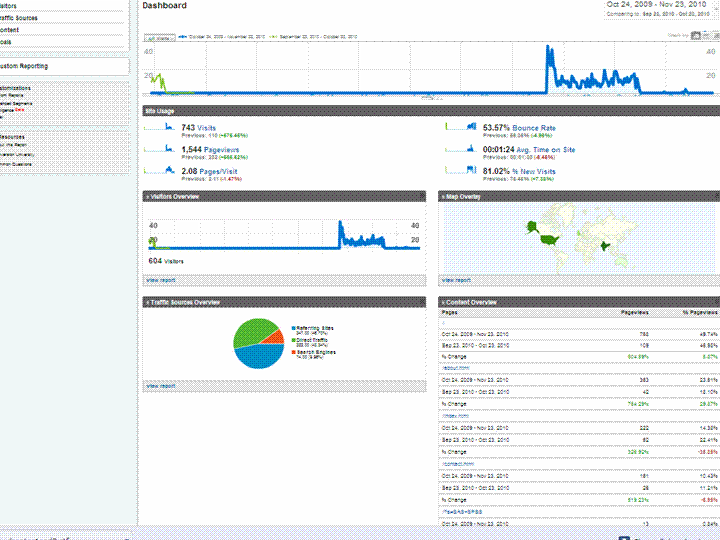
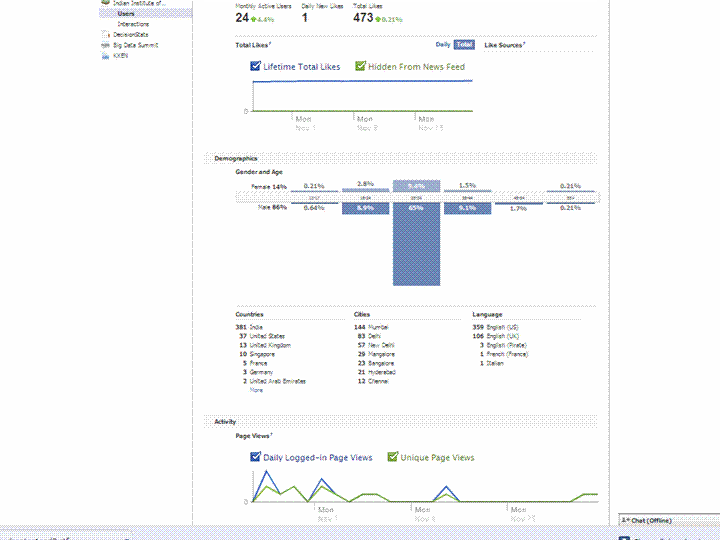
Using a simple screenshot- you can see Facebook Analytics for a Facebook page is simpler at explaining who is coming to visit rather than Google Analytics Dashboard (which has not seen the attention of a Visual UI or Graphic Redesign)

And if Facebook is going to take over the internet, well it is definitely giving better analytics in the process. What do you think?

Which Interface is simpler- and gives you better targeting. Ignore the numbers and just see the metrics measured and the way they are presented. Coincidently R is used at Facebook a lot (which has given the jjplot package)- and Google has NOT INVESTED MAJOR MONEY in creating Premium R Packages or Big Data Packages. I am talking investment at the scale Google is known for- not measly meetups.

(the summer of code dont count- it is for students mostly)

(but thanks for the Pizza G Men- and maybe revise that GA interface by putting a razor to some metrics)

GA vs Facebook Analytics