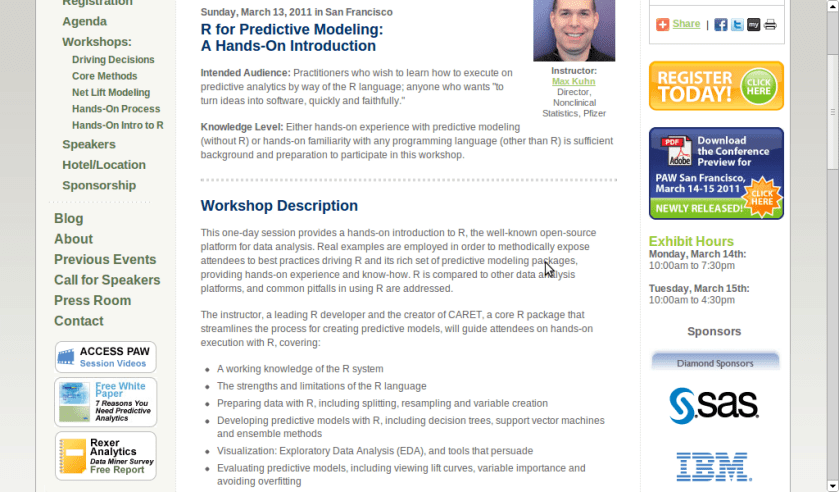
A workshop on using R for Predictive Modeling, by the Director, Non Clinical Stats, Pfizer. Interesting Bay Area Event- part of next edition of Predictive Analytics World
Sunday, March 13, 2011 in San Francisco
R for Predictive Modeling:
A Hands-On Introduction
Intended Audience: Practitioners who wish to learn how to execute on predictive analytics by way of the R language; anyone who wants “to turn ideas into software, quickly and faithfully.”
Knowledge Level: Either hands-on experience with predictive modeling (without R) or hands-on familiarity with any programming language (other than R) is sufficient background and preparation to participate in this workshop.
Workshop Description
This one-day session provides a hands-on introduction to R, the well-known open-source platform for data analysis. Real examples are employed in order to methodically expose attendees to best practices driving R and its rich set of predictive modeling packages, providing hands-on experience and know-how. R is compared to other data analysis platforms, and common pitfalls in using R are addressed.
The instructor, a leading R developer and the creator of CARET, a core R package that streamlines the process for creating predictive models, will guide attendees on hands-on execution with R, covering:
A working knowledge of the R system
The strengths and limitations of the R language
Preparing data with R, including splitting, resampling and variable creation
Developing predictive models with R, including decision trees, support vector machines and ensemble methods
Visualization: Exploratory Data Analysis (EDA), and tools that persuade
Evaluating predictive models, including viewing lift curves, variable importance and avoiding overfitting
Hardware: Bring Your Own Laptop
Each workshop participant is required to bring their own laptop running Windows or OS X. The software used during this training program, R, is free and readily available for download.
Attendees receive an electronic copy of the course materials and related R code at the conclusion of the workshop.
Max Kuhn, Director, Nonclinical Statistics, Pfizer
Max Kuhn is a Director of Nonclinical Statistics at Pfizer Global R&D in Connecticut. He has been apply models in the pharmaceutical industries for over 15 years.
He is a leading R developer and the author of several R packages including the CARET package that provides a simple and consistent interface to over 100 predictive models available in R.
Mr. Kuhn has taught courses on modeling within Pfizer and externally, including a class for the India Ministry of Information Technology.
Here is an interview with Prof Luis Torgo, author of the recent best seller “Data Mining with R-learning with case studies”.
Ajay- Describe your career in science. How do you think can more young people be made interested in science.
Luis- My interest in science only started after I’ve finished my degree. I’ve entered a research lab at the University of Porto and started working on Machine Learning, around 1990. Since then I’ve been involved generally in data analysis topics both from a research perspective as well as from a more applied point of view through interactions with industry partners on several projects. I’ve spent most of my career at the Faculty of Economics of the University of Porto, but since 2008 I’m at the department of Computer Science of the Faculty of Sciences of the same university. At the same time I’ve been a researcher at LIAAD / Inesc Porto LA (www.liaad.up.pt).
I like a lot what I do and like science and the “scientific way of thinking”, but I cannot say that I’ve always thought of this area as my “place”. Most of all I like solving challenging problems through data analysis. If that translates into some scientific outcome than I’m more satisfied but that is not my main goal, though I’m kind of “forced” to think about that because of the constraints of an academic career.
That does not mean I’m not passionate about science, I just think there are many more ways of “doing science” than what is reflected in the usual “scientific indicators” that most institutions seem to be more and more obsessed about.
Regards interesting young people in science that is a hard question that I’m not sure I’m qualified to answer. I do tend to think that young people are more sensible to concrete examples of problems they think are interesting and that science helps in solving, as a way of finding a motivation for facing the hard work they will encounter in a scientific career. I do believe in case studies as a nice way to learn and motivate, and thus my book 😉
Ajay- Describe your new book “Data Mining with R, learning with case studies” Why did you choose a case study based approach? who is the target audience? What is your favorite case study from the book
Luis- This book is about learning how to use R for data mining. The book follows a “learn by doing it” approach to data mining instead of the more common theoretical description of the available techniques in this discipline. This is accomplished by presenting a series of illustrative case studies for which all necessary steps, code and data are provided to the reader. Moreover, the book has an associated web page (www.liaad.up.pt/~ltorgo/DataMiningWithR) where all code inside the book is given so that easy copy-paste is possible for the more lazy readers.
The language used in the book is very informal without many theoretical details on the used data mining techniques. For obtaining these theoretical insights there are already many good data mining books some of which are referred in “further readings” sections given throughout the book. The decision of following this writing style had to do with the intended target audience of the book.
In effect, the objective was to write a monograph that could be used as a supplemental book for practical classes on data mining that exist in several courses, but at the same time that could be attractive to professionals working on data mining in non-academic environments, and thus the choice of this more practically oriented approach.
Regards my favorite case study that is a hard question for an author… still I would probably choose the “Predicting Stock Market Returns” case study (Chapter 3). Not only because I like this challenging problem, but mainly because the case study addresses all aspects of knowledge discovery in a real world scenario and not only the construction of predictive models. It tackles data collection, data pre-processing, model construction, transforming predictions into actions using different trading policies, using business-related performance metrics, implementing a trading simulator for “real-world” evaluation, and laying out grounds for constructing an online trading system.
Obviously, for all these steps there are far too many options to be possible to describe/evaluate all of them in a chapter, still I do believe that for the reader it is important to see the overall picture, and read about the relevant questions on this problem and some possible paths that can be followed at these different steps.
In other words: do not expect to become rich with the solution I describe in the chapter !
Ajay- Apart from R, what other data mining software do you use or have used in the past. How would you compare their advantages and disadvantages with R
Luis- I’ve played around with Clementine, Weka, RapidMiner and Knime, but really only playing with teaching goals, and no serious use/evaluation in the context of data mining projects. For the latter I mainly use R or software developed by myself (either in R or other languages). In this context, I do not think it is fair to compare R with these or other tools as I lack serious experience with them. I can however, tell you about what I see as the main pros and cons of R. The main reason for using R is really not only the power of the tool that does not stop surprising me in terms of what already exists and keeps appearing as contributions of an ever growing community, but mainly the ability of rapidly transforming ideas into prototypes. Regards some of its drawbacks I would probably mention the lack of efficiency when compared to other alternatives and the problem of data set sizes being limited by main memory.
I know that there are several efforts around for solving this latter issue not only from the community (e.g. http://cran.at.r-project.org/web/views/HighPerformanceComputing.html), but also from the industry (e.g. Revolution Analytics), but I would prefer that at this stage this would be a standard feature of the language so the the “normal” user need not worry about it. But then this is a community effort and if I’m not happy with the current status instead of complaining I should do something about it!
Ajay- Describe your writing habit- How do you set about writing the book- did you write a fixed amount daily or do you write in bursts etc
Luis- Unfortunately, I write in bursts whenever I find some time for it. This is much more tiring and time consuming as I need to read back material far too often, but I cannot afford dedicating too much consecutive time to a single task. Actually, I frequently tease my PhD students when they “complain” about the lack of time for doing what they have to, that they should learn to appreciate the luxury of having a single task to complete because it will probably be the last time in their professional life!
Ajay- What do you do to relax or unwind when not working?
Luis- For me, the best way to relax from work is by playing sports. When I’m involved in some game I reset my mind and forget about all other things and this is very relaxing for me. A part from sports I enjoy a lot spending time with my family and friends. A good and long dinner with friends over a good bottle of wine can do miracles when I’m too stressed with work! Finally,I do love traveling around with my family.
Short Bio: Luis Torgo has a degree in Systems and Informatics Engineering and a PhD in Computer Science. He is an Associate Professor of the Department of Computer Science of the Faculty of Sciences of the University of Porto. He is also a researcher of the Laboratory of Artificial Intelligence and Data Analysis (LIAAD) belonging to INESC Porto LA. Luis Torgo has been an active researcher in Machine Learning and Data Mining for more than 20 years. He has lead several academic and industrial Data Mining research projects. Luis Torgo accompanies the R project almost since its beginning, using it on his research activities. He teaches R at different levels and has given several courses in different countries.
For reading “Data Mining with R” – you can visit this site, also to avail of a 20% discount the publishers have generously given (message below)-
For more information and to place an order, visit us at http://www.crcpress.com. Order online and apply 20% Off discount code 907HM at checkout. CRC is pleased to offer free standard shipping on all online orders!
Price: $79.95 Cat. #: K10510 ISBN: 9781439810187 ISBN 10: 1439810184 Publication Date: November 09, 2010 Number of Pages: 305 Availability: In Stock Binding(s): Hardback
Additional features in R over other analytical packages-
1) Source Code is given to ensure complete custom solution and embedding for a particular application. Open source code has an advantage that is extensively peer- reviewed in Journals and Scientific Literature. This means bugs will found, shared and corrected transparently.
2) Wide literature of training material in the form of books is available for the R analytical platform.
3) Extensively the best data visualization tools in analytical software (apart from Tableau Software ‘s latest version). The extensive data visualization available in R is of the form a variety of customizable graphs, as well as animation. The principal reason third-party software initially started creating interfaces to R is because the graphical library of packages in R is more advanced as well as rapidly getting more features by the day.
4) Free in upfront license cost for academics and thus budget friendly for small and large analytical teams.
5) Flexible programming for your data environment. This includes having packages that ensure compatibility with Java, Python and C++.
6) Easy migration from other analytical platforms to R Platform. It is relatively easy for a non R platform user to migrate to R platform and there is no danger of vendor lock-in due to the GPL nature of source code and open community.
Statistics are numbers that tell (descriptive), advise ( prescriptive) or forecast (predictive). Analytics is a decision-making help tool. Analytics on which no decision is to be made or is being considered can be classified as purely statistical and non analytical. Thus ease of making a correct decision separates a good analytical platform from a not so good analytical platform. The distinction is likely to be disputed by people of either background- and business analysis requires more emphasis on how practical or actionable the results are and less emphasis on the statistical metrics in a particular data analysis task. I believe one clear reason between business analytics is different from statistical analysis is the cost of perfect information (data costs in real world) and the opportunity cost of delayed and distorted decision-making.
Specific to the following domains R has the following costs and benefits
Business Analytics
R is free per license and for download
It is one of the few analytical platforms that work on Mac OS
It’s results are credibly established in both journals like Journal of Statistical Software and in the work at LinkedIn, Google and Facebook’s analytical teams.
It has open source code for customization as per GPL
It also has a flexible option for commercial vendors like Revolution Analytics (who support 64 bit windows) as well as bigger datasets
It has interfaces from almost all other analytical software including SAS,SPSS, JMP, Oracle Data Mining, Rapid Miner. Existing license holders can thus invoke and use R from within these software
Huge library of packages for regression, time series, finance and modeling
High quality data visualization packages
Data Mining
R as a computing platform is better suited to the needs of data mining as it has a vast array of packages covering standard regression, decision trees, association rules, cluster analysis, machine learning, neural networks as well as exotic specialized algorithms like those based on chaos models.
Flexibility in tweaking a standard algorithm by seeing the source code
The RATTLE GUI remains the standard GUI for Data Miners using R. It was created and developed in Australia.
Business Dashboards and Reporting
Business Dashboards and Reporting are an essential piece of Business Intelligence and Decision making systems in organizations. R offers data visualization through GGPLOT, and GUI like Deducer and Red-R can help even non R users create a metrics dashboard
For online Dashboards- R has packages like RWeb, RServe and R Apache- which in combination with data visualization packages offer powerful dashboard capabilities.
R can be combined with MS Excel using the R Excel package – to enable R capabilities to be imported within Excel. Thus a MS Excel user with no knowledge of R can use the GUI within the R Excel plug-in to use powerful graphical and statistical capabilities.
Additional factors to consider in your R installation-
There are some more choices awaiting you now-
1) Licensing Choices-Academic Version or Free Version or Enterprise Version of R
2) Operating System Choices-Which Operating System to choose from? Unix, Windows or Mac OS.
3) Operating system sub choice- 32- bit or 64 bit.
4) Hardware choices-Cost -benefit trade-offs for additional hardware for R. Choices between local ,cluster and cloud computing.
5) Interface choices-Command Line versus GUI? Which GUI to choose as the default start-up option?
6) Software component choice- Which packages to install? There are almost 3000 packages, some of them are complimentary, some are dependent on each other, and almost all are free.
7) Additional Software choices- Which additional software do you need to achieve maximum accuracy, robustness and speed of computing- and how to use existing legacy software and hardware for best complementary results with R.
1) Licensing Choices-
You can choose between two kinds of R installations – one is free and open source from http://r-project.org The other R installation is commercial and is offered by many vendors including Revolution Analytics. However there are other commercial vendors too.
Windows remains the most widely used operating system on this planet. If you are experienced in Windows based computing and are active on analytical projects- it would not make sense for you to move to other operating systems. This is also based on the fact that compatibility problems are minimum for Microsoft Windows and the help is extensively documented. However there may be some R packages that would not function well under Windows- if that happens a multiple operating system is your next option.
Enterprise R from Revolution Analytics- Enterprise R from Revolution Analytics has a complete R Development environment for Windows including the use of code snippets to make programming faster. Revolution is also expected to make a GUI available by 2011. Revolution Analytics claims several enhancements for it’s version of R including the use of optimized libraries for faster performance.
MacOS
Reasons for choosing MacOS remains its considerable appeal in aesthetically designed software- but MacOS is not a standard Operating system for enterprise systems as well as statistical computing. However open source R claims to be quite optimized and it can be used for existing Mac users. However there seem to be no commercially available versions of R available as of now for this operating system.
Linux
Ubuntu
Red Hat Enterprise Linux
Other versions of Linux
Linux is considered a preferred operating system by R users due to it having the same open source credentials-much better fit for all R packages and it’s customizability for big data analytics.
Ubuntu Linux is recommended for people making the transition to Linux for the first time. Ubuntu Linux had an marketing agreement with revolution Analytics for an earlier version of Ubuntu- and many R packages can installed in a straightforward way as Ubuntu/Debian packages are available. Red Hat Enterprise Linux is officially supported by Revolution Analytics for it’s enterprise module. Other versions of Linux popular are Open SUSE.
Multiple operating systems-
Virtualization vs Dual Boot-
You can also choose between having a VMware VM Player for a virtual partition on your computers that is dedicated to R based computing or having operating system choice at the startup or booting of your computer. A software program called wubi helps with the dual installation of Linux and Windows.
64 bit vs 32 bit – Given a choice between 32 bit versus 64 bit versions of the same operating system like Linux Ubuntu, the 64 bit version would speed up processing by an approximate factor of 2. However you need to check whether your current hardware can support 64 bit operating systems and if so- you may want to ask your Information Technology manager to upgrade atleast some operating systems in your analytics work environment to 64 bit operating systems.
Hardware choices- At the time of writing this book, the dominant computing paradigm is workstation computing followed by server-client computing. However with the introduction of cloud computing, netbooks, tablet PCs, hardware choices are much more flexible in 2011 than just a couple of years back.
Hardware costs are a significant cost to an analytics environment and are also remarkably depreciated over a short period of time. You may thus examine your legacy hardware, and your future analytical computing needs- and accordingly decide between the various hardware options available for R.
Unlike other analytical software which can charge by number of processors, or server pricing being higher than workstation pricing and grid computing pricing extremely high if available- R is well suited for all kinds of hardware environment with flexible costs. Given the fact that R is memory intensive (it limits the size of data analyzed to the RAM size of the machine unless special formats and /or chunking is used)- it depends on size of datasets used and number of concurrent users analyzing the dataset. Thus the defining issue is not R but size of the data being analyzed.
Local Computing- This is meant to denote when the software is installed locally. For big data the data to be analyzed would be stored in the form of databases.
Server version- Revolution Analytics has differential pricing for server -client versions but for the open source version it is free and the same for Server or Workstation versions.
Workstation
Cloud Computing- Cloud computing is defined as the delivery of data, processing, systems via remote computers. It is similar to server-client computing but the remote server (also called cloud) has flexible computing in terms of number of processors, memory, and data storage. Cloud computing in the form of public cloud enables people to do analytical tasks on massive datasets without investing in permanent hardware or software as most public clouds are priced on pay per usage. The biggest cloud computing provider is Amazon and many other vendors provide services on top of it. Google is also coming for data storage in the form of clouds (Google Storage), as well as using machine learning in the form of API (Google Prediction API)
Amazon
Google
Cluster-Grid Computing/Parallel processing- In order to build a cluster, you would need the RMpi and the SNOW packages, among other packages that help with parallel processing.
How much resources
RAM-Hard Disk-Processors- for workstation computing
Instances or API calls for cloud computing
Interface Choices
Command Line
GUI
Web Interfaces
Software Component Choices
R dependencies
Packages to install
Recommended Packages
Additional software choices
Additional legacy software
Optimizing your R based computing
Code Editors
Code Analyzers
Libraries to speed up R
citation- R Development Core Team (2010). R: A language and environment for statistical computing. R Foundation for Statistical Computing,Vienna, Austria. ISBN 3-900051-07-0, URL http://www.R-project.org.
2011: Brussels, FOSDEM.(2011-02-05 – 2011-02-06).. Your first chance ever to give a talk for LibreOffice at this great open source event… obviously you don’t want to miss this!
Do you want to share your experience in starting to hack the code, or tell about the tweaks in your build environment, talk about the code changes you have done or those that you prepare, or do you want to share insight on your QA work? Simply submit your proposal at this page.
We really like you to share in the way that fits you best, be it 5, 10 or up to 30 minutes 🙂
It might well be that we’ll have to choose between the various proposals, after all FOSDEM is only two days 😉 So please give a clear description of your talk, goals and target audience. For details, see the outline that is provided at the wiki.
FOSDEM is a free conference to attend, and we will try to seek sponsorship. But funding is limited, so please only request it if you cannot attend otherwise, and we will try our best to support you.
Here is the software matrix that I am trying to develop for analytical software- It should help as a tentative guide for software purchases- it’s independent so unbiased (hopefully)- and it will try and bring as much range or sensitivity as possible. The list (rather than matrix) is of the format-
Type 0f analysis-
Data Visualization (Reporting with Pivot Ability to aggregate, disaggregate)
Reporting without Pivot Ability
Regression -Logistic Regression for Propensity or Risk Models
New software just released from the guys in California (@RevolutionR) so if you are a Linux user and have academic credentials you can download it for free (@Cmastication doesnt), you can test it to see what the big fuss is all about (also see http://www.revolutionanalytics.com/why-revolution-r/benchmarks.php) –
Revolution Analytics has just released Revolution R Enterprise 4.0.1 for Red Hat Enterprise Linux, a significant step forward in enterprise data analytics. Revolution R Enterprise 4.0.1 is built on R 2.11.1, the latest release of the open-source environment for data analysis and graphics. Also available is the initial release of our deployment server solution, RevoDeployR 1.0, designed to help you deliver R analytics via the Web. And coming soon to Linux: RevoScaleR, a new package for fast and efficient multi-core processing of large data sets.
As a registered user of the Academic version of Revolution R Enterprise for Linux, you can take advantage of these improvements by downloading and installing Revolution R Enterprise 4.0.1 today. You can install Revolution R Enterprise 4.0.1 side-by-side with your existing Revolution R Enterprise installations; there is no need to uninstall previous versions.
Download Information
The following information is all you will need to download and install the Academic Edition.
Supported Platforms:
Revolution R Enterprise Academic edition and RevoDeployR are supported on Red Hat® Enterprise Linux® 5.4 or greater (64-bit processors).
Approximately 300MB free disk space is required for a full install of Revolution R Enterprise. We recommend at least 1GB of RAM to use Revolution R Enterprise.
For the full list of system requirements for RevoDeployR, refer to the RevoDeployR™ Installation Guide for Red Hat® Enterprise Linux®.
Download Links:
You will first need to download the Revolution R Enterprise installer.
Installation Instructions for Revolution R Enterprise Academic Edition
After downloading the installer, do the following to install the software:
Log in as root if you have not already.
Change directory to the directory containing the downloaded installer.
Unpack the installer using the following command:
tar -xzf Revo-Ent-4.0.1-RHEL5-desktop.tar.gz
Change directory to the RevolutionR_4.0.1 directory created.
Run the installer by typing ./install.py and following the on-screen prompts.
Getting Started with the Revolution R Enterprise
After you have installed the software, launch Revolution R Enterprise by typing Revo64 at the shell prompt.
Documentation is available in the form of PDF documents installed as part of the Revolution R Enterprise distribution. Type Revo.home(“doc”) at the R prompt to locate the directory containing the manuals Getting Started with Revolution R (RevoMan.pdf) and the ParallelR User’s Guide(parRman.pdf).
Installation Instructions for RevoDeployR (and RServe)
After downloading the RevoDeployR distribution, use the following steps to install the software:
Note: These instructions are for an automatic install. For more details or for manual install instructions, refer to RevoDeployR_Installation_Instructions_for_RedHat.pdf.
Log into the operating system as root.
su –
Change directory to the directory containing the downloaded distribution for RevoDeployR and RServe.
Unzip the contents of the RevoDeployR tar file. At prompt, type:
tar -xzf deployrRedHat.tar.gz
Change directories. At the prompt, type:
cd installFiles
Launch the automated installation script and follow the on-screen prompts. At the prompt, type:
./installRedHat.sh Note:Red Hat installs MySQL without a password.
Getting Started with RevoDeployR
After installing RevoDeployR, you will be directed to the RevoDeployR landing page. The landing page has links to documentation, the RevoDeployR management console, the API Explorer development tool, and sample code.
The simple R-benchmark-25.R test script is a quick-running survey of general R performance. The Community-developed test consists of three sets of small benchmarks, referred to in the script as Matrix Calculation, Matrix Functions, and Program Control.
Revolution Analytics has created its own tests to simulate common real-world computations. Their descriptions are explained below.
Linear Algebra Computation
Base R 2.9.2
Revolution R (1-core)
Revolution R (4-core)
Speedup (4 core)
Matrix Multiply
243 sec
22 sec
5.9 sec
41x
Cholesky Factorization
23 sec
3.8 sec
1.1 sec
21x
Singular Value Decomposition
62 sec
13 sec
4.9 sec
12.6x
Principal Components Analysis
237 sec
41 sec
15.6 sec
15.2x
Linear Discriminant Analysis
142 sec
49 sec
32.0 sec
4.4x
Speedup = Slower time / Faster Time – 1
Matrix Multiply
This routine creates a random uniform 10,000 x 5,000 matrix A, and then times the computation of the matrix product transpose(A) * A.
set.seed (1)
m <- 10000
n <- 5000
A <- matrix (runif (m*n),m,n)
system.time (B <- crossprod(A))
The system will respond with a message in this format:
User system elapsed
37.22 0.40 9.68
The “elapsed” times indicate total wall-clock time to run the timed code.
The table above reflects the elapsed time for this and the other benchmark tests. The test system was an INTEL® Xeon® 8-core CPU (model X55600) at 2.5 GHz with 18 GB system RAM running Windows Server 2008 operating system. For the Revolution R benchmarks, the computations were limited to 1 core and 4 cores by calling setMKLthreads(1) and setMKLthreads(4) respectively. Note that Revolution R performs very well even in single-threaded tests: this is a result of the optimized algorithms in the Intel MKL library linked to Revolution R. The slight greater than linear speedup may be due to the greater total cache available to all CPU cores, or simply better OS CPU scheduling–no attempt was made to pin execution threads to physical cores. Consult Revolution R’s documentation to learn how to run benchmarks that use less cores than your hardware offers.
Cholesky Factorization
The Cholesky matrix factorization may be used to compute the solution of linear systems of equations with a symmetric positive definite coefficient matrix, to compute correlated sets of pseudo-random numbers, and other tasks. We re-use the matrix B computed in the example above:
system.time (C <- chol(B))
Singular Value Decomposition with Applications
The Singular Value Decomposition (SVD) is a numerically-stable and very useful matrix decompisition. The SVD is often used to compute Principal Components and Linear Discriminant Analysis.
# Singular Value Deomposition
m <- 10000
n <- 2000
A <- matrix (runif (m*n),m,n)
system.time (S <- svd (A,nu=0,nv=0))
# Principal Components Analysis
m <- 10000
n <- 2000
A <- matrix (runif (m*n),m,n)
system.time (P <- prcomp(A))
# Linear Discriminant Analysis require (‘MASS’)
g <- 5
k <- round (m/2)
A <- data.frame (A, fac=sample (LETTERS[1:g],m,replace=TRUE))
train <- sample(1:m, k)
system.time (L <- lda(fac ~., data=A, prior=rep(1,g)/g, subset=train))
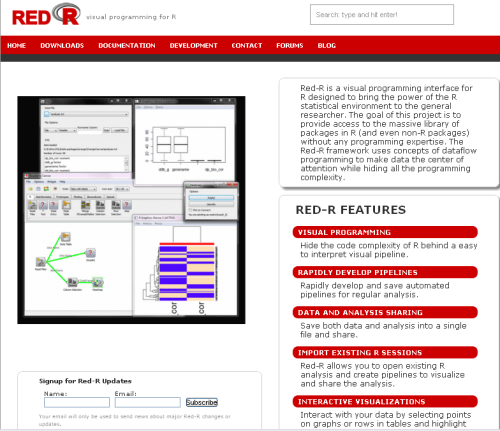
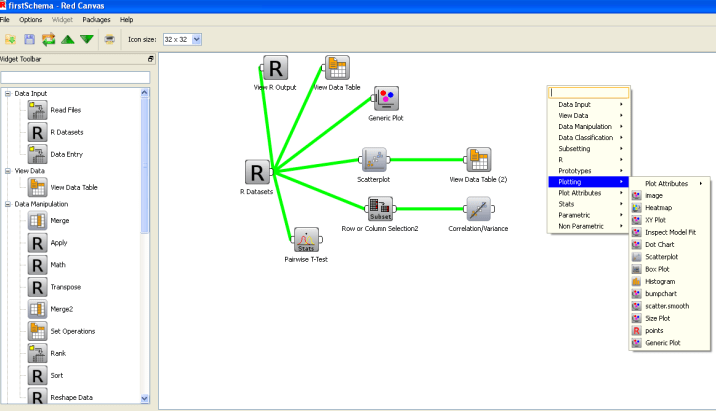
Red R 1.8 has been compiled and is available for download.
If you have seen Red R, well it resembles software like Enterprise Miner or Rapid Miner in the visual sense as it basically has a work-flow style of showing and setting up data analysis.
I played a bit with it, and this version is a definite improvement over the last ones.- Here is one more really groovy GUI for R- and it’s quite professionally done.





 DECISION STATS