Wubi only adds an extra option to boot into Ubuntu. Wubi does not require you to modify the partitions of your PC, or to use a different bootloader, and does not install special drivers.
Wine lets you run Windows software on other operating systems. With Wine, you can install and run these applications just like you would in Windows. Read more at http://wiki.winehq.org/Debunking_Wine_Myths
Cygwin is a Linux-like environment for Windows. It consists of two parts:
A DLL (cygwin1.dll) which acts as a Linux API emulation layer providing substantial Linux API functionality.
A collection of tools which provide Linux look and feel
What Isn’t Cygwin?
Cygwin is not a way to run native linux apps on Windows. You have to rebuild your application from source if you want it to run on Windows.
Cygwin is not a way to magically make native Windows apps aware of UNIX ® functionality, like signals, ptys, etc. Again, you need to build your apps from source if you want to take advantage of Cygwin functionality.
VMware Player is the easiest way to run multiple operating systems at the same time on your PC. With its user-friendly interface, VMware Player makes it effortless for anyone to try out Windows 7, Chrome OS or the latest Linux releases, or create isolated virtual machines to safely test new software and surf the Web
Here is a short list of resources and material I put together as starting points for R and Cloud Computing It’s a bit messy but overall should serve quite comprehensively.
Cloud computing is a commonly used expression to imply a generational change in computing from desktop-servers to remote and massive computing connections,shared computers, enabled by high bandwidth across the internet.
As per the National Institute of Standards and Technology Definition,
Cloud computing is a model for enabling convenient, on-demand network access to a shared pool of configurable computing resources (e.g., networks, servers, storage, applications, and services) that can be rapidly provisioned and released with minimal management effort or service provider interaction.
Rweb is developed and maintained by Jeff Banfield. The Rweb Home Page provides access to all three versions of Rweb—a simple text entry form that returns output and graphs, a more sophisticated JavaScript version that provides a multiple window environment, and a set of point and click modules that are useful for introductory statistics courses and require no knowledge of the R language. All of the Rweb versions can analyze Web accessible datasets if a URL is provided.
The paper “Rweb: Web-based Statistical Analysis”, providing a detailed explanation of the different versions of Rweb and an overview of how Rweb works, was published in the Journal of Statistical Software (http://www.jstatsoft.org/v04/i01/).
Ulf Bartel has developed R-Online, a simple on-line programming environment for R which intends to make the first steps in statistical programming with R (especially with time series) as easy as possible. There is no need for a local installation since the only requirement for the user is a JavaScript capable browser. See http://osvisions.com/r-online/ for more information.
Rcgi is a CGI WWW interface to R by MJ Ray. It had the ability to use “embedded code”: you could mix user input and code, allowing the HTMLauthor to do anything from load in data sets to enter most of the commands for users without writing CGI scripts. Graphical output was possible in PostScript or GIF formats and the executed code was presented to the user for revision. However, it is not clear if the project is still active.
Currently, a modified version of Rcgi by Mai Zhou (actually, two versions: one with (bitmap) graphics and one without) as well as the original code are available from http://www.ms.uky.edu/~statweb/.
David Firth has written CGIwithR, an R add-on package available from CRAN. It provides some simple extensions to R to facilitate running R scripts through the CGI interface to a web server, and allows submission of data using both GET and POST methods. It is easily installed using Apache under Linux and in principle should run on any platform that supports R and a web server provided that the installer has the necessary security permissions. David’s paper “CGIwithR: Facilities for Processing Web Forms Using R” was published in the Journal of Statistical Software (http://www.jstatsoft.org/v08/i10/). The package is now maintained by Duncan Temple Lang and has a web page athttp://www.omegahat.org/CGIwithR/.
Rpad, developed and actively maintained by Tom Short, provides a sophisticated environment which combines some of the features of the previous approaches with quite a bit of JavaScript, allowing for a GUI-like behavior (with sortable tables, clickable graphics, editable output), etc.
Jeff Horner is working on the R/Apache Integration Project which embeds the R interpreter inside Apache 2 (and beyond). A tutorial and presentation are available from the project web page at http://biostat.mc.vanderbilt.edu/twiki/bin/view/Main/RApacheProject.
Rserve is a project actively developed by Simon Urbanek. It implements a TCP/IP server which allows other programs to use facilities of R. Clients are available from the web site for Java and C++ (and could be written for other languages that support TCP/IP sockets).
OpenStatServer is being developed by a team lead by Greg Warnes; it aims “to provide clean access to computational modules defined in a variety of computational environments (R, SAS, Matlab, etc) via a single well-defined client interface” and to turn computational services into web services.
Two projects use PHP to provide a web interface to R. R_PHP_Online by Steve Chen (though it is unclear if this project is still active) is somewhat similar to the above Rcgi and Rweb. R-php is actively developed by Alfredo Pontillo and Angelo Mineo and provides both a web interface to R and a set of pre-specified analyses that need no R code input.
webbioc is “an integrated web interface for doing microarray analysis using several of the Bioconductor packages” and is designed to be installed at local sites as a shared computing resource.
Rwui is a web application to create user-friendly web interfaces for R scripts. All code for the web interface is created automatically. There is no need for the user to do any extra scripting or learn any new scripting techniques. Rwui can also be found at http://rwui.cryst.bbk.ac.uk.
Finally, the R.rsp package by Henrik Bengtsson introduces “R Server Pages”. Analogous to Java Server Pages, an R server page is typically HTMLwith embedded R code that gets evaluated when the page is requested. The package includes an internal cross-platform HTTP server implemented in Tcl, so provides a good framework for including web-based user interfaces in packages. The approach is similar to the use of the brew package withRapache with the advantage of cross-platform support and easy installation.
Remote access to R/Bioconductor on EBI’s 64-bit Linux Cluster
Start the workbench by downloading the package for your operating system (Macintosh or Windows), or via Java Web Start, and you will get access to an instance of R running on one of EBI’s powerful machines. You can install additional packages, upload your own data, work with graphics and collaborate with colleagues, all as if you are running R locally, but unlimited by your machine’s memory, processor or data storage capacity.
Most up-to-date R version built for multicore CPUs
Access to all Bioconductor packages
Access to our computing infrastructure
Fast access to data stored in EBI’s repositories (e.g., public microarray data in ArrayExpress)
Using R Google Docs http://www.omegahat.org/RGoogleDocs/run.pdf
It uses the XML and RCurl packages and illustrates that it is relatively quick and easy
to use their primitives to interact with Web services.
Amazon’s EC2 is a type of cloud that provides on demand computing infrastructures called an Amazon Machine Images or AMIs. In general, these types of cloud provide several benefits:
Simple and convenient to use. An AMI contains your applications, libraries, data and all associated configuration settings. You simply access it. You don’t need to configure it. This applies not only to applications like R, but also can include any third-party data that you require.
On-demand availability. AMIs are available over the Internet whenever you need them. You can configure the AMIs yourself without involving the service provider. You don’t need to order any hardware and set it up.
Elastic access. With elastic access, you can rapidly provision and access the additional resources you need. Again, no human intervention from the service provider is required. This type of elastic capacity can be used to handle surge requirements when you might need many machines for a short time in order to complete a computation.
Pay per use. The cost of 1 AMI for 100 hours and 100 AMI for 1 hour is the same. With pay per use pricing, which is sometimes called utility pricing, you simply pay for the resources that you use.
#This example requires you had previously created a bucket named data_language on your Google Storage and you had uploaded a CSV file named language_id.txt (your data) into this bucket – see for details
library(predictionapirwrapper)
Elastic-R is a new portal built using the Biocep-R platform. It enables statisticians, computational scientists, financial analysts, educators and students to use cloud resources seamlessly; to work with R engines and use their full capabilities from within simple browsers; to collaborate, share and reuse functions, algorithms, user interfaces, R sessions, servers; and to perform elastic distributed computing with any number of virtual machines to solve computationally intensive problems.
Also see Karim Chine’s http://biocep-distrib.r-forge.r-project.org/
R for Salesforce.com
At the point of writing this, there seem to be zero R based apps on Salesforce.com This could be a big opportunity for developers as both Apex and R have similar structures Developers could write free code in R and charge for their translated version in Apex on Salesforce.com
Force.com and Salesforce have many (1009) apps at http://sites.force.com/appexchange/home for cloud computing for
businesses, but very few forecasting and statistical simulation apps.
These are like iPhone apps except meant for business purposes (I am
unaware if any university is offering salesforce.com integration
though google apps and amazon related research seems to be on)
Personal Note-Mentioning SAS in an email to a R list is a big no-no in terms of getting a response and love. Same for being careless about which R help list to email (like R devel or R packages or R help)
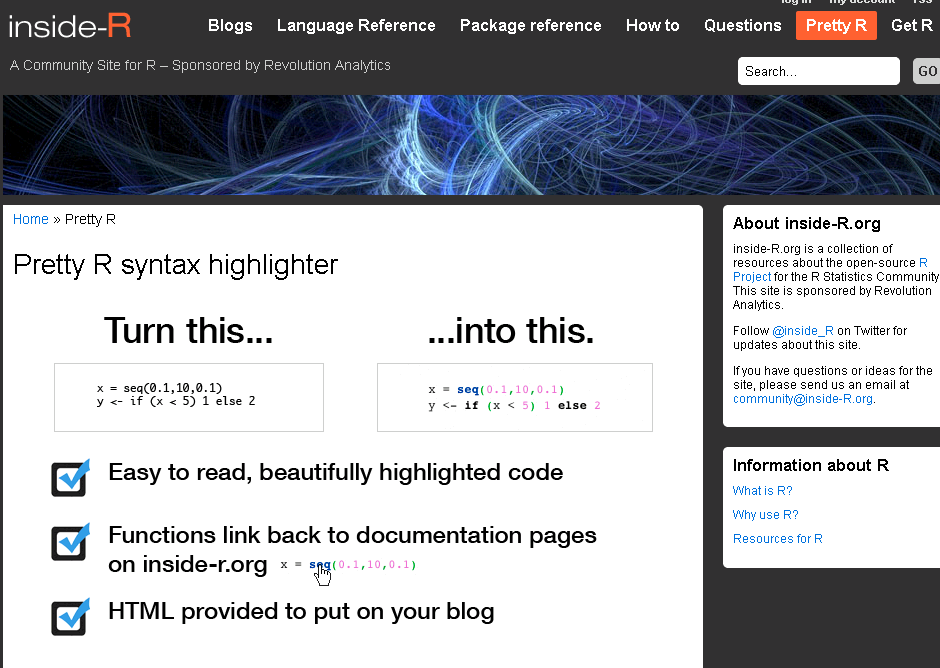
Basically Inside R is a go-to site for tips, tricks, packages, as well as blog posts. It thus enhances R Bloggers – but also adds in other multiple features as well.
It is an excellent place for R beginners and learning R. Also it is moderated ( so you wont get the flashy jhing bhang stuff- just your R.
What I really liked is the Pretty R functionality for turning R code -its nifty for color coding R code for use of posting in your blog, journal or article
and when you are there drop them a line for their excellent R support for events (like Pizza, sponsorship) and nifty R packages (doSNOW, foreach, RevoScaler, RevoDeployR) and how much open core makes them look silly?
Come on Revolution- share the open code for RevoScaler package- did you notice any sales dip when you open sourced the other packages? (cue to David Smith to roll his eyes again)
Note- for some strange reason I continue to be on top ranked LibreOffice blogs- maybe because I write more on the software itself than on Oracle politics or coffee spillovers.
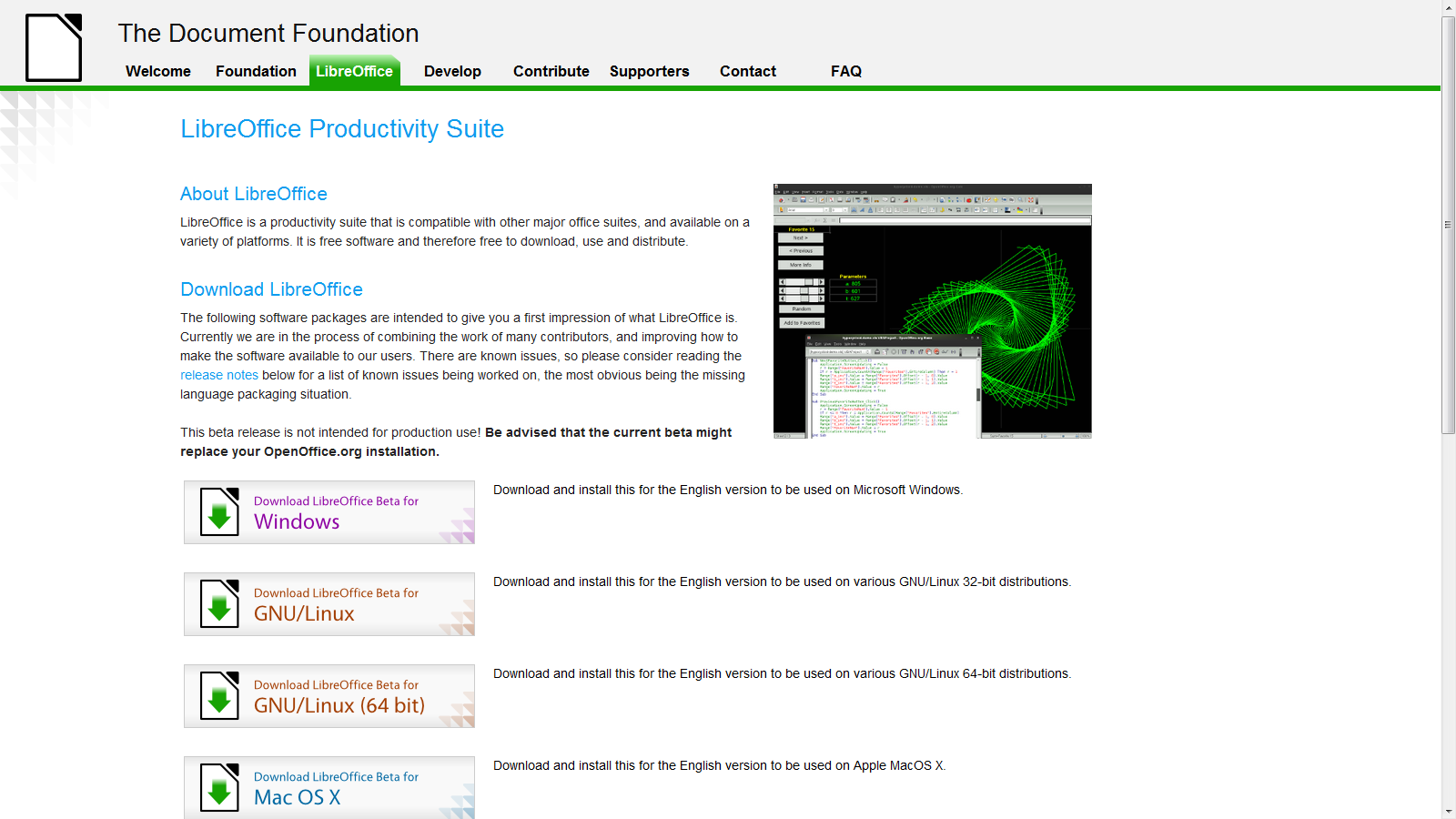
LibreOffice Beta 2 is ready and I just installed it on Windows 7 – works nice- and I somehow think open Office and Google needs an example to stop being so scary on cautioning—— hey,hey it’s a beta – (do you see Oracle saying this release is a beta or Windows saying hey this Windows Vista is a beta for Windows 7- No right?)-
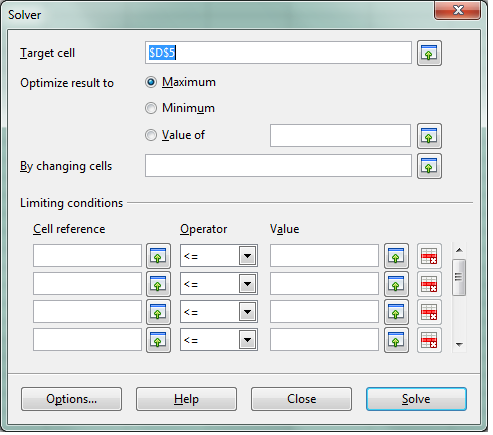
see screenshot of solver in LibreOffice spreadsheet -works just fine.
We cant wait for Chromium OS and LibreOffice integration (or Google Docs-LibreOffice integration) so Google starts thinking on those lines (of course
Google also needs to ramp up Google Storage and Google Predict API– but dude are you sure you wanna take on Amazon, Oracle and MS and Yahoo and Apple at the same time. Dear Herr Schmidt- Last German Guy who did that , ended up in a bunker in Berlin. (Ever since I had to pay 50 euros as Airline Transit fee -yes Indian passport holders have to do that in Germany- I am kind of non objective on that issue)
Google Management is busy nowadays thinking of trying to beat Facebook -hint -hint-
-buy out the biggest app makers of Facebook apps and create an api for Facebook info download and upload into Orkut –maybe invest like an angel in that startup called Diaspora http://www.joindiaspora.com/) see-
Back to the topic (and there are enough people blogging on Google should or shouldnt do)
-LibreOffice aesthetically rocks! It has a cool feel.
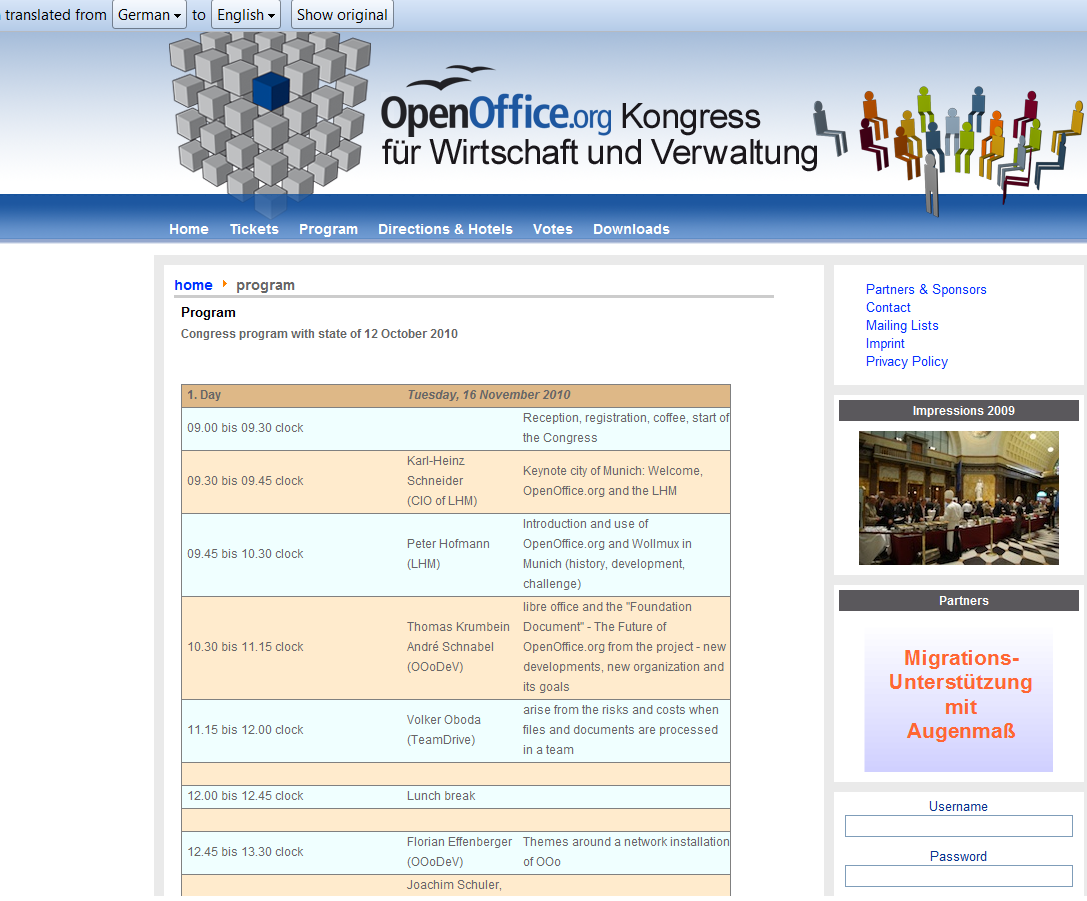
As you can see I used the Chrome Extension for Google Translate for an instant translation from German into English (though it still needs some work, Herr Translator)
Back to actually working on LibreOffice- if Word and Powerpoint is all you do- save some money for Christmas and download it today from
Here is an important new step in Python- the established statistical programming language (used to be really pushed by SPSS in pre-IBM days and the rPy package integrates R and Python).
Well the news ( http://www.kdnuggets.com/2010/10/eap-evolutionary-algorithms-in-python.html ) is the release of Distributed Evolutionary Algorithms in Python. If your understanding of modeling means running regression and iterating it- you may need to read some more. If you have felt frustrated at lack of parallelization in statistical software as well as your own hardware constraints- well go DEAP (and for corporate types the licensing is
DEAP is intended to be an easy to use distributed evolutionary algorithm library in the Python language. Its two main components are modular and can be used separately. The first module is a Distributed Task Manager (DTM), which is intended to run on cluster of computers. The second part is the Evolutionary Algorithms in Python (EAP) framework.
The most basic features of EAP requires Python2.5 (we simply do not offer support for 2.4). In order to use multiprocessing you will need Python2.6 and to be able to combine the toolbox and the multiprocessing module Python2.7 is needed for its support to pickle partial functions.
If you want your project listed here, simply send us a link and a brief description and we’ll be glad to add it.
and from the wordpress.com blog (funny how people like code.google.com but not blogger.google.com anymore) at http://deapdev.wordpress.com/
EAP is part of the DEAP project, that also includes some facilities for the automatic distribution and parallelization of tasks over a cluster of computers. The D part of DEAP, called DTM, is under intense development and currently available as an alpha version. DTM currently provides two and a half ways to distribute workload on a cluster or LAN of workstations, based on MPI and TCP communication managers.
This public release (version 0.6) is more complete and simpler than ever. It includes Genetic Algorithms using any imaginable representation, Genetic Programming with strongly and loosely typed trees in addition to automatically defined functions, Evolution Strategies (including Covariance Matrix Adaptation), multiobjective optimization techniques (NSGA-II and SPEA2), easy parallelization of algorithms and much more like milestones, genealogy, etc.
We are impatient to hear your feedback and comments on that system at .
Best,
François-Michel De Rainville
Félix-Antoine Fortin
Marc-André Gardner
Christian Gagné
Marc Parizeau
Laboratoire de vision et systèmes numériques
Département de génie électrique et génie informatique
Université Laval
Quebec City (Quebec), Canada
and if you are new to Python -sigh here are some statistical things (read ad-van-cED analytics using Python) by a slideshare from Visual numerics (pre Rogue Wave acquisition)
New software just released from the guys in California (@RevolutionR) so if you are a Linux user and have academic credentials you can download it for free (@Cmastication doesnt), you can test it to see what the big fuss is all about (also see http://www.revolutionanalytics.com/why-revolution-r/benchmarks.php) –
Revolution Analytics has just released Revolution R Enterprise 4.0.1 for Red Hat Enterprise Linux, a significant step forward in enterprise data analytics. Revolution R Enterprise 4.0.1 is built on R 2.11.1, the latest release of the open-source environment for data analysis and graphics. Also available is the initial release of our deployment server solution, RevoDeployR 1.0, designed to help you deliver R analytics via the Web. And coming soon to Linux: RevoScaleR, a new package for fast and efficient multi-core processing of large data sets.
As a registered user of the Academic version of Revolution R Enterprise for Linux, you can take advantage of these improvements by downloading and installing Revolution R Enterprise 4.0.1 today. You can install Revolution R Enterprise 4.0.1 side-by-side with your existing Revolution R Enterprise installations; there is no need to uninstall previous versions.
Download Information
The following information is all you will need to download and install the Academic Edition.
Supported Platforms:
Revolution R Enterprise Academic edition and RevoDeployR are supported on Red Hat® Enterprise Linux® 5.4 or greater (64-bit processors).
Approximately 300MB free disk space is required for a full install of Revolution R Enterprise. We recommend at least 1GB of RAM to use Revolution R Enterprise.
For the full list of system requirements for RevoDeployR, refer to the RevoDeployR™ Installation Guide for Red Hat® Enterprise Linux®.
Download Links:
You will first need to download the Revolution R Enterprise installer.
Installation Instructions for Revolution R Enterprise Academic Edition
After downloading the installer, do the following to install the software:
Log in as root if you have not already.
Change directory to the directory containing the downloaded installer.
Unpack the installer using the following command:
tar -xzf Revo-Ent-4.0.1-RHEL5-desktop.tar.gz
Change directory to the RevolutionR_4.0.1 directory created.
Run the installer by typing ./install.py and following the on-screen prompts.
Getting Started with the Revolution R Enterprise
After you have installed the software, launch Revolution R Enterprise by typing Revo64 at the shell prompt.
Documentation is available in the form of PDF documents installed as part of the Revolution R Enterprise distribution. Type Revo.home(“doc”) at the R prompt to locate the directory containing the manuals Getting Started with Revolution R (RevoMan.pdf) and the ParallelR User’s Guide(parRman.pdf).
Installation Instructions for RevoDeployR (and RServe)
After downloading the RevoDeployR distribution, use the following steps to install the software:
Note: These instructions are for an automatic install. For more details or for manual install instructions, refer to RevoDeployR_Installation_Instructions_for_RedHat.pdf.
Log into the operating system as root.
su –
Change directory to the directory containing the downloaded distribution for RevoDeployR and RServe.
Unzip the contents of the RevoDeployR tar file. At prompt, type:
tar -xzf deployrRedHat.tar.gz
Change directories. At the prompt, type:
cd installFiles
Launch the automated installation script and follow the on-screen prompts. At the prompt, type:
./installRedHat.sh Note:Red Hat installs MySQL without a password.
Getting Started with RevoDeployR
After installing RevoDeployR, you will be directed to the RevoDeployR landing page. The landing page has links to documentation, the RevoDeployR management console, the API Explorer development tool, and sample code.
The simple R-benchmark-25.R test script is a quick-running survey of general R performance. The Community-developed test consists of three sets of small benchmarks, referred to in the script as Matrix Calculation, Matrix Functions, and Program Control.
Revolution Analytics has created its own tests to simulate common real-world computations. Their descriptions are explained below.
Linear Algebra Computation
Base R 2.9.2
Revolution R (1-core)
Revolution R (4-core)
Speedup (4 core)
Matrix Multiply
243 sec
22 sec
5.9 sec
41x
Cholesky Factorization
23 sec
3.8 sec
1.1 sec
21x
Singular Value Decomposition
62 sec
13 sec
4.9 sec
12.6x
Principal Components Analysis
237 sec
41 sec
15.6 sec
15.2x
Linear Discriminant Analysis
142 sec
49 sec
32.0 sec
4.4x
Speedup = Slower time / Faster Time – 1
Matrix Multiply
This routine creates a random uniform 10,000 x 5,000 matrix A, and then times the computation of the matrix product transpose(A) * A.
set.seed (1)
m <- 10000
n <- 5000
A <- matrix (runif (m*n),m,n)
system.time (B <- crossprod(A))
The system will respond with a message in this format:
User system elapsed
37.22 0.40 9.68
The “elapsed” times indicate total wall-clock time to run the timed code.
The table above reflects the elapsed time for this and the other benchmark tests. The test system was an INTEL® Xeon® 8-core CPU (model X55600) at 2.5 GHz with 18 GB system RAM running Windows Server 2008 operating system. For the Revolution R benchmarks, the computations were limited to 1 core and 4 cores by calling setMKLthreads(1) and setMKLthreads(4) respectively. Note that Revolution R performs very well even in single-threaded tests: this is a result of the optimized algorithms in the Intel MKL library linked to Revolution R. The slight greater than linear speedup may be due to the greater total cache available to all CPU cores, or simply better OS CPU scheduling–no attempt was made to pin execution threads to physical cores. Consult Revolution R’s documentation to learn how to run benchmarks that use less cores than your hardware offers.
Cholesky Factorization
The Cholesky matrix factorization may be used to compute the solution of linear systems of equations with a symmetric positive definite coefficient matrix, to compute correlated sets of pseudo-random numbers, and other tasks. We re-use the matrix B computed in the example above:
system.time (C <- chol(B))
Singular Value Decomposition with Applications
The Singular Value Decomposition (SVD) is a numerically-stable and very useful matrix decompisition. The SVD is often used to compute Principal Components and Linear Discriminant Analysis.
# Singular Value Deomposition
m <- 10000
n <- 2000
A <- matrix (runif (m*n),m,n)
system.time (S <- svd (A,nu=0,nv=0))
# Principal Components Analysis
m <- 10000
n <- 2000
A <- matrix (runif (m*n),m,n)
system.time (P <- prcomp(A))
# Linear Discriminant Analysis require (‘MASS’)
g <- 5
k <- round (m/2)
A <- data.frame (A, fac=sample (LETTERS[1:g],m,replace=TRUE))
train <- sample(1:m, k)
system.time (L <- lda(fac ~., data=A, prior=rep(1,g)/g, subset=train))
Ubuntu One Basic – available now This is the same as the current free 2 GB option but with a new name. Users can continue to sync files, contacts, bookmarks and notes for free as part of our basic service and access the integrated Ubuntu One Music Store. We are also extending our platform support to include a Windows client, which will be available in Beta very soon.
Ubuntu One Mobile – available October 7th Ubuntu One Mobile is our first example of a service that helps you do more with the content stored in your personal cloud. With Ubuntu One Mobile’s main feature – mobile music streaming – users can listen to any MP3 songs in their personal cloud (any owned MP3s, not just those purchased from the Ubuntu One Music Store) using our custom developed apps for iPhone and Android (coming soon to their respective marketplaces). These will be open source and available from Launchpad. Ubuntu One Mobile will also include the mobile contacts sync feature that was launched in Beta for the 10.04 release.
Ubuntu One Mobile is available for $3.99 (USD) per month or $39.99 (USD) per year. Users interested in this add-on can try the service free for 30 days. Ubuntu One Mobile will be the perfect companion to your morning exercise, daily commute, and weekend at the beach – we’re really excited to bring you this service!
Ubuntu One 20-Packs – available now A 20-Pack is 20 GB of storage for files, contacts, notes, and bookmarks. Users will be able to add multiple 20-Packs at $2.99 (USD) per month or $29.99 (USD) per year each. If you start with Ubuntu One Basic (2 GB) and add 1 20-Pack (20 GB), you will have 22 GB of storage.
All add-ons are available for purchase in multiple currencies – USD, EUR and, recently added, GBP.
Users currently paying for the old 50 GB plan (including mobile contacts sync) can either keep their existing service or switch to the new plans structure to get more value from Ubuntu One at a lower price.








 DECISION STATS