Browsing update- Dear Decisionstats.com Reader

Wordpress default1 mainpage
Image via Wikipedia

In view of the recent root level breach of WordPress, which may include viewing source code for hidden hacks or Trojans, as effective immediately, please Decisionstats.com has no responsibility for any viruses, or Trojans that you may inadvertently download while on this website. I will be responsible for any deliberate malicious honey traps I put up , but any body putting an interesting comment with a link on this website , can and may direct you to phishing.

All disputes will be to subject to the jurisdiction of Tis Hazari Court, Delhi, India as already mentioned.

Why does Matt (of WordPress) hate Matt (of Google)

Biz Stone, co-founder of Twitter
Image via Wikipedia

I want to show some bad ads of Google Ad sense. I pay through my nose for video upgrades and extra space to keep people happy.

120,000 views in 2010

Money earned By Matt (of WordPress)= $$$$$ from me

Money earned by Mutt -(thats me)= 000,000,000

Please allow me to run ads on wordpress.com

or create your own fucking ad networks

but do it PHAST.

ESLE blog trsnfer using Blog Export, divide Xml file into 13 files  using Notepad copy and paste

go to Appspot

Convert files to Blogger files\

Thats the company BIZ stone OF tWITTER  made

before these Two matts got into dog fights.

https://wordpress2blogger.appspot.com/

Ever wanted to move your WordPress blogs over to Blogger? This site can aid in the process!

Instructions

  1. Login to your WordPress account and navigate to the Dashboard for the blog that you’d like to transfer to Blogger.
  2. Click on the Manage tab below the Blog name.
  3. Click on the Export link below the Manage tab.
  4. Download the WordPress WXR export file by clicking on Download Export File.
  5. Save this file to your local machine.
  6. Browse to that saved document with the form below and click Convert.
     
  7. Save this file to your local machine. This file will be the contents of your posts/comments from WordPress in a Blogger export file.
  8. Login to your Blogger or create a new user.
  9. Once logged in, click on the Create a Blog link from the user dashboard, and then click on the Import Blog Tool
  10. Follow the instructions and upload your Blogger export file when prompted.
  11. After completing the import wizard, you should have a set of imported posts from WordPress that you can now publish to Blogger. Have fun!

NOTE: This hosted application will only allow downloads smaller than 1MB.

For information on how to run this conversion on your own, visit the open source project hosted at code.google.com

Powered by Google App Engine

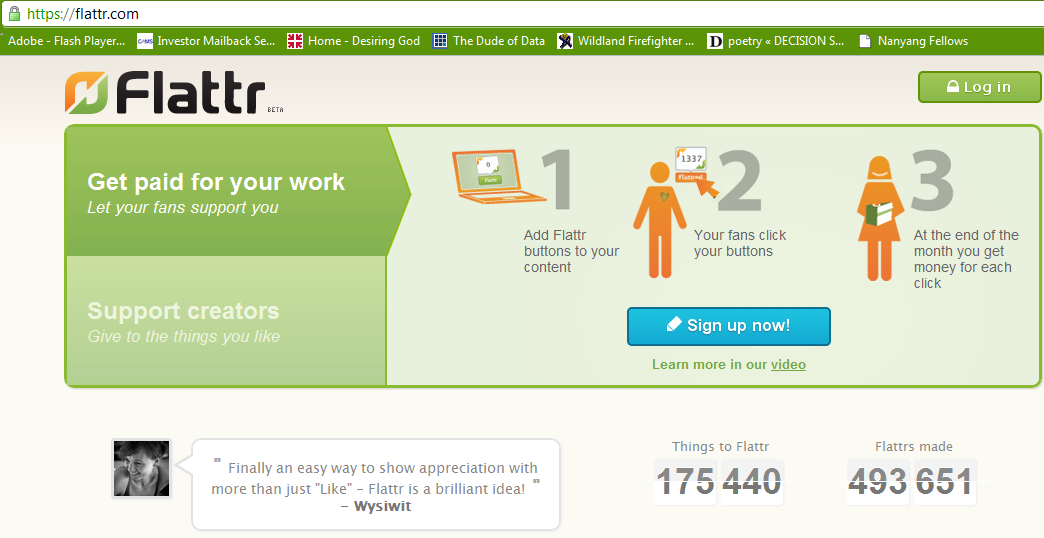
Getting Flatr on a wordpress.com blog

What is Flattr?

social micro payments- aka another way for bloggers, tweeters, facebookies to make money.

Thing of it as the Paypal plus a ReTweetmeme button.

FlattR is the new legal business of the creator of Pirate Bay- the large search engine for bit torrent data.

 and how to enable it on WordPress.com

Read some snarkly grrovy instructions here with a screenshot

http://thereturnofthepublic.wordpress.com/2011/04/10/putting-flattr-on-a-wordpress-com-blog-a-guide-for-drooling-imbeciles/

1.) Open a Flattr.com account here. This should be reasonably straightforward. A monkey hitting keys at random could manage it in about half an hour. It took me less than 45 minutes.

2.) In the top right of ‘Your Flattr Dashboard’ there is a button ‘Submit Thing’. Click on that and enter the details of your blog – the URL (like decisionstats.com for me) and a description (make that atleast 3 sentences). Flattr will create a page – for example,https://flattr.com/thing/162940/example-blog


Now go to your wordpress dashboard- sharing tab.

/wp-admin/options-general.php?page=sharing

Add the following lines to your New Add Service in respective tabs

URL= https://flattr.com/thing/175763/DecisionStats (change this to the one created for yourself instep2 above)

ICON = http://api.flatrr.com/button/flattr-badge-large.png

 If you have a non WordPress blog see instructions at http://markup.io/v/jz3wv155bsfg or screenshot of instructions here-

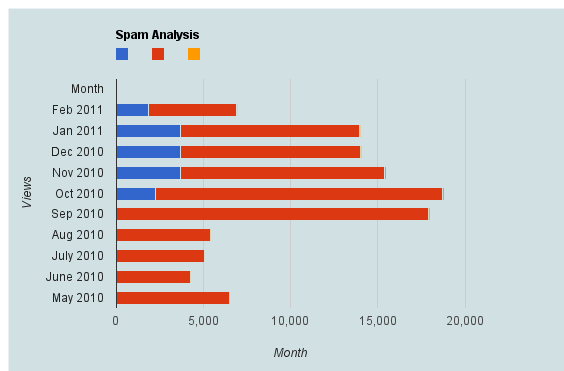
Spam Analysis Akismet-WPStats-Blogging

Here is a brief dataset I out after one hour of cutting and pasting from WordPress.com’s creative data style formats. It shows spam,comments,traffic, and number of posts written monthly.

Clearly monthly traffic is directly related to number I write (suppose A + B* Posts)

But Spam is showing a discontinuous growth especially after a big month (in which Reddit helped)

Akismet had some missing historical values (which is curious)

So what can we do with this dataframe in R or any other statistical software.

Spam Analysis
Month Spam detected Traffic excluding spam Posts Written Traffic /Post Spam /Post Spam/Traffic Ham detected Missed spam False positives
Feb-11 1848 5079 18 282.17 102.6667 36.39% 4.00 6.00 0.0%
Jan-11 3724 10238 35 292.51 106.4 36.37% 0.00 3.00 0.0%
Dec-10 3676 10345 35 295.57 105.0286 35.53% 8.00 6.00 0.0%
Nov-10 3680 11723 71 165.11 51.83099 31.39% 24.00 3.00 0.0%
Oct-10 2292 16430 71 231.41 32.28169 13.95% 24.00 18.00 0.0%
Sep-10 0 17913 63 284.33 0 0.00% 0.00 0.00 0.0%
Aug-10 0 5403 17 317.82 0 0.00% 0.00 0.00 0.0%
Jul-10 2 5041 10 504.1 0.2 0.04% 0.00 0.00 0.0%
Jun-10 5 4271 11 388.27 0.454545 0.12% 10.00 1.00 0.0%

2010 in review and WP-Stats

The following is an auto generated post thanks to WordPress.com stats team- clearly they have got some stuff wrong

1) Defining the speedometer quantitatively

2) The busiest day numbers are plain wrong ( 2 views ??)

3) There is still no geographic data in WordPress -com stats (unlike Google Analytics) and I cant enable Google Analytics on a wordpress.com hosted site.


The stats helper monkeys at WordPress.com mulled over how this blog did in 2010, and here’s a high level summary of its overall blog health:

Healthy blog!

The Blog-Health-o-Meter™ reads Wow.

Crunchy numbers

Featured image

The Louvre Museum has 8.5 million visitors per year. This blog was viewed about 97,000 times in 2010. If it were an exhibit at The Louvre Museum, it would take 4 days for that many people to see it.


In 2010, there were 367 new posts, growing the total archive of this blog to 1191 posts. There were 411 pictures uploaded, taking up a total of 121mb. That’s about 1 pictures per day.

The busiest day of the year was September 22nd with 2 views. The most popular post that day was Top 10 Graphical User Interfaces in Statistical Software.

Where did they come from?

The top referring sites in 2010 were r-bloggers.com, reddit.com, rattle.togaware.com, twitter.com, and Google Reader.

Some visitors came searching, mostly for libre office, facebook analytics, test drive a chrome notebook, test drive a chrome notebook., and wps sas lawsuit.

Attractions in 2010

These are the posts and pages that got the most views in 2010.

1

Top 10 Graphical User Interfaces in Statistical Software April 2010
8 comments and 1 Like on WordPress.com,

2

Wealth = function (numeracy, memory recall) December 2009
1 Like on WordPress.com,

3

Matlab-Mathematica-R and GPU Computing September 2010
1 Like on WordPress.com,

4

About DecisionStats July 2008

5

The Top Statistical Softwares (GUI) May 2010
1 comment and 1 Like on WordPress.com,

A Dare for Analytics Bloggers in 2011

A new challenge for R , SAS and all techie bloggers-

http://en.blog.wordpress.com/2010/12/30/challenge-for-2011-want-to-blog-more-often/

As part of the DailyPost, we’re launching two campaigns:

  • Post a Day 2011: Post something to your blog every single day through 2011
  • Post a Week 2011: Post to your blog at least once a week through 2011

Signing up is simple – do the following:

  1. Post on your blog, right now, that you’re participating
  2. (You can grab a sample post from dailypost.wordpress.com)
  3. Use the tag postaday2011 or postaweek2011 in your posts (tips on tagging here)
  4. Go to dailypost.wordpress.com
  5. Subscribe to dailypost.wordpress.com– you’ll get reminders and inspirations every day to help you bring your full potential to your WordPress blog!


Do you write a blog or own a website?

Well how about taking up this challenge?

Who Dares-    Wins

Game On!!!

Reputation on Social Networks

Law of Diminishing Marginal Utility
Image via Wikipedia

Classical Economics talks of the value of utlity, diminishing marginal utility if the same things is repeated again and again (like spam in an online community)

StackOverflow has a great way of measuring reputation – and thus allows intangible benefits /awards -similar to wikipedia badges , reddit karma. Utility is also auto generated like @klout  on twitter or lists memberships and other sucessful open source communities online including Ubuntu forums have ways to create ah hierarchies even in class less utopian classes.

Basically it then acts as the motivating game as the mostly boy population try to race on numbers.


in Stack Overflow- you can get buddies to upvote you and basically act as a role playing game too.

—–From http://stackoverflow.com/faq#reputation

To gain reputation, post good questions and useful answers. Your peers will vote on your posts, and those votes will cause you to gain (or, in rare cases, lose) reputation:

answer is voted up +10
question is voted up +5
answer is accepted +15 (+2 to acceptor)
post is voted down -2 (-1 to voter)

A maximum of 30 votes can be cast per user per day, and you can earn a maximum of 200 reputation per day (although accepted answers and bounty awards are immune to this limit). Also, please note that votes for any posts marked “community wiki” do not generate reputation.

Amass enough reputation points and Stack Overflow will allow you to go beyond simply asking and answering questions:

15 Vote up
15 Flag offensive
50 Leave comments
100 Edit community wiki posts
125 Vote down (costs 1 rep)
200 Reduced advertising