Interview- Top Data Mining Blogger on Earth , Sandro Saitta

Surajustement Modèle 2
Image via Wikipedia

If you do a Google search for Data Mining Blog- for the past several years one Blog will come on top. data mining blog – Google Search http://bit.ly/kEdPlE

To honor 5 years of Sandro Saitta’s blog (yes thats 5 years!) , we cover an exclusive interview with him where he reveals his unique sauce for cool techie blogging.

Ajay- Describe your journey as a scientist and data miner, from early experiences, to schooling to your work/research/blogging.

Sandro- My first experience with data mining was my master project. I used decision tree to predict pollen concentration for the following week using input data such as wind, temperature and rain. The fact that an algorithm can make a computer learn from experience was really amazing to me. I found it so interesting that I started a PhD in data mining. This time, the field of application was civil engineering. Civil engineers put a lot of sensors on their structure in order to understand how they behave. With all these sensors they generate a lot of data. To interpret these data, I used data mining techniques such as feature selection and clustering. I started my blog, Data Mining Research, during my PhD, to share with other researchers.

I then started applying data mining in the stock market as my first job in industry. I realized the difference between image recognition, where 99% correct classification rate is state of the art, and stock market, where you’re happy with 55%. However, the company ambiance was not as good as I thought, so I moved to consulting. There, I applied data mining in behavioral targeting to increase click-through rates. When you compare the number of customers who click with the ones who don’t, then you really understand what class imbalance mean. A few months ago, I accepted a very good opportunity at SICPA. I’m looking forward to resolving new challenges there.

Ajay- Your blog is the top ranked blog for “data mining blog”. Could you share some tips on better blogging for analytics and technical people

Sandro- It’s always difficult to start a blog, since at the beginning you have no reader. Writing for nobody may seem stupid, but it is not. By writing my first posts during my PhD I was reorganizing my ideas. I was expressing concepts which were not always clear to me. I thus learned a lot and also improved my English level. Of course, it’s still not perfect, but I hope most people can understand me.

Next come the readers. A few dozen each week first. To increase this number, I then started to learn SEO (Search Engine Optimization) by reading books and blogs. I tested many techniques that increased Data Mining Research visibility in the blogosphere. I think SEO is interesting when you already have some content published (which means not at the very beginning of your blog). After a while, once your blog is nicely ranked, the main task is to work on the content of the blog. To be of interest, your content must be particular: original, informative or provocative for example. I also had the chance to have a good visibility thanks to well-known people in the field like Kevin Hillstrom, Gregory Piatetsky-Shapiro, Will Dwinnell / Dean Abbott, Vincent Granville, Matthew Hurst and many others.

Ajay- Whats your favorite statistical software and what are the various softwares that you have worked with.
Could you compare and contrast these software as well.

Sandro- My favorite software at this point is SAS. I worked with it for two years. Once you know the language, you can perform ETL and data mining so easily. It’s also very fast compared to others. There are a lot of tools for data mining, but I cannot think of a tool that is as powerful as SAS and, in the same time, has a high-level programming language behind it.

I also worked with R and Matlab. R is very nice since you have all the up-to-date data mining algorithms implemented. However, working in the memory is not always a good choice, especially for ETL. Matlab is an excellent tool for prototyping. It’s not so fast and certainly not done for ETL, but the price is low regarding all the possibilities for data mining. According to me, SAS is the best choice for ETL and a good choice for data mining. Of course, there is the price.

Ajay- What are your favorite techniques and training resources for learning basics of data mining to say statisticians or business management graduates.

Sandro- I’m the kind of guy who likes to read books. I read data mining books one after the other. The fact that the same concepts are explained differently (and by different people) helps a lot in learning a topic like data mining. Of course, nothing replaces experience in the field. You can read hundreds of books, you will still not be a good practitioner until you really apply data mining in specific fields. My second choice after books is blogs. By reading data mining blogs, you will really see the issues and challenges in the field. It’s still not experience, but we are closer. Finally, web resources and networks such as KDnuggets of course, but also AnalyticBridge and LinkedIn.

Ajay- Describe your hobbies and how they help you ,if at all in your professional life.

Sandro- One of my hobbies is reading. I read a lot of books about data mining, SEO, Google as well as Sci-Fi and Fantasy. I’m a big fan of Asimov by the way. My other hobby is playing tennis. I think I simply use my hobbies as a way to find equilibrium in my life. I always try to find the best balance between work, family, friends and sport.

Ajay- What are your plans for your website for 2011-2012.

Sandro- I will continue to publish guest posts and interviews. I think it is important to let other people express themselves about data mining topics. I will not write about my current applications due to the policies of my current employer. But don’t worry, I still have a lot to write, whether it is technical or not. I will also emphasis more on my experience with data mining, advices for data miners, tips and tricks, and of course book reviews!

Standard Disclosure of Blogging- Sandro awarded me the Peoples Choice award for his blog for 2010 and carried out my interview. There is a lot of love between our respective wordpress blogs, but to reassure our puritan American readers- it is platonic and intellectual.

About Sandro S-



Sandro Saitta is a Data Mining Research Engineer at SICPA Security Solutions. He is also a blogger at Data Mining Research (www.dataminingblog.com). His interests include data mining, machine learning, search engine optimization and website marketing.

You can contact Mr Saitta at his Twitter address- 

https://twitter.com/#!/dataminingblog

Browsing update- Dear Decisionstats.com Reader

Wordpress default1 mainpage
Image via Wikipedia

In view of the recent root level breach of WordPress, which may include viewing source code for hidden hacks or Trojans, as effective immediately, please Decisionstats.com has no responsibility for any viruses, or Trojans that you may inadvertently download while on this website. I will be responsible for any deliberate malicious honey traps I put up , but any body putting an interesting comment with a link on this website , can and may direct you to phishing.

All disputes will be to subject to the jurisdiction of Tis Hazari Court, Delhi, India as already mentioned.

Why does Matt (of WordPress) hate Matt (of Google)

Biz Stone, co-founder of Twitter
Image via Wikipedia

I want to show some bad ads of Google Ad sense. I pay through my nose for video upgrades and extra space to keep people happy.

120,000 views in 2010

Money earned By Matt (of WordPress)= $$$$$ from me

Money earned by Mutt -(thats me)= 000,000,000

Please allow me to run ads on wordpress.com

or create your own fucking ad networks

but do it PHAST.

ESLE blog trsnfer using Blog Export, divide Xml file into 13 files  using Notepad copy and paste

go to Appspot

Convert files to Blogger files\

Thats the company BIZ stone OF tWITTER  made

before these Two matts got into dog fights.

https://wordpress2blogger.appspot.com/

Ever wanted to move your WordPress blogs over to Blogger? This site can aid in the process!

Instructions

  1. Login to your WordPress account and navigate to the Dashboard for the blog that you’d like to transfer to Blogger.
  2. Click on the Manage tab below the Blog name.
  3. Click on the Export link below the Manage tab.
  4. Download the WordPress WXR export file by clicking on Download Export File.
  5. Save this file to your local machine.
  6. Browse to that saved document with the form below and click Convert.
     
  7. Save this file to your local machine. This file will be the contents of your posts/comments from WordPress in a Blogger export file.
  8. Login to your Blogger or create a new user.
  9. Once logged in, click on the Create a Blog link from the user dashboard, and then click on the Import Blog Tool
  10. Follow the instructions and upload your Blogger export file when prompted.
  11. After completing the import wizard, you should have a set of imported posts from WordPress that you can now publish to Blogger. Have fun!

NOTE: This hosted application will only allow downloads smaller than 1MB.

For information on how to run this conversion on your own, visit the open source project hosted at code.google.com

Powered by Google App Engine

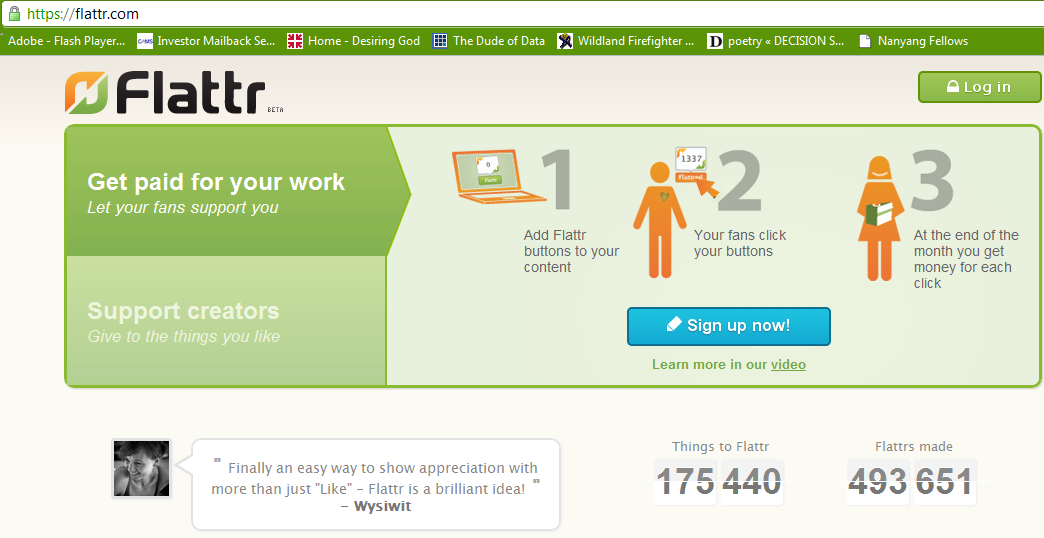
Getting Flatr on a wordpress.com blog

What is Flattr?

social micro payments- aka another way for bloggers, tweeters, facebookies to make money.

Thing of it as the Paypal plus a ReTweetmeme button.

FlattR is the new legal business of the creator of Pirate Bay- the large search engine for bit torrent data.

 and how to enable it on WordPress.com

Read some snarkly grrovy instructions here with a screenshot

http://thereturnofthepublic.wordpress.com/2011/04/10/putting-flattr-on-a-wordpress-com-blog-a-guide-for-drooling-imbeciles/

1.) Open a Flattr.com account here. This should be reasonably straightforward. A monkey hitting keys at random could manage it in about half an hour. It took me less than 45 minutes.

2.) In the top right of ‘Your Flattr Dashboard’ there is a button ‘Submit Thing’. Click on that and enter the details of your blog – the URL (like decisionstats.com for me) and a description (make that atleast 3 sentences). Flattr will create a page – for example,https://flattr.com/thing/162940/example-blog


Now go to your wordpress dashboard- sharing tab.

/wp-admin/options-general.php?page=sharing

Add the following lines to your New Add Service in respective tabs

URL= https://flattr.com/thing/175763/DecisionStats (change this to the one created for yourself instep2 above)

ICON = http://api.flatrr.com/button/flattr-badge-large.png

 If you have a non WordPress blog see instructions at http://markup.io/v/jz3wv155bsfg or screenshot of instructions here-

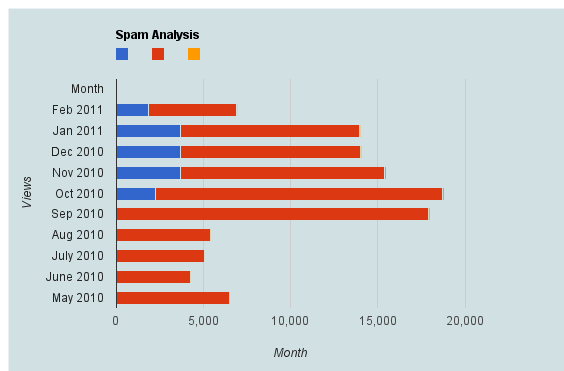
Spam Analysis Akismet-WPStats-Blogging

Here is a brief dataset I out after one hour of cutting and pasting from WordPress.com’s creative data style formats. It shows spam,comments,traffic, and number of posts written monthly.

Clearly monthly traffic is directly related to number I write (suppose A + B* Posts)

But Spam is showing a discontinuous growth especially after a big month (in which Reddit helped)

Akismet had some missing historical values (which is curious)

So what can we do with this dataframe in R or any other statistical software.

Spam Analysis
Month Spam detected Traffic excluding spam Posts Written Traffic /Post Spam /Post Spam/Traffic Ham detected Missed spam False positives
Feb-11 1848 5079 18 282.17 102.6667 36.39% 4.00 6.00 0.0%
Jan-11 3724 10238 35 292.51 106.4 36.37% 0.00 3.00 0.0%
Dec-10 3676 10345 35 295.57 105.0286 35.53% 8.00 6.00 0.0%
Nov-10 3680 11723 71 165.11 51.83099 31.39% 24.00 3.00 0.0%
Oct-10 2292 16430 71 231.41 32.28169 13.95% 24.00 18.00 0.0%
Sep-10 0 17913 63 284.33 0 0.00% 0.00 0.00 0.0%
Aug-10 0 5403 17 317.82 0 0.00% 0.00 0.00 0.0%
Jul-10 2 5041 10 504.1 0.2 0.04% 0.00 0.00 0.0%
Jun-10 5 4271 11 388.27 0.454545 0.12% 10.00 1.00 0.0%

2010 in review and WP-Stats

The following is an auto generated post thanks to WordPress.com stats team- clearly they have got some stuff wrong

1) Defining the speedometer quantitatively

2) The busiest day numbers are plain wrong ( 2 views ??)

3) There is still no geographic data in WordPress -com stats (unlike Google Analytics) and I cant enable Google Analytics on a wordpress.com hosted site.


The stats helper monkeys at WordPress.com mulled over how this blog did in 2010, and here’s a high level summary of its overall blog health:

Healthy blog!

The Blog-Health-o-Meter™ reads Wow.

Crunchy numbers

Featured image

The Louvre Museum has 8.5 million visitors per year. This blog was viewed about 97,000 times in 2010. If it were an exhibit at The Louvre Museum, it would take 4 days for that many people to see it.


In 2010, there were 367 new posts, growing the total archive of this blog to 1191 posts. There were 411 pictures uploaded, taking up a total of 121mb. That’s about 1 pictures per day.

The busiest day of the year was September 22nd with 2 views. The most popular post that day was Top 10 Graphical User Interfaces in Statistical Software.

Where did they come from?

The top referring sites in 2010 were r-bloggers.com, reddit.com, rattle.togaware.com, twitter.com, and Google Reader.

Some visitors came searching, mostly for libre office, facebook analytics, test drive a chrome notebook, test drive a chrome notebook., and wps sas lawsuit.

Attractions in 2010

These are the posts and pages that got the most views in 2010.

1

Top 10 Graphical User Interfaces in Statistical Software April 2010
8 comments and 1 Like on WordPress.com,

2

Wealth = function (numeracy, memory recall) December 2009
1 Like on WordPress.com,

3

Matlab-Mathematica-R and GPU Computing September 2010
1 Like on WordPress.com,

4

About DecisionStats July 2008

5

The Top Statistical Softwares (GUI) May 2010
1 comment and 1 Like on WordPress.com,

A Dare for Analytics Bloggers in 2011

A new challenge for R , SAS and all techie bloggers-

http://en.blog.wordpress.com/2010/12/30/challenge-for-2011-want-to-blog-more-often/

As part of the DailyPost, we’re launching two campaigns:

  • Post a Day 2011: Post something to your blog every single day through 2011
  • Post a Week 2011: Post to your blog at least once a week through 2011

Signing up is simple – do the following:

  1. Post on your blog, right now, that you’re participating
  2. (You can grab a sample post from dailypost.wordpress.com)
  3. Use the tag postaday2011 or postaweek2011 in your posts (tips on tagging here)
  4. Go to dailypost.wordpress.com
  5. Subscribe to dailypost.wordpress.com– you’ll get reminders and inspirations every day to help you bring your full potential to your WordPress blog!


Do you write a blog or own a website?

Well how about taking up this challenge?

Who Dares-    Wins

Game On!!!