Trying out Google Prediction API from R

Ubuntu Login
Image via Wikipedia

So I saw the news at NY R Meetup and decided to have a go at Prediction API Package (which first started off as a blog post at

http://onertipaday.blogspot.com/2010/11/r-wrapper-for-google-prediction-api.html

1)My OS was Ubuntu 10.10 Netbook

Ubuntu has a slight glitch plus workaround for installing the RCurl package on which the Google Prediction API is dependent- you need to first install this Ubuntu package for RCurl to install libcurl4-gnutls-dev

Once you install that using Synaptic,

Simply start R

2) Install Packages rjson and Rcurl using install.packages and choosing CRAN

Since GooglePredictionAPI is not yet on CRAN

,

3) Download that package from

https://code.google.com/p/google-prediction-api-r-client/downloads/detail?name=googlepredictionapi_0.1.tar.gz&can=2&q=

You need to copy this downloaded package to your “first library ” folder

When you start R, simply run

.libPaths()[1]

and thats the folder you copy the GooglePredictionAPI package  you downloaded.

5) Now the following line works

  1. Under R prompt,
  2. > install.packages("googlepredictionapi_0.1.tar.gz", repos=NULL, type="source")

6) Uploading data to Google Storage using the GUI (rather than gs util)

Just go to https://sandbox.google.com/storage/

and thats the Google Storage manager

Notes on Training Data-

Use a csv file

The first column is the score column (like 1,0 or prediction score)

There are no headers- so delete headers from data file and move the dependent variable to the first column  (Note I used data from the kaggle contest for R package recommendation at

http://kaggle.com/R?viewtype=data )

6) The good stuff:

Once you type in the basic syntax, the first time it will ask for your Google Credentials (email and password)

It then starts showing you time elapsed for training.

Now you can disconnect and go off (actually I got disconnected by accident before coming back in a say 5 minutes so this is the part where I think this is what happened is why it happened, dont blame me, test it for yourself) –

and when you come back (hopefully before token expires)  you can see status of your request (see below)

> library(rjson)
> library(RCurl)
Loading required package: bitops
> library(googlepredictionapi)
> my.model <- PredictionApiTrain(data="gs://numtraindata/training_data")
The request for training has sent, now trying to check if training is completed
Training on numtraindata/training_data: time:2.09 seconds
Training on numtraindata/training_data: time:7.00 seconds

7)

Note I changed the format from the URL where my data is located- simply go to your Google Storage Manager and right click on the file name for link address  ( https://sandbox.google.com/storage/numtraindata/training_data.csv)

to gs://numtraindata/training_data  (that kind of helps in any syntax error)

8) From the kind of high level instructions at  https://code.google.com/p/google-prediction-api-r-client/, you could also try this on a local file

Usage

## Load googlepredictionapi and dependent libraries
library(rjson)
library(RCurl)
library(googlepredictionapi)

## Make a training call to the Prediction API against data in the Google Storage.
## Replace MYBUCKET and MYDATA with your data.
my.model <- PredictionApiTrain(data="gs://MYBUCKET/MYDATA")

## Alternatively, make a training call against training data stored locally as a CSV file.
## Replace MYPATH and MYFILE with your data.
my.model <- PredictionApiTrain(data="MYPATH/MYFILE.csv")

At the time of writing my data was still getting trained, so I will keep you posted on what happens.

R is Ready for Business™

A new 5 page brochure from Revolution Analytics. Not that slick and some marketing under-kill (which frankly is a surprise)- but I guess Revolution Analytics does not have a full time graphics designer to help with it’s collateral.

Take a look if you are curious how and why R is getting more and more ready for business.

How to Analyze Wikileaks Data – R SPARQL

Logo for R
Image via Wikipedia

Drew Conway- one of the very very few Project R voices I used to respect until recently. declared on his blog http://www.drewconway.com/zia/

Why I Will Not Analyze The New WikiLeaks Data

and followed it up with how HE analyzed the post announcing the non-analysis.

“If you have not visited the site in a week or so you will have missed my previous post on analyzing WikiLeaks data, which from the traffic and 35 Comments and 255 Reactions was at least somewhat controversial. Given this rare spotlight I thought it would be fun to use the infochimps API to map out the geo-location of everyone that visited the blog post over the last few days. Unfortunately, after nearly two years with the same web hosting service, only today did I realize that I was not capturing daily log files for my domain”

Anyways – non American users of R Project can analyze the Wikileaks data using the R SPARQL package I would advise American friends not to use this approach or attempt to analyze any data because technically the data is still classified and it’s possession is illegal (which is the reason Federal employees and organizations receiving federal funds have advised not to use this or any WikiLeaks dataset)

https://code.google.com/p/r-sparql/

Overview

R is a programming language designed for statistics.

R Sparql allows you to run SPARQL Queries inside R and store it as a R data frame.

The main objective is to allow the integration of Ontologies with Statistics.

It requires Java and rJava installed.

Example (in R console):

> library(sparql)> data <- query("SPARQL query>","RDF file or remote SPARQL Endpoint")

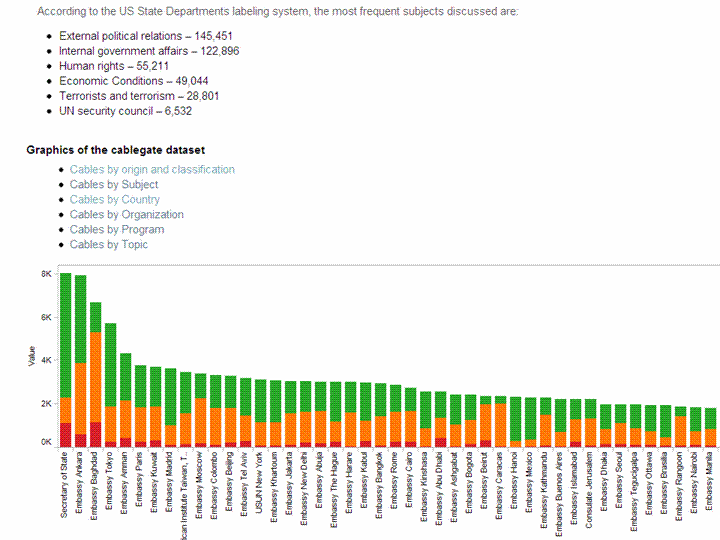
and the data in a remote SPARQL  http://www.ckan.net/package/cablegate

SPARQL is an easy language to pick  up, but dammit I am not supposed to blog on my vacations.

http://code.google.com/p/r-sparql/wiki/GettingStarted

Getting Started

1. Installation

1.1 Make sure Java is installed and is the default JVM:

$ sudo apt-get install sun-java6-bin sun-java6-jre sun-java6-jdk$ sudo update-java-alternatives -s java-6-sun

1.2 Configure R to use the correct version of Java

$ sudo R CMD javareconf

1.3 Install the rJava library

$ R> install.packages("rJava")> q()

1.4 Download and install the sparql library

Download: http://code.google.com/p/r-sparql/downloads/list

$ R CMD INSTALL sparql-0.1-X.tar.gz

2. Executing a SPARQL query

2.1 Start R

#Load the librarylibrary(sparql)#Run the queryresult <- query("SELECT ... ", "http://...")#Print the resultprint(result)

3. Examples

3.1 The Query can be a string or a local file:

query("SELECT ?date ?number ?season WHERE {  ... }", "local-file.rdf")
query("my-query.rq", "local-file.rdf")

The package will detect if my-query.rq exists and will load it from the file.

3.3 The uri can be a file or an url (for remote queries):

query("SELECT ... ","local-file.db")
query("SELECT ... ","http://dbpedia.org/sparql")

3.4 Get some examples here: http://code.google.com/p/r-sparql/downloads/list

SPARQL Tutorial-

http://openjena.org/ARQ/Tutorial/index.html

Also read-

http://webr3.org/blog/linked-data/virtuoso-6-sparqlgeo-and-linked-data/

and from the favorite blog of Project R- Also known as NY Times

http://bits.blogs.nytimes.com/2010/11/15/sorting-through-the-government-data-explosion/?twt=nytimesbits

In May 2009, the Obama administration started putting raw 
government data on the Web. 
It started with 47 data sets. Today, there are more than
 270,000 government data sets, spanning every imaginable 
category from public health to foreign aid.

Why did Amazon pull the plug on Wikileaks and will it bite them?

Why did Amazon pull the plug on Wikileaks and will it bite them? 6 answers on Quora

Why did Amazon pull the plug on Wikileaks and will it bite them?

American Decline- Why outsourcing doesnt make sense

Bureau of Labor Statistics logo RGB colors.
Image via Wikipedia

Here is a celebrated graphic from an American journalist using U.S. Department of Labor’s Bureau of Labor Statistics. It is a good example of using time as a dimension for animation- and heat maps for geography enabled visualizations.

————————–According to the U.S. Department of Labor’s Bureau of Labor Statistics, there are nearly 31 million people currently unemployed — that’s including those involuntarily working part time and those who want a job, but have given up on trying to find one. In the face of the worst economic upheaval since the Great Depression, millions of Americans are hurting. “The Decline: The Geography of a Recession,” as created by labor writer LaToya Egwuekwe, serves as a vivid representation of just how much. Watch the deteriorating transformation of the U.S. economy from January 2007 — approximately one year before the start of the recession — to the most recent unemployment data available today. Original link: http://www.latoyaegwuekwe.com/geographyofarecession.html. For more information, email latoya.egwuekwe@yahoo.com

————————————————————————————-


31 million unemployed- Does a US corporation seriously think that it can build everything OUTSIDE America and SELL INSIDE America. or who think it is okay intellectual property continues to be stolen as long as labor is cheap.

Shame on you if you outsourced your neighbour’s jobs- or would rather hire in a geography where they steal your intellectual property.


This Christmastime – May the Ghost of  the Unemployed Family Christmases visit you in your sleep instead.

Brief Interview Timo Elliott

Here is a brief interview with Timo Elliott.Timo Elliott is a 19-year veteran of SAP Business Objects.

Ajay- What are the top 5 events in Business Integration and Data Visualization services you saw in 2010 and what are the top three trends you see in these in 2011.


Timo-

Top five events in 2010:

(1) Back to strong market growth. IT spending plummeted last year (BI continued to grow, but more slowly than previous years). This year, organizations reopened their wallets and funded new analytics initiatives — all the signs indicate that BI market growth will be double that of 2009.

(2) The launch of the iPad. Mobile BI has been around for years, but the iPad opened the floodgates of organizations taking a serious look at mobile analytics — and the easy-to-use, executive-friendly iPad dashboards have considerably raised the profile of analytics projects inside organizations.

(3) Data warehousing got exciting again. Decades of incremental improvements (column databases, massively parallel processing, appliances, in-memory processing…) all came together with robust commercial offers that challenged existing data storage and calculation methods. And new “NoSQL” approaches, designed for the new problems of massive amounts of less-structured web data, started moving into the mainstream.

(4) The end of Google Wave, the start of social BI.Google Wave was launched as a rethink of how we could bring together email, instant messaging, and social networks. While Google decided to close down the technology this year, it has left its mark, notably by influencing the future of “social BI”, with several major vendors bringing out commercial products this year.

(5) The start of the big BI merge. While several small independent BI vendors reported strong growth, the major trend of the year was consolidation and integration: the BI megavendors (SAP, Oracle, IBM, Microsoft) increased their market share (sometimes by acquiring smaller vendors, e.g. IBM/SPSS and SAP/Sybase) and integrated analytics with their existing products, blurring the line between BI and other technology areas.

Top three trends next year:

(1) Analytics, reinvented. New DW techniques make it possible to do sub-second, interactive analytics directly against row-level operational data. Now BI processes and interfaces need to be rethought and redesigned to make best use of this — notably by blurring the distinctions between the “design” and “consumption” phases of BI.

(2) Corporate and personal BI come together. The ability to mix corporate and personal data for quick, pragmatic analysis is a common business need. The typical solution to the problem — extracting and combining the data into a local data store (either Excel or a departmental data mart) — pleases users, but introduces duplication and extra costs and makes a mockery of information governance. 2011 will see the rise of systems that let individuals and departments load their data into personal spaces in the corporate environment, allowing pragmatic analytic flexibility without compromising security and governance.

(3) The next generation of business applications. Where are the business applications designed to support what people really do all day, such as implementing this year’s strategy, launching new products, or acquiring another company? 2011 will see the first prototypes of people-focused, flexible, information-centric, and collaborative applications, bringing together the best of business intelligence, “enterprise 2.0”, and existing operational applications.

And one that should happen, but probably won’t:

(4) Intelligence = Information + PEOPLE. Successful analytics isn’t about technology — it’s about people, process, and culture. The biggest trend in 2011 should be organizations spending the majority of their efforts on user adoption rather than technical implementation.                 About- http://timoelliott.com/blog/about

Timo Elliott is a 19-year veteran of SAP BusinessObjects, and has spent the last twenty years working with customers around the world on information strategy.

He works closely with SAP research and innovation centers around the world to evangelize new technology prototypes.

His popular Business Analytics and SAPWeb20 blogs track innovation in analytics and social media, including topics such as augmented corporate reality, collaborative decision-making, and social network analysis.

His PowerPoint Twitter Tools lets presenters see and react to tweets in real time, embedded directly within their slides.

A popular and engaging speaker, Elliott presents regularly to IT and business audiences at international conferences, on subjects such as why BI projects fail and what to do about it, and the intersection of BI and enterprise 2.0.

Prior to Business Objects, Elliott was a computer consultant in Hong Kong and led analytics projects for Shell in New Zealand. He holds a first-class honors degree in Economics with Statistics from Bristol University, England. He blogs on http://timoelliott.com/blog/ (one of the best designed blogs in BI) . You can see more about him personal web site here and photo/sketch blog here. You should follow Timo at http://twitter.com/timoelliott

Art Credit- Timo Elliott

Related Articles

The Gospel as per WikiLeaks

Logo used by Wikileaks
Image via Wikipedia

– First Assume Nothing-

I would be very surprised if 260,000 documents and not even one was a counter-intelligence dis information move. Why was ALL the information stored in one place- maybe Wikileaks would leak the launch codes of the missiles next.

One more data visualization for Tableau– R watchers can not how jjplot by Facebook Analytics and Tableau are replacing GGPLOT 2 as visualization standards- (GGPLOT 2 needs a better GUI maybe using pyqt than the Deducer currently- maybe they can create GGPLOT extensions for Red R yet)

and yes stranger stupid things have happened in diplomacy and intelligence (like India exploding the nuclear bomb on exactly the same date and same place —-surprising CIA, but we are supposed to be on the same side atleast for the next decade) but it would be wrong not to cross reference the cables with the some verification.

Tableau gives great data viz though, but I dont think all 260,000 cables are valid data points (and boy they must really be regretting creating the internet at DARPA and DoD- but you can always blame Al Gore for that)