A white paper is an authoritative report or guide that helps solve a problem. White papers are used to educate readers and help people make decisions, and are often requested and used in politics, policy, business, and technical fields. In commercial use, the term has also come to refer to documents used by businesses as a marketing or sales tool. Policy makers frequently request white papers from universities or academic personnel to inform policy developments with expert opinions or relevant research.
Government white papers
In the Commonwealth of Nations, “white paper” is an informal name for a parliamentary paper enunciating government policy; in the United Kingdom these are mostly issued as “Command papers“. White papers are issued by the government and lay out policy, or proposed action, on a topic of current concern. Although a white paper may on occasion be a consultation as to the details of new legislation, it does signify a clear intention on the part of a government to pass new law. White Papers are a “…. tool of participatory democracy … not [an] unalterable policy commitment.[1] “White Papers have tried to perform the dual role of presenting firm government policies while at the same time inviting opinions upon them.” [2]
In Canada, a white paper “is considered to be a policy document, approved by Cabinet, tabled in the House of Commons and made available to the general public.”[3] A Canadian author notes that the “provision of policy information through the use of white and green papers can help to create an awareness of policy issues among parliamentarians and the public and to encourage an exchange of information and analysis. They can also serve as educational techniques”.[4]
“White Papers are used as a means of presenting government policy preferences prior to the introduction of legislation”; as such, the “publication of a White Paper serves to test the climate of public opinion regarding a controversial policy issue and enables the government to gauge its probable impact”.[5]
By contrast, green papers, which are issued much more frequently, are more open ended. These green papers, also known as consultation documents, may merely propose a strategy to be implemented in the details of other legislation or they may set out proposals on which the government wishes to obtain public views and opinion.
White papers published by the European Commission are documents containing proposals for European Union action in a specific area. They sometimes follow a green paper released to launch a public consultation process.
Churchill White Paper, 1922, planning a national home in Palestine for Jews. The white paper which unfortunately couldnt see the consequences- ergo high gas prices due to oil shocks,dead people in all manners of idiotic terror plots, global headache. Mr Churchill also had to deny requests for emergency food leading to 3 million Bengali deaths in 1940-45 Winston Churchill the Prime Minister of that time responded with a telegram to Wavell asking, if food was so scarce, “why Gandhi hadn’t died yet.
You know whom to blame for all of this. Its Winston Churchill, not Barack Obama
White Paper of 1939, calling for the creation of a unified Palestinian state and a limited Jewish immigration and ability to purchase land. Which contradicted the white paper above –
1969 White Paper, 1969 (later abandoned), to abolish the Indian Act in Canada and recognize First Nations as the same as other minorities in Canada, rather than distinct groups.
Since the early 1990s, the term white paper has also come to refer to documents used by businesses and so-called think tanks as marketing or sales tools. White papers of this sort argue that the benefits of a particular technology, product or policy are superior for solving a specific problem.
These types of white papers are almost always marketing communications documents designed to promote a specific company’s or group’s solutions or products. As a marketing tool, these papers will highlight information favorable to the company authorizing or sponsoring the paper. Such white papers are often used to generate sales leads, establish thought leadership, make a business case, or to educate customers or voters.
There are four main types of commercial white papers:
Business benefits: Makes a business case for a certain technology or methodology.
Technical: Describes how a certain technology works.
Hybrid: Combines business benefits with technical details in a single document.
Policy: Makes a case for a certain political solution to a societal or economic challenge.
Resources
Stelzner, Michael (2007). Writing White Papers: How to capture readers and keep them engaged. Poway, California: WhitePaperSource Publishing. pp. 214. ISBN9780977716937.
Bly, Robert W. (2006). The White Paper Marketing Handbook. Florence, Kentucky: South-Western Educational Publishing. pp. 256. ISBN9780324300826.
Kantor, Jonathan (2009). Crafting White Paper 2.0: Designing Information for Today’s Time and Attention Challenged Business Reader. Denver,Colorado: Lulu Publishing. pp. 167.ISBN9780557163243.
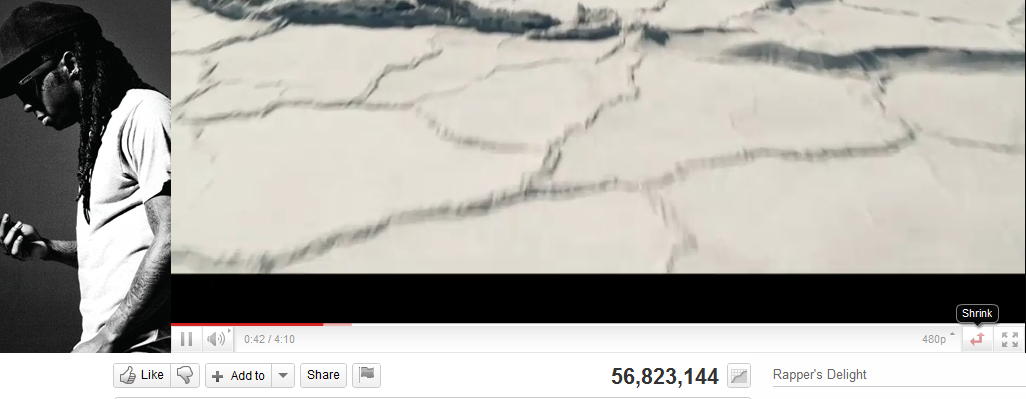
A continuing series on better design interfaces for my favorite music channel – You Tube
Some things I like.
The shrink- expand button.
The wasted space for advertisement – to the left of the video that is hugely static in terms of changes. It should be rotated more often.
The non existing average time of play- does everyone watch the whole video . or is the whole video watched 56 million times.
the inability to scroll and zoom into the video analytics.
the completely outdated comments button- which can be better used to create a SOCIAL community. but all it shows is top ranked comment, and click before dropping down. I liked the NYT approach to segmented comments including Editors Picks, Most Recommended, Highlights.
The video response feature that can be easily gamed to ensure video views /phishes.
The comments page numbers at the bottom instead of being at the top for the casual scanner of comments.
Facebook is the first button rather than second button in the minimum shared view list. Is that true? Can these buttons be self learning to my preferred social network instead of a default. (hint- use Google prediction API)
There is no provision to replay a video, unless you put into a playlist- which fortunately has been quite changed, even though the urls for playlists should have a separate url shortener than you.tube
A much better recommended playlist of related videos- they should be customized to the eclectic taste of the signed in user than the actual content. Maybe Try something like iTunes Genius feature.
No provision for a paid , premium channel even for countries that are blocked en masse from watching certain videos, hence depend on illegal video responses.
This is NOT an April fool joke or a publicity stunt. It is also not meant to provoke discussion for the sake of provocation.
For a time, as I have studied both US and India , in what makes Government work or fail, academia work or fail, or businesses to work or fail- a common thread is the quality of people involved. Someone who is a wasteful businessman, will be a wasteful politician. Someone who is a flamboyant businessman with flair more than substance will continue that in public life.
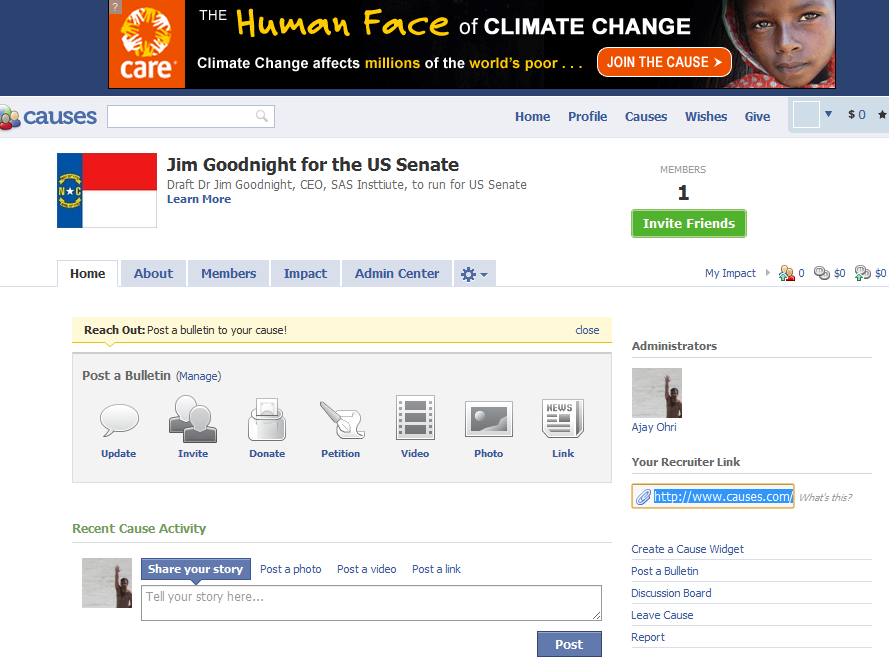
Accordingly I have created a Facebook cause-
If Donald Trump can run for President, I can think of no one who has done more for the American South. Unlike the tech heavy, Stanford dominated boom in California, the Mid West and South have been declining centers of influence. Cities like Austin Texas or Raleigh, North California are the exception rather than norm there. A friend who went to Duke once told me, the worst thing is to be borne a rural white male who is poor in America. There are no groups lobbying for education or internet hi fi blazing speeds for you. Socially you are expected to walk and thrive alone.
The Southern Baptist Church has managed to infiltrate and influence young minds there- the average conservative American seemed better off and happier in his moderated social behaviour. But the Church exacts a 10 % tithe, and it is efficient in stretching every dollar and every cent of church donations. Government works with the best intentions, but spending someone else’s money (your tax money money by a bureaucrat) is always more inefficient than the actual owner spending it alone. Taxes are higher than the 10 % tithe and seem to accomplish much less social change. You would rather go to work or go to war?
Accordingly I find that on the West Coast there are very few tech savvy leaders with a track record of both fiscal pragmatism, educational reform and job creation. Certainly the industry lobbyist is smarter at evading taxes than the average Joe, and campaign financing is still dependent on deep pockets despite the innovations of internet retail fund raising.
Would you like your Senator to be as considerate of creating jobs as entrepreneurs are. Jim Goodnight here is a metaphor for all entrepreneurs who dont believe in reckless hire-fire,outsourcing and long term views on people.
Click here to spread this cause- perhaps it will make existing politicians more efficient just by the threat of new competition.
Youtube seems to have a different interface for sharing a channel, a playlist or an individual song. Also it seems to be missing out on revenue from Itunes (or maybe it isnt). and it seems to promoting Facebook and Twitter to the expense of other social media sharing buttons which can be only seen when you click share more (or maybe the buttons/social media channels change based on sharing activity analytics 🙂 )
on a slightly different note read my techie tutorial on boosting your youtube channel views
This makes the task of searching among these packages and comparing functions for the same analytical task across different packages a bit tedious and prone to manual searching (of reading multiple Pdfs of help /vignette of packages) or sending an email to the R help list.
However using R Views is a slightly better way of managing all your analytical requirements for software rather than the large number of packages (see Graphics view below).
CRAN Task Views allow you to browse packages by topic and provide tools to automatically install all packages for special areas of interest. Currently, 28 views are available. http://cran.r-project.org/web/views/
and then the views can be installed via install.views or update.views (which first assesses which of the packages are already installed and up-to-date), e.g.,
R is rich with facilities for creating and developing interesting graphics. Base R contains functionality for many plot types including coplots, mosaic plots, biplots, and the list goes on. There are devices such as postscript, png, jpeg and pdf for outputting graphics as well as device drivers for all platforms running R. lattice and grid are supplied with R’s recommended packages and are included in every binary distribution. lattice is an R implementation of William Cleveland’s trellis graphics, while grid defines a much more flexible graphics environment than the base R graphics.
R’s base graphics are implemented in the same way as in the S3 system developed by Becker, Chambers, and Wilks. There is a static device, which is treated as a static canvas and objects are drawn on the device through R plotting commands. The device has a set of global parameters such as margins and layouts which can be manipulated by the user using par() commands. The R graphics engine does not maintain a user visible graphics list, and there is no system of double buffering, so objects cannot be easily edited without redrawing a whole plot. This situation may change in R 2.7.x, where developers are working on double buffering for R devices. Even so, the base R graphics can produce many plots with extremely fine graphics in many specialized instances.
One can quickly run into trouble with R’s base graphic system if one wants to design complex layouts where scaling is maintained properly on resizing, nested graphs are desired or more interactivity is needed. grid was designed by Paul Murrell to overcome some of these limitations and as a result packages like lattice, ggplot2, vcd or hexbin (on Bioconductor ) use grid for the underlying primitives. When using plots designed with grid one needs to keep in mind that grid is based on a system of viewports and graphic objects. To add objects one needs to use grid commands, e.g., grid.polygon() rather than polygon(). Also grid maintains a stack of viewports from the device and one needs to make sure the desired viewport is at the top of the stack. There is a great deal of explanatory documentation included with grid as vignettes.
The graphics packages in R can be organized roughly into the following topics, which range from the more user oriented at the top to the more developer oriented at the bottom. The categories are not mutually exclusive but are for the convenience of presentation:
Plotting : Enhancements for specialized plots can be found in plotrix, for polar plotting, vcd for categorical data, hexbin (on Bioconductor ) for hexagon binning, gclus for ordering plots and gplots for some plotting enhancements. Some specialized graphs, like Chernoff faces are implemented in aplpack, which also has a nice implementation of Tukey’s bag plot. For 3D plots lattice, scatterplot3d and misc3d provide a selection of plots for different kinds of 3D plotting. scatterplot3d is based on R’s base graphics system, while misc3d is based on rgl. The package onion for visualizing quaternions and octonions is well suited to display 3D graphics based on derived meshes.
Graphic Applications : This area is not much different from the plotting section except that these packages have tools that may not for display, but can aid in creating effective displays. Also included are packages with more esoteric plotting methods. For specific subject areas, like maps, or clustering the excellent task views contributed by other dedicated useRs is an excellent place to start.
Effect ordering : The gclus package focuses on the ordering of graphs to accentuate cluster structure or natural ordering in the data. While not for graphics directly cba and seriation have functions for creating 1 dimensional orderings from higher dimensional criteria. For ordering an array of displays, biclust can be useful.
Large Data Sets : Large data sets can present very different challenges from moderate and small datasets. Aside from overplotting, rendering 1,000,000 points can tax even modern GPU’s. For univariate datalvplot produces letter value boxplots which alleviate some of the problems that standard boxplots exhibit for large data sets. For bivariate data ash can produce a bivariate smoothed histogram very quickly, and hexbin, on Bioconductor , can bin bivariate data onto a hexagonal lattice, the advantage being that the irregular lines and orientation of hexagons do not create linear artifacts. For multivariate data, hexbin can be used to create a scatterplot matrix, combined with lattice. An alternative is to use scagnostics to produce a scaterplot matrix of “data about the data”, and look for interesting combinations of variables.
Trees and Graphs : ape and ade4 have functions for plotting phylogenetic trees, which can be used for plotting dendrograms from clustering procedures. While these packages produce decent graphics, they do not use sophisticated algorithms for node placement, so may not be useful for very large trees. igraph has the Tilford-Rheingold algorithm implementead and is useful for plotting larger trees. diagram as facilities for flow diagrams and simple graphs. For more sophisticated graphs Rgraphviz and igraph have functions for plotting and layout, especially useful for representing large networks.
Graphics Systems : lattice is built on top of the grid graphics system and is an R implementation of William Cleveland’s trellis system for S-PLUS. lattice allows for building many types of plots with sophisticated layouts based on conditioning. ggplot2 is an R implementation of the system described in “A Grammar of Graphics” by Leland Wilkinson. Like lattice, ggplot (also built on top of grid) assists in trellis-like graphics, but allows for much more. Since it is built on the idea of a semantics for graphics there is much more emphasis on reshaping data, transformation, and assembling the elements of a plot.
Devices : Whereas grid is built on top of the R graphics engine, many in the R community have found the R graphics engine somewhat inflexible and have written separate device drivers that either emphasize interactivity or plotting in various graphics formats. R base supplies devices for PostScript, PDF, JPEG and other formats. Devices on CRAN include cairoDevice which is a device based libcairo, which can actually render to many device types. The cairo device is desgned to work with RGTK2, which is an interface to the Gimp Tool Kit, similar to pyGTK2. GDD provides device drivers for several bitmap formats, including GIF and BMP. RSvgDevice is an SVG device driver and interfaces well with with vector drawing programs, or R web development packages, such as Rpad. When SVG devices are for web display developers should be aware that internet explorer does not support SVG, but has their own standard. Trust Microsoft. rgl provides a device driver based on OpenGL, and is good for 3D and interactive development. Lastly, the Augsburg group supplies a set of packages that includes a Java-based device, JavaGD.
Colors : The package colorspace provides a set of functions for transforming between color spaces and mixcolor() for mixing colors within a color space. Based on the HCL colors provided in colorspace, vcdprovides a set of functions for choosing color palettes suitable for coding categorical variables ( rainbow_hcl()) and numerical information ( sequential_hcl(), diverge_hcl()). Similar types of palettes are provided in RColorBrewer and dichromat is focused on palettes for color-impaired viewers.
Interactive Graphics : There are several efforts to implement interactive graphics systems that interface well with R. In an interactive system the user can interactively query the graphics on the screen with the mouse, or a moveable brush to zoom, pan and query on the device as well as link with other views of the data. rggobi embeds the GGobi interactive graphics system within R, so that one can display a data frame or several in GGobi directly from R. The package has functions to support longitudinal data, and graphs using GGobi’s edge set functionality. The RoSuDA repository maintained and developed by the University of Augsburg group has two packages, iplots and iwidgets as well as their Java development environment including a Java device, JavaGD. Their interactive graphics tools contain functions for alpha blending, which produces darker shading around areas with more data. This is exceptionally useful for parallel coordinate plots where many lines can quickly obscure patterns. playwith has facilities for building interactive versions of R graphics using the cairoDevice and RGtk2. Lastly, the rgl package has mechanisms for interactive manipulation of plots, especially 3D rotations and surfaces.
Development : For development of specialized graphics packages in R, grid should probably be the first consideration for any new plot type. rgl has better tools for 3D graphics, since the device is interactive, though it can be slow. An alternative is to use Java and the Java device in the RoSuDA packages, though Java has its own drawbacks. For porting plotting code to grid, using the package gridBase presents a nice intermediate step to embed base graphics in grid graphics and vice versa.







 DECISION STATS