Lyx Releases 2

Ubuntu Login
Image via Wikipedia

Lyx releases new version- now if only there was a SIMPLE way to put R code in a Lyx existing text class (having tried Sweave and sweaved myself into knots ! 😦

and I hope Ubuntu Linux 10.10  netbook fixes the curious case of disappearing menu bar in Lyx

see https://bugs.launchpad.net/ubuntu/+source/indicator-appmenu/+bug/619811

(Hint start Lyx using from the terminal:
QT_X11_NO_NATIVE_MENUBAR=1 lyx)

Latest News from the

http://www.lyx.org/News#item2

We are pleased to announce the release of LyX 1.6.9


Beta Release: LyX 2.0.0 beta 4 released.

February 6, 2011

We are pleased to announce the fourth public pre-release of LyX 2.0.0.
Except usual bugfixing we fixed random crashes connected with the new background export and compilation feature.

As far as new features is considered it is now possible

  • to set the table width,
  • customize the language package per document,
  • export LyX files as a single archive containing linked material (e.g. images) directly via export menu.


Since this is most probably the last beta release we also added convertor for old (1.6) preference files which are automatically checked on the startup now.


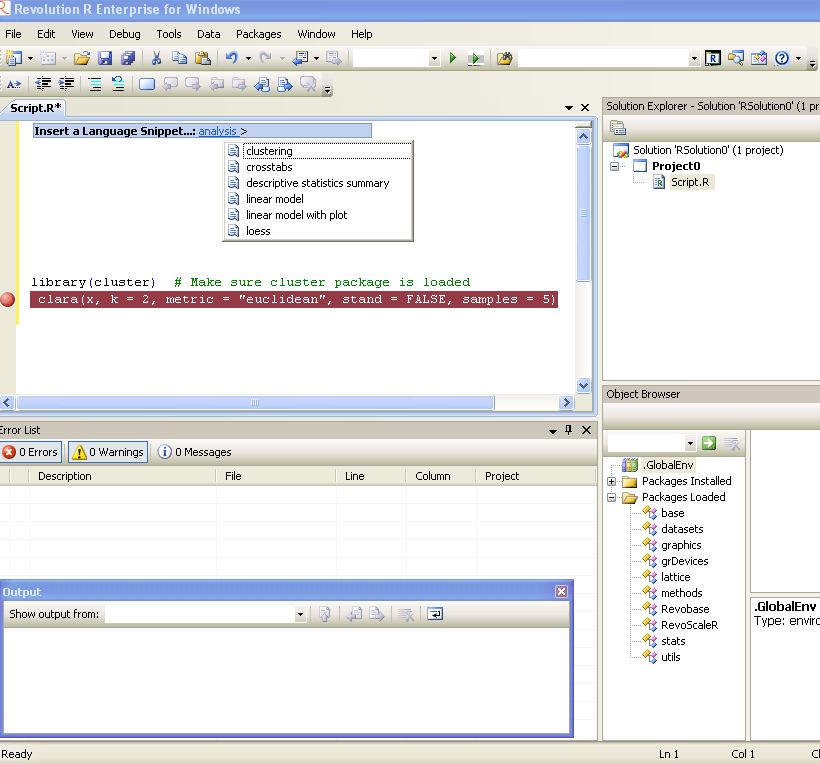
Revolution R Enterprise 4.2

Revo R gets more and more yum yum-

he following new features:

  • Direct import of SAS data sets into the native, efficient XDF file format
  • Direct import of fixed-format text data files into XDF file format
  • New commands to read subsets of rows and variables from XDF files in memory;
  • Many enhancements to the R Productivity Environment (RPE) for Windows
  • Expanded and updated user documentation
  • Added support on Linux for the big-data statistics package RevoScaleR
  • Added support on Windows for Web Services integration of predictive analytics with RevoDeployR.

Revolution R Enterprise 4.2 is available immediately for 64-bit Red Hat Enterprise Linux systems and both 32-bit and 64-bit Windows systems. Pricing starts at $1,000 per single-user workstation

And its free for academic licenses- so come on guys it is worth  atleast one download, and test.

http://www.revolutionanalytics.com/downloads/free-academic.php


SAS to R Challenge: Unique benchmarking

Flag of Town of Cary
Image via Wikipedia

An interesting announcemnet from Revolution Analytics promises to convert your legacy code in SAS language not only cheaper but faster. It’ s a very very interesting challenge and I wonder how SAS users ,corporates, customers as well as the Institute itself reacts

http://www.revolutionanalytics.com/sas-challenge/

Take the SAS to R Challenge

Are you paying for expensive software licenses and hardware to run time-consuming statistical analyses on big data sets?

If you’re doing linear regressions, logistic regressions, predictions, or multivariate crosstabulations* there’s something you should know: Revolution Analytics can get the same results for a substantially lower cost and faster than SAS®.

For a limited time only, Revolution Analytics invites you take the SAS to R Challenge. Let us prove that we can deliver on our promise of replicating your results in R, faster and cheaper than SAS.

Take the challenge

Here’s how it works:

Fill out the short form below, and one of our conversion experts will contact you to discuss the SAS code you want to convert. If we think Revolution R Enterprise can get the same results faster than SAS, we’ll convert your code to R free of charge. Our goal is to demonstrate that Revolution R Enterprise will produce the same results in less time. There’s no obligation, but if you choose to convert, we guarantee that your license cost for Revolution R Enterprise will be less than half what you’re currently paying for the equivalent SAS software.**

It’s that simple.

We’ll show you that you don’t need expensive hardware and software to do high quality statistical analysis of big data. And we’ll show that you don’t need to tie up your computing resources with long running operations. With Revolution R Enterprise, you can run analyses on commodity hardware using Linux or Windows, scale to terabyte-class data problems and do it at processing speeds you would never have thought possible.

Sign up now, and we will be in touch shortly.

Take the challenge


—————————-

SAS is a registered trademark of the SAS Institute, Cary, NC, in the US and other countries.

*Additional statistical algorithms are being rapidly added to Revolution R Enterprise. Custom development services are also available.

**Revolution Analytics retains the right to determine eligibility for this offer. Offer available until March 31, 2011.

R Commander Plugins-20 and growing!

First graphical user interface in 1973.
Image via Wikipedia
R Commander Extensions: Enhancing a Statistical Graphical User Interface by extending menus to statistical packages

R Commander ( see paper by Prof J Fox at http://www.jstatsoft.org/v14/i09/paper ) is a well known and established graphical user interface to the R analytical environment.
While the original GUI was created for a basic statistics course, the enabling of extensions (or plug-ins  http://www.r-project.org/doc/Rnews/Rnews_2007-3.pdf ) has greatly enhanced the possible use and scope of this software. Here we give a list of all known R Commander Plugins and their uses along with brief comments.

  1. DoE – http://cran.r-project.org/web/packages/RcmdrPlugin.DoE/RcmdrPlugin.DoE.pdf
  2. doex
  3. EHESampling
  4. epack- http://cran.r-project.org/web/packages/RcmdrPlugin.epack/RcmdrPlugin.epack.pdf
  5. Export- http://cran.r-project.org/web/packages/RcmdrPlugin.Export/RcmdrPlugin.Export.pdf
  6. FactoMineR
  7. HH
  8. IPSUR
  9. MAc- http://cran.r-project.org/web/packages/RcmdrPlugin.MAc/RcmdrPlugin.MAc.pdf
  10. MAd
  11. orloca
  12. PT
  13. qcc- http://cran.r-project.org/web/packages/RcmdrPlugin.qcc/RcmdrPlugin.qcc.pdf and http://cran.r-project.org/web/packages/qcc/qcc.pdf
  14. qual
  15. SensoMineR
  16. SLC
  17. sos
  18. survival-http://cran.r-project.org/web/packages/RcmdrPlugin.survival/RcmdrPlugin.survival.pdf
  19. SurvivalT
  20. Teaching Demos

Note the naming convention for above e plugins is always with a Prefix of “RCmdrPlugin.” followed by the names above
Also on loading a Plugin, it must be already installed locally to be visible in R Commander’s list of load-plugin, and R Commander loads the e-plugin after restarting.Hence it is advisable to load all R Commander plugins in the beginning of the analysis session.

However the notable E Plugins are
1) DoE for Design of Experiments-
Full factorial designs, orthogonal main effects designs, regular and non-regular 2-level fractional
factorial designs, central composite and Box-Behnken designs, latin hypercube samples, and simple D-optimal designs can currently be generated from the GUI. Extensions to cover further latin hypercube designs as well as more advanced D-optimal designs (with blocking) are planned for the future.
2) Survival- This package provides an R Commander plug-in for the survival package, with dialogs for Cox models, parametric survival regression models, estimation of survival curves, and testing for differences in survival curves, along with data-management facilities and a variety of tests, diagnostics and graphs.
3) qcc -GUI for  Shewhart quality control charts for continuous, attribute and count data. Cusum and EWMA charts. Operating characteristic curves. Process capability analysis. Pareto chart and cause-and-effect chart. Multivariate control charts
4) epack- an Rcmdr “plug-in” based on the time series functions. Depends also on packages like , tseries, abind,MASS,xts,forecast. It covers Log-Exceptions garch
and following Models -Arima, garch, HoltWinters
5)Export- The package helps users to graphically export Rcmdr output to LaTeX or HTML code,
via xtable() or Hmisc::latex(). The plug-in was originally intended to facilitate exporting Rcmdr
output to formats other than ASCII text and to provide R novices with an easy-to-use,
easy-to-access reference on exporting R objects to formats suited for printed output. The
package documentation contains several pointers on creating reports, either by using
conventional word processors or LaTeX/LyX.
6) MAc- This is an R-Commander plug-in for the MAc package (Meta-Analysis with
Correlations). This package enables the user to conduct a meta-analysis in a menu-driven,
graphical user interface environment (e.g., SPSS), while having the full statistical capabilities of
R and the MAc package. The MAc package itself contains a variety of useful functions for
conducting a research synthesis with correlational data. One of the unique features of the MAc
package is in its integration of user-friendly functions to complete the majority of statistical steps
involved in a meta-analysis with correlations. It uses recommended procedures as described in
The Handbook of Research Synthesis and Meta-Analysis (Cooper, Hedges, & Valentine, 2009).

A query to help for ??Rcmdrplugins reveals the following information which can be quite overwhelming given that almost 20 plugins are now available-

RcmdrPlugin.DoE::DoEGlossary
Glossary for DoE terminology as used in
RcmdrPlugin.DoE
RcmdrPlugin.DoE::Menu.linearModelDesign
RcmdrPlugin.DoE Linear Model Dialog for
experimental data
RcmdrPlugin.DoE::Menu.rsm
RcmdrPlugin.DoE response surface model Dialog
for experimental data
RcmdrPlugin.DoE::RcmdrPlugin.DoE-package
R-Commander plugin package that implements
design of experiments facilities from packages
DoE.base, FrF2 and DoE.wrapper into the
R-Commander
RcmdrPlugin.DoE::RcmdrPlugin.DoEUndocumentedFunctions
Functions used in menus
RcmdrPlugin.doex::ranblockAnova
Internal RcmdrPlugin.doex objects
RcmdrPlugin.doex::RcmdrPlugin.doex-package
Install the DOEX Rcmdr Plug-In
RcmdrPlugin.EHESsampling::OpenSampling1
Internal functions for menu system of
RcmdrPlugin.EHESsampling
RcmdrPlugin.EHESsampling::RcmdrPlugin.EHESsampling-package
Help with EHES sampling
RcmdrPlugin.Export::RcmdrPlugin.Export-package
Graphically export objects to LaTeX or HTML
RcmdrPlugin.FactoMineR::defmacro
Internal RcmdrPlugin.FactoMineR objects
RcmdrPlugin.FactoMineR::RcmdrPlugin.FactoMineR
Graphical User Interface for FactoMineR
RcmdrPlugin.IPSUR::IPSUR-package
An IPSUR Plugin for the R Commander
RcmdrPlugin.MAc::RcmdrPlugin.MAc-package
Meta-Analysis with Correlations (MAc) Rcmdr
Plug-in
RcmdrPlugin.MAd::RcmdrPlugin.MAd-package
Meta-Analysis with Mean Differences (MAd) Rcmdr
Plug-in
RcmdrPlugin.orloca::activeDataSetLocaP
RcmdrPlugin.orloca: A GUI for orloca-package
(internal functions)
RcmdrPlugin.orloca::RcmdrPlugin.orloca-package
RcmdrPlugin.orloca: A GUI for orloca-package
RcmdrPlugin.orloca::RcmdrPlugin.orloca.es
RcmdrPlugin.orloca.es: Una interfaz grafica
para el paquete orloca
RcmdrPlugin.qcc::RcmdrPlugin.qcc-package
Install the Demos Rcmdr Plug-In
RcmdrPlugin.qual::xbara
Internal RcmdrPlugin.qual objects
RcmdrPlugin.qual::RcmdrPlugin.qual-package
Install the quality Rcmdr Plug-In
RcmdrPlugin.SensoMineR::defmacro
Internal RcmdrPlugin.SensoMineR objects
RcmdrPlugin.SensoMineR::RcmdrPlugin.SensoMineR
Graphical User Interface for SensoMineR
RcmdrPlugin.SLC::Rcmdr.help.RcmdrPlugin.SLC
RcmdrPlugin.SLC: A GUI for slc-package
(internal functions)
RcmdrPlugin.SLC::RcmdrPlugin.SLC-package
RcmdrPlugin.SLC: A GUI for SLC R package
RcmdrPlugin.sos::RcmdrPlugin.sos-package
Efficiently search R Help pages
RcmdrPlugin.steepness::Rcmdr.help.RcmdrPlugin.steepness
RcmdrPlugin.steepness: A GUI for
steepness-package (internal functions)
RcmdrPlugin.steepness::RcmdrPlugin.steepness
RcmdrPlugin.steepness: A GUI for steepness R
package
RcmdrPlugin.survival::allVarsClusters
Internal RcmdrPlugin.survival Objects
RcmdrPlugin.survival::RcmdrPlugin.survival-package
Rcmdr Plug-In Package for the survival Package
RcmdrPlugin.TeachingDemos::RcmdrPlugin.TeachingDemos-package
Install the Demos Rcmdr Plug-In


GrapheR

GNU General Public License
Image via Wikipedia

GrapherR

GrapheR is a Graphical User Interface created for simple graphs.

Depends: R (>= 2.10.0), tcltk, mgcv
Description: GrapheR is a multiplatform user interface for drawing highly customizable graphs in R. It aims to be a valuable help to quickly draw publishable graphs without any knowledge of R commands. Six kinds of graphs are available: histogram, box-and-whisker plot, bar plot, pie chart, curve and scatter plot.
License: GPL-2
LazyLoad: yes
Packaged: 2011-01-24 17:47:17 UTC; Maxime
Repository: CRAN
Date/Publication: 2011-01-24 18:41:47

More information about GrapheR at CRAN
Path: /cran/newpermanent link

Advantages of using GrapheR

  • It is bi-lingual (English and French) and can import in text and csv files
  • The intention is for even non users of R, to make the simple types of Graphs.
  • The user interface is quite cleanly designed. It is thus aimed as a data visualization GUI, but for a more basic level than Deducer.
  • Easy to rename axis ,graph titles as well use sliders for changing line thickness and color

Disadvantages of using GrapheR

  • Lack of documentation or help. Especially tips on mouseover of some options should be done.
  • Some of the terms like absicca or ordinate axis may not be easily understood by a business user.
  • Default values of color are quite plain (black font on white background).
  • Can flood terminal with lots of repetitive warnings (although use of warnings() function limits it to top 50)
  • Some of axis names can be auto suggested based on which variable s being chosen for that axis.
  • Package name GrapheR refers to a graphical calculator in Mac OS – this can hinder search engine results

Using GrapheR

  • Data Input -Data Input can be customized for CSV and Text files.
  • GrapheR gives information on loaded variables (numeric versus Factors)
  • It asks you to choose the type of Graph 
  • It then asks for usual Graph Inputs (see below). Note colors can be customized (partial window). Also number of graphs per Window can be easily customized 
  • Graph is ready for publication


Chapman/Hall announces new series on R

Rice University, Houston, Texas, USA - Cohen H...
Image via Wikipedia
R Authors get more choice and variety now-
http://www.mail-archive.com/r-help@r-project.org/msg122965.html
We are pleased to announce the launch of a new series of books on R. 

Chapman & Hall/CRC: The R Series

Aims and Scope
This book series reflects the recent rapid growth in the development and 
application of R, the programming language and software environment for 
statistical computing and graphics. R is now widely used in academic research, 
education, and industry. It is constantly growing, with new versions of the 
core software released regularly and more than 2,600 packages available. It is 
difficult for the documentation to keep pace with the expansion of the 
software, and this vital book series provides a forum for the publication of 
books covering many aspects of the development and application of R.

The scope of the series is wide, covering three main threads:
• Applications of R to specific disciplines such as biology, epidemiology, 
genetics, engineering, finance, and the social sciences.
• Using R for the study of topics of statistical methodology, such as linear 
and mixed modeling, time series, Bayesian methods, and missing data.
• The development of R, including programming, building packages, and graphics.

The books will appeal to programmers and developers of R software, as well as 
applied statisticians and data analysts in many fields. The books will feature 
detailed worked examples and R code fully integrated into the text, ensuring 
their usefulness to researchers, practitioners and students.

Series Editors
John M. Chambers (Department of Statistics, Stanford University, USA; 
j...@stat.stanford.edu)
Torsten Hothorn (Institut für Statistik, Ludwig-Maximilians-Universität, 
München, Germany; torsten.hoth...@stat.uni-muenchen.de)
Duncan Temple Lang (Department of Statistics, University of California, Davis, 
USA; dun...@wald.ucdavis.edu)
Hadley Wickham (Department of Statistics, Rice University, Houston, Texas, USA; 
had...@rice.edu)

Call for Proposals
We are interested in books covering all aspects of the development and 
application of R software. If you have an idea for a book, please contact one 
of the series editors above or one of the Chapman & Hall/CRC statistics 
acquisitions editors below. Please provide brief details of topic, audience, 
aims and scope, and include an outline if possible.

We look forward to hearing from you.

Best regards,Rob Calver (rob.cal...@informa.com)
David Grubbs (david.gru...@taylorandfrancis.com)
John Kimmel (john.kim...@taylorandfrancis.com)


Handling time and date in R

John Harrison's famous chronometer
Image via Wikipedia

One of the most frustrating things I had to do while working as financial business analysts was working with Data Time Formats in Base SAS. The syntax was simple enough and SAS was quite good with handing queries to the Oracle data base that the client was using, but remembering the different types of formats in SAS language was a challenge (there was a date9. and date6 and mmddyy etc )

Data and Time variables are particularly important variables in financial industry as almost everything is derived variable from the time (which varies) while other inputs are mostly constants. This includes interest as well as late fees and finance fees.

In R, date and time are handled quite simply-

Use the strptime( dataset, format) function to convert the character into string

For example if the variable dob is “01/04/1977) then following will convert into a date object

z=strptime(dob,”%d/%m/%Y”)

and if the same date is 01Apr1977

z=strptime(dob,"%d%b%Y")


does the same

For troubleshooting help with date and time, remember to enclose the formats

%d,%b,%m and % Y in the same exact order as the original string- and if there are any delimiters like ” -” or “/” then these delimiters are entered in exactly the same order in the format statement of the strptime

Sys.time() gives you the current date-time while the function difftime(time1,time2) gives you the time intervals( say if you have two columns as date-time variables)


What are the various formats for inputs in date time?

%a
Abbreviated weekday name in the current locale. (Also matches full name on input.)
%A
Full weekday name in the current locale. (Also matches abbreviated name on input.)
%b
Abbreviated month name in the current locale. (Also matches full name on input.)
%B
Full month name in the current locale. (Also matches abbreviated name on input.)
%c
Date and time. Locale-specific on output, "%a %b %e %H:%M:%S %Y" on input.
%d
Day of the month as decimal number (01–31).
%H
Hours as decimal number (00–23).
%I
Hours as decimal number (01–12).
%j
Day of year as decimal number (001–366).
%m
Month as decimal number (01–12).
%M
Minute as decimal number (00–59).
%p
AM/PM indicator in the locale. Used in conjunction with %I and not with %H. An empty string in some locales.
%S
Second as decimal number (00–61), allowing for up to two leap-seconds (but POSIX-compliant implementations will ignore leap seconds).
%U
Week of the year as decimal number (00–53) using Sunday as the first day 1 of the week (and typically with the first Sunday of the year as day 1 of week 1). The US convention.
%w
Weekday as decimal number (0–6, Sunday is 0).
%W
Week of the year as decimal number (00–53) using Monday as the first day of week (and typically with the first Monday of the year as day 1 of week 1). The UK convention.
%x
Date. Locale-specific on output, "%y/%m/%d" on input.
%X
Time. Locale-specific on output, "%H:%M:%S" on input.
%y
Year without century (00–99). Values 00 to 68 are prefixed by 20 and 69 to 99 by 19 – that is the behaviour specified by the 2004 POSIX standard, but it does also say ‘it is expected that in a future version the default century inferred from a 2-digit year will change’.
%Y
Year with century.
%z
Signed offset in hours and minutes from UTC, so -0800 is 8 hours behind UTC.
%Z
(output only.) Time zone as a character string (empty if not available).

Also to read the helpful documentation (especially for time zone level, and leap year seconds and differences)
http://stat.ethz.ch/R-manual/R-patched/library/base/html/difftime.html
http://stat.ethz.ch/R-manual/R-patched/library/base/html/strptime.html
http://stat.ethz.ch/R-manual/R-patched/library/base/html/Ops.Date.html
http://stat.ethz.ch/R-manual/R-patched/library/base/html/Dates.html